
idea开启springboot的devtools自动热部署功能
1、先在pom文件中添加下面代码段
<!-- 热部署 -->

    <dependency>

      <groupId>org.springframework.boot</groupId>

      <artifactId>spring-boot-devtools</artifactId>

      <optional>true</optional>

      <scope>true</scope>

    </dependency>

----------------------------------------------------

<build>

    <plugins>

      <plugin>

        <groupId>org.springframework.boot</groupId>

        <artifactId>spring-boot-maven-plugin</artifactId>

        <configuration>

          <!-- 没有该配置,devtools 不生效 -->

          <fork>true</fork>

          <addResources>true</addResources>

        </configuration>

      </plugin>

    </plugins>

  </build>
2、需要修改idea中的两个配置,来开启idea自动编译功能
1 - Enable Automake from the compiler
PRESS: CTRL + SHIFT + A
TYPE: make project automatically
PRESS: Enter
Enable Make Project automatically feature
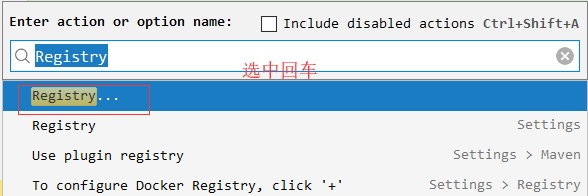
2 - Enable Automake when the application is running
PRESS: CTRL + SHIFT + A
TYPE: Registry
Find the key compiler.automake.allow.when.app.running and enable it
意思是
1、CTRL + SHIFT + A --> 查找make project automatically --> 选中

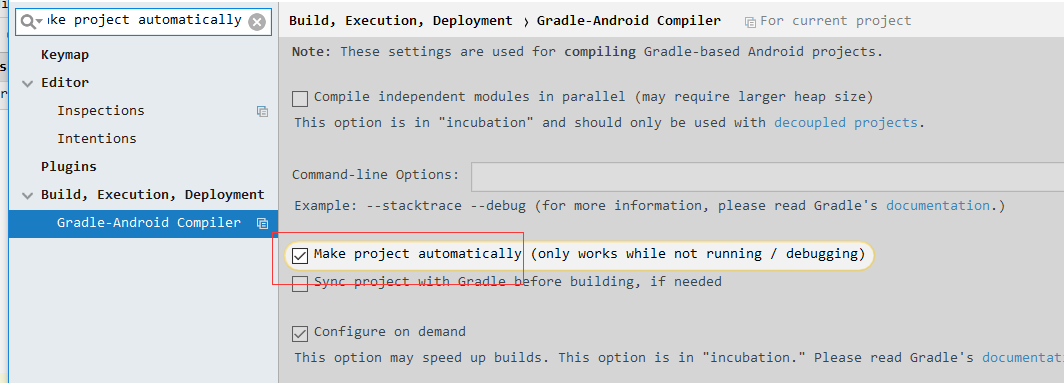
2、CTRL + SHIFT + A --> 查找Registry --> 找到并勾选compiler.automake.allow.when.app.running
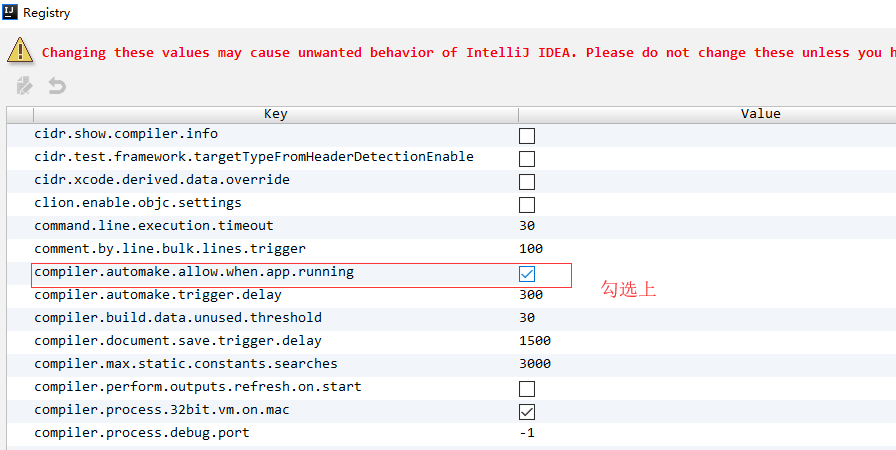
如果不想做上面这两部勾选,不想让idea开启自动编译部署,那么手动按Ctrl+F9也是可以的,开启这两项在添加springboot应用时,会找不到主类,需要去掉勾选后才能好用,所以idea是不建议开启这两项的,除非springboot已经运行好了,不然建议去掉勾选后再进行添加
idea开启springboot的devtools自动热部署功能的更多相关文章
- SpringBoot配置devtools实现热部署
spring为开发者提供了一个名为spring-boot-devtools的模块来使Spring Boot应用支持热部署,提高开发者的开发效率,无需手动重启Spring Boot应用. devtool ...
- SpringBoot 4.SpringBoot 整合 devtools 实现热部署
一.添加 devtools 依赖 <!-- Spring boot 热部署 : 此热部署会遇到 java.lang.ClassCastException 异常 --> <!-- op ...
- SpringBoot 整合 devtools 实现热部署
来源:https://www.cnblogs.com/rcddup/p/7533125.html 一.添加 devtools 依赖 <!-- Spring boot 热部署 : 此热部署会遇到 ...
- 第4章 springboot热部署 4-1 SpringBoot 使用devtools进行热部署
/imooc-springboot-starter/src/main/resources/application.properties #关闭缓存, 即时刷新 #spring.freemarker.c ...
- IDEA+DevTools实现热部署功能
开发IDE: Intellij IDEA 2018.1 SpringBoot:1.5.9.RELEASE 热部署 大家都知道在项目开发过程中,常常会改动页面数据或者修改数据结构,为了显示改动效果, ...
- idea springBoot 配置devtools实现热部署
1.pom文件依赖引入 <dependencies> <dependency> <groupId>org.springframework.boot</grou ...
- (40). springboot + devtools(热部署)【从零开始学Spring Boot】
我们之前在在()Spring Boot热部署[从零开始学Spring Boot] (http://412887952-qq-com.iteye.com/blog/2291518 )讲过通过使用spri ...
- SpringBoot开发 - 什么是热部署和热加载?devtool的原理是什么?
在SpringBoot开发调试中,如果我每行代码的修改都需要重启启动再调试,可能比较费时间:SpringBoot团队针对此问题提供了spring-boot-devtools(简称devtools)插件 ...
- springboot在eclipse实现热部署
eclipse使用spring-tool-suite插件创建springboot项目,项目创建完成后. 选中项目,右键 Spring Tools --> Add Boot Devtools 点 ...
随机推荐
- python bottle学习(三)动态路由配置(通配符)
from bottle import (run, route, get, post, default_app, Bottle) @route('/', method='GET') @route('/i ...
- JZOJ.3769【NOI2015模拟8.14】A+B
Description 对于每个数字x,我们总可以把它表示成一些斐波拉切数字之和,比如8 = 5 + 3, 而22 = 21 + 1,因此我们可以写成 x = a1 * Fib1 + a2 * F ...
- 【BZOJ3714】[PA2014]Kuglarz 最小生成树
[BZOJ3714][PA2014]Kuglarz Description 魔术师的桌子上有n个杯子排成一行,编号为1,2,…,n,其中某些杯子底下藏有一个小球,如果你准确地猜出是哪些杯子,你就可以获 ...
- java怎么计算散列码hashcode?
转自:https://blog.csdn.net/qq_21430549/article/details/52225801 1.从HashMap说起 我们知道Map以键值对的形式来存储数据.有一点值得 ...
- 《JAVA多线程编程核心技术》 笔记:第六章:单例模式与多线程
一.立即加载/"饿汉模式"和延迟加载/"懒汉模式" 立即加载(又称饿汉模式):在使用类的时候已经将对象创建完毕,常见实现方法是直接new实例化 延迟加载(又称懒 ...
- 如何使用android studio及夜神模拟器开发调试
android studio 只安装sdk(不安装自带模拟器)1.下载并安装夜神模拟器 2.先启动夜神模拟器 3.然后运行cmd命令,cd到夜神安装目录(bin目录下),执行命令: nox_adb.e ...
- Access 2010 VBA 读取 表中的数据
Option Compare Database Private Sub Command0_Click() Dim db Dim rs As Recordset Dim str As String Se ...
- Angular学习笔记—创建一个angular项目
开始项目前,你需要先安装node和npm,然后执行npm install -g @angular/cli安装Angular CLI. 如何安装node.js和npm npm使用介绍 1.安装angul ...
- 我们是80后 golang入坑系列
现在这个系列,已经开始两极分化了. 点赞的认为风格轻松,看着不困.反之,就有人嫌写的罗里吧嗦,上纲上线.所以善意提醒,里面不只是技术语言,还有段子.专心看技术的,千万别点!别怪我没提醒!差点忘说,版权 ...
- 简明python教程五----数据结构
python中有三种内建的数据结构:列表.元组和字典 list是处理一组有序项目的数据结构,即你可以在一个列表中存储一个序列的项目.在python中,每个项目之间用逗号分隔. 列表中的项目应该包括在方 ...