
[转]Activitys, Threads, & Memory Leaks
转自:http://www.androiddesignpatterns.com/2013/04/activitys-threads-memory-leaks.html
http://www.cnblogs.com/kissazi2/p/4125356.html
A common difficulty in Android programming is coordinating long-running tasks over the Activity lifecycle and avoiding the subtle memory leaks which might result. Consider the Activity code below, which starts and loops a new thread upon its creation:
/**

 * Example illustrating how threads persist across configuration

 * changes (which cause the underlying Activity instance to be

 * destroyed). The Activity context also leaks because the thread

 * is instantiated as an anonymous class, which holds an implicit

 * reference to the outer Activity instance, therefore preventing

 * it from being garbage collected.

 */

public class MainActivity extends Activity {

  @Override

  protected void onCreate(Bundle savedInstanceState) {

    super.onCreate(savedInstanceState);

    exampleOne();

  }

  private void exampleOne() {

    new Thread() {

      @Override

      public void run() {

        while (true) {

          SystemClock.sleep(1000);

        }

      }

    }.start();

  }

}
When a configuration change occurs, causing the entire Activity to be destroyed and re-created, it is easy to assume that Android will clean up after us and reclaim the memory associated with the Activity and its running thread. However, this is not the case. Both will leak never to be reclaimed, and the result will likely be a significant reduction in performance.
How to Leak an Activity
The first memory leak should be immediately obvious if you read my previous post on Handlers and inner classes. In Java, non-static anonymous classes hold an implicit reference to their enclosing class. If you're not careful, storing this reference can result in the Activity being retained when it would otherwise be eligible for garbage collection. Activity objects hold a reference to their entire view hierarchy and all its resources, so if you leak one, you leak a lot of memory.
The problem is only exacerbated by configuration changes, which signal the destruction and re-creation of the entire underlying Activity. For example, after ten orientation changes running the code above, we can see (using Eclipse Memory Analyzer) that each Activity object is in fact retained in memory as a result of these implicit references:
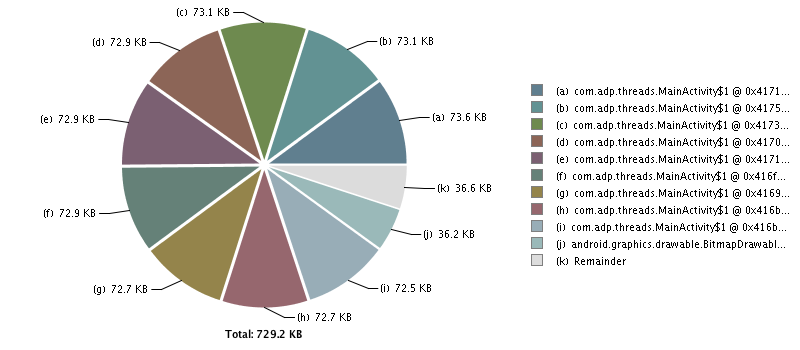
Figure 1. Activity instances retained in memory after ten orientation changes.
After each configuration change, the Android system creates a new Activity and leaves the old one behind to be garbage collected. However, the thread holds an implicit reference to the old Activity and prevents it from ever being reclaimed. As a result, each new Activity is leaked and all resources associated with them are never able to be reclaimed.
The fix is easy once we've identified the source of the problem: declare the thread as a private static inner class as shown below.
/**

 * This example avoids leaking an Activity context by declaring the

 * thread as a private static inner class, but the threads still

 * continue to run even across configuration changes. The DVM has a

 * reference to all running threads and whether or not these threads

 * are garbage collected has nothing to do with the Activity lifecycle.

 * Active threads will continue to run until the kernel destroys your

 * application's process.

 */

public class MainActivity extends Activity {

  @Override

  protected void onCreate(Bundle savedInstanceState) {

    super.onCreate(savedInstanceState);

    exampleTwo();

  }

  private void exampleTwo() {

    new MyThread().start();

  }

  private static class MyThread extends Thread {

    @Override

    public void run() {

      while (true) {

        SystemClock.sleep(1000);

      }

    }

  }

}
The new thread no longer holds an implicit reference to the Activity, and the Activity will be eligible for garbage collection after the configuration change.
How to Leak a Thread
The second issue is that for each new Activity that is created, a thread is leaked and never able to be reclaimed. Threads in Java are GC roots; that is, the Dalvik Virtual Machine (DVM) keeps hard references to all active threads in the runtime system, and as a result, threads that are left running will never be eligible for garbage collection. For this reason, you must remember to implement cancellation policies for your background threads! One example of how this might be done is shown below:
/**

 * Same as example two, except for this time we have implemented a

 * cancellation policy for our thread, ensuring that it is never

 * leaked! onDestroy() is usually a good place to close your active

 * threads before exiting the Activity.

 */

public class MainActivity extends Activity {

  private MyThread mThread;

  @Override

  protected void onCreate(Bundle savedInstanceState) {

    super.onCreate(savedInstanceState);

    exampleThree();

  }

  private void exampleThree() {

    mThread = new MyThread();

    mThread.start();

  }

  /**

   * Static inner classes don't hold implicit references to their

   * enclosing class, so the Activity instance won't be leaked across

   * configuration changes.

   */

  private static class MyThread extends Thread {

    private boolean mRunning = false;

    @Override

    public void run() {

      mRunning = true;

      while (mRunning) {

        SystemClock.sleep(1000);

      }

    }

    public void close() {

      mRunning = false;

    }

  }

  @Override

  protected void onDestroy() {

    super.onDestroy();

    mThread.close();

  }

}
In the code above, closing the thread in onDestroy() ensures that you never accidentally leak the thread. If you want to persist the same thread across configuration changes (as opposed to closing and re-creating a new thread each time), consider using a retained, UI-less worker fragment to perform the long-running task. Check out my blog post, titled Handling Configuration Changes with Fragments, for an example explaining how this can be done. There is also a comprehensive example available in the API demos which illustrates the concept.
Conclusion
In Android, coordinating long-running tasks over the Activity lifecycle can be difficult and memory leaks can result if you aren't careful. Here are some general tips to consider when dealing with coordinating your long-running background tasks with the Activity lifecycle:
Favor static inner classes over nonstatic. Each instance of a nonstatic inner class will have an extraneous reference to its outer Activity instance. Storing this reference can result in the Activity being retained when it would otherwise be eligible for garbage collection. If your static inner class requires a reference to the underlying Activity in order to function properly, make sure you wrap the object in a
WeakReferenceto ensure that you don't accidentally leak the Activity.Don't assume that Java will ever clean up your running threads for you. In the example above, it is easy to assume that when the user exits the Activity and the Activity instance is finalized for garbage collection, any running threads associated with that Activity will be reclaimed as well. This is never the case. Java threads will persist until either they are explicitly closed or the entire process is killed by the Android system. As a result, it is extremely important that you remember to implement cancellation policies for your background threads, and to take appropriate action when Activity lifecycle events occur.
Consider whether or not you should use a Thread. The Android application framework provides many classes designed to make background threading easier for developers. For example, consider using a Loader instead of a thread for performing short-lived asynchronous background queries in conjunction with the Activity lifecycle. Likewise, if the background thread is not tied to any specific Activity, consider using a Service and report the results back to the UI using a
BroadcastReceiver. Lastly, remember that everything discussed regarding threads in this blog post also applies toAsyncTasks (since theAsyncTaskclass uses anExecutorServiceto execute its tasks). However, given thatAsyncTasks should only be used for short-lived operations ("a few seconds at most", as per the documentation), leaking an Activity or a thread by these means should never be an issue.
The source code for this blog post is available on GitHub. A standalone application (which mirrors the source code exactly) is also available for download on Google Play.
As always, leave a comment if you have any questions and don't forget to +1 this blog in the top right corner!
【译】Activitys, Threads和 内存泄露
Android编程中一个共同的困难就是协调Activity的生命周期和长时间运行的任务(task),并且要避免可能的内存泄露。思考下面Activity的代码,在它启动的时候开启一个线程并循环执行任务。
/**

 * 一个展示线程如何在配置变化中存活下来的例子(配置变化会导致创

 * 建线程的Activity被销毁)。代码中的Activity泄露了,因为线程被实

 * 例为一个匿名类实例,它隐式地持有外部Activity实例,因此阻止Activity

 * 被回收。

 */

public class MainActivity extends Activity {

  @Override

  protected void onCreate(Bundle savedInstanceState) {

    super.onCreate(savedInstanceState);

    exampleOne();

  }

  private void exampleOne() {

    new Thread() {

      @Override

      public void run() {

        while (true) {

          SystemClock.sleep(1000);

        }

      }

    }.start();

  }

}
当配置发生变化(如横竖屏切换)时,会导致整个Activity被销毁并重新创建,很容易假定Android将会为我们清理和回收跟Activity相关的内存及它运行中的线程。然而,这并非如此。这两者都会导致内存泄露而且不会被回收, 后果是性能可能显著地下降。
怎么样让一个Activity泄露
如果你读过我前一篇关于Handler和内部类的文章,那么第一种内存泄露应该很容易理解。在Java中,非静态匿名类隐式地持有他们的外部类的引用。如果你不小心,保存这个引用可能导致Activity在可以被GC回收的时候被保存下来。Activity持有一个指向它们整个View继承树和它所持有的所有资源的引用,所以如果你泄露了一个,很多内存都会连带着被泄露。
配置发生变化只加剧了这个问题,它发出一个信号让Activity销毁并重新创建。比如,基于上面的代码进行10次横竖屏变化后,我们可以看到(使用Eclipse Memory Analyzer)由于那些隐式的引用,每一个Activity对象其实都留存在内存中:
图1.在10次配置发生变化后,存留在内存中的Activity实例
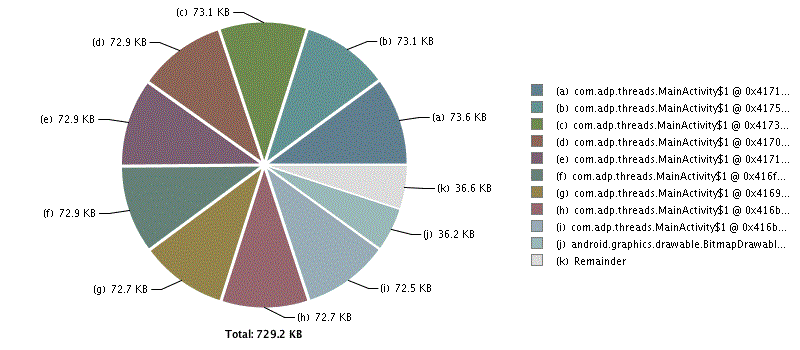
每一次配置发生变化后,Android系统都会创建一个新的Activity并让旧的Activity可以被回收。然而,隐式持有旧Activity引用的线程,阻止他们被回收。所以每次泄露一个新的Activity,都会导致所有跟他们关联的资源都没有办法被回收。
解决方法也很简单,在我们确定了问题的根源,那么只要将线程定义为private static内部类,如下所示:
/**

 * 这个例子通过将线程实例声明为private static型的内部 类,从而避免导致Activity泄

 * 露,但是这个线程依旧会跨越配置变化存活下来。DVM有一个指向所有运行中线程的

 * 引用(无论这些线程是否 可以被垃圾回收),而线程能存活多长时间以及什么时候可

 * 以被回收跟Activity的生命周期没有任何关系。

 * 活动线程会一直运行下去,直到系统将你的应用程序销毁。

 */

public class MainActivity extends Activity {

  @Override

  protected void onCreate(Bundle savedInstanceState) {

    super.onCreate(savedInstanceState);

    exampleTwo();

  }

  private void exampleTwo() {

    new MyThread().start();

  }

  private static class MyThread extends Thread {

    @Override

    public void run() {

      while (true) {

        SystemClock.sleep(1000);

      }

    }

  }

}
新的线程不会隐式地持有Activity的引用,并且Activity在配置发生变化后都会变得可以被回收。
怎么使一个Thread泄露
第二个问题是每当创建了一个新Activity,就会导致一个thread泄露并且不会被回收。在Java中,thread是GC Root也就是说在系统中的Dalvik Virtual Machine (DVM)保存对所有活动 中线程的强引用,这就导致了这些线程留存下来继续运行并且不会达到可以被回收的条件。因此你必须要考虑怎样停止后台线程。下面是一个例子:
/**

 * 跟例子2一样,除了这次我们实现了取消线程的机制,从而保证它不会泄露。

 * onDestroy()常常被用来在Activity推出前取消线程。

 */

public class MainActivity extends Activity {

  private MyThread mThread;

  @Override

  protected void onCreate(Bundle savedInstanceState) {

    super.onCreate(savedInstanceState);

    exampleThree();

  }

  private void exampleThree() {

    mThread = new MyThread();

    mThread.start();

  }

  /**

    * 静态内部类不会隐式地持有他们外部类的引用,所以Activity实例不会在配置变化

    * 中被泄露

   */

  private static class MyThread extends Thread {

    private boolean mRunning = false;

    @Override

    public void run() {

      mRunning = true;

      while (mRunning) {

        SystemClock.sleep(1000);

      }

    }

    public void close() {

      mRunning = false;

    }

  }

  @Override

  protected void onDestroy() {

    super.onDestroy();

    mThread.close();

  }

}
在上面的代码中,我们在onDestroy()中关闭线程保证了线程不会意外泄露。如果你想要在配置变化的时候保存线程的状态(而不是每次都要关闭并重新创建一个新的线程)。考虑使用可留存(在配置变化中不会被销毁)、没有UI的fragment来执行长时间任务。看看我的博客,叫做《用Fragment解决屏幕旋转(状态发生变化)状态不能保持的问题》,里面有一个例子说明实现这点。API Demo中也一个全面的例子。
总结
在Android中处理Activity生命周期与长时间运行的任务的关系可能很困难并且可能导致内存泄露。下面有一些值得考虑的通用建议:
优先使用静态内部类而不是非静态的。非静态内部类的每个实例都会有一个对它外部Activity实例的引用。当Activity可以被GC回收时,存储在非静态内部类中的外部Activity引用可能导致垃圾回收失败。如果你的静态内部类需要宿主Activity的引用来执行某些东西,你要将这个引用封装在一个WeakReference中,避免意外导致Activity泄露。
不要假定Java最后总会为你清理运行中的线程。在上面的例子中,很容易错误地认为用户退出Activity后,Activity就会被回收,任何跟这个Activity关联的线程也都将一并被回收。事实上不是这样的。Java线程会继续运行下去,直到他们被显式地关闭或者整个process被Android系统杀掉。因此,一定要记得记得为后台线程实现对应的取消策略,并且在Activity生命周期事件发生的时候使用合理的措施。
考虑你是否真的应该使用线程。Android Framework提供了很多旨在为开发者简化后台线程开发的类。比如,考虑使用Loader而不是线程当你需要配合Activity生命周期做一些短时间的异步后台任务查询类任务。考虑使用使用Service,然后向使用BrocastReceiver向UI反馈进度、结果。最后,记住本篇文章中一切关于线程的讨论也适用于AsyncTask(因为Asynctask类使用ExecutorService来执行它的任务)。然而,鉴于AsyncTask只应该用于短时间的操作(最多几秒钟,参照文档),它倒不至于会导致像Activity或线程泄露那么大的问题。
这篇文章中的源代码都可以从github下载。文章中的示例程序可以从Google play下载。
[转]Activitys, Threads, & Memory Leaks的更多相关文章
- Activitys, Threads, & Memory Leaks
Activitys, Threads, & Memory Leaks 在Android编程中,一个公认的难题是在Activity的生命周期如何协调长期运行的任务和避免有可能出现的内存泄漏问题. ...
- 【译】Activitys, Threads和 内存泄露
Android编程中一个共同的困难就是协调Activity的生命周期和长时间运行的任务(task),并且要避免可能的内存泄露.思考下面Activity的代码,在它启动的时候开启一个线程并循环执行任务. ...
- On Memory Leaks in Java and in Android.
from:http://chaosinmotion.com/blog/?p=696 Just because it's a garbage collected language doesn't mea ...
- Diagnosing out of memory errors and memory leaks 内存泄露实例 C Java JavaScript 内存泄露
小结: 1. 数据库连接池. JDBC语句和结果对象必须显式地关闭. 2. 电梯到目标楼层后地址是否被释放 When a button is pressed: Get some memory, whi ...
- Identify Memory Leaks in Visual CPP Applications —— VLD内存泄漏检测工具
原文地址:http://www.codeproject.com/Articles/1045847/Identify-Memory-Leaks-in-Visual-CPP-Applications 基于 ...
- 解决:Detected memory leaks
最近在一个项目中,程序退出后都出现内存泄漏: Detected memory leaks!Dumping objects ->{171} normal block at 0x05785AD0, ...
- [Angular2 Router] Exiting an Angular 2 Route - How To Prevent Memory Leaks
In this tutorial we are going to learn how we can accidentally creating memory leaks in our applicat ...
- The Introduction of Java Memory Leaks
One of the most significant advantages of Java is its memory management. You simply create objects a ...
- 【转】简单内存泄漏检测方法 解决 Detected memory leaks! 问题
我的环境是: XP SP2 . VS2003 最近在一个项目中,程序退出后都出现内存泄漏: Detected memory leaks! Dumping objects -> {98500} n ...
随机推荐
- 快速上手:在CVM上安装Apache
欢迎大家前往腾讯云+社区,获取更多腾讯海量技术实践干货哦~ 本文由一步 发表于云+社区专栏 介绍 Apache HTTP服务器是世界上使用最广泛的Web服务器.它提供了许多强大的功能,包括可动态加载的 ...
- Codeforces 550C —— Divisibility by Eight——————【枚举 || dp】
Divisibility by Eight time limit per test 2 seconds memory limit per test 256 megabytes input stand ...
- Windows Server 2008 R2系统上安装SQLServer2012集群(简略)
4台服务器(1台AD.2台SQL服务器.1台iSCSI存储服务器) 9个IP(1个AD的IP.2个SQL服务器的IP.2个心跳IP.1个iSCSI存储服务器的IP.1个集群IP.1个DTC的IP.1个 ...
- Lucene学习之四:Lucene的索引文件格式(3)
本文转载自:http://www.cnblogs.com/forfuture1978/archive/2010/02/02/1661436.html ,略有删改和备注. 四.具体格式 4.2. 反向信 ...
- post方式发送接收文件
//文件post发送 var express = require('express');var router = express.Router();var request = require(&quo ...
- AndroidVideoCache 框架源码分析
1.简析: 在客户端播放视频的使用,容易出现这样的一个问题.在网络状况不好的情况下,视频流很容易卡顿或者中断,即使播放软件本身有一点的缓存能力,但是这个往往不够,造成播放失败,卡顿. AndroidV ...
- CAP理论-解析
分布式系统的CAP理论:理论首先把分布式系统中的三个特性进行了如下归纳:● 一致性(C):在分布式系统中的所有数据备份,在同一时刻是否同样的值.(等同于所有节点访问同一份最新的数据副本) ...
- vs2015 web项目加载失败解决办法
1.问题 ---------------------------Microsoft Visual Studio---------------------------Web 应用程序项目 XXWeb 已 ...
- ubuntu终端颜色设置
在 .bashrc中增加 PS1='${debian_chroot:+($debian_chroot)}\[\033[00;32m\]\u @ \h\[\033[00m\]:\[\033[00;34m ...
- Junit 单元测试、BeanUtils、Properties类
一. Junit单元测试 1.1. Junit单元测试框架的基本使用 一.搭建环境: 导入junit.jar包(junit4) 二.写测试类: 0,一般一个类对应一个测试类. 1,测试类与被测试类最好 ...