
@RequestBody与serialize()、serializeArray()、拼接Json 妙用总结
@requestBody注解常用来处理content-type不是默认的application/x-www-form-urlcoded编码的内容,
比如说:application/json或者是application/xml等。一般情况下来说常用其来处理application/json类型。
jQuery序列化表单的方法总结
现在这里贴出案例中静态的html网页内容:
<!DOCTYPE html>
<html lang="en">
<head>
<meta charset="UTF-8">
<title>Title</title>
</head>
<body>
<form id="test_form">
账户:<input type="text" name="username" value="user"/><br>
密码:<input type="password" name="password" value="123"><br>
<input type="button" value="序列化为(Key=Value)格式Url"onclick="testJquerySerializeUrl()" id="serializeUrl"/>
<input type="button" value="序列化为json" onclick="testJquerySerializeArray()" id="serializeJson"/>
<input type="button" value="手动拼接为json" onclick="testAutoSetJsonData()" id="autoSetJson"/>
</form>
</body>
知识点一:表单序列化serialize()
不需要使用@RequestBody
方法介绍:
作用:序列表单内容为字符串。
参数: 无
Content-Type:application/x-www-form-urlencoded; charset=UTF-8
默认返回类型,不需要使用@RequestBody
案例代码:
<script>

    function testJquerySerializeUrl() {

		alert($("#test_form").serialize());

        console.log($("#test_form").serialize());

        $.ajax({

            url: "/SerializeUrl",

            type: "post",

            data: $("#test_form").serialize()

        })

    }

</script>
后台代码:
@RequestMapping("/SerializeUrl")

public void hello( user user){

   System.out.println(user);

}
测试结果:
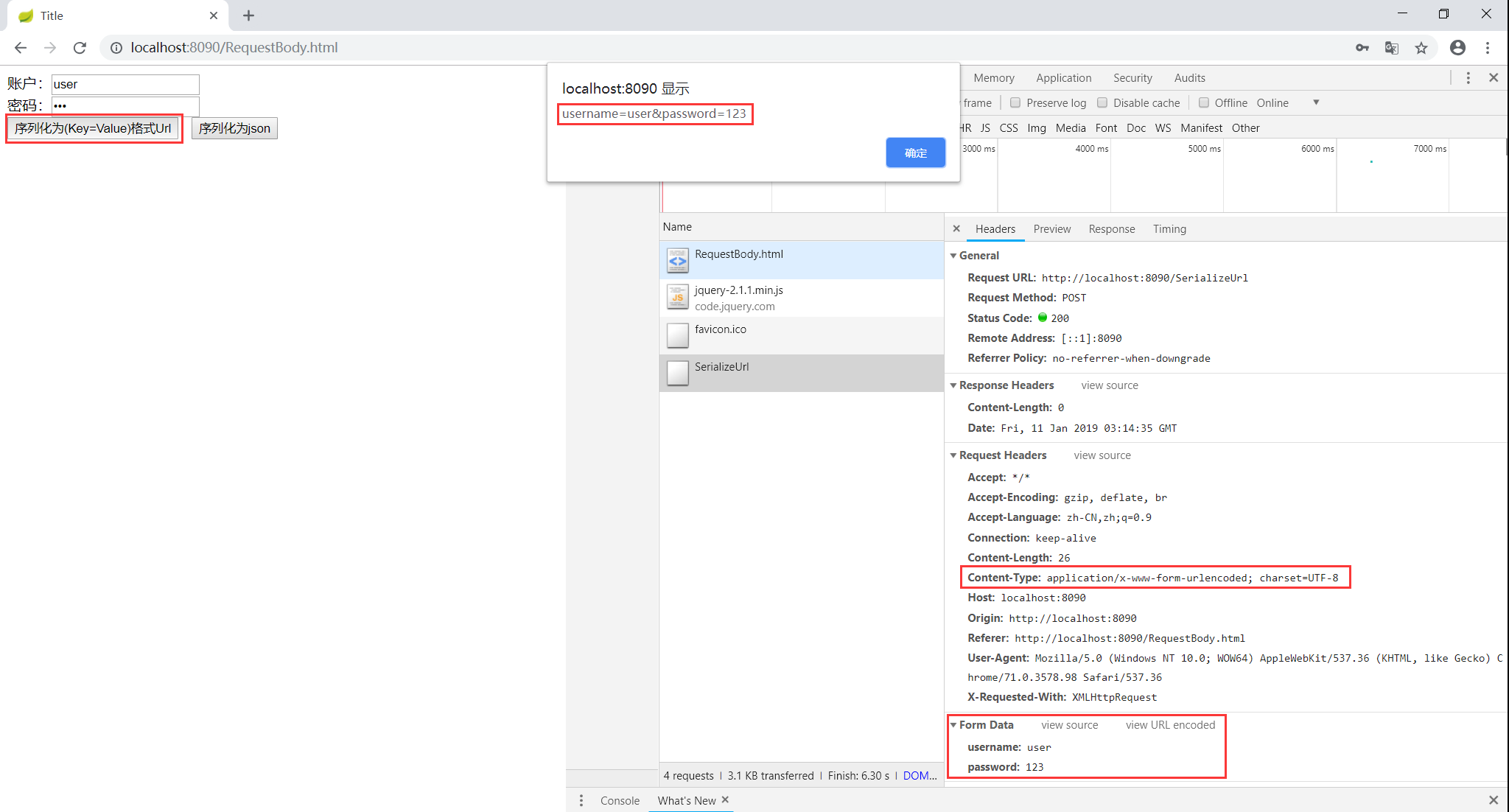
总结: ajax使用默认Content-Type:
application/x-www-form-urlencoded; charset=UTF-81.我们看到输出的结果为表单项中的各表单元素的name和value值
2.格式是以 KEY:VALUE 参数的形式
需要使用@RequestBody
作用:序列表单内容为字符串。
参数: 无
Content-Type:contentType: "application/json"
需要使用@RequestBody
案例:
<script>

    function testJquerySerializeUrl() {

		alert($("#test_form").serialize());

        console.log($("#test_form").serialize());

        $.ajax({

            url: "/SerializeUrl",

            type: "post",

            data: $("#test_form").serialize(),

    		contentType: "application/json"

        })

    }

</script>
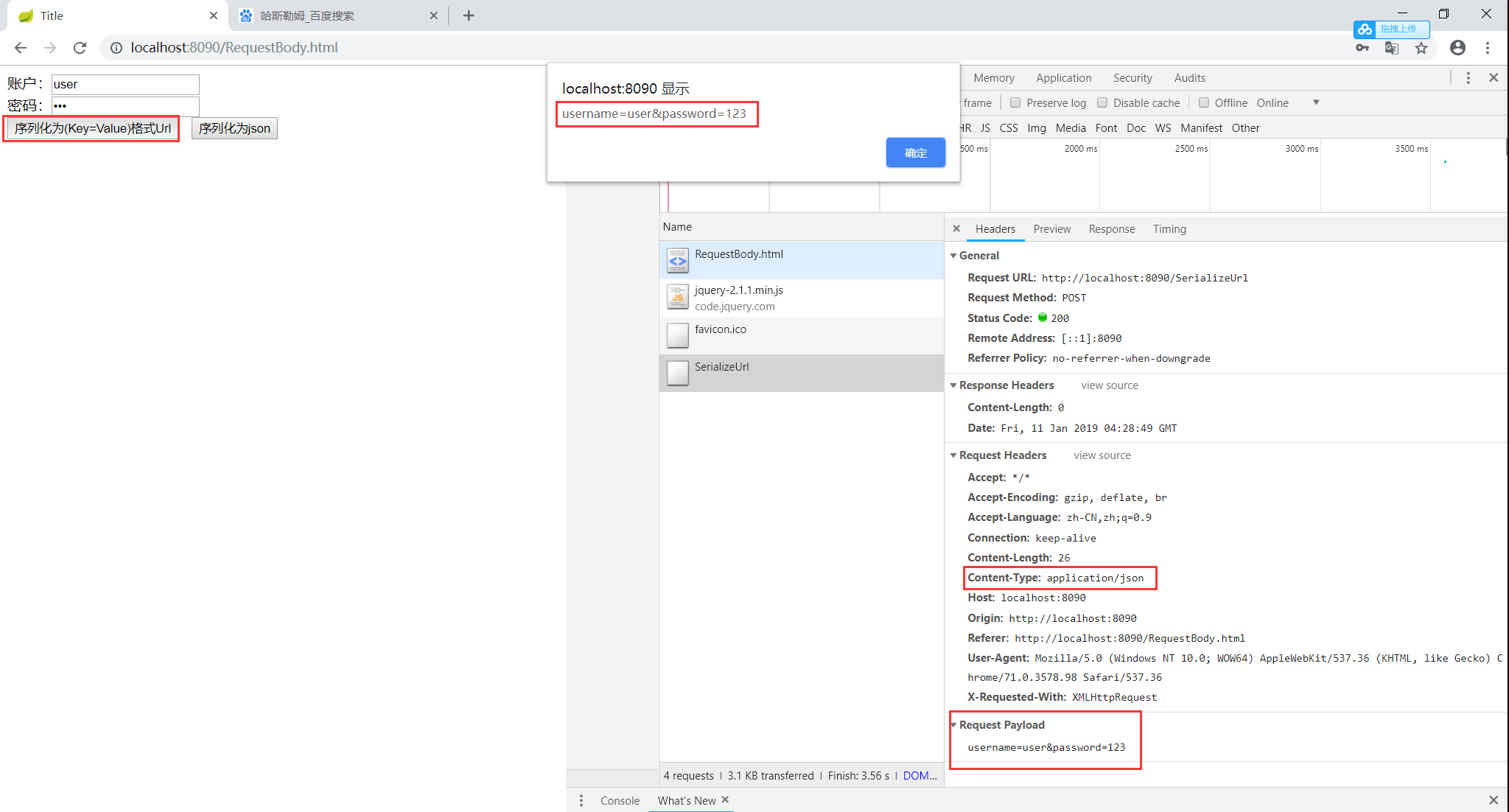
有上图可以看到请求体的值为:username=user&password=123,此时后台使用无法接收到传回的值的。需要重新组装表单序列化Url为Json串,然后通过JSON.stringify()将javascript值转成json字符串
<script>

    function testJquerySerializeUrl() {

        alert(JSON.stringify($("#test_form").serialize()));

        console.log($("#test_form").serialize());

        //重新组装表单序列化Url为Json串

        var jsonData = {}

        var serializeStr = $("#test_form").serialize();

        var array = serializeStr.split("&");

        $(array).each(function (i) {

            jsonData[array[i].split("=")[0]] = array[i].split("=")[1];

        })

        console.log(jsonData);

        $.ajax({

            url: "/SerializeUrl",

            type: "post",

            data: JSON.stringify(jsonData),

            contentType: "application/json"

        })

    }

</script>
后台代码:添加@RequestBody
@RequestMapping("/SerializeUrl")

public void SerializeUrl(@RequestBody user user){

    System.out.println(user);

}
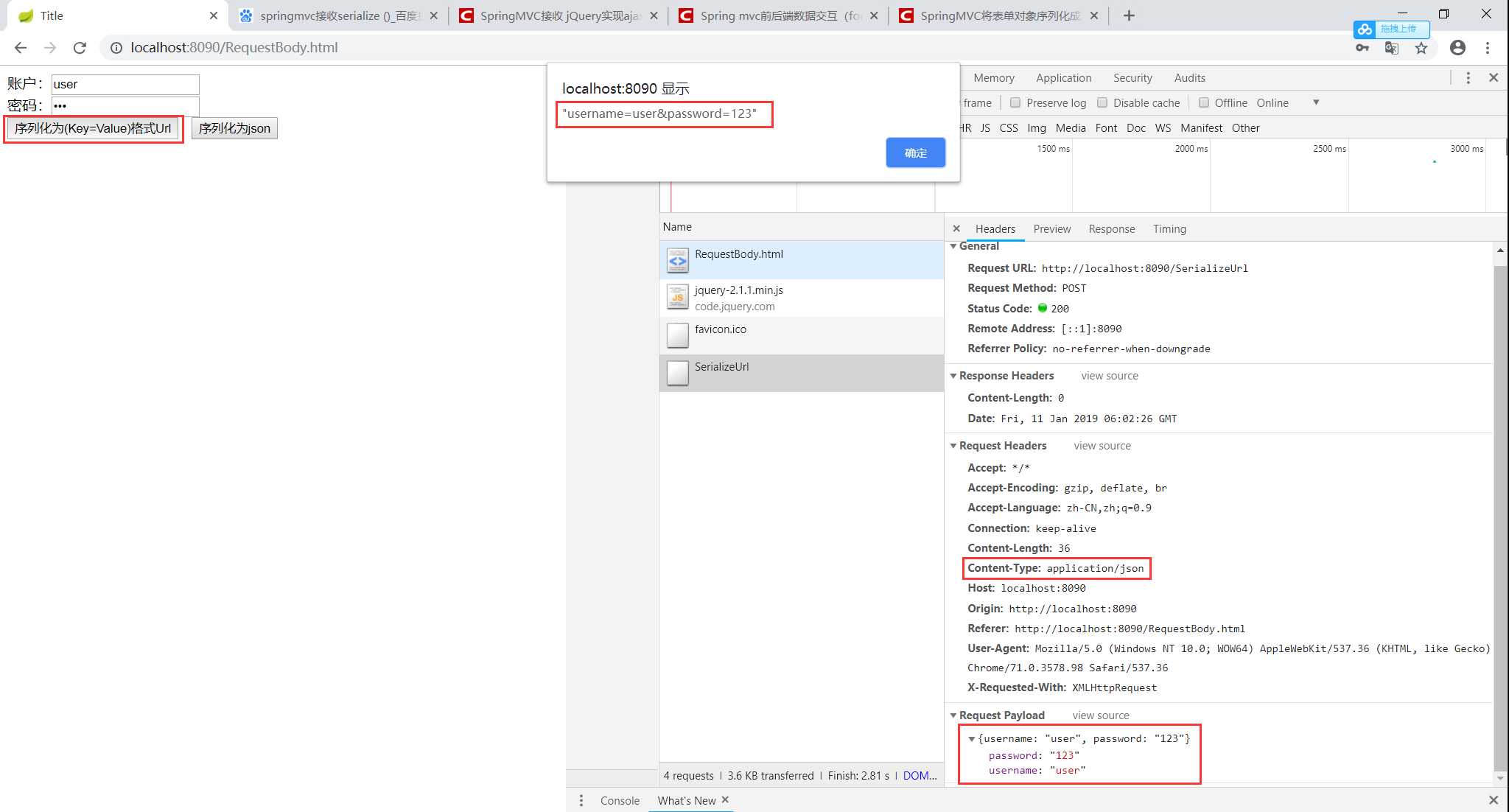
总结:ajax使用Content-Type:
contentType: "application/json"1.我们看到输出的结果为表单项中的各表单元素的name和value值
2.格式是以url参数的形式,第一个参数前面没有&符号
知识点二:表单序列化serializeArray()方法
不需要使用@RequestBody
方法介绍:
作用:序列化表格元素 (类似 '.serialize()' 方法) 返回 JSON 数据结构数据。
参数:无
返回值:返回的是JSON对象而非JSON字符串Content-Type:`application/x-www-form-urlencoded; charset=UTF-8
案例:
<script>

    function testJquerySerializeArray() {

        alert($("#test_form").serializeArray());

        console.log($("#test_form").serializeArray());

        $.ajax({

            url: "/SerializeArray",

            type: "post",

            data: $("#test_form").serializeArray(),

        })

    }

</script>
后台代码:
@RequestMapping("/SerializeArray")

public void SerializeArray(user user){

    System.out.println(user);

}
测试结果:
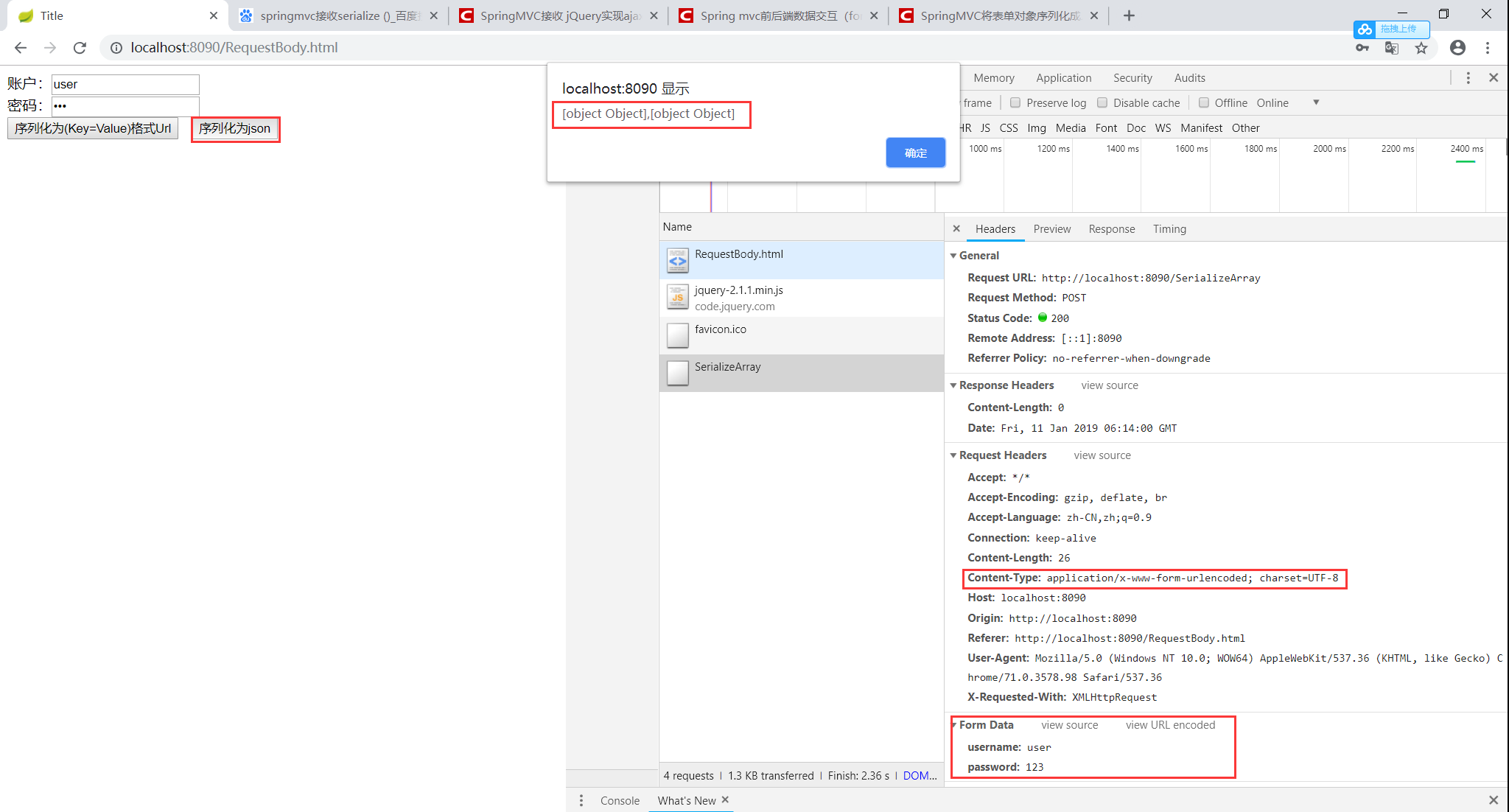
总结: ajax使用默认Content-Type:
application/x-www-form-urlencoded; charset=UTF-81.我们看到输出的结果为Json
[
{name: 'firstname', value: 'Hello'},
{name: 'lastname', value: 'World'},
{name: 'alias'}, // this one was empty
]
需要使用@RequestBody
案例:
<script>

    function testJquerySerializeArray() {

        alert($("#test_form").serializeArray());

        console.log($("#test_form").serializeArray());

        var jsonData = {};

        var serializeArray = $("#test_form").serializeArray();

        // 先转换成{"id": ["12","14"], "name": ["aaa","bbb"], "pwd":["pwd1","pwd2"]}这种形式

        $(serializeArray).each(function () {

            if (jsonData[this.name]) {

                if ($.isArray(jsonData[this.name])) {

                    jsonData[this.name].push(this.value);

                } else {

                    jsonData[this.name] = [jsonData[this.name], this.value];

                }

            } else {

                jsonData[this.name] = this.value;

            }

        });

        console.log(jsonData);

        $.ajax({

            url: "/SerializeArray",

            type: "post",

            data: JSON.stringify(jsonData),

            contentType: "application/json"

        })

    }

</script>
后台代码:添加@RequestBody
@RequestMapping("/SerializeArray")

public void SerializeArray(@RequestBody user user){

    System.out.println(user);

}
测试结果:
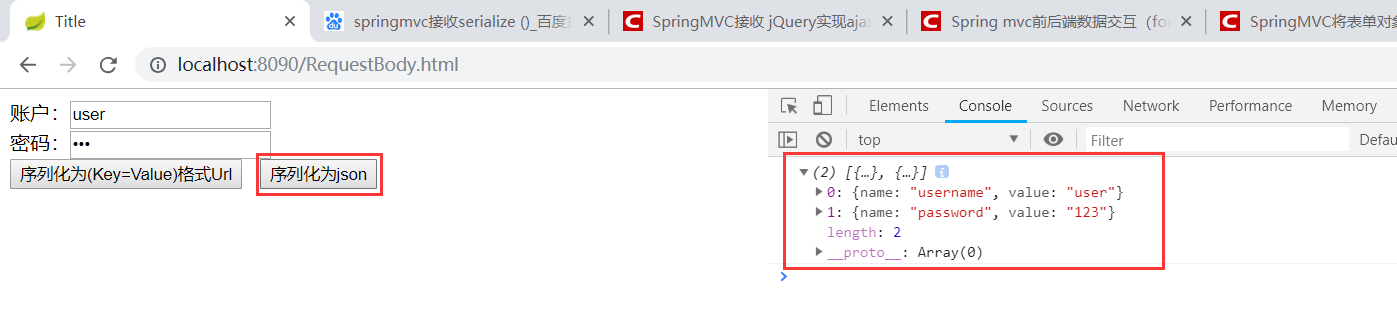
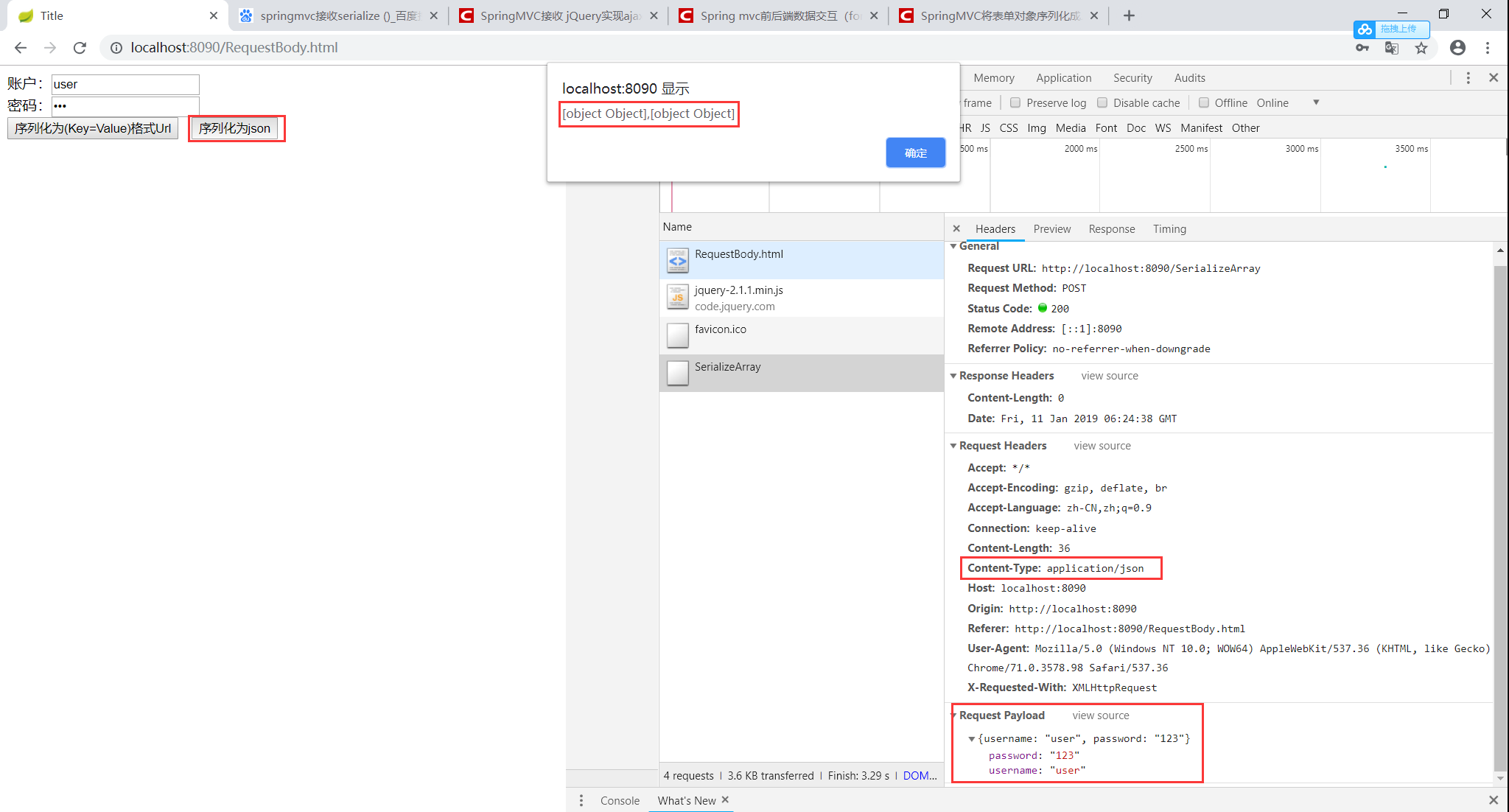
有上图可以看到console.log打印出来为一个json对象,此时使用@RequestBody后台无法接收。需要重新组装表单序列化json对象为Json串,然后通过JSON.stringify()将javascript值转成json字符串
总结:
1.我们看到调用方法返回的是json对象
2.可是用JSON.stringify()方法将json对象转化为json字符串
知识点三:拼接json串
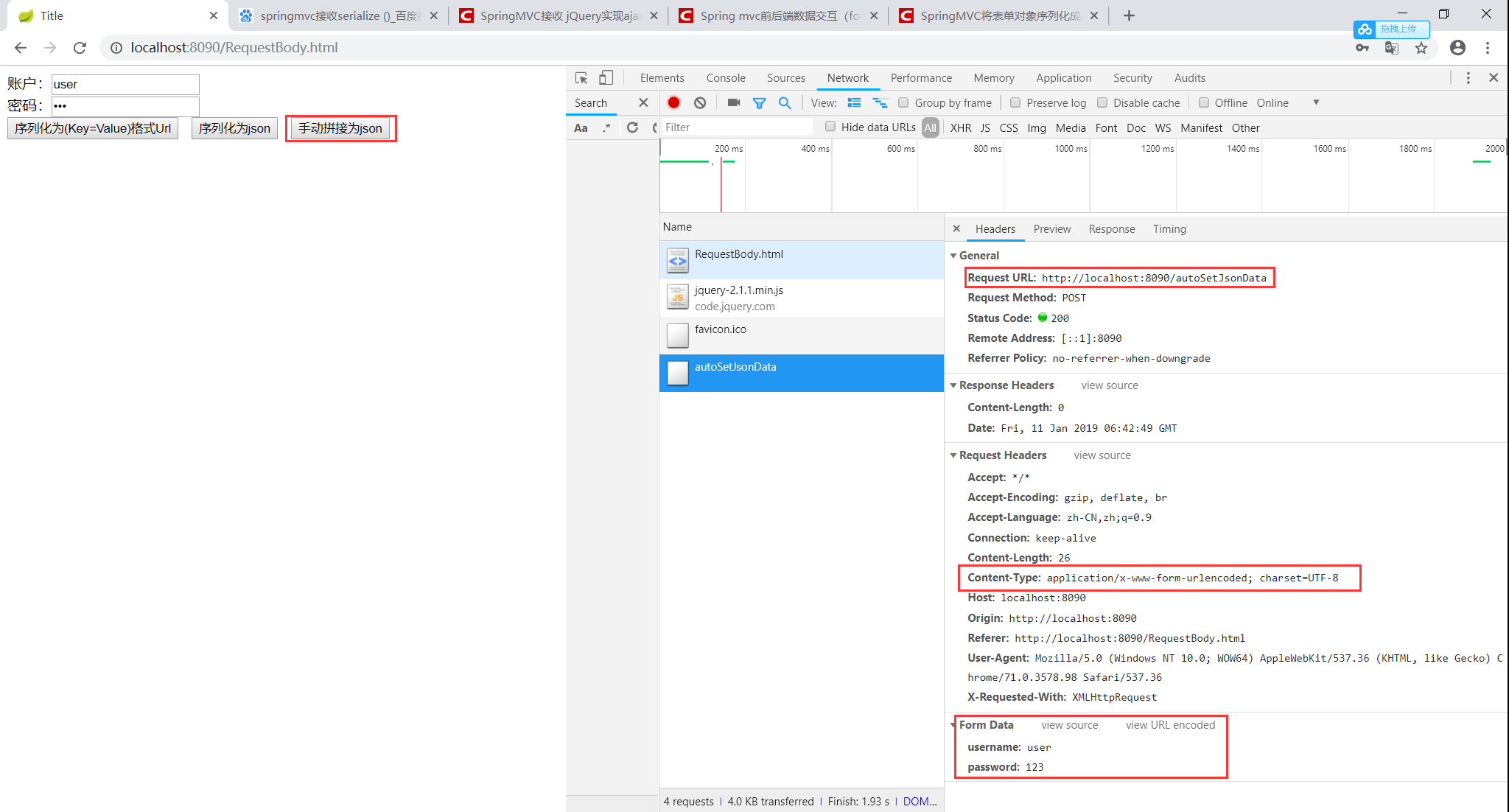
不需要使用@RequestBody
案例:
<script>

    function testAutoSetJsonData() {

        $.ajax({

            url:"/autoSetJsonData",

            type:"post",

            data:{

                username:"user",

                password:"123"

            }

        })

    }

</script>
后台代码:
@RequestMapping("/autoSetJsonData")

public void autoSetJsonData(user user){

    System.out.println(user);

}
测试结果:
需要使用@RequestBody
案例:
<script>

    function testAutoSetJsonData() {

        $.ajax({

            url:"/autoSetJsonData",

            type:"post",

            data:JSON.stringify({

                username:"user",

                password:"123"

            }),

            contentType: "application/json"

        })

    }

</script>
后台代码:添加@RequestBody
@RequestMapping("/autoSetJsonData")

public void autoSetJsonData(@RequestBody user user){

    System.out.println(user);

}
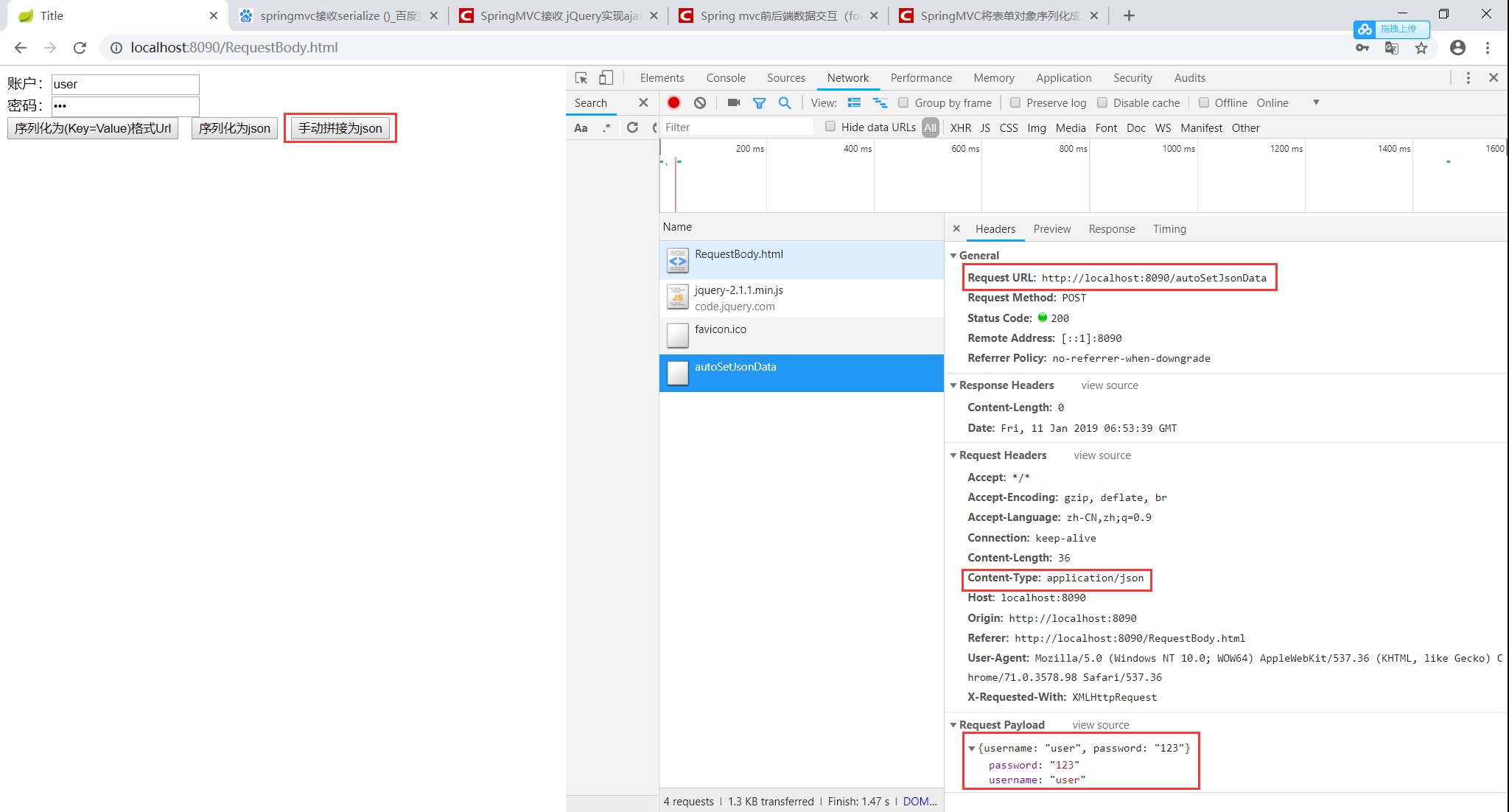
测试结果:
总结
拿好小本子记笔记了
@RequestBody接收的是一个Json对象的字符串,而不是一个Json对象/javascript值(重点)。所以为什么在使用
@RequestBody接收contentType:"application/json"的数据时,后台一直显示为null,是需要将data数据使用JSON.stringify()转换成json字符串,当然也可以使用字符串拼接的方式。
扩展:@RequestParam 用于默认 Content-Type:application/x-www-form-urlencoded; charset=UTF-8,接收Url指定的参数
相关博客连接:
jQuery序列化表单的方法总结(serialize()、serializeArray())
Github测试代码:
https://github.com/YoCiyy/springboot-helloworld
@RequestBody与serialize()、serializeArray()、拼接Json 妙用总结的更多相关文章
- jQuery序列化表单 serialize() serializeArray()
1.serialize()方法 描述:序列化表单内容为字符串,用于Ajax请求. 格式:var data = $(form).serialize(); 2.serializeArray()方法 描述: ...
- jQuery序列化表单 serialize() serializeArray()(非常重要)
https://m.2cto.com/kf/201412/361303.html 2014-12-15 1.serialize()方法 描述:序列化表单内容为字符串,用于Ajax请求. 格式:var ...
- IOS开发之——使用SBJson拼接Json字符串
SBJson包的下载地址在上一篇文章中. 能够使用NSDictionary中的键值对来拼接Json数据,很方便,也能够进行嵌套,直接上代码: //開始拼接Json字符串 NSDictionary *d ...
- 在SpringMVC中使用@RequestBody和@ResponseBody注解处理json时,报出HTTP Status 415的解决方案
我在使用SpringMVC的@RequestBody和@ResponseBody注解处理JSON数据的时候,总是出现415的错误,说是不支持所提交数据格式,我在页面中使用了JQuery的AJAX来发出 ...
- Atitit php序列化 php的serialize序列化和json序列化
Atitit php序列化 php的serialize序列化和json序列化 PHP 对不同类型的数据用不同的字母进行标示,Yahoo 开发网站提供的Using Serialized PHP with ...
- @RequestBody接收的是一个json对象
一直以为在SpringMVC环境中,@RequestBody接收的是一个json对象,调试代码时没有成功,后来才发现,其实 @RequestBody接收的是一个json字符串,而不是一个json对象. ...
- jQuery 序列化表单 serialize() serializeArray()
1.serialize()方法 格式:var data = $("form").serialize(); 功能:将表单内容序列化成一个字符串. 这样在ajax提交表单数据时,就不用 ...
- jQuery 序列化表单数据 serialize() serializeArray()
1.serialize()方法 格式:var data = $("form").serialize(); 功能:将表单内容序列化成一个字符串. 这样在ajax提交表单数据时,就不用 ...
- jQuery使用serialize(),serializeArray()方法取得表单数据+字符串和对象类型两种表单提交的方法
原始form表单值获取方式(手动): $.ajax({ type: "POST", url: "ajax.php", data: "Name=摘取天上 ...
随机推荐
- jquery中animate({left:'-='+width})中的 '-='+是什么意思?
left:'-='+width的意思是:left属性的最终值,是left现有值减去width这个值 例如:left:'200px' 意思是left最终值变成200left:'+200px' 意思与上面 ...
- css3滚动条
<!DOCTYPE html> <html lang="en"> <head> <meta charset="UTF-8&quo ...
- 为什么程序员都不喜欢使用switch而使用if来做条件跳转
请用5秒钟的时间查看下面的代码是否存在bug. OK,熟练的程序猿应该已经发现Bug所在了,在第8行和第10行下面我没有添加关键字break; 这就导致这段代码的行为逻辑与我的设计初衷不符了. 缺 ...
- “全栈2019”Java第十一章:标识符
难度 初级 学习时间 10分钟 适合人群 零基础 开发语言 Java 开发环境 JDK v11 IntelliJ IDEA v2018.3 文章原文链接 "全栈2019"Java第 ...
- jxl操作excel单个单元格换行和获取换行
excel中同表格换行: a+"\n"+b 1.读取 String str = sheet.getCell(c, r).getContents(); String[] split ...
- nginx高性能WEB服务器系列之八--nginx日志分析与切割
nginx系列友情链接:nginx高性能WEB服务器系列之一简介及安装https://www.cnblogs.com/maxtgood/p/9597596.htmlnginx高性能WEB服务器系列之二 ...
- leetcode-475-Heaters
题目描述: Winter is coming! Your first job during the contest is to design a standard heater with fixed ...
- PHP将多维数组变成一维数组
function reduceArray($array) { $return = []; array_walk_recursive($array, function ($x) use (&$r ...
- tomcat在bin下的startup.bat下启动报错
测试环境是否安装配置好. 如果环境配置好.报错如下:或者是730013 -----------解决问题:是因为tomcat端口被占用.查看是否启动两个tomcat
- mongodb与python随手记
在python中使用pymongo连接mongodb数据库. 基本代码如下: from pymongo import MongoClient client = MongoClient('127.0.0 ...