
第六篇——Struts2的后缀
Struts2后缀
1、Struts2默认后缀是action;
2、Struts2使用默认后缀时 *.aciton 和 * 都是同一个请求;
3、Struts2自定义后缀后只能使用自定义的后缀访问;
4、Struts2自定义后缀的方法:
- 方法一:在struts.xml中配置struts.action.extension;
- 方法二:在web.xml中配置struts.action.extension。
项目实例
1、项目结构
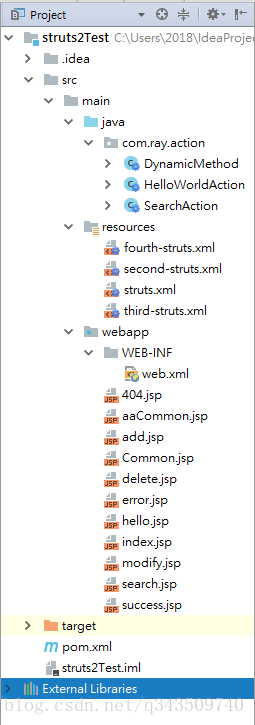
2、pom.xml
<project xmlns="http://maven.apache.org/POM/4.0.0" xmlns:xsi="http://www.w3.org/2001/XMLSchema-instance"
  xsi:schemaLocation="http://maven.apache.org/POM/4.0.0 http://maven.apache.org/maven-v4_0_0.xsd">
  <modelVersion>4.0.0</modelVersion>
  <groupId>com.ray</groupId>
  <artifactId>struts2Test</artifactId>
  <packaging>war</packaging>
  <version>1.0-SNAPSHOT</version>
  <name>struts2Test Maven Webapp</name>
  <url>http://maven.apache.org</url>

  <dependencies>

    <dependency>
      <groupId>junit</groupId>
      <artifactId>junit</artifactId>
      <version>3.8.1</version>
      <scope>test</scope>
    </dependency>

    <!-- https://mvnrepository.com/artifact/org.apache.struts/struts2-core -->
    <dependency>
      <groupId>org.apache.struts</groupId>
      <artifactId>struts2-core</artifactId>
      <version>2.5.16</version>
    </dependency>

  </dependencies>

  <build>
    <finalName>struts2Test</finalName>
  </build>

</project>
3、web.xml
<web-app xmlns="http://java.sun.com/xml/ns/javaee"
         xmlns:xsi="http://www.w3.org/2001/XMLSchema-instance"
         xsi:schemaLocation="http://java.sun.com/xml/ns/javaee
                      http://java.sun.com/xml/ns/javaee/web-app_3_0.xsd"
         version="3.0" metadata-complete="true">
  <display-name>Archetype Created Web Application</display-name>

  <!-- 过滤所有请求交给Struts2处理 -->
  <filter>
    <filter-name>struts2</filter-name>
    <filter-class>
      org.apache.struts2.dispatcher.filter.StrutsPrepareAndExecuteFilter
    </filter-class>

    <!-- action后缀(方法二)-->
    <!--<init-param>-->
      <!--<param-name>struts.action.extension</param-name>-->
      <!--<param-value>ray</param-value>-->
    <!--</init-param>-->
  </filter>

  <filter-mapping>
    <filter-name>struts2</filter-name>
    <url-pattern>/*</url-pattern>
  </filter-mapping>

</web-app>
4、HelloWorldAction.java
package com.ray.action;

import com.opensymphony.xwork2.ActionSupport;

/**
 * Created by Ray on 2018/3/26 0026.
 **/
public class HelloWorldAction extends ActionSupport {

    /**
    * @Author: Ray
    * @Date: 2018/3/26 0026
    * @Description: Struts2默认执行的方法
    * @Return: SUCCESS
    */
    @Override
    public String execute() throws Exception {
        return super.execute();
    }
}
5、struts.xml
<?xml version="1.0" encoding="UTF-8"?>

<!DOCTYPE struts PUBLIC
        "-//Apache Software Foundation//DTD Struts Configuration 2.5//EN"
        "http://struts.apache.org/dtds/struts-2.5.dtd">

<struts>

    <!-- action后缀(方法一) -->
    <constant name="struts.action.extension" value="ra"/>

    <package name="default" namespace="/" extends="struts-default">
        <!-- 默认action -->
        <default-action-ref name="404"/>
        <action name="404">
            <result>/404.jsp</result>
        </action>

        <action name="helloWorld" class="com.ray.action.HelloWorldAction">
            <result name="success">/success.jsp</result>
        </action>

    </package>

    <include file="second-struts.xml"/>
    <include file="third-struts.xml"/>
    <include file="fourth-struts.xml"/>
</struts>
6、hello.jsp
<%@ page language="java" import="java.util.*" pageEncoding="UTF-8" %>
<%
    String path = request.getContextPath();
    String basePath = request.getScheme() + "://" + request.getServerName() + ":" + request.getServerPort() + path + "/";
%>

<!DOCTYPE HTML PUBLIC "-//W3C//DTD HTML 4.01 Transitional//EN">
<html>
<head>
    <base href="<%=basePath%>">

    <title>指定多个配置文件测试</title>

    <meta http-equiv="pragma" content="no-cache">
    <meta http-equiv="cache-control" content="no-cache">
    <meta http-equiv="expires" content="0">
    <meta http-equiv="keywords" content="keyword1,keyword2,keyword3">
    <meta http-equiv="description" content="This is my page">
    <!--
	<link rel="stylesheet" type="text/css" href="styles.css">
	-->

</head>

<body>
    指定多个配置文件测试成功
</body>
</html>
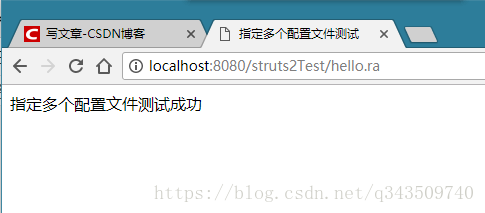
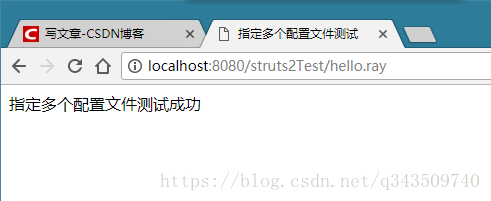
7、 页面效果
7.1 方式一
7.2 方式二
ok!
第六篇——Struts2的后缀的更多相关文章
- Struts2(十六篇)
(一)Struts2框架概述 (二)Struts2配置文件 (三)Struts2的Action(简单讲解版) (四)Struts2的Action(深入讲解版) (五)Struts2处理结果管理 (六) ...
- 六、Struts2的配置文件
六.Struts2的配置文件 1.default.properties:在struts2-core-**.jar的org.apache.struts包中 关于Struts2一些常量配置(框架内部) s ...
- 解剖SQLSERVER 第十六篇 OrcaMDF RawDatabase --MDF文件的瑞士军刀(译)
解剖SQLSERVER 第十六篇 OrcaMDF RawDatabase --MDF文件的瑞士军刀(译) http://improve.dk/orcamdf-rawdatabase-a-swiss-a ...
- 解剖SQLSERVER 第六篇 对OrcaMDF的系统测试里避免regressions(译)
解剖SQLSERVER 第六篇 对OrcaMDF的系统测试里避免regressions (译) http://improve.dk/avoiding-regressions-in-orcamdf-b ...
- Python之路【第十六篇】:Django【基础篇】
Python之路[第十六篇]:Django[基础篇] Python的WEB框架有Django.Tornado.Flask 等多种,Django相较与其他WEB框架其优势为:大而全,框架本身集成了O ...
- 二十六:Struts2 和 spring整合
二十六:Struts2 和 spring整合 将项目名称为day29_02_struts2Spring下的scr目录下的Struts.xml文件拷贝到新项目的scr目录下 在新项目的WebRoot-- ...
- 第六篇 :微信公众平台开发实战Java版之如何自定义微信公众号菜单
我们来了解一下 自定义菜单创建接口: http请求方式:POST(请使用https协议) https://api.weixin.qq.com/cgi-bin/menu/create?access_to ...
- RabbitMQ学习总结 第六篇:Topic类型的exchange
目录 RabbitMQ学习总结 第一篇:理论篇 RabbitMQ学习总结 第二篇:快速入门HelloWorld RabbitMQ学习总结 第三篇:工作队列Work Queue RabbitMQ学习总结 ...
- 第六篇 Replication:合并复制-发布
本篇文章是SQL Server Replication系列的第六篇,详细内容请参考原文. 合并复制,类似于事务复制,包括一个发布服务器,一个分发服务器和一个或多个订阅服务器.每一个发布服务器上可以定义 ...
随机推荐
- 【QT】二进制读取图像文件测试
QDataStream in(&file); int n; in >> n ; file.close(); qDebug() << n<<"en& ...
- 在vue中使用highcharts的仪表图等扩展
仪表图(”solidgauge“)在highcharts中属于扩展,单独引入highcharts使用仪表图会报错,需要在你的组件中做一谢其他的引入: // 最主要是这里模块的引入 很坑 import ...
- My google script which based on Google Sheet and Form
My google script which based on Google Sheet and Form // get sheet data function getSpreadsheetData( ...
- 【CF613D】Kingdom and its Cities 虚树+树形DP
[CF613D]Kingdom and its Cities 题意:给你一棵树,每次询问给出k个关键点,问做多干掉多少个非关键点才能使得所有关键点两两不连通. $n,\sum k\le 10^5$ 题 ...
- Power BI数据网关
前言 你的组织中的用户可以访问本地数据(他们已经具有该数据的访问授权),但在这些用户可以连接到你的本地数据源之前,需要安装和配置本地数据网关. 该网关便于云中的用户与你的本地数据源相互进行快速安全 ...
- python __get__ & __set__
目的: 提供类似java中的getter/setter的东西. (getter/setter的目的: 将属性方法化,使得属性的引用变得简单---尤其将来属性的读取/赋值有比较复杂的逻辑) 官方简明文 ...
- mysql避免数据库误操作小技巧(转)
避免混淆开发环境的DB和生产环境的DB这在小公司小团队尤其常见.一个人即负责开发,又管DB.桌面上开了一坨终端,有的是开发的DB,有的是生产的DB.一不留神,就写串了,或者粘贴串了.更郁闷的是,有时候 ...
- pytorch实现AlexNet网络
直接上图吧 写网络就像搭积木
- sqlserver为不同数据库建立不同访问权限的帐号
正式服务器中,为了安全.互不干扰,会给个DB库分配不同的账号,A库有ARead\AReadWrite\AOwn账号,B库有BRead\BReadWrite\BOwn账号.需要配置出来,甚至还能限制AR ...
- GAN (Generative Adversarial Network)
https://www.bilibili.com/video/av9770302/?p=15 前面说了auto-encoder,VAE可以用于生成 VAE的问题, AE的训练是让输入输出尽可能的接近, ...