
ASP.NET MVC中使用FluentValidation验证实体(转载)
1、FluentValidation介绍
FluentValidation是与ASP.NET DataAnnotataion Attribute验证实体不同的数据验证组件,提供了将实体与验证分离开来的验证方式,同时FluentValidation还提供了表达式链式语法。
2、安装FluentValidation
FluentValidation地址:http://fluentvalidation.codeplex.com/
使用Visual Studio的管理NuGet程序包安装FluentValidation及FluentValidation.Mvc
3、通过ModelState使用FluentValidation验证
项目解决方案结构图:
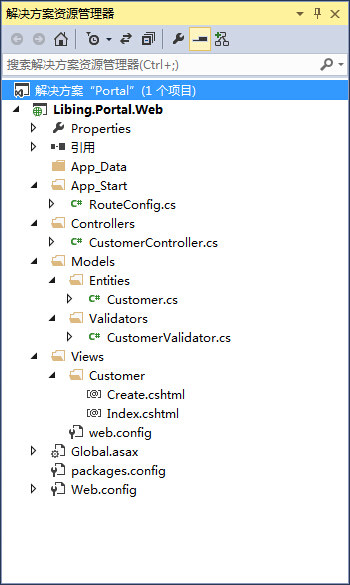
实体类Customer.cs:

using System;

using System.Collections.Generic;

using System.Linq;

using System.Web;

namespace Libing.Portal.Web.Models.Entities

{

    public class Customer

    {

        public int CustomerID { get; set; }

        public string CustomerName { get; set; }

        public string Email { get; set; }

        public string Address { get; set; }

        public string Postcode { get; set; }

        public float? Discount { get; set; }

        public bool HasDiscount { get; set; }

    }

}
数据验证类CustomerValidator.cs:
using System;

using System.Collections.Generic;

using System.Linq;

using System.Web;

using FluentValidation;

using Libing.Portal.Web.Models.Entities;

namespace Libing.Portal.Web.Models.Validators

{

    public class CustomerValidator : AbstractValidator<Customer>

    {

        public CustomerValidator()

        {

            RuleFor(customer => customer.CustomerName).NotNull().WithMessage("客户名称不能为空");

            RuleFor(customer => customer.Email)

                .NotEmpty().WithMessage("邮箱不能为空")

                .EmailAddress().WithMessage("邮箱格式不正确");

            RuleFor(customer => customer.Discount)

                .NotEqual(0)

                .When(customer => customer.HasDiscount);

            RuleFor(customer => customer.Address)

                .NotEmpty()

                .WithMessage("地址不能为空")

                .Length(20, 50)

                .WithMessage("地址长度范围为20-50字节");

        }

    }

}
控制器类CustomerController.cs:
using System;

using System.Collections.Generic;

using System.Linq;

using System.Web;

using System.Web.Mvc;

using FluentValidation.Results;

using Libing.Portal.Web.Models.Entities;

using Libing.Portal.Web.Models.Validators;

namespace Libing.Portal.Web.Controllers

{

    public class CustomerController : Controller

    {

        public ActionResult Index()

        {

            return View();

        }

        public ActionResult Create()

        {

            return View();

        }

        [HttpPost]

        public ActionResult Create(Customer customer)

        {

            CustomerValidator validator = new CustomerValidator();

            ValidationResult result = validator.Validate(customer);

            if (!result.IsValid)

            {

                result.Errors.ToList().ForEach(error =>

                {

                    ModelState.AddModelError(error.PropertyName, error.ErrorMessage);

                });

            }

            if (ModelState.IsValid)

            {

                return RedirectToAction("Index");

            }

            return View(customer);

        }

    }

}
View页面Create.cshtml,该页面为在添加View时选择Create模板自动生成:
@model Libing.Portal.Web.Models.Entities.Customer

@{

    Layout = null;

}

<!DOCTYPE html>

<html>

<head>

    <meta name="viewport" content="width=device-width" />

    <title>Create</title>

</head>

<body>

    @using (Html.BeginForm())

    {

        @Html.AntiForgeryToken()

        <div class="form-horizontal">

            <h4>Customer</h4>

            <hr />

            @Html.ValidationSummary(true)

            <div class="form-group">

                @Html.LabelFor(model => model.CustomerName, new { @class = "control-label col-md-2" })

                <div class="col-md-10">

                    @Html.EditorFor(model => model.CustomerName)

                    @Html.ValidationMessageFor(model => model.CustomerName)

                </div>

            </div>

            <div class="form-group">

                @Html.LabelFor(model => model.Email, new { @class = "control-label col-md-2" })

                <div class="col-md-10">

                    @Html.EditorFor(model => model.Email)

                    @Html.ValidationMessageFor(model => model.Email)

                </div>

            </div>

            <div class="form-group">

                @Html.LabelFor(model => model.Address, new { @class = "control-label col-md-2" })

                <div class="col-md-10">

                    @Html.EditorFor(model => model.Address)

                    @Html.ValidationMessageFor(model => model.Address)

                </div>

            </div>

            <div class="form-group">

                @Html.LabelFor(model => model.Postcode, new { @class = "control-label col-md-2" })

                <div class="col-md-10">

                    @Html.EditorFor(model => model.Postcode)

                    @Html.ValidationMessageFor(model => model.Postcode)

                </div>

            </div>

            <div class="form-group">

                @Html.LabelFor(model => model.Discount, new { @class = "control-label col-md-2" })

                <div class="col-md-10">

                    @Html.EditorFor(model => model.Discount)

                    @Html.ValidationMessageFor(model => model.Discount)

                </div>

            </div>

            <div class="form-group">

                @Html.LabelFor(model => model.HasDiscount, new { @class = "control-label col-md-2" })

                <div class="col-md-10">

                    @Html.EditorFor(model => model.HasDiscount)

                    @Html.ValidationMessageFor(model => model.HasDiscount)

                </div>

            </div>

            <div class="form-group">

                <div class="col-md-offset-2 col-md-10">

                    <input type="submit" value="Create" class="btn btn-default" />

                </div>

            </div>

        </div>

    }

</body>

</html>
运行效果:

4、通过设置实体类Attribute与验证类进行验证
修改实体类Customer.cs:
using System;

using System.Collections.Generic;

using System.Linq;

using System.Web;

using FluentValidation.Attributes;

using Libing.Portal.Web.Models.Validators;

namespace Libing.Portal.Web.Models.Entities

{

    [Validator(typeof(CustomerValidator))]

    public class Customer

    {

        public int CustomerID { get; set; }

        public string CustomerName { get; set; }

        public string Email { get; set; }

        public string Address { get; set; }

        public string Postcode { get; set; }

        public float? Discount { get; set; }

        public bool HasDiscount { get; set; }

    }

}
修改Global.asax.cs:
using System;

using System.Collections.Generic;

using System.Linq;

using System.Web;

using System.Web.Mvc;

using System.Web.Routing;

using FluentValidation.Attributes;

using FluentValidation.Mvc;

namespace Libing.Portal.Web

{

    public class MvcApplication : System.Web.HttpApplication

    {

        protected void Application_Start()

        {

            AreaRegistration.RegisterAllAreas();

            RouteConfig.RegisterRoutes(RouteTable.Routes);

            // FluentValidation设置

            DataAnnotationsModelValidatorProvider.AddImplicitRequiredAttributeForValueTypes = false;

            ModelValidatorProviders.Providers.Add(new FluentValidationModelValidatorProvider(new AttributedValidatorFactory()));

        }

    }

}
ASP.NET MVC中使用FluentValidation验证实体(转载)的更多相关文章
- ASP.NET MVC中使用FluentValidation验证实体
1.FluentValidation介绍 FluentValidation是与ASP.NET DataAnnotataion Attribute验证实体不同的数据验证组件,提供了将实体与验证分离开来的 ...
- ASP.NET MVC中使用窗体验证出现上下文的模型在数据库创建后发生更改,导致调试失败(一)
在ASP.NET MVC中使用窗体验证.(首先要明白,验证逻辑是应该加在Model.View和Controller哪一个里面?由于Model的责任就是负责信息访问与商业逻辑验证的,所以我们把验证逻辑加 ...
- windows server 证书的颁发与IIS证书的使用 Dapper入门使用,代替你的DbSQLhelper Asp.Net MVC中Action跳转(转载)
windows server 证书的颁发与IIS证书的使用 最近工作业务要是用服务器证书验证,在这里记录下一. 1.添加服务器角色 [证书服务] 2.一路下一步直到证书服务安装完成; 3.选择圈选 ...
- C# MVC 用户登录状态判断 【C#】list 去重(转载) js 日期格式转换(转载) C#日期转换(转载) Nullable<System.DateTime>日期格式转换 (转载) Asp.Net MVC中Action跳转(转载)
C# MVC 用户登录状态判断 来源:https://www.cnblogs.com/cherryzhou/p/4978342.html 在Filters文件夹下添加一个类Authenticati ...
- asp.net mvc 中的自定义验证(Custom Validation Attribute)
前言
- asp.net mvc中的后台验证
asp.net mvc的验证包含后台验证和前端验证.后台验证主要通过数据注解的形式实现对model中属性的验证,其验证过程发生在model绑定的过程中.前端验证是通过结合jquery.validate ...
- 再议ASP.NET MVC中CheckBoxList的验证
在ASP.NET MVC 4中谈到CheckBoxList,经常是与CheckBoxList的显示以及验证有关.我在"MVC扩展生成CheckBoxList并水平排列"中通过扩展H ...
- asp.net MVC 中 Session统一验证的方法
验证登录状态的方法有:1 进程外Session 2 方法过滤器(建一个类继承ActionFilterAttribute)然后给需要验证的方法或控制器加特性标签 3 :新建一个BaseContro ...
- Asp.Net MVC中Action跳转(转载)
首先action的跳转大致归类: 1跳转到与当前同一控制器内的action和不同控制器内的action. 2带有参数的action跳转和不带参数的action跳转. 3跳转到指定视图,不经过Contr ...
随机推荐
- xhr是什么文件类型?
xhr:XMLHttpRequest在后台与服务器交换数据,这意味着可以在不加载整个网页的情况下,对网页某部分的内容进行更新. 是Ajax的一种用法,而Ajax并不是一门语言,只是一种不需要加载整个网 ...
- Android MediaPlayer播放项目res/raw和res/assets下的音频文件
1..播放res/raw //方法一:根据音频文件的ID来创建MediaPlayer MediaPlayer mp = new MediaPlayer(this,R.raw.test); mp.sta ...
- 开源中文分词工具探析(七):LTP
LTP是哈工大开源的一套中文语言处理系统,涵盖了基本功能:分词.词性标注.命名实体识别.依存句法分析.语义角色标注.语义依存分析等. [开源中文分词工具探析]系列: 开源中文分词工具探析(一):ICT ...
- Elasticsearch索引mapping的写入、查看与修改(转)
mapping的写入与查看 首先创建一个索引: curl -XPOST "http://127.0.0.1:9200/productindex" {"acknowledg ...
- TensorFlow官网无法访问
相信很多搞深度学习的小伙伴最近都为访问不了 TensorFlow官网 而苦恼吧!虽然网上也给出了一些方法,但是却缺少一个很重要的步骤.接下来,我就给大家讲解一个完整的过程,大牛绕过. 1.更改Host ...
- Asp.Net Newtonsoft.Json使用教程
json序列化和反序列化的使用教程 实体 public class wendaModel { private string _title; private string _cons; public s ...
- XSS测试代码
无script的Xss <img/src=# onerror=alert('XSS')> HTML5 XSS测试代码 <video> <source onerror=” ...
- 搭建hbase1.2.5完全分布式集群
简介 有一段时间,没写博客了,因为公司开发分布式调用链追踪系统,用到hbase,在这里记录一下搭建过程 1.集群如下: ip 主机名 角色 192.168.6.130 node1.jacky.com ...
- 第四百一十五节,python常用排序算法学习
第四百一十五节,python常用排序算法学习 常用排序 名称 复杂度 说明 备注 冒泡排序Bubble Sort O(N*N) 将待排序的元素看作是竖着排列的“气泡”,较小的元素比较轻,从而要往上浮 ...
- 第四百一十四节,python常用算法学习
本节内容 算法定义 时间复杂度 空间复杂度 常用算法实例 1.算法定义 算法(Algorithm)是指解题方案的准确而完整的描述,是一系列解决问题的清晰指令,算法代表着用系统的方法描述解决问题的策略机 ...