
cxf+spring+soap简单接口开发
最近学了cxf框架开发webservice,简单搭了个接口,方便后续翻阅,本人才疏学浅,若有不足,请多多谅解!
一、服务端:
1.所用到的jar包:
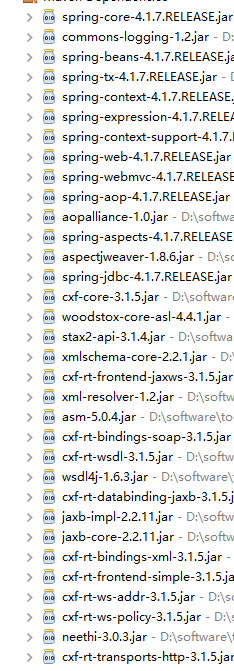
maven的pom.xml配置:
<project xmlns="http://maven.apache.org/POM/4.0.0" xmlns:xsi="http://www.w3.org/2001/XMLSchema-instance"

  xsi:schemaLocation="http://maven.apache.org/POM/4.0.0 http://maven.apache.org/maven-v4_0_0.xsd">

  <modelVersion>4.0.0</modelVersion>

  <groupId>com.CXFWebService</groupId>

  <artifactId>cxf-demo</artifactId>

  <packaging>war</packaging>

  <version>0.0.1-SNAPSHOT</version>

  <name>cxf-demo Maven Webapp</name>

  <url>http://maven.apache.org</url>

  <dependencies>

    <!-- 添加 Spring dependency -->

    <dependency>

        <groupId>org.springframework</groupId>

        <artifactId>spring-core</artifactId>

        <version>4.1.7.RELEASE</version>

    </dependency>

    <dependency>

        <groupId>org.springframework</groupId>

        <artifactId>spring-beans</artifactId>

        <version>4.1.7.RELEASE</version>

    </dependency>

    <dependency>

         <groupId>org.springframework</groupId>

         <artifactId>spring-tx</artifactId>

         <version>4.1.7.RELEASE</version>

        </dependency>

    <dependency>

        <groupId>org.springframework</groupId>

        <artifactId>spring-context</artifactId>

        <version>4.1.7.RELEASE</version>

    </dependency>

    <dependency>

        <groupId>org.springframework</groupId>

        <artifactId>spring-context-support</artifactId>

        <version>4.1.7.RELEASE</version>

    </dependency>

    <dependency>

        <groupId>org.springframework</groupId>

        <artifactId>spring-web</artifactId>

        <version>4.1.7.RELEASE</version>

    </dependency>

    <dependency>

        <groupId>org.springframework</groupId>

        <artifactId>spring-webmvc</artifactId>

        <version>4.1.7.RELEASE</version>

    </dependency>

    <dependency>

        <groupId>org.springframework</groupId>

        <artifactId>spring-aop</artifactId>

        <version>4.1.7.RELEASE</version>

    </dependency>

    <dependency>

        <groupId>org.springframework</groupId>

        <artifactId>spring-aspects</artifactId>

        <version>4.1.7.RELEASE</version>

    </dependency>

    <dependency>

        <groupId>org.springframework</groupId>

        <artifactId>spring-jdbc</artifactId>

        <version>4.1.7.RELEASE</version>

    </dependency>

    <!-- 添加CXF dependency  -->

    <dependency>

        <groupId>org.apache.cxf</groupId>

        <artifactId>cxf-core</artifactId>

        <version>3.1.5</version>

    </dependency>

    <dependency>

        <groupId>org.apache.cxf</groupId>

        <artifactId>cxf-rt-frontend-jaxws</artifactId>

        <version>3.1.5</version>

    </dependency>

    <dependency>

        <groupId>org.apache.cxf</groupId>

        <artifactId>cxf-rt-transports-http</artifactId>

        <version>3.1.5</version>

    </dependency>

  </dependencies>

  <build>

    <finalName>cxf-demo</finalName>

  </build>

</project>
2.配置web.xml:
<?xml version="1.0" encoding="UTF-8"?>

<web-app xmlns:xsi="http://www.w3.org/2001/XMLSchema-instance"

    xmlns="http://java.sun.com/xml/ns/javaee" xmlns:web="http://java.sun.com/xml/ns/javaee"

    xsi:schemaLocation="http://java.sun.com/xml/ns/javaee http://java.sun.com/xml/ns/javaee/web-app_2_5.xsd"

    version="2.5">

    <display-name>cxf-demo</display-name>

    <!-- Spring config-->

    <context-param>

        <param-name>contextConfigLocation</param-name>

        <param-value>classpath*:applicationContext*.xml</param-value>

    </context-param>

    <!-- Spring listener -->

    <listener>

        <listener-class>org.springframework.web.context.ContextLoaderListener</listener-class>

    </listener>

    <!-- Add on a servlet to handle web service request -->

    <servlet>

         <servlet-name>CXFServlet</servlet-name>

         <servlet-class>org.apache.cxf.transport.servlet.CXFServlet</servlet-class>

    </servlet>

    <servlet-mapping>

       <servlet-name>CXFServlet</servlet-name>

       <url-pattern>/webservice/*</url-pattern>

    </servlet-mapping>

</web-app>
3.配置applicationContext.xml
<?xml version="1.0" encoding="UTF-8"?>

<beans xmlns="http://www.springframework.org/schema/beans"

    xmlns:mvc="http://www.springframework.org/schema/mvc" xmlns:context="http://www.springframework.org/schema/context"

    xmlns:tx="http://www.springframework.org/schema/tx" xmlns:xsi="http://www.w3.org/2001/XMLSchema-instance"

    xmlns:cache="http://www.springframework.org/schema/cache" xmlns:p="http://www.springframework.org/schema/p"

    xmlns:jaxws="http://cxf.apache.org/jaxws"

    xsi:schemaLocation="

    http://www.springframework.org/schema/mvc

    http://www.springframework.org/schema/mvc/spring-mvc-3.2.xsd

    http://www.springframework.org/schema/beans

    http://www.springframework.org/schema/beans/spring-beans-3.2.xsd

    http://www.springframework.org/schema/context

    http://www.springframework.org/schema/context/spring-context-3.2.xsd

    http://www.springframework.org/schema/tx

    http://www.springframework.org/schema/tx/spring-tx-3.2.xsd

    http://www.springframework.org/schema/cache

    http://www.springframework.org/schema/cache/spring-cache-3.1.xsd

    http://cxf.apache.org/jaxws

    http://cxf.apache.org/schemas/jaxws.xsd">

    <import resource="classpath:META-INF/cxf/cxf.xml" />

    <import resource="classpath:META-INF/cxf/cxf-servlet.xml" />

    <bean id="helloWordServiceImpl" class="com.webservice.HelloWordServiceImpl"></bean>

    <jaxws:endpoint id="helloWordWebService" implementor="#helloWordServiceImpl" address="/helloWordWebService"></jaxws:endpoint>

</beans>
4.建一个service:HelloWordService
package com.webservice;

import javax.jws.WebService;

@WebService

public interface HelloWordService {

    public String sayHello(String name);

}
以及他的实现类:
package com.webservice;

import javax.jws.WebService;

import org.springframework.stereotype.Component;

@Component("helloWorld")

@WebService

public class HelloWordServiceImpl implements HelloWordService {

    public String sayHello(String name) {

        return "Hello Word,"+name;

    }

}
服务端就已经开发完毕,部署tomcat,访问:http://localhost:8080/cxf-demo/webService/helloWordService?wsdl,地址根据自己配置的为准,如果可以访问,就说明成功。
二、客户端
建立客户端
JaxWsDynamicClientFactory dcf = JaxWsDynamicClientFactory.newInstance();

        org.apache.cxf.endpoint.Client client = dcf.createClient("xxxx?wsdl");

        Object[] objects;

        try {

            objects = client.invoke("方法名", "请求内容");

            System.out.println(objects[0].toString());

        } catch (Exception e) {

            e.printStackTrace();

        }
cxf+spring+soap简单接口开发的更多相关文章
- cxf+spring+restful简单接口搭建
之前都是用soap协议搭建,最近学了下restful,以便日后翻阅,小生才疏学浅,不足之处请多见谅. 1.maven配置 <project xmlns="http://maven.ap ...
- 通过CXF,开发soap协议接口
1. 引入cxf的jar包 pom文件里面直接增加依赖 < dependency> <groupId > junit</ groupId> <artifact ...
- 在线支付接口之PHP支付宝接口开发简单介绍
php100:92:在线支付接口之PHP支付宝接口开发 支付接口一般是第三方提供的代收款.付款的平台,可以通过支付接口帮助企业或个人利用一切可以使用的支付方式.常见支付平台:支付宝.快钱.云网支付.财 ...
- Java开发笔记(五十八)简单接口及其实现
前面介绍了抽象方法及抽象类的用法,看似解决了不确定行为的方法定义,既然叫唤动作允许声明为抽象方法,那么飞翔.游泳也能声明为抽象方法,并且鸡类涵盖的物种不够多,最好把这些行为动作扩展到鸟类这个群体,于是 ...
- 阶段5 3.微服务项目【学成在线】_day16 Spring Security Oauth2_20-认证接口开发-接口测试
测试接口 因为继承了spring security会拦截这个请求,我们需要写代码 让他对这个认证接口放行 查看代码发现之前已经写过放行的代码了 发现是路径前面少了auth 加断点,测试.申请令牌 r ...
- python——flask常见接口开发(简单案例)
python——flask常见接口开发(简单案例)原创 大蛇王 发布于2019-01-24 11:34:06 阅读数 5208 收藏展开 版本:python3.5+ 模块:flask 目标:开发一个只 ...
- 使用Flask开发简单接口(1)--GET请求接口
前言 很多想学习接口测试的同学,可能在最开始的时候,常常会因没有可以练习的项目而苦恼,毕竟网上可以练习的接口项目不多,有些可能太简单了,有些可能又太复杂了,或者是网上一些免费接口请求次数有限制,最终导 ...
- 阶段5 3.微服务项目【学成在线】_day16 Spring Security Oauth2_14-认证接口开发-需求分析
4 认证接口开发 4.1 需求分析 用户登录的流程图如下: 执行流程: 1.用户登录,请求认证服务 2.认证服务认证通过,生成jwt令牌,将jwt令牌及相关信息写入Redis,并且将身份令牌写入coo ...
- 转:spring中InitailizingBean接口的简单理解
转自:https://www.cnblogs.com/wxgblogs/p/6849782.html spring中InitializingBean接口使用理解 InitializingBean接 ...
随机推荐
- Linux下安装Julia1.0.0
MIT正式发布编程语言Julia 1.0:Python.R.C++三合一! 由于官方文档提示中安装的不是最新的Julia版本,官方的0.7版本安装方法为: ...
- [Leetcode 15]三数之和 3 Sum
[题目] Given an array nums of n integers, are there elements a, b, c in nums such that a + b + c = 0? ...
- intelij idea常用功能介绍
1.查看本地文件修改记录 保存本地修改记录: 可以将system下的LocalHistory保存,到另一个目录,需要的时候保存即可. 2.debbuger查看代码 1)优化设置 2)常用 3.条件断点 ...
- 数据库行转列、列转行,pivot透视多列
这就是典型的行转列问题. 首先说下最简单的思路 用union all select year,sum(m1) m1,sum(m2) m2,sum(m3) m3,sum(m4) m4 from ( s ...
- 邮件远控电脑MCC-python实现
本次实现的是一个通过邮件来远程控制电脑,以达到某些远程操作,例如让电脑执行CMD命令,播放音乐,打开指定文件等操作的项目.代码参考了网上的部分教程. 具体流程: 在python代码中,通过一个循环来接 ...
- 剑指Offer 5. 用两个栈实现队列 (栈)
题目描述 用两个栈来实现一个队列,完成队列的Push和Pop操作. 队列中的元素为int类型. 题目地址 https://www.nowcoder.com/practice/54275ddae22f4 ...
- Hbuilder护眼主题分享
sublime还有webstorm有很多主题,但是Hbuilder就相对较少,或者直接说基本没什么主题,在网上搜索了很久也很少有Hbuilder的主题分享,于是就自己取色调了一个仿的护眼主题来分享一下 ...
- jQuery-3.事件篇---表单事件
jQuery表单事件之blur与focus事件 在之前2.8与2.9节我们学过了表单处理事件focusin事件与focusout事件,同样用于处理表单焦点的事件还有blur与focus事件 它们之间的 ...
- 编写 python 小程序,将LOL官网的皮肤保存下来,上传百度云,记录那些强撸灰飞烟灭的日子
to 撸的血泪史:大学四年几乎都在宿舍打撸,So,把官网的皮肤都保存下来,存到百度云,就当一种纪念 编辑器:pycharm 用到的包:urllib.request, requests, json, r ...
- alpha冲刺(2/10)
前言 队名:旅法师 作业链接 队长博客 燃尽图 会议 会议照片 会议内容 陈晓彬(组长) 今日进展: 召开会议 安排任务 博客撰写 构建之法的阅读 问题困扰: 分配任务,还是不熟练,对后台不熟悉,不知 ...