
SpringMVC使用Swagger
Swagger 是一个规范和完整的框架,用于生成、描述、调用和可视化 RESTful 风格的 Web 服务。总体目标是使客户端和文件系统作为服务器以同样的速度来更新。文件的方法,参数和模型紧密集成到服务器端的代码,允许API来始终保持同步。
我们这里使用SpringBoot来快速搭建一个MVC,同时使用Swagger插件。
pom.xml,主要是引用swagger2
<parent>

    <groupId>org.springframework.boot</groupId>

    <artifactId>spring-boot-starter-parent</artifactId>

    <version>2.0.6.RELEASE</version>

    <relativePath />

</parent>

<properties>

    <project.build.sourceEncoding>UTF-8</project.build.sourceEncoding>

    <project.reporting.outputEncoding>UTF-8</project.reporting.outputEncoding>

    <java.version>1.8</java.version>

</properties>

<dependencies>

    <dependency>

        <groupId>org.springframework.boot</groupId>

        <artifactId>spring-boot-starter-web</artifactId>

        <exclusions>

            <exclusion>

                <groupId>org.springframework.boot</groupId>

                <artifactId>spring-boot-starter-logging</artifactId>

            </exclusion>

        </exclusions>

    </dependency>

    <dependency>

        <groupId>org.springframework.boot</groupId>

        <artifactId>spring-boot-starter-test</artifactId>

        <scope>test</scope>

    </dependency>

    <dependency>

        <groupId>io.springfox</groupId>

        <artifactId>springfox-swagger2</artifactId>

        <version>2.6.1</version>

    </dependency>

    <dependency>

        <groupId>io.springfox</groupId>

        <artifactId>springfox-swagger-ui</artifactId>

        <version>2.6.1</version>

    </dependency>

</dependencies>

<build>

    <plugins>

        <plugin>

            <groupId>org.springframework.boot</groupId>

            <artifactId>spring-boot-maven-plugin</artifactId>

        </plugin>

    </plugins>

</build>
Swagger2配置类
package cn.duanjt.config;

import org.springframework.context.annotation.Bean;

import org.springframework.context.annotation.Configuration;

import springfox.documentation.builders.ApiInfoBuilder;

import springfox.documentation.builders.PathSelectors;

import springfox.documentation.builders.RequestHandlerSelectors;

import springfox.documentation.service.ApiInfo;

import springfox.documentation.spi.DocumentationType;

import springfox.documentation.spring.web.plugins.Docket;

import springfox.documentation.swagger2.annotations.EnableSwagger2;

@Configuration

@EnableSwagger2

public class Swagger2 {

    /**

     * 创建API应用

     * apiInfo() 增加API相关信息

     * 通过select()函数返回一个ApiSelectorBuilder实例,用来控制哪些接口暴露给Swagger来展现,

     * 本例采用指定扫描的包路径来定义指定要建立API的目录。

     *

     * @return

     */

    @Bean

    public Docket createRestApi() {

        return new Docket(DocumentationType.SWAGGER_2)

                .apiInfo(apiInfo())

                .select()

                .apis(RequestHandlerSelectors.basePackage("cn.duanjt.controller"))//指定要扫描的包名

                .paths(PathSelectors.any())

                .build();

    }

    /**

     * 创建该API的基本信息(这些基本信息会展现在文档页面中)

     * 访问地址:http://项目实际地址/swagger-ui.html

     * @return

     */

    private ApiInfo apiInfo() {

        return new ApiInfoBuilder()

                .title("Spring Boot中使用Swagger2构建RESTful APIs")

                .description("更多请关注http://www.baidu.com")

                .termsOfServiceUrl("http://www.baidu.com")

                .contact("段江涛")

                .version("1.0")

                .build();

    }

}
控制器StudentController
package cn.duanjt.controller;

import org.springframework.web.bind.annotation.RequestMapping;

import org.springframework.web.bind.annotation.RequestMethod;

import org.springframework.web.bind.annotation.RestController;

import cn.duanjt.pojo.Student;

import io.swagger.annotations.Api;

import io.swagger.annotations.ApiImplicitParam;

import io.swagger.annotations.ApiOperation;

@RestController

@RequestMapping("/student")

@Api(description = "学生信息")

public class StudentController {

    @RequestMapping(path = "/getAll", method = RequestMethod.GET)

    @ApiOperation(value = "获取所有用户信息", notes = "备注:获取所有用户信息")

    public Student getAll() {

        Student stu = new Student(1, "zhangsan", 20);

        return stu;

    }

    @RequestMapping(path = "/getById", method = RequestMethod.GET)

    @ApiOperation(value = "根据Id查询用户信息", notes = "备注:根据Id查询用户信息")

    @ApiImplicitParam(paramType = "query", name = "id", value = "用户id", required = true, dataType = "Integer")

    public Student getById(int id) {

        Student stu = new Student(id, "zhangsan", 20);

        return stu;

    }

    @RequestMapping(path = "/insert", method = RequestMethod.POST)

    @ApiOperation(value = "新增用户信息", notes = "备注:新增用户信息")

    public String insert(Student student){

        System.out.println(student.toString());

        return "成功";

    }

}
说明:
1.需要在配置类Swagger2中指定需要扫描的包名
2.@Api标记在类上面,用于表示该类需要被Swagger扫描
3.@ApiOperation标记方法
4.@ApiImplicitParam标记方法,描述参数信息
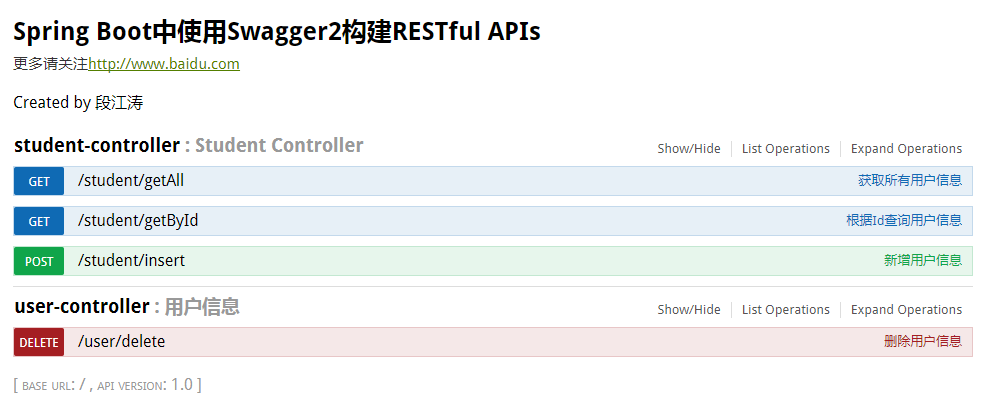
运行之后,在浏览器输入:http://localhost:8080/swagger-ui.html
原文参考:https://blog.csdn.net/sanyaoxu_2/article/details/80555328
SpringMVC使用Swagger的更多相关文章
- 一步步完成Maven+SpringMVC+SpringFox+Swagger整合示例
本文给出一个整合Maven+SpringMVC+SpringFOX+Swagger的示例,并且一步步给出完成步骤. 本人在做实例时发现 http://blog.csdn.net/zth1002/art ...
- spring-mvc集成 swagger
问题1:spring-mvc集成 swagger, 配置好后界面 404, 原因: dispatcher-servlet.xml 文件中, 要在这上面 <!-- 启用spring mvc 注解 ...
- SpringMVC集成Swagger插件以及Swagger注解的简单使用
一.简介 Swagger 是一个规范和完整的框架,用于生成.描述.调用和可视化 RESTful 风格的 Web 服务.总体目标是使客户端和文件系统作为服务器以同样的速度来更新 .接口的方法,参数和模型 ...
- springMVC整合swagger(亲自试验完全可用)
swagger是什么: [plain] view plain copy Swagger 是一款RESTFUL接口的文档在线自动生成+功能测试功能软件.本文简单介绍了在项目中集成swagger的方法和一 ...
- SpringMVC+JWT+Swagger UI+RestFul
前言: 其实很早就想写这篇文章了,因为我觉得这会对很多新手有指引作用,当初自己也是瞎子过河的摸索着过来的.目前后台开发比较流行的MVC框架中使用Spring MVC还是比较多的,当然还有Spring ...
- springmvc整合swagger
前言 Swagger 是一个规范和完整的框架,用于生成.描述.调用和可视化 RESTful 风格的 Web 服务.总体目标是使客户端和文件系统作为服务器以同样的速度来更新.文件的方法,参数和模型紧密集 ...
- Maven+SpringMVC+SpringFox+Swagger整合示例
查考链接:https://my.oschina.net/wangmengjun/blog/907679 coding地址:https://git.coding.net/conding_hjy/Spri ...
- SpringMVC融合Swagger UI使用
相信大家都很熟悉springmvc,在用其进行开发工作的时候,有没有遇到几个小问题?比如: 1.前后端分离的模式下,前端开发人员如何得知后端的开发进度,有哪些接口可用? 2.后端开发人员在测试自己的接 ...
- springmvc使用swagger生成rest api文档
pom.xml <dependency> <groupId>io.springfox</groupId> <artifactId>springfox-s ...
随机推荐
- Gym 101194E / UVALive 7901 - Ice Cream Tower - [数学+long double][2016 EC-Final Problem E]
题目链接: http://codeforces.com/gym/101194/attachments https://icpcarchive.ecs.baylor.edu/index.php?opti ...
- Cesium 实践
详细内容请参考教程:https://www.jianshu.com/p/31c3b55a21eb 该教程翻译自官方英文教程,对入门cesium 帮助很大. 2,Cesium项目实例 实践: 问题 ...
- Java之事务的基本应用
基本介绍 事务是数据一致性最基本的保证,也就是说一个事务中的操作要么都成功,要么都失败,不允许部分成功.我们常说的事务就是jdbc事务,当然Java中还有其他事务,并且在使用jdbc事务有很多注意点, ...
- .net core 获取不到session 和cookies的值
在启动类的configure services()方法中,设置选项.checkconsent必需=context=false;如下: services.Configure<CookiePolic ...
- Python3学习之路~5.9 xml处理模块
xml是实现不同语言或程序之间进行数据交换的协议,跟json差不多,但json使用起来更简单,不过,以前在json还没诞生的时候,大家只能选择用xml,至今很多传统公司如金融行业的很多系统的接口还主要 ...
- SybaseIQ上SQL基本使用
锁定: sp_iqlocks 踢人: 存储过程查找: sybase central里面查询的命令(查找过滤器例如:%table%),Sybase Central/Sybase IQ 15/服务器/xx ...
- python基础之 列表,元组,字典
other help(str.strip) #查看是否有返回值以及返回值类型[] :称为索引操作符 1.列表 列表相比字符串来说能存储大量数据的python的基本数据类型,并且也拥有字符串的一些方法( ...
- (转)Golang--使用iota(常量计数器)
iota是golang语言的常量计数器,只能在常量的表达式中使用. iota在const关键字出现时将被重置为0(const内部的第一行之前),const中每新增一行常量声明将使iota计数一次(io ...
- linux系统644、755、777权限详解
在linux系统中644.755.777三种权限是非常重要的一些权限了,下面我来详细的介绍644.755.777三种权限的使用,希望对各位有帮助. 常用的linux文件权限:444 r--r--r-- ...
- node (02 CommonJs 和 Nodejs 中自定义模块)顺便讲讲module.exports和exports的区别 dependencies 与 devDependencies 之间的区别
CommonJS 规范的提出,主要是为了弥补当前 JavaScript 没有标准的缺陷.它的终极目标就是:提供一个类似 Python,Ruby 和 Java 语言的标准库,而不只是停留在小脚本程序的阶 ...