
django实战模拟博客系统
数据库代码块
 from django.db import models
 from django.utils import timezone
 from django.contrib.auth.models import User

 # Create your models here.
 class BlogArticles(models.Model):
     title = models.CharField(max_length=30)
     author = models.ForeignKey(User,related_name="blog_posts")
     body = models.TextField()
     publish = models.DateTimeField(default=timezone.now)

     class Meta:
         ordering = ("-publish",)

     def __str__(self):
         return self.title
显示文章标题代码块
 from django.shortcuts import render
 from .models import BlogArticles

 def blog_title(request):
     blogs = BlogArticles.objects.all()
     return render(request,'blog/titles.html',{"blogs":blogs})
公共模板base.html
 {% load staticfiles %}
 <!DOCTYPE html>
 <html lang="en">
 <head>
     <meta charset="UTF-8">
     <title>{% block title %}{% endblock %}</title>
     <link rel="stylesheet" href="/static/bootstrap-3.3.7-dist/css/bootstrap.min.css">
 </head>
 <body>
 <div class="container">
     {% block content %}
     {% endblock %}
 </div>
 <script src="/static/jquery.min.js"></script>
 <script src="/static/bootstrap-3.3.7-dist/js/bootstrap.min.js"></script>
 </body>
 </html>
显示文章标题
unblog的url中
url(r'^blog/', include('blog.urls')),
blog的url中
url(r'^blog_title/', views.blog_title),
视图函数
 from .models import BlogArticles

 def blog_title(request):
     blogs = BlogArticles.objects.all()
     return render(request,'blog/titles.html',{"blogs":blogs})
titles。html
 {% extends "base.html" %}

 {% block title %}blog titles{% endblock %}

 {% block content %}
     <div class="row text-center vertical-middle-sm" ><h1>我的博客</h1></div>
     <div class="row">
     <div>
         <ul>
             {% for blog in blogs %}
                 <li><a href="#">{{ blog.title }}</a></li>
             {% endfor %}
         </ul>
     </div>
     </div>
 {% endblock %}
显示结果

查看文章内容
映射关系
    url(r'^blog_title/$', views.blog_title),
    url(r'^blog_title/(?P<nid>\d)/$', views.blog_article),
前端中的title,html更改项目
            {% for blog in blogs %}
                <li><a href="{{ blog.id }}">{{ blog.id }}>>>{{ blog.title }}</a></li>
            {% endfor %}
函数部分
 def blog_article(request,nid):
     # article=BlogArticles.objects.get(id=nid)
     article= get_object_or_404(BlogArticles,id=nid)
     pub = article.publish
     return render(request,'blog/content.html', {"article":article,"pub":pub})
content.html前端代码
{% extends "base.html" %}
{% block title %}blog articel{% endblock %}
{% block content %}
    <div class="row text-center vertical-middle-sm"><h1>{{ article.title }}</h1></div>
    <div class="row">
        <div>
            <P class="text-center">
                <span>{{ article.author.username }}</span>
                <span>{{ pub }}</span>
            </P>
        </div>
        <div>{{ article.body }}</div>
    </div>
{% endblock %}
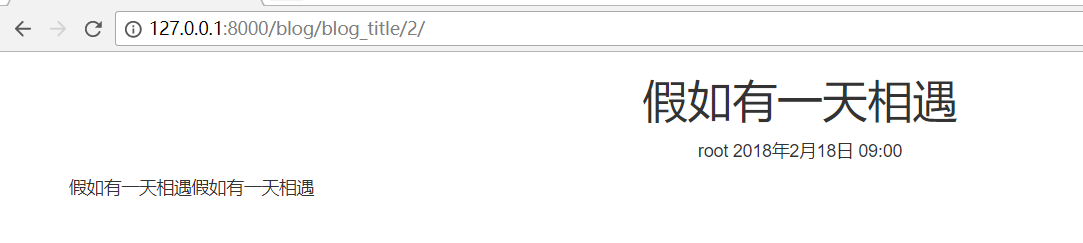
最后结果
url代码
url(r'^register/$', views.user_register, name='user_register'),
注册的视图函数
def user_register(request):
    if request.method == 'GET':
        user_form = RegistrationForm()
        return render(request, 'account/register.html', {"form": user_form})
    if request.method == 'POST':
        user_form = RegistrationForm(request.POST)
        print(">>>",request.POST)
        if user_form.is_valid():
            new_user = user_form.save(commit=False)
            ',new_user)
            new_user.set_password(user_form.cleaned_data['password'])
            ',new_user)
            new_user.save()
            return HttpResponse('注册成功')
        else:
            return HttpResponse('注册失败')
    else:
        user_form = RegistrationForm()
        return render(request, 'account/register.html', {"form": user_form})
html验证的代码
注册时的代码html的代码
 {% extends "base.html" %}
 {% load staticfiles %}
 {% block title %}用户注册{% endblock %}

 {% block content %}
     <div class="row text-center vertical-middles-sm">
         <h1>登陆注册页面</h1>
         <p>如果账户已存在请<strong><a href="{% url 'account:user_login' %}">登陆</a></strong></p>
         <p>或者,请注册</p>
         <form class="form-horizontal" action="." method="post">{% csrf_token %}
             <div class="form-group">
                 <label for="{{ from.username.id_for_lable }}" class="col-md-5 control-label">Username</label>
                 <div class="col-md-6 text-left">{{ form.username }}</div>
             </div>
             <div class="form-group">
                 <label for="{{ from.email.id_for_lable }}" class="col-md-5 control-label">Email</label>
                 <div class="col-md-6 text-left">{{ form.email }}</div>
             </div>
             <div class="form-group">
                 <label for="{{ from.password.id_for_lable }}" class="col-md-5 control-label">Password</label>
                 <div class="col-md-6 text-left">{{ form.password }}</div>
             </div>
             <div class="form-group">
                 <label for="{{ from.password.id_for_lable }}" class="col-md-5 control-label">Confirm Password</label>
                 <div class="col-md-6 text-left">{{ form.password2 }}</div>
             </div>
             <input type="submit" class="btn btn-lg btn-primary" value="注册">
         </form>
     </div>
 {% endblock %}
未完待续
django实战模拟博客系统的更多相关文章
- Django:(博客系统)使用使用mysql数据->后台管理tag/post/category的配置
Django后台一般是不需要人为的去开发的,因为django已经通过配置实现哪些模块是后台需要管理,如何排序,列表展示哪些列,列显示名称,是否为空(默认值),过滤条件,分页页数,列表中哪些项可编辑等等 ...
- Django快速搭建博客系统
Django快速搭建博客系统 一.开发环境 Windows 7(64bit) python 3.6 https://www.python.org/ Django 2.0 https://www. ...
- 【完全开源】Django多人博客系统——支持MarkDown和tinyMce
目录 说明 功能 如何使用 说明 这是一个用Django开发的多人博客系统,功能简单,但完全满足公司内部或个人的博客使用需求.支持普通富文本编辑器(tinyMCE)和MarkDown编辑器 由于嫌弃D ...
- Django:(博客系统)使用使用mysql数据&创建post/category/tag实体,并同步到数据中
背景: 之前也读过一些关于django的一些书,看过别人写的一些博客系统.但是总有一种看别人的都会,但自己写不出来的感觉,于是为了加深对django的学习就开始动手学习了. 环境搭建: 环境:使用py ...
- Django实现的博客系统中使用富文本编辑器ckeditor
操作系统为OS X 10.9.2,Django为1.6.5. 1.下载和安装 1.1 安装 ckeditor 下载地址 https://github.com/shaunsephton/django-c ...
- 动手实践记录(利用django创建一个博客系统)
1.添加一个分类的标签,和主表的关系是 外键 class Category(models.Model): """ 分类 """ name = ...
- 用Python和Django实现多用户博客系统(二)——UUBlog
这次又更新了一大部分功能,这次以app的形式来开发. 增加博客分类功能:博客关注.推荐功能(ajax实现) 增加二级频道功能 更多功能看截图及源码,现在还不完善,大家先将就着看.如果大家有哪些功能觉的 ...
- 用Python和Django实现多用户博客系统——UUBlog
又过了一周,把代码整个的优化和完善了一下,也把TBlog更名为UUBlog.这次基本是把上次的整个更新了一下具体的功能大家可以下载后自己看看说一下主要的变化增加了频道表.博客表. 功能方面主要有增加频 ...
- Django:(博客系统)添加文章(中文)出现UnicodeEncodeError乱码
添加文章时出现了一个UnicodeEncodeError乱码问题 在添加文章时,抛出了异常: 解决方案,修改manage.py(添加import sys reload(sys) sys.setdefa ...
随机推荐
- [转] 设置div的overflow:scroll,但是在手机上滑动的时候有点卡顿
设置div的overflow:scroll,但是在手机上滑动的时候有点卡顿,所以在这个div上加一个css: -webkit-overflow-scrolling : touch; 在苹果手机上使用- ...
- 前端:Jquery 处理同一Name的Radio组时,绑定checked属性异常的问题.(已解决)
将: $("input[type=radio][name=optionsContractGroup][value=201]").attr("checked",t ...
- [WC2014]紫荆花之恋
题解: 首先考虑点分治 dis(i,u)+dis(i,v)<=value[u]+value[v] 移项就很容易发现用平衡树可以很简单的维护这个东西 但是有重复,需要在下一层的每个平衡树内减去这个 ...
- python排列组合之itertools模块
1. 参考 几个有用的python函数 (笛卡尔积, 排列, 组合) 9.7. itertools — Functions creating iterators for efficient loopi ...
- ubuntu ibus pinyin输入法异常
http://blog.csdn.net/granvillegao/article/details/41115211 命令行运行 ibus-setup 在常规页面,取消了“在应用程序窗口中启用内嵌编辑 ...
- 【AtCoder】AGC014
AGC014 链接 A - Cookie Exchanges 发现两个数之间的差会逐渐缩小,所以只要不是三个数都相同,那么log次左右一定会得到答案 #include <bits/stdc++. ...
- mysql数据库授权
mysql数据库授权所有人 grant all privileges on *.* to 'root'@'%' identified by 'password'; flush privileges; ...
- ubuntu中git
1.在ubuntu中安装git $ sudo apt-get install git git-core 2.配置本机的git $ git config --global user.name " ...
- 在mybatis中调用存储过程的时候,不能加工语句
select count(0) from ({call pkg_business.P_ZZS_LYFPHJSKJQK ('2018-04')}) 这是错误的.
- Petya and Array CodeForces - 1042D (树状数组)
D. Petya and Array time limit per test 2 seconds memory limit per test 256 megabytes input standard ...