
django实战模拟博客系统
数据库代码块
 from django.db import models
 from django.utils import timezone
 from django.contrib.auth.models import User

 # Create your models here.
 class BlogArticles(models.Model):
     title = models.CharField(max_length=30)
     author = models.ForeignKey(User,related_name="blog_posts")
     body = models.TextField()
     publish = models.DateTimeField(default=timezone.now)

     class Meta:
         ordering = ("-publish",)

     def __str__(self):
         return self.title
显示文章标题代码块
 from django.shortcuts import render
 from .models import BlogArticles

 def blog_title(request):
     blogs = BlogArticles.objects.all()
     return render(request,'blog/titles.html',{"blogs":blogs})
公共模板base.html
 {% load staticfiles %}
 <!DOCTYPE html>
 <html lang="en">
 <head>
     <meta charset="UTF-8">
     <title>{% block title %}{% endblock %}</title>
     <link rel="stylesheet" href="/static/bootstrap-3.3.7-dist/css/bootstrap.min.css">
 </head>
 <body>
 <div class="container">
     {% block content %}
     {% endblock %}
 </div>
 <script src="/static/jquery.min.js"></script>
 <script src="/static/bootstrap-3.3.7-dist/js/bootstrap.min.js"></script>
 </body>
 </html>
显示文章标题
unblog的url中
url(r'^blog/', include('blog.urls')),
blog的url中
url(r'^blog_title/', views.blog_title),
视图函数
 from .models import BlogArticles

 def blog_title(request):
     blogs = BlogArticles.objects.all()
     return render(request,'blog/titles.html',{"blogs":blogs})
titles。html
 {% extends "base.html" %}

 {% block title %}blog titles{% endblock %}

 {% block content %}
     <div class="row text-center vertical-middle-sm" ><h1>我的博客</h1></div>
     <div class="row">
     <div>
         <ul>
             {% for blog in blogs %}
                 <li><a href="#">{{ blog.title }}</a></li>
             {% endfor %}
         </ul>
     </div>
     </div>
 {% endblock %}
显示结果

查看文章内容
映射关系
    url(r'^blog_title/$', views.blog_title),
    url(r'^blog_title/(?P<nid>\d)/$', views.blog_article),
前端中的title,html更改项目
            {% for blog in blogs %}
                <li><a href="{{ blog.id }}">{{ blog.id }}>>>{{ blog.title }}</a></li>
            {% endfor %}
函数部分
 def blog_article(request,nid):
     # article=BlogArticles.objects.get(id=nid)
     article= get_object_or_404(BlogArticles,id=nid)
     pub = article.publish
     return render(request,'blog/content.html', {"article":article,"pub":pub})
content.html前端代码
{% extends "base.html" %}
{% block title %}blog articel{% endblock %}
{% block content %}
    <div class="row text-center vertical-middle-sm"><h1>{{ article.title }}</h1></div>
    <div class="row">
        <div>
            <P class="text-center">
                <span>{{ article.author.username }}</span>
                <span>{{ pub }}</span>
            </P>
        </div>
        <div>{{ article.body }}</div>
    </div>
{% endblock %}
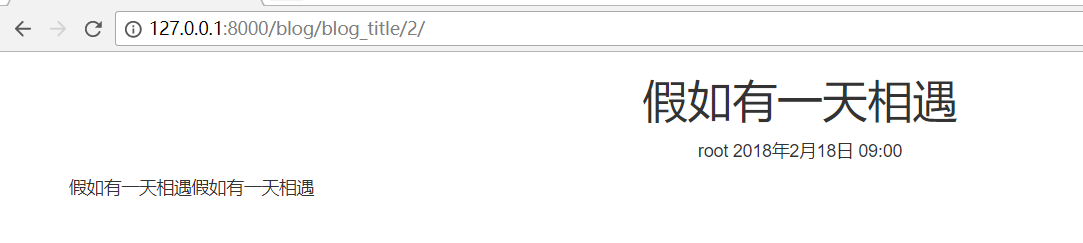
最后结果
url代码
url(r'^register/$', views.user_register, name='user_register'),
注册的视图函数
def user_register(request):
    if request.method == 'GET':
        user_form = RegistrationForm()
        return render(request, 'account/register.html', {"form": user_form})
    if request.method == 'POST':
        user_form = RegistrationForm(request.POST)
        print(">>>",request.POST)
        if user_form.is_valid():
            new_user = user_form.save(commit=False)
            ',new_user)
            new_user.set_password(user_form.cleaned_data['password'])
            ',new_user)
            new_user.save()
            return HttpResponse('注册成功')
        else:
            return HttpResponse('注册失败')
    else:
        user_form = RegistrationForm()
        return render(request, 'account/register.html', {"form": user_form})
html验证的代码
注册时的代码html的代码
 {% extends "base.html" %}
 {% load staticfiles %}
 {% block title %}用户注册{% endblock %}

 {% block content %}
     <div class="row text-center vertical-middles-sm">
         <h1>登陆注册页面</h1>
         <p>如果账户已存在请<strong><a href="{% url 'account:user_login' %}">登陆</a></strong></p>
         <p>或者,请注册</p>
         <form class="form-horizontal" action="." method="post">{% csrf_token %}
             <div class="form-group">
                 <label for="{{ from.username.id_for_lable }}" class="col-md-5 control-label">Username</label>
                 <div class="col-md-6 text-left">{{ form.username }}</div>
             </div>
             <div class="form-group">
                 <label for="{{ from.email.id_for_lable }}" class="col-md-5 control-label">Email</label>
                 <div class="col-md-6 text-left">{{ form.email }}</div>
             </div>
             <div class="form-group">
                 <label for="{{ from.password.id_for_lable }}" class="col-md-5 control-label">Password</label>
                 <div class="col-md-6 text-left">{{ form.password }}</div>
             </div>
             <div class="form-group">
                 <label for="{{ from.password.id_for_lable }}" class="col-md-5 control-label">Confirm Password</label>
                 <div class="col-md-6 text-left">{{ form.password2 }}</div>
             </div>
             <input type="submit" class="btn btn-lg btn-primary" value="注册">
         </form>
     </div>
 {% endblock %}
未完待续
django实战模拟博客系统的更多相关文章
- Django:(博客系统)使用使用mysql数据->后台管理tag/post/category的配置
Django后台一般是不需要人为的去开发的,因为django已经通过配置实现哪些模块是后台需要管理,如何排序,列表展示哪些列,列显示名称,是否为空(默认值),过滤条件,分页页数,列表中哪些项可编辑等等 ...
- Django快速搭建博客系统
Django快速搭建博客系统 一.开发环境 Windows 7(64bit) python 3.6 https://www.python.org/ Django 2.0 https://www. ...
- 【完全开源】Django多人博客系统——支持MarkDown和tinyMce
目录 说明 功能 如何使用 说明 这是一个用Django开发的多人博客系统,功能简单,但完全满足公司内部或个人的博客使用需求.支持普通富文本编辑器(tinyMCE)和MarkDown编辑器 由于嫌弃D ...
- Django:(博客系统)使用使用mysql数据&创建post/category/tag实体,并同步到数据中
背景: 之前也读过一些关于django的一些书,看过别人写的一些博客系统.但是总有一种看别人的都会,但自己写不出来的感觉,于是为了加深对django的学习就开始动手学习了. 环境搭建: 环境:使用py ...
- Django实现的博客系统中使用富文本编辑器ckeditor
操作系统为OS X 10.9.2,Django为1.6.5. 1.下载和安装 1.1 安装 ckeditor 下载地址 https://github.com/shaunsephton/django-c ...
- 动手实践记录(利用django创建一个博客系统)
1.添加一个分类的标签,和主表的关系是 外键 class Category(models.Model): """ 分类 """ name = ...
- 用Python和Django实现多用户博客系统(二)——UUBlog
这次又更新了一大部分功能,这次以app的形式来开发. 增加博客分类功能:博客关注.推荐功能(ajax实现) 增加二级频道功能 更多功能看截图及源码,现在还不完善,大家先将就着看.如果大家有哪些功能觉的 ...
- 用Python和Django实现多用户博客系统——UUBlog
又过了一周,把代码整个的优化和完善了一下,也把TBlog更名为UUBlog.这次基本是把上次的整个更新了一下具体的功能大家可以下载后自己看看说一下主要的变化增加了频道表.博客表. 功能方面主要有增加频 ...
- Django:(博客系统)添加文章(中文)出现UnicodeEncodeError乱码
添加文章时出现了一个UnicodeEncodeError乱码问题 在添加文章时,抛出了异常: 解决方案,修改manage.py(添加import sys reload(sys) sys.setdefa ...
随机推荐
- mzf的考验
题解: 比较水吧 显然是平衡树的操作 然后就是写写写 用对拍来查错相比之下直接样例查还是比较容易的 刚开始没有优化常数没开O2就变成暴力分了smg 开了O2就a了 代码: #include <b ...
- OpenGL搭建环境-VS2012【OpenGL】
在学习cocos2dx时,其底层就用到了OpenGL,因此,想要能够精通cocos2dx,还是需要了解OpenGL的. 本着这个目的,开始搭建OpenGL的环境,并进行学习. OpenGL环境的搭建相 ...
- form表单利用iframe高仿ajax
html代码 <!DOCTYPE html> <html lang="en"> <head> <meta charset="UT ...
- window下用taskkill杀死进程
TASKKILL [/S system [/U username [/P [password]]]] { [/FI filter] [/PID processid | /IM imagename] } ...
- BZOJ1095 [ZJOI2007]Hide 捉迷藏 动态点分治 堆
原文链接https://www.cnblogs.com/zhouzhendong/p/BZOJ1095.html 题目传送门 - BZOJ1095 题意 有 N 个点,每一个点是黑色或者白色,一开始所 ...
- youDao
2018-09-22Journeys end in lovers' meeting.漂泊止于爱人的相遇. All extremes of feeling are allied with madness ...
- Linux下java开发环境配置总结
1 安装JDK,卸载以前的jdk,安装jdk1.8 : 参考:http://www.jb51.net/os/RedHat/73016.html 需要注意配置环境变量中的路径要和当前安装的jdk路径一致 ...
- 12306登录爬虫 cookies版本
import requests import re import base64 cookies = None # 进入主页,保留cookies login_url = 'https://kyfw.12 ...
- HDU 2242 考研路茫茫—空调教室 (边双连通+树形DP)
<题目链接> 题目大意: 给定一个连通图,每个点有点权,现在需要删除一条边,使得整张图分成两个连通块,问你删除这条边后,两联通块点权值和差值最小是多少. 解题分析: 删除一条边,使原连通图 ...
- 解决和排查 "必须使用适当的属性和方法修改 User-Agent" 错误时遇到的一些坑
解决 必须使用适当的属性和方法修改 User-Agent 错误 问题描述:近在项目中有一个需求为需要在 Http 的Header里面添加一个User-Agent参数,当请求时.项目本身的目标框架是 . ...