
flutter 自己整理
2018-05
资料 常见问题解决处
https://flutter.io/flutter-for-android/
起步 api widget
https://flutter.io/docs/
其他(资源来自 Udacity https://cn.udacity.com/course/build-native-mobile-apps-with-flutter--ud905)
- Documentation: https://docs.flutter.io/
- Github: https://github.com/flutter/flutter
- StackOverflow: https://stackoverflow.com/questions/tagged/flutter
- Gitter: https://gitter.im/flutter/flutter
- Effective Dart Guide: https://www.dartlang.org/guides/language/effective-dart
- Dart Tips: https://www.dartlang.org/resources/dart-tips
- Flutter FAQ: https://flutter.io/faq/
- Flutter Rendering: https://www.youtube.com/watch?v=UUfXWzp0-DU
- Flutter Engine: https://github.com/flutter/engine/wiki
- Hot Reload: https://flutter.io/hot-reload/
- Flutter Inspector: https://dart-lang.github.io/observatory/
- Dart Style Guide: https://www.dartlang.org/guides/language/effective-dart/style
- Dart Observatory: https://dart-lang.github.io/observatory/
- Flutter Widgets: https://flutter.io/widgets/
- Flutter Gallery App Code: https://github.com/flutter/flutter/tree/master/examples/flutter_gallery
- Flutter Gallery Android App: https://play.google.com/store/apps/details?id=io.flutter.gallery
- Flutter Layout: https://flutter.io/tutorials/layout/
- Material: https://material.io
- Icons: https://thenounproject.com
- Images: https://unsplash.com
- Fonts: https://fonts.google.com
- Google APIs: https://pub.dartlang.org/packages/googleapis
- Async and Futures: https://www.dartlang.org/tutorials/language/futures
- Testing: https://flutter.io/testing/
资料
https://flutter.io/platform-channels/
flutter 与原生交互
https://docs.flutter.io/flutter/widgets/Center-class.html
A widget that centers its child within itself.
https://docs.flutter.io/flutter/widgets/Flex-class.html
https://docs.flutter.io/flutter/widgets/Row-class.html
https://docs.flutter.io/flutter/widgets/Column-class.html
两个常用的 Row 和 Column 类都是 Flex 的子类 而 Flex 类是不会产生滚动条的 要滚动条 可考虑 ListView
Column 里面放 ListView 需要用 Expanded 包一下
body: new Column(
  children: <Widget>[
    new Expanded(
        child: new ListView(
      scrollDirection: Axis.horizontal,
      children: _getGamesListData(),
    )),
    new Expanded(
        child: new ListView(
      scrollDirection: Axis.horizontal,
      children: _getGamesListData(),
    )),
  ],
),
https://docs.flutter.io/flutter/widgets/Flexible-class.html
A widget that controls how a child of a Row, Column, or Flex flexes.
Using a Flexible widget gives a child of a Row, Column, or Flex the flexibility to expand to fill the available
space in the main axis (e.g., horizontally for a Row or vertically for a Column), but, unlike Expanded, Flexible
does not require the child to fill the available space.
A Flexible widget must be a descendant of a Row, Column, or Flex, and the path from the Flexible widget to
its enclosing Row, Column, or Flex must contain only StatelessWidgets or StatefulWidgets (not other kinds of widgets, like RenderObjectWidgets).
https://docs.flutter.io/flutter/widgets/Expanded-class.html
Using an Expanded widget makes a child of a Row, Column, or Flex expand to fill the available space in the
main axis (e.g., horizontally for a Row or vertically for a Column).
https://docs.flutter.io/flutter/widgets/Container-class.html
A convenience widget that combines common painting, positioning, and sizing widgets.
https://docs.flutter.io/flutter/widgets/GestureDetector-class.html
A widget that detects gestures.
Attempts to recognize gestures that correspond to its non-null callbacks.
If this widget has a child, it defers to that child for its sizing behavior. If it does not have a child, it grows to fit
the parent instead.
https://docs.flutter.io/flutter/widgets/State-class.html
initState() → void
Called when this object is inserted into the tree.
setState(VoidCallback fn) → void
Notify the framework that the internal state of this object has changed.(有状态的东西得放在State里)
dispose() → void
Called when this object is removed from the tree permanently.

assets 里面的资源只读
读取assets里面的文档 假如是json文件

https://docs.flutter.io/flutter/painting/ColorSwatch-class.html(暂时不知道怎么用)
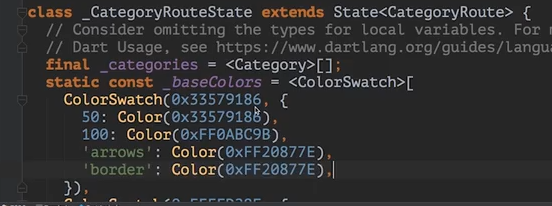
StatefullWidget 的变量放法

https://docs.flutter.io/flutter/widgets/Directionality-class.html
A widget that determines the ambient directionality of text and text-direction-sensitive render objects.
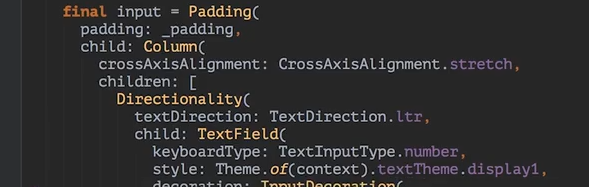
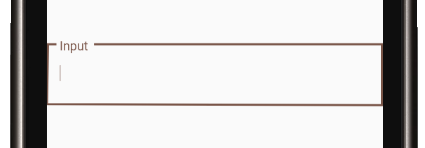
https://docs.flutter.io/flutter/material/OutlineInputBorder-class.html
return new Scaffold(
  appBar: new AppBar(
    title: new Text('游戏房间'),
    centerTitle: true,
  ),
  body: new Center(
    child: new TextField(
      keyboardType: TextInputType.number,
      decoration: new InputDecoration(
          labelText: 'Input',
          border: new OutlineInputBorder(
              borderRadius: new BorderRadius.circular(0.0))),
    ),
  ),
);
https://docs.flutter.io/flutter/widgets/Navigator-class.html
  A widget that manages a set of child widgets with a stack discipline.

void main() => runApp(new MyApp());

class MyApp extends StatelessWidget {
  @override
  Widget build(BuildContext context) {
    return new MaterialApp(
      title: 'Flutter Demo',
      theme: new ThemeData(
        primarySwatch: Colors.brown,
      ),
      home: new MyHomePage(title: 'xwh渣渣游戏平台'),
      routes: <String, WidgetBuilder>{
        '/gaming': (BuildContext context) => new Gaming(),
      },
    );
  }
}
弹出:
Navigator.pop(context);
压入:
Navigator.of(context).pushNamed('/gaming');
其他方法:

https://docs.flutter.io/flutter/dart-io/Socket-class.html
connect(dynamic host, int port, { dynamic sourceAddress, Duration timeout }) → Future<Socket>
Creates a new socket connection to the host and port and returns a Future that will complete with either a
Socket once connected or an error if the host-lookup or connection failed
listen(void onData(T event), { Function onError, void onDone(), bool cancelOnError }) →
StreamSubscription<List<int>>
Adds a subscription to this stream.
transform<S>(StreamTransformer<List<int>, S> streamTransformer) → Stream<S>
Applies a StreamTransformer to the current stream.
例子:
建立
......
StreamSubscription<String> streamSubscription;
final oneSocket = Socket.connect("111.231.54.107", 80).then<Socket>((socket) {
  streamSubscription = socket.transform(utf8.decoder).listen((data) {
    print("接收到来自Server的数据:" + data);
  });
  return socket;
}).whenComplete(() {
  print("全局唯一socket 初始化完成");
}); //全局唯一socket

void main() => runApp(new MyApp());
......

 发送数据
void _incrementCounter() {
  oneSocket.then<Socket>((socket) {
    socket.write('Server 你好!');
  }).then((socket) {
    if (streamSubscription.isPaused) {
      streamSubscription.resume();
    }
  }).catchError((e) {
    print('Something really unknown: $e');
  });
}
https://docs.flutter.io/flutter/dart-async/StreamSubscription-class.html
A subscription on events from a Stream.
When you listen on a Stream using Stream.listen, a StreamSubscription object is returned.
onData method :
Replaces the data event handler of this subscription.
  ///gameName 游戏名

  ///changeViewFunction 改变当前Corridor显示的函数

  static  setGameCorridorView(gameName,changeViewFunction) {

    if (SocketTools.oneSocket == null) {

      new Future(() {

        SocketTools.connect();

      }).then((_) {

        var timer;

        timer = Timer.periodic(const Duration(milliseconds: ), (Void) {

          if (SocketTools.oneSocket != null) {

            (timer as Timer).cancel();

            print("socket 连接建立成功");

            print("设置无延迟成功?" +

                SocketTools.oneSocket

                    .setOption(SocketOption.tcpNoDelay, true)

                    .toString());

            SocketTools.oneSocket.write(

                '0066{"role":"corridor","action":"connect","msg":{"game":"'+gameName+'"}}');

            handler = SocketTools.oneSocket.transform(utf8.decoder).listen((data) {

              print("接收到来自Server的数据:" + data);

              changeViewFunction(data);

            });

          }

        });

      });

    }

    for (dynamic element in (Game.gameConfigValue as List<dynamic>)) {

      if (element["lev"] == Game.roomLev) {

        Game.levMoney = element["lev_money"];

        Game.rooms = element["rooms"];

        Game.levMoney = element["lev_money"];

      }

    }

  }
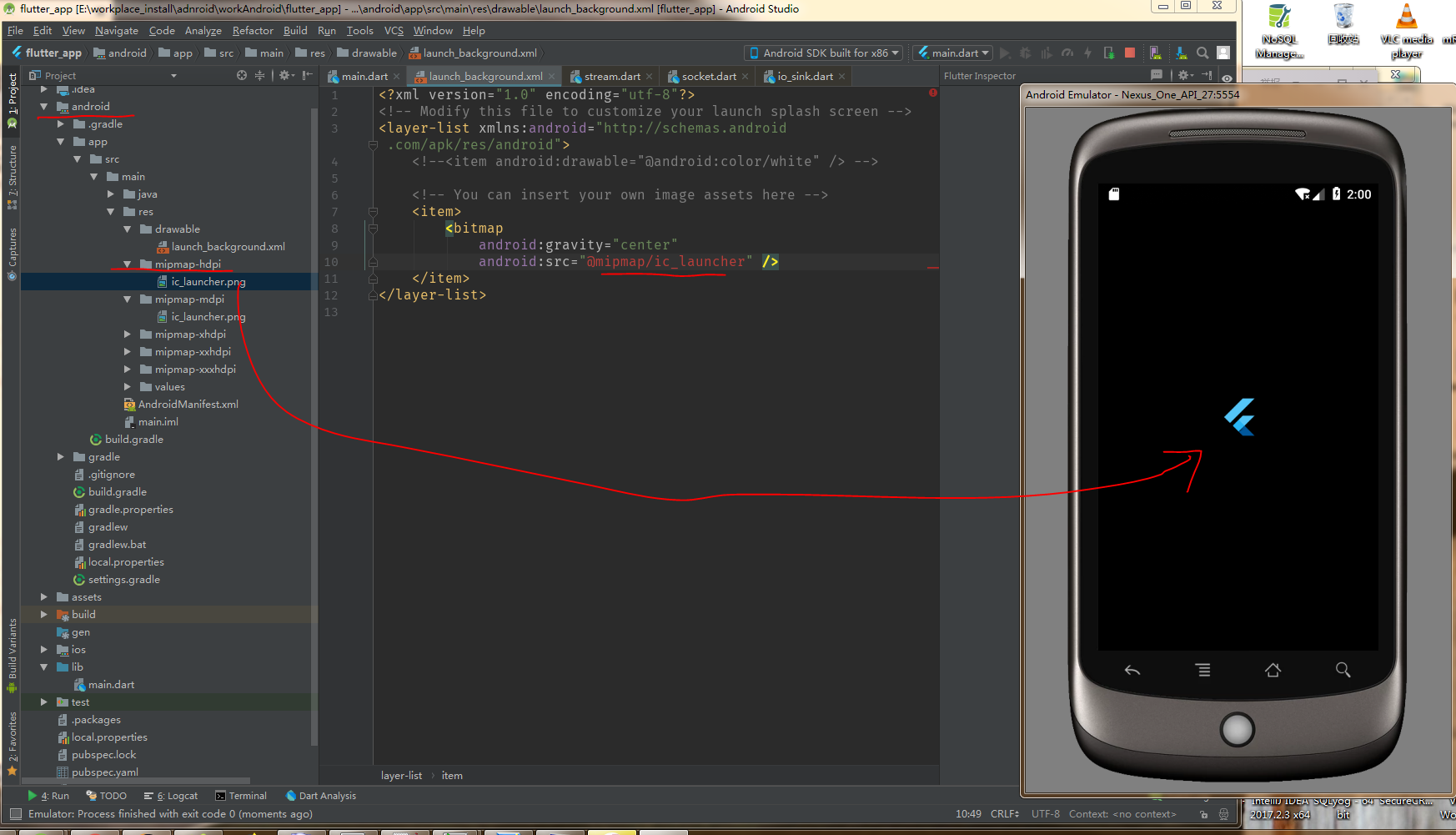
https://flutter.io/assets-and-images/#updating-the-launch-screen
添加app启动过渡画面

安卓的测试: ios照做就行了
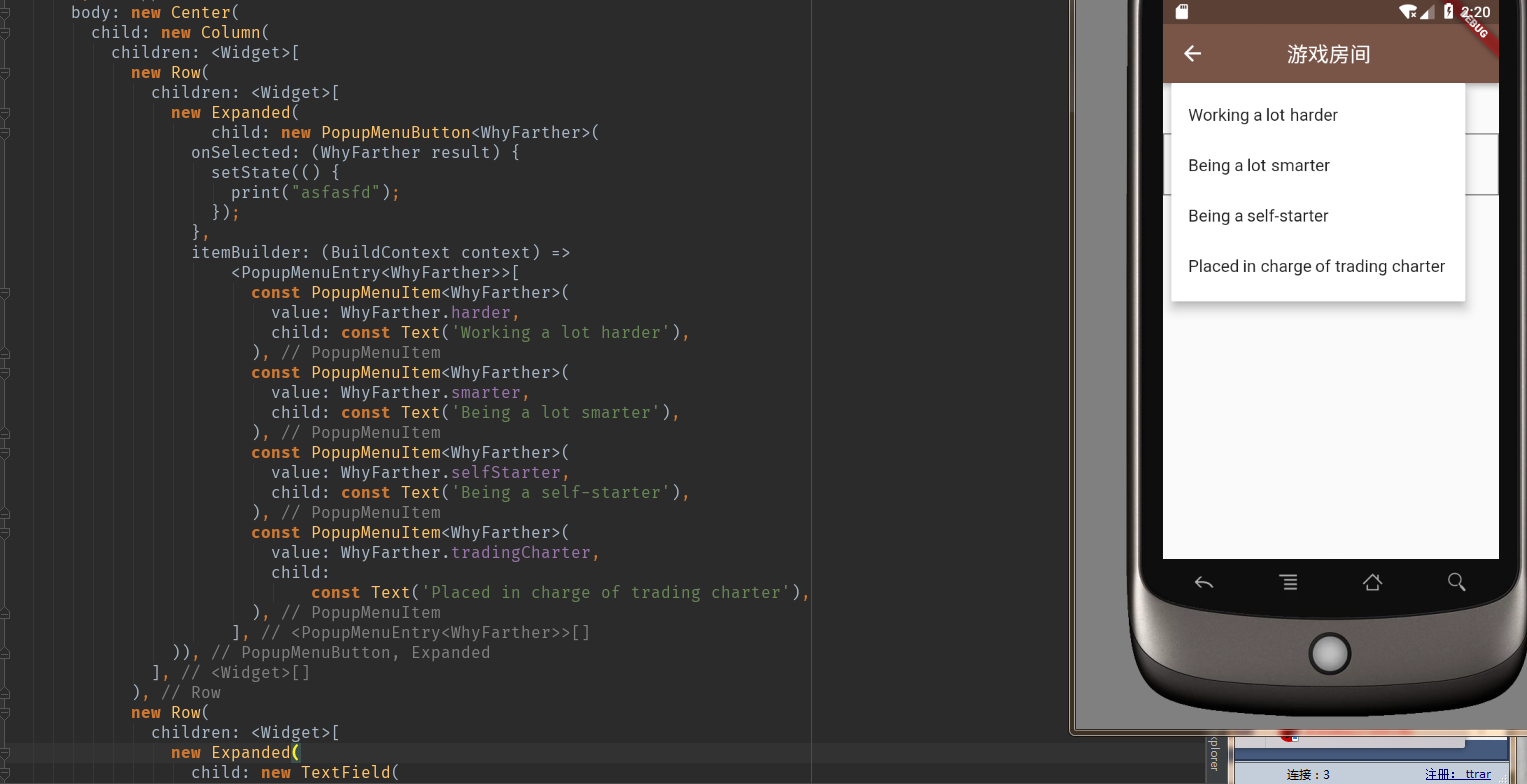
https://docs.flutter.io/flutter/material/PopupMenuButton-class.html
  Displays a menu when pressed and calls onSelected when the menu is dismissed because an
    item was selected. The value passed to onSelected is the value of the selected menu item.
https://docs.flutter.io/flutter/widgets/State-class.html
  State的生命周期
https://docs.flutter.io/flutter/material/FlatButton-class.html
  Use flat buttons on toolbars, in dialogs, or inline
showDialog(
    context: context,
    builder: (ctx) => new AlertDialog(
          content: new Text('注册${pirateNames['mes']}'),
          actions: <Widget>[
            new ButtonBar(children: <Widget>[
              new FlatButton(
                  onPressed: () {Navigator.pop(context);Navigator.pop(context);},
                  child: new Text("返回登录"))
            ])
          ],
        ));
https://www.dartlang.org/dart-vm/io-library-tour#http-client
import 'dart:io';
import 'dart:async';
import 'dart:convert';

Future<String> login(ename,pas) async {
  var url = Uri.parse("http://192.168.0.53:3000/login?user%5bename%5d=$ename&user%5bpas%5d=$pas");
  var httpClient = HttpClient();
  var request = await httpClient.postUrl(url);
  var response = await request.close();
  var data = await response.transform(utf8.decoder).single;
  print('Response ${response.statusCode}: $data');
  httpClient.close();
  return data;
}
其中 %5b是[ 的UrlEncode编码 %5d是 ]的UrlEncode编码 上面显示的是post请求
https://docs.flutter.io/flutter/widgets/GlobalKey-class.html
A key that is unique across the entire app.
Global keys uniquely identify elements. Global keys provide access to other objects that are associated with
elements, such as the a BuildContext and, for StatefulWidgets, a State.
final _formKey = new GlobalKey<FormState>();
String _account;
String _pas;
void _onSubmit() async {
  final form = _formKey.currentState;
  if (form.validate()) {
    form.save();
  ......
https://docs.flutter.io/flutter/rendering/BoxConstraints-class.html
  Immutable layout constraints for RenderBox layout.
https://docs.flutter.io/flutter/package-platform_platform/Platform-class.html

https://docs.flutter.io/flutter/dart-ui/Window-class.html
  The most basic interface to the host operating system's user interface.
  There is a single Window instance in the system, which you can obtain from the window property.
  调用方式:
    import 'dart:ui';
    ...
    class _RoomBDXPageState extends State<RoomBDXPage> {
    ...
    @override
    Widget build(BuildContext context) {
      print(window.physicalSize);//可以调用到
    ...
https://docs.flutter.io/flutter/widgets/StreamBuilder-class.html
  Widget that builds itself based on the latest snapshot of interaction with a Stream.
- Inheritance
-
- Object
- Diagnosticable
- DiagnosticableTree
- Widget
- StatefulWidget
- StreamBuilderBase<T, AsyncSnapshot<T>>
- StreamBuilder
https://docs.flutter.io/flutter/widgets/SafeArea-class.html
A widget that insets its child by sufficient padding to avoid intrusions by the operating system.
For example, this will indent the child by enough to avoid the status bar at the top of the screen.
It will also indent the child by the amount necessary to avoid The Notch on the iPhone X, or other similar creative physical features of the display.
When a minimum padding is specified, the greater of the minimum padding or the safe area padding will be applied.
https://docs.flutter.io/flutter/widgets/Positioned-class.html
A widget that controls where a child of a Stack is positioned.
https://docs.flutter.io/flutter/material/Material-class.html
A piece of material.
<动画方面>
https://docs.flutter.io/flutter/widgets/SingleTickerProviderStateMixin-class.html
Provides a single Ticker that is configured to only tick while the current tree is enabled, as defined by TickerMode.
To create the AnimationController in a State that only uses a single AnimationController, mix in this class, then
pass vsync: this to the animation controller constructor.
This mixin only supports vending a single ticker. If you might have multiple AnimationController objects over the
lifetime of the State, use a full TickerProviderStateMixin instead.
https://docs.flutter.io/flutter/animation/AnimationController-class.html
A controller for an animation.
https://docs.flutter.io/flutter/animation/Animation-class.html
An animation with a value of typeT.
An animation consists of a value (of typeT) together with a status.
https://docs.flutter.io/flutter/animation/Tween-class.html
A linear interpolation between a beginning and ending value.Tween is useful if you want to
interpolate across a range.
To use a Tween object with an animation, call the Tween object's animate method and pass it the Animation object
that you want to modify.
https://docs.flutter.io/flutter/animation/CurvedAnimation-class.html
  Flutter offers a set of pre-defined Curved variations. The list is shown here below:
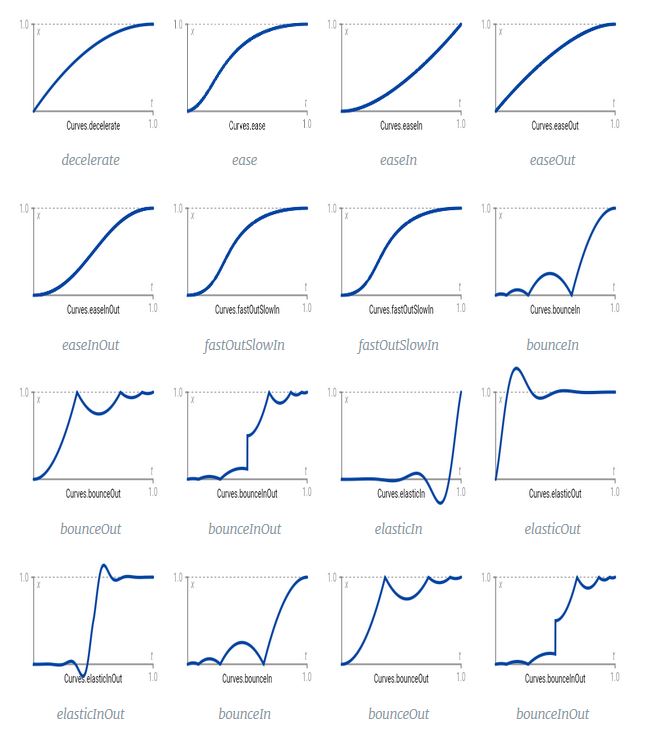
To use these variations:
  Animation<double> angleAnimation = new Tween(begin: 0.0, end: pi/2).animate(

	  new CurvedAnimation(

		  parent: _controller,

		  curve:  Curves.ease,

		  reverseCurve: Curves.easeOut

	  ));
This creates a variation of value [0; π/2], which varies using the
- Curves.ease when the animation goes 0.0 -> π/2 (= forward)
- Curves.easeOut when the animation goes π/2 -> 0.0 (= reverse)
https://docs.flutter.io/flutter/dart-ui/Offset-class.html
  An immutable 2D floating-point offset.
https://docs.flutter.io/flutter/animation/Interval-class.html
A curve that is 0.0 until begin, then curved (according to curve from 0.0 to 1.0 at end, then 1.0.
An Interval can be used to delay an animation. For example, a six second animation that uses an Interval with
its begin set to 0.5 and its end set to 1.0 will essentially become a three-second animation that starts three
seconds later.
https://docs.flutter.io/flutter/widgets/Transform-class.html
A widget that applies a transformation before painting its child.
</动画方面>
flutter 自己整理的更多相关文章
- Flutter 吐血整理组件继承关系图
老孟导读:前几天一个读者和我说能不能整理一个各个控件之间的继承关系,这2天抽时间整理了一下,不整理不知道,一整理真的吓一跳啊,仅仅Widget的子类(包括间接子类)就高达353个,今天发群里给大家浏览 ...
- Flutter教程- Dart语言规范-知识点整理
Flutter教程- Dart语言知识点整理 Dart语言简介 Dart语言介绍 ① 注释的方式 ② 变量的声明 ③ 字符串的声明和使用 ④ 集合变量的声明 ⑤ 数字的处理 ⑥ 循环的格式 ⑦ 抛异常 ...
- 腾讯技术团队整理,为什么 Flutter 能最好地改变移动开发
导语 | Flutter 框架是当下非常热门的跨端解决方案,能够帮助开发者通过一套代码库高效构建多平台精美应用,支持移动.Web.桌面等多端开发.但仍然有很多产品.设计.甚至开发同学并不了解 Flut ...
- 《吐血整理》高级系列教程-吃透Fiddler抓包教程(31)-Fiddler如何抓取Android系统中Flutter应用程序的包
1.简介 Flutter是谷歌的移动UI框架,可以快速在iOS和Android上构建高质量的原生用户界面.Flutter应用程序是用Dart编写的,这是一种由Google在7年多前创建的语言.Flut ...
- 【译】Java、Kotlin、RN、Flutter 开发出来的 App 大小,你了解过吗?
现在开发 App 的方式非常多,原生.ReactNative.Flutter 都是不错的选择.那你有没有关注过,使用不同的方式,编译生成的 Apk ,大小是否会有什么影响呢?本文就以一个最简单的 He ...
- 我花了 8 小时,"掌握"了一下 Flutter | Flutter 中文站上线
Hi,大家好,我是承香墨影! 距离 Google 在 2018 世界移动大会上发布 Flutter 的 Beta 版本,Flutter 是 Google 用以帮助开发者在 Android 和 iOS ...
- 在Flutter中嵌入Native组件的正确姿势是...
引言 在漫长的从Native向Flutter过渡的混合工程时期,要想平滑地过渡,在Flutter中使用Native中较为完善的控件会是一个很好的选择.本文希望向大家介绍AndroidView的使用方式 ...
- flutter安装教程(win7)
本文是在安装flutter的时候,所遇到的问题参考的各个文档整理集合.此次是在win7上安装的问题记录.因为当初安装的时候针对win7的文档比较少,而且各个文档的解释比较散,本人遇到问题也是找了很久才 ...
- Flutter不完全安裝指南(AndroidStudio集成)
Flutter是谷歌的移动UI框架,可以快速在iOS和Android上构建高质量的原生用户界面.真心無力吐槽這些所谓的中文站以及社区的文档,整理一下安装流程吧. 本人是android开发,基于此基础上 ...
随机推荐
- Google - Reconstruct To Chain
/* 4. 给你一串input,比如: A -> B B -> C X -> Y Z -> X . . . 然后让你设计一个data structure来存这些关系,最后读完了 ...
- keepalived自动安装脚本
#!/bin/bash tar xf keepalived-1.1.17.tar.gz cd keepalived-1.1.17 yum -y install openssl-* kernel-dev ...
- Python Django orm操作数据库笔记之外键和表关系
外键 在MySQL中,表有两种引擎,一种是InnoDB,另外一种是myisam.如果使用的是InnoDB引擎,是支持外键约束的. 外键的使用 使用外键前需要先确保相应外键已存储在数据库中(flask中 ...
- (转)解决OSX上面PHP curl SSLRead()
原创 2016年05月19日 19:39:04 标签: php / curl / osx 830 这个问题的原因是因为OSX curl默认使用 SecureTransport 而不是OpenSSL. ...
- DevExpress破解和消除弹出框问题
在解决方案管理器列表中找到 license.licx 设置属性 将[生成操作]选项改为[无]
- commit lint规范化团队git提交信息
一.快速提交符号angular编码规范的提交信息 1.命令行中安装commitizen: npm install -g commitizen commitizen init cz-convention ...
- 4.IIC总线
一.IIC总线说明: IIC总线时序只有高低电平的持续时间一般是大于多少us/ms. iic时序: 开始:当SCL为高电平时,SDA由高电平状态切换到低电平状 ...
- 谷歌浏览器内核Cef js代码整理(三) 字符串处理
*字符串截取方法*/ var s="abc_def[ghi]jk[i]"; var temp;function CopyFromStr(str_source,str_key, bl ...
- Nios II Host-Based File System
Nios II Host-Based File System 允许运行在Nios II的程序,在Debug模式下,通过Altera download cable来读写PC上当前工程目录下(及其子目录) ...
- JavaSE中的小知识点分析
1.System.out.println(); 调用System类中的public static final PrintStream out,输出为PrintStream(字节形式的输出流,为Outp ...