
shell+curl监控网站页面(域名访问状态),并利用sendemail发送邮件
应领导要求,对公司几个主要站点的域名访问情况进行监控。下面分享一个监控脚本,并利用sendemail进行邮件发送。
监控脚本如下:
下面是写了一个多线程的网站状态检测脚本,直接从文件中读出站点地址,然后用curl去检测返回码,发现速度非常好,基本几秒钟内就能出结果。
[root@bastion-IDC ~]# cat url-monit.sh
#!/bin/bash
#取出网站数据
data=`cat /root/url.list`
if [ -z "$data" ];then
echo "Faild to connect database!"
exit 1
fi
test -f result.log && rm -f result.log
function delay {
sleep 2
}
tmp_fifofile=/tmp/$$.fifo
mkfifo $tmp_fifofile
exec 6<>$tmp_fifofile
rm $tmp_fifofile
#定义并发线程数,需根据vps配置进行调整。
thread=100
for ((i=0 ;i<$thread;i++ ))
do
echo
done>&6
#开始多线程循环检测
for url in $data
do
read -u6
{
#curl抓取网站http状态码
code=`curl -o /dev/null --retry 3 --retry-max-time 8 -s -w %{http_code} $url`
echo "HTTP Status of $url is $code ">>result.log
#判断子线程是否执行成功,并输出结果
delay && {
echo "HTTP Status of $url is $code"
} || {
echo "Check thread error!"
}
echo >& 6
}&
done
#等待所有线程执行完毕
wait
exec 6>&-
exit 0
[root@bastion-IDC ~]# cat url.list
www.fangfull.com
www.huanqiu.com
erp.fangfull.com
fanghuadmin.huanqiu.com
www.hqsbtime.com
qmjjr.huanqiu.com
admin.huanqiu.com
m.huanqiu.com
fq.huanqiu.com
mfq.huanqiu.com
zc.huanqiu.com
mzc.huanqiu.com
uc.huanqiu.com
fanghu.huanqiu.com
img.huanqiu.com
app.huanqiu.com
www.fangfull.cn
www.huanqiu.wang.com
执行脚本:
[root@bastion-IDC ~]# sh url-monit.sh
HTTP Status of app.huanqiu.com is 301
HTTP Status of fanghu.huanqiu.com is 301
HTTP Status of www.huanqiu.com is 301
HTTP Status of fanghuadmin.huanqiu.com is 301
HTTP Status of admin.huanqiu.com is 301
HTTP Status of mfq.huanqiu.com is 301
HTTP Status of zc.huanqiu.com is 301
HTTP Status of erp.fangfull.com is 302
HTTP Status of www.fangfull.com is 200
HTTP Status of fq.huanqiu.com is 301
HTTP Status of img.huanqiu.com is 301
HTTP Status of www.hqsbtime.com is 200
HTTP Status of mzc.huanqiu.com is 301
HTTP Status of www.fangfull.cn is 000
HTTP Status of uc.huanqiu.com is 301
HTTP Status of qmjjr.huanqiu.com is 301
HTTP Status of m.huanqiu.com is 301
HTTP Status of www.huanqiu.wang.com is 000
测试利用上面的多线程的网站状态检测脚本的执行时间,如下,12s多执行完毕!
[root@bastion-IDC ~]# time sh url-monit.sh
HTTP Status of app.huanqiu.com is 301
HTTP Status of fanghu.huanqiu.com is 301
HTTP Status of www.huanqiu.com is 301
HTTP Status of fanghuadmin.huanqiu.com is 301
HTTP Status of admin.huanqiu.com is 301
HTTP Status of mfq.huanqiu.com is 301
HTTP Status of zc.huanqiu.com is 301
HTTP Status of erp.fangfull.com is 302
HTTP Status of www.fangfull.com is 200
HTTP Status of fq.huanqiu.com is 301
HTTP Status of img.huanqiu.com is 301
HTTP Status of www.hqsbtime.com is 200
HTTP Status of mzc.huanqiu.com is 301
HTTP Status of www.fangfull.cn is 000
HTTP Status of uc.huanqiu.com is 301
HTTP Status of qmjjr.huanqiu.com is 301
HTTP Status of m.huanqiu.com is 301
HTTP Status of www.huanqiu.wang.com is 000
real 0m12.782s
user 0m0.085s
sys 0m0.096s
下面再测试直接curl监测网站状态的时间:
[root@bastion-IDC ~]# cat testurl-monit.sh
#!/bin/bash
for url in `cat /root/url.list`
do
code=`curl -I -s $url | head -1 | cut -d " " -f2`
echo "HTTP Status of $url is $code "
done
如下,这个脚本执行时间要30s多!
[root@bastion-IDC ~]# time sh testurl-monit.sh
HTTP Status of www.fangfull.com is 200
HTTP Status of www.huanqiu.com is 301
HTTP Status of erp.fangfull.com is 302
HTTP Status of fanghuadmin.huanqiu.com is 301
HTTP Status of www.hqsbtime.com is 200
HTTP Status of qmjjr.huanqiu.com is 301
HTTP Status of admin.huanqiu.com is 301
HTTP Status of m.huanqiu.com is 301
HTTP Status of fq.huanqiu.com is 301
HTTP Status of mfq.huanqiu.com is 301
HTTP Status of zc.huanqiu.com is 301
HTTP Status of mzc.huanqiu.com is 301
HTTP Status of uc.huanqiu.com is 301
HTTP Status of fanghu.huanqiu.com is 301
HTTP Status of img.huanqiu.com is 301
HTTP Status of app.huanqiu.com is 301
HTTP Status of www.fangfull.cn is
HTTP Status of www.huanqiu.wang.com is
real 0m31.689s
user 0m0.067s
sys 0m0.124s
显然多线程的测试脚本执行速度要快点!所以保留第一个脚本url-monit.sh!
-------------------------------------------------------------------------------------------------------
下面是邮件报警设置:
1)先下载安装包到本地,解压。
[root@bastion-IDC ~]# cd /usr/local/src/
[root@bastion-IDC src]# wget -c http://caspian.dotconf.net/menu/Software/SendEmail/sendEmail-v1.56.tar.gz
[root@bastion-IDC src]# tar -zvxf sendEmail-v1.56.tar.gz
[root@bastion-IDC src]# cd sendEmail-v1.56
[root@bastion-IDC sendEmail-v1.56]# cp -a sendEmail /usr/local/bin/
[root@bastion-IDC sendEmail-v1.56]# chmod +x /usr/local/bin/sendEmail
[root@bastion-IDC sendEmail-v1.56]# file /usr/local/bin/sendEmail
/usr/local/bin/sendEmail: a /usr/bin/perl -w script text executable
2)安装下依赖
[root@bastion-IDC sendEmail-v1.56]# yum install perl-Net-SSLeay perl-IO-Socket-SSL -y
3)部署发送脚本
这里由于一些域名做了跳转,所以如果发现域名访问后的结果不是200,301,302,那么就是不能正常访问状态,需要发送报警邮件!
如下,报警邮件发送给wangshibo@huanqiu.cn和hugang@huanqiu.cn两个邮箱:
[root@bastion-IDC ~]# cat url-mail.sh
#!/bin/bash
NUM=$(/bin/sh /root/url-monit.sh|grep -v "200"|grep -v "301"|grep -v "302"|wc -l)
DOMAIN=$(/bin/sh /root/url-monit.sh|grep -v "200"|grep -v "301"|grep -v "302"|awk -F" " '{print $4}')
if [ $NUM -ne 0 ];then
for url in $DOMAIN;do
/usr/local/bin/sendEmail -f ops@huanqiu.cn -t wangshibo@huanqiu.cn -s smtp.huanqiu.cn -u "Domain monitoring" -o message-content-type=html -o message-charset=utf8 -xu ops@huanqiu.cn -xp zh@123bj -m "[$url] can not normally access,please deal with it as soon as possible "
/usr/local/bin/sendEmail -f ops@huanqiu.cn -t hugang@huanqiu.cn -s smtp.huanqiu.cn -u "Domain monitoring" -o message-content-type=html -o message-charset=utf8 -xu ops@huanqiu.cn -xp zh@123bj -m "[$url] can not normally access,please deal with it as soon as possible "
done
else
echo "it is OK"
fi
-----------------------------------------------------------------
邮件发送参数说明:
命令说明:
/usr/local/bin/sendEmail #命令主程序
-f from@uhanqiu.cn #发件人邮箱
-t to@huanqiu.cn #收件人邮箱
-s smtp.huanqi.cn #发件人邮箱的smtp服务器
-u "....." #邮件的标题
-o message-content-type=html #邮件内容的格式,html表示它是html格式
-o message-charset=utf8 #邮件内容编码
-xu from@huanqiu.cn #发件人邮箱的用户名
-xp zh@123bj #发件人邮箱密码
-m "......" #邮件的具体内容
-----------------------------------------------------------------
[root@bastion-IDC ~]# sh -x url-mail.sh
++ /bin/sh /root/url-monit.sh
++ grep -v 200
++ grep -v 301
++ grep -v 302
++ wc -l
+ NUM=2
++ /bin/sh /root/url-monit.sh
++ grep -v 200
++ grep -v 301
++ grep -v 302
++ awk '-F ' '{print $4}'
+ DOMAIN='www.fangfull.cn
www.huanqiu.wang.com'
+ '[' 2 -ne 0 ']'
+ for url in '$DOMAIN'
+ /usr/local/bin/sendEmail -f ops@huanqiu.cn -t wangshibo@huanqiu.cn -s smtp.huanqiu.cn -u 'Domain monitoring' -o message-content-type=html -o message-charset=utf8 -xu ops@huanqiu.cn -xp zh@123bj -m '[www.fangfull.cn] can not normally access,please deal with it as soon as possible '
Oct 25 19:21:43 bastion-idc sendEmail[19668]: Email was sent successfully!
+ for url in '$DOMAIN'
+ /usr/local/bin/sendEmail -f ops@huanqiu.cn -t wangshibo@huanqiu.cn -s smtp.huanqiu.cn -u 'Domain monitoring' -o message-content-type=html -o message-charset=utf8 -xu ops@huanqiu.cn -xp zh@123bj -m '[www.huanqiu.wang.com] can not normally access,please deal with it as soon as possible '
Oct 25 19:21:47 bastion-idc sendEmail[19672]: Email was sent successfully!
+ for url in '$DOMAIN'
+ /usr/local/bin/sendEmail -f ops@huanqiu.cn -t huang@huanqiu.cn -s smtp.huanqiu.cn -u 'Domain monitoring' -o message-content-type=html -o message-charset=utf8 -xu ops@huanqiu.cn -xp zh@123bj -m '[www.fangfull.cn] can not normally access,please deal with it as soon as possible '
Oct 25 19:21:43 bastion-idc sendEmail[19668]: Email was sent successfully!
+ for url in '$DOMAIN'
+ /usr/local/bin/sendEmail -f ops@huanqiu.cn -t hugang@huanqiu.cn -s smtp.huanqiu.cn -u 'Domain monitoring' -o message-content-type=html -o message-charset=utf8 -xu ops@huanqiu.cn -xp zh@123bj -m '[www.huanqiu.wang.com] can not normally access,please deal with it as soon as possible '
Oct 25 19:21:47 bastion-idc sendEmail[19672]: Email was sent successfully!
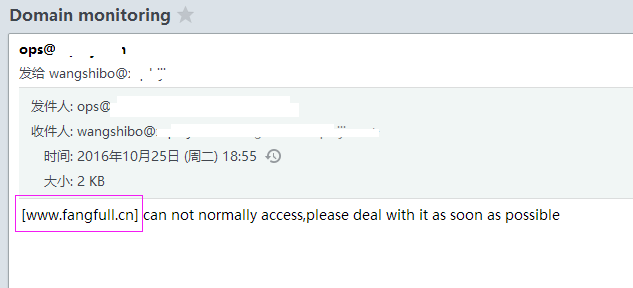
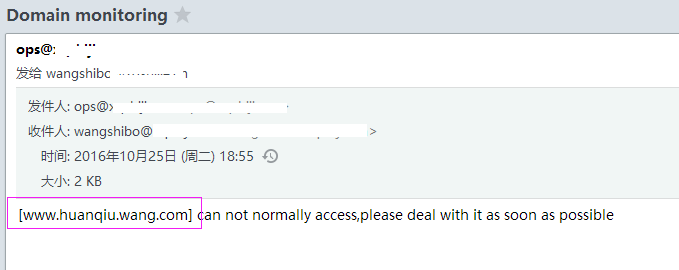
登陆wangshibo@huanqiu.cn邮箱,发现已经收到报警邮件了!
最后添加计划任务,每5分钟执行一次
[root@bastion-IDC ~]# crontab -l
#domain monit
*/5 * * * * /bin/bash -x /root/url-mail.sh >/dev/null 2>&1
shell+curl监控网站页面(域名访问状态),并利用sendemail发送邮件的更多相关文章
- shell+curl监控网站页面(域名访问状态),并利用sedemail发送邮件
应领导要求,对公司几个主要站点的域名访问情况进行监控.下面分享一个监控脚本,并利用sendemail进行邮件发送. 监控脚本如下:下面是写了一个多线程的网站状态检测脚本,直接从文件中读出站点地址,然后 ...
- shell脚本监控网站状态
shell脚本监控网站状态 #!/bin/sh date=`date +"%Y%m%d-%H%M"` title="status" contentFail=&q ...
- shell批量监控网站状态码
shell批量监控网站状态码脚本,使用curl很慢.等我学完其他方式,在来更新. #!/bin/bash #GuoYabin yuming=`/bin/cat yuming.txt` for i in ...
- 利用wget 和 curl 监控网站是否正常
监控网站URL是否正常最常见的方法莫过于wget和curl命令了,这两个命令都是非常强大,参数也非常多,下面列举几个常用的参数. wget 常用命令参数:--spider ...
- 部署Nginx网站服务实现访问状态统计以及访问控制功能
原文:https://blog.51cto.com/11134648/2130987 Nginx专为性能优化而开发,最知名的优点是它的稳定性和低系统资源消耗,以及对HTTP并发连接的高处理能力,单个物 ...
- 使用curl获取网站的http的状态码
发布:thebaby 来源:net [大 中 小] 本文分享一例shell脚本,一个使用curl命令获取网站的httpd状态码的例子,有需要的朋友参考下.本文转自:http://www.j ...
- shell脚本监控k8s集群job状态,若出现error通过触发阿里云的进程监控报警
#!/bin/bash while [ 1 ] do job_error_no=`kubectl get pod -n weifeng |grep -i "job"|grep -c ...
- shell脚本监控httpd服务80端口状态
监控httpd服务端口状态,根据端口判断服务器是否启动,如果没有启动则脚本自动拉起服务,如果服务正在运行则退出脚本程序:如果换成别的服务端口也可以,但是脚本程序需要做调整. #!/bin/bash # ...
- 案例六:shell脚本监控httpd服务80端口状态
这里是举例监控httpd服务端口状态,根据端口判断服务器是否启动,如果没有启动则脚本自动拉起服务,如果服务正在运行则退出脚本程序:如果换成别的服务端口也可以,但是脚本程序需要做调整. #!/bin/b ...
随机推荐
- owncloud 实现私有云进行多端文件同步
研究生生涯开始了,事情逐渐多了起来.都没时间写博客了... 开学实验室配了台电脑,我把主机装上了Fedora 作为我的服务器.平时有些实验室的材料,经常几个电脑一起看,使用U盘拷来拷去很是麻烦.今天重 ...
- Linux 用户名、主机添加背景色
文章参考:PS1应用之——修改linux终端命令行各字体颜色 Linux 用户名.主机添加背景色,用于生产环境,这样可以减少人为的误操作. [root@zhang ~]# tail /etc/bash ...
- 关于plist文件的那些事
今天遇到新生问一个问题,就是用自己定义了一个plist文件,然后可以往里面写东西,但是写过再次运行的时候里面的数据总是最后一次写入的数据.后来就专门研究了一下plist文件. 大家都知道当你创建一个项 ...
- PyQt5--QSplitter
# -*- coding:utf-8 -*- ''' Created on Sep 20, 2018 @author: SaShuangYiBing Comment: ''' import sys f ...
- cglib之Enhancer
1. 背景 cglib库的Enhancer在Spring AOP中作为一种生成代理的方式被广泛使用.本文针对Enhancer的用法以实际代码为例作一些介绍. 2. Enhancer是啥 Enhance ...
- 2018-2019-2 网络对抗技术 20165318 Exp6 信息搜集与漏洞扫描
2018-2019-2 网络对抗技术 20165318 Exp6 信息搜集与漏洞扫描 原理与实践说明 实践原理 实践内容概述 基础问题回答 实践过程记录 各种搜索技巧的应用 DNS IP注册信息的查询 ...
- go标准库的学习-strings-字符串操作
参考https://studygolang.com/pkgdoc 导入方式: import "strings" strings包实现了用于操作字符的简单函数. 常用的几个函数: f ...
- web安全之攻击
转自 知乎https://www.zhihu.com/question/22953267 作者:潘良虎链接:https://www.zhihu.com/question/22953267/answer ...
- Drool实战系列(一)之入门程序
Drools官网地址为:https://www.drools.org/ maven环境 入门程序例子如下: 项目结构截图: 一.导入pom文件 <project xmlns="http ...
- poi导出excel,表头数据动态拼装
/* * 第一步:拼装表头和数据 */ // 放多个sheet的集合 List<Map<String,Object>> datas = new ArrayList<Map ...