
SpringBoot之OAuth2.0学习之客户端快速上手
2.1、@EnableOAuth2Sso
这个注解是为了开启OAuth2.0的sso功能,如果我们配置了WebSecurityConfigurerAdapter,它通过添加身份验证过滤器和身份验证(entryPoint)来增强对应的配置。如果没有的话,我们所有的请求都会被保护,也就是说我们的所有请求都必须经过授权认证才可以,该注解的源代码如下:
    @Target(ElementType.TYPE)

    @Retention(RetentionPolicy.RUNTIME)

    @Documented

    @EnableOAuth2Client

    @EnableConfigurationProperties(OAuth2SsoProperties.class)

    @Import({ OAuth2SsoDefaultConfiguration.class, OAuth2SsoCustomConfiguration.class,

    		ResourceServerTokenServicesConfiguration.class })

    public @interface EnableOAuth2Sso {

    }
我们可以看到,这个注解包含了@EnableOAuth2Client的注解,因此它也是OAuth2.0的客户端。同时分别导入了OAuth2SsoDefaultConfiguration,OAuth2SsoCustomConfiguration ,ResourceServerTokenServicesConfiguration
- OAuth2SsoDefaultConfiguration 这个类配置了权限认证的相关信息,它默认会拦截所有的请求,我们可以看一下相关代码:
    package org.springframework.boot.autoconfigure.security.oauth2.client;

    /**

     * Configuration for OAuth2 Single Sign On (SSO). If the user only has

     * {@code @EnableOAuth2Sso} but not on a {@code WebSecurityConfigurerAdapter} then one is

     * added with all paths secured.

     *

     * @author Dave Syer

     * @since 1.3.0

     */

    @Configuration

    @Conditional(NeedsWebSecurityCondition.class)

    public class OAuth2SsoDefaultConfiguration extends WebSecurityConfigurerAdapter {

    	private final ApplicationContext applicationContext;

    	public OAuth2SsoDefaultConfiguration(ApplicationContext applicationContext) {

    		this.applicationContext = applicationContext;

    	}

    	@Override

    	protected void configure(HttpSecurity http) throws Exception {

            //拦截所有请求路径

    		http.antMatcher("/**").authorizeRequests().anyRequest().authenticated();

    		new SsoSecurityConfigurer(this.applicationContext).configure(http);

    	}

    	protected static class NeedsWebSecurityCondition extends EnableOAuth2SsoCondition {

    		@Override

    		public ConditionOutcome getMatchOutcome(ConditionContext context,

    				AnnotatedTypeMetadata metadata) {

    			return ConditionOutcome.inverse(super.getMatchOutcome(context, metadata));

    		}

    	}

    }
- OAuth2SsoCustomConfiguration这个类主要是利用代理对已配置的WebSecurityConfigurerAdapter进行增强处理。
    /**

     * Configuration for OAuth2 Single Sign On (SSO) when there is an existing

     * {@link WebSecurityConfigurerAdapter} provided by the user and annotated with

     * {@code @EnableOAuth2Sso}. The user-provided configuration is enhanced by adding an

     * authentication filter and an authentication entry point.

     *

     * @author Dave Syer

     */

    @Configuration

    @Conditional(EnableOAuth2SsoCondition.class)

    public class OAuth2SsoCustomConfiguration

    		implements ImportAware, BeanPostProcessor, ApplicationContextAware {

    	private Class<?> configType;

    	private ApplicationContext applicationContext;

    	@Override

    	public void setApplicationContext(ApplicationContext applicationContext) {

    		this.applicationContext = applicationContext;

    	}

    	@Override

    	public void setImportMetadata(AnnotationMetadata importMetadata) {

    		this.configType = ClassUtils.resolveClassName(importMetadata.getClassName(),

    				null);

    	}

    	@Override

    	public Object postProcessBeforeInitialization(Object bean, String beanName)

    			throws BeansException {

    		return bean;

    	}

    	@Override

    	public Object postProcessAfterInitialization(Object bean, String beanName)

    			throws BeansException {

    		if (this.configType.isAssignableFrom(bean.getClass())

    				&& bean instanceof WebSecurityConfigurerAdapter) {

    			ProxyFactory factory = new ProxyFactory();

    			factory.setTarget(bean);

    			factory.addAdvice(new SsoSecurityAdapter(this.applicationContext));

    			bean = factory.getProxy();

    		}

    		return bean;

    	}

    	private static class SsoSecurityAdapter implements MethodInterceptor {

    		private SsoSecurityConfigurer configurer;

    		SsoSecurityAdapter(ApplicationContext applicationContext) {

    			this.configurer = new SsoSecurityConfigurer(applicationContext);

    		}

    		@Override

    		public Object invoke(MethodInvocation invocation) throws Throwable {

    			if (invocation.getMethod().getName().equals("init")) {

    				Method method = ReflectionUtils

    						.findMethod(WebSecurityConfigurerAdapter.class, "getHttp");

    				ReflectionUtils.makeAccessible(method);

    				HttpSecurity http = (HttpSecurity) ReflectionUtils.invokeMethod(method,

    						invocation.getThis());

    				this.configurer.configure(http);

    			}

    			return invocation.proceed();

    		}

    	}

    }
- ResourceServerTokenServicesConfiguration这个主要配置了请求资源服务器的核心配置,比如说在创建比较重要的UserInfoRestTemplateFactory(该类通过OAuth2RestTemplate请求配置资源),UserInfoTokenServices(根据token来请求用户信息的类)等
2.2、application.yml
在属性文件中有几个关键点,我需要在这里说明一下,配置文件例子:
    server:

      port: 8081

      servlet:

        session:

          cookie:

            name: OAUTH2SESSION

    spring:

      application:

        name: sport-service

    security:

      oauth2:

        client:

          clientId: root

          clientSecret: root

          accessTokenUri: http://localhost:8080/oauth/token

          userAuthorizationUri: http://localhost:8080/oauth/authorize

          pre-established-redirect-uri: http://localhost:8081/prom

        resource:

          userInfoUri: http://localhost:8080/user

          preferTokenInfo: false

        sso:

          login-path: /login
- 如果我们既在本地部署服务端又部署客户端,那么
server.servlet.session.cookie.name必须配置,否则会报org.springframework.security.oauth2.common.exceptions.InvalidRequestException, Possible CSRF detected - state parameter was required but no state could be found的错误,具体可以参考:地址 - 几个必须配置项accessTokenUri(获取koken的地址),userAuthorizationUri(授权的验证地址),userInfoUri(其中userInfoUri是)配置获取认证用户的地址,该地址返回的数据必须为json格式。注意userInfoUri这里可以参考类
OAuth2ClientAuthenticationProcessingFilter,这个类为资源服务器获取user信息的认证过滤器,源代码如下:
@Override

	public Authentication attemptAuthentication(HttpServletRequest request, HttpServletResponse response)

			throws AuthenticationException, IOException, ServletException {

		OAuth2AccessToken accessToken;

		try {

                        //拿到token 如果当前环境没有存token则去accessTokenUri地址获取

			accessToken = restTemplate.getAccessToken();

		} catch (OAuth2Exception e) {

			BadCredentialsException bad = new BadCredentialsException("Could not obtain access token", e);

			publish(new OAuth2AuthenticationFailureEvent(bad));

			throw bad;

		}

		try {

                         //根据token加载用户资源

			OAuth2Authentication result = tokenServices.loadAuthentication(accessToken.getValue());

			if (authenticationDetailsSource!=null) {

				request.setAttribute(OAuth2AuthenticationDetails.ACCESS_TOKEN_VALUE, accessToken.getValue());

				request.setAttribute(OAuth2AuthenticationDetails.ACCESS_TOKEN_TYPE, accessToken.getTokenType());

				result.setDetails(authenticationDetailsSource.buildDetails(request));

			}

			publish(new AuthenticationSuccessEvent(result));

			return result;

		}

		catch (InvalidTokenException e) {

			BadCredentialsException bad = new BadCredentialsException("Could not obtain user details from token", e);

			publish(new OAuth2AuthenticationFailureEvent(bad));

			throw bad;

		}

	}
这里面一定注意的是,如果资源服务器和认证服务器分开的话,请确保认证服务器的地址一定允许匿名访问
2.3、完整示例
2.3.1、定制化授权页面
说句实话,spring提供那一套白花花的登录与授权页面我想我们大家也不会去用吧,那么根据官网的提示我们可以自己配置授权页面与登录页,官网说明说下:
Most of the Authorization Server endpoints are used primarily by machines, but there are a couple of resource that need a UI and those are the GET for /oauth/confirm_access and the HTML response from /oauth/error. They are provided using whitelabel implementations in the framework, so most real-world instances of the Authorization Server will want to provide their own so they can control the styling and content. All you need to do is provide a Spring MVC controller with @RequestMappings for those endpoints, and the framework defaults will take a lower priority in the dispatcher. In the /oauth/confirm_access endpoint you can expect an AuthorizationRequest bound to the session carrying all the data needed to seek approval from the user (the default implementation is WhitelabelApprovalEndpoint so look there for a starting point to copy). You can grab all the data from that request and render it however you like, and then all the user needs to do is POST back to /oauth/authorize with information about approving or denying the grant. The request parameters are passed directly to a UserApprovalHandler in the AuthorizationEndpoint so you can interpret the data more or less as you please.
归纳总结一下,这里给我们的信息:
/oauth/confirm_access这个端点用于跳转至授权页的,我们需要提供一个SpringMVC的Controller并使用@RequestMapping注解标注,同时会将AuthorizationRequest请求绑定到Session当中来用户授权时所需的信息/oauth/error这个端点是用于配置时的错误页面- 对于scope是否允许授权,我们可以使用true或者false,其默认请求参数格式为:
scpoe.<scopename>,具体可以参考org.springframework.security.oauth2.provider.approval.ApprovalStoreUserApprovalHandler类的updateAfterApproval的方法 - 另外如果配置了CSRF的保护,我们一定不要忘记添加对应的隐藏表单域
在这里我们看看源代码就好理解了,AuthorizationEndpoint源代码如下:
    @FrameworkEndpoint

    @SessionAttributes("authorizationRequest")

    public class AuthorizationEndpoint extends AbstractEndpoint {

       //.....

    	private String userApprovalPage = "forward:/oauth/confirm_access";

    	private String errorPage = "forward:/oauth/error";

    	//.... 省略其他代码

        @RequestMapping(value = "/oauth/authorize")

    	public ModelAndView authorize(Map<String, Object> model, @RequestParam Map<String, String> parameters,

    			SessionStatus sessionStatus, Principal principal) {

           		 //....省略其他代码

            	// Place auth request into the model so that it is stored in the session

    			// for approveOrDeny to use. That way we make sure that auth request comes from the session,

    			// so any auth request parameters passed to approveOrDeny will be ignored and retrieved from the session.

    			model.put("authorizationRequest", authorizationRequest);

    			return getUserApprovalPageResponse(model, authorizationRequest, (Authentication) principal);

        }

        // We need explicit approval from the user.

    	private ModelAndView getUserApprovalPageResponse(Map<String, Object> model,

    			AuthorizationRequest authorizationRequest, Authentication principal) {

    		logger.debug("Loading user approval page: " + userApprovalPage);

    		model.putAll(userApprovalHandler.getUserApprovalRequest(authorizationRequest, principal));

    		return new ModelAndView(userApprovalPage, model);

    	}

        //.....省略其他代码

    }
在这里我贴出一个具体示例,可供大家参考:
      <form class="am-form tpl-form-line-form" action="/oauth/authorize" method="post">

                                <#list scopes as scope>

                                <div class="am-form-group">

                                    <h3>${scope}</h3>

                                    <label class="am-radio-inline">

                                        <!-- name必须为scope.<scopename>,比如scope.email -->

                                        <input type="radio" name="${scope}" value="true" data-am-ucheck> 同意

                                    </label>

                                    <label class="am-radio-inline">

                                        <input type="radio" name="${scope}" value="false" data-am-ucheck> 拒绝

                                    </label>

                                </div>

                                </#list>

                                <div class="am-form-group">

                                    <div class="am-u-sm-9 am-u-sm-push-3">

                                        <input type="submit" class="am-btn am-btn-primary tpl-btn-bg-color-success " value="验证"/>

                                    </div>

                                </div>

                                <#--<input type="hidden" name="_csrf" value="${_csrf??.token}">-->

          <!-- 此隐藏表单域必须添加-->

                                <input name='user_oauth_approval' value='true' type='hidden'/>

                            </form>
不过大家也可以参考SpringSecruity提供的授权页面源代码来定制化自己的页面元素
2.3.2、定义测试类
    @Controller

    @EnableOAuth2Sso

    public class IndexService {

        @ResponseBody

        @GetMapping("/prom")

        public String prometheus() {

            ThreadLocalRandom random = ThreadLocalRandom.current();

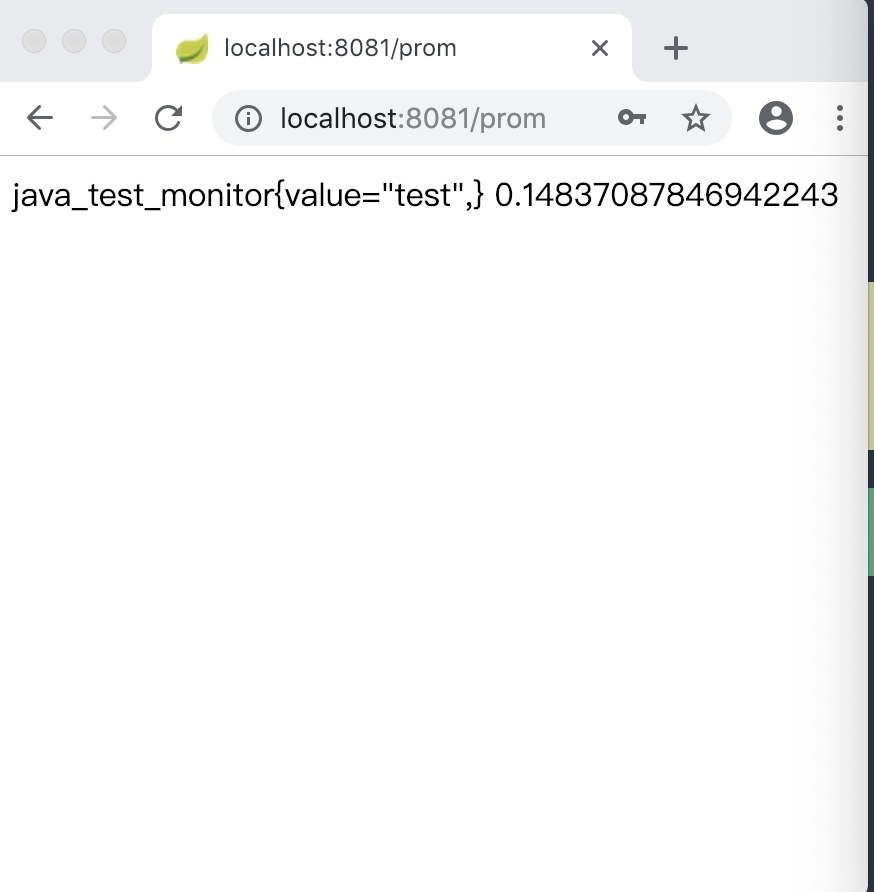
            return "java_test_monitor{value=\"test\",} " + random.nextDouble();

        }

        @ResponseBody

        @GetMapping("/user")

        public Authentication user() {

            return SecurityContextHolder.getContext().getAuthentication();

        }

    }
2.3.3、启动服务端认证
首先我们开启服务端,那么在先前的例子作如下更改
    @SpringBootApplication

    @EnableAuthorizationServer

    @Controller

    public class AuthorizationServer {

        @GetMapping("/order")

        public ResponseEntity<String> order() {

            ResponseEntity<String> responseEntity = new ResponseEntity("order", HttpStatus.OK);

            return responseEntity;

        }

        @GetMapping("/free/test")

        public ResponseEntity<String> test() {

            ResponseEntity<String> responseEntity = new ResponseEntity("free", HttpStatus.OK);

            return responseEntity;

        }

        @GetMapping("/login")

        public String login() {

            return "login";

        }

        @ResponseBody

        @GetMapping("/user")

        public Map<String, Object> userInfo() {

            OAuth2Authentication

                    authentication = (OAuth2Authentication) SecurityContextHolder.getContext().getAuthentication();

            Map<String, Object> map = new HashMap<>();

            map.put("auth", authentication);

            return map;

        }

        @GetMapping("/oauth/confirm_access")

        public String confirmAccess(HttpSession session, Map<String, Object> model, HttpServletRequest request) {

            //在这里推荐使用AuthorizationRequest来获取scope

           AuthorizationRequest authorizationRequest = (AuthorizationRequest) session.getAttribute("authorizationRequest");

            Authentication authentication = SecurityContextHolder.getContext().getAuthentication();

            model.put("auth", authentication);

            LinkedHashMap<String, String> linkedHashMap = (LinkedHashMap<String, String>) request.getAttribute("scopes");

            model.put("scopes", linkedHashMap.keySet());

            return "confirm_access";

        }

        public static void main(String[] args) {

            SpringApplication.run(AuthorizationServer.class, args);

        }

    }
在原有的基础之上添加confirmAccess,userInfo,login的方法分别用于跳转授权页,获取用户信息,及登录页的方法
Resource的资源配置类:
```java

@Configuration

@EnableResourceServer

public class ResourceConfigure extends ResourceServerConfigurerAdapter {

    @Override

    public void configure(HttpSecurity http) throws Exception {

        http.csrf().disable().sessionManagement().sessionCreationPolicy(SessionCreationPolicy.IF_REQUIRED)

                .and().authorizeRequests().antMatchers("/free/**").permitAll()

            	//静态资源过滤

                .and().authorizeRequests().antMatchers("/assets/**").permitAll()

                .and().authorizeRequests().anyRequest().authenticated()

                .and().formLogin().loginPage("/login").permitAll();//必须认证过后才可以访问

    }

}

```
这里的变动主要是针对于静态资源的过滤,同时配置了登录页也允许直接访问,同时权限页的配置相较之前没有太多变化。
@Configuration
public class WebSecurityConfig extends WebSecurityConfigurerAdapter {
@Override
protected void configure(HttpSecurity http) throws Exception {
http.csrf().disable().requestMatchers().anyRequest().
and().authorizeRequests().antMatchers("/oauth/*").authenticated().
and().formLogin().loginPage("/login").permitAll();
}
}
```
##2.3.4、演示示例
当启动好服务端后,再启动客户端,两个服务启动完毕后。我们根据上述例子,访问http://localhost:8081/prom ,然后它会跳转至服务端的登录页进行授权。
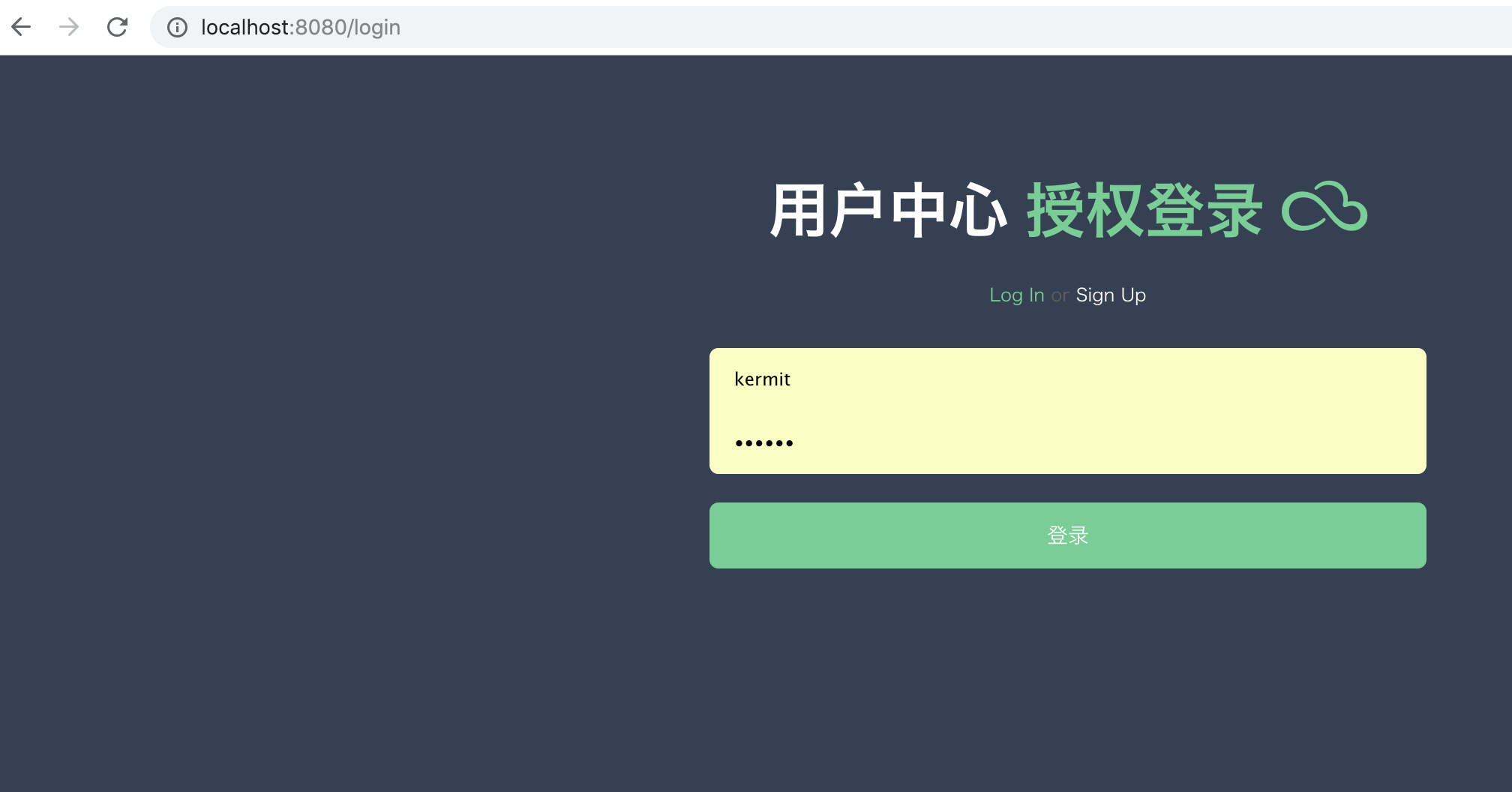
登录过后,会跳转到授权页
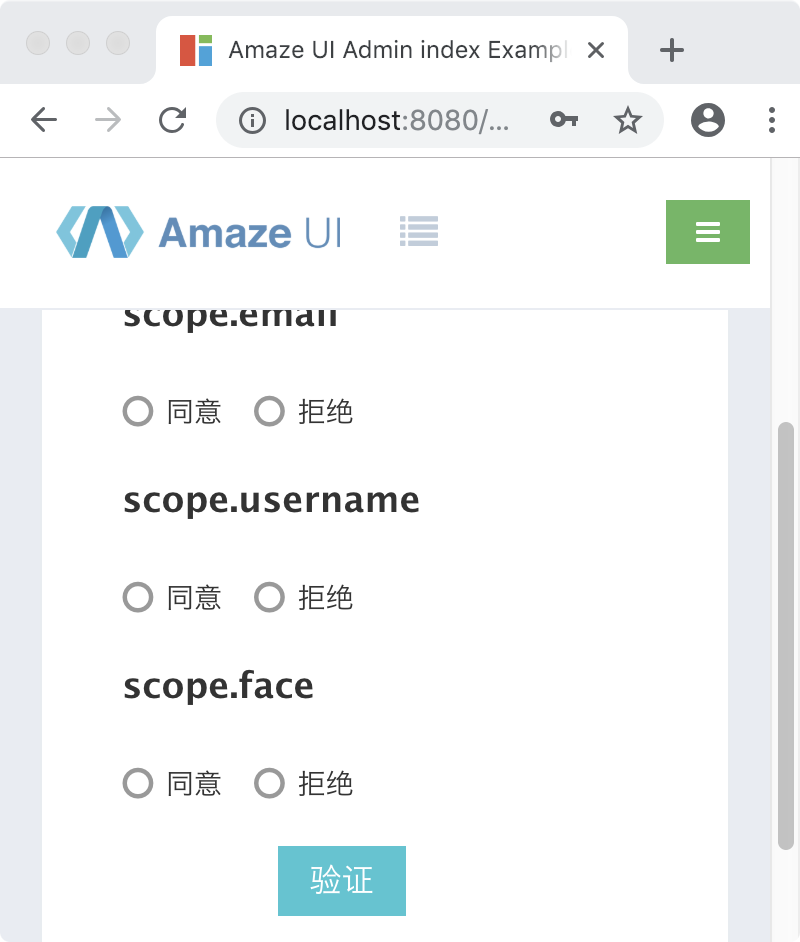
当通过授权后,会跳转到登录页进行token的获取,登录成功后我们可以访问到我们的目标地址:
SpringBoot之OAuth2.0学习之客户端快速上手的更多相关文章
- SpringBoot之oauth2.0学习之服务端配置快速上手
现在第三方登录的例子数见不鲜.其实在这种示例当中,oauth2.0是使用比较多的一种授权登录的标准.oauth2.0也是从oauth1.0升级过来的.那么关于oauth2.0相关的概念及其原理,大家可 ...
- OAuth2.0学习(1-12)开源的OAuth2.0项目和比较
OAuth2.0学习(2-1)OAuth的开源项目 1.开源项目列表 http://www.oschina.net/project/tag/307/oauth?lang=19&sort=t ...
- 如何比较Keras, TensorLayer, TFLearn ?——如果只是想玩玩深度学习,想快速上手 -- Keras 如果工作中需要解决内部问题,想快速见效果 -- TFLearn 或者 Tensorlayer 如果正式发布的产品和业务,自己设计网络模型,需要持续开发和维护 -- Tensorlayer
转自:https://www.zhihu.com/question/50030898/answer/235137938 如何比较Keras, TensorLayer, TFLearn ? 这三个库主要 ...
- OAuth2.0学习(2-1)Spring Security OAuth2.0 开发指南
开发指南:http://www.cnblogs.com/xingxueliao/p/5911292.html Spring OAuth2.0 提供者实现原理: Spring OAuth2.0提供者实际 ...
- OAuth2.0学习(1-11)新浪开放平台微博认证-使用OAuth2.0调用微博的开放API
使用OAuth2.0调用API 使用OAuth2.0调用API接口有两种方式: 1. 直接使用参数,传递参数名为 access_token URL 1 https://api.weibo.com/2/ ...
- OAuth2.0学习(1-2)OAuth2.0的一个企业级应用场景 - 新浪开放平台微博OAuth2.0认证
http://open.weibo.com/wiki/%E9%A6%96%E9%A1%B5 开发者可以先浏览OAuth2.0的接口文档,熟悉OAuth2.0的接口及参数的含义,然后我们根据应用场景各自 ...
- OAuth2.0学习(1-8) 授权方式五之Access_Token令牌过期更新
OAuth2.0的Access_Token令牌过期更新 如果用户访问的时候,客户端的"访问令牌"已经过期,则需要使用"更新令牌"申请一个新的访问令牌. 客户端发 ...
- OAuth2.0学习(1-3)OAuth2.0的参与者和流程
OAuth(开放授权)是一个开放标准.允许第三方网站在用户授权的前提下访问在用户在服务商那里存储的各种信息.而这种授权无需将用户提供用户名和密码提供给该第三方网站. OAuth允许用户提供一个令牌给第 ...
- oauth2.0学习笔记(摘抄简化)
大量摘抄白话简明教程. 附:可以参考<RFC6749协议中文版及oauth2.0>文档 一.OAuth 白话简明教程 1.简述 http://www.cnblogs.com/Ceri/p/ ...
随机推荐
- 100-days: nineteen
Title: Figure skating(花样滑冰): Olympic(奥林匹克的) champion Hanyu says '100 percent' on(引出时机) return to ice ...
- 大数据OLAP引擎对比
Presto:内存计算,mpp架构 PB级别数据 presto适合pb级的海量数据查询分析,不是说把pb的数据放进内存,比如一张pb表,查询count,vag这种有个特点,虽然数据很多,但是最终的 ...
- java各历史版本官网下载
java各历史版本官网下载: http://www.oracle.com/technetwork/java/javase/archive-139210.html
- Django实现微信消息推送
一 所需准备条件 微信公众号的分类 微信消息推送 公众号 已认证公众号 服务号 已认证服务号 企业号 基于:微信认证服务号 主动推送微信消息.前提:关注服务号环境:沙箱环境 沙箱环境地址: https ...
- stark组件开发之编辑功能实现
编辑功能.和添加一样! 唯一不同的就是, 需要编辑一个指定的 记录.这就需要,在列表页面, 渲染编辑的时候,添加一个 id 值: class UserInfoHandler(StartHandler ...
- spring rabbitmq集成
pom.xml加 <dependency> <groupId>com.rabbitmq</groupId> <artifactId>amqp-clien ...
- solr7.7.0搜索引擎使用(二)(添加搜索)
一.安装完毕之后,需要为solr添加core,每一个搜索server就是一个core,solr可以有很多core,我们需要创建一个core用于我们的搜索 添加core的方式有两种: 第一种进入solr ...
- java web+模板
这次测试需要在java web的基础上套入模板,在测试的过程中我遇到了许多问题,现在我可以使用模板来美化网页的许多格式.但是模板的许多代码我还是看不懂,其中有jquery的许多代码.在今后我会学习相关 ...
- quick-cocos2d-x lua框架解析(一)对UI进行操作的UiUtil脚本
最近一段时间接手了一个cocos游戏项目,由于我是U3D开发入门,所以花了一段时间来钻研cocos2d的使用与项目架构.与U3D相比,cocos2d的开发界面实在做的不咋地.不过在看过源码之后,源码跑 ...
- PAT 1088 三人行 模拟,坑 C
PAT 1088 三人行 https://pintia.cn/problem-sets/994805260223102976/problems/1038429286185074688 题目: 子曰:“ ...