
第二章:Python基础の快速认识基本数据类型和操作实战
本课主题
- 字符串和操作实战
- 二进制操作实战
- List 列表和操作实战
- Tuple 元組和操作实战
- Dict 字典和操作实战
- 作業需求
引言
这遍文章简单介绍了 Python 字符串和集合的方法和应用,包括字符串 (String)、列表 (List) 、字典 (Dictionary)、Tuple (元组)
字符串和操作实战
以下是字符串类里的函数:
import copy

fruits = ['apple','banana',[7,3,5,2],'straweberry','orange']

copy_fruit = copy.copy(fruits)

deep_fruit = copy.deepcopy(fruits)

# Copy

fruits2 = fruits.copy()

fruits[0] = "APPLE" # 改了做大寫都不會影響原本的列表

fruits[2][1] = 4444444444444444

fruits2[2][2] = "HAHA"

# python 默應只 COPY 第一層

print("fruits List :", fruits)

print("fruits2 List :", fruits2)

print("copy_fruit List :", copy_fruit)

print("deep_fruit List :", deep_fruit)
返回數字的函数
- len( ): 计算一个字符串的长度
>>> string = "0000Hello Python GoodBye Python GoodNight Python3333"

>>> len(string)

52
len(string)例子
- count( ): 计算函数里的字符串在当前字符串里出现多少次
>>> string = "0000Hello Python GoodBye Python GoodNight Python3333"

>>> string.count("Python")

3
String.count()例子
返回Boolean 值
当 value = False, 0, None, empty value, empty list [], empty string "",Boolean 会返回 False
当 value = True, 1, non-empty value, non-empty list [1,2,], non-empty string "hello",Boolean 会返回 True
- isdigit( ):查看当前字符串里是不是数字
>>> string = "0000Hello Python GoodBye Python GoodNight Python3333"

>>> string.isdigit()

False

>>> string = ""

>>> string.isdigit()

True
string.isdigit()例子
- islower( ):查看当前字符串里是不是小写
>>> string = "0000Hello Python GoodBye Python GoodNight Python3333"

>>> string.islower()

False

>>> string = "000python3"

>>> string.islower()

True
string.islower()例子
- isupper( ):查看当前字符串里是不是大写
>>> string = "0000Hello Python GoodBye Python GoodNight Python3333"

>>> string.isupper()

False

>>> string = "000PYTHON3"

>>> string.isupper()

True
string.isupper()例子
- isalpha( ):查看当前字符串里是不是只有英文
>>> string = "000python3"

>>> string.isalpha()

False

>>> string = "python"

>>> string.isalpha()

True
string.isalpha()例子
- isalnum( ):查看当前字符串里是不是所有字符里都是英文字/數字 (有空格不算所有)
>>> string = "0000Hello Python GoodBye Python GoodNight Python3333"

>>> string.isalnum()

False

>>> string = "python"

>>> string.isalnum()

True

>>> string = "000python3"

>>> string.isalnum()

True
string.isalnum()例子
- isdecimal( ):查看当前字符串里是不是所有都是数字
>>> string = "000python3"

>>> string.isdecimal()

False

>>> string = ""

>>> string.isdecimal()

True
string.isdecimal()例子
- isnumeric( ): 查看当前字符串裡是不是數字
>>> string = "000python3"

>>> string.isnumeric()

False

>>> string = ""

>>> string.isnumeric()

True

>>> string = 9999999

>>> string.isnumeric()

Traceback (most recent call last):

  File "<stdin>", line 1, in <module>

AttributeError: 'int' object has no attribute 'isnumeric'
string.isnumeric()例子
- istitle( ):
- isspace( ): 查看当前字符串裡是不是空值
>>> string = "000python3" #沒有空格

>>> string.isspace()

False

>>> string = "000 python 3" #字符串中间有空格

>>> string.isspace()

False

>>> string = "" #什么都没有

>>> string.isspace()

False

>>> string = " " #有一个空格

>>> string.isspace()

True
string.isspace()例子
- startswith( ): 查看当前字符串里开始值是不是以函数里的字符串开始
>>> string = "000python3"

>>> string.startswith("Hello")

False

>>> string = "Hello Python GoodBye Python GoodNight Python"

>>> string.startswith("Hello")

True
string.startswith()例子
- endswith( ): 查看当前字符串里结束值是不是以函数里的字符串结束
>>> string = "Hello Python GoodBye Python GoodNight Python"

>>> string.endswith("Python")

True

>>> string = "000python3"

>>> string.endswith("Python")

False
string.endswith()例子
操作字符串
- capitalize( ): 把当前字符串的第一个字母变成大写
>>> string = "apple"

>>> string.capitalize()

'Apple'
string.capitalize()例子
- strip( ): 把当前字符串的开始跟最后的0删除掉
>>> string = "000Python000"

>>> string.strip()

'000Python000'

>>> string.strip("")

'Python'
string.strip()例子
- rstrip( ): 把当前字符串的最后的0删除掉
>>> string = "000Python000"

>>> string.rstrip("")

'000Python'
string.rstrip()例子
- lower( ): 把当前字符串的所有字母变成小写
>>> string = "PyTHon"

>>> string.lower()

'python'

>>>
string.lower()例子
- upper( ): 把当前字符串的所有字母变成大写
>>> string = "PyTHon"

>>> string.upper()

'PYTHON'
string.upper()例子
- replace( ): 把函数里的字符串从当前的字符串转换成目标字符串
>>> string = "Hello Python GoodBye Python"

>>> string.replace("y","!")

'Hello P!thon GoodB!e P!thon'
string.replace()例子一
- replace( ): 把函数里的字符串从当前的字符串转换成目标字符串
>>> string.replace("y","!",2)

'Hello P!thon GoodB!e Python'
string.replace()例子二
- center( ): 把当前字符串置中
>>> string = "Hello Python GoodBye Python"

>>> string.center(100,"*")

'************************************Hello Python GoodBye Python*************************************'
string.center()例子
- join( ): 将当前字符串跟函数左边的字符串加起来,例如用 split( ) 函数把字符串分刮割成一個列表,再用 join( )函数把列表中的字符串合併。连接字符串应优先使用 join 而不是 +,join 的效率一舨比要高于 + 操作符,特别是字符串规模比较大的时候,因为使用join( )方法连接字符串时,会首先计算需要申请的总内存空间,然后一次性申请所需要的内存并将字符串序列中的每一个元素复制到内存中去。[3]
>>> string = "Hello Python GoodBye Python"

>>> "|".join(string)

'H|e|l|l|o| |P|y|t|h|o|n| |G|o|o|d|B|y|e| |P|y|t|h|o|n'

>>> fruit = ['apple','orange','watermelon']

>>> fruit

['apple', 'orange', 'watermelon']

>>> '|'.join(fruit)

'apple|orange|watermelon'

>>> str1, str2, str3 = 'Python ','is ','cool'

>>> res1 = str1 + str2 + str3

>>> res2 = ''.join([str1,str2,str3])  #建议尽量使用这个方法来做字符连接

>>> res1

'Python is cool'

>>> res2

'Python is cool'
'|'.join(a) 例子
- 将当前字符串切片,切片從[X到Y]
>>> string = "Hello Python GoodBye Python"

>>> string[5:10]

' Pyth'

>>> string[3:20]

'lo Python GoodBye'
切片例子
二进制操作实战
[更新中...]
List 列表和操作实战
一个列表可以存储不同类型的数据,它是一个可变的集合
List 類有以下的函数:
class list(object):

    """

    list() -> new empty list

    list(iterable) -> new list initialized from iterable's items

    """

    def append(self, p_object): # real signature unknown; restored from __doc__

        """ L.append(object) -> None -- append object to end """

        pass

    def clear(self): # real signature unknown; restored from __doc__

        """ L.clear() -> None -- remove all items from L """

        pass

    def copy(self): # real signature unknown; restored from __doc__

        """ L.copy() -> list -- a shallow copy of L """

        return []

    def count(self, value): # real signature unknown; restored from __doc__

        """ L.count(value) -> integer -- return number of occurrences of value """

        return 0

    def extend(self, iterable): # real signature unknown; restored from __doc__

        """ L.extend(iterable) -> None -- extend list by appending elements from the iterable """

        pass

    def index(self, value, start=None, stop=None): # real signature unknown; restored from __doc__

        """

        L.index(value, [start, [stop]]) -> integer -- return first index of value.

        Raises ValueError if the value is not present.

        """

        return 0

    def insert(self, index, p_object): # real signature unknown; restored from __doc__

        """ L.insert(index, object) -- insert object before index """

        pass

    def pop(self, index=None): # real signature unknown; restored from __doc__

        """

        L.pop([index]) -> item -- remove and return item at index (default last).

        Raises IndexError if list is empty or index is out of range.

        """

        pass

    def remove(self, value): # real signature unknown; restored from __doc__

        """

        L.remove(value) -> None -- remove first occurrence of value.

        Raises ValueError if the value is not present.

        """

        pass

    def reverse(self): # real signature unknown; restored from __doc__

        """ L.reverse() -- reverse *IN PLACE* """

        pass

    def sort(self, key=None, reverse=False): # real signature unknown; restored from __doc__

        """ L.sort(key=None, reverse=False) -> None -- stable sort *IN PLACE* """

        pass

    def __add__(self, *args, **kwargs): # real signature unknown

        """ Return self+value. """

        pass

    def __contains__(self, *args, **kwargs): # real signature unknown

        """ Return key in self. """

        pass

    def __delitem__(self, *args, **kwargs): # real signature unknown

        """ Delete self[key]. """

        pass

    def __eq__(self, *args, **kwargs): # real signature unknown

        """ Return self==value. """

        pass

    def __getattribute__(self, *args, **kwargs): # real signature unknown

        """ Return getattr(self, name). """

        pass

    def __getitem__(self, y): # real signature unknown; restored from __doc__

        """ x.__getitem__(y) <==> x[y] """

        pass

    def __ge__(self, *args, **kwargs): # real signature unknown

        """ Return self>=value. """

        pass

    def __gt__(self, *args, **kwargs): # real signature unknown

        """ Return self>value. """

        pass

    def __iadd__(self, *args, **kwargs): # real signature unknown

        """ Implement self+=value. """

        pass

    def __imul__(self, *args, **kwargs): # real signature unknown

        """ Implement self*=value. """

        pass

    def __init__(self, seq=()): # known special case of list.__init__

        """

        list() -> new empty list

        list(iterable) -> new list initialized from iterable's items

        # (copied from class doc)

        """

        pass

    def __iter__(self, *args, **kwargs): # real signature unknown

        """ Implement iter(self). """

        pass

    def __len__(self, *args, **kwargs): # real signature unknown

        """ Return len(self). """

        pass

    def __le__(self, *args, **kwargs): # real signature unknown

        """ Return self<=value. """

        pass

    def __lt__(self, *args, **kwargs): # real signature unknown

        """ Return self<value. """

        pass

    def __mul__(self, *args, **kwargs): # real signature unknown

        """ Return self*value.n """

        pass

    @staticmethod # known case of __new__

    def __new__(*args, **kwargs): # real signature unknown

        """ Create and return a new object.  See help(type) for accurate signature. """

        pass

    def __ne__(self, *args, **kwargs): # real signature unknown

        """ Return self!=value. """

        pass

    def __repr__(self, *args, **kwargs): # real signature unknown

        """ Return repr(self). """

        pass

    def __reversed__(self): # real signature unknown; restored from __doc__

        """ L.__reversed__() -- return a reverse iterator over the list """

        pass

    def __rmul__(self, *args, **kwargs): # real signature unknown

        """ Return self*value. """

        pass

    def __setitem__(self, *args, **kwargs): # real signature unknown

        """ Set self[key] to value. """

        pass

    def __sizeof__(self): # real signature unknown; restored from __doc__

        """ L.__sizeof__() -- size of L in memory, in bytes """

        pass

    __hash__ = None
class list(object) 源码
返回数字的函数
- 计算列表中有多少 count( ) 函数里指定的字符串,e.g. 计算列表中有出现了多少次 22
>>> list = [11,22,33,44,22,44,77,88,99]

>>> list.count(22)

2
list.count()例子
- 计算 index( ) 函数里的字符串在列表中的第几位,从0开始
>>> list = [11,22,33,44,22,44,77,88,99]

>>> list.index(77)

6
list.index()例子
- 把列表中的数组排序 list.sort( ),注意列表中的数值必需是单一的字符串类型或者是数字类型,列表排序不支持部份是字符串部份是数值类型的数据
>>> list = [11,22,33,44,22,44,77,88,99]

>>> list.sort()

>>> list

[11, 22, 22, 33, 44, 44, 77, 88, 99]
list.sort()例子
>>> list = [11,22,33,44,'h','a','n',77,88,99]

>>> list.sort()

Traceback (most recent call last):

  File "<stdin>", line 1, in <module>

TypeError: unorderable types: str() < int()
list.sort()混合型数据例子
- 调用 list.reverse( ) 倒传列表顺序
>>> list = [11,22,33,44,22,44,77,88,99]

>>> list.reverse()

>>> list

[99, 88, 77, 44, 22, 44, 33, 22, 11]
list.reverse( )例子
- 计算这个列表的长度 e.g. len(list)
>>> list = [11,22,33,44,22,44,77,88,99]

>>> len(list)

9
len()例子
- max( ): 计算这个列表的最大值
>>> list = [11,22,33,44,22,44,77,88,99]

>>> max(list)

99
max()例子
- min( ): 计算这个列表的最小值
>>> list = [11,22,33,44,22,44,77,88,99]

>>> min(list)

11
min()例子
新增
- list.append( ): 新增数据到列表中
>>> list = [11,22,33,44,22,44,77,88,99]

>>> list.append(55)

>>> list

[11, 22, 33, 44, 22, 44, 77, 88, 99, 55]
list.append()例子
- list += new_list:新增 new_list 列表到 list 列表中,类似于 extend 的作用
>>> list = ['apple','orange','waterlemon']

>>> new_list = ['coke','pizza','grillfish']

>>> list += new_list

>>> list

['apple', 'orange', 'waterlemon', 'coke', 'pizza', 'grillfish']
list += new_list 例子
- list.extend( ): 新增一组数据到列表中
>>> list = [11,22,33,44,22,44,77,88,99]

>>> list.extend([333,444,555])

>>> list

[11, 22, 33, 44, 22, 44, 77, 88, 99, 333, 444, 555]
list.extend()例子
- list.insert( ): 新增/插入数据到特定的位置
>>> list = [11,22,33,44,22,44,77,88,99]

>>> list.insert(3,55555555)

>>> list

[11, 22, 33, 55555555, 44, 22, 44, 77, 88, 99]
list.insert()例子
- list.copy( ): 复制列表
>>> list = [11,22,33,44,22,44,77,88,99]

>>> list2 = []

>>> list2

[]

>>> list2 = list.copy()

>>> list2

[11, 22, 33, 44, 22, 44, 77, 88, 99]
list.copy()例子
删除
- pop( ):移取列表中的一个元素(默认是最后一个),如果输入一个参数 e.g. pop(2),这表示从第2个索引取出数字
>>> list = [11,22,33,44,22,44,77,88,99]

>>> list.pop()

99

>>> list

[11, 22, 33, 44, 22, 44, 77, 88]
list.pop()例子
- remove( ):移取列表中的数据,可以输入参数,如果输入一个参数 e.g. list.remove(33) 表示从列表中取出的 33
>>> list = [11,22,33,44,22,44,77,88,99]

>>> list.remove(33)

>>> list

[11, 22, 44, 22, 44, 77, 88, 99]
list.remove()例子
- del:根据索引移取在列中的数据
>>> list = [11,22,33,44,22,44,77,88,99]

>>> del list[4]

>>> list

[11, 22, 33, 44, 44, 77, 88, 99]
del 例子
操作列表
- list[1]:
>>> list = [11,22,33,44,22,44,77,88,99]

>>> list[2]

33
list[]例子
返回Boolean
- in: 成员资格测试
>>> permission = 'rw'

>>> 'w' in permission

True

>>> fruits = ['apple','banana','orange','pineapple']

>>> 'apple' in fruits

True

>>> x = [11,22,33,44,55,66]

>>> 99 in x

False
in例子
列表解析
[expr for iter_var in iterable if cond_expr]
>>> a = [11,22,33,44,55]

>>> b = [i for i in a if i > 22]

>>> b

[33, 44, 55]
列表解析(例子一)
fruits = ['apple  ','  orange','pineapple  ']

fruits_list1 = []

for f in fruits:

    word = f.strip()

    fruits_list1.append(word)

fruits_list1

fruits_list2 = [ f.strip() for f in fruits]

fruits_list2
列表解析(例子二)
List课堂作业
- 写一个列表,列表里包含本组所有成员的名字
- 往中间的位置插入两个临组成员的名字
- 取出第3-8的人的列表
- 删除第7个人
- 把刚才加入的2个临的那2个人一次性删除
- 把组长的名字加入组长备注
# 写一个列表,列表里包含本组所有成员的名字

>>> student = ['Janice','Peter','Mary','Alex','Jason','Bonnie','Coco','Ben','Matthew','Roy']

# 往中间的位置插入两个临组成员的名字

>>> student.insert(5,'Tmp1_David')

>>> student

['Janice', 'Peter', 'Mary', 'Alex', 'Jason', 'Tmp1_David', 'Bonnie', 'Coco', 'Ben', 'Matthew', 'Roy']

>>> student.insert(6,'Tmp2_Kenny')

>>> student

['Janice', 'Peter', 'Mary', 'Alex', 'Jason', 'Tmp1_David', 'Tmp2_Kenny', 'Bonnie', 'Coco', 'Ben', 'Matthew', 'Roy']

# 取出第3-8的人的列表

>>> new_student = student[2:8]

>>> new_student

['Mary', 'Alex', 'Jason', 'Tmp1_David', 'Tmp2_Kenny', 'Bonnie']

# 删除第8个人

>>> student.remove("Bonnie")

>>> student

['Janice', 'Peter', 'Mary', 'Alex', 'Jason', 'Tmp1_David', 'Tmp2_Kenny', 'Coco', 'Ben', 'Matthew', 'Roy']

# 把刚才加入的2个临的那2个人一次性删除

>>> del student[5:7]

>>> student

['Janice', 'Peter', 'Mary', 'Alex', 'Jason', 'Coco', 'Ben', 'Matthew', 'Roy']

# 把组长的名字加入组长备注

>>> student[0] = 'Captain: Janice'

>>> student

['Captain: Janice', 'Peter', 'Mary', 'Alex', 'Jason', 'Coco', 'Ben', 'Matthew', 'Roy']

# 每隔一個取一個

>>> new_student2 = student[::2]

>>> new_student2

['Captain: Janice', 'Mary', 'Jason', 'Ben', 'Roy']
List课堂作业代码
>>> database = [

...     ['albert',''],

...     ['alex','alex123'],

...     ['janice','janice123'],

...     ['kennith','ken123'],

...     ['joe','jo123']

... ]

>>> user_input = input("Username: ")

Username: janice

>>> pswd_input = input("Password: ")

Password: janice123

>>> if [user_input,pswd_input] in database:

...     print("Access granted")

...

Access granted
登入列表检查例子
Tuple 元組和操作实战
元组跟列表一样也是一种序列,不同的是元组是不能修改,它是一个不可变的集合 (immutable collection)
- 创建 Tuple 有两种方式
>>> fruit = ['apple','orange','pineapple']

>>> type(fruit)

<class 'list'>

>>> t = tuple(fruit)

>>> t

('apple', 'orange', 'pineapple')

>>> type(t)

<class 'tuple'>
创建 tuple( ) 例子一
>>> t = (11,)

>>> t

(11,)
创建 tuple( ) 例子二
- unpack tuple
>>> a, b, c, d = ('one', 'two', 'three', 'four')

>>> a

'one'

>>> b

'two'

>>> c

'three'

>>> d

'four'
Unpack tuple
- 如果是单个数据需要定义 tuple 类型,必需要加上 , 号来区分 tuple 和普通数据
>>> x = 1,2,3

>>> x

(1, 2, 3)

>>> type(x)

<class 'tuple'>

>>> y = 42

>>> type(y)

<class 'int'>

>>> z = 42,

>>> type(z)

<class 'tuple'>

tuple
NamedTuple
>>> from collections import namedtuple

>>> Fruits = namedtuple('Fruits',['name','price'])

>>> fruit = Fruits('apple',5.35)

>>> fruit

Fruits(name='apple', price=5.35)

>>> fruit.name

'apple'

>>> fruit.price

5.35
namedtuple
Dict 字典和操作实战
dict = {'name':'Janice','age':20, 'gender':'Female'}
字典裡取值的方法
- d['key']:获取字典中的值
>>> dict = {'name':'Janice','age':20, 'gender':'Female'}

>>> dict['name']

'Janice'

>>> dict['age']

20
dict['key']
- d['key'] = 'value':把一个新的值赋值都指定的键
>>> dict = {'name':'Janice','age':20, 'gender':'Female'}

>>> dict['name'] = 'Beatrice'

>>> dict

{'name': 'Beatrice', 'gender': 'Female', 'age': 20}
dict['name']='Beatrice'
- len(dict):查看字典的长度
>>> len(dict)

3
len(dict)
- get('key'):获取字典里键的数值,如果没有的话便默认返回第二个参数的值。类似于 getOrElse( )函数。
>>> dict.get('name',None)

'Janice'
dict.get('name',None)
- copy( ):在内存中复制多一份数据,它会获取不同的内存地址。
>>> dict1 = {'name':'Janice','age':20, 'gender':'Female'}

# 把 dict1 用两个不同的方式复制

>>> copy_dict1 = dict1 # 直接相等

>>> dict2 = dict1.copy() # 调用 copy()函数

# 首先查看它们3个变量的数值

>>> dict1

{'name': 'Janice', 'gender': 'Female', 'age': 20}

>>> dict2

{'name': 'Janice', 'gender': 'Female', 'age': 20}

>>> copy_dict1

{'name': 'Janice', 'gender': 'Female', 'age': 20}

# 然后查看它们3个变量的内存地址

>>> id(dict1)

4485479816

>>> id(copy_dict1)

4485479816

>>> id(dict2)

4485479560
dict2 = dict1.copy()
- keys( ):只查看字典中的键
>>> dict.keys()

dict_keys(['name', 'gender', 'age'])
dict.keys()
- items( ):查看字典的所有键、值,而一个列表里面是一个元组的方式储存。
>>> dict.items()

dict_items([('name', 'Janice'), ('gender', 'Female'), ('age', 20)])
dict.items()
- values( ):只查看字典中的值
>>> dict.values()

dict_values(['Janice', 'Female', 20])
dict.values()
- setdefault( ):
>>> dict.setdefault('weight','50kg')

'50kg'

>>> dict

{'name': 'Janice', 'gender': 'Female', 'weight': '50kg', 'age': 20}
dict.setdefault()
- update( ):更新字典的值,有点似插入新的 Key、Value 组合到指定的字典中。
>>> d1 = {'langauge':'Python'}

>>> d2 = {'country':'China'}

>>> d1.update(d2)

>>> d1

{'langauge': 'Python', 'country': 'China'}

>>> d3 = {'country':'USA'}

>>> d1.update(d3)

>>> d1

{'langauge': 'Python', 'country': 'USA'}
d1.update(d2)
- popitem( ):取出一個 key,value 組合
>>> dict = {'name':'Janice','age':20, 'gender':'Female'}

>>> dict.popitem()

('name', 'Janice')

>>> dict.popitem()

('gender', 'Female')

>>> dict

{'age': 20}
dict.popitem()
- dict.pop('key','not found'):删除指定的 key,value 組合,接受第2个参数,如果删除时没有那个键的话会设回第2个参数,否则会报错。
>>> dict = {'name':'Janice','age':20, 'gender':'Female'}

>>> dict.pop('height','not found')

'not found'

>>> dict.pop('name')

'Janice'

>>> dict

{'gender': 'Female', 'age': 20}

>>> dict.pop('weight')

Traceback (most recent call last):

  File "<stdin>", line 1, in <module>

KeyError: 'weight'
dict.pop('height','not found')
- in:判断字符串是否是字典中的键
>>> dict = {'name':'Janice','age':20, 'gender':'Female'}

>>> 'name' in dict

True

>>> 'height' in dict

False
key in dict
- del dict[key]:删取字典中的键
>>> dict = {'name':'Janice','age':20, 'gender':'Female'}

>>> dict

{'name': 'Janice', 'gender': 'Female', 'age': 20}

>>> del dict['name']

>>> dict

{'gender': 'Female', 'age': 20}
del dict['key']
两个方法可以从字典里取数据:
- 需要一个从 Dict to List 的转换过程: dict.items( )
>>> dict = {"Name":"Janice","Age":20}

>>> for item in dict.items():

...     print("key: %s, values: %s" %(item[0],item[1]))

...

key: Name, values: Janice

key: Age, values: 20

>>> for k,v in dict.items():

...     print("key: %s, values: %s" %(k,v))

...

key: Name, values: Janice

key: Age, values: 20
Dict-List转换例子
- 先取出 key 然後再取出 value (这是个推荐的方法,因为不需要列表的转换过程,如果数据量太大的话,会有效率问题)
>>> dict = {"Name":"Janice","Age":20}

>>> for k in dict:

...     print(k,dict[k])

...

Name Janice

Age 20
dict[k]
有序字典
>>> from collections import OrderedDict

>>> d = OrderedDict()

>>> d['foo'] = 1

>>> d['bar'] = 2

>>> d['spam'] = 3

>>> d['grok'] = 4

>>>

>>> # Outputs "foo 1", "bar 2", "spam 3", "grok 4"

... for key in d:

...     print(key, d[key])

...

foo 1

bar 2

spam 3

grok 4
有序字典 OrderedDict()
总结
作业需求
- 启动程序后,让用户输入工资,然后打印商品列表
- 允许用户根据商品编号购买商品
- 用户选择商品后,检测余额是否够,够就直接扣款,不够就提醒
- 可随时退出,退出时,打印已购买商品和余额
- 优化购物程序,购买时允许用户选择购买多少件,
- 允許多用戶登錄,下一次登錄後,继续按上次的余額继续購買
- 允许用户查看之前的购买记录(纪录要显示商品购买时间)
- 商品列表分級展示,比如:
第一层菜单:

- 家电类

- 衣服

- 手机类

- 车类

随便选一个然后进入第二层菜单

- BMW X3 33333

- Audi Q5 333335

- Pasate 3333336

- Tesla Model_3 43890

- Tesla Model S 88888

- 显示已购买商品时,如果有重复的商品,不打印多行,而是在一行展示

id    p_name    num    total_price

1    TeslaModelS    2    4567897654

2    Coffee       2    60

3    Bike        1    700
菜单例子
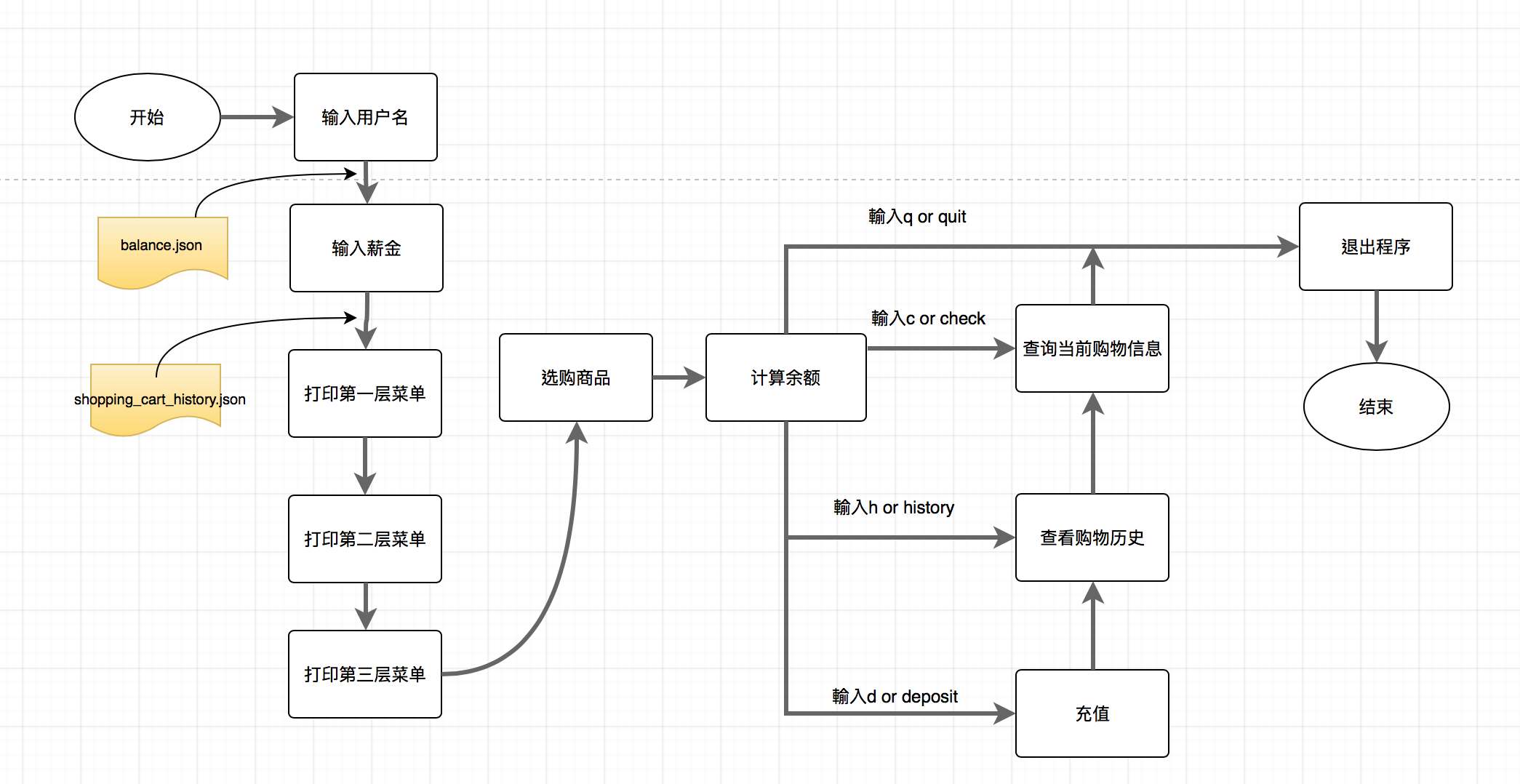
作业流程图
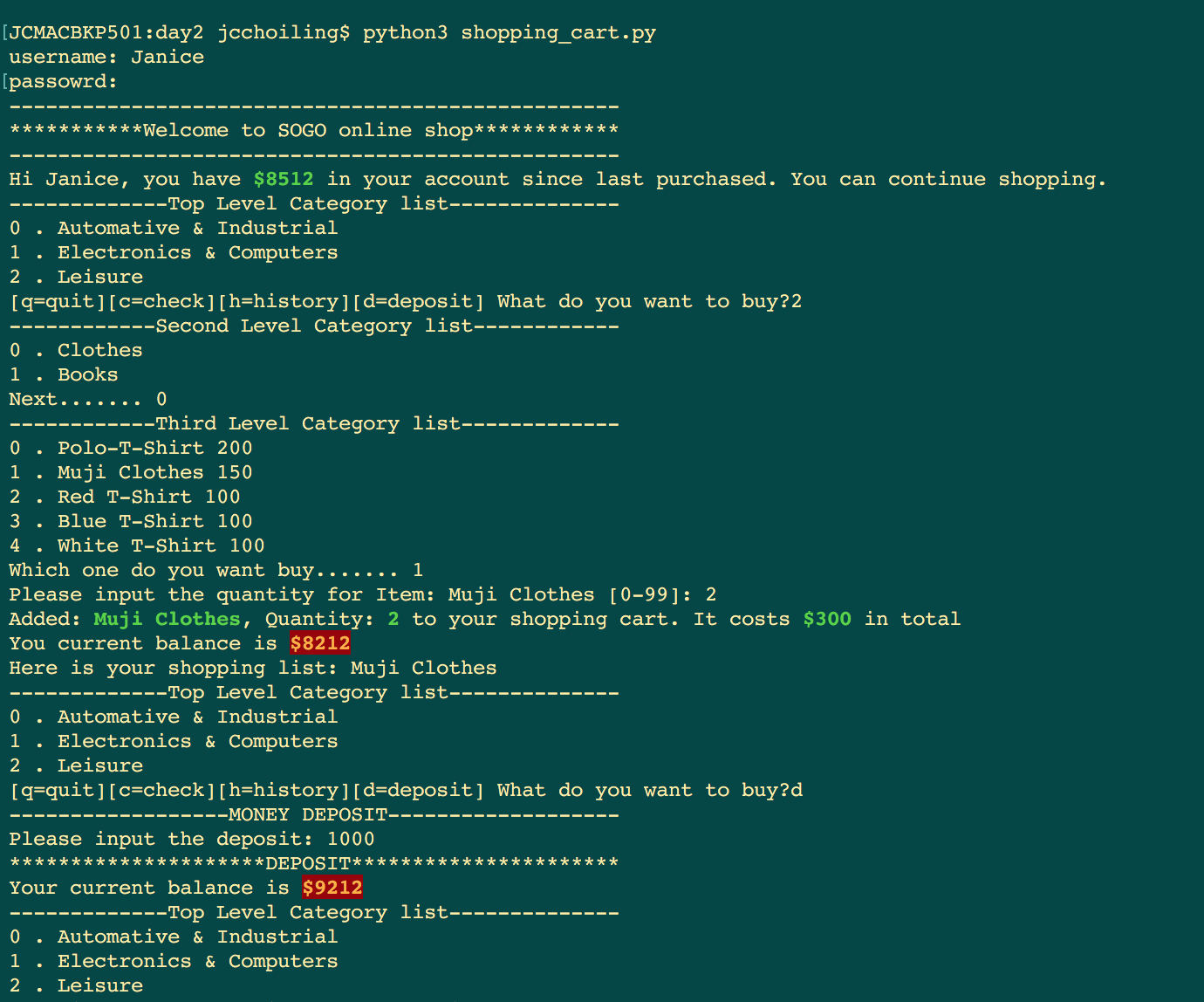
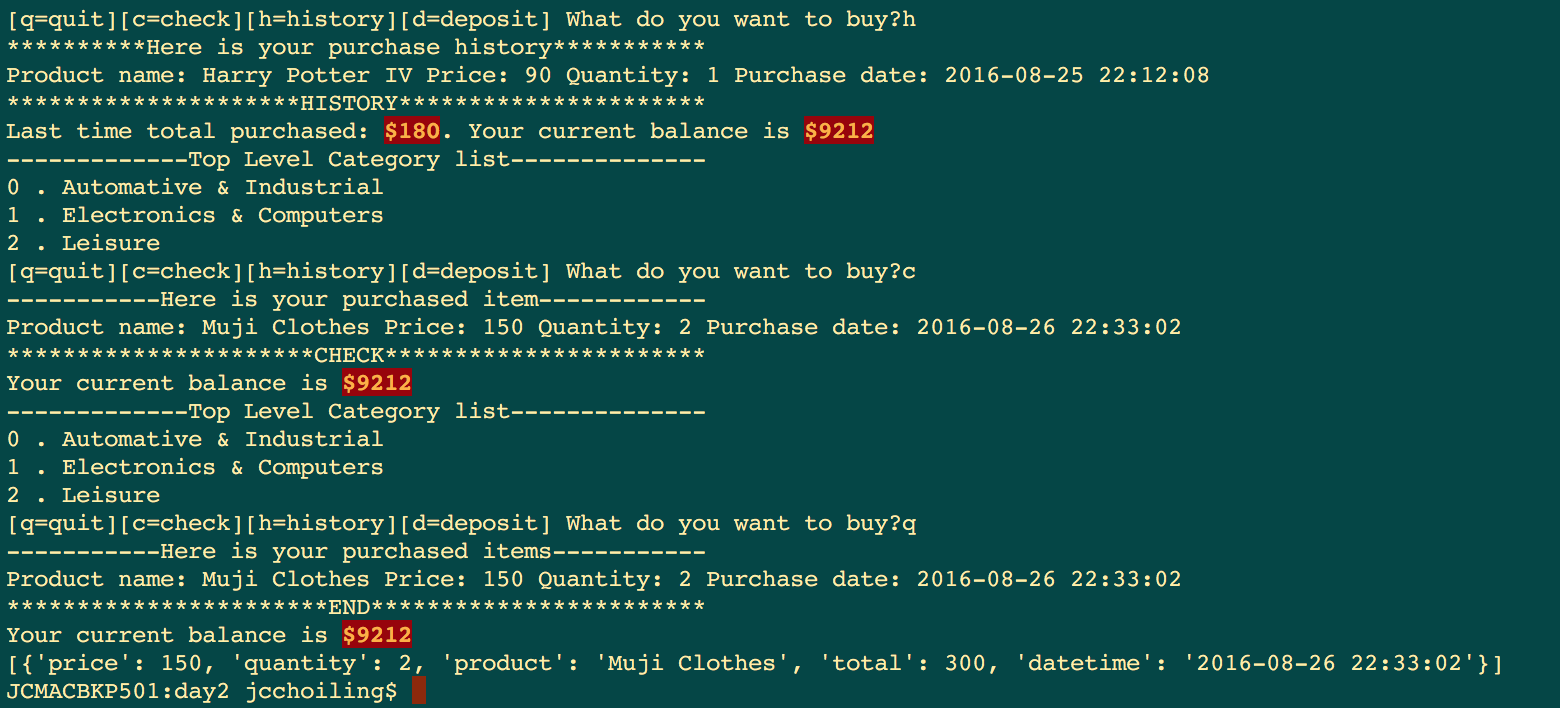
運行程序的結果
参考资料
[1] 金角大王:
[2] 银角大王:Python开发【第三篇】:Python基本数据类型
[3] 编写高质量代码:改善Python程序的91个建义:建议27
第二章:Python基础の快速认识基本数据类型和操作实战的更多相关文章
- 第二章 python基础(一)
第一节 Python文件类型 源代码 Python源代码的文件以“py”为扩展名,由Python程序解释,不需要编译 字节代码 Python源文件经编译后生成的扩展名为“pyc”的文件 编译方法 im ...
- 第二章----python基础
概要:python是一种计算机编程语言,有自己的一套语法,编译器或者解释器负责把符合语法的程序代码翻译成CPU能识别的机器码,然后执行.python使用缩进来组织代码块,Python程序中大小写是敏感 ...
- 第二章 python基础(二)
第九节 函数 函数就是完成特定功能的一个语句组,这组语句可以作为一个单位使用,并且给它取一个名字. 可以通过函数名在程序的不同地方多次执行(这通常叫做函数调用),却不需要在所有地方都重复编写这些语句. ...
- 第二章 Python基础语法
2.1 环境的安装 解释器:py2 / py3 (环境变量) 开发工具:pycharm 2.2 编码 编码基础 ascii ,英文.符号,8位为一个东西,2**8 unicode ,万国码,可以表示所 ...
- 第二章 python基础(三)
第十六节 MySQLdb win64位安装python-mysqldb1.2.5 ubuntu下安装MySQLdb sudo apt-get install python-MySQLdb 导入MySQ ...
- 第二章Python入门
第二章 Python入门 2.1.简介 Python是著名的"龟叔"(Guido van Rossum)在1989年圣诞节期间,为了打发无聊的圣诞节而编写的一个编程语言 Pytho ...
- java面向对象编程——第二章 java基础语法
第二章 java基础语法 1. java关键字 abstract boolean break byte case catch char class const continue default do ...
- [Python笔记][第二章Python序列-tuple,dict,set]
2016/1/27学习内容 第二章 Python序列-tuple tuple创建的tips a_tuple=('a',),要这样创建,而不是a_tuple=('a'),后者是一个创建了一个字符 tup ...
- net core体系-web应用程序-4asp.net core2.0 项目实战(CMS)-第二章 入门篇-快速入门ASP.NET Core看这篇就够了
.NET Core实战项目之CMS 第二章 入门篇-快速入门ASP.NET Core看这篇就够了 原文链接:https://www.cnblogs.com/yilezhu/p/9985451.ht ...
随机推荐
- 在CentOS上为Docker开启SELinux
a { color: #4183C4; text-decoration: none } a:hover { text-decoration: underline } ul,ol { padding-l ...
- 【Scala-ML】使用Scala构建机器学习工作流
引言 在这一小节中.我将介绍基于数据(函数式)的方法来构建数据应用.这里会介绍monadic设计来创建动态工作流,利用依赖注入这种高级函数式特性来构建轻便的计算工作流. 建模过程 在统计学和概率论中, ...
- ORACLE-015:ora-25153 暂时表空间为空,ora01652 无法通过128
写了一个复杂的select语句,突然oracle就报了:ora-25153 暂时表空间为空,这个错误,于是网上查了下.发现了例如以下解决方法:创建一个新的暂时表空间. 首先要有system权限.登录进 ...
- 什么是PMI
项目管理协会 PMI PMI是世界领先的非盈利会员协会的项目管理专业机构 ,在全球185个国家有70多万会员和证书持有人.此外,PMI还是多个英文短语的缩写,较为著名的是采购经理指数PMI. 项目管理 ...
- java基础数据类型包装类
*/ .hljs { display: block; overflow-x: auto; padding: 0.5em; color: #333; background: #f8f8f8; } .hl ...
- Java Web 单表操作
为了测试 JavaWeb 项目,我做了一个关于一张表的更新操作. 1.加群 如果需要本项目的源码,欢迎加群:438255459 2.解压 解压开这个包,然后用 Eclipse 打开项目,至于涉及到 T ...
- Hue上的Oozie构建工作流和定时任务步骤
Oozie是什么? Oozie是一种Java Web应用程序,它运行在Java servlet容器--即Tomcat--中,并使用数据库来存储以下内容: 工作流定义 当前运行的工作流实例,包括实例的状 ...
- 图片验证码(Struts2中使用)
写在前面: 最近在项目中做了一个登录页面,用到了图片验证码的功能,所以记录一下.方便之后再有用到,直接拿来用即可.其实图片验证码的生成都是有固定步骤的,网上也有很多的例子,有的时候,如果不想深究,都是 ...
- 【批处理】IF ERRORLEVER语句顺序注意
@echo off dir d:\dddddd if errorlevel 1 goto 1 if errorlevel 0 goto 0 rem 两行if语句不可交换位置,否则失败了也会显示成功. ...
- 为了CET-4!(二)
directions: For this part,you are allowed 30 minutes to write an eassay.Suppose there are two option ...