
SoapUI中XML解析
From http://www.robert-nemet.com/2011/11/groovy-xml-parsing-in-soapui.html
Introduction
Since soapUI allows users to add Groovy scripts in large number of
places ( property expansions, setup /teardown scripts, listeners, test
step, etc... ) users can use any technology to reach to the goal. Lets
look at those which can make our life easier when it comes to XML
parsing.
soapUI XML Support
Old way would be soapUI way or using GroovyUtils from soapUI. Its goal is to simplify scripting and it can be instantiate from any Groovy script in soapUI, with:
where context is available in any Groovy script in soapUI. Lets look at GroovyUtils:
def groovyUtils = new com.eviware.soapui.support.GroovyUtils( context )
| GroovyUtils Methods | |
|---|---|
expand(property) |
returns value of property, if there are property expansions they are expanded. |
extractErrorLineNumber(error) |
returns line number where error occurred |
|
getProjectPath()
|
returns path to project file |
|
getXml(node)
|
returns xml as a string from passed node |
getXmlHolder(xmlPropertyOrString) |
returns XmlHolder as a result of parsing passed Xml string |
registerJdbcDriver(driver) |
register JDBC driver for use in Groovy script |
setPropertyValue(testStep, property, value) |
sets a value for given test step property |
This time getXmlHolder is one that does what we need. Pars a given string as XML and returns object which we can use to manipulate with it.
| XmlHolder Methods | |
|---|---|
declareNamespace(prefix, uri) |
declare namespace prefix and URI |
getDomNode(xpath) |
returns a DOM node pointed by XPath expression |
getDomNodes(xpath) |
returns an array of DOM nodes pointed by XPath expression |
getNamespaces() |
returns a Map of namespaces |
getNodeValue(xpath) |
returns a value of node specified by XPath expression |
getNodeValues(xpath) |
returns an array of values specified by XPath expression |
getPrettyXml() |
returns a formatted XML |
getXml() |
returns a XML |
getXmlObject() |
returns a XmlBean Object |
| removeDomNodes(xpath) | removes a nodes specified by XPath expression |
setNodeValue(xpath, value) |
set a node value |
updateProperty() |
if a XmlHolder is created from test step property this updates that property |
updateProperty(prettyPrint)
|
if a XmlHolder is created from test step property this updates that property with well formatted XML |
Few Examples
Assume you have response:
For this examples I added a Properties Test Step with property response.
<soapenv:Envelope xmlns:soapenv="http://schemas.xmlsoap.org/soap/envelope/" xmlns:sim="http://www.example.org/SimpleSocialSOA/">

   <soapenv:Header/>

   <soapenv:Body>

      <sim:LoginResponse>

         <id>4456643453</id>

      </sim:LoginResponse>

   </soapenv:Body>

</soapenv:Envelope>
1. Parsing XML
According to that to get id from response you can do:
def groovyUtils = new com.eviware.soapui.support.GroovyUtils( context )

def holder = groovyUtils.getXmlHolder("Properties#response")

log.info holder.getNodeValue("//id")

log.info holder['//id']
notice two ways to get node value with getNodeValue method and with [] operator. Difference is that getNodeValue will return first value that can be found with set XPath, while [] operator returns a array of values.
If you assume that response is like:
<soapenv:Envelope xmlns:soapenv="http://schemas.xmlsoap.org/soap/envelope/" xmlns:sim="http://www.example.org/SimpleSocialSOA/">

   <soapenv:Header/>

   <soapenv:Body>

      <sim:LoginResponse>

         <id>4456643453</id>

         <id>4456643452</id>

         <id>4456643451</id>

         <id>4456643450</id>

      </sim:LoginResponse>

   </soapenv:Body>

</soapenv:Envelope>
Than this script:
def groovyUtils = new com.eviware.soapui.support.GroovyUtils( context )

def holder = groovyUtils.getXmlHolder("Properties#response")

log.info holder.getNodeValue("//id")

for( node in holder['//id'] )

 log.info node
will produce result like this:

2. Updating XML
Response as above and we do:
def groovyUtils = new com.eviware.soapui.support.GroovyUtils( context )

def holder = groovyUtils.getXmlHolder("Properties#response")

holder.setNodeValue("//id", "aaaaa")

for( node in holder['//id'] )

 log.info node

def holder2 = groovyUtils.getXmlHolder("Properties#response")

holder2.getNodeValue("//id")

for( node in holder2['//id'] )

 log.info node
Result is:
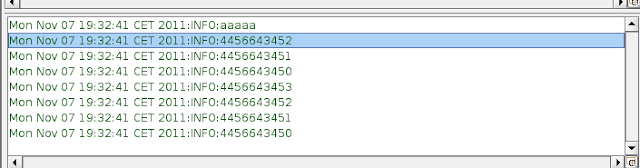
from this we can learn:
- if there are several nodes as result of XPath expression only first's node value will be changed with setNodeValue
- setting node value is not enough to update property value, we forgot to use updateProperty method
def groovyUtils = new com.eviware.soapui.support.GroovyUtils( context )

def holder = groovyUtils.getXmlHolder("Properties#response")

holder.setNodeValue("//id", "aaaaa")

for( node in holder['//id'] )

 log.info node

holder.updateProperty()

def holder2 = groovyUtils.getXmlHolder("Properties#response")

holder2.getNodeValue("//id")

for( node in holder2['//id'] )

 log.info node
Instead of using:
holder.setNodeValue("//id", "aaaaa")
you can use also:
holder["//id"] = "aaaaa"
And if XmlNode is created from property as in example above use updateProperty method to apply your changes to property or use GroovyUtils.setPropertyValue method.
Groovy XML
There are three classes built in Groovy for processing XML: XMLParser, XMLSlurper and DOMCategory. Best practice is to use XMLSlurper in
soapUI. Reason is that it have smallest memory footprint from all
three. I would no go in depths for those, you can read here XML processing.
This for example:
import groovy.xml.StreamingMarkupBuilder

def response = context.testCase.testSteps['Properties'].properties['response'].value

def responseXml = new XmlSlurper().parseText(response)

responseXml.breadthFirst().each {

 def v = it.toString()

 if ( it.name() == 'id')

    it.replaceBody("$v XX")

 }
appends " XX" to values of all id nodes.
Generally it is easier to use GroovyUtils but if you are familiar or invest some time in XmlSlurper you can get better results and more flexible scripts.
SoapUI中XML解析的更多相关文章
- 2016 - 1- 23 iOS中xml解析 (!!!!!!!有坑要解决!!!!!!)
一: iOS中xml解析的几种方式简介 1.官方原生 NSXMLParser :SAX方式解析,使用起来比较简单 2.第三方框架 libxml2 :纯C 同时支持DOM与SAX GDataXML: D ...
- Android中XML解析-Dom解析
Android中需要解析服务器端传过来的数据,由于XML是与平台无关的特性,被广泛运用于数据通信中,有的时候需要解析xml数据,格式有三种方式,分别是DOM.SAX以及PULL三种方式,本文就简单以D ...
- Android中XML解析-SAX解析
昨天由于时间比较匆忙只写了Android中的XML解析的Dom方式,这种方式比较方便,很容易理解,最大的不足就是内容多的时候,会消耗内存.SAX(Simple API for XML)是一个解析速度快 ...
- Android中XML解析-PULL解析
前面写了两篇XML解析的Dom和SAX方式,Dom比较符合思维方式,SAX事件驱动注重效率,除了这两种方式以外也可以使用Android内置的Pull解析器解析XML文件. Pull解析器的运行方式与 ...
- Android中XML解析,保存的三种方法
简单介绍 在Android开发中,关于XML解析有三种方式,各自是: SAX 基于事件的解析器.解析速度快.占用内存少.非常适合在Android移动设备中使用. DOM 在内存中以树形结构存放,因此检 ...
- Android中XML解析
package com.example.thebroadproject; public class Book { private int id; private String name; privat ...
- xml解析----java中4中xml解析方法(转载)
转载:https://www.cnblogs.com/longqingyang/p/5577937.html 描述 XML是一种通用的数据交换格式,它的平台无关性.语言无关性.系统无关性.给数据集成与 ...
- cocos2d-x 中XML解析与数据存储
一不小心就玩了一周的游戏了.哎.玩的时候时间过得总是这么快... 于是今天决定看一下之前不怎么非常熟悉的XML;(之前做游戏时数据的储存用到过XML,但这块是还有一个同事在做,所以不怎么熟悉), 看了 ...
- C# 将XML格式字符串,写入数据集的表中 XML解析
将XML格式字符串,写入数据集的表1中 命名空间:using System.Xml; string strRead;//strRead为以下xml值 ...
随机推荐
- unrecognized font family "iconfont2"
起因:使用React Native开发App,需要使用自定义字体iconfont2.ttf,要在xCode中引入该字体 步骤:将字体文件拷贝到项目工程中,在Info.plist文件中添加Fonts p ...
- jquery 的页面下拉选项
<!-- field的属性对应数据库表的内容 --> <th field="ANSWERNUM" formatter="formatterOption& ...
- android-iconify 使用详解
android-iconify 使用详解 有图有真相 1.android-iconify简介 iconify的github地址:https://github.com/JoanZapata/androi ...
- ORACLE - 用户和角色的权限管理
在ORACLE中,创建用户后需要授权才能使用. 一.用户管理 1. 用户和角色信息查询 --查询所有用户 SQL> select * from dba_users; --经授予的用户或角色的系统 ...
- Python的time和datetime模块
Python的time和datetime模块 time 常用的有time.time()和time.sleep()函数. import time print(time.time()) 149930555 ...
- Codeforces 828B Black Square(简单题)
Codeforces 828B Black Square(简单题) Description Polycarp has a checkered sheet of paper of size n × m. ...
- 表达式求值(二叉树方法/C++语言描述)(三)
二叉树方法求值对运算数处理的方法与栈方法求值不太相同,除了将字符串中的运算数转换为浮点类型外,还需要生成新的节点: void Calculator::dealWithNumber(char *& ...
- null == undefined ?
最近在看<JavaScript高级程序设计>一书,书中讲到相等操作符(==)时说,要比较相等性之前,不能将 null 和 undefined 转换成其他任何值,但要记住 null == u ...
- 字符串匹配之KMP,C++实现
文字介绍KMP我就不讲了,相信大家看了不少别的文章也没看懂,我肯定也不能用文字表达清楚. 最好的办法就是看严老师的视频,讲的很清晰. 请百度 KMP 严蔚敏: 在这里我用C++实现一下: #inclu ...
- java虚拟机详解
注: 此篇文章可以算是读<深入理解Java虚拟机:JVM高级特性与最佳实践>一书后的笔记总结加上我个人的心得看法. 整体总结顺序沿用了书中顺序,但多处章节用自己的话或直白或扩展的进行了重新 ...