
将数据库从服务器移到浏览器--indexedDB基本操作封装
数据库是属于服务器的,这是天经地义的事,但是有时候数据也许并非需要存储在服务器,但是这些数据也是一条一条的记录,怎么办?今天来带领你领略一下H5的一个新特性--indexedDB的风骚。你会情不自禁的发出感叹--不可思议!
一、链接数据库
indexedDB没有创建数据库的概念,你可以直接链接数据库,如果你链接的数据库并不存在,那么会自动的创建一个数据库。看下面的这个例子。
<!DOCTYPE html>

<html lang="en">

<head>

    <meta charset="UTF-8">

    <title>Document</title>

</head>

<body>

    <button type="" id='conbtn'>链接数据库</button>

<script>

    // In the following line, you should include the prefixes of implementations you want to test.

    window.indexedDB = window.indexedDB || window.mozIndexedDB || window.webkitIndexedDB || window.msIndexedDB;

   // DON'T use "var indexedDB = ..." if you're not in a function.

   // Moreover, you may need references to some window.IDB* objects:

   window.IDBTransaction = window.IDBTransaction || window.webkitIDBTransaction || window.msIDBTransaction;

   window.IDBKeyRange = window.IDBKeyRange || window.webkitIDBKeyRange || window.msIDBKeyRange

   // (Mozilla has never prefixed these objects, so we don't need window.mozIDB*)

   function connectDB(name,version,success,error){

         let dbConnect = indexedDB.open(name,version);

              dbConnect.onsuccess = function(e){

                  console.log('数据库链接成功!');

                success(e.target.result);

            }

            dbConnect.onerror = function(e){

                console.log('数据库链接失败!');

                error(e);

            }

            dbConnect.onupgradeneeded = function(e){

                success(e.target.result);

                let oldVersion = e.oldVersion;

                let newVersion = e.newVersion;

                console.log('数据库更新成功,旧的版本号为:'+oldVersion+",新的版本号为:"+newVersion);

            }

   }

   window.onload=function(){

           let btn  = document.getElementById('conbtn');

           btn.onclick = function(){

               connectDB('haha',1,function(){

                   console.log('链接成功,或者更新成功回调函数');

               },function(){

                   console.log('链接失败回调函数!')

               });

           }

   }

</script>

</body>

</html>
我点了两次链接数据库,结果是这样的。
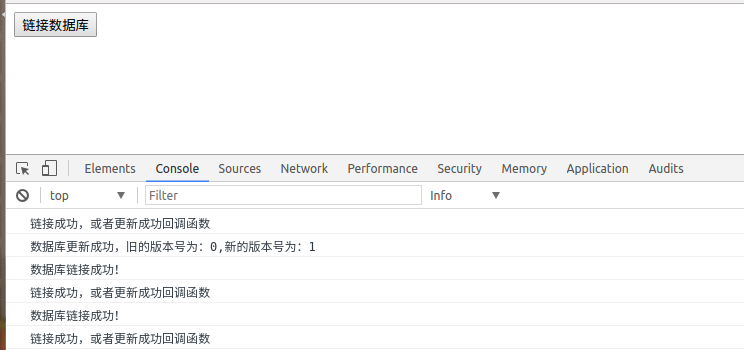
在Application的indexedDB中我们发现多了一个东西。
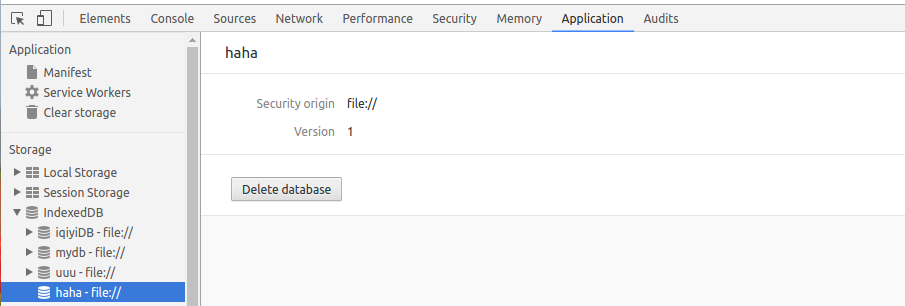
可以看到haha数据库已经成功建立了。
indexedDB的open方法用来链接或者更新数据库,第一次创建也认为是一次更新。第一个参数是数据库的名字,第二个参数为版本号。第一次创建或者版本号发生改变时出发更新事件upgradeneeded,链接成功后出发success事件,链接出错时触发error事件。
二、建表和索引
<!DOCTYPE html>

<html lang="en">

<head>

    <meta charset="UTF-8">

    <title>Document</title>

</head>

<body>

    <button type="" id='conbtn'>链接数据库</button>

<script>

    // In the following line, you should include the prefixes of implementations you want to test.

    window.indexedDB = window.indexedDB || window.mozIndexedDB || window.webkitIndexedDB || window.msIndexedDB;

   // DON'T use "var indexedDB = ..." if you're not in a function.

   // Moreover, you may need references to some window.IDB* objects:

   window.IDBTransaction = window.IDBTransaction || window.webkitIDBTransaction || window.msIDBTransaction;

   window.IDBKeyRange = window.IDBKeyRange || window.webkitIDBKeyRange || window.msIDBKeyRange

   // (Mozilla has never prefixed these objects, so we don't need window.mozIDB*)

   function connectDB(name,version,success,update,error){

         let dbConnect = indexedDB.open(name,version);

              dbConnect.onsuccess = function(e){

                  console.log('数据库链接成功!');

                success(e.target.result);

            }

            dbConnect.onerror = function(e){

                console.log('数据库链接失败!');

                error(e);

            }

            dbConnect.onupgradeneeded = function(e){

                update(e.target.result);

                let oldVersion = e.oldVersion;

                let newVersion = e.newVersion;

                console.log('数据库更新成功,旧的版本号为:'+oldVersion+",新的版本号为:"+newVersion);

            }

   }

       function createTable(idb,storeName,key,idxs){

        if(!idb){

            console.log(idb);

            return ;

        }

        if(!key || !idxs){

            console.log('参数错误');

            return ;

        }

        if(!storeName){

            console.log('storeName必须');

            return ;

        }

        try{

            var store = idb.createObjectStore(storeName,key);

            console.log('数据库存储对象(table)创建成功');

            for(var i = 0;i<idxs.length;i++){

                var idx = idxs[i];

                store.createIndex(idx.indexName,idx.keyPath,idx.optionalParameters);

                    console.log('索引'+idx.indexName+'创建成功');

            }

        }catch(e){

            console.log('建表出现错误');

            console.log(JSON.stringify(e))

        }

    }

   window.onload=function(){

           let btn  = document.getElementById('conbtn');

           btn.onclick = function(){

               connectDB('haha',1,

                 function(idb){

                   console.log('链接成功,或者更新成功回调函数');

               },function(idb){

                   createTable(idb,'test',{keyPath:'id',autoIncrement:true},[

                       {

                       indexName:'testIndex',

                     keyPath:'name',

                     optionalParameters:{

                         unique:true,

                         multiEntry:false

                     }}]);

               },function(){

                   console.log('链接失败回调函数!')

               });

           }

   }

</script>

</body>

</html>
我点了一下按钮结果时这样的。
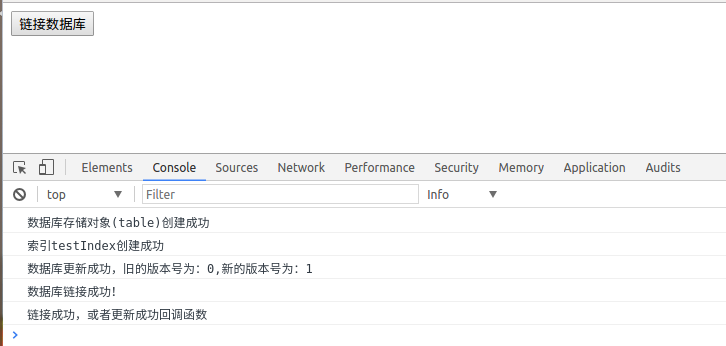

这里用到的两个核心方法时createObjectStore,和createIndex,这两个方法必须在数据库发生更新的事件中执行。
createObjectStore方法可以理解成是创建表,接受第一个参数为一个字符串,表示表名,第二个参数是一个对象,指定主键相关的东西,{keyPath:'主键是哪个字段',autoIncrement:是否自增}。
createIndex方法是创建索引的,接受三个参数,第一个是一个字符串,表示索引的名字,第二个参数表示字段名(谁的索引),第三个参数是个对象,具体自己查去。索引的作用是在查询操作时可以用到,不详讲,自行google吧。
三、添加数据
<!DOCTYPE html>

<html lang="en">

<head>

    <meta charset="UTF-8">

    <title>Document</title>

</head>

<body>

    <button type="" id='conbtn'>链接数据库</button>

    <button type="" id='add'>添加数据</button>

<script>

    // In the following line, you should include the prefixes of implementations you want to test.

    window.indexedDB = window.indexedDB || window.mozIndexedDB || window.webkitIndexedDB || window.msIndexedDB;

   // DON'T use "var indexedDB = ..." if you're not in a function.

   // Moreover, you may need references to some window.IDB* objects:

   window.IDBTransaction = window.IDBTransaction || window.webkitIDBTransaction || window.msIDBTransaction;

   window.IDBKeyRange = window.IDBKeyRange || window.webkitIDBKeyRange || window.msIDBKeyRange

   // (Mozilla has never prefixed these objects, so we don't need window.mozIDB*)

   function connectDB(name,version,success,update,error){

         let dbConnect = indexedDB.open(name,version);

              dbConnect.onsuccess = function(e){

                  console.log('数据库链接成功!');

                success(e.target.result);

            }

            dbConnect.onerror = function(e){

                console.log('数据库链接失败!');

                error(e);

            }

            dbConnect.onupgradeneeded = function(e){

                update(e.target.result);

                let oldVersion = e.oldVersion;

                let newVersion = e.newVersion;

                console.log('数据库更新成功,旧的版本号为:'+oldVersion+",新的版本号为:"+newVersion);

            }

   }

       function createTable(idb,storeName,key,idxs){

        if(!idb){

            console.log(idb);

            return ;

        }

        if(!key || !idxs){

            console.log('参数错误');

            return ;

        }

        if(!storeName){

            console.log('storeName必须');

            return ;

        }

        try{

            var store = idb.createObjectStore(storeName,key);

            console.log('数据库存储对象(table)创建成功');

            for(var i = 0;i<idxs.length;i++){

                var idx = idxs[i];

                store.createIndex(idx.indexName,idx.keyPath,idx.optionalParameters);

                    console.log('索引'+idx.indexName+'创建成功');

            }

        }catch(e){

            console.log('建表出现错误');

            console.log(JSON.stringify(e))

        }

    }

    function add(storeName,values){

    connectDB('haha',1,function(idb){

        var ts = idb.transaction(storeName,"readwrite");

        var store = ts.objectStore(storeName);

        for(var i = 0;i<values.length;i++){

            (function(i){

                var value = values[i];

                var req = store.put(value);

                req.onsuccess = function(){

                    console.log("添加第"+i+"个数据成功");

                }

                req.onerror = function(e){

                    console.log("添加第"+i+"个数据失败");

                    console.log(JSON.stringify(e));

                }

            })(i)

        }

        ts.oncomplete = function(){

            console.log('添加数据事务结束!');

        }

    },function(){},function(){});

    }

   window.onload=function(){

           let btn  = document.getElementById('conbtn');

           btn.onclick = function(){

               connectDB('haha',1,

                 function(idb){

                   console.log('链接成功,或者更新成功回调函数');

               },function(idb){

                   createTable(idb,'test',{keyPath:'id',autoIncrement:true},[

                       {

                       indexName:'testIndex',

                     keyPath:'name',

                     optionalParameters:{

                         unique:true,

                         multiEntry:false

                     }}]);

               },function(){

                   console.log('链接失败回调函数!')

               });

           }

           let add1 = document.getElementById('add');

           add1.onclick = function(){

               add('test',[{name:"fjidfji",a:'uuuu'}])

           }

   }

</script>

</body>

</html>
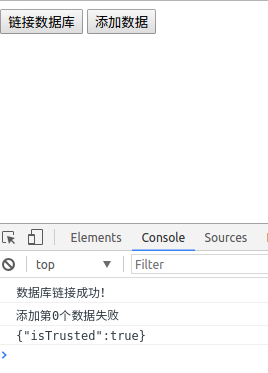
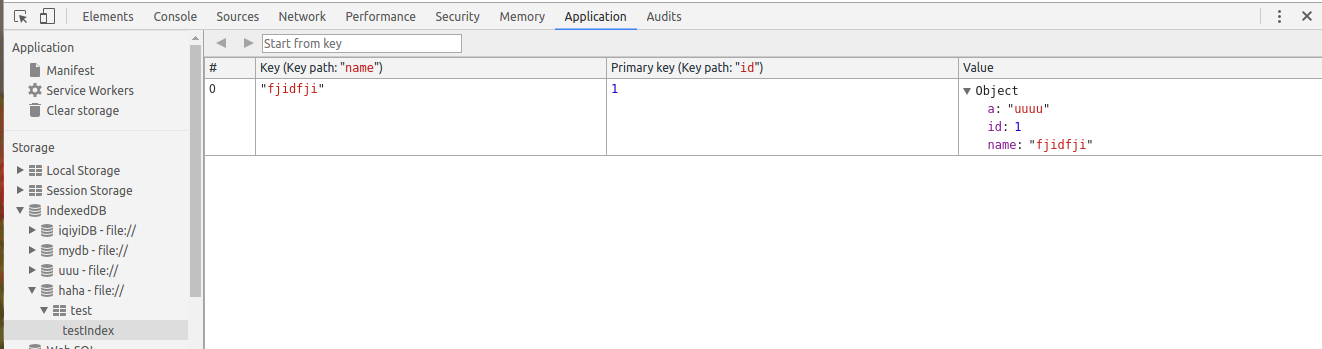
比较神奇的是你在建表的时候不需要指定你的字段,再添加数据时可以随便加。添加数据用到的是表对象的put方法,之前需要一个事务,从事务调个方法拿到存储对象(可以理解为表),具体看看例子就明白了。
四、查询数据
<!DOCTYPE html>

<html lang="en">

<head>

    <meta charset="UTF-8">

    <title>Document</title>

</head>

<body>

    <button type="" id='conbtn'>链接数据库</button>

    <button type="" id='add'>添加数据</button>

    <button type="" id="selectBtn">查询</button>

<script>

    // In the following line, you should include the prefixes of implementations you want to test.

    window.indexedDB = window.indexedDB || window.mozIndexedDB || window.webkitIndexedDB || window.msIndexedDB;

   // DON'T use "var indexedDB = ..." if you're not in a function.

   // Moreover, you may need references to some window.IDB* objects:

   window.IDBTransaction = window.IDBTransaction || window.webkitIDBTransaction || window.msIDBTransaction;

   window.IDBKeyRange = window.IDBKeyRange || window.webkitIDBKeyRange || window.msIDBKeyRange

   // (Mozilla has never prefixed these objects, so we don't need window.mozIDB*)

   function connectDB(name,version,success,update,error){

         let dbConnect = indexedDB.open(name,version);

              dbConnect.onsuccess = function(e){

                  console.log('数据库链接成功!');

                success(e.target.result);

            }

            dbConnect.onerror = function(e){

                console.log('数据库链接失败!');

                error(e);

            }

            dbConnect.onupgradeneeded = function(e){

                update(e.target.result);

                let oldVersion = e.oldVersion;

                let newVersion = e.newVersion;

                console.log('数据库更新成功,旧的版本号为:'+oldVersion+",新的版本号为:"+newVersion);

            }

   }

       function createTable(idb,storeName,key,idxs){

        if(!idb){

            console.log(idb);

            return ;

        }

        if(!key || !idxs){

            console.log('参数错误');

            return ;

        }

        if(!storeName){

            console.log('storeName必须');

            return ;

        }

        try{

            var store = idb.createObjectStore(storeName,key);

            console.log('数据库存储对象(table)创建成功');

            for(var i = 0;i<idxs.length;i++){

                var idx = idxs[i];

                store.createIndex(idx.indexName,idx.keyPath,idx.optionalParameters);

                    console.log('索引'+idx.indexName+'创建成功');

            }

        }catch(e){

            console.log('建表出现错误');

            console.log(JSON.stringify(e))

        }

    }

    function add(storeName,values){

    connectDB('haha',1,function(idb){

        var ts = idb.transaction(storeName,"readwrite");

        var store = ts.objectStore(storeName);

        for(var i = 0;i<values.length;i++){

            (function(i){

                var value = values[i];

                var req = store.put(value);

                req.onsuccess = function(){

                    console.log("添加第"+i+"个数据成功");

                }

                req.onerror = function(e){

                    console.log("添加第"+i+"个数据失败");

                    console.log(JSON.stringify(e));

                }

            })(i)

        }

        ts.oncomplete = function(){

            console.log('添加数据事务结束!');

        }

    },function(){},function(){});

    }

    function select(storeName,count,callback){

        connectDB('haha',1,function(idb){

            var total = 0;

            var data = [];

            var ts = idb.transaction(storeName,"readonly");

            var store = ts.objectStore(storeName);

            var req = store.count();

            var req2 = null;

            req.onsuccess = function(){

                total = this.result;

                var realCount = (count<=total)?count:total;

                    var range = IDBKeyRange.bound(0,Number.MAX_VALUE);

                    req2 = store.openCursor(range,'prev');

                    var cc = 0;

                    req2.onsuccess = function(){

                        var cursor = this.result;

                        if(cursor){

                            cc++;

                            data.push(cursor.value);

                            if(cc==realCount){

                                callback(data);

                                return;

                            }

                            cursor.continue();

                        }

                    }

                    req2.onerror = function(){

                        console.log("检索出错")

                    }

            }

        },function(){},function(){});

    }

   window.onload=function(){

           let btn  = document.getElementById('conbtn');

           btn.onclick = function(){

               connectDB('haha',1,

                 function(idb){

                   console.log('链接成功,或者更新成功回调函数');

               },function(idb){

                   createTable(idb,'test',{keyPath:'id',autoIncrement:true},[

                       {

                       indexName:'testIndex',

                     keyPath:'name',

                     optionalParameters:{

                         unique:true,

                         multiEntry:false

                     }}]);

               },function(){

                   console.log('链接失败回调函数!')

               });

           }

           let add1 = document.getElementById('add');

           add1.onclick = function(){

               add('test',[{name:"fjidfji",a:'uuuu'}])

           }

           let selectBtn = document.getElementById('selectBtn');

           selectBtn.onclick = function(){

               select('test',2,function(data){

                   console.log(data);

               })

           }

   }

</script>

</body>

</html>
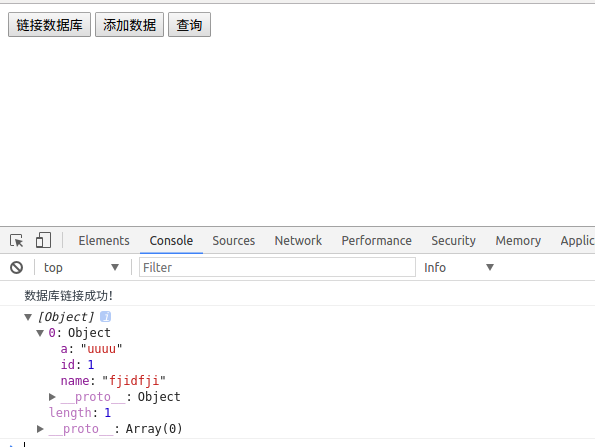
查询操作主要用到了游标,这个说起来还比较多,没时间说了,自行google。还有很多的操作这里不讲了。给一个我封装的不是很好的简易库,仅供参考。
一个简易库。
(function(window){

    'use strict';

    window.dbUtil={

    indexedDB :(window.indexedDB || window.mozIndexedDB || window.webkitIndexedDB || window.msIndexedDB),

    IDBTransaction :(window.IDBTransaction || window.webkitIDBTransaction || window.msIDBTransaction),

    IDBKeyRange :(window.IDBKeyRange || window.webkitIDBKeyRange || window.msIDBKeyRange),

    IDBCursor : (window.IDBCursor || window.webkitIDBCursor || window.msIDBCursor),

    idb:null,

    dbName:"",

    dbVersion:"",

    /**

     * 初始化数据库,创建表和建立链接

     * @param  {[type]} dbName    [description]

     * @param  {[type]} dbVersion [description]

     * @param  {[type]} storeObjs [description]

     * @return {[type]}           [description]

     */

    initDB:function (dbName,dbVersion,storeObjs){

        this.dbName = dbName;

        this.dbVersion = dbVersion;

        var dbConnect = this.indexedDB.open(this.dbName,this.dbVersion);

        var self = this;

        dbConnect.onsuccess = function(e){

            self.idb = e.target.result;

            self.log('数据库链接成功!');

        }

        dbConnect.onerror = function(e){

            console.log(e)

            self.log('数据库链接失败!');

        }

        dbConnect.onupgradeneeded = function(e){

            self.idb = e.target.result;

            var ts = e.target.transaction;

            var oldVersion = e.oldVersion;

            var newVersion = e.newVersion;

            self.log('数据库更新成功,旧的版本号为:'+oldVersion+",新的版本号为:"+newVersion);

            if(storeObjs){

                for(var k = 0,len=storeObjs.length;k<len;k++){

                    var storeObj = storeObjs[k];

                    var storeName = storeObj.storeName;

                    var key = storeObj.key;

                    var idxs = storeObj.idxs;

                    self.createTable(storeName,key,idxs)

                }

            }

        }

    },

    /**

     * 创建数据库存储对象(表)

     * @param  {[type]} key [description]

     * @param  {[type]}     [description]

     * @return {[type]}     [description]

     */

    createTable:function(storeName,key,idxs){

        var self = this;

        var idb = self.idb;

        if(!idb){

            self.log('数据库没有链接');

            return ;

        }

        if(!key || !idxs){

            self.log('参数错误');

            return ;

        }

        if(!storeName){

            self.log('storeName必须');

            return ;

        }

        try{

            var store = idb.createObjectStore(storeName,key);

            self.log('数据库存储对象(table)创建成功');

            for(var i = 0;i<idxs.length;i++){

                var idx = idxs[i];

                store.createIndex(idx.indexName,idx.keyPath,idx.optionalParameters);

            self.log('索引'+idx.indexName+'创建成功');

            }

        }catch(e){

            self.log('建表出现错误');

            console.log(JSON.stringify(e))

        }

    },

    /**

     * [add description]

     * @param {[type]} storeName [description]

     * @param {[type]} values    [description]

     */

    add:function(storeName,values){

        var dbConnect = this.indexedDB.open(this.dbName,this.dbVersion);

        var self = this;

        dbConnect.onsuccess = function(e){

            var idb = e.target.result;

            var ts = idb.transaction(storeName,"readwrite");

            var store = ts.objectStore(storeName);

            for(var i = 0;i<values.length;i++){

                (function(i){

                    var value = values[i];

                    var req = store.put(value);

                    req.onsuccess = function(){

                        self.log("添加第"+i+"个数据成功");

                    }

                    req.onerror = function(e){

                        self.log("添加第"+i+"个数据失败");

                        self.log(JSON.stringify(e));

                    }

                })(i)

            }

            ts.oncomplete = function(){

                self.log('添加数据事务结束!');

            }

        }

    },

    /**

     * [select description]

     * @param  {[type]}   storeName [description]

     * @param  {[type]}   count     [description]

     * @param  {Function} callback  [description]

     * @param  {[type]}   indexName [description]

     * @return {[type]}             [description]

     */

    select:function(storeName,count,callback,indexName){

        var dbConnect = this.indexedDB.open(this.dbName,this.dbVersion);

        var self = this;

        var total = 0;

        var data = [];

        dbConnect.onsuccess = function(e){

            self.log("数据库链接成功!");

            var idb = e.target.result;

            var ts = idb.transaction(storeName,"readonly");

            var store = ts.objectStore(storeName);

            var req = store.count();

            var req2 = null;

            req.onsuccess = function(){

                total = this.result;

                var realCount = (count<=total)?count:total;

                if(typeof indexName == 'undefined'){

                    var range = IDBKeyRange.bound(0,"9999999999999999999999");

                    req2 = store.openCursor(range,'prev');

                    var cc = 0;

                    req2.onsuccess = function(){

                        var cursor = this.result;

                        if(total == 0){

                            callback([]);

                            return;

                        }

                        if(cursor){

                            cc++;

                            data.push(cursor.value);

                            if(cc==realCount){

                                callback(data);

                                return;

                            }

                            cursor.continue();

                        }

                    }

                    req2.onerror = function(){

                        self.log("检索出错")

                    }

                }else{

                    //待写

                }

            }

        }

    },

    /**

     * [delete description]

     * @param  {[type]} storeName [description]

     * @param  {[type]} key       [description]

     * @return {[type]}           [description]

     */

    delete:function(storeName,key,callback){

        var dbConnect = this.indexedDB.open(this.dbName,this.dbVersion);

        let self = this;

        dbConnect.onsuccess = function(e){

            var idb = e.target.result;

            var ts = idb.transaction(storeName,'readwrite');

            var store = ts.objectStore(storeName);

            store.delete(key);

            self.log('删除成功!');

            if(callback){

                callback();

            }

        }

    },

    /**

     * [funciton description]

     * @param  {[type]} storeName    [description]

     * @param  {[type]} key          [description]

     * @param  {[type]} existCall    [description]

     * @param  {[type]} notExistCall [description]

     * @return {[type]}              [description]

     */

    isExist:function(storeName,key,existCall,notExistCall){

        var dbConnect = this.indexedDB.open(this.dbName,this.dbVersion);

        dbConnect.onsuccess = function(e){

            var idb = e.target.result;

            var ts = idb.transaction(storeName,'readonly');

            var store = ts.objectStore(storeName);

            var req = store.get(key);

            req.onsuccess = function(){

                if(this.result == undefined){

                    notExistCall();

                }else{

                    existCall(this.result);

                }

            }

            req.onerror = function(){

                notExistCall();

            }

        }

    },

    /**

     * clear

     * @param  {[type]} storeName [description]

     * @return {[type]}           [description]

     */

    clear:function clearObjectStore(storeName){

            var dbConnect = this.indexedDB.open(this.dbName,this.dbVersion);

            dbConnect.onsuccess = function(e){

                var idb = e.target.result;

                var ts = idb.transaction(storeName,'readwrite');

                var store = ts.objectStore(storeName);

                store.clear();

            }

    },

    /**

     * 删除数据库

     * @param  {[type]} dbName [description]

     * @return {[type]}        [description]

     */

    dropDatabase:function(dbName){

        this.indexedDB.deleteDatabase(dbName);

        this.log('成功删除数据库:'+dbName);

    },

    /**

     * [log description]

     * @param  {[type]} msg [description]

     * @return {[type]}     [description]

     */

    log:function(msg){

        console.log((new Date()).toTimeString()+":"+msg)

    }

    }

})(window);
五、使用indexedDB的优缺点
1、优点:可以将一些数据放到浏览器端,不用和服务器交互就可以实现一些功能,减轻服务器负担,加快响应速度。
2、缺点:
(1)不可靠:用户可能删处indexedDB,而且更换浏览器或者设备后这些数据就没了。
2)不便于数据采集:有很多时候将数据存到服务器是为了获得一些数据,如果放到浏览器端,这些数据比较难获取。
(3)无法共享:不同用户没办法共享数据,甚至时一个设备的不同浏览器也没法共享。
所以,是否适用indexedDB要进行一下利弊权衡,不是有了indexedDB就啥也不管,一骨脑将数据放进去。
最近两个课程设计,还有面试, 文章写的比较匆忙,如有问题请各位园友批评指正。最近找实习,各位园友要是我写的东西还可以而且公司招聘实习生的话可以给大熊一个机会,谢谢!
将数据库从服务器移到浏览器--indexedDB基本操作封装的更多相关文章
- 附加数据库对于服务器失败(Microsoft.SqlServer.Smo),无法升级数据库,因为它是只读的,或者具有只读文件
今天在将一个 SQL Server 2000 数据库附加到 SQL Server 2005时出现如下的错误:附加数据库对于服务器失败(Microsoft.SqlServer.Smo),无法升级数据库t ...
- 附加数据库 对于 服务器“00-PC”失败
错误消息: 标题: Microsoft SQL Server Management Studio------------------------------ 附加数据库 对于 服务器“LL-PC”失败 ...
- php服务器代理解决浏览器跨越问题
详见代码 <?php $url = $_SERVER["QUERY_STRING"]; switch ($_SERVER['REQUEST_METHOD']) { case ...
- 数据库级别DDL操作监控审计、数据库触发器/服务器触发器
关键词:数据库触发器/服务器触发器 ,数据库级别DDL操作监控审计,禁止修改登录名密码 [1]数据库级别DDL操作监控审计 转自2012示例库,只能数据库级别,不能实例级别 use database ...
- sql server 数据库跨服务器备份,复制监视器——快照代理,复制流程
在做数据库跨服务器复制时,查看复制监视器的快照代理,可以看到复制流程,具体如下: 初始化 连接发布服务器 设置服务器数据库兼容性级别 更新索引的统计信息 在生成快照时锁定已发布的表 复制快照数据(每个 ...
- js中ajax连接服务器open函数的另外两个默认参数get请求和默认异步(open的post方式send函数带参数)(post请求和get请求区别:get:快、简单 post:安全,量大,不缓存)(服务器同步和异步区别:同步:等待服务器响应当中浏览器不能做别的事情)(ajax和jquery一起用的)
js中ajax连接服务器open函数的另外两个默认参数get请求和默认异步(open的post方式send函数带参数)(post请求和get请求区别:get:快.简单 post:安全,量大,不缓存)( ...
- 跟浩哥学自动化测试Selenium -- 浏览器的基本操作与元素定位(3)
浏览器的基本操作与元素定位 通过上一章学习,我们已经学会了如何设置驱动路径,如何创建浏览器对象,如何打开一个网站,接下来我们要进行一些复杂的操作比如先打开百度首页,在打开博客园,网页后退,前进等等,甚 ...
- NIO开发Http服务器(4):Response封装和响应
最近学习了Java NIO技术,觉得不能再去写一些Hello World的学习demo了,而且也不想再像学习IO时那样编写一个控制台(或者带界面)聊天室.我们是做WEB开发的,整天围着tomcat.n ...
- PHP. 01. C/S架构、B/S架构、服务器类型、服务器软件、HTTP协议/服务器、数据库、服务器web开发、PHP简介/常见语法、PHPheader()、 PHP_POST/GET数据获取和错误处理
C/S架构 Client/Server 指客户端,服务器 架构的意思 优点:性能性高:可将一部分的计算工作放在客户端上,服务器只需处理出局即可 洁面炫酷,可使用更多系统提供的效果 缺点:更新软件需 ...
随机推荐
- WebSocket学习总结
一 .websocket 已解决 但是websocket延伸出来的网络编程还有好多知识点没有清理.主要的流程和实现方式已经大概了解清楚,下面从学习的进度思路来一点点复习. 网络 ...
- node.js 中回调函数callback(转载),说的很清楚,看一遍就理解了
最近在看 express,满眼看去,到处是以函数作为参数的回调函数的使用.如果这个概念理解不了,nodejs.express 的代码就会看得一塌糊涂.比如: 复制代码 代码如下: app.use(fu ...
- hdu2159 FATE 经典二维背包
题目链接:http://acm.hdu.edu.cn/showproblem.php?pid=2159 思路: 定义ans存当前满足条件的消耗的最小的忍耐值(满足条件的忍耐值为在当前消耗的忍耐值的情况 ...
- Memcache服务搭建
Memcache Memcache的作用网上资料都讲的很好,说简单点就是减轻读取数据库的压力,原理也很简单: 被请求的数据会先到memcache里去取,如果没有就去数据库里取,顺便给memcache带 ...
- 【JAVAWEB学习笔记】13_servlet
JavaWeb核心之Servlet 教学目标 案例一.完成用户登录功能 案例二.记录成功登录系统的人次 一.Servlet简介 1.什么是Servlet Servlet 运行在服务端的Java小程序, ...
- B507实验室打印机连接方法
一.准备工具 实验室打印机内网IP地址:172.16.135.41 ,这个地址要看具体的打印机地址(可能会更换). 从实验室QQ群(土匪窝)上下载打印机驱动,如下图所示. 3. 非常重要的事情:请链接 ...
- Git Flow Note
近期困惑于Git代码版本控制,集中两天时间研究,其中基础知识来源于<Git权威指南>,分支思想则来源于一篇博文<A successful Git branching model> ...
- Editplus配置java运行环境以及其他需求的简单设置
java配置 首先,打开"工具"(tools)选项,选择"配置自定义工具组"(英文版 是倒数第二个)然后按照上面第二幅图片来配置javac环境,其中命令一栏是j ...
- TensorFlowSharp入门使用C#编写TensorFlow人工智能应用
TensorFlowSharp入门使用C#编写TensorFlow人工智能应用学习. TensorFlow简单介绍 TensorFlow 是谷歌的第二代机器学习系统,按照谷歌所说,在某些基准测试中,T ...
- sublime text3 支持终端打开文件
sudo ln -s /Applications/Sublime\ Text.app/Contents/SharedSupport/bin/subl /usr/local/bin/subl