
将数据库从服务器移到浏览器--indexedDB基本操作封装
数据库是属于服务器的,这是天经地义的事,但是有时候数据也许并非需要存储在服务器,但是这些数据也是一条一条的记录,怎么办?今天来带领你领略一下H5的一个新特性--indexedDB的风骚。你会情不自禁的发出感叹--不可思议!
一、链接数据库
indexedDB没有创建数据库的概念,你可以直接链接数据库,如果你链接的数据库并不存在,那么会自动的创建一个数据库。看下面的这个例子。
<!DOCTYPE html>

<html lang="en">

<head>

    <meta charset="UTF-8">

    <title>Document</title>

</head>

<body>

    <button type="" id='conbtn'>链接数据库</button>

<script>

    // In the following line, you should include the prefixes of implementations you want to test.

    window.indexedDB = window.indexedDB || window.mozIndexedDB || window.webkitIndexedDB || window.msIndexedDB;

   // DON'T use "var indexedDB = ..." if you're not in a function.

   // Moreover, you may need references to some window.IDB* objects:

   window.IDBTransaction = window.IDBTransaction || window.webkitIDBTransaction || window.msIDBTransaction;

   window.IDBKeyRange = window.IDBKeyRange || window.webkitIDBKeyRange || window.msIDBKeyRange

   // (Mozilla has never prefixed these objects, so we don't need window.mozIDB*)

   function connectDB(name,version,success,error){

         let dbConnect = indexedDB.open(name,version);

              dbConnect.onsuccess = function(e){

                  console.log('数据库链接成功!');

                success(e.target.result);

            }

            dbConnect.onerror = function(e){

                console.log('数据库链接失败!');

                error(e);

            }

            dbConnect.onupgradeneeded = function(e){

                success(e.target.result);

                let oldVersion = e.oldVersion;

                let newVersion = e.newVersion;

                console.log('数据库更新成功,旧的版本号为:'+oldVersion+",新的版本号为:"+newVersion);

            }

   }

   window.onload=function(){

           let btn  = document.getElementById('conbtn');

           btn.onclick = function(){

               connectDB('haha',1,function(){

                   console.log('链接成功,或者更新成功回调函数');

               },function(){

                   console.log('链接失败回调函数!')

               });

           }

   }

</script>

</body>

</html>
我点了两次链接数据库,结果是这样的。
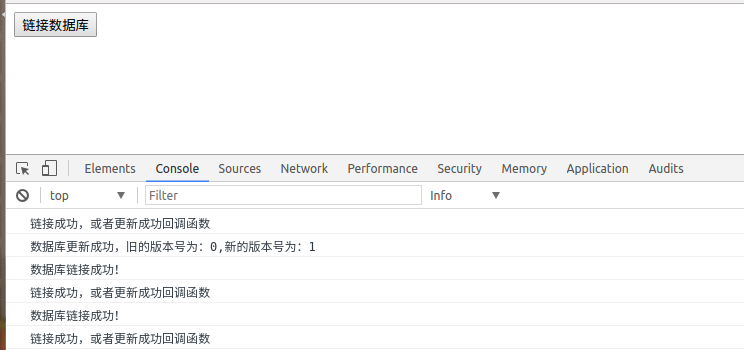
在Application的indexedDB中我们发现多了一个东西。
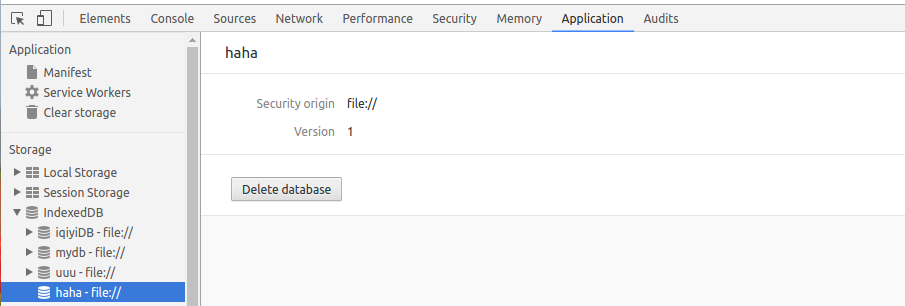
可以看到haha数据库已经成功建立了。
indexedDB的open方法用来链接或者更新数据库,第一次创建也认为是一次更新。第一个参数是数据库的名字,第二个参数为版本号。第一次创建或者版本号发生改变时出发更新事件upgradeneeded,链接成功后出发success事件,链接出错时触发error事件。
二、建表和索引
<!DOCTYPE html>

<html lang="en">

<head>

    <meta charset="UTF-8">

    <title>Document</title>

</head>

<body>

    <button type="" id='conbtn'>链接数据库</button>

<script>

    // In the following line, you should include the prefixes of implementations you want to test.

    window.indexedDB = window.indexedDB || window.mozIndexedDB || window.webkitIndexedDB || window.msIndexedDB;

   // DON'T use "var indexedDB = ..." if you're not in a function.

   // Moreover, you may need references to some window.IDB* objects:

   window.IDBTransaction = window.IDBTransaction || window.webkitIDBTransaction || window.msIDBTransaction;

   window.IDBKeyRange = window.IDBKeyRange || window.webkitIDBKeyRange || window.msIDBKeyRange

   // (Mozilla has never prefixed these objects, so we don't need window.mozIDB*)

   function connectDB(name,version,success,update,error){

         let dbConnect = indexedDB.open(name,version);

              dbConnect.onsuccess = function(e){

                  console.log('数据库链接成功!');

                success(e.target.result);

            }

            dbConnect.onerror = function(e){

                console.log('数据库链接失败!');

                error(e);

            }

            dbConnect.onupgradeneeded = function(e){

                update(e.target.result);

                let oldVersion = e.oldVersion;

                let newVersion = e.newVersion;

                console.log('数据库更新成功,旧的版本号为:'+oldVersion+",新的版本号为:"+newVersion);

            }

   }

       function createTable(idb,storeName,key,idxs){

        if(!idb){

            console.log(idb);

            return ;

        }

        if(!key || !idxs){

            console.log('参数错误');

            return ;

        }

        if(!storeName){

            console.log('storeName必须');

            return ;

        }

        try{

            var store = idb.createObjectStore(storeName,key);

            console.log('数据库存储对象(table)创建成功');

            for(var i = 0;i<idxs.length;i++){

                var idx = idxs[i];

                store.createIndex(idx.indexName,idx.keyPath,idx.optionalParameters);

                    console.log('索引'+idx.indexName+'创建成功');

            }

        }catch(e){

            console.log('建表出现错误');

            console.log(JSON.stringify(e))

        }

    }

   window.onload=function(){

           let btn  = document.getElementById('conbtn');

           btn.onclick = function(){

               connectDB('haha',1,

                 function(idb){

                   console.log('链接成功,或者更新成功回调函数');

               },function(idb){

                   createTable(idb,'test',{keyPath:'id',autoIncrement:true},[

                       {

                       indexName:'testIndex',

                     keyPath:'name',

                     optionalParameters:{

                         unique:true,

                         multiEntry:false

                     }}]);

               },function(){

                   console.log('链接失败回调函数!')

               });

           }

   }

</script>

</body>

</html>
我点了一下按钮结果时这样的。
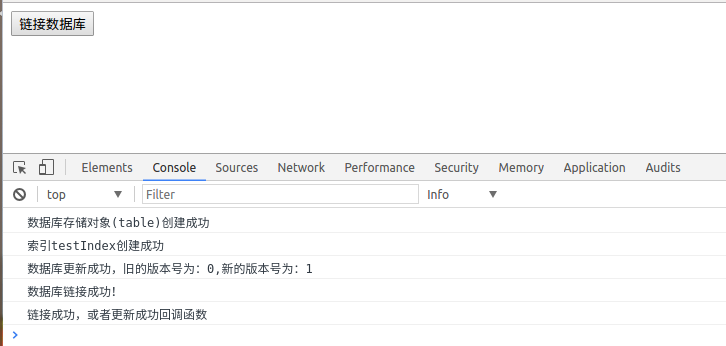

这里用到的两个核心方法时createObjectStore,和createIndex,这两个方法必须在数据库发生更新的事件中执行。
createObjectStore方法可以理解成是创建表,接受第一个参数为一个字符串,表示表名,第二个参数是一个对象,指定主键相关的东西,{keyPath:'主键是哪个字段',autoIncrement:是否自增}。
createIndex方法是创建索引的,接受三个参数,第一个是一个字符串,表示索引的名字,第二个参数表示字段名(谁的索引),第三个参数是个对象,具体自己查去。索引的作用是在查询操作时可以用到,不详讲,自行google吧。
三、添加数据
<!DOCTYPE html>

<html lang="en">

<head>

    <meta charset="UTF-8">

    <title>Document</title>

</head>

<body>

    <button type="" id='conbtn'>链接数据库</button>

    <button type="" id='add'>添加数据</button>

<script>

    // In the following line, you should include the prefixes of implementations you want to test.

    window.indexedDB = window.indexedDB || window.mozIndexedDB || window.webkitIndexedDB || window.msIndexedDB;

   // DON'T use "var indexedDB = ..." if you're not in a function.

   // Moreover, you may need references to some window.IDB* objects:

   window.IDBTransaction = window.IDBTransaction || window.webkitIDBTransaction || window.msIDBTransaction;

   window.IDBKeyRange = window.IDBKeyRange || window.webkitIDBKeyRange || window.msIDBKeyRange

   // (Mozilla has never prefixed these objects, so we don't need window.mozIDB*)

   function connectDB(name,version,success,update,error){

         let dbConnect = indexedDB.open(name,version);

              dbConnect.onsuccess = function(e){

                  console.log('数据库链接成功!');

                success(e.target.result);

            }

            dbConnect.onerror = function(e){

                console.log('数据库链接失败!');

                error(e);

            }

            dbConnect.onupgradeneeded = function(e){

                update(e.target.result);

                let oldVersion = e.oldVersion;

                let newVersion = e.newVersion;

                console.log('数据库更新成功,旧的版本号为:'+oldVersion+",新的版本号为:"+newVersion);

            }

   }

       function createTable(idb,storeName,key,idxs){

        if(!idb){

            console.log(idb);

            return ;

        }

        if(!key || !idxs){

            console.log('参数错误');

            return ;

        }

        if(!storeName){

            console.log('storeName必须');

            return ;

        }

        try{

            var store = idb.createObjectStore(storeName,key);

            console.log('数据库存储对象(table)创建成功');

            for(var i = 0;i<idxs.length;i++){

                var idx = idxs[i];

                store.createIndex(idx.indexName,idx.keyPath,idx.optionalParameters);

                    console.log('索引'+idx.indexName+'创建成功');

            }

        }catch(e){

            console.log('建表出现错误');

            console.log(JSON.stringify(e))

        }

    }

    function add(storeName,values){

    connectDB('haha',1,function(idb){

        var ts = idb.transaction(storeName,"readwrite");

        var store = ts.objectStore(storeName);

        for(var i = 0;i<values.length;i++){

            (function(i){

                var value = values[i];

                var req = store.put(value);

                req.onsuccess = function(){

                    console.log("添加第"+i+"个数据成功");

                }

                req.onerror = function(e){

                    console.log("添加第"+i+"个数据失败");

                    console.log(JSON.stringify(e));

                }

            })(i)

        }

        ts.oncomplete = function(){

            console.log('添加数据事务结束!');

        }

    },function(){},function(){});

    }

   window.onload=function(){

           let btn  = document.getElementById('conbtn');

           btn.onclick = function(){

               connectDB('haha',1,

                 function(idb){

                   console.log('链接成功,或者更新成功回调函数');

               },function(idb){

                   createTable(idb,'test',{keyPath:'id',autoIncrement:true},[

                       {

                       indexName:'testIndex',

                     keyPath:'name',

                     optionalParameters:{

                         unique:true,

                         multiEntry:false

                     }}]);

               },function(){

                   console.log('链接失败回调函数!')

               });

           }

           let add1 = document.getElementById('add');

           add1.onclick = function(){

               add('test',[{name:"fjidfji",a:'uuuu'}])

           }

   }

</script>

</body>

</html>
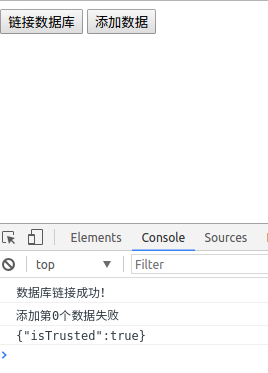
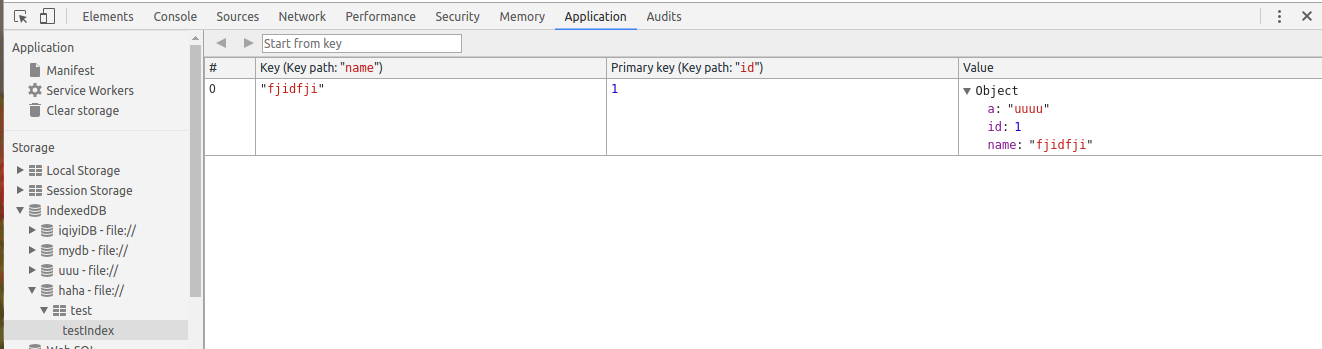
比较神奇的是你在建表的时候不需要指定你的字段,再添加数据时可以随便加。添加数据用到的是表对象的put方法,之前需要一个事务,从事务调个方法拿到存储对象(可以理解为表),具体看看例子就明白了。
四、查询数据
<!DOCTYPE html>

<html lang="en">

<head>

    <meta charset="UTF-8">

    <title>Document</title>

</head>

<body>

    <button type="" id='conbtn'>链接数据库</button>

    <button type="" id='add'>添加数据</button>

    <button type="" id="selectBtn">查询</button>

<script>

    // In the following line, you should include the prefixes of implementations you want to test.

    window.indexedDB = window.indexedDB || window.mozIndexedDB || window.webkitIndexedDB || window.msIndexedDB;

   // DON'T use "var indexedDB = ..." if you're not in a function.

   // Moreover, you may need references to some window.IDB* objects:

   window.IDBTransaction = window.IDBTransaction || window.webkitIDBTransaction || window.msIDBTransaction;

   window.IDBKeyRange = window.IDBKeyRange || window.webkitIDBKeyRange || window.msIDBKeyRange

   // (Mozilla has never prefixed these objects, so we don't need window.mozIDB*)

   function connectDB(name,version,success,update,error){

         let dbConnect = indexedDB.open(name,version);

              dbConnect.onsuccess = function(e){

                  console.log('数据库链接成功!');

                success(e.target.result);

            }

            dbConnect.onerror = function(e){

                console.log('数据库链接失败!');

                error(e);

            }

            dbConnect.onupgradeneeded = function(e){

                update(e.target.result);

                let oldVersion = e.oldVersion;

                let newVersion = e.newVersion;

                console.log('数据库更新成功,旧的版本号为:'+oldVersion+",新的版本号为:"+newVersion);

            }

   }

       function createTable(idb,storeName,key,idxs){

        if(!idb){

            console.log(idb);

            return ;

        }

        if(!key || !idxs){

            console.log('参数错误');

            return ;

        }

        if(!storeName){

            console.log('storeName必须');

            return ;

        }

        try{

            var store = idb.createObjectStore(storeName,key);

            console.log('数据库存储对象(table)创建成功');

            for(var i = 0;i<idxs.length;i++){

                var idx = idxs[i];

                store.createIndex(idx.indexName,idx.keyPath,idx.optionalParameters);

                    console.log('索引'+idx.indexName+'创建成功');

            }

        }catch(e){

            console.log('建表出现错误');

            console.log(JSON.stringify(e))

        }

    }

    function add(storeName,values){

    connectDB('haha',1,function(idb){

        var ts = idb.transaction(storeName,"readwrite");

        var store = ts.objectStore(storeName);

        for(var i = 0;i<values.length;i++){

            (function(i){

                var value = values[i];

                var req = store.put(value);

                req.onsuccess = function(){

                    console.log("添加第"+i+"个数据成功");

                }

                req.onerror = function(e){

                    console.log("添加第"+i+"个数据失败");

                    console.log(JSON.stringify(e));

                }

            })(i)

        }

        ts.oncomplete = function(){

            console.log('添加数据事务结束!');

        }

    },function(){},function(){});

    }

    function select(storeName,count,callback){

        connectDB('haha',1,function(idb){

            var total = 0;

            var data = [];

            var ts = idb.transaction(storeName,"readonly");

            var store = ts.objectStore(storeName);

            var req = store.count();

            var req2 = null;

            req.onsuccess = function(){

                total = this.result;

                var realCount = (count<=total)?count:total;

                    var range = IDBKeyRange.bound(0,Number.MAX_VALUE);

                    req2 = store.openCursor(range,'prev');

                    var cc = 0;

                    req2.onsuccess = function(){

                        var cursor = this.result;

                        if(cursor){

                            cc++;

                            data.push(cursor.value);

                            if(cc==realCount){

                                callback(data);

                                return;

                            }

                            cursor.continue();

                        }

                    }

                    req2.onerror = function(){

                        console.log("检索出错")

                    }

            }

        },function(){},function(){});

    }

   window.onload=function(){

           let btn  = document.getElementById('conbtn');

           btn.onclick = function(){

               connectDB('haha',1,

                 function(idb){

                   console.log('链接成功,或者更新成功回调函数');

               },function(idb){

                   createTable(idb,'test',{keyPath:'id',autoIncrement:true},[

                       {

                       indexName:'testIndex',

                     keyPath:'name',

                     optionalParameters:{

                         unique:true,

                         multiEntry:false

                     }}]);

               },function(){

                   console.log('链接失败回调函数!')

               });

           }

           let add1 = document.getElementById('add');

           add1.onclick = function(){

               add('test',[{name:"fjidfji",a:'uuuu'}])

           }

           let selectBtn = document.getElementById('selectBtn');

           selectBtn.onclick = function(){

               select('test',2,function(data){

                   console.log(data);

               })

           }

   }

</script>

</body>

</html>
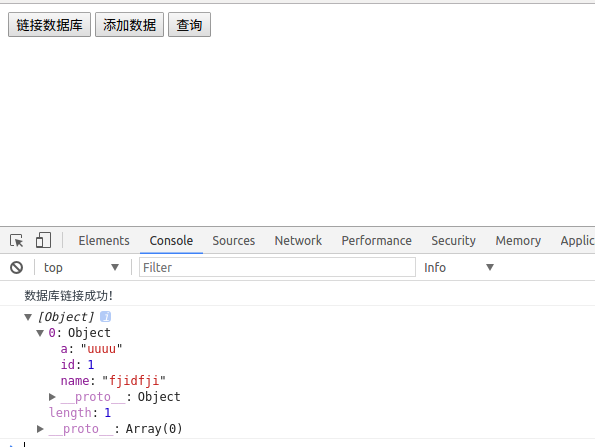
查询操作主要用到了游标,这个说起来还比较多,没时间说了,自行google。还有很多的操作这里不讲了。给一个我封装的不是很好的简易库,仅供参考。
一个简易库。
(function(window){

    'use strict';

    window.dbUtil={

    indexedDB :(window.indexedDB || window.mozIndexedDB || window.webkitIndexedDB || window.msIndexedDB),

    IDBTransaction :(window.IDBTransaction || window.webkitIDBTransaction || window.msIDBTransaction),

    IDBKeyRange :(window.IDBKeyRange || window.webkitIDBKeyRange || window.msIDBKeyRange),

    IDBCursor : (window.IDBCursor || window.webkitIDBCursor || window.msIDBCursor),

    idb:null,

    dbName:"",

    dbVersion:"",

    /**

     * 初始化数据库,创建表和建立链接

     * @param  {[type]} dbName    [description]

     * @param  {[type]} dbVersion [description]

     * @param  {[type]} storeObjs [description]

     * @return {[type]}           [description]

     */

    initDB:function (dbName,dbVersion,storeObjs){

        this.dbName = dbName;

        this.dbVersion = dbVersion;

        var dbConnect = this.indexedDB.open(this.dbName,this.dbVersion);

        var self = this;

        dbConnect.onsuccess = function(e){

            self.idb = e.target.result;

            self.log('数据库链接成功!');

        }

        dbConnect.onerror = function(e){

            console.log(e)

            self.log('数据库链接失败!');

        }

        dbConnect.onupgradeneeded = function(e){

            self.idb = e.target.result;

            var ts = e.target.transaction;

            var oldVersion = e.oldVersion;

            var newVersion = e.newVersion;

            self.log('数据库更新成功,旧的版本号为:'+oldVersion+",新的版本号为:"+newVersion);

            if(storeObjs){

                for(var k = 0,len=storeObjs.length;k<len;k++){

                    var storeObj = storeObjs[k];

                    var storeName = storeObj.storeName;

                    var key = storeObj.key;

                    var idxs = storeObj.idxs;

                    self.createTable(storeName,key,idxs)

                }

            }

        }

    },

    /**

     * 创建数据库存储对象(表)

     * @param  {[type]} key [description]

     * @param  {[type]}     [description]

     * @return {[type]}     [description]

     */

    createTable:function(storeName,key,idxs){

        var self = this;

        var idb = self.idb;

        if(!idb){

            self.log('数据库没有链接');

            return ;

        }

        if(!key || !idxs){

            self.log('参数错误');

            return ;

        }

        if(!storeName){

            self.log('storeName必须');

            return ;

        }

        try{

            var store = idb.createObjectStore(storeName,key);

            self.log('数据库存储对象(table)创建成功');

            for(var i = 0;i<idxs.length;i++){

                var idx = idxs[i];

                store.createIndex(idx.indexName,idx.keyPath,idx.optionalParameters);

            self.log('索引'+idx.indexName+'创建成功');

            }

        }catch(e){

            self.log('建表出现错误');

            console.log(JSON.stringify(e))

        }

    },

    /**

     * [add description]

     * @param {[type]} storeName [description]

     * @param {[type]} values    [description]

     */

    add:function(storeName,values){

        var dbConnect = this.indexedDB.open(this.dbName,this.dbVersion);

        var self = this;

        dbConnect.onsuccess = function(e){

            var idb = e.target.result;

            var ts = idb.transaction(storeName,"readwrite");

            var store = ts.objectStore(storeName);

            for(var i = 0;i<values.length;i++){

                (function(i){

                    var value = values[i];

                    var req = store.put(value);

                    req.onsuccess = function(){

                        self.log("添加第"+i+"个数据成功");

                    }

                    req.onerror = function(e){

                        self.log("添加第"+i+"个数据失败");

                        self.log(JSON.stringify(e));

                    }

                })(i)

            }

            ts.oncomplete = function(){

                self.log('添加数据事务结束!');

            }

        }

    },

    /**

     * [select description]

     * @param  {[type]}   storeName [description]

     * @param  {[type]}   count     [description]

     * @param  {Function} callback  [description]

     * @param  {[type]}   indexName [description]

     * @return {[type]}             [description]

     */

    select:function(storeName,count,callback,indexName){

        var dbConnect = this.indexedDB.open(this.dbName,this.dbVersion);

        var self = this;

        var total = 0;

        var data = [];

        dbConnect.onsuccess = function(e){

            self.log("数据库链接成功!");

            var idb = e.target.result;

            var ts = idb.transaction(storeName,"readonly");

            var store = ts.objectStore(storeName);

            var req = store.count();

            var req2 = null;

            req.onsuccess = function(){

                total = this.result;

                var realCount = (count<=total)?count:total;

                if(typeof indexName == 'undefined'){

                    var range = IDBKeyRange.bound(0,"9999999999999999999999");

                    req2 = store.openCursor(range,'prev');

                    var cc = 0;

                    req2.onsuccess = function(){

                        var cursor = this.result;

                        if(total == 0){

                            callback([]);

                            return;

                        }

                        if(cursor){

                            cc++;

                            data.push(cursor.value);

                            if(cc==realCount){

                                callback(data);

                                return;

                            }

                            cursor.continue();

                        }

                    }

                    req2.onerror = function(){

                        self.log("检索出错")

                    }

                }else{

                    //待写

                }

            }

        }

    },

    /**

     * [delete description]

     * @param  {[type]} storeName [description]

     * @param  {[type]} key       [description]

     * @return {[type]}           [description]

     */

    delete:function(storeName,key,callback){

        var dbConnect = this.indexedDB.open(this.dbName,this.dbVersion);

        let self = this;

        dbConnect.onsuccess = function(e){

            var idb = e.target.result;

            var ts = idb.transaction(storeName,'readwrite');

            var store = ts.objectStore(storeName);

            store.delete(key);

            self.log('删除成功!');

            if(callback){

                callback();

            }

        }

    },

    /**

     * [funciton description]

     * @param  {[type]} storeName    [description]

     * @param  {[type]} key          [description]

     * @param  {[type]} existCall    [description]

     * @param  {[type]} notExistCall [description]

     * @return {[type]}              [description]

     */

    isExist:function(storeName,key,existCall,notExistCall){

        var dbConnect = this.indexedDB.open(this.dbName,this.dbVersion);

        dbConnect.onsuccess = function(e){

            var idb = e.target.result;

            var ts = idb.transaction(storeName,'readonly');

            var store = ts.objectStore(storeName);

            var req = store.get(key);

            req.onsuccess = function(){

                if(this.result == undefined){

                    notExistCall();

                }else{

                    existCall(this.result);

                }

            }

            req.onerror = function(){

                notExistCall();

            }

        }

    },

    /**

     * clear

     * @param  {[type]} storeName [description]

     * @return {[type]}           [description]

     */

    clear:function clearObjectStore(storeName){

            var dbConnect = this.indexedDB.open(this.dbName,this.dbVersion);

            dbConnect.onsuccess = function(e){

                var idb = e.target.result;

                var ts = idb.transaction(storeName,'readwrite');

                var store = ts.objectStore(storeName);

                store.clear();

            }

    },

    /**

     * 删除数据库

     * @param  {[type]} dbName [description]

     * @return {[type]}        [description]

     */

    dropDatabase:function(dbName){

        this.indexedDB.deleteDatabase(dbName);

        this.log('成功删除数据库:'+dbName);

    },

    /**

     * [log description]

     * @param  {[type]} msg [description]

     * @return {[type]}     [description]

     */

    log:function(msg){

        console.log((new Date()).toTimeString()+":"+msg)

    }

    }

})(window);
五、使用indexedDB的优缺点
1、优点:可以将一些数据放到浏览器端,不用和服务器交互就可以实现一些功能,减轻服务器负担,加快响应速度。
2、缺点:
(1)不可靠:用户可能删处indexedDB,而且更换浏览器或者设备后这些数据就没了。
2)不便于数据采集:有很多时候将数据存到服务器是为了获得一些数据,如果放到浏览器端,这些数据比较难获取。
(3)无法共享:不同用户没办法共享数据,甚至时一个设备的不同浏览器也没法共享。
所以,是否适用indexedDB要进行一下利弊权衡,不是有了indexedDB就啥也不管,一骨脑将数据放进去。
最近两个课程设计,还有面试, 文章写的比较匆忙,如有问题请各位园友批评指正。最近找实习,各位园友要是我写的东西还可以而且公司招聘实习生的话可以给大熊一个机会,谢谢!
将数据库从服务器移到浏览器--indexedDB基本操作封装的更多相关文章
- 附加数据库对于服务器失败(Microsoft.SqlServer.Smo),无法升级数据库,因为它是只读的,或者具有只读文件
今天在将一个 SQL Server 2000 数据库附加到 SQL Server 2005时出现如下的错误:附加数据库对于服务器失败(Microsoft.SqlServer.Smo),无法升级数据库t ...
- 附加数据库 对于 服务器“00-PC”失败
错误消息: 标题: Microsoft SQL Server Management Studio------------------------------ 附加数据库 对于 服务器“LL-PC”失败 ...
- php服务器代理解决浏览器跨越问题
详见代码 <?php $url = $_SERVER["QUERY_STRING"]; switch ($_SERVER['REQUEST_METHOD']) { case ...
- 数据库级别DDL操作监控审计、数据库触发器/服务器触发器
关键词:数据库触发器/服务器触发器 ,数据库级别DDL操作监控审计,禁止修改登录名密码 [1]数据库级别DDL操作监控审计 转自2012示例库,只能数据库级别,不能实例级别 use database ...
- sql server 数据库跨服务器备份,复制监视器——快照代理,复制流程
在做数据库跨服务器复制时,查看复制监视器的快照代理,可以看到复制流程,具体如下: 初始化 连接发布服务器 设置服务器数据库兼容性级别 更新索引的统计信息 在生成快照时锁定已发布的表 复制快照数据(每个 ...
- js中ajax连接服务器open函数的另外两个默认参数get请求和默认异步(open的post方式send函数带参数)(post请求和get请求区别:get:快、简单 post:安全,量大,不缓存)(服务器同步和异步区别:同步:等待服务器响应当中浏览器不能做别的事情)(ajax和jquery一起用的)
js中ajax连接服务器open函数的另外两个默认参数get请求和默认异步(open的post方式send函数带参数)(post请求和get请求区别:get:快.简单 post:安全,量大,不缓存)( ...
- 跟浩哥学自动化测试Selenium -- 浏览器的基本操作与元素定位(3)
浏览器的基本操作与元素定位 通过上一章学习,我们已经学会了如何设置驱动路径,如何创建浏览器对象,如何打开一个网站,接下来我们要进行一些复杂的操作比如先打开百度首页,在打开博客园,网页后退,前进等等,甚 ...
- NIO开发Http服务器(4):Response封装和响应
最近学习了Java NIO技术,觉得不能再去写一些Hello World的学习demo了,而且也不想再像学习IO时那样编写一个控制台(或者带界面)聊天室.我们是做WEB开发的,整天围着tomcat.n ...
- PHP. 01. C/S架构、B/S架构、服务器类型、服务器软件、HTTP协议/服务器、数据库、服务器web开发、PHP简介/常见语法、PHPheader()、 PHP_POST/GET数据获取和错误处理
C/S架构 Client/Server 指客户端,服务器 架构的意思 优点:性能性高:可将一部分的计算工作放在客户端上,服务器只需处理出局即可 洁面炫酷,可使用更多系统提供的效果 缺点:更新软件需 ...
随机推荐
- 【算法系列学习】线段树vs树状数组 单点修改,区间查询 [kuangbin带你飞]专题七 线段树 A - 敌兵布阵
https://vjudge.net/contest/66989#problem/A 单点修改,区间查询 方法一:线段树 http://www.cnblogs.com/kuangbin/archive ...
- Android系统--输入系统(十一)Reader线程_简单处理
Android系统--输入系统(十一)Reader线程_简单处理 1. 引入 Reader线程主要负责三件事情 获得输入事件 简单处理 上传给Dispatch线程 InputReader.cpp vo ...
- jquery.uploadifive 解决上传限制图片或文件大小
dotNet疯狂之路No.28 今天很残酷,明天更残酷,后天很美好,但是绝大部分人是死在明天晚上,只有那些真正的英雄才能见到后天的太阳. We're here to put a dent in t ...
- IOS开发常用的基础方法
.//退出键盘 [self.view endEditing:YES]; 隐藏手机上方的状态栏 -(BOOL)prefersStatusBarHidden{ return YES; } //获取当前控制 ...
- Struts2之 OGNL表达式和值栈
技术分析之OGNL表达式概述(了解) 1. OGNL是Object Graphic Navigation Language(对象图导航语言)的缩写 * 所谓对象图,即以任意 ...
- NUMBER_GET_NEXT 获取编号 遇到关于按年度编号的问题
最近给财务做了一个平台,在系统创建一些特殊类型的合同,需要生成合同编号:财务要求 合同类型+公司代码 +年+三位流水号, eg:CP6008-2017001 SNRO 子对象数据元素就是 公司代码 不 ...
- 如何让CSS区别IE版本
关于IE浏览器实在太坑爹了,但你又不得不去解决它,不过就本人所知,IE8—IE10差别不大,至少本人还没有遇到过在IE8环境下到了IE9及以上版本就出现坑爹的问题,但我们又不得不面对IE8以下的版本, ...
- 求序列的和,杭电0j-2058
原题地址:http://acm.hdu.edu.cn/showproblem.php?pid=2058 [Problem Description] Given a sequence 1,2,3,... ...
- redis入门指南-附录B
- 项目管理之 Objective-C 编码规范
目录: 一.格式化代码 二.命名 命名要求 1. 类的命名: 规则: 大驼峰命名法,每个单词的首字母都采用大写字母.一般添加业务前缀.后缀一般是当前类的种类. ViewController:后缀:Vi ...