
.elf格式内容
arm-linux-ld
可以将程序链接成我们arm平台下的可运行的程序
以之前使用过的led程序为例:
首先:
arm-linux-gcc -g -c led.S (-g是表示产生调试信息, -c是表示只编译不链接)
产生led.o文件
arm-linux-ld -Tled.lds -o led.elf led.o
产生.elf格式的文件
然后通过:
arm-linux-readelf命令:读出.elf的详细内容:
arm-linux-readelf -a led.elf(显示所有的log信息)
摘网上一幅图显示.elf格式的内容:
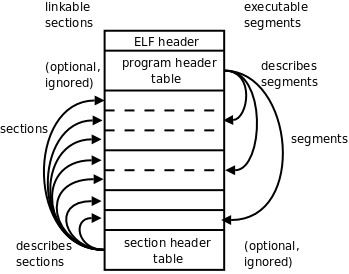
(该图片使用的是Linux C编程作者 宋劲斌的图片)
log信息:(红色的自己修改的)
ELF Header:
Magic: 7f 45 4c 46 01 01 01 00 00 00 00 00 00 00 00 00
Class: ELF32
Data: 2's complement, little endian(小端模式)
Version: 1 (current)
OS/ABI: UNIX - System V
ABI Version: 0
Type: EXEC (Executable file)
Machine: ARM(可运行在ARM平台上)
Version: 0x1
Entry point address: 0xd0020000
Start of program headers: 52 (bytes into file)
Start of section headers: 33192 (bytes into file)
Flags: 0x5000002, has entry point, Version5 EABI
Size of this header: 52 (bytes)
Size of program headers: 32 (bytes)
Number of program headers: 1
Size of section headers: 40 (bytes)
Number of section headers: 10
Section header string table index: 7
Section Headers:
[Nr] Name Type Addr Off Size ES Flg Lk Inf Al
[ 0] NULL 00000000 000000 000000 00 0 0 0
[ 1] .text PROGBITS d0020000 008000 00004c 00 AX 0 0 4
[ 2] .ARM.attributes ARM_ATTRIBUTES 00000000 00804c 000018 00 0 0 1
[ 3] .debug_line PROGBITS 00000000 008064 000045 00 0 0 1
[ 4] .debug_info PROGBITS 00000000 0080a9 000061 00 0 0 1
[ 5] .debug_abbrev PROGBITS 00000000 00810a 000014 00 0 0 1
[ 6] .debug_aranges PROGBITS 00000000 008120 000020 00 0 0 8
[ 7] .shstrtab STRTAB 00000000 008140 000066 00 0 0 1
[ 8] .symtab SYMTAB 00000000 008338 0000e0 10 9 11 4
[ 9] .strtab STRTAB 00000000 008418 000033 00 0 0 1
Key to Flags:
W (write), A (alloc), X (execute), M (merge), S (strings)
I (info), L (link order), G (group), x (unknown)
O (extra OS processing required) o (OS specific), p (processor specific)
There are no section groups in this file.
Program Headers:
Type Offset VirtAddr PhysAddr FileSiz MemSiz Flg Align
LOAD 0x008000 0xd0020000 0xd0020000 0x0004c 0x0004c R E 0x8000
Section to Segment mapping:
Segment Sections...
00 .text
There is no dynamic section in this file.
There are no relocations in this file.
There are no unwind sections in this file.
Symbol table '.symtab' contains 14 entries:
Num: Value Size Type Bind Vis Ndx Name
0: 00000000 0 NOTYPE LOCAL DEFAULT UND
1: d0020000 0 SECTION LOCAL DEFAULT 1
2: 00000000 0 SECTION LOCAL DEFAULT 2
3: 00000000 0 SECTION LOCAL DEFAULT 3
4: 00000000 0 SECTION LOCAL DEFAULT 4
5: 00000000 0 SECTION LOCAL DEFAULT 5
6: 00000000 0 SECTION LOCAL DEFAULT 6
7: d0020000 0 NOTYPE LOCAL DEFAULT 1 $a
8: d0020008 0 NOTYPE LOCAL DEFAULT 1 led_debug
9: d0020004 0 NOTYPE LOCAL DEFAULT 1 MAIN_LOOP
10: d0020044 0 NOTYPE LOCAL DEFAULT 1 $d
11: d0020000 0 NOTYPE GLOBAL DEFAULT 1 _start
12: d002004c 0 NOTYPE GLOBAL DEFAULT ABS __bss_start
13: d002004c 0 NOTYPE GLOBAL DEFAULT ABS _end
No version information found in this file.
Attribute Section: aeabi
File Attributes
Tag_CPU_name: "4T"
Tag_CPU_arch: v4T
Tag_ARM_ISA_use: Yes
log信息:
Tag Type Name/Value
0x00000001 (NEEDED) Shared library: [libc.so.6](这就是需要用到的库) 0x0000000c (INIT) 0x8274
0x0000000d (FINI) 0x841c
0x00000019 (INIT_ARRAY) 0x10448
0x0000001b (INIT_ARRAYSZ) 4 (bytes)
0x0000001a (FINI_ARRAY) 0x1044c
0x0000001c (FINI_ARRAYSZ) 4 (bytes)
0x00000004 (HASH) 0x8168
0x00000005 (STRTAB) 0x81e0
0x00000006 (SYMTAB) 0x8190
0x0000000a (STRSZ) 65 (bytes)
0x0000000b (SYMENT) 16 (bytes)
0x00000015 (DEBUG) 0x0
0x00000003 (PLTGOT) 0x1053c
0x00000002 (PLTRELSZ) 32 (bytes)
0x00000014 (PLTREL) REL
0x00000017 (JMPREL) 0x8254
0x00000011 (REL) 0x824c
0x00000012 (RELSZ) 8 (bytes)
0x00000013 (RELENT) 8 (bytes)
0x6ffffffe (VERNEED) 0x822c
0x6fffffff (VERNEEDNUM) 1
0x6ffffff0 (VERSYM) 0x8222
0x00000000 (NULL) 0x0
.elf格式内容的更多相关文章
- 可执行文件(ELF)格式之讲解
ELF(Executable and Linking Format)是一种对象文件的格式,用于定义不同类型的对象文件(Object files)中都放了什么东西.以及都以什么样的格式去放这些东西.它自 ...
- Hex、bin、axf、elf格式文件小结
转自Hex.bin.axf.elf格式文件小结 一.HEX Hex文件,一般是指Intel标准的十六进制文件.Intelhex 文件常用来保存单片机或其他处理器的目标程序代码.它保存物理程序存储区中的 ...
- elf格式分析
近期研究了一下elf文件格式,发现好多资料写的都比較繁琐,可能会严重打击学习者的热情,我把自己研究的结果和大家分享,希望我的描写叙述可以简洁一些. 一.基础知识 elf是一种文件格式,用于存储Linu ...
- 初识ELF格式 ABI,EABI,OABI
尽管每天都在调用linux的elf文件做各种事,但却很少去了解他,最近尝试在orangepi上编译个elf到android手机上运行,因为两个CPU都是ARMv8的.结果运行失败了.遂查找原因.结果挖 ...
- ELF格式文件分析以及运用
基于本文的一个实践<使用Python分析ELF文件优化Flash和Sram空间的案例>. 1.背景 ELF是Executable and Linkable Format缩写,其官方规范在& ...
- ELF格式探析之三:sections
前文链接: ELF格式探析之一:Segment和Section ELF格式探析之二:文件头ELF Header详解 今天我们讲对目标文件(可重定位文件)和可执行文件都很重要的section. 我们在讲 ...
- ELF格式文件符号表全解析及readelf命令使用方法
http://blog.csdn.net/edonlii/article/details/8779075 1. 读取ELF文件头: $ readelf -h signELF Header: Magi ...
- Linux ELF格式分析
http://www.cnblogs.com/hzl6255/p/3312262.html ELF, Executable and Linking Format, 是一种用于可执行文件.目标文件.共享 ...
- Lab_1:练习4——分析bootloader加载ELF格式的OS的过程
一.实验内容 通过阅读bootmain.c,了解bootloader如何加载ELF文件.通过分析源代码和通过qemu来运行并调试bootloader&OS, bootloader如何读取硬盘扇 ...
随机推荐
- 【openstack N版】——认证服务keystone
一. 基础环境 1.1环境介绍 linux-node1(控制节点) #系统版本 [root@linux-node1 ~]# cat /etc/redhat-release CentOS Linux r ...
- 工具使用——MATLAB基本调试方法
作者:桂. 时间:2017-02-28 07:06:30 链接:http://www.cnblogs.com/xingshansi/articles/6477185.html 声明:转载请注明出处, ...
- 每天一个Linux命令(02)--cd命令
Linux cd 命令可以说是Linux中最基本的命令语句,其他的命令语句都要进行操作,都是建立在使用 cd命令基础上的. 所以,学习Linux常用命令,首先就要学好 cd 命令的使用技巧. 1.命令 ...
- 数据库:oracle,MySQL,SqlServer 安装资源分享
1. oracle 11g: 链接:http://pan.baidu.com/s/1bppaqR1 密码:http 2. mysql 链接:http://pan.baidu.com/s/1jH8O ...
- iOS性能检测之Instrunments - 几种常用工具简单介绍
Instrunments: 没错,就是这货,很多人平时开发可能不一定会用到这个,但我要说的是,学会使用它,会让你加分不少哦 先来一张全家福: 1.打开方式 或者 两种方式都行. 2.今天主要介绍一下 ...
- 服务器数据库搭建流程(CentOs+mysql)
前言: 服务器上数据库搭建需要知道Linux系统的版本,以前的Ubuntu14.04直接在终端下输入apt-get install (package)便可方便的下载并安装mysql,但是在centOs ...
- swift -- 代理delegate
1.声明协议 protocol SecondDelagate { func sendValue(text : String!) -> Void } 2.声明代理属性 var delegate : ...
- 关于Hibernate
计应134(实验班) 李佳鸿 Hibernate简介 Hibernate是一个开放源代码的对象关系映射框架,它对JDBC进行了非常轻量级的对象封装,使得Java程序员可以随心所欲的使用对象编程思维来 ...
- Centos 搭建LAMP环境
1.安装Apache yum install httpd 相关命令: systemctl start httpd.service #启动apache systemctl stop httpd.serv ...
- 基于AGS JS开发自定义贴图图层
文章版权由作者李晓晖和博客园共有,若转载请于明显处标明出处:http://www.cnblogs.com/naaoveGIS/ 1.前言 假设一个景区有多张图片需要在地图上展示,并且随着地图的缩放而缩 ...