
python--注释
#的英文:pound character或者octothorpe
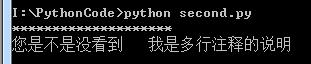
python中单行注释用#,多行注释用""",看下面的代码:
 #!/usr/bin/python

 #coding:utf-8

 #编码方式

 #打印一行*

 print "********************" #我也是注释

 """

 我是多行注释

 """

 print "您是不是没看到   我是多行注释的说明"
结果:
特别说明下:
为什么#coding:utf-8能起作用?
我们参考python的官方文档发现,这是规定好的,一共三种方式,第三种方式运用了正则表达式,有兴趣可以去研究下。网址:https://www.python.org/dev/peps/pep-0263/
这个PEP的目的是介绍在一个Python源文件中如何声明编码的语法。随后Python解释器会在解释文件的时候用到这些编码信息。最显著的是源文件中对Unicode的解释,使得在一个能识别Unicode的编辑器中使用如FUT-8编码成为可能
 Python will default to ASCII as standard encoding if no other encoding hints are given.

 To define a source code encoding, a magic comment must be placed into the source files either as first or second line in the file, such as:

 # coding=<encoding name>

 or (using formats recognized by popular editors):

 #!/usr/bin/python

 # -*- coding: <encoding name> -*-

 or:

 #!/usr/bin/python

 # vim: set fileencoding=<encoding name> :

 More precisely, the first or second line must match the following regular expression:

 ^[ \t\v]*#.*?coding[:=][ \t]*([-_.a-zA-Z0-9]+)

 The first group of this expression is then interpreted as encoding name. If the encoding is unknown to Python, an error is raised during compilation. There must not be any Python statement on the line that contains the encoding declaration. If the first line matches the second line is ignored.

 To aid with platforms such as Windows, which add Unicode BOM marks to the beginning of Unicode files, the UTF-8 signature \xef\xbb\xbf will be interpreted as 'utf-8' encoding as well (even if no magic encoding comment is given).

 If a source file uses both the UTF-8 BOM mark signature and a magic encoding comment, the only allowed encoding for the comment is 'utf-8'. Any other encoding will cause an error.
python--注释的更多相关文章
- python注释、脚本参数、字节码
python注释.脚本参数.字节码 --道心 python安装 1.下载安装包 https://www.python.org/downloads/ 2.安装 默认安装路径:C:\python27 3. ...
- 使用sphinx快速为你python注释生成API文档
sphinx简介sphinx是一种基于Python的文档工具,它可以令人轻松的撰写出清晰且优美的文档,由Georg Brandl在BSD许可证下开发.新版的Python3文档就是由sphinx生成的, ...
- Python 注释和中文乱码
Python 注释分为三种: 1.单行注释:# 2.多行注释:前后3个单引号,或者三个双引号: 如:''' 多行注释 ''', """或者 多行注释 '"&qu ...
- python注释-输入输出-基本数据类型-运算符
python注释 用处:注释用来书写一些解释性信息,对代码的逻辑作用等作出描述 单行注释.多行注释 # 这是行注释,注释内容与# 之间要空一格 print("hello world!&quo ...
- 使用sphinx为python注释生成docAPI文档
sphinx简介 sphinx是一种基于Python的文档工具,它可以令人轻松的撰写出清晰且优美的文档,由Georg Brandl在BSD许可证下开发. 新版的Python3文档就是由sphinx生成 ...
- 四.python注释说明
Python第四节 Python注释 注释说明 注释分为单行注释和多行注释 单行注释以#开头 # 注释示例 > print("上面是一个注释的示例") 多行注释 多行注释可以 ...
- 养成编程思维,可以从python开始,今天说说python注释
先看思维导图!对内容简单了解一下. 提高代码的可读性,需要提供对代码的注释.python注释,主要作用在代码中,对代码功能进行解释,是一种标注性文字.一般情况下分成三类,单行注释.多行注释.中文声明注 ...
- Python 注释(Python Comments)用法详解
目录 1 Python 注释概述 2 Python 注释的作用 2.1 调试代码 2.2 提高程序的可读性 3 Python 单行注释 3.1 Python 单行注释概述 3.2 单行注释注释单行代码 ...
- 如何在Python 中使用UTF-8 编码 && Python 使用 注释,Python ,UTF-8 编码 , Python 注释
如何在Python 中使用UTF-8 编码 && Python 使用 注释,Python ,UTF-8 编码 , Python 注释 PIP $ pip install beauti ...
- 每天学一点——python注释规范
python注释规范 python注释语法 这个是注释 注释是不影响代码运行的 当然注释也是有书写规范的,就像图片中的 注释前面#加空格再加上这条代码的注释(单行注释用#) 不然你会得到下面的结果 * ...
随机推荐
- 【TensorFlow入门完全指南】模型篇·逻辑斯蒂回归模型
import库,加载mnist数据集. 设置学习率,迭代次数,batch并行计算数量,以及log显示. 这里设置了占位符,输入是batch * 784的矩阵,由于是并行计算,所以None实际上代表并行 ...
- rsync随机启动脚本
服务端 #!/bin/sh # chkconfig: # description: Saves and restores system entropy pool for \ #create by xi ...
- Go语言学习笔记(四)结构体struct & 接口Interface & 反射
加 Golang学习 QQ群共同学习进步成家立业工作 ^-^ 群号:96933959 结构体struct struct 用来自定义复杂数据结构,可以包含多个字段(属性),可以嵌套: go中的struc ...
- struts2.0的工作原理?
struts2并不是一个陌生的web框架,它是以Webwork的设计思想为核心,吸收struts1的优点,可以说 struts2是struts1和Webwork结合的产物. struts2 的工作原理 ...
- (转)css内边距与外边距的区别,精辟啊
css内边距与外边距的区别 (2012-05-02 13:54:54) 转载▼ 标签: 杂谈 分类: css 本文也是网上看了后收藏的,忘了原地址(以后收藏文章得注意) 你真的了解margin吗?你知 ...
- (转)目前比较全的CSS重设(reset)方法总结
在当今网页设计/开发实践中,使用CSS来为语义化的(X)HTML标记添加样式风格是重要的关键.在设计师们的梦想中都存在着这样的一个完美世界:所有的浏览器都能够理解和适用多有CSS规则,并且呈现相同的视 ...
- linux下删除文件及文件夹命令
一.删除空文件与文件夹 rm或rmdir 文件/文件夹 二.删除非空文件与文件夹 rm -rf 文件/文件夹
- 41. leetcode 53. Maximum Subarray
53. Maximum Subarray Find the contiguous subarray within an array (containing at least one number) w ...
- OpenCV1.0在VC ++6.0下的配置
1.本人使用win7操作系统,首先要预装VC++6.0,安装方法不再赘述. 2.在OpenCV官方网站下载OpenCV的安装文件"OpenCV_1.0.EXE"(参考链接:http ...
- 用vue写添加数据、删除数据、筛选数据表格
<!DOCTYPE html> <html lang="en"> <head> <meta charset="utf-8&quo ...