
编译安装Nginx到Linux
之前安装的H2O不知道为啥,总是崩溃,换Nginx了
第一步,下载最新版代码:
http://nginx.org/download/
第二步,配置:
安装额外软件包:
apt install -y libgcrypt11-dev libpcre3 libpcre3-dev libssl-dev
./configure --prefix=/usr/local/nginx --with-http_sub_module --with-http_stub_status_module --with-ipv6 --with-http_ssl_module --with-http_v2_module --with-http_gzip_static_module --with-http_sub_module --with-openssl=/usr/bin/openssl --with-pcre=/root/pcre-8.41
后面两个并不是必加的
提示缺少openssl库,下载openssl源码解压安装,并加上:--with-openssl=OPENSSL安装路径
如果提示:PCRE library is not used试试这些操作:
1:apt-get install libpcre*
2:--with-pcre=PCRE安装路径
下载PCRE源码地址(亲测,不能用PCRE2):
https://ftp.pcre.org/pub/pcre/
第三步,编译:
make -j2
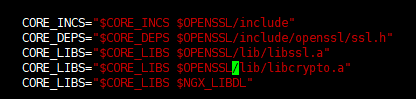
如果编译过程中提示少了openssl,可按这个操作:
vim auto/lib/openssl/conf

改为:
第四步,安装:
make install
启动试试:
/usr/nginx/sbin/nginx
停止:
查询nginx ID
ps -ef | grep nginx
从容停止Nginx:
kill -QUIT ID
重启:
kill -HUP ID
配置文件路径:
/usr/nginx/conf/nginx.conf
检测配置文件格式是否正确:
nginx -t -c /usr/nginx/conf/nginx.conf
或者
/usr/nginx/sbin/nginx -t
user  root;

worker_processes  1;

#error_log  logs/error.log;

#error_log  logs/error.log  notice;

#error_log  logs/error.log  info;

#pid        logs/nginx.pid;

events {

    worker_connections  1024;

}

http {

    include       mime.types;

    default_type  application/octet-stream;

    #log_format  main  '$remote_addr - $remote_user [$time_local] "$request" '

    #                  '$status $body_bytes_sent "$http_referer" '

    #                  '"$http_user_agent" "$http_x_forwarded_for"';

    #access_log  logs/access.log  main;

    sendfile        on;

    #tcp_nopush     on;

    #keepalive_timeout  0;

    keepalive_timeout  65;

    #gzip  on;

    server {

        listen       80;

        server_name  www.xxx.com;

        #charset koi8-r;

        #access_log  logs/host.access.log  main;

        location / {

            root   /home/wwwroot/wz;

            index  index.html index.htm;

        }

        #error_page  404              /404.html;

        # redirect server error pages to the static page /50x.html

        #

        error_page   500 502 503 504  /50x.html;

        location = /50x.html {

            root   html;

        }

        # proxy the PHP scripts to Apache listening on 127.0.0.1:80

        #

        #location ~ \.php$ {

        #    proxy_pass   http://127.0.0.1;

        #}

        # pass the PHP scripts to FastCGI server listening on 127.0.0.1:9000

        #

        location ~ \.php$ {

            fastcgi_buffer_size 128k;

            fastcgi_buffers 32 32k;

            root           /home/wwwroot/wz;

            fastcgi_pass   unix:/tmp/php-fpm.sock;

            fastcgi_index  index.php;

            #include fastcgi.conf;

            fastcgi_param  DOCUMENT_ROOT /home/wwwroot/wz;

            fastcgi_param  SCRIPT_FILENAME  /home/wwwroot/wz$fastcgi_script_name;

            include        fastcgi_params;

        }

        # deny access to .htaccess files, if Apache's document root

        # concurs with nginx's one

        #

        #location ~ /\.ht {

        #    deny  all;

        #}

    }

    # another virtual host using mix of IP-, name-, and port-based configuration

    #

    #server {

    #    listen       8000;

    #    listen       somename:8080;

    #    server_name  somename  alias  another.alias;

    #    location / {

    #        root   html;

    #        index  index.html index.htm;

    #    }

    #}

    # HTTPS server

    #

    #server {

    #    listen       443 ssl;

    #    server_name  localhost;

    #    ssl_certificate      cert.pem;

    #    ssl_certificate_key  cert.key;

    #    ssl_session_cache    shared:SSL:1m;

    #    ssl_session_timeout  5m;

    #    ssl_ciphers  HIGH:!aNULL:!MD5;

    #    ssl_prefer_server_ciphers  on;

    #    location / {

    #        root   html;

    #        index  index.html index.htm;

    #    }

    #}

}
设置systemd:
 [Unit]

 Description=nginx optimized HTTP server

 After=network.target remote-fs.target nss-lookup.target

 [Service]

 Type=forking

 PIDFile=/tmp/nginx.pid

 ExecStart=/usr/local/nginx/sbin/nginx -c /usr/local/nginx/conf/nginx.conf

 ExecReload=/usr/bin/kill -HUP $MAINPID

 ExecsTOP=/usr/bin/kill -s QUIT $MAINPID

 privateTmp=true

 [Install]

 WantedBy=multi-user.target
编译安装Nginx到Linux的更多相关文章
- linux软件管理之------编译安装nginx服务器并手动编写自动化运行脚本
红帽系列的 linux软件管理分为三类:1. rpm 安装软件.2. yum 安装软件.3. 源码包编译安装.前面两种会在相关专题给出详细讲解.源码包的编译安装是非常关键的,我们知道linux的相关版 ...
- 【转】linux 编译安装nginx,配置自启动脚本
linux 编译安装nginx,配置自启动脚本 本文章来给各位同学介绍一篇关于linux 编译安装nginx,配置自启动脚本教程,希望有需要了解的朋友可一起来学习学习哦. 在公司的suse服务器装ng ...
- linux 编译安装nginx,配置自启动脚本
本文章来给各位同学介绍一篇关于linux 编译安装nginx,配置自启动脚本教程,希望有需要了解的朋友可一起来学习学习哦. 在公司的suse服务器装nginx,记录下安装过程: 参照这篇文章:Linu ...
- linux服务基础之编译安装nginx
nginx源码下载地址: http://nginx.org/download/nginx-1.16.0.tar.gz //根据需要下载其他版本 1. 下载nginx # wget http://ngi ...
- Centos7 编译安装 Nginx PHP Mariadb Memcached 扩展 ZendOpcache扩展 (实测 笔记 Centos 7.3 + Mariadb 10.1.20 + Nginx 1.10.2 + PHP 7.1.0 + Laravel 5.3 )
环境: 系统硬件:vmware vsphere (CPU:2*4核,内存2G,双网卡) 系统版本:CentOS-7-x86_64-Minimal-1611.iso 安装步骤: 1.准备 1.0 查看硬 ...
- CentOS7 编译安装 Nginx (实测 笔记 Centos 7.0 + nginx 1.6.2)
环境: 系统硬件:vmware vsphere (CPU:2*4核,内存2G,双网卡) 系统版本:CentOS-7.0-1406-x86_64-DVD.iso 安装步骤: 1.准备 1.1 显示系统版 ...
- Centos7 编译安装 Nginx Mariadb Asp.net Core2 (实测 笔记 Centos 7.3 + Openssl 1.1.0h + Mariadb 10.3.7 + Nginx 1.14.0 + Asp.net. Core 2 )
环境: 系统硬件:vmware vsphere (CPU:2*4核,内存2G,双网卡) 系统版本:CentOS-7-x86_64-Minimal-1611.iso 安装步骤: 1.准备 1.0 查看硬 ...
- Centos7 编译安装 Nginx PHP Mariadb Memcached 扩展 ZendOpcache扩展 (实测 笔记 Centos 7.3 + Openssl 1.1.0e + Mariadb 10.1.22 + Nginx 1.12.0 + PHP 7.1.4 + Laravel 5.4 )
环境: 系统硬件:vmware vsphere (CPU:2*4核,内存2G,双网卡) 系统版本:CentOS-7-x86_64-Minimal-1611.iso 安装步骤: 1.准备 1.0 查看硬 ...
- Centos7 编译安装 Nginx PHP Mariadb Memcache扩展 ZendOpcache扩展 (实测 笔记 Centos 7.0 + Mariadb 10.1.9 + Nginx 1.9.9 + PHP 5.5.30)
环境: 系统硬件:vmware vsphere (CPU:2*4核,内存2G,双网卡) 系统版本:CentOS-7-x86_64-Minimal-1503-01.iso 安装步骤: 1.准备 1.1 ...
随机推荐
- 实现quartz定时器及quartz定时器原理介绍(转)
一.核心概念 Quartz的原理不是很复杂,只要搞明白几个概念,然后知道如何去启动和关闭一个调度程序即可.1.Job表示一个工作,要执行的具体内容.此接口中只有一个方法void execute(Job ...
- Vim入门学习之Vim解析
Vim解析... ----------------------- 首先你要会从官网上下载你想要的Vim版本: 官网: http://www.vim.org/==================== ...
- HTML Input属性
HTML Input 属性 value 属性 value 属性规定输入字段的初始值: readonly 属性 readonly 属性规定输入字段为只读(不能修改): readonly 属性不需要值.它 ...
- 剑指Offer第36题—Java版
本题使用归并排序的思想,结合归并排序,写出的算法解. //数组中的逆序对 public static int InversePairs(int[] array){ if(array==null||ar ...
- spring MVC处理请求过程及配置详解
本文主要梳理下Spring MVC处理http请求的过程,以及配置servlet及业务application需要的常用标签,及其包含的意义. spring MVC处理请求过程 首先看一个整体图 简单说 ...
- 针对通达OA20170729集团版设计门户管理解决方案的具体实例
随着企业信息化建设的深入,应用系统数量不断增加,应用功能不断丰富,数据信息也在呈几何级数增长,在支撑企业正常工作运转的同时,也衍生出许多新的问题: 通达信科根据自身从业多年的行业实践经验,勇于打破传统 ...
- photoshop软件应用手记
------------------------常用图片格式------------------------ 位图和矢量图 位图也叫点阵图,是由一个个的方形的像素点排列在一起拼接而成的,位图在放大时, ...
- SVG图案
前面的话 给SVG元素应用填充和描边,除了使用纯色和渐变外,还可以使用图案.本文将详细介绍SVG图案 概述 <pattern>可以实现重复的效果,在canvas中被翻译为模式,而在SVG中 ...
- LVS之DR模式实战及高可用性
author:JevonWei 版权声明:原创作品 LVS-DR实现同网段调度web模式 拓扑环境 网络环境 RS1 RIP 192.168.198.138/24 VIP 192.168.198.10 ...
- CountDownLatch与CyclicBarrier
对于AbstractQueuedSynchronizer衍生出来的并发工具类,这一篇再介绍俩. 场景1:有4个大文件的数据需要统计,最终将所有的统计结果进行加工,得到最后的分析数据.为了加速处理过程, ...