
Android--获取App应用程序的大小
Android对这种方法进行了封装,我们没有权限去调用这个方法,所以我们只能通过AIDL,然后利用Java的反射机制去调用系统级的方法。
下面上代码:(注释比较详细)
/**

     * 作用:-----获取包的大小-----

     * @param context 上下文

     * @param pkgName app的包名

     * @param appInfo 实体类,用于存放App的某些信息

     */

    public static void getPkgSize(final Context context, String pkgName, final PhoneAppInfo appInfo) {

        // getPackageSizeInfo是PackageManager中的一个private方法,所以需要通过反射的机制来调用

        Method method;

        try {

            method = PackageManager.class.getMethod("getPackageSizeInfo",

                    new Class[]{String.class, IPackageStatsObserver.class});

            // 调用 getPackageSizeInfo 方法,需要两个参数:1、需要检测的应用包名;2、回调

            method.invoke(context.getPackageManager(), pkgName,

                    new IPackageStatsObserver.Stub() {

                        @Override

                        public void onGetStatsCompleted(PackageStats pStats, boolean succeeded) throws RemoteException {

                            if (succeeded && pStats != null) {

                               synchronized (PhoneAppInfo.class) {

                                    appInfo.setCatchSize(pStats.cacheSize);//缓存大小

                                    appInfo.setDataSize(pStats.dataSize);  //数据大小

                                    appInfo.setCodeSize(pStats.codeSize);  //应用大小

                                    appInfo.setAppSize(pStats.cacheSize + pStats.codeSize + pStats.dataSize);//应用的总大小

                                    Log.d("asdasdxx",appInfo.getAppSize()+"");

                                }

                            }

                        }

                    });

        } catch (NoSuchMethodException | InvocationTargetException | IllegalAccessException e) {

            e.printStackTrace();

        }

    }
下面是两个AIDL文件的代码。。。
步骤(Android Studio):1、在main文件夹下,建立一个aidl文件夹的文件夹
2、建立一个包,包名为android.content.pm
3、结构图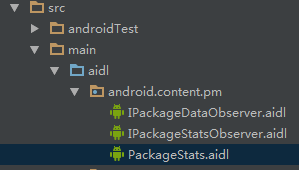
*******PackageStats.aidl文件***************
/* //device/java/android/android/view/WindowManager.aidl

**

** Copyright 2007, The Android Open Source Project

**

** Licensed under the Apache License, Version 2.0 (the "License");

** you may not use this file except in compliance with the License.

** You may obtain a copy of the License at

**

**     http://www.apache.org/licenses/LICENSE-2.0

**

** Unless required by applicable law or agreed to in writing, software

** distributed under the License is distributed on an "AS IS" BASIS,

** WITHOUT WARRANTIES OR CONDITIONS OF ANY KIND, either express or implied.

** See the License for the specific language governing permissions and

** limitations under the License.

*/

package android.content.pm;

parcelable PackageStats;
****************IPackageStatusObserver.aidl******************
/*

**

** Copyright 2007, The Android Open Source Project

**

** Licensed under the Apache License, Version 2.0 (the "License");

** you may not use this file except in compliance with the License.

** You may obtain a copy of the License at

**

**     http://www.apache.org/licenses/LICENSE-2.0

**

** Unless required by applicable law or agreed to in writing, software

** distributed under the License is distributed on an "AS IS" BASIS,

** WITHOUT WARRANTIES OR CONDITIONS OF ANY KIND, either express or implied.

** See the License for the specific language governing permissions and

** limitations under the License.

*/

package android.content.pm;

import android.content.pm.PackageStats;

/**

 * API for package data change related callbacks from the Package Manager.

 * Some usage scenarios include deletion of cache directory, generate

 * statistics related to code, data, cache usage(TODO)

 * {@hide}

 */

oneway interface IPackageStatsObserver {

    void onGetStatsCompleted(in PackageStats pStats, boolean succeeded);

}
Android--获取App应用程序的大小的更多相关文章
- android获取APP 包名和activity
1.连接设备并启动被测试app应用 2.打开cmd窗口 3.windows获取包名和activity adb shell dumpsys activity |find "mFocuse ...
- Android获取App版本号和版本名
1 //获取版本名 public static String getVersionName(Context context) { return getPackageInfo(context).vers ...
- Android获取屏幕大小和设置无标题栏
android获取屏幕大小非常常用,例如写个程序,如果要做成通用性很强的程序,适用屏幕很强,一般布局的时候都是根据屏幕的长宽来定义的,所以我把这个总结一下,方便日后忘记的时候查阅.还有就是有时候写程序 ...
- Android中App可分配内存的大小
现在真实测试结果: 1,为了搞清楚每个应用程序在Android系统中最多可分配多少内存空间,我们使用了真机进行测试,测试机型为魅族MX4 Pro,3G内存. 测试方法是直接申请一块较大的内存空间,看应 ...
- Android中App可分配内存的大小(转)
转自:http://blog.csdn.net/u011506413/article/details/50965435 现在真实测试结果: 1,为了搞清楚每个应用程序在Android系统中最多可分配多 ...
- wemall app商城源码Android 获取XML网络数据并绑定到ListView
wemall-mobile是基于WeMall的android app商城,只需要在原商城目录下上传接口文件即可完成服务端的配置,客户端可定制修改.本文分享Android 获取XML网络数据并绑定到Li ...
- Android获取程序路径 (/data/data/appname)
Android获取文件夹路径 /data/data/ http://www.2cto.com/kf/201301/186614.html String printTxtPath = getApplic ...
- Android获取屏幕大小
本来想着如下方法就能得到了 Display display = getWindowManager().getDefaultDisplay(); Log.i("view", &quo ...
- 微信小程序开发之如何哪获取微信小程序的APP ID
微信小程序的开发工具,在新建项目的时候,默认提示填写APP ID,如果不填写AppID 也是可以本地测试和开发的,但是无法通过手机调试,只能在开发工具里查看 如果需要真机调试微信小程序,需要安装微信6 ...
随机推荐
- django+celery+redis环境搭建
初次尝试搭建django+celery+redis环境,记录下来,慢慢学习~ 1.安装apache 下载httpd-2.0.63.tar.gz,解压tar zxvf httpd-2.0.63.tar. ...
- linux中强大且常用命令:find、grep
在linux下面工作,有些命令能够大大提高效率.本文就向大家介绍find.grep命令,他哥俩可以算是必会的linux命令,我几乎每天都要用到他们. 本文结构如下: find命令 find命令的一般形 ...
- 企业内网信息安全实践-记ChinaUnix技术交流
企业内网信息安全实践 随着棱镜计划的曝光,越来越多的信息安全的事件暴露在公众面前.对于企业来说,遭受到黑客攻击和破坏是家常便饭,只是您没有觉察到.自从09年就开始研究Ossim0.9版本,历经进10个 ...
- 动态链接库(VC_Win32)
目录 动态链接库概述相关函数动态链接库编程dumpbin工具 (本章节中例子都是用 VS2005 编译调试的) 动态链接概述 说明 所谓动态链接,就是把一些经常会共用的代码(静态链接的OBJ程序库)制 ...
- CSS实用的代码段
摘抄的一些代码还有自己总结的常用的代码~ 1>浏览器样式统一 *{ margin:0px; padding:0px; } 浏览器样式统一 2>清除浮动的方法 3>跨浏览器设置透明度 ...
- KVM: 安装Windows virtio半虚拟化驱动
Install KVM Windows virtio para-virtualized dirver If you can't read Chinese, there's an English ver ...
- linux进程状态
系统维护的时候难免会遇到进程的状态的查询和管理,到底什么是R,有的是S,有的还是S+呢?一直有些混沌的问题,今天细细的来总结一下: ps是用来报告系统中程序执行状况的命令这个是无可厚非的,linux进 ...
- JavaScript中的Get和Set访问器
今天要和大家分享的是JavaScript中的Get和Set访问器,和C#中的访问器非常相似. 标准的Get和Set访问器的实现 function Field(val){ this.va ...
- Xen、Openvz、KVM有什么区别?
VPS的全称为Virtual Private Server,叫做虚拟专用服务器(Godaddy称之为Virtual Dedicated Server,VDS).就是利用各种虚拟化手段把单台物理服务器虚 ...
- nodejs前端自动化构建
http://99jty.com/?p=1257 http://www.jankerli.com/?p=1628 http://www.cnblogs.com/zhepama/archive/2013 ...