
vimdiff vimmerge 配置及使用
1 Set up vimdiff
The vimdiff as a merge tool will display several buffers to show the yours/theirs/original changes.
The key point is to set up the vimdiff so that the buffer number in the vimdiff status line is visible.
First, add following code into your ~/.vimrc
set laststatus= "show the status line

set statusline=%-.3n  "buffer number
Second, if you know the buffer number, you can use hot key like ",2" (press comma first, then press two as quickly as possible) to pull change from buffer number two.Add below code into your ~/.vimrc to set up hot keys:
map <silent> <leader> :diffget <CR> :diffupdate<CR>

map <silent> <leader> :diffget <CR> :diffupdate<CR>

map <silent> <leader> :diffget <CR> :diffupdate<CR>

map <silent> <leader> :diffget <CR> :diffupdate<CR>
注意: 设置hot key的时候,需要将<leader>替换为你需要设置的前导符号,例如如果设置 ",2" 为获取buffer 2 的内容,那么你需要将 <leader>设置为 ','
即:
map <silent> , :diffget <CR> :diffupdate<CR>

map <silent> , :diffget <CR> :diffupdate<CR>

map <silent> , :diffget <CR> :diffupdate<CR>

map <silent> , :diffget <CR> :diffupdate<CR>
2 Set up git tool
To use vimdiff as default merge tool:
git config --global merge.tool vimdiff

git config --global mergetool.prompt false
3 Resolve merge conflict
Bob and Chen has edited same files. So please merge branch "bob" into "master" at first. Then merge from "chen". The merge conflicts will be created.
git branch         # double check that we got three local branches: master, bob, chen

git checkout master    # set master branch as main branch

git merge bob       #this is ok, because bob is the first one to merge changes

git merge chen       # now some conflicts created because Bob has already edited and merged same files
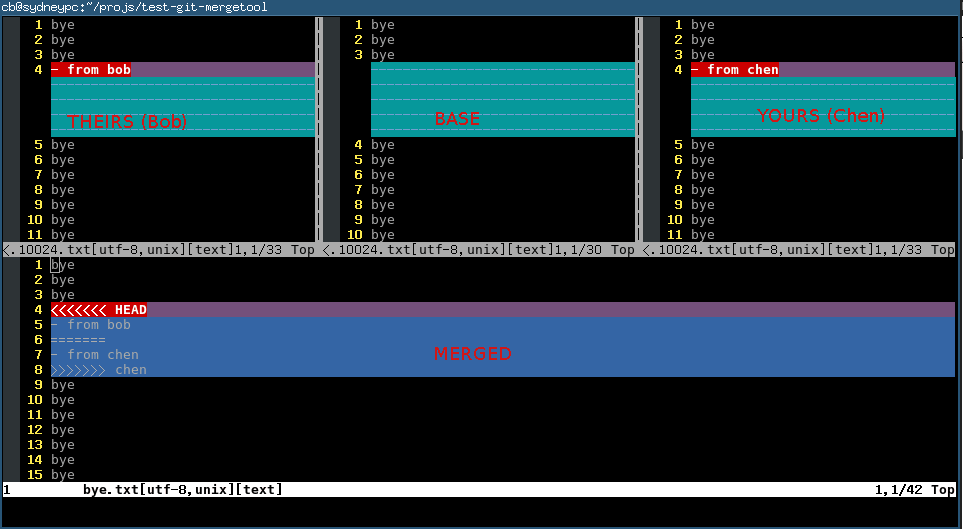 Here is the explanation of each buffer:
| Buffer | Explanation | Buffer Number |
|---|---|---|
| THEIRS | contents of the file on the current branch | 2 |
| BASE | common base for the merge | 3 |
| YOURS | contents of the file to be merged. | 4 |
| MERGED | The file containing the conflict markers. You need edit and commit this file. | 1 |
You could use hot key ",2" (comma + two) ",3" (comma+three) ",4" (comma+four) to pick the content you want to use
(either THEIRS or BASE or YOURS) to replace the marked conflict in MERGED buffer whose buffer number is one.
Or you can edit the content directly in MERGED buffer. Anyway, git only care about the the file binding to MERGED buffer.
Any other buffer will be ignored by git.
You can use hot key "[c" and "]c" to navigate to previous/next conflict (including the conflict resolved by git automatically) in current file which is binding to MERGED buffer.
After finishing editing of the conflicting file in MERGED buffer, you can use hot key ":xa" to exit vimdiff. Git will open next conflicting file with vimdiff automatically.
When you have resolved all the conflicts, follow the hint of git to commit your changes.
vimdiff vimmerge 配置及使用的更多相关文章
- Git使用指南(1)——Git配置命令
配置用户信息 git config --global user.name bongxin git config --global user.email bongxin@yeah.net 配置文本编辑器 ...
- Linux系统(Centos)下安装nodejs并配置环境
总结Centos下安装nodejs并配置环境,记录成功安装的方法.推荐的安装方法是利用已编译的二进制文件安装,不推荐使用源码的形式安装,一是源码安装比较麻烦,二是需要自行下载编译浪费时间. 1.安装n ...
- git 使用详解(2)——安装+配置+获取帮助
安装 Git Git 有许多种安装方式,主要分为两种,一种是通过编译源代码来安装:另一种是使用为特定平台预编译好的安装包. 从源代码安装 若是条件允许,从源代码安装有很多好处,至少可以安装最新的版本. ...
- git基本操作
一.在Windows平台上安装Git,可以下载一个msysGit的安装包,点击exe即可安装运行.安装包下载地址:https://git-for-windows.github.io/备注:git命令行 ...
- 【使用git】初识git
0. 版本控制 版本控制是一种记录若干文件内容变化,以便将来查阅特定版本修改情况的系统(vcs). svn等是集中式版本控制,即服务器在单一机器上,每次checkout变化的文件,若机器故障,则有可能 ...
- windows上git安装
Git的官方网站:http://git-scm.com 1.下载:http://msysgit.github.com/ 2.安装 3.配置 用户名.邮箱 这个很重要将来项目提交的账号 $ git ...
- git起步
关于版本控制 什么是版本控制?为什么要版本控制? 版本控制是记录文件内容变化,以便在将来查阅特定版本的系统.有了版本控制,我们就可以将某个文件或是整个项目回退到之前的某个时间段,查看现在和之前相比项目 ...
- Ubuntu12.04 GIT安装和使用
一.安装GIT和配置GIT 1.安装GIT apt-get install git 2.配置GIT ##配置用户信息 git config --global user.name "John ...
- 如何在 CentOS7 中安装 Nodejs
一.安装Nodejs 安装版本:10.13.0 1.安装必要的编译软件包 yum -y install gcc gcc-c++ 2.从源码下载Nodejs cd /usr/local/src wget ...
随机推荐
- 【转】SQL SERVER DateTime类型的精度
先看下边的SQL 语句 CREATE TABLE #DateTest( Id INT, SampleDate DATETIME ) INSERT INTO #DateTest VALUES(1,'1 ...
- Segment fault及LINUX core dump详解 (zz)
C 程序在进行中发生segment fault(core dump)错误,通常与内存操作不当有关,主要有以下几种情况: (1)数组越界. (2)修改了只读内存. (3)scanf("%d&q ...
- C4.5决策树算法概念学习
数据挖掘一般是指从大量的数据中自动搜索隐藏于其中的有着特殊关系性的信息的过程. •分类和聚类 •分类(Classification)就是按照某种标准给对象贴标签,再根据标签来区分归类,类别数不变. • ...
- Report_报表中Ref Cursor数据源的概念和用法(案例)
2014-06-22 Created By BaoXinjian
- OAF_VO系列4 - Row Imp的分析(概念)
20150706 Created By BaoXinjian
- c#(特殊集合)
Stack集合(先进后出) Stack ss = new Stack();//初始化 ss.Push(1);//.Push()一个一个推进,赋值ss.Push(2);ss.Push(3);ss.Pus ...
- 漫谈刑事辩护 z
各位律师,各位助理: 大家好!今天的律师沙龙由我来给大家谈一谈刑事辩护方面的问题.这次我谈的,主要是我这么多年来办理刑事案件,从事刑事辩护中的一些体会. 刑事辩护,大家最关心的莫过于收费问题了.我认为 ...
- Git中的文件状态和使用
(暂存区 即Index In Git) commit 到 local respository的内容,不想push,则使用git reset 将文件状态回转到staged|modified|unstag ...
- 94、EventBus框架 ---- 转载
EventBus使用之基础 http://blog.csdn.net/yanbober/article/details/45667363 EventBus框架库代码走读 http://blog.cs ...
- [Java] 实现一个基于命令行的用户管理
实现基于一个命令行的用户管理,控制台操作 控制类 /* * 文 件 名: mvc.my.test.UserInterface.java * 版 权: XXX Technologies Co., Ltd ...