
加密–RSA前端与后台的加密&解密
1. 前言
本问是根据网上很多文章的总结得到的。
2. 介绍
RSA加密算法是一种非对称加密算法。
对极大整数做因数分解的难度决定了RSA算法的可靠性。换言之,对一极大整数做因数分解愈困难,RSA算法愈可靠。假如有人找到一种快速因数分解的算法的话,那么用RSA加密的信息的可靠性就肯定会极度下降。但找到这样的算法的可能性是非常小的。今天只有短的RSA钥匙才可能被强力方式解破。到2016年为止,世界上还没有任何可靠的攻击RSA算法的方式。只要其钥匙的长度足够长,用RSA加密的信息实际上是不能被解破的。
1983年麻省理工学院在美国为RSA算法申请了专利。这个专利2000年9月21日失效。由于该算法在申请专利前就已经被发表了,在世界上大多数其它地区这个专利权不被承认。
具体介绍可以查看维基百科
https://zh.wikipedia.org/wiki/RSA%E5%8A%A0%E5%AF%86%E6%BC%94%E7%AE%97%E6%B3%95
3. 开始
1)在线RSA加密,请选用PKCS#1来生成公钥与私钥
http://web.chacuo.net/netrsakeypair

点击【生成秘钥对RSA】就可以生成对应的非对称加密公钥与非对称加密似钥
2)前端JS框架
http://travistidwell.com/jsencrypt/
3)流程图
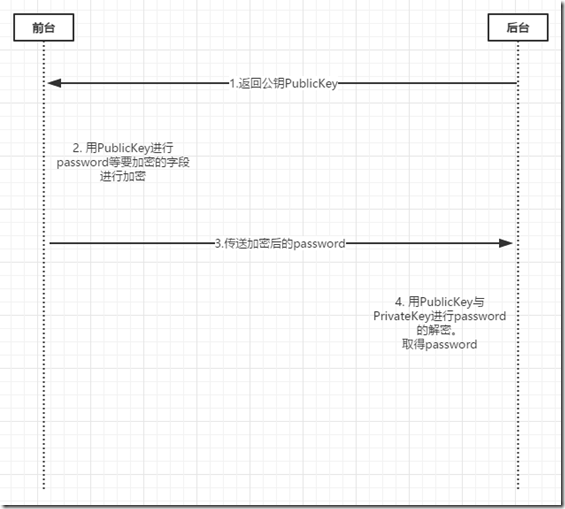
从上图可以看到,先从网站上生成publicKey与privateKey。
第一步返回publicKey前端,用来对password等敏感字段的加密。
第二步,前端进行password敏感字段的加密。
第三步post数据给后端。
第四步用publicKey与privateKey进行解密。
4.代码
这里的代码是简单的直接从前端访问后台,后台进行解密。逻辑根据读者的爱好编写。
前端代码

<!DOCTYPE html>

<html xmlns="http://www.w3.org/1999/xhtml">

<head runat="server">

    <meta http-equiv="Content-Type" content="text/html; charset=utf-8" />

    <title></title>

    <script src="http://code.jquery.com/jquery-1.8.3.min.js"></script>

    <script src="http://passport.cnblogs.com/scripts/jsencrypt.min.js"></script>

    <script type="text/javascript">

        // 使用jsencrypt类库加密js方法,

        function encryptRequest(reqUrl, data, publicKey) {

            var encrypt = new JSEncrypt();

            encrypt.setPublicKey(publicKey);

            // ajax请求发送的数据对象

            var sendData = new Object();

            // 将data数组赋给ajax对象

            for (var key in data) {

                sendData[key] = encrypt.encrypt(data[key]);

            }

            $.ajax({

                url: reqUrl,

                type: 'post',

                data: sendData,

                dataType: 'json',

                //contentType: 'application/json; charset=utf-8',

                success: function (data) {

                    console.info(data);

                },

                error: function (xhr) {

                    //console.error('出错了');

                }

            });

        }

        // Call this code when the page is done loading.

        $(function () {

            $('#testme').click(function () {

                var data = [];

                data['username'] = $('#username').val();

                data['passwd'] = $('#passwd').val();

                var pkey = $('#pubkey').val();

                encryptRequest('/WebForm2.aspx', data, pkey);

            });

        });

    </script>

</head>

<body>

    <form id="form1" runat="server">

        <div>

            <label for="pubkey">Public Key</label><br />

            <textarea id="pubkey" rows="15" cols="65">

                MIGfMA0GCSqGSIb3DQEBAQUAA4GNADCBiQKBgQCDbrIgHK8qkz5IfK/A7At4SVZQ

                31TalDPsc4vzeDVjd5ao46hcf+eOEQNm8jmxxHTm6WPSTy7RDVXG/NI489L9okkd

                K++kVh2Z9GjBo5jw/n9EYojt8aYyEOc6cMHT2Fv+1smG+X/W2HeXXoJJjcFLSjBe

                CKx1SoCD4+B2ZiDQ8wIDAQAB

            </textarea><br />

            <label for="input">Text to encrypt:</label><br />

            name:<input id="username" name="username" type="text"></input><br />

            password:<input id="passwd" name="passwd" type="password"></input><br />

            <input id="testme" type="button" value="submit" /><br />

        </div>

    </form>

</body>

</html>
后端代码
解密
 private RSACrypto rsaCrypto = new RSACrypto(PublicAttribute.PrivateKey, PublicAttribute.PublicKey);

//获取参数

 string usernameEncode = Request["username"];

 string pwdEncode = Request["pwd"];

//解密 RSA

 string username = rsaCrypto.Decrypt(usernameEncode);

 string pwd = rsaCrypto.Decrypt(pwdEncode);
类 RSACrypto
public class RSACrypto

    {

        private RSACryptoServiceProvider _privateKeyRsaProvider;

        private RSACryptoServiceProvider _publicKeyRsaProvider;

        public RSACrypto(string privateKey, string publicKey = null)

        {

            if (!string.IsNullOrEmpty(privateKey))

            {

                _privateKeyRsaProvider = CreateRsaProviderFromPrivateKey(privateKey);

            }

            if (!string.IsNullOrEmpty(publicKey))

            {

                _publicKeyRsaProvider = CreateRsaProviderFromPublicKey(publicKey);

            }

        }

        public string Decrypt(string cipherText)

        {

            if (_privateKeyRsaProvider == null)

            {

                throw new Exception("_privateKeyRsaProvider is null");

            }

            return Encoding.UTF8.GetString(_privateKeyRsaProvider.Decrypt(System.Convert.FromBase64String(cipherText), false));

        }

        public string Encrypt(string text)

        {

            if (_publicKeyRsaProvider == null)

            {

                throw new Exception("_publicKeyRsaProvider is null");

            }

            return Convert.ToBase64String(_publicKeyRsaProvider.Encrypt(Encoding.UTF8.GetBytes(text), false));

        }

        private RSACryptoServiceProvider CreateRsaProviderFromPrivateKey(string privateKey)

        {

            var privateKeyBits = System.Convert.FromBase64String(privateKey);

            var RSA = new RSACryptoServiceProvider();

            var RSAparams = new RSAParameters();

            using (BinaryReader binr = new BinaryReader(new MemoryStream(privateKeyBits)))

            {

                byte bt = 0;

                ushort twobytes = 0;

                twobytes = binr.ReadUInt16();

                if (twobytes == 0x8130)

                    binr.ReadByte();

                else if (twobytes == 0x8230)

                    binr.ReadInt16();

                else

                    throw new Exception("Unexpected value read binr.ReadUInt16()");

                twobytes = binr.ReadUInt16();

                if (twobytes != 0x0102)

                    throw new Exception("Unexpected version");

                bt = binr.ReadByte();

                if (bt != 0x00)

                    throw new Exception("Unexpected value read binr.ReadByte()");

                RSAparams.Modulus = binr.ReadBytes(GetIntegerSize(binr));

                RSAparams.Exponent = binr.ReadBytes(GetIntegerSize(binr));

                RSAparams.D = binr.ReadBytes(GetIntegerSize(binr));

                RSAparams.P = binr.ReadBytes(GetIntegerSize(binr));

                RSAparams.Q = binr.ReadBytes(GetIntegerSize(binr));

                RSAparams.DP = binr.ReadBytes(GetIntegerSize(binr));

                RSAparams.DQ = binr.ReadBytes(GetIntegerSize(binr));

                RSAparams.InverseQ = binr.ReadBytes(GetIntegerSize(binr));

            }

            RSA.ImportParameters(RSAparams);

            return RSA;

        }

        private int GetIntegerSize(BinaryReader binr)

        {

            byte bt = 0;

            byte lowbyte = 0x00;

            byte highbyte = 0x00;

            int count = 0;

            bt = binr.ReadByte();

            if (bt != 0x02)

                return 0;

            bt = binr.ReadByte();

            if (bt == 0x81)

                count = binr.ReadByte();

            else

                if (bt == 0x82)

            {

                highbyte = binr.ReadByte();

                lowbyte = binr.ReadByte();

                byte[] modint = { lowbyte, highbyte, 0x00, 0x00 };

                count = BitConverter.ToInt32(modint, 0);

            }

            else

            {

                count = bt;

            }

            while (binr.ReadByte() == 0x00)

            {

                count -= 1;

            }

            binr.BaseStream.Seek(-1, SeekOrigin.Current);

            return count;

        }

        private RSACryptoServiceProvider CreateRsaProviderFromPublicKey(string publicKeyString)

        {

            // encoded OID sequence for  PKCS #1 rsaEncryption szOID_RSA_RSA = "1.2.840.113549.1.1.1"

            byte[] SeqOID = { 0x30, 0x0D, 0x06, 0x09, 0x2A, 0x86, 0x48, 0x86, 0xF7, 0x0D, 0x01, 0x01, 0x01, 0x05, 0x00 };

            byte[] x509key;

            byte[] seq = new byte[15];

            int x509size;

            x509key = Convert.FromBase64String(publicKeyString);

            x509size = x509key.Length;

            // ---------  Set up stream to read the asn.1 encoded SubjectPublicKeyInfo blob  ------

            using (MemoryStream mem = new MemoryStream(x509key))

            {

                using (BinaryReader binr = new BinaryReader(mem))  //wrap Memory Stream with BinaryReader for easy reading

                {

                    byte bt = 0;

                    ushort twobytes = 0;

                    twobytes = binr.ReadUInt16();

                    if (twobytes == 0x8130) //data read as little endian order (actual data order for Sequence is 30 81)

                        binr.ReadByte();    //advance 1 byte

                    else if (twobytes == 0x8230)

                        binr.ReadInt16();   //advance 2 bytes

                    else

                        return null;

                    seq = binr.ReadBytes(15);       //read the Sequence OID

                    if (!CompareBytearrays(seq, SeqOID))    //make sure Sequence for OID is correct

                        return null;

                    twobytes = binr.ReadUInt16();

                    if (twobytes == 0x8103) //data read as little endian order (actual data order for Bit String is 03 81)

                        binr.ReadByte();    //advance 1 byte

                    else if (twobytes == 0x8203)

                        binr.ReadInt16();   //advance 2 bytes

                    else

                        return null;

                    bt = binr.ReadByte();

                    if (bt != 0x00)     //expect null byte next

                        return null;

                    twobytes = binr.ReadUInt16();

                    if (twobytes == 0x8130) //data read as little endian order (actual data order for Sequence is 30 81)

                        binr.ReadByte();    //advance 1 byte

                    else if (twobytes == 0x8230)

                        binr.ReadInt16();   //advance 2 bytes

                    else

                        return null;

                    twobytes = binr.ReadUInt16();

                    byte lowbyte = 0x00;

                    byte highbyte = 0x00;

                    if (twobytes == 0x8102) //data read as little endian order (actual data order for Integer is 02 81)

                        lowbyte = binr.ReadByte();  // read next bytes which is bytes in modulus

                    else if (twobytes == 0x8202)

                    {

                        highbyte = binr.ReadByte(); //advance 2 bytes

                        lowbyte = binr.ReadByte();

                    }

                    else

                        return null;

                    byte[] modint = { lowbyte, highbyte, 0x00, 0x00 };   //reverse byte order since asn.1 key uses big endian order

                    int modsize = BitConverter.ToInt32(modint, 0);

                    int firstbyte = binr.PeekChar();

                    if (firstbyte == 0x00)

                    {   //if first byte (highest order) of modulus is zero, don't include it

                        binr.ReadByte();    //skip this null byte

                        modsize -= 1;   //reduce modulus buffer size by 1

                    }

                    byte[] modulus = binr.ReadBytes(modsize);   //read the modulus bytes

                    if (binr.ReadByte() != 0x02)            //expect an Integer for the exponent data

                        return null;

                    int expbytes = (int)binr.ReadByte();        // should only need one byte for actual exponent data (for all useful values)

                    byte[] exponent = binr.ReadBytes(expbytes);

                    // ------- create RSACryptoServiceProvider instance and initialize with public key -----

                    RSACryptoServiceProvider RSA = new RSACryptoServiceProvider();

                    RSAParameters RSAKeyInfo = new RSAParameters();

                    RSAKeyInfo.Modulus = modulus;

                    RSAKeyInfo.Exponent = exponent;

                    RSA.ImportParameters(RSAKeyInfo);

                    return RSA;

                }

            }

        }

        private bool CompareBytearrays(byte[] a, byte[] b)

        {

            if (a.Length != b.Length)

                return false;

            int i = 0;

            foreach (byte c in a)

            {

                if (c != b[i])

                    return false;

                i++;

            }

            return true;

        }

    }
到此结束了。
加密–RSA前端与后台的加密&解密的更多相关文章
- C# 加密–RSA前端与后台的加密&解密
1. 前言 本问是根据网上很多文章的总结得到的. 2. 介绍 RSA加密算法是一种非对称加密算法. 对极大整数做因数分解的难度决定了RSA算法的可靠性.换言之,对一极大整数做因数分解愈困难,RSA算法 ...
- RSA前端JS加密,后端JAVA解密实现
用RSA非对称加密方式实现.后台生成rsa密钥对,然后在页面设置rsa公钥,提交时用公钥加密密码,生成的密文传到后台,后台再用私钥解密,获取密码明文.这样客户端只需要知道rsa加密方式和公钥,前台不知 ...
- RSA前端加密
昨天做了登陆模块,接触了md5&RSA加密.有点意思,talk is cheap,show me the code! 前端加密 为什么要加密 前端加密的方式 后台如何解密 1 为什么要加密? ...
- C# 基于大整数类的RSA算法实现(公钥加密私钥解密,私钥加密公钥解密)
但是C#自带的RSA算法类RSACryptoServiceProvider只支持公钥加密私钥解密,即数字证书的使用. 所以参考了一些网上的资料写了一个RSA的算法实现.算法实现是基于网上提供的一个大整 ...
- python 加密 解密 签名 验证签名 公钥 私钥 非对称加密 RSA
加密与解密,这很重要,我们已经可以用pypcap+npcap简单嗅探到网络中的数据包了.而这个工具其实可以嗅探到更多的数据.如果我们和别人之间传输的数据被别人嗅探到,那么信息泄漏,信息被篡改,将给我们 ...
- 前端和后台对接时对sign加密方法
前端和后台对接时对sign加密方法 /*后台php对接进行sign标签加密 1 获取向后台请求的数据data(key/value方式),可以是个对象(obj),也可以是数组(arr); 2 将数据的k ...
- RSA 签名、验证、加密、解密帮助类
import java.io.IOException; import java.security.InvalidKeyException; import java.security.KeyFactor ...
- 非对称加密RSA的应用及在C#中的实现
quote: http://www.cnblogs.com/happinessCodes/archive/2010/07/27/1786404.html 一说到数据的加密,常常会涉及到这几个单词: ...
- Ajax请求接口加密研究(针对网页前端的接口安全加密机制研究)
通常我们在h5前端调用后台接口时,一般是ajax,那么接口的安全成了一个问题. 这里可以肯定的说,前端调用的接口一定要验证! 然后剖析了微信网页版.京东网页版这些,也都是通过接口的形势绑定数据,所以在 ...
随机推荐
- Codeforces Round #379 (Div. 2) A. Anton and Danik 水题
A. Anton and Danik 题目连接: http://codeforces.com/contest/734/problem/A Description Anton likes to play ...
- Android 5.1 AOSP 源码获取
本文已同步更新至:http://dxjia.cn/2015/08/android-aosp-code-sync/ Android 5.1源码开放有一个多月啦,但由于城墙的关系,每次想着更新最新源码学习 ...
- iOS杂谈-图片拉伸的实现
如上图是一个按钮的背景图,在Android上,很多图片资源都是类似这样子的,但是由于按钮的高度及宽度与图片的世纪尺寸不同,所以需要采用9patch来实现拉伸处理, 可参考:http://www.cnb ...
- android 抓包 使用 tcpdmp + Wireshark
下载地址tcpdump: http://www.androidtcpdump.com/ 使用su用户, 给/system/可写的权限 mount -o remount,rw -t ...
- C++14 make code cleaner
在C++11中我们如果要写一个通过tuple实现函数调用的函数要这样写: template<int...> struct IndexTuple{}; template<int N, ...
- CSS - DIV标签width根据内容自适应
设置样式: 父标签{ width: auto; display: inline-block; } 子标签 { // 内容自动填充父节点宽度: } JSFiddle Demo: http://jsfid ...
- 导出程序界面(UI)到图片
无意间看到这个需求,查阅了相关文章,有两篇不错的博客给出了解决方案,地址如下: 1.在WPF程序中将控件所呈现的内容保存成图像 2.随心所欲导出你的 UI 界面到 PDF 文件 主要使用的接口: Si ...
- c++ 状态模式(state)
/************************************************************************/ /* 状态模式 */ /************* ...
- wordpress添加文章浏览统计(刷新不重复)
wordpress本身不带文章浏览统计,可以用插件wp-postview,但是刷新还是算一个浏览次数. 1.首先在主题下functions.php里增加以下代码,这段代码也是网上可以找到的 //add ...
- Factorization Machine
Factorization Machine Model 如果仅考虑两个样本间的交互, 则factorization machine的公式为: $\hat{y}(\mathbf{x}):=w_0 + \ ...