
Jquery和雅虎的YQL服务实现天气预报功能!
可以直接使用http://www.tianqi.com/plugin/#tjdm定制天气
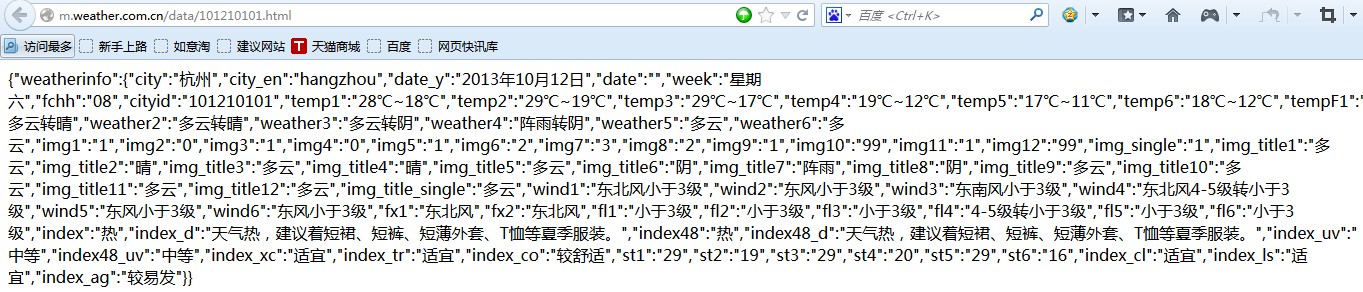
很多外部网站都有天气预报功能,对于很多企业内部的门户也需要有天气预报功能,但实现天气预报的功能和方式确有所差异,本文介绍一个利用Jquery和雅虎的YQL服务实现天气预报功能,不涉及任何后端开发代码(如.Net,JAVA等),并在本人之前开发的移动OA网站上使用。目前最权威的天气预报数据是中国天气网(http://www.weather.com.cn/),因为这个是官方提供的气象数据,除了商业的增值服务外,还提供了免费的以JSON数据格式返回的气象数据,以查看杭州的天气数据为例,可以输入以下地址:http://m.weather.com.cn/data/101210101.html ,返回的JSON数据格式如下图:
YQL服务可以实现对网上不同数据源的query,filter,combine(查询,过滤,合并),提供类似SQL,具体地址如下:http://developer.yahoo.com/yql/console/ 。当实施查询的时候,YQL服务就会访问网络上的数据源,传输数据,返回XML或者JSON形式的数据结果。YQL可以使用许多类型的数据源,包括Yahoo!Web services 或者其他的网络服务,和网络数据类型例如:HTML, XML, RSS,和Atom。
因此可以通过两者的结合使用,完成天气预报功能的开发,具体JS代码如下:

function getWeather() {
$.getJSON("http://query.yahooapis.com/v1/public/yql", {
q: "select * from json where url=\"http://m.weather.com.cn/data/101210101.html\"",
format: "json"
}, function (data) {
if (data.query.results) {
//$("#content").text(JSON.stringify(data.query.results));
var J_data = JSON.parse(JSON.stringify(data.query.results));
//alert(J_data.weatherinfo.city);
$("#content").append("<p>"+J_data.weatherinfo.city+"天气预报(数据来源中国天气网)"+"</p>");
$("#content").append("<p>"+J_data.weatherinfo.date_y+" "+J_data.weatherinfo.week+" "+J_data.weatherinfo.temp1+" "+J_data.weatherinfo.weather1+" "+J_data.weatherinfo.wind1+" "+J_data.weatherinfo.index+" "+J_data.weatherinfo.index_d+"</p>");
var t= J_data.weatherinfo.date_y;
t=t.replace("年","/");
t=t.replace("月","/");
t=t.replace("日","");
var tdy = new Date(t);
var t2 = new Date();
t2.setDate(tdy.getDate()+1);
$("#content").append("<p>"+ t2.Format("yyyy年MM月dd日")+" "+getweekdays(t2)+" "+J_data.weatherinfo.temp2+" "+J_data.weatherinfo.weather2+" "+J_data.weatherinfo.wind2+"</p>");
var t3 = new Date();
t3.setDate(tdy.getDate()+2);
$("#content").append("<p>"+t3.Format("yyyy年MM月dd日")+" "+getweekdays(t3)+" "+J_data.weatherinfo.temp3+" "+J_data.weatherinfo.weather3+" "+J_data.weatherinfo.wind3+"</p>");
var t4 = new Date();
t4.setDate(tdy.getDate()+3);
$("#content").append("<p>"+t4.Format("yyyy年MM月dd日")+" "+getweekdays(t4)+" "+J_data.weatherinfo.temp4+" "+J_data.weatherinfo.weather4+" "+J_data.weatherinfo.wind4+"</p>");
var t5 = new Date();
t5.setDate(tdy.getDate()+4);
$("#content").append("<p>"+t5.Format("yyyy年MM月dd日")+" "+getweekdays(t5)+" "+J_data.weatherinfo.temp5+" "+J_data.weatherinfo.weather5+" "+J_data.weatherinfo.wind5+"</p>");
var t6 = new Date();
t6.setDate(tdy.getDate()+5);
$("#content").append("<p>"+t6.Format("yyyy年MM月dd日")+" "+getweekdays(t6)+" "+J_data.weatherinfo.temp6+" "+J_data.weatherinfo.weather6+" "+J_data.weatherinfo.wind6+"</p>");
//alert(getweekdays(t2));
} else {
$("#content").text('no such code: ' + code);
}
});
//$.getJSON("http://m.weather.com.cn/data/101210101.html", null, function(json) { alert(json); });
}
function getweekdays(datey)
{
if(datey.getDay()==0)
{
return "星期日";
}
else if(datey.getDay()==1)
{
return "星期一";
}
else if(datey.getDay()==2)
{
return "星期二";
}
else if(datey.getDay()==3)
{
return "星期三";
}
else if(datey.getDay()==4)
{
return "星期四";
}
else if(datey.getDay()==5)
{
return "星期五";
}
else if(datey.getDay()==6)
{
return "星期六";
}
}
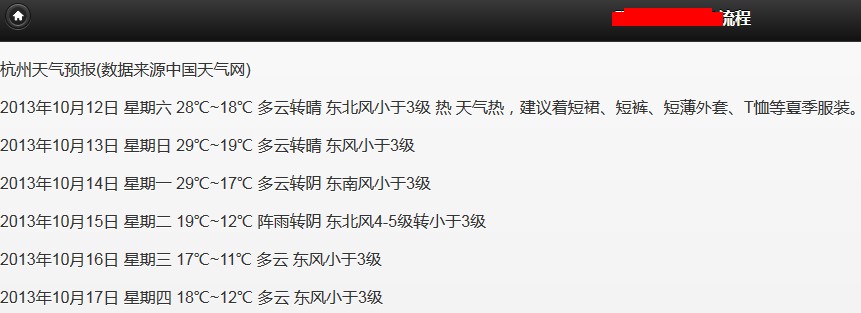
最终实现的效果,如下图:
Jquery和雅虎的YQL服务实现天气预报功能!的更多相关文章
- 【AS3 Coder】任务七:初涉PureMVC——天气预报功能实现
转自:http://www.iamsevent.com/post/36.html AS3 Coder]任务七:初涉PureMVC——天气预报功能实现 使用框架:AS3任务描述:了解PureMVC框架使 ...
- Ajax实现天气预报功能
实现天气预报功能 闲来无聊,写下此文 经常看见很多网站上有那种天气预报功能,自己之前也写过一个,不过属于那种涉及WCF服务引用那种,今天发现一个更为简单的方式来实现,使用Javascript和Ajax ...
- jquery.cookie.js 操作cookie实现记住密码功能的实现代码
jquery.cookie.js操作cookie实现记住密码功能,很简单很强大,喜欢的朋友可以参考下. 复制代码代码如下: //初始化页面时验证是否记住了密码 $(document).ready( ...
- jQuery实现全选与全不选功能
初始时: 实现功能后: 实现该功能的核心代码: <script> $(function(){ $("#selectBtn").click(function(){ con ...
- 完全国人自主研发原创的智能软件路由器BDS即将发布,附带企业服务总线ESB功能
完全国人自主研发原创的智能软件路由器即将发布: 完全国人自主研发原创的智能软件路由器BDS即将发布,附带企业服务总线ESB功能 智能软件路由器 BDS 简要介绍 http://kan.weibo.co ...
- Linux的setup命令启动服务名称和功能
Linux的setup命令启动服务名称和功能 1 anacron 可执行crontab既定时间内没执行的工作.2 atd 单一使用的例行性命令.3 apmd 了解系统电池电量(手提式计算机使用).4 ...
- Vue.js与 ASP.NET Core 服务端渲染功能整合
http://mgyongyosi.com/2016/Vuejs-server-side-rendering-with-aspnet-core/ 原作者:Mihály Gyöngyösi 译者:oop ...
- Atitit.用户权限服务 登录退出功能
Atitit.用户权限服务 登录退出功能 参数说明 /com.attilax/user/loginOut.jsp?url="+url Utype=mer 作者:: ★(attilax)&g ...
- GMGDC专訪戴亦斌:具体解释QAMAster全面測试服务6大功能
GMGDC专訪戴亦斌:具体解释QAMAster全面測试服务6大功能 2014/10/10 · Testin · 业界资讯 在9月24-25日第三届全球移动游戏开发人员大会上,Testin云測COO戴亦 ...
随机推荐
- Protocol Buffer技术详解(数据编码)
Protocol Buffer技术详解(数据编码) 之前已经发了三篇有关Protocol Buffer的技术博客,其中第一篇介绍了Protocol Buffer的语言规范,而后两篇则分别基于C++和J ...
- Web Service 元数据注释(JSR 181)
Web Service 元数据注释(JSR 181) @WebService 1.serviceName: 对外发布的服务名,指定 Web Service 的服务名称:wsdl:service.缺省值 ...
- 32和64位的CentOS 6.0下 安装 Mono 2.10.8 和Jexus 5.0
http://www.cnblogs.com/shanyou/archive/2012/01/07/2315982.html shanyou 博客
- 关闭 ubuntu System program problem detected
每次开机都出现: System program problem detected 很麻烦,关闭方法: vim /etc/default/apport # set this to 0 to disabl ...
- jQuery 事件用法详解
jQuery 事件用法详解 目录 简介 实现原理 事件操作 绑定事件 解除事件 触发事件 事件委托 事件操作进阶 阻止默认事件 阻止事件传播 阻止事件向后执行 命名空间 自定义事件 事件队列 jque ...
- 老项目的#iPhone6与iPhone6Plus适配#Icon适配
本文永久地址为http://www.cnblogs.com/ChenYilong/p/4020373.html ,转载请注明出处. 这是Evernote印象笔记的链接:https://www ...
- 敲点JavaScript代码
1. DOM DEMO-表格的行排序 <!DOCTYPE html PUBLIC "-//W3C//DTD XHTML 1.0 Transitional//EN" " ...
- php面试题之三——PHP网络编程(高级部分)
三.PHP网络编程 [!!!]1.禁用COOKIE后SEESION还能用吗?(51.com笔试题) 可以,COOKIE和SESSION都是用来实现会话机制的,由于http协议是无状态的,所以要想跟踪一 ...
- SGU 170 Particles(规律题)
题目链接:http://acm.sgu.ru/problem.php?contest=0&problem=170 解题报告:输入两个由'+'和'-'组成的字符串,让你判断第二个串能不能由第一个 ...
- UIImage imageNamed和UIImage imageWithContentsOfFile区别
UIImage imageNamed和 [UIImage imageWithContentsOfFile:[[NSBundle mainBundle] pathForResource:imageNam ...