
centos7.2 利用yum安装配置apache2.4多虚拟主机

分类:

Linux题目(8)
版权声明:本文为博主原创文章,未经博主允许不得转载。
一、安装apache
安装
# yum install httpd -y

# rpm -qa httpd
- 1
- 2
- 1
- 2
操作步骤:
[root@centos7-1 httpd]# cat /etc/centos-release

CentOS Linux release 7.2.1511 (Core)

[root@centos7-1 ~]# yum install httpd -y

Loaded plugins: fastestmirror

…………………………………………………………………………

Dependency Installed:

  httpd-tools.x86_64 0:2.4.6-45.el7.centos                         mailcap.noarch 0:2.1.41-2.el7

Complete!

[root@centos7-1 ~]# rpm -qa httpd

httpd-2.4.6-45.el7.centos.x86_64
- 1
- 2
- 3
- 4
- 5
- 6
- 7
- 8
- 9
- 10
- 11
- 1
- 2
- 3
- 4
- 5
- 6
- 7
- 8
- 9
- 10
- 11
二、启动测试apache
1、启动apache
[root@centos7-1 ~]# systemctl start httpd.service
- 1
- 1
2、查看是否启动成功
[root@centos7-1 ~]# ps -ef|grep httpd

root      1739     1  0 18:34 ?        00:00:00 /usr/sbin/httpd -DFOREGROUND

apache    1740  1739  0 18:34 ?        00:00:00 /usr/sbin/httpd -DFOREGROUND

apache    1741  1739  0 18:34 ?        00:00:00 /usr/sbin/httpd -DFOREGROUND

apache    1742  1739  0 18:34 ?        00:00:00 /usr/sbin/httpd -DFOREGROUND

apache    1743  1739  0 18:34 ?        00:00:00 /usr/sbin/httpd -DFOREGROUND

apache    1744  1739  0 18:34 ?        00:00:00 /usr/sbin/httpd -DFOREGROUND

root      1749  1112  0 18:37 pts/0    00:00:00 grep --color=auto httpd

[root@centos7-1 ~]# netstat -lntup|grep httpd

tcp6       0      0 :::80                   :::*                    LISTEN      1739/httpd
- 1
- 2
- 3
- 4
- 5
- 6
- 7
- 8
- 9
- 10
- 1
- 2
- 3
- 4
- 5
- 6
- 7
- 8
- 9
- 10
[root@centos7-1 ~]# echo "192.168.56.101 centos7-1.com www.centos7-1.com bbs.centos7-1.com blog.centos7-1.com">>/etc/hosts

[root@centos7-1 ~]# tail -1 /etc/hosts

192.168.56.101 centos7-1.com www.centos7-1.com bbs.centos7-1.com blog.centos7-1.com
- 1
- 2
- 3
- 1
- 2
- 3
使用curl命令测试
[root@centos7-1 ~]# echo "http://www.$HOSTNAME">/var/www/html/index.html

[root@centos7-1 ~]# cat /var/www/html/index.html

http://www.centos7-1.com

[root@centos7-1 ~]# curl www.centos7-1.com

http://www.centos7-1.com
- 1
- 2
- 3
- 4
- 5
- 1
- 2
- 3
- 4
- 5
三、配置apache
1、修改前备份文件
[root@centos7-1 ~]# cp /etc/httpd/conf/httpd.conf /etc/httpd/conf/httpd.conf.$(date +%F)

[root@centos7-1 ~]# ll /etc/httpd/conf/httpd.conf /etc/httpd/conf/httpd.conf.$(date +%F)

-rw-r--r-- 1 root root 11753 Nov 15 00:53 /etc/httpd/conf/httpd.conf

-rw-r--r-- 1 root root 11753 Jan 10 18:42 /etc/httpd/conf/httpd.conf.2017-01-10

[root@centos7-1 ~]#
- 1
- 2
- 3
- 4
- 5
- 1
- 2
- 3
- 4
- 5
2、配置httpd文件
因为在apache2.4中变化挺大,和nginx一样,可以自定义.conf文件。
在主配置文件中启用虚拟主机
[root@centos7-1 httpd]# mkdir /etc/httpd/vhost.d/

[root@centos7-1 httpd]# echo "include vhost.d/*.conf"

[root@centos7-1 httpd]# tail -1 /etc/httpd/conf/httpd.conf

include vhost.d/*.conf
- 1
- 2
- 3
- 4
- 1
- 2
- 3
- 4
虚拟主机配置文件
[root@centos7-1 httpd]# cat ./vhost.d/name.conf

<VirtualHost *:80>

    ServerAdmin admin@amsilence.com

    DocumentRoot "/var/html/www"

    ServerName www.centos7-1.com

    ErrorLog "/var/httpd/logs/www-error_log"

    CustomLog "/var/httpd/logs/www-access_log" common

</VirtualHost>

<Directory /var/html/www/>

Require all granted

</Directory>

<VirtualHost *:80>

    ServerAdmin admin@amsilence.com

    DocumentRoot "/var/html/bbs"

    ServerName bbs.centos7-1.com

    ErrorLog "/var/httpd/logs/bbs-error_log"

    CustomLog "/var/httpd/logs/bbs-access_log" common

</VirtualHost>

<Directory /var/html/bbs/>

Require all granted

</Directory>

<VirtualHost *:80>

    ServerAdmin admin@amsilence.com

    DocumentRoot "/var/html/blog"

    ServerName blog.centos7-1.com

    ErrorLog "/var/httpd/logs/blog-error_log"

    CustomLog "/var/httpd/logs/blog-access_log" common

</VirtualHost>

<Directory /var/html/blog/>

Require all granted

</Directory>
- 1
- 2
- 3
- 4
- 5
- 6
- 7
- 8
- 9
- 10
- 11
- 12
- 13
- 14
- 15
- 16
- 17
- 18
- 19
- 20
- 21
- 22
- 23
- 24
- 25
- 26
- 27
- 28
- 29
- 30
- 31
- 32
- 33
- 34
- 35
- 36
- 1
- 2
- 3
- 4
- 5
- 6
- 7
- 8
- 9
- 10
- 11
- 12
- 13
- 14
- 15
- 16
- 17
- 18
- 19
- 20
- 21
- 22
- 23
- 24
- 25
- 26
- 27
- 28
- 29
- 30
- 31
- 32
- 33
- 34
- 35
- 36
测试配置文件是否正确
[root@centos7-1 httpd]# /sbin/service httpd configtest

Syntax OK
- 1
- 2
- 1
- 2
重新启动apache服务
[root@centos7-1 httpd]# systemctl restart httpd.service

[root@centos7-1 httpd]# ps -ef|grep httpd

root      1129     1  2 20:40 ?        00:00:00 /usr/sbin/httpd -DFOREGROUND

apache    1131  1129  0 20:40 ?        00:00:00 /usr/sbin/httpd -DFOREGROUND

apache    1132  1129  0 20:40 ?        00:00:00 /usr/sbin/httpd -DFOREGROUND

apache    1133  1129  0 20:40 ?        00:00:00 /usr/sbin/httpd -DFOREGROUND

apache    1134  1129  0 20:40 ?        00:00:00 /usr/sbin/httpd -DFOREGROUND

apache    1135  1129  0 20:40 ?        00:00:00 /usr/sbin/httpd -DFOREGROUND

root      1138  1112  0 20:40 pts/0    00:00:00 grep --color=auto httpd
- 1
- 2
- 3
- 4
- 5
- 6
- 7
- 8
- 9
- 1
- 2
- 3
- 4
- 5
- 6
- 7
- 8
- 9
四、测试web服务
curl测试
[root@centos7-1 httpd]# for name in www bbs blog;do curl $name.centos7-1.com;done;

http://www.centos7-1.com

http://bbs.centos7-1.com

http://blog.centos7-1.com
- 1
- 2
- 3
- 4
- 1
- 2
- 3
- 4
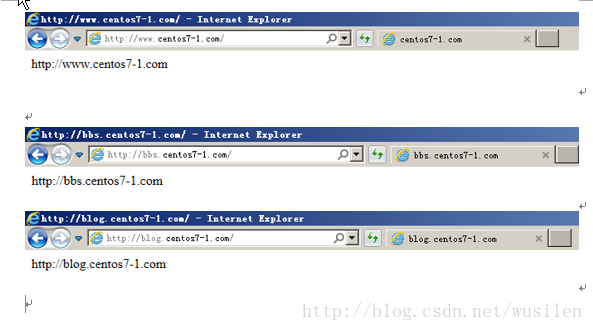
ie浏览器测试
centos7.2 利用yum安装配置apache2.4多虚拟主机的更多相关文章
- ubuntu下安装配置apache2(含虚拟主机配置)
在Ubuntu14.14中安装apache 安装指令: sudo apt-get install apache2 安装结束后: 产生的启动和停止文件是: /etc/init.d/apache2 启动: ...
- 在CentOS7中利用yum命令安装mysql
在CentOS7中利用yum命令安装mysql 原创 2016年08月31日 10:42:33 标签: mysql / centos 4832 一.说明 我们是在VMware虚拟机上安装的mysql, ...
- centos7 yum安装配置redis 并设置密码
原文:https://www.cnblogs.com/fanlinglong/p/6635828.html centos7 yum安装配置redis 并设置密码 1.设置Redis的仓库地址 yum ...
- Linux 下安装Nginx两种方法- yum安装 and Centos7下yum安装配置nginx与php
转载csdn: Linux 下安装Nginx两种方法- yum安装_在电脑前深思的博客-CSDN博客 Linux安装Nginx(两种方式)_HHRunning的博客-CSDN博客_linux 是否安装 ...
- CentOS7下使用YUM安装mariadb10
1:由于centos7 默认使用yum安装MySQL的话就会安装mariadb,只是安装的版本停留在mariadb5.x,版本比较低.如果我们需要安装mariadb10这里就需要删除mariadb-l ...
- centos7中使用yum安装tomcat以及它的启动、停止、重启
centos7中使用yum安装tomcat 介绍 Apache Tomcat是用于提供Java应用程序的Web服务器和servlet容器. Tomcat是Apache Software Foundat ...
- centos7: svbversion版本的安装配置+tortoisesvn登录验证
centos7: svbversion版本的安装配置+tortoisesvn登录验证 命令工具:svnadmin create #创建版本库 hotcopy #版本库热备份 Islocks #打印所有 ...
- Centos7.6使用yum安装PHP7.2
Centos7.6使用yum安装PHP7.2 1.安装源 安装php72w,是需要配置额外的yum源地址的,否则会报错不能找到相关软件包. php高版本的yum源地址,有两部分,其中一部分是epel- ...
- centos7下使用yum安装mysql
CentOS7的yum源中默认好像是没有mysql的.为了解决这个问题,我们要先下载mysql的repo源. 1. 下载mysql的repo源 wget http://repo.mysql.com/m ...
- centOS下yum安装配置samba
centOS下yum安装配置samba 2010-03-29 15:46:00 标签:samba yum centOS 安装 休闲 注意:本文的原则是只将文件共享应用于内网服务器,并让将要被共享的目 ...
随机推荐
- VC-MFC(1) 随笔笔记+连接数据库
1 数据库语句: 2 CREATE DATABASE---创建新数据库 3 ALTER DATABASE-----修改数据库 4 CREATE TABLE ---- -创建新表 5 ALTER TAB ...
- Codeforces Round 920 (Div. 3)(A~F)
目录 A B C D E F A 按题意模拟即可 #include <bits/stdc++.h> #define int long long #define rep(i,a,b) for ...
- 文心一言 VS 讯飞星火 VS chatgpt (210)-- 算法导论16.1 1题
一.根据递归式(16.2)为活动选择问题设计一个动态规划算法.算法应该按前文定义计算最大兼容活动集的大小 c[i,j]并生成最大集本身.假定输入的活动已按公式(16.1)排好序.比较你的算法和GREE ...
- Pandas导出美化技巧,让你的Excel更出众
pandas的DataFrame可以通过设置参数使得在jupyter notebook中显示的更加美观,但是,将DataFrame的数据导出excel时,却只能以默认最朴素的方式将数据写入excel. ...
- 缓存 SpringModules Cache ( spring 和 ehcache的整合 )
spring提供缓存bean方案 springbeancachecachingpath 下面格式整理有些混乱,spring3.1如何使用cache 缓存请参照:spring cache http:// ...
- HiSi 3516CV500 NNIE(Neural Network Inference Engine) 摸鱼记录(3) ---真机调试(实例分析)
PS:要转载请注明出处,本人版权所有. PS: 这个只是基于<我自己>的理解, 如果和你的原则及想法相冲突,请谅解,勿喷. 前置说明 本文作为本人csdn blog的主站的备份.(Bl ...
- 记录--开局一张图,构建神奇的 CSS 效果
这里给大家分享我在网上总结出来的一些知识,希望对大家有所帮助 假设,我们有这样一张 Gif 图: 利用 CSS,我们尝试来搞一些事情. 图片的 Glitch Art 风 在这篇文章中 --CSS 故障 ...
- EventSource JS实时通信
前台 html <script type="text/javascript"> if (typeof (EventSource) != "undefined& ...
- nodejs下载 安装 配置环境
1.下载 下载地址:https://nodejs.org/en/download/ 下载完成后,双击安装包,开始安装,一直点next即可.我把安装路径设置为 D:\Program Files\node ...
- linux安装jdk压缩包版
1.下载压缩包可以选择国内大厂的jdk镜像网站下载速度很快, 比如华为的:https://repo.huaweicloud.com/java/jdk/ 2.查看Linux系统是否有自带的jdk: 输入 ...