
myeclipse过期问题
安装myeclipse后就会遇到过期问题。如下代码永久解决过期问题。
import java.io.BufferedReader;

import java.io.IOException;

import java.io.InputStreamReader;

public class MyEclipseGen {

	private static final String LL = "Decompiling this copyrighted software is a violation of both your license agreement and the Digital Millenium Copyright Act of 1998 (http://www.loc.gov/copyright/legislation/dmca.pdf). Under section 1204 of the DMCA, penalties range up to a $500,000 fine or up to five years imprisonment for a first offense. Think about it; pay for a license, avoid prosecution, and feel better about yourself.";

	public String getSerial(String userId, String licenseNum) {

		java.util.Calendar cal = java.util.Calendar.getInstance();

		cal.add(1, 3);

		cal.add(6, -1);

		java.text.NumberFormat nf = new java.text.DecimalFormat("000");

		licenseNum = nf.format(Integer.valueOf(licenseNum));

		String verTime = new StringBuilder("-").append(

				new java.text.SimpleDateFormat("yyMMdd").format(cal.getTime()))

				.append("0").toString();

		String type = "YE3MP-";

		String need = new StringBuilder(userId.substring(0, 1)).append(type)

				.append("300").append(licenseNum).append(verTime).toString();

		String dx = new StringBuilder(need).append(LL).append(userId)

				.toString();

		int suf = this.decode(dx);

		String code = new StringBuilder(need).append(String.valueOf(suf))

				.toString();

		return this.change(code);

	}

	private int decode(String s) {

		int i;

		char[] ac;

		int j;

		int k;

		i = 0;

		ac = s.toCharArray();

		j = 0;

		k = ac.length;

		while (j < k) {

			i = (31 * i) + ac[j];

			j++;

		}

		return Math.abs(i);

	}

	private String change(String s) {

		byte[] abyte0;

		char[] ac;

		int i;

		int k;

		int j;

		abyte0 = s.getBytes();

		ac = new char[s.length()];

		i = 0;

		k = abyte0.length;

		while (i < k) {

			j = abyte0[i];

			if ((j >= 48) && (j <= 57)) {

				j = (((j - 48) + 5) % 10) + 48;

			} else if ((j >= 65) && (j <= 90)) {

				j = (((j - 65) + 13) % 26) + 65;

			} else if ((j >= 97) && (j <= 122)) {

				j = (((j - 97) + 13) % 26) + 97;

			}

			ac[i] = (char) j;

			i++;

		}

		return String.valueOf(ac);

	}

	public MyEclipseGen() {

		super();

	}

	public static void main(String[] args) {

		try {

			System.out.println("please input register name:");

			BufferedReader reader = new BufferedReader(new InputStreamReader(

					System.in));

			String userId = null;

			userId = reader.readLine();

			MyEclipseGen myeclipsegen = new MyEclipseGen();

			String res = myeclipsegen.getSerial(userId, "5");

			System.out.println("Serial:" + res);

			reader.readLine();

		} catch (IOException ex) {

		}

	}

}
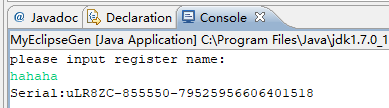
运行程序
myeclipse过期问题的更多相关文章
- MyEclipse过期激活方法
如果已经过期会提示,进行购买.重新激活和退出,我们选择重新激活. 打开浏览器,地址栏输入key.858game.com,然后输入名称,在线获得MyEclipse的激活码. 输入Sumscripter: ...
- 解决myeclipse过期问题
一般myeclise使用期限为30天,超过之后,会频繁的提醒你,购买软件,很讨厌,有个这个小工具,,以后再也不怕啦!!! 使用方法: 1:将这个类导入到myeclipse包中 2:运行main方法,提 ...
- MyEclipse过期后怎么破解
方法一:写一个程序生成Subscriptioncode import java.io.*; public class MyEclipseGen { private static final Strin ...
- myeclipse过期以后提示过期以后怎么办?!
昨天电脑上装的myeclipse到期了,不能进到工作空间里边,只有激活和退出选项,在网上百度了一下,有很多破解工具, 1.刚开始直接使用工具破解,没有成功,总是提示要么激活,要么退出 2.继续想办法, ...
- MyEclipse 过期
package util; import java.io.BufferedReader;import java.io.IOException;import java.io.InputStreamRea ...
- MyEclipse部署项目报"Add Deployment". Invalid Subscription Level - Discontinuing this MyEclipse
"Add Deployment". Invalid Subscription Level - Discontinuing this MyEclipse 猜测应该是MyEclipse ...
- 2014年到期的myeclipse5.5.1注冊码
假设点击Myeclipse的载入项目到server的图标没有反应,这就是MyEclipse过期了,下面是还能用一年的注冊码: subscriber: axin Serial:nLR8ZC-85557 ...
- 2014由于在myeclipse5.5.1许可证
点击假设Myeclipse负载项目server该图标不响应.这是MyEclipse过期,这也是一年许可: subscriber: axin Serial:nLR8ZC-855575-69517252 ...
- myeclipse 8.5最新注册码(过期时间到2016年)
myeclipse 8.5最新注册码(过期时间到2016年) 这几天myeclipse弹出注册码过期,去网上一搜,要么已过期,要么就剩一两个月.倒腾了半天,自己申请了几个注册码,给大家分享一下 Sub ...
- 即将进行论文答辩的我发现MyEclipse 2016 激活过期害得我又一次把 MyEclipse 2016 给重新激活注册,详细的图文解说激活过程
背景: 在家美滋滋的上着网课享受着因为疫情带来的平静,没想到随着微信.钉钉铃声响起打破了我半年以来的平静的生活:通知我们过完劳动节要进行答辩,由于我的答辩项目是由 MyEclipse 这个工具编写的我 ...
随机推荐
- 大数据 - MapReduce:从原理到实战的全面指南
本文深入探讨了MapReduce的各个方面,从基础概念和工作原理到编程模型和实际应用场景,最后专注于性能优化的最佳实践. 关注[TechLeadCloud],分享互联网架构.云服务技术的全维度知识.作 ...
- windows查看GPU信息(nvidia-smi)
一般在使用windows系统的电脑时,想要了解GPU的使用情况时,我们通常会打开任务管理器去查看.但是这种方式一般只能看到简单的情况.那么我们想要了解更多的情况的话,该怎么办呢.可以在cmd中输入nv ...
- 18、defer
1.defer是什么? 字面意思来看,defer是延迟,推迟的意思 在go语言中,使用defer关键字来延迟一个函数或者方法的执行 2.defer能干嘛? 对象.close(),临时文件的删除 文件. ...
- 开源不挣钱?这个项目上线半年月入超 30w
很兴奋的告诉大家,Sealos 自从 6 月份上线以来,仅半年时间注册用户已经突破 7万,月收入超过 30w,本文来向大家介绍我们是怎么做开源商业化的.每月平均增速超过 40%,而且这些收入大部分来自 ...
- Oracle表空间和数据文件
表空间:tablespace 表空间就是:存放数据库表.索引.等等对象的逻辑空间. oracle数据在安装并创建实例后,默认会自动创建多个表空间. ORACL默认表空间 SYSTEM表空间 存放ora ...
- 【C# 技术】C# 常用排序方式
前言 在最近的项目中经常会对C#中的数据进行排序,对于基本数据类型,其排序方式比较简单,只需要调用内置算法即可实现,但对于自定义数据类型以及自定义排序规则的情况实现起来就比较麻烦,所以在本文章中将 ...
- 深入理解JavaScript堆栈、事件循环、执行上下文和作用域以及闭包
1. 堆栈 在JavaScript中,内存堆是内存分配的地方,调用栈是代码执行的地方. 原始类型的保存方式:在变量中保存的是值本身,所以原始类型也被称之为值类型. 对象类型的保存方式:在变量中保存的是 ...
- UDP与KCP详解
UDP 以及TCP是什么.我们知道传输层中有TCP和UDP两种网络协议,这节就讲UDP是什么. Internet协议集支持一个无连接的传输协议,该协议称为用户数据报协议(UDP,User Datagr ...
- JSON字符串中获取一个特定字段的值
第一种 import com.google.gson.JsonObject; import com.google.gson.JsonParser; String json="{\" ...
- maven 实现pb的实时编译
<properties> <protobuf.version>3.15.7</protobuf.version></properties> <ex ...