
Java freemarker生成word模板文件(如合同文件)及转pdf文件方法
Java freemarker生成word模板文件(如合同文件)及转pdf文件方法
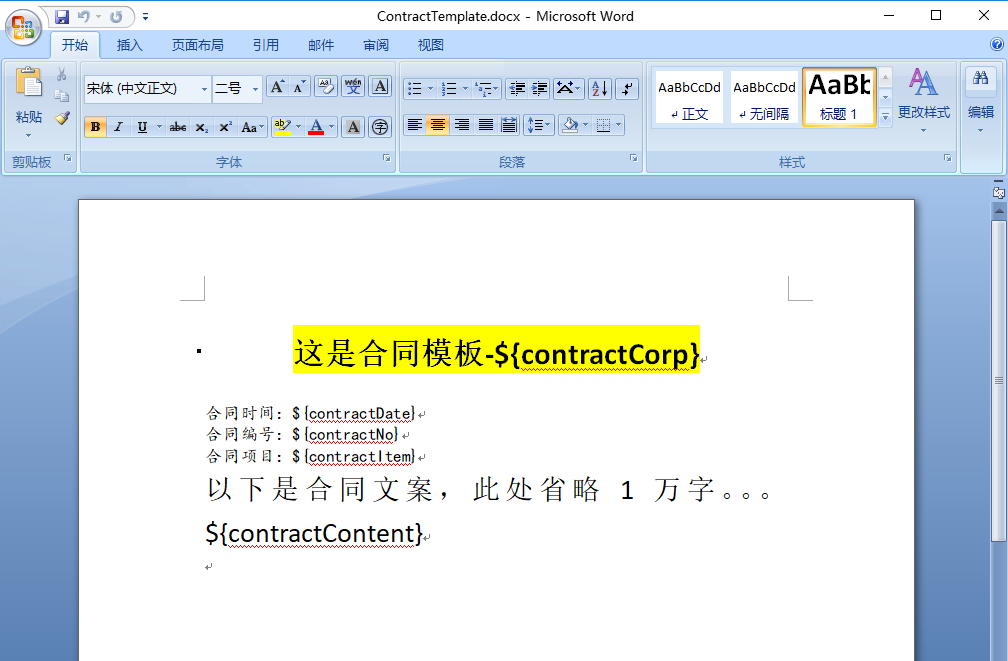
创建模板文件
ContractTemplate.docx
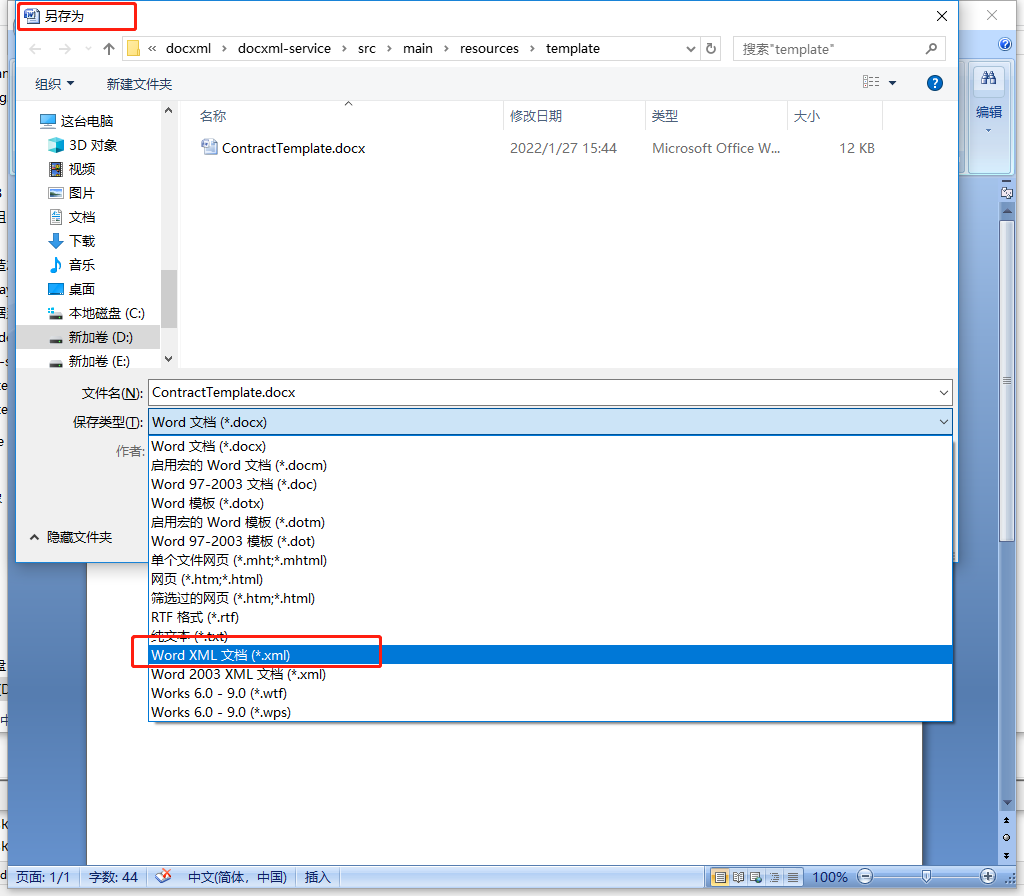
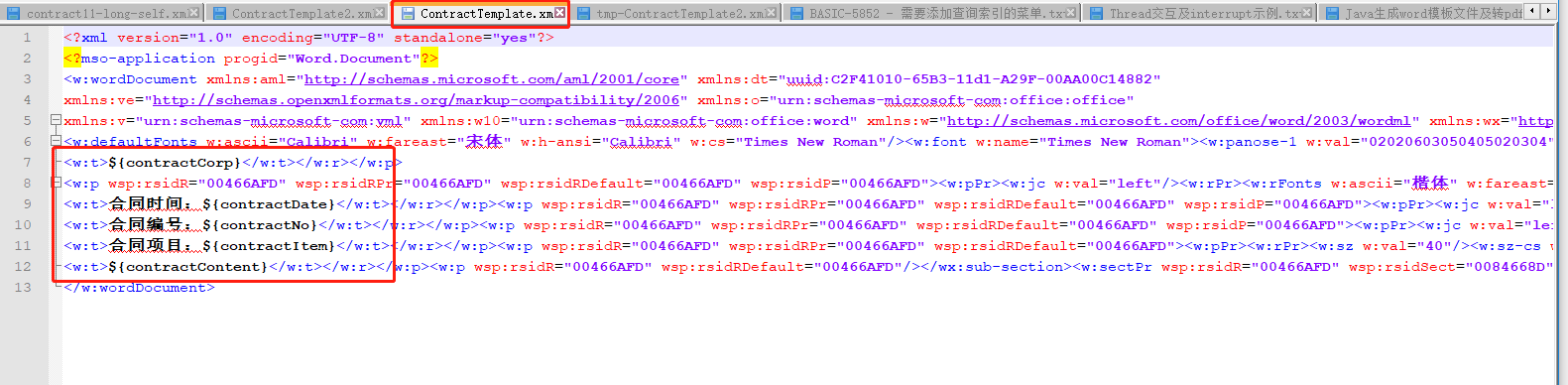
ContractTemplate.xml
导入的Jar包
compile("junit:junit")
compile("org.springframework:spring-test")
compile("org.springframework.boot:spring-boot-test")
testCompile 'org.springframework.boot:spring-boot-starter-test'
compile 'org.freemarker:freemarker:2.3.28'
compile 'fakepath:aspose-words:19.5jdk'
compile 'fakepath:aspose-cells:8.5.2'
Java工具类 xml文档 转换 Word XmlToDocx.java
package com.test.docxml.utils;

import java.io.File;

import java.io.FileInputStream;

import java.io.FileOutputStream;

import java.io.InputStream;

import java.util.Enumeration;

import java.util.zip.ZipEntry;

import java.util.zip.ZipFile;

import java.util.zip.ZipOutputStream;

/**

 * xml文档 转换 Word

 */

public class XmlToDocx {

    /**

     *

     * @param documentFile 动态生成数据的docunment.xml文件

     * @param docxTemplate docx的模板

     * @param toFilePath 需要导出的文件路径

     * @throws Exception

     */

    public static void outDocx(File documentFile, String docxTemplate, String toFilePath,String key) throws Exception {

        try {

            File docxFile = new File(docxTemplate);

            ZipFile zipFile = new ZipFile(docxFile);

            Enumeration<? extends ZipEntry> zipEntrys = zipFile.entries();

            FileOutputStream fileOutputStream = new FileOutputStream(toFilePath);

            ZipOutputStream zipout = new ZipOutputStream(fileOutputStream);

            int len = -1;

            byte[] buffer = new byte[1024];

            while (zipEntrys.hasMoreElements()) {

                ZipEntry next = zipEntrys.nextElement();

                InputStream is = zipFile.getInputStream(next);

                // 把输入流的文件传到输出流中 如果是word/document.xml由我们输入

                zipout.putNextEntry(new ZipEntry(next.toString()));

                if ("word/document.xml".equals(next.toString())) {

                    InputStream in = new FileInputStream(documentFile);

                    while ((len = in.read(buffer)) != -1) {

                        zipout.write(buffer, 0, len);

                    }

                    in.close();

                } else {

                    while ((len = is.read(buffer)) != -1) {

                        zipout.write(buffer, 0, len);

                    }

                    is.close();

                }

            }

            zipout.close();

        } catch (Exception e) {

            e.printStackTrace();

        }

    }

}
Java工具类 word文档 转换 PDF WordToPdf.java
package com.test.docxml.utils;

import com.aspose.cells.*;

import com.aspose.cells.License;

import com.aspose.words.*;

import java.io.ByteArrayInputStream;

import java.io.File;

import java.io.FileOutputStream;

import java.io.InputStream;

/**

 * word文档 转换 PDF

 */

public class WordToPdf {

    /**

     * 获取license许可凭证

     * @return

     */

    private static boolean getLicense() {

        boolean result = false;

        try {

            String licenseStr = "<License>\n"

                    + " <Data>\n"

                    + " <Products>\n"

                    + " <Product>Aspose.Total for Java</Product>\n"

                    + " <Product>Aspose.Words for Java</Product>\n"

                    + " </Products>\n"

                    + " <EditionType>Enterprise</EditionType>\n"

                    + " <SubscriptionExpiry>20991231</SubscriptionExpiry>\n"

                    + " <LicenseExpiry>20991231</LicenseExpiry>\n"

                    + " <SerialNumber>23dcc79f-44ec-4a23-be3a-03c1632404e9</SerialNumber>\n"

                    + " </Data>\n"

                    + " <Signature>0nRuwNEddXwLfXB7pw66G71MS93gW8mNzJ7vuh3Sf4VAEOBfpxtHLCotymv1PoeukxYe31K441Ivq0Pkvx1yZZG4O1KCv3Omdbs7uqzUB4xXHlOub4VsTODzDJ5MWHqlRCB1HHcGjlyT2sVGiovLt0Grvqw5+QXBuinoBY0suX0=</Signature>\n"

                    + "</License>";

            InputStream license = new ByteArrayInputStream(licenseStr.getBytes("UTF-8"));

            License asposeLic = new License();

            asposeLic.setLicense(license);

            result = true;

        } catch (Exception e) {

            e.printStackTrace();

        }

        return result;

    }

    /**

     * word文档  转换为 PDF

     * @param inPath 源文件

     * @param outPath 目标文件

     */

    public static File doc2pdf(String inPath, String outPath) {

        //验证License,获取许可凭证

        if (!getLicense()) {

            return null;

        }

        //新建一个PDF文档

        File file = new File(outPath);

        try {

            //新建一个IO输出流

            FileOutputStream os = new FileOutputStream(file);

            //获取将要被转化的word文档

            Document doc = new Document(inPath);

            // 全面支持DOC, DOCX,OOXML, RTF HTML,OpenDocument,PDF, EPUB, XPS,SWF 相互转换

            doc.save(os, com.aspose.words.SaveFormat.PDF);

            os.close();

        } catch (Exception e) {

            e.printStackTrace();

        }

        return file;

    }

    public static void main(String[] args) {

        doc2pdf("D:/1.doc", "D:/1.pdf");

    }

}
Java单元测试类 XmlDocTest.java
package com.test.docxml;

import com.test.docxml.utils.WordToPdf;

import com.test.docxml.utils.XmlToDocx;

import freemarker.template.Configuration;

import freemarker.template.Template;

import org.junit.Test;

import org.junit.runner.RunWith;

import org.springframework.boot.test.context.SpringBootTest;

import org.springframework.core.io.ClassPathResource;

import org.springframework.core.io.Resource;

import org.springframework.test.context.junit4.SpringJUnit4ClassRunner;

import org.springframework.test.context.web.WebAppConfiguration;

import java.io.File;

import java.io.PrintWriter;

import java.io.Writer;

import java.nio.charset.Charset;

import java.util.HashMap;

import java.util.Locale;

import java.util.Map;

/**

 * 本地单元测试

 */

@RunWith(SpringJUnit4ClassRunner.class)

//@RunWith(SpringRunner.class)

@SpringBootTest(classes= TemplateApplication.class)

@WebAppConfiguration

public class XmlDocTest {

    //短租

    @Test

    public void testContract() throws Exception{

        String contractNo = "1255445544";

        String contractCorp = "银河宇宙无敌测试soft";

        String contractDate = "2022-01-27";

        String contractItem = "房地产交易中心";

        String contractContent = "稳定发展中的文案1万字";

        //doc xml模板文件

        String docXml = "ContractTemplate.xml";  //使用替换内容

        //xml中间临时文件

        String xmlTemp = "tmp-ContractTemplate.xml";

        //生成文件的doc文件

        String toFilePath = contractNo + ".docx";

        //模板文档

        String docx = "ContractTemplate.docx";

        //生成pdf文件

        String toPdfFilePath = contractNo + ".pdf";;

        String CONTRACT_ROOT_URL = "/template";

        Resource contractNormalPath = new ClassPathResource(CONTRACT_ROOT_URL + File.separator + docXml);

        String docTemplate = contractNormalPath.getURI().getPath().replace(docXml, docx);

        //设置文件编码(注意点1)

        Writer writer = new PrintWriter(new File(xmlTemp),"UTF-8");

        Configuration configuration = new Configuration(Configuration.VERSION_2_3_28);

        configuration.setEncoding(Locale.CHINESE, Charset.forName("UTF-8").name());

        //设置配置(注意点3)

        configuration.setDefaultEncoding("UTF-8");

        String filenametest = contractNormalPath.getURI().getPath().replace(docXml, "");

        System.out.println("filenametest=" + filenametest);

        configuration.setDirectoryForTemplateLoading(new File(filenametest));

//        Template template = configuration.getTemplate(ContractConstants.CONTRACT_NORMAL_URL+orderType+type+".xml");

        //设置模板编码(注意点2)

        Template template = configuration.getTemplate(docXml,"UTF-8");  //绝对地址

        Map paramsMap = new HashMap();

        paramsMap.put("contractCorp",contractCorp);

        paramsMap.put("contractDate",contractDate);

        paramsMap.put("contractNo",contractNo);

        paramsMap.put("contractItem",contractItem);

        paramsMap.put("contractContent",contractContent);

        template.process(paramsMap, writer);

        XmlToDocx.outDocx(new File(xmlTemp), docTemplate, toFilePath, null);

        System.out.println("do finish");

        //转成pdf

        WordToPdf.doc2pdf(toFilePath,toPdfFilePath);

    }

}
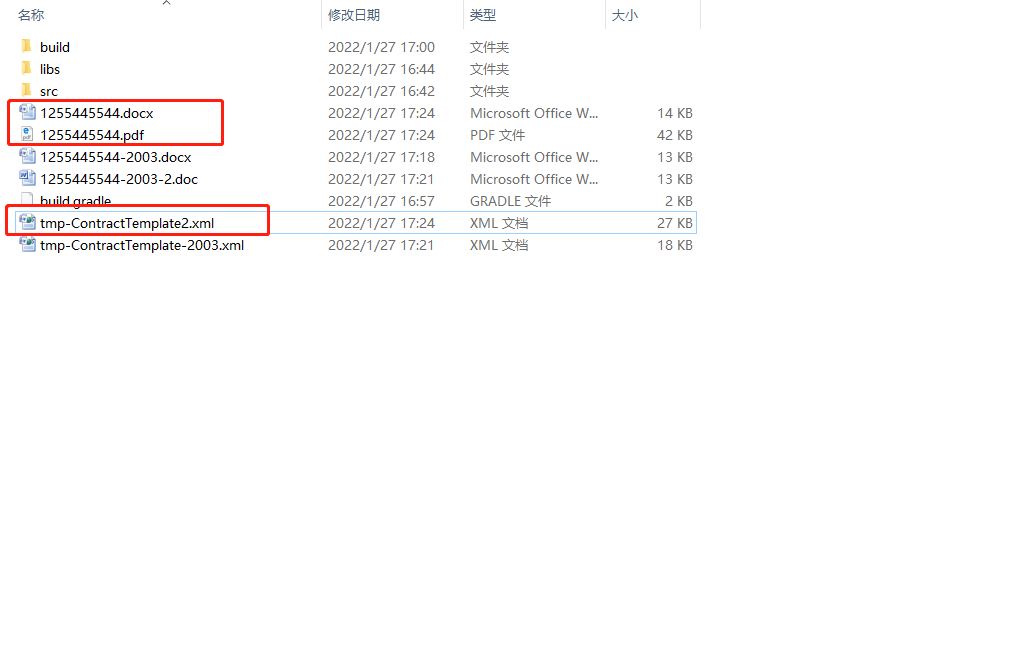
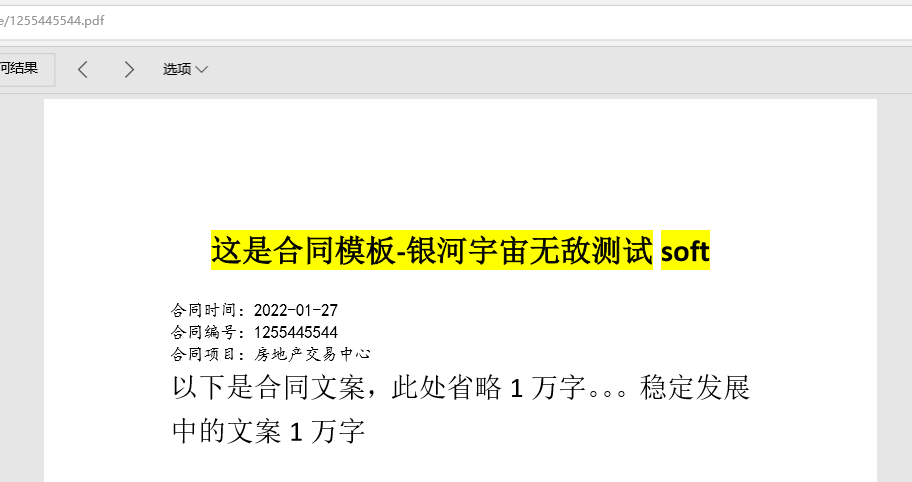
创建成功之后的文件如下:
Java freemarker生成word模板文件(如合同文件)及转pdf文件方法的更多相关文章
- Java Freemarker生成word
Java Freemarker生成word freeMaker 简介: FreeMarker是一款模板引擎: 即一种基于模板和要改变的数据, 并用来生成输出文本(HTML网页.电子邮件.配置文件.源代 ...
- Java Web项目中使用Freemarker生成Word文档遇到的问题
这段时间项目中使用了freemarker生成word文档.在项目中遇到了几个问题,在这里记录一下.首先就是关于遍历遇到的坑.整行整行的遍历是很简单的,只需要在整行的<w:tr></w ...
- 使用freemarker生成word、html时图片显示问题
使用freemarker生成word.html时图片显示问题 博客分类: Java 使用freemarker生成word时图片显示问题使用freemarker生成html时图片显示问题使用iText生 ...
- FreeMarker生成word
FreeMarker生成word数据填充是通过,Map填充. Map dataMap = new HashMap<String, Object>(); List<User> l ...
- 使用freemarker生成xml模板
今天在java交流群里有个人问我如何用freemarker生成xml模板文件,可以手动配置参数,于是我到网上百度了一下.发现有一位同行的博文写的很nice,于是我就照着他的代码敲了一遍,最后实现了,本 ...
- freemarker生成word,表格分页
在做项目的过程中,使用到了freemarker生成word.又有一个需求,明细的要确定有多少页,这就用到了换页的xml标签了,找了我好久 <w:p ><w:r><w:br ...
- JSP生成WORD文档,EXCEL文档及PDF文档的方法
转自:https://www.jb51.net/article/73528.htm 本文实例讲述了JSP生成WORD文档,EXCEL文档及PDF文档的方法.分享给大家供大家参考,具体如下: 在web- ...
- C# 将多个office文件转换及合并为一个PDF文件
PDF文件介绍 PDF(Portable Document Format )文件源于20世纪90年代初期,如今早已成为了一种最流行的的文件格式之一.因为PDF文件有很多优点: 支持跨平台和跨设备共享 ...
- Java Web项目中使用Freemarker生成Word文档
Web项目中生成Word文档的操作屡见不鲜.基于Java的解决方式也是非常多的,包含使用Jacob.Apache POI.Java2Word.iText等各种方式,事实上在从Office 2003開始 ...
- java使用freemarker 生成word文档
java 生成word文档 最近需要做一个导出word的功能, 在网上搜了下, 有用POI,JXL,iText等jar生成一个word文件然后将数据写到该文件中,API非常繁琐而且拼出来的 ...
随机推荐
- 解读如何安全快速建立IT治理环境
简介:云计算经过十多年的发展,从基础的IAAS,大数据,到各种的PaaS有丰富的产品和生态,非常有效地助力了业务增长和技术创新,并提高了业务的效率.最直观的感受是过去需要几天到一个月的资源交付,现在 ...
- [Contract] Solidity 合约使用 truffle 部署到测试网和主网
使用 truffle 发布到非本地的以太坊主网或者测试网时,需要提供钱包的助记词或私钥. 首先安装 truffle 组件:npm install @truffle/hdwallet-provider ...
- Win32 使用 CreateProcess 方法让任务管理器里的命令行不显示应用文件路径
本文记录一个 Win32 的有趣行为,调用 CreateProcess 方法传入特别的参数,可以让任务管理器里的命令行不显示应用文件路径 开始之前,先看看下面这张有趣的图片 可以看到我编写的 Svca ...
- dotnet 读 WPF 源代码笔记 插入触摸设备的初始化获取设备信息
在 WPF 触摸应用中,插入触摸设备,即可在应用里面使用上插入的触摸设备.在 WPF 使用触摸设备的触摸时,需要获取到触摸设备的信息,才能实现触摸 获取触摸设备插入 在 WPF 中,通过 Window ...
- ffmpeg7.0常用命令笔记 windows下
1.多媒体格式转换 ffmpeg -i input.mov -acodec copy -vcodec copy out.mp4 2.从多媒体文件中抽取音频 ffmpeg -i input.mov -v ...
- Python中强大的通用ORM框架:SQLAlchemy
Python中强大的通用ORM框架:SQLAlchemy https://zhuanlan.zhihu.com/p/444930067
- 鸿蒙HarmonyOS实战-ArkUI事件(手势方法)
一.手势方法 应用程序的手势操作是指在移动设备上使用手指或手势进行与应用程序交互的方式.手势操作可以包括点击.滑动.双击.捏合等动作,用于实现不同的功能和操作. HarmonyOS中常见的手势操作及其 ...
- 一键自动化博客发布工具,用过的人都说好(cnblogs篇)
cnblogs和其他的博客平台相比会比较复杂,需要设置的项目也比较多一些,弄懂了cnblogs的实现方式,那么你应该对selenium的整个框架使用已经烂熟于心了. 除了正常的标题,内容,摘要之外,c ...
- 密码学—RSA公钥算法Python程序
RSA流程 选取两个素数p,q,保密p,q 计算出n = p×q ,公开n 计算φ(n)=(p-1)(q-1) ,保密φ(n) 选择一个数e ,e满足:e < φ(n) , gcd(e,φ(n) ...
- C数据结构线性表:实现顺序表的增删改查&完整篇
文章目录 ①前言 顺序表结构体的定义 ②初始化顺序表 ③插入新的元素 插入的时候需要特别注意的几点 ④删除元素 第一个删除元素功能实现 第二个删除元素功能实现 对代码下面中**i- -**的说明(第二 ...