
springboot如何集成Prometheus如何暴露Histogram来获取P99等监控指标
背景
springboot如何集成Prometheus我这里不做详细描述,要想了解集成过程,可以参考一下博客:
Spring Boot 使用 Micrometer 集成 Prometheus 监控 Java 应用性能,
这里我讲一下如果我们j需要获取到某些监控指标的p99、p90等度量数据,比如说http请求的响应时长p99等,
Micrometer
根据指标监控的对象个数、监视目的和含义的不同,Micrometer指标类型大体可以分为Gauge、Counter、DistributionSummary、Timer四种。
这里我重点说一下DistributionSummary。
DistributionSummary
DistributionSummary是用于跟踪事件的分布情况,有多个指标组成:
- count,事件的个数,聚合指标,如响应的个数
- sum,综合,聚合指标,如响应大小的综合
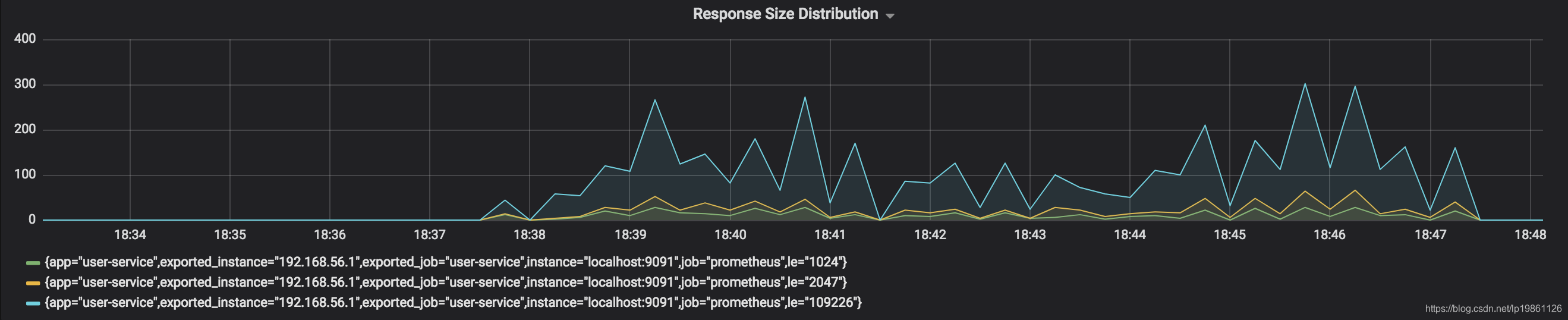
- histogram,分布,聚合指标,包含le标签用于区分bucket,例如web.response.size.historgram{le=512} = 99,表示响应大小不超过512(Byte)的响应个数是99个。一般有多个bucket,如le=128,le=256,le=512,le=1024,le=+Inf等。
每个bucket展示为一条时间序列,会得到类似下面的图。
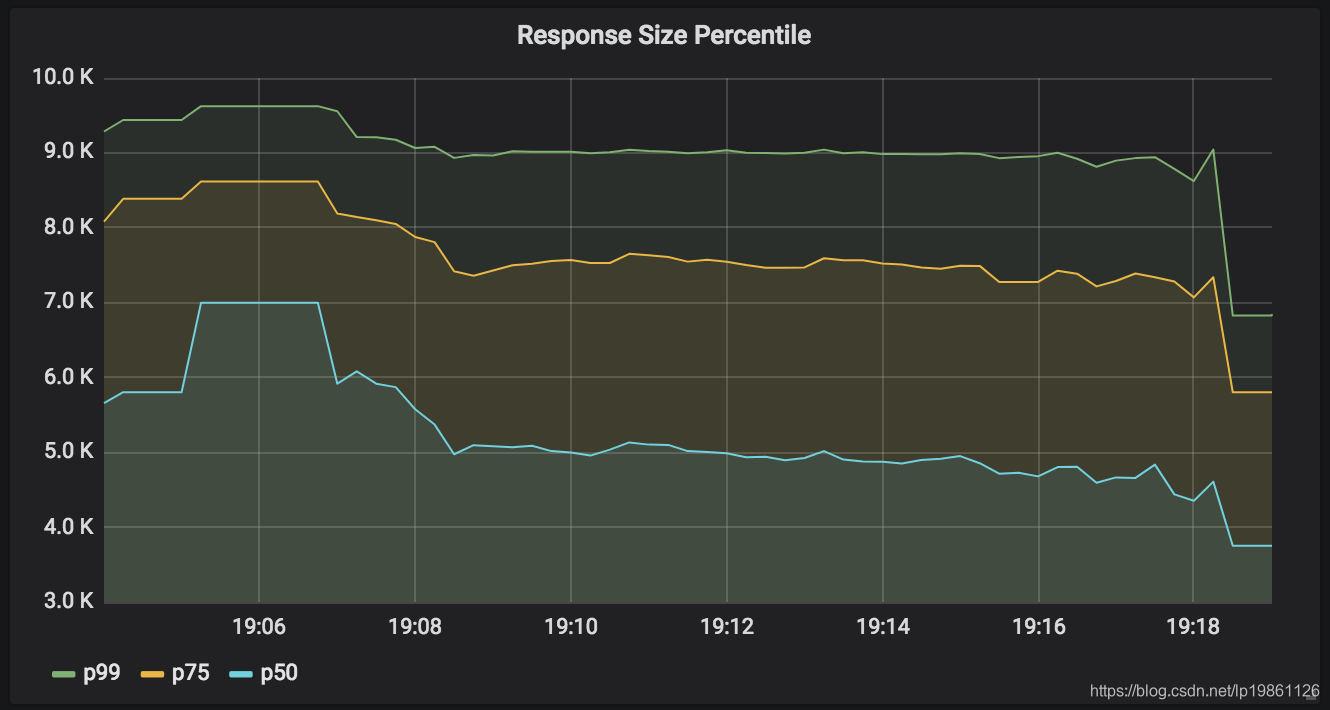
percentile(quantile),百分位数,聚合指标,包含percentile标签用于区分不同的百分位,例如web.response.size.percentile{p=90) = 512,表示90%的响应大小都小于512。一般有多个percentile,如p50,p75,p90,p99。
每个百分位展示为一条时间序列,会得到类似下面的图。
Timer
Timer是DistributionSummary的特化,专门用于计时类的指标,可以对记录的时间值(duration)进行单位换算。
暴露histogram
 <dependency>

            <groupid>io.micrometer</groupid>

            <artifactid>micrometer-registry-prometheus</artifactid>

        </dependency>
其中prometheus的类库中为我们提供了很多的监控指标,可以访问下
http://localhost:8080/actuator/prometheus就可以看到已有监控看信息
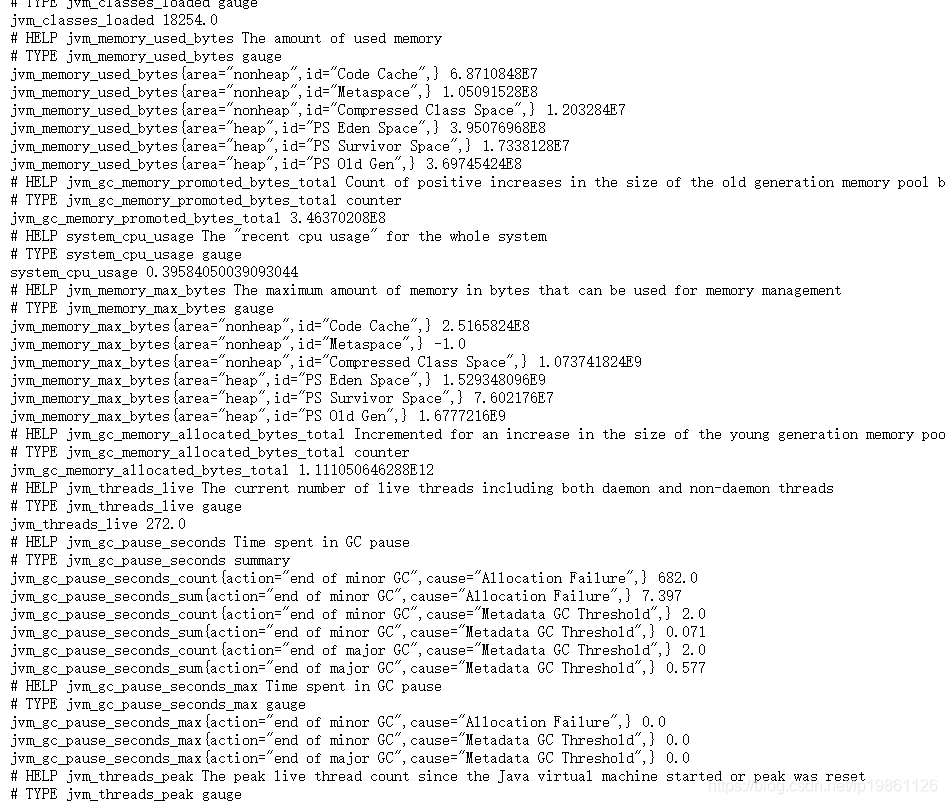
但是默认这些监控指标并不是DistributionSummary,所以需要我们在初始化时替换配置并打开计数开关,如下:
import io.micrometer.core.instrument.Meter;
import io.micrometer.core.instrument.MeterRegistry;
import io.micrometer.core.instrument.config.MeterFilter;
import io.micrometer.core.instrument.distribution.DistributionStatisticConfig;
import lombok.extern.slf4j.Slf4j;
import org.springframework.boot.actuate.autoconfigure.metrics.MeterRegistryCustomizer;
import org.springframework.context.annotation.Bean;
import org.springframework.context.annotation.Configuration;
import java.time.Duration;
@Configuration
@Slf4j
public class MicrometerConfig {
@Bean
MeterRegistryCustomizer<meterregistry> metricsCommonTags() {
return registry -> {
registry.config().meterFilter(
new MeterFilter() {
@Override
public DistributionStatisticConfig configure(Meter.Id id, DistributionStatisticConfig config) {
if (id.getType() == Meter.Type.TIMER&&id.getName().matches("^(http|hystrix){1}.*")) {
return DistributionStatisticConfig.builder()
.percentilesHistogram(true)
.percentiles(0.5, 0.90,0.95, 0.99)
.sla(Duration.ofMillis(50).toNanos(),
Duration.ofMillis(100).toNanos(),
Duration.ofMillis(200).toNanos(),
Duration.ofSeconds(1).toNanos(),
Duration.ofSeconds(5).toNanos(),
.minimumExpectedValue(Duration.ofMillis(1).toNanos())
.maximumExpectedValue(Duration.ofSeconds(5).toNanos())
.build()
.merge(config);
} else {
return config;
}
}
});
};
}
}
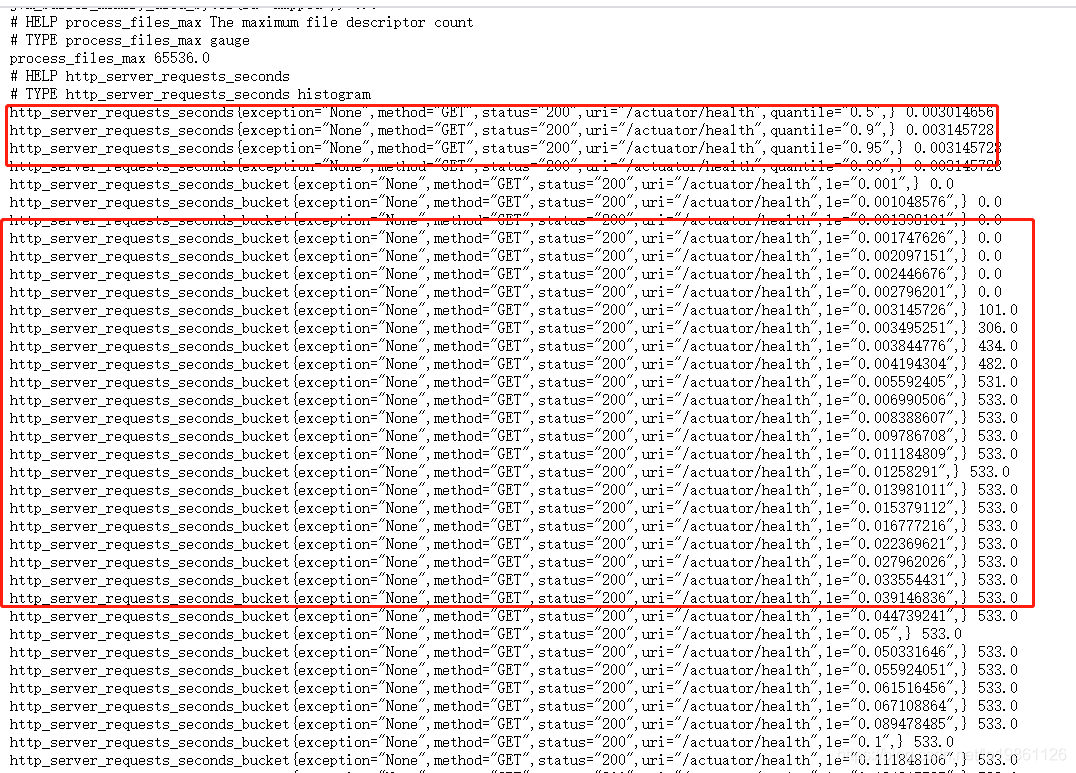
以上代码根据需要来暴露histogram信息,这里是选择http响应时长以及hystrix响应监控暴露histogram,如果有需要可以不增加过滤条件。
打开后可以看到多了很多监控信息:
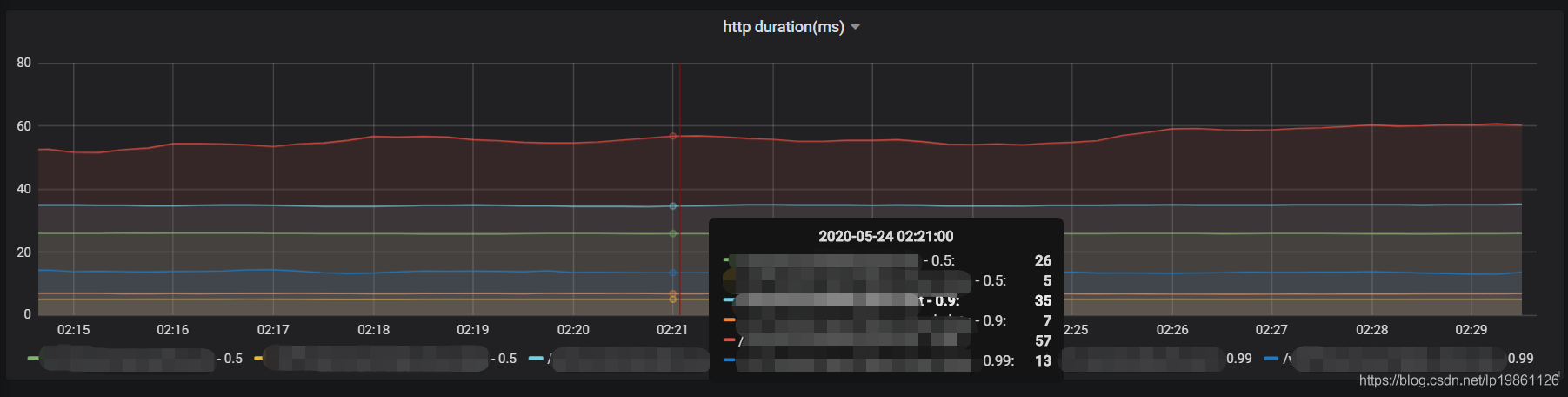
配置到grafana
avg(http_server_requests_seconds{service=~"$service" ,quantile =~ "0.9|0.5|0.99", uri !~ "/actuator.*|/health|/prometheus|root"}*1000 > 0) by (uri,quantile)
 </meterregistry>
springboot如何集成Prometheus如何暴露Histogram来获取P99等监控指标的更多相关文章
- asp.net core 集成 Prometheus
asp.net core 集成 prometheus Intro Prometheus 是一个开源的现代化,云原生的系统监控框架,并且可以轻松的集成 PushGateway, AlertManager ...
- SpringBoot应用集成微服务组件Nacos
目录 springboot与微服务组件nacos Nacos服务快速启动 STS4 开发工具 Maven 环境配置 STS4开发工具引入Maven配置 Maven Repo配置阿里云镜像源 Sprin ...
- Spring Boot 微服务应用集成Prometheus + Grafana 实现监控告警
Spring Boot 微服务应用集成Prometheus + Grafana 实现监控告警 一.添加依赖 1.1 Actuator 的 /prometheus端点 二.Prometheus 配置 部 ...
- springboot elasticsearch 集成注意事项
文章来源: http://www.cnblogs.com/guozp/p/8686904.html 一 elasticsearch基础 这里假设各位已经简单了解过elasticsearch,并不对es ...
- Springboot Application 集成 OSGI 框架开发
内容来源:https://www.ibm.com/developerworks/cn/java/j-springboot-application-integrated-osgi-framework-d ...
- SpringBoot项目集成Hystrix
Hystrix Hystrix是由Netflix开源的一个服务隔离组件,通过服务隔离来避免由于依赖延迟.异常,引起资源耗尽导致系统不可用的解决方案. 1.什么是服务熔断 服务熔断就是对该服务的调用 ...
- 钉钉通知机器人与SpringBoot的集成
Spring Boot Admin 集成自定义监控告警(2.0.1版本)------钉钉机器人 - yuancao24的博客 - CSDN博客https://blog.csdn.net/yuancao ...
- SpringBoot项目集成PageHelper使用
SpringBoot项目集成PageHelper使用 一.开始 地址:https://github.com/pagehelper/Mybatis-PageHelper 在spring boot ...
- Springboot简单集成ActiveMQ
Springboot简单集成ActiveMQ 消息发送者的实现 pom.xml添加依赖 <dependency> <groupId>org.springframework.bo ...
- 在springboot中集成mybatis开发
在springboot中利用mybatis框架进行开发需要集成mybatis才能进行开发,那么如何在springboot中集成mybatis呢?按照以下几个步骤就可以实现springboot集成myb ...
随机推荐
- GIS数据获取:气象数据免费下载网站
本文对目前主要的气象数据获取网站加以整理与介绍. 本文为"GIS数据获取整理"专栏中第二篇独立博客,因此本文全部标题均由"2"开头.本文对目前主要的气象 ...
- MYSQL8存储过程生成日历表以及异常处理
一.环境 数据库:mysql8.0.25 社区版 操作系统:windows 11 ------------------------------------ 二.创建日历表 CREATE TABLE ` ...
- mac brew install Error: No available formula with the name “*“的解决办法
背景 在mac上使用brew安装软件发生错误 解决办法 执行以下命令即可 rm -rf /usr/local/Homebrew/Library/Taps/homebrew/homebrew-core ...
- OpenSSL&&libcurl库的交叉编译
一.编译前环境准备 使用的内核:4.15.0-118-generic(命令:uname -r可以查看) 交叉编译器:aarch64-linux-gnu-gcc curl源码:curl-7.72.0.t ...
- 实测952Mbps!四路千兆网PCIe拓展方案,国产工业级!
测试环境说明 运行系统:Debian-11.8 评估板:TL3588-EVM(RK3588J) 模块:PCIe扩展2/4路千兆网口模块 方案:无锡沐创N500L-AM2C-DD.N500L-AM4C- ...
- 阿里云服务器Docket安装RabbitMQ 3.8.12
DocketMQ安装RabbitMQ 地址:https://hub.docker.com/ 拉取镜像 docker pull rabbitmq:3.8.12-management-alpine 运行 ...
- centos下安装Docker容器
安装前的准备工作 1.列出docker安装过的相关包 sudo yum list installed | grep docker 2.删除相关安装包 #根据查找出来的进行删除,不同版本可能有不一样的情 ...
- 【原创软件】第6期:极简SciHub论文下载器
一.背景 因为科研需求下载英文论文,省得自己去找有效的scihub网址,特此写了一个基于c#和wpf的小软件. 二.使用方法 只需要输入doi即可,点击[打开浏览器下载论文]即可跳转浏览器进行下载.下 ...
- 2024秋招字节跳动朝夕光年UE4客户端开发实习生岗笔试题目
20240117更新 2024年秋招笔试题目,没想到时隔几个月字节跳动游戏业务就要寄了,本文仅供参考,请大佬多多指教 Q1字符串处理 Q2 杯子问题 桌子上有4109+1个饮料杯,这些饮料杯的编号依次 ...
- 精品 IDEA 插件大汇总!值得收藏
轻松提高 Java 开发效率 俗话说,工欲善其事,必先利其器.想要提升编程开发效率,必须选择一款顺手的开发工具. 对于 Java 开发者,JetBrains IDEA 无疑是目前最主流的开发工具,既简 ...