
windows下编译jpeg
项目为了脱离OpenCV,直接采用libjpeg,记录在windows下jpeg安装。
项目地址http://www.ijg.org/
下载解压缩jpeg-9a
看了看OpenCV中对libjpeg的整合通过Cmakefiles,不过看了压缩包下的帮助文档
Microsoft Windows, Microsoft Visual C++ 2010 Developer Studio (v10):
We include makefiles that should work as project files in Visual Studio
2010 or later. There is a library makefile that builds the IJG library
as a static Win32 library, and application makefiles that build the sample
applications as Win32 console applications. (Even if you only want the
library, we recommend building the applications so that you can run the
self-test.)
To use:
1. Open the command prompt, change to the main directory and execute the
command line
NMAKE /f makefile.vc setup-v10
This will move jconfig.vc to jconfig.h and makefiles to project files.
(Note that the renaming is critical!)
2. Open the solution file jpeg.sln, build the library project.
(If you are using Visual Studio more recent than 2010 (v10), you'll
probably get a message saying that the project files are being updated.)
3. Open the solution file apps.sln, build the application projects.
4. To perform the self-test, execute the command line
NMAKE /f makefile.vc test-build
5. Move the application .exe files from `app`\Release to an
appropriate location on your path.
可以进行上述安装
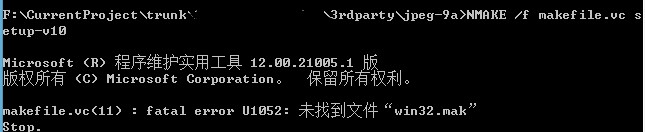
通过EveryThing找一下win32.mak
在路径C:\Program Files (x86)\Microsoft SDKs\Windows\v7.1A\Include下,修改win32.mak的路径为绝对路径
重新生成,生成成功之后用vs打开。
windows下编译jpeg的更多相关文章
- 在Windows下编译Emacs
在Windows下编译Emacs Windows下编译好的Emacs主要有两个版本,一个来自http://nqmacs.sourceforge.net/,另一个来自http://www.crasseu ...
- [转] Windows下编译OpenSSL
简述 OpenSSL是一个开源的第三方库,它实现了SSL(Secure SocketLayer)和TLS(Transport Layer Security)协议,被广泛企业应用所采用.对于一般的开发人 ...
- Windows下编译objective-C
Windows下编译objective-C 2011-08-31 14:32 630人阅读 评论(0) 收藏 举报 windowscocoa工具objective clibraryxcode 目录 ...
- 在Windows下编译FFmpeg详细说明
MinGW:一个可自由使用和自由发布的Windows特定头文件和使用GNC工具集导入库的集合,允许你生成本地的Windows程序而不需要第三方C运行时 MinGW,即 Minimalist GNU F ...
- 如何在WINDOWS下编译BOOST C++库 .
如何在WINDOWS下编译BOOST C++库 cheungmine 2008-6-25 写出来,怕自己以后忘记了,也为初学者参考.使用VC8.0和boost1.35.0. 1)下载boost ...
- 在Windows下编译OpenSSL(VS2005和VC6)
需要说明的是请一定安装openssl-0.9.8a . openssl-1.0.0我没有编译成功. 如何在Windows下编译OpenSSL (Vs2005使用Vc8的cl编译器)1.安装Activ ...
- windows下编译java源文件的编码错误
import java.util.Arrays;public class ArrayAsAReference{ public static void main(String[] args) { int ...
- Windows下编译SDL
Windows下编译SDL的理由我就不多说了,无论用VS来编译或调试SDL库都是很方便的.而且SDL源代码中也包含了VC工程,你所要做的只是解压VC工程,进行适当的配置,然后编译.调试. 编译SDL大 ...
- Windows下编译安装 FFmpeg
在Linux/Mac下编译 ffmpeg是非常方便的.但要在 Windows下编译 ffmpeg还真要花点时间.以下就是在 Windowns下编译ffmpeg的步骤: 一.安装Cygwin 在wind ...
随机推荐
- lua使用lfs.dll库进行文件操作
在项目开发中,为了提高开发效率往往需要开发一些辅助工具.最近在公司用lua帮拓展了一个资源扫描的工具,这个工具的功能就是从原始demo下指定目标资源文件,对该文件进行读取并筛选过滤一遍然后拷贝到最终d ...
- was--创建概要文件(典型)
1.第一步 2 .创建 3.创建 4 .典型 5 下一步 6 下一步 7.下一步 8.输入用户和密码,下一步 9.下一步 10.下一步 11.下一步 12.下一步 13.下一步 14.创建 ...
- 重构31-Replace conditional with Polymorphism(多态代替条件)
多态(Polymorphism)是面向对象编程的基本概念之一.在这里,是指在进行类型检查和执行某些类型操作时,最好将算法封装在类中,并且使用多态来对代码中的调用进行抽象. public class O ...
- yii在Windows下安装(通过composer方式)
Composer 安装: (Composer 不是一个包管理器,它仅仅是一个依赖管理工具.它涉及 "packages" 和 "libraries",但它在每个项 ...
- PDO 错误处理模式
异常模式: $pdo->setAttribute(PDO::ATTR_ERRMODE, PDO::ERRMODE_EXCEPTION); 这个模式需要配合 try 使用 :一旦出错,就会: 1. ...
- caffe LOG LOG_IF
caffe使用了glog,在caffe的solver中输出都是用的LOG和LOG_IF LOG_IF是条件输出: LOG_IF(INFO, num_cookies > ) << &q ...
- linux学习系列博客地址汇总
2018-09-28 16:03:43 CentOS7 yum命令:这是一个用来管理rpm包进行自动化安装的C/S模式的一个程序. CentOS7(无图形界面)支持中文显示的办法:系统安装好之后,有可 ...
- Linux系统用户、组和权限管理
一.用户与组 1.用户与组的概念 在linux系统中,根据系统管理需要将用户分为三种类型: 1.超级用户:root是linux系统的超级用户,对系统拥有绝对权限.由于root用户权限太大,只有在进行系 ...
- LNMP构架搭建论坛
1 yum install -y apr* autoconf automake bison bzip2 bzip2* compat* cpp curl curl-devel fontconfig fo ...
- linux arp-显示和修改IP到MAC转换表
博主推荐:更多网络测试相关命令关注 网络测试 收藏linux命令大全 arp命令用于操作主机的arp缓冲区,它可以显示arp缓冲区中的所有条目.删除指定的条目或者添加静态的ip地址与MAC地址对应关 ...