
Maven实现多个项目关联自动化构建(maven-invoker-plugin插件的使用)
以下内容引用自https://ayayui.gitbooks.io/tutorialspoint-maven/content/book/maven_build_automation.html:
注意:由于时间问题,原文的方法已经无法使用,在此我更新了最新的方法去实现。同时也是官方原版的方法:https://www.tutorialspoint.com/maven/maven_build_automation.htm。
一、场景
设想一个团队正在开发一个项目bus-core-api, 并且有其他两个项目app-web-ui和app-desktop-ui依赖于这个项目。
bus-core-api项目为1.0快照版本。
app-web-ui项目使用的是bus-core-api项目的1.0快照。
app-desktop-ui项目使用的是bus-core-api项目的1.0快照。
现在app-web-ui和app-desktop-ui项目的团队要求的是不管bus-core-api项目何时变化,他们的构建过程都应当可以启动。
使用快照确保了最新的bus-core-api项目会被使用,但要达到上面的要求,我们还需要做一些额外的工作。
提示:其实这个场景有一点矛盾,但是为了演示效果,可以这样理解,即当bus-core-api项目构建时,自动构建app-web-ui和app-desktop-ui项目。
二、构建方式选择
- 在bus-core-api项目的pom.xml文件中添加一个maven-invoker-plugin插件操作来启动app-web-ui和app-desktop-ui项目的构建。
- 使用持续集成(CI) 服务器,比如Jenkins,来自行管理构建自动化。(省略)
- 使用脚本实现(Linux/Windows)(省略)
三、使用maven-invoker-plugin插件操作实现详解
maven-invoker-plugin插件详细用法参考:http://maven.apache.org/plugins/maven-invoker-plugin/
准备环境:
1、建立目录C:\MVN和C:\MVN\projects。
2、在C:\MVN下创建bus-core-api项目,在C:\MVN\projects下创建app-web-ui和app-desktop-ui项目。
目录结构如下:
├─bus-core-api

│  ├─src

│  │  ├─main

│  │  │  └─java

│  │  │      └─com

│  │  │          └─jsoft

│  │  │              └─test

│  │  └─test

│  │      └─java

│  │          └─com

│  │              └─jsoft

│  │                  └─test

│  └─target

│      ├─classes

│      │  └─com

│      │      └─jsoft

│      │          └─test

│      ├─invoker-reports

│      ├─maven-archiver

│      ├─surefire-reports

│      └─test-classes

│          └─com

│              └─jsoft

│                  └─test

└─projects

    ├─app-desktop-ui

    │  ├─src

    │  │  ├─main

    │  │  │  └─java

    │  │  │      └─com

    │  │  │          └─jsoft

    │  │  │              └─test

    │  │  └─test

    │  │      └─java

    │  │          └─com

    │  │              └─jsoft

    │  │                  └─test

    │  └─target

    │      ├─classes

    │      │  └─com

    │      │      └─jsoft

    │      │          └─test

    │      ├─maven-archiver

    │      ├─surefire

    │      ├─surefire-reports

    │      └─test-classes

    │          └─com

    │              └─jsoft

    │                  └─test

    └─app-web-ui

        ├─src

        │  ├─main

        │  │  └─java

        │  │      └─com

        │  │          └─jsoft

        │  │              └─test

        │  └─test

        │      └─java

        │          └─com

        │              └─jsoft

        │                  └─test

        └─target

            ├─classes

            │  └─com

            │      └─jsoft

            │          └─test

            ├─maven-archiver

            ├─surefire

            ├─surefire-reports

            └─test-classes

                └─com

                    └─jsoft

                        └─test
app-web-ui项目的pom.xml:
<project xmlns="http://maven.apache.org/POM/4.0.0" xmlns:xsi="http://www.w3.org/2001/XMLSchema-instance"

  xsi:schemaLocation="http://maven.apache.org/POM/4.0.0 http://maven.apache.org/maven-v4_0_0.xsd">

  <modelVersion>4.0.0</modelVersion>

  <groupId>com.jsoft.test</groupId>

  <artifactId>app-web-ui</artifactId>

  <packaging>jar</packaging>

  <version>1.0-SNAPSHOT</version>

  <name>app-web-ui</name>

  <url>http://maven.apache.org</url>

  <dependencies>

    <dependency>

      <groupId>junit</groupId>

      <artifactId>junit</artifactId>

      <version>3.8.1</version>

      <scope>test</scope>

    </dependency>

    <dependency>

    <groupId>com.jsoft.test</groupId>

    <artifactId>bus-core-api</artifactId>

    <version>1.0-SNAPSHOT</version>

    <scope>system</scope>

    <systemPath>C:\MVN\bus-core-api\target\bus-core-api-1.0-SNAPSHOT.jar</systemPath>

    </dependency>

  </dependencies>

</project>
提示:为了测试,设置bus-core-api项目依赖为本地依赖。其中C:\MVN\bus-core-api\target\bus-core-api-1.0-SNAPSHOT.jar为bus-core-api项目生成的jar包最终存放位置。
app-desktop-ui项目的pom.xml:
<project xmlns="http://maven.apache.org/POM/4.0.0" xmlns:xsi="http://www.w3.org/2001/XMLSchema-instance"

  xsi:schemaLocation="http://maven.apache.org/POM/4.0.0 http://maven.apache.org/maven-v4_0_0.xsd">

  <modelVersion>4.0.0</modelVersion>

  <groupId>com.jsoft.test</groupId>

  <artifactId>app-desktop-ui</artifactId>

  <packaging>jar</packaging>

  <version>1.0-SNAPSHOT</version>

  <name>app-desktop-ui</name>

  <url>http://maven.apache.org</url>

  <dependencies>

    <dependency>

      <groupId>junit</groupId>

      <artifactId>junit</artifactId>

      <version>3.8.1</version>

      <scope>test</scope>

    </dependency>

    <dependency>

    <groupId>com.jsoft.test</groupId>

    <artifactId>bus-core-api</artifactId>

    <version>1.0-SNAPSHOT</version>

    <scope>system</scope>

    <systemPath>C:\MVN\bus-core-api\target\bus-core-api-1.0-SNAPSHOT.jar</systemPath>

    </dependency>

  </dependencies>

</project>
bus-core-api项目的pom.xml:
<project xmlns="http://maven.apache.org/POM/4.0.0" xmlns:xsi="http://www.w3.org/2001/XMLSchema-instance"

  xsi:schemaLocation="http://maven.apache.org/POM/4.0.0 http://maven.apache.org/maven-v4_0_0.xsd">

  <modelVersion>4.0.0</modelVersion>

  <groupId>com.jsoft.test</groupId>

  <artifactId>bus-core-api</artifactId>

  <packaging>jar</packaging>

  <version>1.0-SNAPSHOT</version>

  <name>bus-core-api</name>

  <url>http://maven.apache.org</url>

  <dependencies>

    <dependency>

      <groupId>junit</groupId>

      <artifactId>junit</artifactId>

      <version>3.8.1</version>

      <scope>test</scope>

    </dependency>

  </dependencies>

  <build>

    <plugins>

       <plugin>

      <artifactId>maven-invoker-plugin</artifactId>

      <version>2.0.0</version>

      <configuration>

      <debug>true</debug>

      <projectsDirectory>C:\MVN\projects</projectsDirectory>

      </configuration>

      <executions>

               <execution>

                  <id>id-integration-test</id>

                  <goals>

                     <goal>run</goal>

                  </goals>

               </execution>

      </executions>

    </plugin>

    </plugins>

   </build>

</project>
注意:<projectsDirectory>节点指定的是app-web-ui和app-desktop-ui项目的目录C:\MVN\projects。
由于maven-invoker-plugin插件绑定的Maven生命周期阶段为integration-test以上,所以在命令行上输入integration-test阶段及其以上的都可以触发。
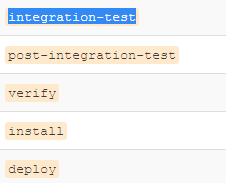
详细的Maven生命周期参考:https://maven.apache.org/guides/introduction/introduction-to-the-lifecycle.html
此时在C:\MVN\bus-core-api执行命令:
mvn integration-test
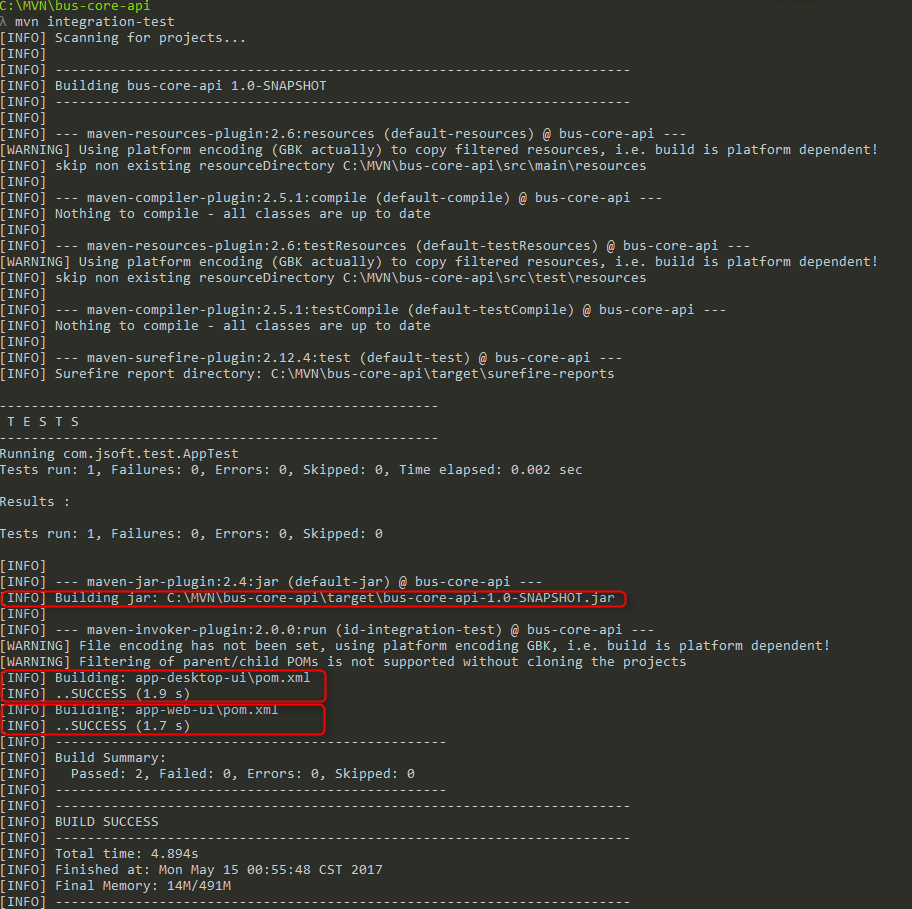
测试成功输出所有项目的jar包。
测试代码:https://github.com/easonjim/5_java_example/tree/master/maventest/test5
Maven实现多个项目关联自动化构建(maven-invoker-plugin插件的使用)的更多相关文章
- Maven 教程(15)— 实现多个项目关联自动化构建(maven-invoker-plugin插件的使用)
原文地址:https://blog.csdn.net/liupeifeng3514/article/details/79726664 一.场景设想一个团队正在开发一个项目 bus-core-api,并 ...
- maven入门(1-4)使用eclipse构建maven项目
1. 安装m2eclipse插件 要用Eclipse构建Maven项目,我们需要先安装meeclipse插件 点击eclipse菜单栏Help->Eclipse Marketplac ...
- Jenkins +Maven+Tomcat+SVN +Apache项目持续集成构建
详解Jenkins +Maven+Tomcat+SVN +Apache项目持续集成 一:前言 1. Jenkins jenkins版本大全http://mirrors.jenkins-ci.org/ ...
- Eclipse+Maven整合开发Java项目(一)➣Maven基础环境配置
概述 Maven是一个Java语言编写的开源项目管理工具,是Apache软件基金会的顶级项目.主要用于项目构建,依赖管理,项目信息管理.有些项目需要添加响应的依赖包,Maven就是公用包集合.存在远程 ...
- 3.将maven项目jar纳入maven仓库,Mave项目依赖另外一个Maven项目的案例
1 若想让maven项目依赖另外一个maven项目.被依赖的项目要在maven仓库中有对应的jar包,所以要对依赖的项目运行mvninstall命令. 2 新建第二个项目模块HelloFrien ...
- jenkins+maven+svn实现springboot项目的自动化部署过程
说明:部署springboot项目的jar 前提(参考:https://www.cnblogs.com/myitnews/p/11493779.html): 全局安全配置(前面配置过) 全局工具配置( ...
- 自动化构建工具maven
Maven是目前最流行的自动化构建工具,对于生产环境下多框架.多模块整合开发有重要作用.Maven 是一款在大型项目开发过程中不可或缺的重要工具. 一.什么是构建? 构建并不是创建,创建一个工程并不等 ...
- 手把手0基础项目实战(一)——教你搭建一套可自动化构建的微服务框架(SpringBoot+Dubbo+Docker+Jenkins)...
原文:手把手0基础项目实战(一)--教你搭建一套可自动化构建的微服务框架(SpringBoot+Dubbo+Docker+Jenkins)... 本文你将学到什么? 本文将以原理+实战的方式,首先对& ...
- 使用eclipse构建Maven项目及发布一个Maven项目
开发环境: Eclipse Jee Mars(截止2015年12月1日目前的最新版eclipse4.5),下载地址:http://www.eclipse.org/downloads/ 因为此版本已经集 ...
随机推荐
- iOS Crash
常见原因及解决方法: 1. 访问数组类对象越界或插入了空对象NSMutableArray/NSMutableDictionary/NSMutableSet 等类下标越界,或者 insert 了一个 n ...
- css布局--两列布局,左侧固定,右侧自适应(其中左侧要可以拖动,右侧水平滚动条)
(css布局所要实现的效果) 在前端面试中经常会被问到CSS布局,两列布局,左侧固定,右侧自适应.前几天去面试,遇到了这道题的升级版,要求左侧可拖动,右侧要有水平滚动条.拿到题目确实有些大脑短路,不知 ...
- URAL1561 Winnie the Pooh
题目描述: vjudge 题解: 高消(线性基)模$7$. 可以算是板子了. 具体见代码: #include<cstdio> #include<cstring> #includ ...
- Zookeeper 集群 BindException: Cannot assign requested address 解决方案
前言 经历: 最近在搭建zookeeper集群,基础是3台机器(尝试过ubuntu 17 和 Centos 7). 一开始选择的是3台腾讯云服务器,每台机器在java环境配置正确的情况下,单机的情况都 ...
- python_列表——元组——字典——集合
列表——元组——字典——集合: 列表: # 一:基本使用# 1.用途:存放多个值 # 定义方式:[]内以逗号为分隔多个元素,列表内元素无类型限制# l=['a','b','c'] #l=list([' ...
- 杭电 1503 Advanced Fruits
Description The company "21st Century Fruits" has specialized in creating new sorts of fru ...
- PAT Basic 1066
1066 图像过滤 图像过滤是把图像中不重要的像素都染成背景色,使得重要部分被凸显出来.现给定一幅黑白图像,要求你将灰度值位于某指定区间内的所有像素颜色都用一种指定的颜色替换. 输入格式: 输入在第一 ...
- luogu3698 [CQOI2017]小Q的棋盘
最长链是根节点到深度最深的结点的路径. 显然,要么直接走最长链,要么兜兜转转几个圈圈再走最长链,而最长链以外的结点因为要"兜圈",所以要经过两次. #include <ios ...
- luogu2604 [ZJOI2010]网络扩容
先做一遍普通的dinic 然后再更改源点为超级源,超级源向原源加一条capacity=k && cost=0的边,再加上有费用的边跑最小费用最大流 #include <iostr ...
- vim 第三章 插入模式
vim 第三章 插入模式 在普通模式下可以删除 复制 及粘贴的命令 在插入模式下也存在以中方便快捷的方式 能够粘贴寄存器中文本 两种方式来插入键盘上不存在的非常用字符 替换模式 ...