
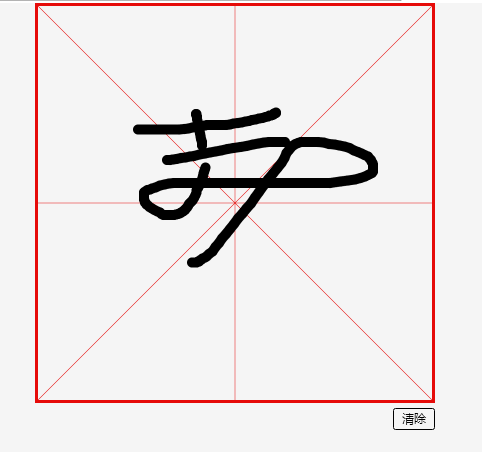
H5 canvas pc 端米字格 写字板
<!DOCTYPE html>

<html lang="en">

<head>

    <meta charset="UTF-8">

    <title>demo02 pc端米字格画布</title>

    <link rel="stylesheet" href="css/canvas.css">

    <script src="scripts/jquery-1.7.1.min.js"></script>

<style>

</style>

</head>

<body>

<canvas id="canvas">您的浏览器不支持canvas</canvas>

<div id="controller"><div class="op_btn" id="clear_btn"> 清除</div></div>

<script src="scripts/canvas.js"></script>

</body>

</html>
 var canvasWidth = 800;

 var canvasHeight =canvasWidth;

 var isMouseDown = false;

 var lastLoc ;

 // var lastLoc = {x:0,y:0};

 var curTimestamp;

 var lastTimestamp = 0;

 var lineWidth;

 var canvas = document.getElementById('canvas');

 var context = canvas.getContext('2d');

 canvas.width = canvasWidth;

 canvas.height = canvasHeight;

 drawGrid();

 $('#clear_btn').click(function(){

     context.clearRect(0,0,canvasWidth,canvasHeight);

     drawGrid();

 })

 canvas.onmousedown = function(e){

     e.preventDefault();

     isMouseDown = true;

     // console.log("mouse down!");

     lastLoc = windowToCanvas(e.clientX,e.clientY);

     lastTimestamp = new Date().getTime();

     // alert(loc.x+","+loc.y);

 }

 canvas.onmouseup = function(e){

     e.preventDefault();

     isMouseDown = false;

     // console.log("mouse up~~~");

 }

 canvas.onmouseout = function(e){

     e.preventDefault();

     isMouseDown = false;

     // console.log("mouse out~~");

 }

 canvas.onmousemove = function(e){

     e.preventDefault();

     // isMouseDown = true;

     if (isMouseDown) {

         // console.log("mouse move");

         var curLoc = windowToCanvas(e.clientX,e.clientY);

         var s = calcDistance(curLoc , lastLoc);

         var t = curTimestamp - lastTimestamp;

         context.beginPath();

         context.moveTo(lastLoc.x , lastLoc.y);

         context.lineTo( curLoc.x , curLoc.y);

         context.strokeStyle = 'black';

         context.lineWidth = 20;

         context.lineCap="round"

         context.lineJoin = "round"

         context.stroke();

         lastLoc = curLoc;

         curTimestamp = lastTimestamp;

         lastLineWidth = lineWidth;

     };

 }

 var maxLineWidth = 30;

 var minLineWidth = 1 ;

 var maxStrokeV = 10;

 var minStrokeV = 0.1;

 function calcLineWidth(t,s){

     var v = s/t;

     var resultLineWidth;

     if ( v <= minStrokeV)

         resultLineWidth = maxLineWidth;

     else if( v >= maxStrokeV)

         resultLineWidth = minLineWidth;

     else

         resultLineWidth = maxLineWidth - (v-minStrokeV )/(maxStrokeV-minStrokeV)*(maxLineWidth-minLineWidth)

     if (lastLineWidth == -1) {

         return resultLineWidth;

     };

     return resultLineWidth*2/3 + resultLineWidth*1/3;

 }

 function calcDistance(loc1 , loc2){

     return Math.sqrt((loc1.x - loc2.x)*(loc1.x - loc2.x) + (loc1.y - loc2.y)*(loc1.y - loc2.y));

 }

 function windowToCanvas(x,y){

     var bbox = canvas.getBoundingClientRect();

     return {x:Math.round(x-bbox.left),y:Math.round(y-bbox.top)};

 }

 function drawGrid(){

     context.save();

 context.strokeStyle = "rgb(230,11,9)";

 context.beginPath();

 context.moveTo(3,3);

 context.lineTo(canvasWidth - 3 , 3 );

 context.lineTo(canvasWidth - 3 , canvasHeight - 3 );

 context.lineTo(3 , canvasHeight - 3  );

 context.closePath();

 context.lineWidth = 6;

 context.stroke();

 context.beginPath();

 context.moveTo(0,0);

 context.lineTo(canvasWidth,canvasHeight);

 context.moveTo(canvasWidth,0);

 context.lineTo(0,canvasHeight);

 context.moveTo(canvasWidth/2,0);

 context.lineTo(canvasWidth/2,canvasHeight);

 context.moveTo(0,canvasHeight/2);

 context.lineTo(canvasWidth,canvasHeight/2);

 context.lineWidth = 1;

 context.stroke();

 context.restore();

 }
H5 canvas pc 端米字格 写字板的更多相关文章
- 社交系统/社群系统“ThinkSNS+”H5及PC端终于来了!一起来“找茬”
[什么是TS+?] ThinkSNS(简称TS),一款全平台综合性社交系统,为国内外大中小企业和创业者提供社会化软件研发及技术解决方案,目前最新版本为ThinkSNS+,简称TS+. 还记得2017年 ...
- 关于H5从PC端切换到移动端,屏幕显示内容由横向转为竖向的研究!
1.前言: 在项目中,我们常会遇见在手机端需要横屏观看的效果,而在pc端则默认切换到竖屏的样式. 或者是,UI提供的图是一个长图,但是在移动端我们需要让这个图在手机横屏时显示. 以上两个都需要我们实行 ...
- 实现pc端信纸留言板
效果如图: 我好像在哪里见过这样的形式,但却从来没有想过怎么实现,有种莫名的兴奋感.怎么控制什么时候换行,怎么控制中间的线条,这些视乎都是CSS无法实现的,我陷入了死局.寻找JS的做法,JS的挺复杂的 ...
- canvas做的一个写字板
<!DOCTYPE html><html><head><title>画板实验</title> <meta charset=" ...
- canvas h5制作写字板
<!DOCTYPE html><html><head> <meta charset="utf-8"> <script type ...
- H5测试与PC端测试不同的点
1.通过H5网页(非手机的返回功能)的返回功能可以返回,不会出现无法返回的情况. 2.横屏竖屏相互切换,能自适应,并且布局不会乱掉: 3.为能在不同分辨率的手机上能更好的展示,建议采用响应式设计(如: ...
- h5微信页面在手机微信端和微信web开发者工具中都能正常显示,但是在pc端微信浏览器上打不开(显示空白)
h5微信页面在手机微信和微信开发者工具中都能正常显示,但是在pc端微信浏览器上打不开或者数据加载不出来. 原因:pc端微信浏览器不支持ES6语法,我的代码中使用了一些ES6的特性 解决:将ES6转换为 ...
- html5之canvas画图 1.写字板功能
写字板事例: 写字板分析:1.点击鼠标開始写字(onmosedown)2.按下鼠标写字(onmousemove)3.松开鼠标,停下写字(撤销onmousemove事件): 代 ...
- 前端:微信支付和支付宝支付在pc端和h5页面中的应用
1:h5微信支付 使用的是https://pay.weixin.qq.com/wiki/doc/api/index.html 中的 (1):公司需要首先要配置公众号微信支付地址和测试白名单(支付的时 ...
随机推荐
- Basic Queries (LINQ to XML)
https://docs.microsoft.com/en-us/dotnet/csharp/programming-guide/concepts/linq/basic-queries-linq-to ...
- add environment path to powershell
https://4sysops.com/archives/use-powershell-to-execute-an-exe/ https://stackoverflow.com/questions/7 ...
- YTU 2845: 编程题AB-卡片游戏
2845: 编程题AB-卡片游戏 时间限制: 1 Sec 内存限制: 128 MB 提交: 30 解决: 13 题目描述 小明对数字的序列产生了兴趣: 现有许多张不同的数字卡片,用这若干张卡片能排 ...
- C# SQLite
/***************************************************************** * C# SQLite * 说明: * 本文记录一下C#中使用SQ ...
- 珠宝 jewelry 省选模拟
n种珠宝.每种各1个.有价格ci元,美度vi. 要求分别输出1元到m元 可买的最大优美度. 整数 :0<n<=10000000, 0<ci<=300,0<=vi< ...
- 洛谷P1527 矩阵乘法——二维树状数组+整体二分
题目:https://www.luogu.org/problemnew/show/P1527 整体二分,先把所有询问都存下来: 然后二分一个值,小于它的加到二维树状数组的前缀和里,判断一遍所有询问,就 ...
- DOS命令汇总
汇总如下: Dos基础命令梳理思路 小编初来乍道, 不清楚我的插图在我发布后会不会不清晰, 因为我在排版时看到插入的图片是清晰的, 以前见其他条友发布的文章中总有不晰的图片, 很是不爽. 所以如果有不 ...
- Surface pro4 触摸板手势快捷键
[一个手指]:这个大家都知道就不必在介绍了,跟之前win7一样,滑动就是鼠标,轻点(或者按左下方)就相当于点鼠标左键.(两个按键按起来真心手感不咋的,所以基本不用)[两个手指]:1.两个手指向上或下滑 ...
- appium封装显示等待Wait类和ExpectedCondition接口
此文已由作者夏鹏授权网易云社区发布. 欢迎访问网易云社区,了解更多网易技术产品运营经验. 使用WebDriver做Web自动化的时候,org.openqa.selenium.support.ui中提供 ...
- 线上项目mysql、redis平滑迁移方案及步骤
1.清晰系统内网及公网可达,CVM配置 2.迁移完整数据,项目部署,测试网络环境. redis:复制rdb文件mysql:xtrabackup备份3.确保项目正常运行,网络正常访问.项目对外接口及账户 ...