
创建NetCore2.2 Web项目+EFCore+SQLServer
在空余时间学习下NetCore,记录日常,供参考。
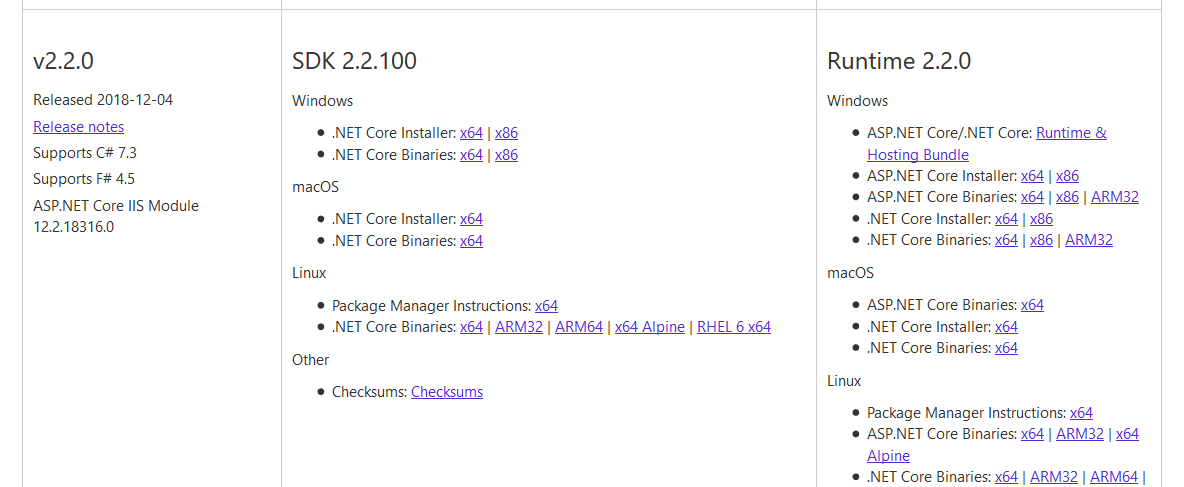
1.确保已下载安装NetCore2.2SDK 环境,下载地址:https://dotnet.microsoft.com/download/dotnet-core/2.2
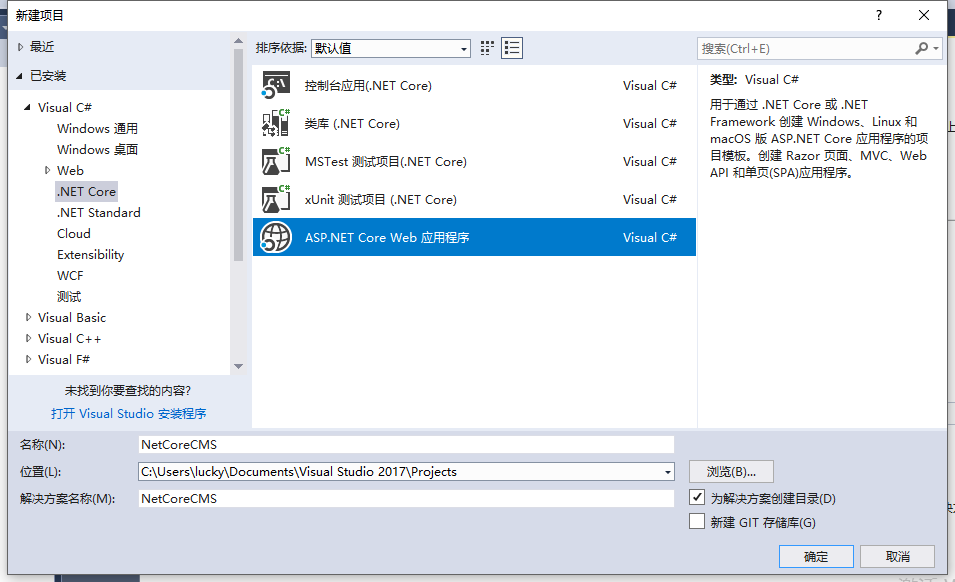
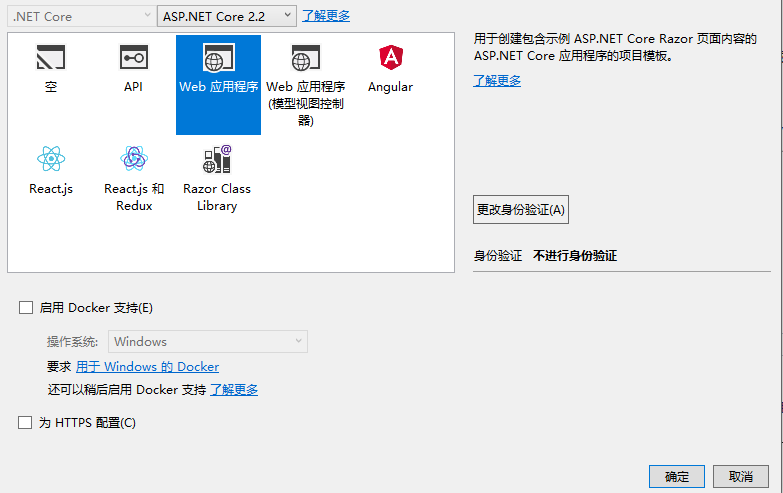
2.打开VS2017,首先新建一个解决方案,并在解决方案上新建项目操作,选择ASP.NET Core Web 应用程序,点击“确定”。继续,NetCore版本选择ASP.NET Core 2.2,类型选择“Web应用程序”点击确定。
3、在appsettings.json添加配置数据库链接字符串,添加后如下图
{

  "Logging": {

    "IncludeScopes": false,

    "LogLevel": {

      "Default": "Warning"

    }

  },
  "AllowedHosts": "*",

  "ConnectionStrings": { "DefaultConnectionString": "Data Source=.;Initial Catalog=bcmf_core;User ID=sa;Password=123456" }

}
4.NetCore2.2的SDK正常包含有Microsoft.EntityFrameworkCore和microsoft.EntityFrameworkCore.SqlServer,若没有,可以在NuGet包中查询安装,这里也是安装的2.2版本
NuGet官网:https://www.nuget.org/
搜索以上两个引用名称,获取安装命令行,在VS2017的程序包管理器控制台输入对应命令行,如下:

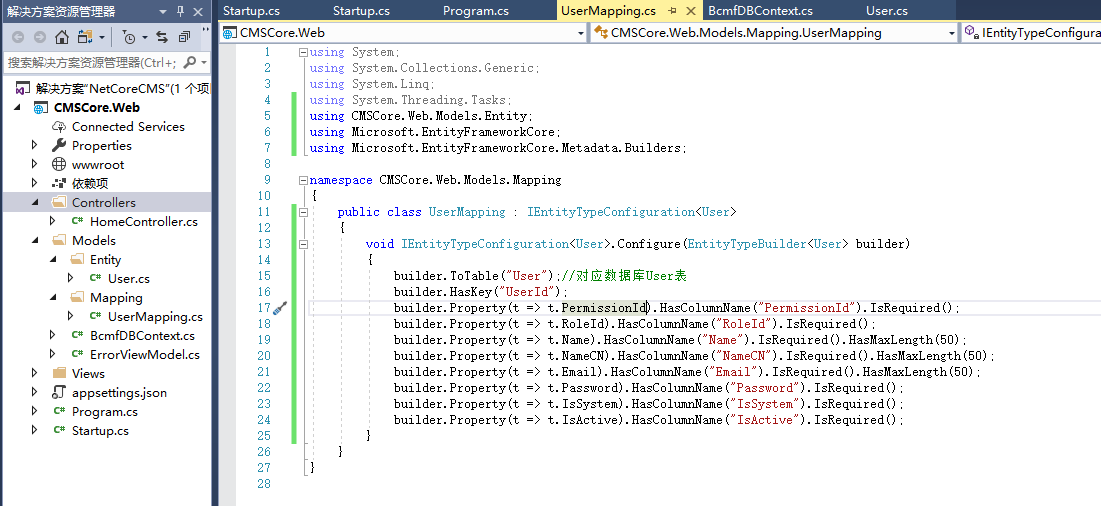
5.在Models文件夹新建文件夹“Entity”,在Entity下存放我们的数据实体类,新建实体类User.cs,这里视个人情况而定,我选择的是以前项目的一个测试数据库。
using System;

using System.Collections.Generic;

using System.Linq;

using System.Threading.Tasks;


namespace NetCoreCMS.Models.Entity
{
    public class User
    {
        public int UserId { get; set; }
        public int PermissionId { get; set; }
        public int RoleId { get; set; }
        public string Name { get; set; }
        public string NameCN { get; set; }
        public string Email { get; set; }
        public string Password { get; set; }
        public bool IsSystem { get; set; }
        public bool IsActive { get; set; }
    }

    /// <summary>
    /// 返回模型类
    /// </summary>
  public class UserViewModel
    {
        public int UserId { get; set; }
        public int PermissionId { get; set; }
        public int RoleId { get; set; }
        public string Name { get; set; }
        public string NameCN { get; set; }
        public string Email { get; set; }
        public string IsSystem { get; set; }
        public string IsActive { get; set; }
    }
}
5、在Models文件夹新建文件夹“Mapping”,在Mapping下存放我们的数据实体映射类,新建实体类UserMapping.cs,
using System;

using System.Collections.Generic;

using System.Linq;

using System.Threading.Tasks;

using CMSCore.Web.Models.Entity;

using Microsoft.EntityFrameworkCore;

using Microsoft.EntityFrameworkCore.Metadata.Builders;

namespace CMSCore.Web.Models.Mapping

{

    public class UserMapping : IEntityTypeConfiguration<User>

    {

        void IEntityTypeConfiguration<User>.Configure(EntityTypeBuilder<User> builder)

        {

            builder.ToTable("User");//对应数据库User表

            builder.HasKey("UserId");

            builder.Property(t => t.PermissionId).HasColumnName("PermissionId").IsRequired();

            builder.Property(t => t.RoleId).HasColumnName("RoleId").IsRequired();

            builder.Property(t => t.Name).HasColumnName("Name").IsRequired().HasMaxLength();

            builder.Property(t => t.NameCN).HasColumnName("NameCN").IsRequired().HasMaxLength();

            builder.Property(t => t.Email).HasColumnName("Email").IsRequired().HasMaxLength();

            builder.Property(t => t.Password).HasColumnName("Password").IsRequired();

            builder.Property(t => t.IsSystem).HasColumnName("IsSystem").IsRequired();

            builder.Property(t => t.IsActive).HasColumnName("IsActive").IsRequired();

        }

    }

}
6、在Models文件夹新建上下文BcmfContext.cs类
using CMSCore.Web.Models.Entity;

using CMSCore.Web.Models.Mapping;

using Microsoft.EntityFrameworkCore;

namespace CMSCore.Web.Models

{

    public class BcmfDBContext : DbContext

    {

        public BcmfDBContext(DbContextOptions options) : base(options)

        {

        }


        public DbSet<User> User { get; set; }

        protected override void OnModelCreating(ModelBuilder modelBuilder)

        {

            modelBuilder.ApplyConfiguration(new UserMapping());

            base.OnModelCreating(modelBuilder);

        }

    }

}
7、在入口文件注册上下文,在根目录Startup.cs的ConfigureServices方法中,注册上下文。
不要忘记了添加引用命名空间
using Microsoft.EntityFrameworkCore;
using Microsoft.EntityFrameworkCore.SqlServer;
 // This method gets called by the runtime. Use this method to add services to the container.

        public void ConfigureServices(IServiceCollection services)

        {

            services.Configure<CookiePolicyOptions>(options =>

            {

                // This lambda determines whether user consent for non-essential cookies is needed for a given request.

                options.CheckConsentNeeded = context => true;

                options.MinimumSameSitePolicy = SameSiteMode.None;

            });

            services.AddMvc().SetCompatibilityVersion(CompatibilityVersion.Version_2_2);

            //注册数据库操作上下文

            services.AddDbContext<BcmfDBContext>(option => option.UseSqlServer(Configuration.GetConnectionString("DefaultConnectionString")));

        }
8、在Controller文件夹下,创建控制器UserController.cs
using System;

using System.Collections.Generic;

using System.Linq;

using System.Threading.Tasks;

using CMSCore.Web.Models;

using CMSCore.Web.Models.Entity;

using Microsoft.AspNetCore.Mvc;

// For more information on enabling MVC for empty projects, visit https://go.microsoft.com/fwlink/?LinkID=397860

namespace CMSCore.Web.Controllers

{

    public class UserController : Controller

    {

        private readonly BcmfDBContext db;

        public UserController(BcmfDBContext _db)

        {

            db = _db;

        }

        // GET: /<controller>/

        public IActionResult Index()

        {

            var userList = db.User.Where(m => m.IsActive).Select(t => new UserViewModel

            {

                Email = t.Email,

                IsActive = t.IsActive ? "激活" : "禁用",

                IsSystem = t.IsSystem ? "是" : "否",

                Name = t.Name,

                NameCN = t.NameCN,

                PermissionId = t.PermissionId,

                RoleId = t.RoleId,

                UserId = t.UserId

            });

            return Json(userList);

        }

    }

}
运行、访问/user/index,成功获取用户信息
创建NetCore2.2 Web项目+EFCore+SQLServer的更多相关文章
- step2-------使用myeclipse创建maven java web项目
1.文章内容概述: 在对项目需求进行分析之后,决定使用maven对我的java web项目进行管理,这篇文章记录了使用myeclipse创建maven java web项目的过程. 2.开发环境: j ...
- 在 Visual Studio 2013 中创建 ASP.NET Web 项目(0):专题导航 [持续更新中]
写在前面的话 随着 Visual Studio 2013 的正式推出,ASP.NET 和 Visual Studio Web 开发工具 也发布了各自的最新版本. 新版本在构建 One ASP.NET ...
- 在 Visual Studio 2013 中创建 ASP.NET Web 项目(1):概述 - 创建 Web 应用程序项目
注:本文是“在 Visual Studio 2013 中创建 ASP.NET Web 项目”专题的一部分,详情参见 专题导航 . 预备知识 本专题适用于 Visual Studio 2013 及以上版 ...
- IDEA如何创建及配置Web项目(多图)
正文之前 在学习Java Web时,第一个遇到的问题就是如何创建或配置Web项目了,今天,就用IntelliJ IDEA 来进行Web项目配置: 创建Web项目 配置web项目 正文 创建Web项目 ...
- Java web 开发填坑记 2 -如何正确的创建一个Java Web 项目
转载请标明出处:http://blog.csdn.net/zhaoyanjun6/article/details/72566261 本文出自[赵彦军的博客] Java web 开发填坑记 1-如何正确 ...
- Eclipse创建一个Maven Web项目
在这篇文章中,我们将演示如何在Eclipse IDE中使用maven创建一个动态Web项目. 使用的工具和技术 - Eclipse Jee Oxygen Maven 3.3.3 JavaSE 1.8 ...
- 创建一个动态Web项目:
开始你的Eclipse,然后进入“文件”>“新建”>“动态Web项目,然后输入项目名称为HelloWorldStruts2和设置其他的选项,在下面的屏幕: 选择在屏幕上的所有默认选项,最后 ...
- maven 学习---用Eclipse创建一个Maven Web项目
下面是使用 Eclipse 来创建一个Maven Web项目的说明.这是相当简单的. 现在让我们开始吧! 1: 启动 Eclipse, 点击 File->New->Other 2: 在弹出 ...
- 【Java Web】IDEA如何创建及配置Web项目(多图)
正文之前 在学习Java Web时,第一个遇到的问题就是如何创建或配置Web项目了,今天,就用IntelliJ IDEA 来进行Web项目配置: 创建Web项目 配置web项目 正文 创建Web项目 ...
随机推荐
- Java 遍历Map对象的4种方法
http://blog.csdn.net/tjcyjd/article/details/11111401
- ch1 About thinking skills
When confronted with a problem , we think about it. The issue, of course, is that our efforts may be ...
- 如何取消android studio启动时自动打开上次关闭的项目
Androidstudio默认每次android studio启动就会自动打开上次关闭的项目,如果想要取消并让它显示此界面 只需要
- Unable to start ServletWebServerApplicationContext due to missing ServletWebServerFactory bean
WebsocketSourceConfiguration { @Bean ServletWebServerFactory servletWebServerFactory(){ return new T ...
- CAD控件:网上打开dwg文件时,对dwg文件路径加密的功能
梦想CAD控件2015.03.12最新更新 1. 增加控件状态栏文字,自定义功能, C++接口为 : CStatusBarInformationReactor::CreatePro ...
- js读写txt文件
view plain<script language="javascript" type="text/javascript"> //读文件funct ...
- C++ Primer(第4版)-学习笔记-第5部分:高级主题
第17章 用于大型程序的工具 异常处理 不存在数组或函数类型的异常.相反,如果抛出一个数组,被抛出的对象转换为指向数组首元素的指针,类似地,如果抛出一个函数,函数被转换为指向该函数的指针. 不要抛出 ...
- 洛谷—— P1450 [HAOI2008]硬币购物
P1450 [HAOI2008]硬币购物 硬币购物一共有$4$种硬币.面值分别为$c1,c2,c3,c4$.某人去商店买东西,去了$tot$次.每次带$di$枚$ci$硬币,买$si$的价值的东西.请 ...
- python_ 学习笔记(基本数据类型)
python3有6中标准数据类型:Number(数字).String(字符串).List(列表).Tuple(元组).Dictionary(字典).Set(集合)不可变数据:Number.String ...
- linux top-显示或管理执行中的程序
推荐:更多linux 性能监测与优化 关注:linux命令大全 top命令可以实时动态地查看系统的整体运行情况,是一个综合了多方信息监测系统性能和运行信息的实用工具.通过top命令所提供的互动式界面, ...