
Linux 创建Bridge
安装Bridge工具软件包
Linux可以工作在网桥模式,必须安装网桥工具bridge-utils,运行命令:
yum install bridge-utils 或 apt-get install bridge-utils
Linux KVM Bridge逻辑结构图
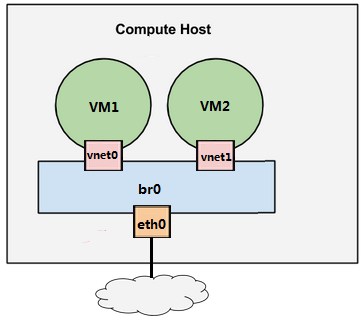
通过命令行创建Bridge
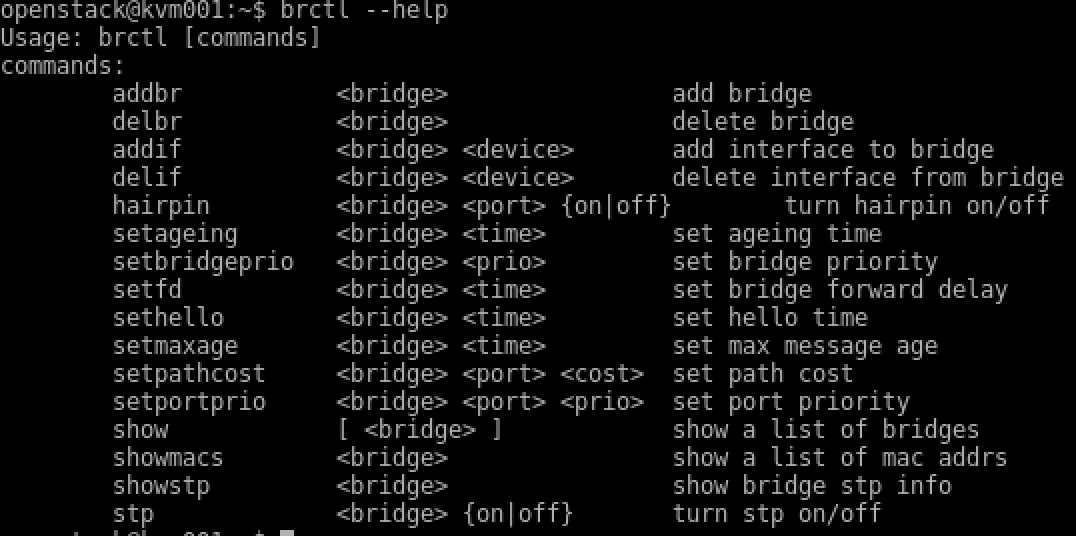
注意:通过命令创建的Brdge在重启后会自动丢失,因此需要在网络配置文件中写入Brdge配置。
# 创建brdge br0
# brctl addbr br0

# 将br0绑定到ens33

# brctl addif br0 ens33
通过网络配置创建创建Bridge
CentOS系统:https://zhidao.baidu.com/question/1046233341920860299.html
Ubuntu Bridge配置示例
auto ens33
iface ens33 inet manual

auto br0

iface br0 inet static

           address 192.168.1.2

           network 192.168.1.0

           netmask 255.255.255.0

           broadcast 192.168.1.255

           bridge_ports eth0

           bridge_bridgeprio 32767

           bridge_portprio eth0 129

           bridge_fd 5
参数
IFACE OPTIONS

       A   little  explanation  on  the  new  options  that  can  be  used  on

       /etc/network/interfaces to setup the bridge, so you don't  have  to  go

       and look at the scripts...

       bridge_ports interface specification

              this option must exist for the scripts to setup the bridge, with

              it you specify the ports you want to add to your bridge,  either

              using  "none" if you want a bridge without any interfaces or you

              want to add them later using brctl, or a list of the  interfaces

              you want to add separated by spaces, for example:

              bridge_ports eth0 eth4

              You  should  not  put any lines to configure the interfaces that

              will be used by the bridge, as this will be setup  automatically

              by the scripts when bringing the bridge up.

              If you need to specify the interfaces more flexibly, you can use

              the following syntax (most useful on a Xen dom0):

              bridge_ports regex (eth|vif).*

              This means to evaluate (as in  egrep(1))  the  expressions  that

              follow  after  "regex"  until  either  the  end  or  a "noregex"

              statement is reached.  The  regular  expressions  are  evaluated

              against all local interfaces and those that match are added.

              Specifying  "all"  is  short  for  "regex  eth.*  em.*  p[0-9].*

              noregex" and will get all the ethX and  biosdevname-format  (emX

              and pX) interfaces added to the bridge.

              Carrying this to the extremes, the following is valid syntax:

              bridge_ports all regex if.0 noregex ext0 regex vif.*

              This will add all ethX interfaces, the ifX0 interfaces, the ext0

              interface and all vifX interfaces.

       bridge_ageing time

              set ageing time, default is 300, can have a fractional part.

       bridge_bridgeprio priority

              set bridge priority, priority is between 0 and 65535, default is

              32768,  affects  bridge  id,  lowest priority bridge will be the

              root.

       bridge_fd time

              set bridge forward delay to time seconds,  default  is  15,  can

              have a fractional part.

       bridge_gcint time

              set  garbage  collection interval to time seconds, default is 4,

              can have a fractional part.  Available on Linux kernel  versions

              < 2.6.0.

       bridge_hello time

              set  hello  time  to  time  seconds,  default  is  2, can have a

              fractional part.

       bridge_hw MAC address

              set the Ethernet MAC address of the bridge to the specified one.

              There  were some concerns of how this was done in the past, see:

              http://bugs.debian.org/271406 but we are doing it on a  new  way

              now that shouldn't be as bad, see: http://bugs.debian.org/725786

              however you should know what you are  doing  before  using  this

              option.

       bridge_maxage time

              set  max  message age to time seconds, default is 20, can have a

              fractional part.

       bridge_maxwait time

              forces to time seconds the maximum time that the  Debian  bridge

              setup  scripts  will  wait  for  the  bridge ports to get to the

              forwarding status, doesn't allow factional part. If it is  equal

              to 0 then no waiting is done.

       bridge_pathcost port cost

              set  path  cost  for a port, default is 100, port is the name of

              the interface to which this setting applies.

       bridge_portprio port priority

              set port priority, default is 32, affects port id, port  is  the

              name  of  the interface to which this setting applies.  On Linux

              kernels older than 2.6.0 the max value is 255, the default  128.

              Newer kernels have a maximum value of 63 and a default of 32.

       bridge_stp state

              turn  spanning  tree protocol on/off, state values are on or yes

              to turn stp on and any other thing to set it  off,  default  has

              changed  to  off  for security reasons in latest kernels, so you

              should specify if you want stp on or off with this  option,  and

              not rely on your kernel's default behaviour.

       bridge_waitport time [ports]

              wait for a max of time seconds for the specified ports to become

              available, if no ports are specified  then  those  specified  on

              bridge_ports  will be used here. Specifying no ports here should

              not be used if we are using regex or "all" on  bridge_ports,  as

              it wouldn't work.
Linux 创建Bridge的更多相关文章
- linux useradd(adduser)命令参数及用法详解(linux创建新用户命令)
linux useradd(adduser)命令参数及用法详解(linux创建新用户命令) useradd可用来建立用户帐号.帐号建好之后,再用passwd设定帐号的密码.而可用userdel删除帐号 ...
- linux创建用户和用户组
Linux创建用户.用户组 及 删除 在创建用户时,需要为新建用户指定一用户组,如果不指定其用户所属的工作组,自动会生成一个与用户名同名的工作组.创建用户user1的时候指定其所属工作组users,例 ...
- Linux创建修改删除用户和组
Linux 创建修改删除用户和组 介绍 在日常的维护过程中创建用户操作用的相对会多一些,但是在这个过程中涉及到的知识点就不单单就是useradd了,接下来就来详细了解账号管理的相关信息. 用户信息 先 ...
- 一起来学习linux创建用户useradd命令
linux创建用户useradd命令 原文地址:linux创建用户useradd命令 http://www.xfcodes.com/linuxcmd/user/24308.htm 一,adduser与 ...
- Linux 创建自定义命令
Linux 创建自定义命令 Linux 可以创建自定义使用命令 这里我们采取使用“alias”命令.这里我们首先了解两个文件,通过这两个文件我们可以根据环境配置相应的自定义命令. 该文件内创建的自定义 ...
- linux创建定时任务,定时执行sql
终于弄清楚一个问题了.linux创建定时任务,定时执行sql,其中分为两个case. case-1 sql语句较少,因此直接在 shell脚本中 写sql语句.如下: [oracle@Oracle11 ...
- Windows和Linux创建软链接和硬链接
1.Wondows创建软链接和硬链接 mklink [/d] [/h] link target /d--创建目录软链接:默认为文件软链接:创建目录链接时必须使用该选项不然创出的软链接无效 /h--创建 ...
- linux 创建守护进程的相关知识
linux 创建守护进程的相关知识 http://www.114390.com/article/46410.htm linux 创建守护进程的相关知识,这篇文章主要介绍了linux 创建守护进程的相关 ...
- [转帖] Linux 创建一个简单的私有CA、发证、吊销证书
原创帖子地址: https://blog.csdn.net/mr_rsq/article/details/71001810 Linux 创建一个简单的私有CA.发证.吊销证书 2017年04月30 ...
随机推荐
- 【已解决】 iView-admin 动态路由问题
IView-admin 在使用的时候 跳转客户详细后,点击其它页面,然后再从选项卡进入页面时,发下控制台 报错,不能正常打开客户详细页面 [vue-router] Route with name 'c ...
- IMSDroid问题集
1.IMSDroid切换摄像头后的接收方横屏显示.事实上非常多种情况下都会突然发现就横屏了.解决的方法就是切换摄像头时同一时候切换横竖屏显示 2.IMSDroid掉音问题:IMSDroid通话几分钟后 ...
- JS-以鼠标位置为中心的滑轮放大功能demo1
以鼠标位置为中心的滑轮放大功能demo1 <!DOCTYPE html PUBLIC "-//W3C//DTD XHTML 1.0 Transitional//EN" &qu ...
- [译]NeHe教程 - 你的第一个多边形
原文: Your First Polygon 在第一节中我讲解了如何创建OpenGL窗体.本节我会讲解如何创建三角形和四边形.我们会用GL_TRIANGLES来创建三角形,用GL_GUADS创建四边形 ...
- git修改用户名以及邮箱
git 修改当前的project的用户名的命令为:git config user.name 你的目标用户名; git 修改当前的project提交邮箱的命令为:git config user.emai ...
- Mysql----MySQL的mysql_insert_id和LAST_INSERT_ID(转)
本文介绍的是mysql中last_insert_id和mysql_insert_id的区别 1 mysql_insert_id 一.PHP获取MYSQL新插入数据的ID mysql_insert_id ...
- Hadoop学习笔记(二)——zookeeper使用和分析
分布式架构是中心化的设计.就是一个主控机连接多个处理节点,因此保证主控机高可用性十分关键.分布式锁是解决该问题的较好方案,多主控机抢一把锁.Zookeeper就是一套分布式锁管理系统,用于高可靠的维护 ...
- 【Atheros】minstrel速率调整算法源码走读
先说几个辅助的宏,因为内核不支持浮点运算,当然还有实现需要,minstrel对很多浮点值做了缩放: /* scaled fraction values */ #define MINSTREL_SCAL ...
- Leetcode - CopyWithRandomList
Algorithm: Iterate and copy the original list first. For the random pointer, just copy the value fro ...
- jedisLock—redis分布式锁实现(转)
一.使用分布式锁要满足的几个条件: 系统是一个分布式系统(关键是分布式,单机的可以使用ReentrantLock或者synchronized代码块来实现) 共享资源(各个系统访问同一个资源,资源的载体 ...