
从mysql8.0.15升级到8.0.16
从mysql8.0.15升级到8.0.16
环境简介
操作系统:Centos 6.10 64位
目前版本:8.0.15 MySQL Community Server 二进制
目的:升级为8.0.16
安装目录:/data/mysql/mysql_3306
一、升级步骤
1、下载软件;
2、一致性停库;
3、备份数据;
4、修改软连接;
5、启动数据库;
6、升级数据库;
7、验证。
1. 下载软件
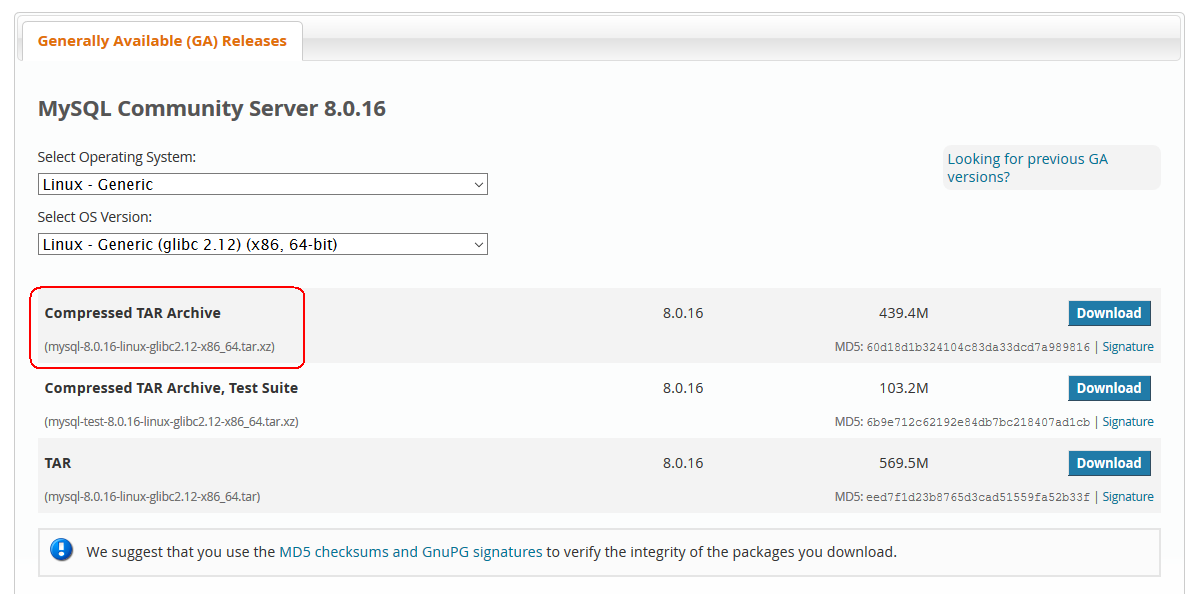
由于是glibc-2.12-1.212.el6.x86_64,所以下载对应的mysql版本。
[root@db144 mysql_3306]# rpm -qa| grep glib

glibc-common-2.12-1.212.el6.x86_64

glibc-2.12-1.212.el6.x86_64

dbus-glib-0.86-.el6.x86_64

glibc-headers-2.12-1.212.el6.x86_64

glib2-2.28.-.el6.x86_64

glibc-devel-2.12-1.212.el6.x86_64

[root@db144 mysql_3306]#
[root@db144 ~]# mysql.3306.login
mysql: [Warning] Using a password on the command line interface can be insecure.
Welcome to the MySQL monitor. Commands end with ; or \g.
Your MySQL connection id is 9
Server version: 8.0.15 MySQL Community Server - GPL
Copyright (c) 2000, 2019, Oracle and/or its affiliates. All rights reserved.
Oracle is a registered trademark of Oracle Corporation and/or its
affiliates. Other names may be trademarks of their respective
owners.
Type 'help;' or '\h' for help. Type '\c' to clear the current input statement.
mysql> show databases;
+--------------------+
| Database |
+--------------------+
| db144 |
| information_schema |
| mysql |
| performance_schema |
| sys |
+--------------------+
5 rows in set (0.36 sec)
mysql> exit
[root@db144 mysql_3306]# cd /opt/

[root@db144 opt]# ll

total

drwxr-xr-x.  root root       Apr  : mysql-8.0.-linux-glibc2.-x86_64

-rw-r--r--.  root root  Apr   : mysql-8.0.-linux-glibc2.-x86_64.tar.xz

[root@db144 opt]# wget https://dev.mysql.com/get/Downloads/MySQL-8.0/mysql-8.0.16-linux-glibc2.12-x86_64.tar.xz
# 解压安装包
[root@db144 opt]# tar -xJf mysql-8.0.16-linux-glibc2.12-x86_64.tar.xz

# 停库
[root@db144 opt]# cd /usr/local/
[root@db144 local]# ll
total 40
drwxr-xr-x. 2 root root 4096 Sep 23 2011 bin
drwxr-xr-x. 2 root root 4096 Sep 23 2011 etc
drwxr-xr-x. 2 root root 4096 Sep 23 2011 games
drwxr-xr-x. 2 root root 4096 Sep 23 2011 include
drwxr-xr-x. 2 root root 4096 Sep 23 2011 lib
drwxr-xr-x. 2 root root 4096 Sep 23 2011 lib64
drwxr-xr-x. 2 root root 4096 Sep 23 2011 libexec
lrwxrwxrwx. 1 root root 40 Apr 10 00:15 mysql -> /opt/mysql-8.0.15-linux-glibc2.12-x86_64
drwxr-xr-x. 2 root root 4096 Sep 23 2011 sbin
drwxr-xr-x. 5 root root 4096 Mar 12 22:38 share
drwxr-xr-x. 2 root root 4096 Sep 23 2011 src
[root@db144 local]# mysql.3306.stop
[1] 9775
[root@db144 local]# mysqladmin: [Warning] Using a password on the command line interface can be insecure.
[1]+ Done /usr/local/mysql/bin/mysqladmin -h127.0.0.1 -P 3306 -uroot -p'AnvcTMagdLarwNV3CKaC' shutdown
[root@db144 local]#
[root@db144 local]# unlink mysql
# 备份数据目录
[root@db144 local]# cp -r /data/mysql/mysql_3306 /data/mysql/mysql_3306.bak
# 做软连接
[root@db144 local]# ln -s /opt/mysql-8.0.16-linux-glibc2.12-x86_64 /usr/local/mysql
[root@db144 local]# ll
total 40
drwxr-xr-x. 2 root root 4096 Sep 23 2011 bin
drwxr-xr-x. 2 root root 4096 Sep 23 2011 etc
drwxr-xr-x. 2 root root 4096 Sep 23 2011 games
drwxr-xr-x. 2 root root 4096 Sep 23 2011 include
drwxr-xr-x. 2 root root 4096 Sep 23 2011 lib
drwxr-xr-x. 2 root root 4096 Sep 23 2011 lib64
drwxr-xr-x. 2 root root 4096 Sep 23 2011 libexec
lrwxrwxrwx. 1 root root 40 May 5 18:21 mysql -> /opt/mysql-8.0.16-linux-glibc2.12-x86_64
drwxr-xr-x. 2 root root 4096 Sep 23 2011 sbin
drwxr-xr-x. 5 root root 4096 Mar 12 22:38 share
drwxr-xr-x. 2 root root 4096 Sep 23 2011 src
[root@db144 local]# chown -R mysql.mysql mysql
[root@db144 local]#
# 启动数据库
[root@db144 local]# mysql.3306.start
[1] 9801
[root@db144 local]# 2019-05-05T10:22:01.454070Z mysqld_safe Logging to '/data/mysql/mysql_3306/logs/error.log'.
2019-05-05T10:22:01.630984Z mysqld_safe Starting mysqld daemon with databases from /data/mysql/mysql_3306/data
# my.cnf中去掉这个参数 #internal_tmp_disk_storage_engine = InnoDB
[root@db144 local]# mysql_upgrade -s -uroot -p -h 127.0.0.1 -P 3306
Enter password:
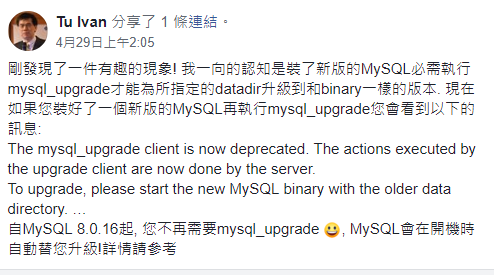
The mysql_upgrade client is now deprecated. The actions executed by the upgrade client are now done by the server.
To upgrade, please start the new MySQL binary with the older data directory. Repairing user tables is done automatically. Restart is not required after upgrade.
The upgrade process automatically starts on running a new MySQL binary with an older data directory. To avoid accidental upgrades, please use the --upgrade=NONE option with the MySQL binary. The option --upgrade=FORCE is also provided to run the server upgrade sequence on demand.
It may be possible that the server upgrade fails due to a number of reasons. In that case, the upgrade sequence will run again during the next MySQL server start. If the server upgrade fails repeatedly, the server can be started with the --upgrade=MINIMAL option to start the server without executing the upgrade sequence, thus allowing users to manually rectify the problem.
[root@db144 local]#
# 经查证,现在已经不使用这个了,服务在启动时,自动帮你升级完毕了。
[root@db144 local]# mysql.3306.login
mysql: [Warning] Using a password on the command line interface can be insecure.
Welcome to the MySQL monitor. Commands end with ; or \g.
Your MySQL connection id is 9
Server version: 8.0.16 MySQL Community Server - GPL
Copyright (c) 2000, 2019, Oracle and/or its affiliates. All rights reserved.
Oracle is a registered trademark of Oracle Corporation and/or its
affiliates. Other names may be trademarks of their respective
owners.
Type 'help;' or '\h' for help. Type '\c' to clear the current input statement.
mysql> \s;
--------------
/usr/local/mysql/bin/mysql Ver 8.0.16 for linux-glibc2.12 on x86_64 (MySQL Community Server - GPL)
Connection id: 9
Current database:
Current user: root@127.0.0.1
SSL: Cipher in use is DHE-RSA-AES128-GCM-SHA256
Current pager: stdout
Using outfile: ''
Using delimiter: ;
Server version: 8.0.16 MySQL Community Server - GPL
Protocol version: 10
Connection: 127.0.0.1 via TCP/IP
Server characterset: utf8mb4
Db characterset: utf8mb4
Client characterset: utf8mb4
Conn. characterset: utf8mb4
TCP port: 3306
Uptime: 9 min 9 sec
Threads: 2 Questions: 8 Slow queries: 0 Opens: 1133 Flush tables: 3 Open tables: 16 Queries per second avg: 0.014
--------------
ERROR:
No query specified
mysql> exit
Bye
[root@db144 local]#
附录 :
社区版的8.0.15的安装方法:https://www.cnblogs.com/bjx2020/p/10682518.html
从mysql8.0.15升级到8.0.16的更多相关文章
- Nuget包CommonServiceLocator从1.0.3升级到2.0.4时MvvmLight的ViewModelLocator初始化SimpleIoc.Default格式不匹配问题
原文:Nuget包CommonServiceLocator从1.0.3升级到2.0.4时MvvmLight的ViewModelLocator初始化SimpleIoc.Default格式不匹配问题 把旧 ...
- 安装zabbix3.0以及升级到5.0过程
关闭防火墙: systemctl stop firewalld.service systemctl disable firewalld.service 需要关闭 selinux,一定要关闭这个,开启s ...
- 【Oracle】RAC 10.2.0.1升级10.2.0.5
环境: OS:OEL5.6 RAC:10.2.0.1.0 相关环境变量: CRS_HOME /u01/app/oracle/product/10.2.0/db_1 ORACLE_HOME /u01 ...
- WangSql 3.0源码共享(WangSql 1.0重大升级到3.0)
WangSql 1.0博文阅读: http://www.cnblogs.com/deeround/p/6204610.html 基于1.0做了以下重大改动: 1.多数据实现方式调整 2.使用EmitM ...
- MVC3.0 项目升级到 MVC4.0
按照 http://www.asp.net/whitepapers/mvc4-release-notes#_Toc303253806 的步骤 第一步:修改web.config 注意,默认的MVC3网站 ...
- Windows平台下面Oracle11.2.0.1 升级Oracle11.2.0.4 的简单步骤
1. 首先查看数据库的版本: 2. ESXi 上面的虚拟机挂在 oracle11.2.0.4的 iso磁盘 3. 执行set 进行升级 4. 安装选项进行选择 升级现有的数据库 5. 注意安装位置必须 ...
- Windows 版本下 Oracle12.1.0.2 升级Oracle12.2.0.1的步骤
oracle12.1.0.1 2013年发布的产品 2014年左右发布12.1.0.2 2016年底发布了 oracle12.2.0.1 经常有人会安装了最早的oracle版本,然后需要升级到最新的o ...
- [python]pip 版本9.0.1升级到10.0.1故障解决办法
问题背景: 在做android自动化时使用到第三方库uiautomator时,提示要安装,但安装该uiautomator库时提示当前的pip版本偏低,需要安装10.0.1版本方可.但在升级到升级到该版 ...
- Oracle11.2.0.1 升级Oracle11.2.0.4 后 listener 的端口改变需要处理
1. 因为Oracle采取了异地升级 发现 Oracle的端口号发生了变化: 2. 如果之前的连接还需要用的话 需要禁用 dbhome1 里面的监听 只打开dbhome2的监听 并且修改 监听的端口号 ...
随机推荐
- I/O流之---FileInputStream和FileOutputStream的使用
FileInputStream和FileOutputStream都属于文件字节流. 通常我们可以用来做文件的复制操作,如下: import java.io.File; import java.io.F ...
- AGC035 B - Even Degrees【思维·树形结构的妙用】
题目传送门 一句话题意: 首先,每一条边会产生1个入度,1个出度,因此,如果边的数量是奇数的话,图的所有节点的总出度就是奇数,不可能每个节点的出度都是偶数,因此无解. 有解时,我们先找出原图中的一棵生 ...
- xampp:windows找不到文件“-n”
转自:http://blog.csdn.net/soar92/article/details/72897789 安装xampp是总是出总是提示以下错误: ①安装xampp时提示windows找不到文件 ...
- Linux c实现一个tcp文件服务器和客户端
总体需求:编写tcp文件服务器和客户端.客户端可以上传和下载文件. ================================================ 分解需求 客户端功能描述: 1)要 ...
- CF498B Name That Tune(动态规划dp)
CF498B 动态规划f[i][j]表示前i秒时间听了j首歌的概率,则有: \(f[i][j]=∑f[i-k][j-1]*(1-p_j)^{k-1}*p_j\) k枚举i秒前的每一秒,要求前i-1秒都 ...
- poj3252(数位dp)(模板)
题目链接:https://vjudge.net/problem/POJ-3252 题意:求[l,r]之间的Round Number数,RN数即化为二进制后0的个数不少于1的个数的数. 思路:之前用组合 ...
- Hbase 0.92.1 Replication
原集群 服务器名称 服务 sht-sgmhadoopnn-01 Master,NameNode,JobTracker sht-sgmhadoopdn-01 RegionServer,DataNode, ...
- [Python3] 030 常用模块 os
目录 os 1. os.getcwd() 2. os.chdir() 3. os.listdir() 4. os.makedir() 5. os.system() 6. os.getenv() 7. ...
- WebMagic 抓取图片并保存至本地
1.近期接触到java 爬虫,开源的爬虫框架有很多,其中WebMagic 是国产的,文档也是中文的,网上资料很多,便于学习,功能强大,可以在很短时间内实现一个简单的网络爬虫.具体可参考官网 http: ...
- kafka 教程(四)-原理进阶
kafka 最初由 Linkedin 公司开发,是一个 分布式.支持分区.多副本的,基于 zookeeper 协调的分布式发布订阅消息系统,该公司在 2010 年将 kafka 贡献给 apache ...