
Zxing二维码的集成使用
在github网站搜索Zxing
详见:https://github.com/yipianfengye/android-zxingLibrary
在module的build.gradle中执行compile操作
compile 'cn.yipianfengye.android:zxing-library:2.1'
在Activity或者Application onCreate()中执行初始化操作
  @Override

    public void onCreate() {

        super.onCreate();

        ZXingLibrary.initDisplayOpinion(this);

    }
添加权限:
    <uses-permission android:name="android.permission.CAMERA"/>

    <uses-permission android:name="android.permission.INTERNET"/>

    <uses-permission android:name="android.permission.VIBRATE"/>

    <uses-permission android:name="android.permission.READ_EXTERNAL_STORAGE"/>
代码实现:
package com.loaderman.zxingdemo;

import android.content.ContentResolver;

import android.content.Intent;

import android.graphics.Bitmap;

import android.net.Uri;

import android.os.Bundle;

import android.provider.MediaStore;

import android.support.v7.app.AppCompatActivity;

import android.view.View;

import android.widget.Toast;

import com.uuzuche.lib_zxing.activity.CaptureActivity;

import com.uuzuche.lib_zxing.activity.CodeUtils;

import com.uuzuche.lib_zxing.activity.ZXingLibrary;

public class MainActivity extends AppCompatActivity {

    private static final int REQUEST_CODE  = 10;

    private static final int REQUEST_IMAGE = 20;

    @Override

    protected void onCreate(Bundle savedInstanceState) {

        super.onCreate(savedInstanceState);

        setContentView(R.layout.activity_main);

        ZXingLibrary.initDisplayOpinion(this);

        findViewById(R.id.btn_create).setOnClickListener(new View.OnClickListener() {

            @Override

            public void onClick(View v) {

                startActivity(new Intent(MainActivity.this,CreateActviity.class));

            }

        });

        findViewById(R.id.btn_open).setOnClickListener(new View.OnClickListener() {

            @Override

            public void onClick(View v) {//集成默认的二维码扫描页面

                Intent intent = new Intent(MainActivity.this, CaptureActivity.class);

                startActivityForResult(intent, REQUEST_CODE);

            }

        });

        findViewById(R.id.btn_openPictrue).setOnClickListener(new View.OnClickListener() {

            @Override

            public void onClick(View v) {//集成对二维码图片的解析功能

                Intent intent = new Intent(Intent.ACTION_GET_CONTENT);

                intent.addCategory(Intent.CATEGORY_OPENABLE);

                intent.setType("image/*");

                startActivityForResult(intent, REQUEST_IMAGE);

            }

        });

        findViewById(R.id.btn_zidingyi).setOnClickListener(new View.OnClickListener() {

            @Override

            public void onClick(View v) {

                startActivity(new Intent(MainActivity.this,MyZxingActviity.class));//定制化显示扫描UI

            }

        });

    }

    @Override

    protected void onActivityResult(int requestCode, int resultCode, Intent data) {

        if (requestCode == REQUEST_CODE) {

            //处理扫描结果(在界面上显示)

            if (null != data) {

                Bundle bundle = data.getExtras();

                if (bundle == null) {

                    return;

                }

                if (bundle.getInt(CodeUtils.RESULT_TYPE) == CodeUtils.RESULT_SUCCESS) {

                    String result = bundle.getString(CodeUtils.RESULT_STRING);

                    Toast.makeText(this, "解析结果:" + result, Toast.LENGTH_LONG).show();

                } else if (bundle.getInt(CodeUtils.RESULT_TYPE) == CodeUtils.RESULT_FAILED) {

                    Toast.makeText(MainActivity.this, "解析二维码失败", Toast.LENGTH_LONG).show();

                }

            }

        }

        if (requestCode == REQUEST_IMAGE) {

            if (data != null) {

                Uri uri = data.getData();

                ContentResolver cr = getContentResolver();

                try {

                    Bitmap mBitmap = MediaStore.Images.Media.getBitmap(cr, uri);//显得到bitmap图片

                    String path = ImageUtil.getImageAbsolutePath(this, uri);

                    CodeUtils.analyzeBitmap(path, new CodeUtils.AnalyzeCallback() {

                        @Override

                        public void onAnalyzeSuccess(Bitmap mBitmap, String result) {

                            Toast.makeText(MainActivity.this, "解析结果:" + result, Toast.LENGTH_LONG).show();

                        }

                        @Override

                        public void onAnalyzeFailed() {

                            Toast.makeText(MainActivity.this, "解析二维码失败", Toast.LENGTH_LONG).show();

                        }

                    });

                    if (mBitmap != null) {

                        mBitmap.recycle();

                    }

                } catch (Exception e) {

                    e.printStackTrace();

                }

            }

        }

    }

}
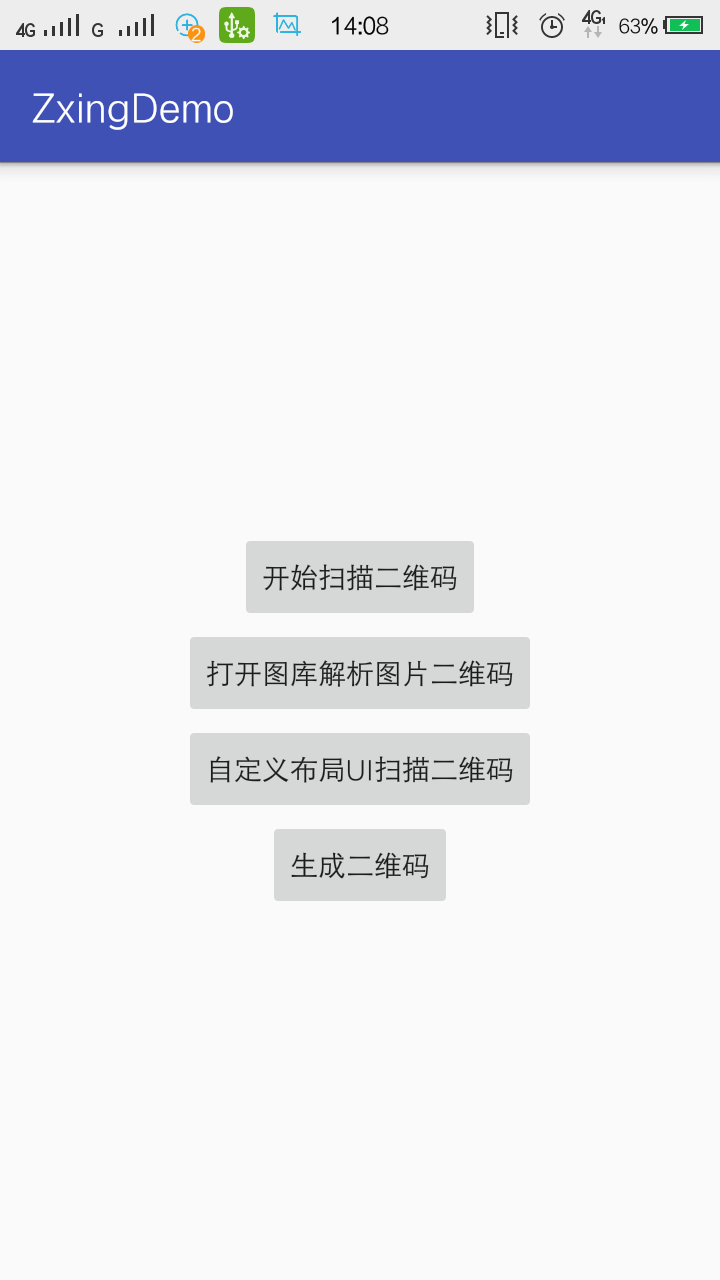
activity_main.xml
<?xml version="1.0" encoding="utf-8"?>

<LinearLayout

    xmlns:android="http://schemas.android.com/apk/res/android"

    xmlns:tools="http://schemas.android.com/tools"

    android:id="@+id/activity_main"

    android:layout_width="match_parent"

    android:layout_height="match_parent"

    android:orientation="vertical"

    android:gravity="center"

    tools:context="com.loaderman.zxingdemo.MainActivity">

    <Button

        android:id="@+id/btn_open"

        android:layout_width="wrap_content"

        android:layout_height="wrap_content"

        android:text="开始扫描二维码"/>

    <Button

        android:layout_width="wrap_content"

        android:id="@+id/btn_openPictrue"

        android:text="打开图库解析图片二维码"

        android:layout_height="wrap_content"/>

    <Button

        android:layout_width="wrap_content"

        android:id="@+id/btn_zidingyi"

        android:text="自定义布局UI扫描二维码"

        android:layout_height="wrap_content"/>

    <Button

        android:layout_width="wrap_content"

        android:id="@+id/btn_create"

        android:text="生成二维码"

        android:layout_height="wrap_content"/>

</LinearLayout>
package com.loaderman.zxingdemo;

import android.annotation.TargetApi;

import android.content.ContentUris;

import android.content.Context;

import android.database.Cursor;

import android.net.Uri;

import android.os.Environment;

import android.provider.DocumentsContract;

import android.provider.MediaStore;

public class ImageUtil {

    /**

     * 根据Uri获取图片绝对路径,解决Android4.4以上版本Uri转换

     *

     * @param context

     * @param imageUri

     */

    @TargetApi(19)

    public static String getImageAbsolutePath(Context context, Uri imageUri) {

        if (context == null || imageUri == null)

            return null;

        if (android.os.Build.VERSION.SDK_INT >= android.os.Build.VERSION_CODES.KITKAT && DocumentsContract.isDocumentUri(context, imageUri)) {

            if (isExternalStorageDocument(imageUri)) {

                String docId = DocumentsContract.getDocumentId(imageUri);

                String[] split = docId.split(":");

                String type = split[0];

                if ("primary".equalsIgnoreCase(type)) {

                    return Environment.getExternalStorageDirectory() + "/" + split[1];

                }

            } else if (isDownloadsDocument(imageUri)) {

                String id = DocumentsContract.getDocumentId(imageUri);

                Uri contentUri = ContentUris.withAppendedId(Uri.parse("content://downloads/public_downloads"), Long.valueOf(id));

                return getDataColumn(context, contentUri, null, null);

            } else if (isMediaDocument(imageUri)) {

                String docId = DocumentsContract.getDocumentId(imageUri);

                String[] split = docId.split(":");

                String type = split[0];

                Uri contentUri = null;

                if ("image".equals(type)) {

                    contentUri = MediaStore.Images.Media.EXTERNAL_CONTENT_URI;

                } else if ("video".equals(type)) {

                    contentUri = MediaStore.Video.Media.EXTERNAL_CONTENT_URI;

                } else if ("audio".equals(type)) {

                    contentUri = MediaStore.Audio.Media.EXTERNAL_CONTENT_URI;

                }

                String selection = MediaStore.Images.Media._ID + "=?";

                String[] selectionArgs = new String[]{split[1]};

                return getDataColumn(context, contentUri, selection, selectionArgs);

            }

        } // MediaStore (and general)

        else if ("content".equalsIgnoreCase(imageUri.getScheme())) {

            // Return the remote address

            if (isGooglePhotosUri(imageUri)) {

                return imageUri.getLastPathSegment();

            }

            //return getDataColumn(context, imageUri, null, null);

            return getRealPathFromUri(context, imageUri);

        }

        // File

        else if ("file".equalsIgnoreCase(imageUri.getScheme())) {

            return imageUri.getPath();

        }

        return null;

    }

    public static String getDataColumn(Context context, Uri uri, String selection, String[] selectionArgs) {

        Cursor cursor = null;

        String column = MediaStore.Images.Media.DATA;

        String[] projection = {column};

        try {

            cursor = context.getContentResolver().query(uri, projection, selection, selectionArgs, null);

            if (cursor != null && cursor.moveToFirst()) {

                int index = cursor.getColumnIndexOrThrow(column);

                return cursor.getString(index);

            }

        } finally {

            if (cursor != null)

                cursor.close();

        }

        return null;

    }

    public static String getRealPathFromUri(Context context, Uri contentUri) {

        Cursor cursor = null;

        try {

            String[] proj = { MediaStore.Images.Media.DATA };

            cursor = context.getContentResolver().query(contentUri, proj, null, null, null);

            int column_index = cursor.getColumnIndexOrThrow(MediaStore.Images.Media.DATA);

            cursor.moveToFirst();

            return cursor.getString(column_index);

        } finally {

            if (cursor != null) {

                cursor.close();

            }

        }

    }

    /**

     * @param uri The Uri to check.

     * @return Whether the Uri authority is ExternalStorageProvider.

     */

    public static boolean isExternalStorageDocument(Uri uri) {

        return "com.android.externalstorage.documents".equals(uri.getAuthority());

    }

    /**

     * @param uri The Uri to check.

     * @return Whether the Uri authority is DownloadsProvider.

     */

    public static boolean isDownloadsDocument(Uri uri) {

        return "com.android.providers.downloads.documents".equals(uri.getAuthority());

    }

    /**

     * @param uri The Uri to check.

     * @return Whether the Uri authority is MediaProvider.

     */

    public static boolean isMediaDocument(Uri uri) {

        return "com.android.providers.media.documents".equals(uri.getAuthority());

    }

    /**

     * @param uri The Uri to check.

     * @return Whether the Uri authority is Google Photos.

     */

    public static boolean isGooglePhotosUri(Uri uri) {

        return "com.google.android.apps.photos.content".equals(uri.getAuthority());

    }

}
package com.loaderman.zxingdemo;

import android.content.Intent;

import android.graphics.Bitmap;

import android.os.Bundle;

import android.support.v7.app.AppCompatActivity;

import android.view.View;

import android.widget.Button;

import com.uuzuche.lib_zxing.activity.CaptureFragment;

import com.uuzuche.lib_zxing.activity.CodeUtils;

public class MyZxingActviity extends AppCompatActivity {

    private boolean flag = false;

    private Button btnLight;

    @Override

    protected void onCreate(Bundle savedInstanceState) {

        super.onCreate(savedInstanceState);

        setContentView(R.layout.activity_my_zxing_actviity);

        btnLight = (Button) findViewById(R.id.btn_light);

        btnLight.setOnClickListener(new View.OnClickListener() {

            @Override

            public void onClick(View v) {

                if (flag) {

                    //关闭闪光灯

                    CodeUtils.isLightEnable(false);

                    flag = false;

                } else {

                    // 打开闪光灯

                    flag = true;

                    CodeUtils.isLightEnable(true);

                }

            }

        });

        findViewById(R.id.btn_cancel).setOnClickListener(new View.OnClickListener() {

            @Override

            public void onClick(View v) {

                finish();

            }

        });

        /**

         * 执行扫面Fragment的初始化操作

         */

        CaptureFragment captureFragment = new CaptureFragment();

        // 为二维码扫描界面设置定制化界面

        CodeUtils.setFragmentArgs(captureFragment, R.layout.my_camera);

        captureFragment.setAnalyzeCallback(analyzeCallback);

        /**

         * 替换自定义扫描控件

         */

        getSupportFragmentManager().beginTransaction().replace(R.id.fl_my_container, captureFragment).commit();

    }

    /**

     * 二维码解析回调函数

     */

    CodeUtils.AnalyzeCallback analyzeCallback = new CodeUtils.AnalyzeCallback() {

        @Override

        public void onAnalyzeSuccess(Bitmap mBitmap, String result) {

            Intent resultIntent = new Intent();

            Bundle bundle = new Bundle();

            bundle.putInt(CodeUtils.RESULT_TYPE, CodeUtils.RESULT_SUCCESS);

            bundle.putString(CodeUtils.RESULT_STRING, result);

            resultIntent.putExtras(bundle);

            MyZxingActviity.this.setResult(RESULT_OK, resultIntent);

            MyZxingActviity.this.finish();

        }

        @Override

        public void onAnalyzeFailed() {

            Intent resultIntent = new Intent();

            Bundle bundle = new Bundle();

            bundle.putInt(CodeUtils.RESULT_TYPE, CodeUtils.RESULT_FAILED);

            bundle.putString(CodeUtils.RESULT_STRING, "");

            resultIntent.putExtras(bundle);

            MyZxingActviity.this.setResult(RESULT_OK, resultIntent);

            MyZxingActviity.this.finish();

        }

    };

}
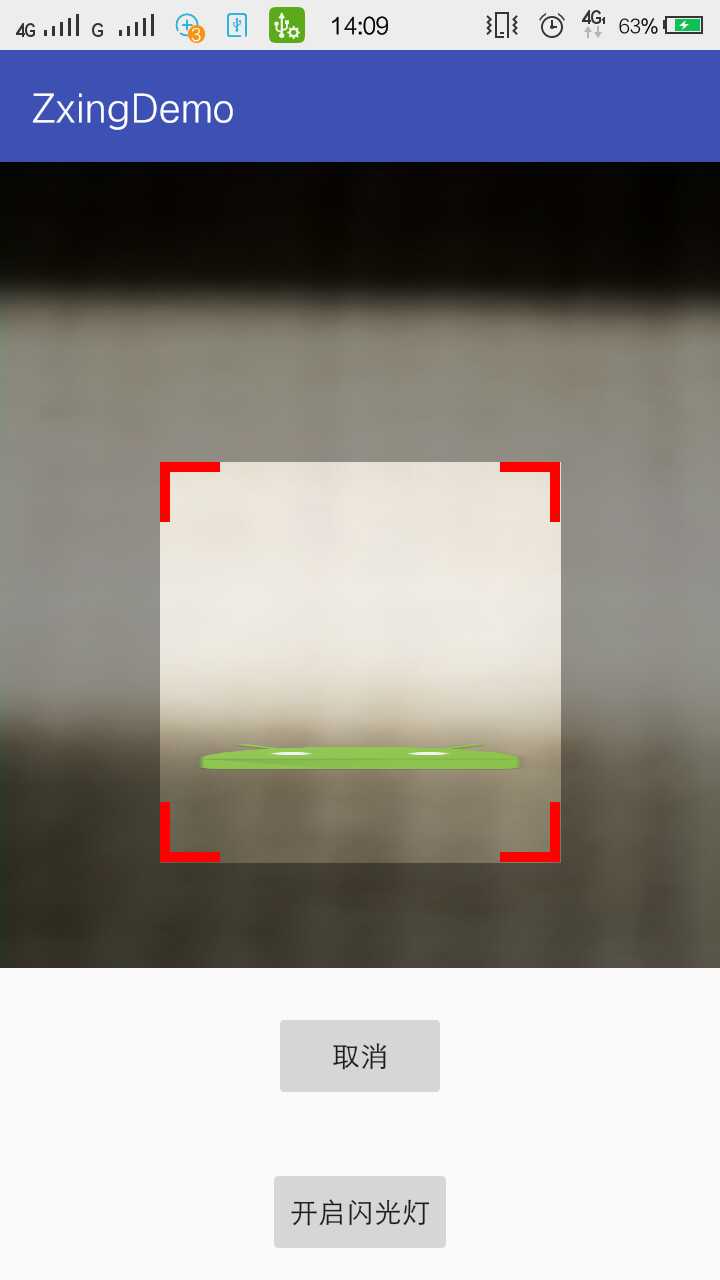
activity_my_zxing_actviity.xml
<?xml version="1.0" encoding="utf-8"?>

<LinearLayout

    xmlns:android="http://schemas.android.com/apk/res/android"

    xmlns:tools="http://schemas.android.com/tools"

    android:id="@+id/activity_my_zxing_actviity"

    android:layout_width="match_parent"

    android:layout_height="match_parent"

    android:orientation="vertical"

    tools:context="com.loaderman.zxingdemo.MyZxingActviity">

    <FrameLayout

        android:layout_weight="1"

        android:id="@+id/fl_my_container"

        android:layout_width="match_parent"

        android:layout_height="match_parent"

        ></FrameLayout>

    <Button

        android:id="@+id/btn_cancel"

        android:layout_width="wrap_content"

        android:layout_height="wrap_content"

        android:text="取消"

        android:layout_marginTop="20dp"

        android:layout_marginLeft="20dp"

        android:layout_marginRight="20dp"

        android:layout_marginBottom="10dp"

        android:layout_gravity="bottom|center_horizontal"

        />

    <Button

        android:id="@+id/btn_light"

        android:layout_width="wrap_content"

        android:layout_height="wrap_content"

        android:text="闪光灯控制"

        android:layout_marginTop="20dp"

        android:layout_marginLeft="20dp"

        android:layout_marginRight="20dp"

        android:layout_marginBottom="10dp"

        android:layout_gravity="bottom|center_horizontal"

        />

</LinearLayout>
my_camera.xml
<?xml version="1.0" encoding="utf-8"?>

<FrameLayout xmlns:android="http://schemas.android.com/apk/res/android"

             xmlns:app="http://schemas.android.com/apk/res-auto"

             android:layout_width="fill_parent"

             android:layout_height="fill_parent" >

    <SurfaceView

        android:id="@+id/preview_view"

        android:layout_width="wrap_content"

        android:layout_height="wrap_content"

        />

    <com.uuzuche.lib_zxing.view.ViewfinderView

        android:id="@+id/viewfinder_view"

        android:layout_width="wrap_content"

        android:layout_height="wrap_content"

        app:inner_width="200dp"

        app:inner_height="200dp"

        app:inner_margintop="150dp"

        app:inner_corner_color="#f00"

        app:inner_corner_length="30dp"

        app:inner_corner_width="5dp"

        app:inner_scan_bitmap="@drawable/ic_launcher"

        app:inner_scan_speed="10"

        app:inner_scan_iscircle="false"

        />

</FrameLayout>
生成二维码图片
package com.loaderman.zxingdemo;

import android.graphics.Bitmap;

import android.graphics.BitmapFactory;

import android.os.Bundle;

import android.support.v7.app.AppCompatActivity;

import android.text.TextUtils;

import android.view.View;

import android.widget.ImageView;

import android.widget.TextView;

import android.widget.Toast;

import com.uuzuche.lib_zxing.activity.CodeUtils;

public class CreateActviity extends AppCompatActivity {

    private TextView editText;

    private ImageView iv;

    private Bitmap mBitmap;

    @Override

    protected void onCreate(Bundle savedInstanceState) {

        super.onCreate(savedInstanceState);

        setContentView(R.layout.activity_create_actviity);

        editText = (TextView) findViewById(R.id.et_text);

        iv = (ImageView) findViewById(R.id.iv);

        findViewById(R.id.btn_logo).setOnClickListener(new View.OnClickListener() {

            @Override

            public void onClick(View v) {//生成带Logo的二维码图片

                String textContent = editText.getText().toString();

                if (TextUtils.isEmpty(textContent)) {

                    Toast.makeText(CreateActviity.this, "您的输入为空!", Toast.LENGTH_SHORT).show();

                    return;

                }

                editText.setText("");

                 mBitmap =   CodeUtils.createImage(textContent, 400, 400, BitmapFactory.decodeResource(getResources(), R.mipmap.ic_launcher));

                iv.setImageBitmap(mBitmap);

            }

        });

        findViewById(R.id.btn_no_logo).setOnClickListener(new View.OnClickListener() {

            @Override

            public void onClick(View v) {//生成不带logo的二维码图片

                String textContent = editText.getText().toString();

                if (TextUtils.isEmpty(textContent)) {

                    Toast.makeText(CreateActviity.this, "您的输入为空!", Toast.LENGTH_SHORT).show();

                    return;

                }

                editText.setText("");

                mBitmap = CodeUtils.createImage(textContent, 400, 400, null);

                iv.setImageBitmap(mBitmap);

            }

        });

    }

}
activity_create_actviity.xml
<?xml version="1.0" encoding="utf-8"?>

<LinearLayout

    android:orientation="vertical"

    xmlns:android="http://schemas.android.com/apk/res/android"

    xmlns:tools="http://schemas.android.com/tools"

    android:id="@+id/activity_create_actviity"

    android:layout_width="match_parent"

    android:layout_height="match_parent"

    tools:context="com.loaderman.zxingdemo.CreateActviity">

   <EditText

       android:id="@+id/et_text"

       android:layout_width="match_parent"

       android:text="输入要生成的二维码内容"

       android:layout_height="wrap_content"/>

    <Button

        android:id="@+id/btn_logo"

        android:text="生成带Logo的二维码"

        android:layout_width="match_parent"

        android:layout_height="wrap_content"/>

    <Button

        android:id="@+id/btn_no_logo"

        android:text="生成不带logo的二维码"

        android:layout_width="match_parent"

        android:layout_height="wrap_content"/>

    <ImageView

        android:id="@+id/iv"

        android:layout_width="wrap_content"

        android:layout_height="wrap_content"/>

</LinearLayout>
效果图:


Zxing二维码的集成使用的更多相关文章
- 程序猿媛 九:Adroid zxing 二维码3.1集成(源码无删减)
Adroid zxing 二维码3.1集成 声明:博文为原创,文章内容为,效果展示,思路阐述,及代码片段. 转载请保留原文出处“http://my.oschina.net/gluoyer/blog”, ...
- Android项目实战(二十八):Zxing二维码实现及优化
前言: 多年之前接触过zxing实现二维码,没想到今日项目中再此使用竟然使用的还是zxing,百度之,竟是如此牛的玩意. 当然,项目中我们也许只会用到二维码的扫描和生成两个功能,所以不必下载完整的ja ...
- Android之Zxing二维码扫描图片拉伸
还是这个接手项目,二维码扫描集成的是zxing,扫描界面的图像有明显的拉伸变形. 这种问题,根据以往的经验,一般是x,y轴错位引起的,处理好x,y轴的问题,一般可以解决问题. 由于这个问题,之前有很多 ...
- (转载)Android项目实战(二十八):Zxing二维码实现及优化
Android项目实战(二十八):Zxing二维码实现及优化 前言: 多年之前接触过zxing实现二维码,没想到今日项目中再此使用竟然使用的还是zxing,百度之,竟是如此牛的玩意. 当然,项目中 ...
- Atitit zxing二维码qr码识别解析
Atitit zxing二维码qr码识别解析 1.1. qr码识别解析 by zxing1 1.2. 解码lib:qrcode.jar 2 1.3. atitit.二维码生成总结java zxing ...
- 谷歌zxing 二维码生成工具
一.加入maven依赖 <!-- 谷歌zxing 二维码 --> <dependency> <groupId>com.google.zxing</groupI ...
- Android项目实战(四十四):Zxing二维码切换横屏扫描
原文:Android项目实战(四十四):Zxing二维码切换横屏扫描 Demo链接 默认是竖屏扫描,但是当我们在清单文件中配置横屏显示的时候: <activity android:name=&q ...
- android开发之集成zxing,二维码,以及扫描二维码的功能实现。带源代码下载
package cc.jiusansec.www; import com.google.zxing.WriterException; import com.zxing.activity.Capture ...
- zxing 二维码扫描 配置和使用
本文转载至 http://blog.csdn.net/a6472953/article/details/8796501 二维码扫描使用最多的主要有两个库:zbarSDK 和zxing 关于zbar ...
随机推荐
- 锋利的jQuery读书随笔
代码规范:var $variable = jQuery对象:var variable = DOM对象: jQuery对象无法使用DOM对象的任何方法,同样DOM对象也无法使用jQuery对象的任何方法 ...
- 了解并安装Nginx
公司使用nginx作为请求分发服务器,发现本人在查看nginx配置上存在些许困难,故仔细阅读了陶辉的<深入理解nginx模块开发与框架>第一部分,并作此记录. 了解 我根据书上的思路来了解 ...
- 使用putty对linux与windows之间的文件传输
一.putty下载 首先下载pytty,解压开发现里面有plink.exe pscp.exe psftp.exe putty.exe puttygen.exe puttytel.exe等可执行文件 进 ...
- 【BZOJ3196】【Luogu P3380】 【模板】二逼平衡树(树套树)
做数据结构一定要平\((fo)\)心\((de)\)静\((yi)\)气\((pi)\)...不然会四处出锅的\(QAQ\) 写法:线段树套平衡树,\(O(Nlog^3N)\).五个操作如果是对于整个 ...
- Redis 管道pipeline
Redis是一个cs模式的tcp server,使用和http类似的请求响应协议. 一个client可以通过一个socket连接发起多个请求命令. 每个请求命令发出后client通常会阻塞并等待red ...
- Mybatis运用到的3种设计模式
Mybatis运用到的3种设计模式 1.构造者模式2.工厂模式3.代理模式1.构造者模式 使用SqlSessionFactoryBuilder,根据核心配置文件,构造一个SqlSessionFacto ...
- vue使用echart中国地图
/* 引入 ECharts (按需加载) 文档:http://echarts.baidu.com/tutorial.html#%E5%9C%A8%20webpack%20%E4%B8%AD%E4%BD ...
- Avro从入门到入土
avro官网 1.Avro历史 Avro是Hadoop的一个数据序列化系统,由Hadoop的创始人Doug Cutting(也是Lucene,Nutch等项目的创始人)开发,设计用于支持大批量数据交换 ...
- 【C#-算法】根据生日自动计算年龄_DataTime 的 DateDiff 方法
dateTimePicker1.Value出生日期控件的值 long BirthDay = DateAndTime.DateDiff(DateInterval.Year, dateTimePicker ...
- SAP Diagnostics Agent无法启动
[问题]SAP Diagnostics Agent无法启动. [现象]Diagnostics Agent安装并没有发生错误,但是打开SAPMMC,Diagnostics Agent(DAA)的Inst ...