
基于谷歌开源的TensorFlow Object Detection API视频物体识别系统搭建自己的应用(四)
本章主要内容是利用mqtt、多线程、队列实现模型一次加载,批量图片识别分类功能
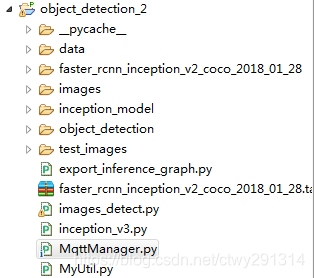
目录结构如下:
mqtt连接及多线程队列管理
# -*- coding:utf8 -*-

import paho.mqtt.client as mqtt

from multiprocessing import Process, Queue

import images_detect

MQTTHOST = "192.168.3.202"

MQTTPORT = 1883

mqttClient = mqtt.Client()

q = Queue()

# 连接MQTT服务器

def on_mqtt_connect():

    mqttClient.connect(MQTTHOST, MQTTPORT, 60)

    mqttClient.loop_start()

# 消息处理函数

def on_message_come(mqttClient, userdata, msg):

    q.put(msg.payload.decode("utf-8"))  # 放入队列

    print("产生消息", msg.payload.decode("utf-8"))

def consumer(q, pid):

    print("开启消费序列进程", pid)

    # 多进程中发布消息需要重新初始化mqttClient

    ImagesDetect = images_detect.ImagesDetect()

    ImagesDetect.detect(q)

# subscribe 消息订阅

def on_subscribe():

    mqttClient.subscribe("test", 1)  # 主题为"test"

    mqttClient.on_message = on_message_come  # 消息到来处理函数

# publish 消息发布

def on_publish(topic, msg, qos):

    mqttClient.publish(topic, msg, qos);

def main():

    on_mqtt_connect()

    on_subscribe()

    for i in range(1, 3):

        c1 = Process(target=consumer, args=(q, i))

        c1.start()

    while True:

        pass

if __name__ == '__main__':

    main()
图片识别
images_detect.py
# coding: utf-8

import numpy as np

import os

import sys

import tarfile

import tensorflow as tf

from object_detection.utils import label_map_util

from object_detection.utils import visualization_utils as vis_util

import cv2

import decimal

import MyUtil

context = decimal.getcontext()

context.rounding = decimal.ROUND_05UP

class ImagesDetect():

    def __init__(self):

        sys.path.append("..")

        MODEL_NAME = 'faster_rcnn_inception_v2_coco_2018_01_28'

        MODEL_FILE = MODEL_NAME + '.tar.gz'

        # Path to frozen detection graph. This is the actual model that is used for the object detection.

        PATH_TO_CKPT = MODEL_NAME + '/frozen_inference_graph.pb'

        # List of the strings that is used to add correct label for each box.

        PATH_TO_LABELS = os.path.join('data', 'mscoco_label_map.pbtxt')

        NUM_CLASSES = 90

        tar_file = tarfile.open(MODEL_FILE)

        for file in tar_file.getmembers():

            file_name = os.path.basename(file.name)

            if 'frozen_inference_graph.pb' in file_name:

                tar_file.extract(file, os.getcwd())

        # ## Load a (frozen) Tensorflow model into memory.

        self.detection_graph = tf.Graph()

        with self.detection_graph.as_default():

            od_graph_def = tf.GraphDef()

            with tf.gfile.GFile(PATH_TO_CKPT, 'rb') as fid:

                serialized_graph = fid.read()

                od_graph_def.ParseFromString(serialized_graph)

                tf.import_graph_def(od_graph_def, name='')

        # ## Loading label map

        # Label maps map indices to category names, so that when our convolution network predicts `5`, we know that this corresponds to `airplane`.  Here we use internal utility functions, but anything that returns a dictionary mapping integers to appropriate string labels would be fine

        label_map = label_map_util.load_labelmap(PATH_TO_LABELS)

        categories = label_map_util.convert_label_map_to_categories(label_map, max_num_classes=NUM_CLASSES, use_display_name=True)

        self.category_index = label_map_util.create_category_index(categories)

        self.image_tensor = self.detection_graph.get_tensor_by_name('image_tensor:0')

        # 每个框代表一个物体被侦测到

        self.boxes = self.detection_graph.get_tensor_by_name('detection_boxes:0')

        # 每个分值代表侦测到物体的可信度.

        self.scores = self.detection_graph.get_tensor_by_name('detection_scores:0')

        self.classes = self.detection_graph.get_tensor_by_name('detection_classes:0')

        self.num_detections = self.detection_graph.get_tensor_by_name('num_detections:0')

    def detect(self, q):

        with self.detection_graph.as_default():

            config = tf.ConfigProto()

            # config.gpu_options.allow_growth = True

            config.gpu_options.per_process_gpu_memory_fraction = 0.2

            with tf.Session(graph=self.detection_graph, config=config) as sess:

                while True:

                    img_src = q.get()

                    print('------------start------------' + MyUtil.get_time_stamp())

                    image_np = cv2.imread(img_src)

                    # 扩展维度,应为模型期待: [1, None, None, 3]

                    image_np_expanded = np.expand_dims(image_np, axis=0)

                    # 执行侦测任务.

                    (boxes, scores, classes, num_detections) = sess.run(

                        [self.boxes, self.scores, self.classes, self.num_detections],

                        feed_dict={self.image_tensor: image_np_expanded})

                    # 检测结果的可视化

                    vis_util.visualize_boxes_and_labels_on_image_array(

                        image_np,

                        np.squeeze(boxes),

                        np.squeeze(classes).astype(np.int32),

                        np.squeeze(scores),

                        self.category_index,

                        use_normalized_coordinates=True,

                        line_thickness=8)

                    print('------------end------------' + MyUtil.get_time_stamp())

                    # cv2.imshow('object detection', cv2.resize(image_np, (800, 600)))

                    if cv2.waitKey(25) & 0xFF == ord('q'):

                        cv2.destroyAllWindows()

                        break
import time

def get_time_stamp():

    ct = time.time()

    local_time = time.localtime(ct)

    data_head = time.strftime("%Y-%m-%d %H:%M:%S", local_time)

    data_secs = (ct - int(ct)) * 1000

    time_stamp = "%s.%03d" % (data_head, data_secs)

    return time_stamp
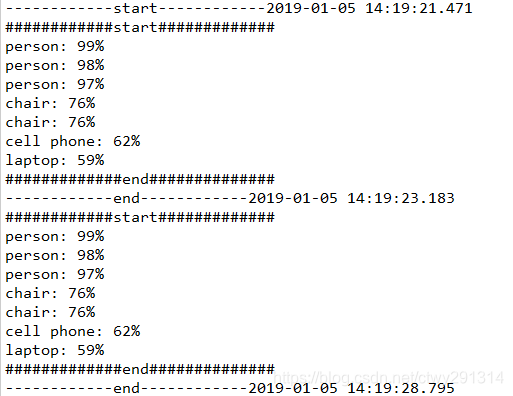
效果:
基于谷歌开源的TensorFlow Object Detection API视频物体识别系统搭建自己的应用(四)的更多相关文章
- 对于谷歌开源的TensorFlow Object Detection API视频物体识别系统实现教程
本教程针对Windows10实现谷歌近期公布的TensorFlow Object Detection API视频物体识别系统,其他平台也可借鉴. 本教程将网络上相关资料筛选整合(文末附上参考资料链接) ...
- 谷歌开源的TensorFlow Object Detection API视频物体识别系统实现教程
视频中的物体识别 摘要 物体识别(Object Recognition)在计算机视觉领域里指的是在一张图像或一组视频序列中找到给定的物体.本文主要是利用谷歌开源TensorFlow Object De ...
- 谷歌开源的TensorFlow Object Detection API视频物体识别系统实现(二)[超详细教程] ubuntu16.04版本
本节对应谷歌开源Tensorflow Object Detection API物体识别系统 Quick Start步骤(一): Quick Start: Jupyter notebook for of ...
- 谷歌开源的TensorFlow Object Detection API视频物体识别系统实现(一)[超详细教程] ubuntu16.04版本
谷歌宣布开源其内部使用的 TensorFlow Object Detection API 物体识别系统.本教程针对ubuntu16.04系统,快速搭建环境以及实现视频物体识别系统功能. 本节首先介绍安 ...
- 安装运行谷歌开源的TensorFlow Object Detection API视频物体识别系统
Linux安装 参照官方文档:https://github.com/tensorflow/models/blob/master/research/object_detection/g3doc/inst ...
- 使用Tensorflow object detection API——训练模型(Window10系统)
[数据标注处理] 1.先将下载好的图片训练数据放在models-master/research/images文件夹下,并分别为训练数据和测试数据创建train.test两个文件夹.文件夹目录如下 2. ...
- 基于TensorFlow Object Detection API进行迁移学习训练自己的人脸检测模型(二)
前言 已完成数据预处理工作,具体参照: 基于TensorFlow Object Detection API进行迁移学习训练自己的人脸检测模型(一) 设置配置文件 新建目录face_faster_rcn ...
- 基于TensorFlow Object Detection API进行相关开发的步骤
*以下二/三.四步骤确保你当前的文件目录是以research文件夹为相对目录. 一/安装或升级protoc 查看protoc版本命令: protoc --version 如果发现版本低于2.6.0或运 ...
- 使用TensorFlow Object Detection API+Google ML Engine训练自己的手掌识别器
上次使用Google ML Engine跑了一下TensorFlow Object Detection API中的Quick Start(http://www.cnblogs.com/take-fet ...
随机推荐
- PG_CONFIG-NOTFOUND
- vue-cli3取消eslint
遇到这样的空白报错问题,删除这行代码就行
- C# 很久以前几个常用类
Base64加密解密 using System; using System.Collections.Generic; using System.Linq; using System.Text; nam ...
- jdk7.x对Jenkins上的SonarQube Plugin的支持不足,替换方式
Jenkins.war放在Tomcat7下,完成各种配置,包括Jenkins中JDK,Maven,Git等. 最初的配置为Tomcat7, JDK7.x. 因为要在Jenkins上安装SonarQub ...
- 动态DP总结
动态DP 何为动态DP? 将画风正常的DP加上修改操作. 举个例子? 给你一个长度为\(n\)的数列,从中选出一些数,要求选出的数互不相邻,最大化选出的数的和. 考虑DP,状态设计为\(f[i][1/ ...
- VMware 15 安装 macOS 10.14优质教程链接集合
https://www.jianshu.com/p/25d2d781bd98 https://mp.weixin.qq.com/s/91Qc7L7E0xbVYXUcReUb_w https://blo ...
- [BZOJ3781]:小B的询问(离线莫队算法)
题目传送门 题目描述 小B有一个序列,包含$N$个$1~K$之间的整数.他一共有$M$个询问,每个询问给定一个区间$[L...R]$,求$\sum \limits_{i=1}^{K}c(i)^2$的值 ...
- python 调用C++ DLL,传递int,char,char*,数组和多维数组
ctypes 数据类型和 C数据类型 对照表 ctypes type C type Python type c_bool _Bool bool (1) c_char char 1-character ...
- C#—Nhibernate使用教程
本篇文章,让我们一起来探索Nhibernate.首先我们去搜索Nhibernate下载地址,如下链接所示.该版本可能是最新版,我下载的4.0.4.GA.其中GA意思我没搞清楚.不过应该不重要.http ...
- 龙珠MAD-视频列表(收集更新)
博主最喜欢的动漫实际上就是龙珠.因此也喜欢收集或创作一些龙珠视频. 一些是一个分享列表.喜欢可以转载或收藏哦.(不定时持续更新) http://test.migucloud.com/vi0/360/3 ...