
centos7上的h5ai折腾记
过程:
安装php-fpm和nginx,且经验证二者在其他项目可以正常使用。
从debian8拷贝过来_h5ai的nginx配置如下:
     location ~ [^/]\.php(/|$) {

         fastcgi_pass unix:/var/run/php/php7.1-fpm.sock; #反注释

         include /etc/nginx/snippets/fastcgi-php.conf;

     }
由于centos7服务器上没有/etc/nginx/snippets/fastcgi-php.conf这个文件,所以把这行改成了include fastcgi_params;,即:
# _h5ai file server

server {

	listen  12345;

        # server_name _;

	root /home/chudongyu/rtorrent/download;

        index  index.html  index.php  /_h5ai/public/index.php;

	location / {

		try_files $uri $uri/ /index.php$is_args$args;

	}

    location ~ [^/]\.php(/|$) {

        fastcgi_pass   127.0.0.1:9000;

        include        fastcgi_params;

    }

}
但是_h5ai并不能用,症状:
打开172.19.240.132:12345,只有空白页面,不显示任何东西。检查nginx的日志里面完全正常,没有错误。
在文件夹下建立index.html,发现可以显示,但是建立index.php()还是一批空白,啥都没有。
折腾良久,最终发现仅仅include fastcgi_params'是不够的,还要添加:
fastcgi_param SCRIPT_FILENAME $document_root$fastcgi_script_name;
完整的正确配置如下
# _h5ai file server

server {

	listen  12345;

        # server_name _;

	root /home/chudongyu/rtorrent/download;

        index  index.html  index.php  /_h5ai/public/index.php;

	location / {

		try_files $uri $uri/ /index.php$is_args$args;

	}

    # location ~ [^/]\.php(/|$) {

    #     fastcgi_pass   127.0.0.1:9000;

    #     include        fastcgi_params;

    # }

    location ~ \.php$ {

            root           /home/chudongyu/rtorrent/download;

            fastcgi_pass   127.0.0.1:9000;

            fastcgi_param  SCRIPT_FILENAME  $document_root$fastcgi_script_name;

            include        fastcgi_params;

        }

}
一个视频播放器更好用的_h5ai修改版:
【自用分享】 h5ai HTML5播放器(DPlayer)版
https://www.hostloc.com/thread-438265-1-2.html
直接下载地址: https://www.moerats.com/usr/down/h5ai_dplayer+modified+by+icycat.zip
另一种配置(在其他端口使用/download/路径,如xxx:8080/download/):
.......

    location ~ /download(/|$) {

        root           /home/chudongyu/rtorrent;

        index  index.html  index.php  /download/_h5ai/public/index.php;

		try_files $uri $uri/ /index.php$is_args$args;

        #  #NOT WORK:

        #  root           /home/chudongyu/rtorrent/download;

        #  index  index.html  index.php  /_h5ai/public/index.php;

		#  try_files $document_root $document_root/ /index.php$is_args$args;  # $real_script为空的时候,还是回访问download/download...

        #  # try_files index.html /_h5ai/public/index.php;

        #  # fastcgi_pass   127.0.0.1:9000;

        #  # fastcgi_index /_h5ai/public/index.php;

        #  # fastcgi_param  SCRIPT_FILENAME  $document_root;

        #  # include        fastcgi_params;

    }

    location ~ /download/\.php$ {

        root           /home/chudongyu/rtorrent/download;

        index  index.html  index.php  /_h5ai/public/index.php;

        # return 200 '$fastcgi_script_name';  # 返回的是 /download/...

        set $real_script '';

        if ( $fastcgi_script_name ~ /download(.*) ){  # 根据location的匹配规则,$1不会为空

            set $real_script $1;

        }

        # return 200 $real_script;

        fastcgi_pass   127.0.0.1:9000;

        fastcgi_param  SCRIPT_FILENAME  $document_root$real_script;

        include        fastcgi_params;

    }

.......

}
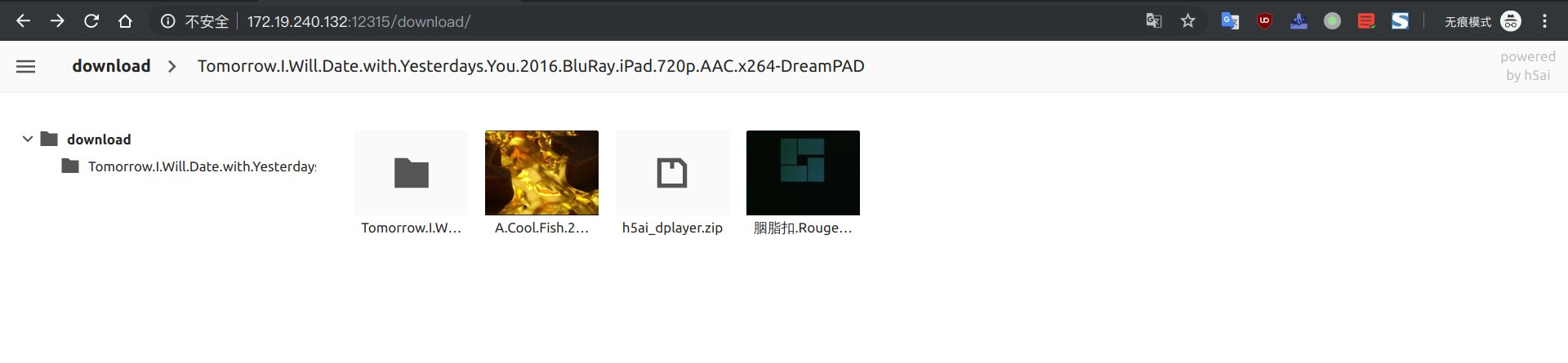
在云服务器搭了个下载器从紫荆下电影。。。

centos7上的h5ai折腾记的更多相关文章
- 【转载】有图 KVM折腾记..
KVM折腾记...https://lengjibo.github.io/KVM%E6%8A%98%E8%85%BE%E8%AE%B0/ Veröffentlicht am 2018-09-20 | ...
- 斐讯N1折腾记
斐讯N1折腾记:运行 Linux 及优化 2018-06-23 37条评论 4,445次阅读 11人点赞 最后更新时间:2019年03月10日 咳咳咳,上篇教程教大家给斐讯 N1 降级并且刷了 ...
- Atom编辑器折腾记
http://blog.csdn.net/bomess/article/category/3202419/2 Atom编辑器折腾记_(1)介绍下载安装 Atom编辑器折腾记_(2)基础了解使用 Ato ...
- 在CentOS7上部署PostgreSQL11数据库系统
在数据库上的选择,也是基于了稳定性为前提.其实选择的范围并不是太大,基本可以选择的范围也就是SQLServer.MySQL.PostgreSQL这三种.SQL Server是微软的商业数据库,无论是性 ...
- BeagleBone折腾记(一):连接你的狗板
BeagleBone折腾记一连接你的狗板 准备 了解BeagleBone BeagleBone社区 所需软硬件 USB连接 TTL连接 结语 准备 了解BeagleBone BeagleBone可能一 ...
- Anaconda折腾记(1)
Anaconda折腾记 谨此记录小白的我在Anaconda里面的摸爬滚打 更换更新源 可以不使用命令,直接进入C盘,进入user文件夹,进入当前的用户文件夹下,记得显示隐藏文件. 找到.condarc ...
- hbase2.1.9 centos7 完全分布式 搭建随记
hbase2.1.9 centos7 完全分布式 搭建随记 这里是当初在三个ECS节点上搭建hadoop+zookeeper+hbase+solr的主要步骤,文章内容未经过润色,请参考的同学搭配其他博 ...
- zookeeper3.5.5 centos7 完全分布式 搭建随记
zookeeper3.5.5 centos7 完全分布式 搭建随记 这里是当初在三个ECS节点上搭建hadoop+zookeeper+hbase+solr的主要步骤,文章内容未经过润色,请参考的同学搭 ...
- 在centos7上安装Jenkins
在centos7上安装Jenkins 安装 添加yum repos,然后安装 sudo wget -O /etc/yum.repos.d/jenkins.repo http://pkg.jenkins ...
随机推荐
- ubuntu18.04 -- 创建第一个Django项目
step1: 安装虚拟环境: sudo pip3 install virtualenv # 安装虚拟环境sudo pip3 install virtualenvwrapper # 安装虚拟环境扩展包# ...
- K8S操作
一.K8Spods操作 kubectl delete all --all //删除 所有pods
- Es学习第六课, ES基本搜索_search
前面几课ES的基本概念.安装和分词都讲过了,下面我们就来实战一下ES的核心功能-搜索,这节课我们主要讲的是基本搜索 _search(注意:ES的关键字都要加前缀_,所以我们在定义索引.类型名称时不要带 ...
- Quartz.Net 任务调度之特性(3)
再实现类中使用,就是继承IJob的类 [PersistJobDataAfterExecution] //执行后的保留作业数据,链式传参(上一次的任务数据) [DisallowConcurrentExe ...
- Vue.js(七)
ES6 默认导出(只能一次)与默认导入 默认导出: // 当前文件模块为 test.js // 定义私有成员 a 和 c let a = 10 let c = 20 // 外界访问不到变量 d ,因为 ...
- Fidder的使用
默认的header是类似这样的 User-Agent: Fiddler Host: localhost Content-Length: 34 只需要改成这样的 User-Agent: Fiddler ...
- 【Java架构:基础技术】一篇文章搞掂:MyBatis-Plus
前言 Mybatis:一个流行的半自动ORM框架. Mybatis-Plus:一个Mybatis的增强工具,在Mybatis的基础上只做增强不做改变,为简化开发.提高效率而生. 本文使用的版本:myb ...
- 国内网络安装ubuntu软件慢的解决方法
以安装scikit-image为例: pip3 install scikit-image==0.13.0 -i https://pypi.tuna.tsinghua.edu.cn/simple 或者 ...
- HTML-参考手册: HTML 拾色器
ylbtech-HTML-参考手册: HTML 拾色器 1.返回顶部 1. HTML 拾色器 选取颜色: 或输入颜色值: OK 或使用 HTML5: 选择的颜色: 黑色文本 阴影 白色文本 阴 ...
- Java第四次作业,面向对象高级特性(继承和多态)
Java第四次作业-面向对象高级特性(继承和多态) (一)学习总结 1.学习使用思维导图对Java面向对象编程的知识点(封装.继承和多态)进行总结. 2.阅读下面程序,分析是否能编译通过?如果不能,说 ...