
centos7上的h5ai折腾记
过程:
安装php-fpm和nginx,且经验证二者在其他项目可以正常使用。
从debian8拷贝过来_h5ai的nginx配置如下:
     location ~ [^/]\.php(/|$) {

         fastcgi_pass unix:/var/run/php/php7.1-fpm.sock; #反注释

         include /etc/nginx/snippets/fastcgi-php.conf;

     }
由于centos7服务器上没有/etc/nginx/snippets/fastcgi-php.conf这个文件,所以把这行改成了include fastcgi_params;,即:
# _h5ai file server

server {

	listen  12345;

        # server_name _;

	root /home/chudongyu/rtorrent/download;

        index  index.html  index.php  /_h5ai/public/index.php;

	location / {

		try_files $uri $uri/ /index.php$is_args$args;

	}

    location ~ [^/]\.php(/|$) {

        fastcgi_pass   127.0.0.1:9000;

        include        fastcgi_params;

    }

}
但是_h5ai并不能用,症状:
打开172.19.240.132:12345,只有空白页面,不显示任何东西。检查nginx的日志里面完全正常,没有错误。
在文件夹下建立index.html,发现可以显示,但是建立index.php()还是一批空白,啥都没有。
折腾良久,最终发现仅仅include fastcgi_params'是不够的,还要添加:
fastcgi_param SCRIPT_FILENAME $document_root$fastcgi_script_name;
完整的正确配置如下
# _h5ai file server

server {

	listen  12345;

        # server_name _;

	root /home/chudongyu/rtorrent/download;

        index  index.html  index.php  /_h5ai/public/index.php;

	location / {

		try_files $uri $uri/ /index.php$is_args$args;

	}

    # location ~ [^/]\.php(/|$) {

    #     fastcgi_pass   127.0.0.1:9000;

    #     include        fastcgi_params;

    # }

    location ~ \.php$ {

            root           /home/chudongyu/rtorrent/download;

            fastcgi_pass   127.0.0.1:9000;

            fastcgi_param  SCRIPT_FILENAME  $document_root$fastcgi_script_name;

            include        fastcgi_params;

        }

}
一个视频播放器更好用的_h5ai修改版:
【自用分享】 h5ai HTML5播放器(DPlayer)版
https://www.hostloc.com/thread-438265-1-2.html
直接下载地址: https://www.moerats.com/usr/down/h5ai_dplayer+modified+by+icycat.zip
另一种配置(在其他端口使用/download/路径,如xxx:8080/download/):
.......

    location ~ /download(/|$) {

        root           /home/chudongyu/rtorrent;

        index  index.html  index.php  /download/_h5ai/public/index.php;

		try_files $uri $uri/ /index.php$is_args$args;

        #  #NOT WORK:

        #  root           /home/chudongyu/rtorrent/download;

        #  index  index.html  index.php  /_h5ai/public/index.php;

		#  try_files $document_root $document_root/ /index.php$is_args$args;  # $real_script为空的时候,还是回访问download/download...

        #  # try_files index.html /_h5ai/public/index.php;

        #  # fastcgi_pass   127.0.0.1:9000;

        #  # fastcgi_index /_h5ai/public/index.php;

        #  # fastcgi_param  SCRIPT_FILENAME  $document_root;

        #  # include        fastcgi_params;

    }

    location ~ /download/\.php$ {

        root           /home/chudongyu/rtorrent/download;

        index  index.html  index.php  /_h5ai/public/index.php;

        # return 200 '$fastcgi_script_name';  # 返回的是 /download/...

        set $real_script '';

        if ( $fastcgi_script_name ~ /download(.*) ){  # 根据location的匹配规则,$1不会为空

            set $real_script $1;

        }

        # return 200 $real_script;

        fastcgi_pass   127.0.0.1:9000;

        fastcgi_param  SCRIPT_FILENAME  $document_root$real_script;

        include        fastcgi_params;

    }

.......

}
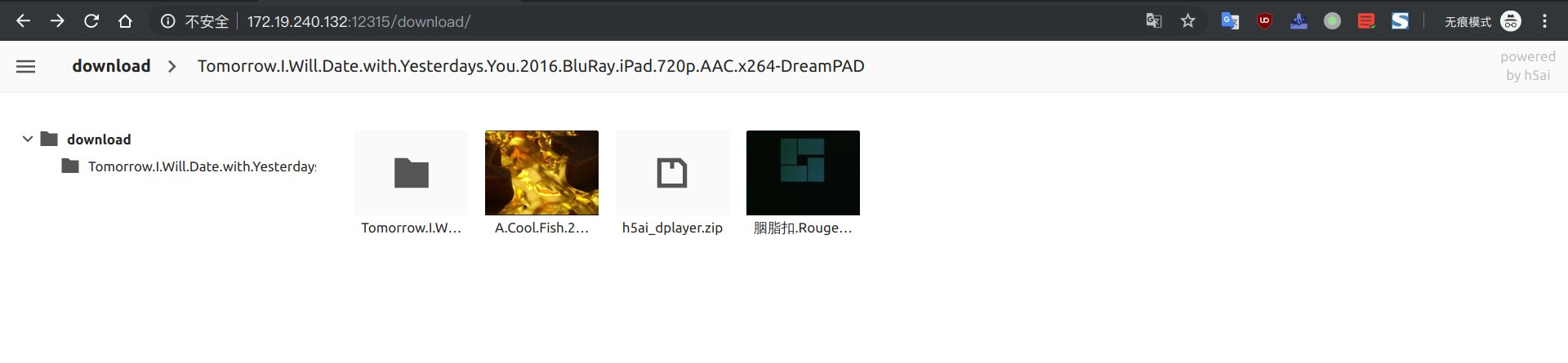
在云服务器搭了个下载器从紫荆下电影。。。

centos7上的h5ai折腾记的更多相关文章
- 【转载】有图 KVM折腾记..
KVM折腾记...https://lengjibo.github.io/KVM%E6%8A%98%E8%85%BE%E8%AE%B0/ Veröffentlicht am 2018-09-20 | ...
- 斐讯N1折腾记
斐讯N1折腾记:运行 Linux 及优化 2018-06-23 37条评论 4,445次阅读 11人点赞 最后更新时间:2019年03月10日 咳咳咳,上篇教程教大家给斐讯 N1 降级并且刷了 ...
- Atom编辑器折腾记
http://blog.csdn.net/bomess/article/category/3202419/2 Atom编辑器折腾记_(1)介绍下载安装 Atom编辑器折腾记_(2)基础了解使用 Ato ...
- 在CentOS7上部署PostgreSQL11数据库系统
在数据库上的选择,也是基于了稳定性为前提.其实选择的范围并不是太大,基本可以选择的范围也就是SQLServer.MySQL.PostgreSQL这三种.SQL Server是微软的商业数据库,无论是性 ...
- BeagleBone折腾记(一):连接你的狗板
BeagleBone折腾记一连接你的狗板 准备 了解BeagleBone BeagleBone社区 所需软硬件 USB连接 TTL连接 结语 准备 了解BeagleBone BeagleBone可能一 ...
- Anaconda折腾记(1)
Anaconda折腾记 谨此记录小白的我在Anaconda里面的摸爬滚打 更换更新源 可以不使用命令,直接进入C盘,进入user文件夹,进入当前的用户文件夹下,记得显示隐藏文件. 找到.condarc ...
- hbase2.1.9 centos7 完全分布式 搭建随记
hbase2.1.9 centos7 完全分布式 搭建随记 这里是当初在三个ECS节点上搭建hadoop+zookeeper+hbase+solr的主要步骤,文章内容未经过润色,请参考的同学搭配其他博 ...
- zookeeper3.5.5 centos7 完全分布式 搭建随记
zookeeper3.5.5 centos7 完全分布式 搭建随记 这里是当初在三个ECS节点上搭建hadoop+zookeeper+hbase+solr的主要步骤,文章内容未经过润色,请参考的同学搭 ...
- 在centos7上安装Jenkins
在centos7上安装Jenkins 安装 添加yum repos,然后安装 sudo wget -O /etc/yum.repos.d/jenkins.repo http://pkg.jenkins ...
随机推荐
- 基于 Scrapy-redis 两种形式的分布式爬虫
基于 Scrapy-redis 两种形式的分布式爬虫 .caret, .dropup > .btn > .caret { border-top-color: #000 !important ...
- JavaScript值传递和引用传递
1、数据类型:boolean,null,undefined,String,Number,指向包含的数据,进行“值传递”: 2.非数据类型:Array,Function,Object,指向了一个内存地址 ...
- 如何用Word制作斜线表头?
如何用Word制作斜线表头?遇到这种问题,你一般是如何操作?本期企业网盘坚果云干货分享与大家分享有关斜线表头的制作方法. 斜线表头分单斜线表头和多斜线表头,下面分情况来了解相关的解决办法. 单斜线表头 ...
- Mysql学习笔记(003)-案例讲解基础查询
案例讲解基础查询 #.下面的语句是否可以执行成功 SELECT last_name, first_name, salary AS sal FROM employees; #.下面的语句是否可以执行成功 ...
- make编写教程(二)
1. make中的变量 makefile中的变量就是c/c++中的宏 2. 引用其他的make文件 类似于c语言中的#include,被包含的文件会原模原样的放在当前文件的包含位置. include& ...
- px4::init_once();和px4::init(argc, argv, "px4");函数学习
px4::init_once(); void init_once() { _shell_task_id = pthread_self(); ...
- mysql数据库帐号权限设置
1.创建帐号 2.给帐号赋权限(xinjinlong帐号只有查看sakila表的权限) 3.更改密码 4.取消授权 revoke all on *.* from sss@localhost ;
- 服务器一般达到多少QPS比较好?
每秒查询率QPS是对一个特定的查询服务器在规定时间内所处理流量多少的衡量标准,在因特网上,作为域名系统服务器的机器的性能经常用每秒查询率来衡量. 原理:每天80%的访问集中在20%的时间里,这20%时 ...
- 膜神犇 DPH
神犇 DPH 让我写博客.但是,似乎我已经开始写了?!! I am young and naïve!!! Let us orz DPH! 上节课讲DFS,这个是我最擅长的.“暴力出奇迹”!
- Xcode5 统计单元测试覆盖率(仅限XCTest)
概要 通过本篇文章,你将学会如何在Xcode5下使用统计XCTest测试代码的覆盖率,以及如何快速得到测试覆盖率的图形化报表. 为什么要特别说明Xcode5下的代码覆盖率统计,原因是,以前的方法在新环 ...