
spring boot 异步发送邮件
发送邮件由于是一个耗时的操作,有可能需要一个几十秒的操作,但是呢,接口 是一个瞬间完成的,为了不影响接口的性能,所以需要对发送邮件的操作进行异步操作,我们这里呢,首先我们要引入发送邮件的测试模块。
  <dependency>

            <groupId>org.springframework.boot</groupId>

            <artifactId>spring-boot-starter-mail</artifactId>

        </dependency>
引入包后呢,我们去配置需要的邮件相关的配置,
  mail:

    host: smtp.qq.com

    port: 587

    username: 952943386@qq.com

    password: 需要在你用的邮箱那里配置

    default-encoding: utf-8

    properties:

      mail:

        smtp:

          socketFactoryClass: javax.net.ssl.SSLSocketFactory

        debug: true
这样配置完毕之后呢,就可以发送邮件了,我们利用异步,首先我们先编写一个发送邮件的接口
public interface EmailServer {

    void  sendemail(String  subject,String from ,String touserEmail,String text);

}
我们去实现这个接口,
@Component

@Service

public class EmailServerImpl implements EmailServer {

    @Autowired

    private JavaMailSender javaMailSender;

    @Async("taskExecutor")

    @Override

    public void sendemail(String subject, String from, String touserEmail, String text) {

        SimpleMailMessage message = new SimpleMailMessage();

        message.setSubject(subject);

        message.setFrom(from);

        message.setTo(touserEmail);

        message.setSentDate(new Date());

        message.setText(text);

        javaMailSender.send(message);

    }

}
实现完毕后呢,我们这里已经配置完毕了,我们就可以在正常 的业务去调用了。
我这里改的找回密码的逻辑。
if (user.getEmail() != null) {

                emailServerl.sendemail("全栈测试平台修改密码",user.getEmail(),

                        user.getEmail(),"你的密码修改成功,用户名:" + user.getUsername());

            }
这里,需要在上面去引入
    @Autowired

    private EmailServer emailServerl;
这样我们就已经开发完毕了,我们还需要配置启动的时候,启动异步。
SpringBootApplication(exclude = {DataSourceAutoConfiguration.class, DataSourceTransactionManagerAutoConfiguration.class}, scanBasePackages = "pan")

@EnableScheduling

@EnableAsync//增加这里即可,

public class PlanApplication extends SpringBootServletInitializer {

    public static void main(String[] args) {

        SpringApplication.run(PlanApplication.class, args);

    }

    protected SpringApplicationBuilder configure(SpringApplicationBuilder builder) {

        return builder.sources(PlanApplication.class);

    }

    @Bean

    MeterRegistryCustomizer meterRegistryCustomizer(MeterRegistry meterRegistry) {

        return meterRegistry1 -> {

            meterRegistry.config()

                    .commonTags("application", "Tenantapp");

        };

    }

}
配置完毕后,我们需要配置下异步任务的配置
@Configuration

public class TaskPoolConfig {

    @Bean("taskExecutor")

    public Executor taskExecutor () {

        ThreadPoolTaskExecutor executor = new ThreadPoolTaskExecutor();

        // 核心线程数10:线程池创建时候初始化的线程数

        executor.setCorePoolSize(10);

        // 最大线程数20:

        executor.setMaxPoolSize(15);

        // 缓冲队列200:

        executor.setQueueCapacity(200);

        // 允许线程的空闲时间60秒:

        executor.setKeepAliveSeconds(60);

        // 线程池名的前缀:

        executor.setThreadNamePrefix("taskExecutor-");

        /*

        线程池对拒绝任务的处理策略:这里采用了CallerRunsPolicy策略,

         */

        executor.setRejectedExecutionHandler(new ThreadPoolExecutor.CallerRunsPolicy());

        // 设置线程池关闭的时候等待所有任务都完成再继续销毁其他的Bean

        executor.setWaitForTasksToCompleteOnShutdown(true);

        // 设置线程池中任务的等待时间,如果超过这个时候还没有销毁就强制销毁,

        executor.setAwaitTerminationSeconds(600);

        return executor;

    }

}
这样,我们就完成了整体的代码开发,我们去调用下我们的api测试下
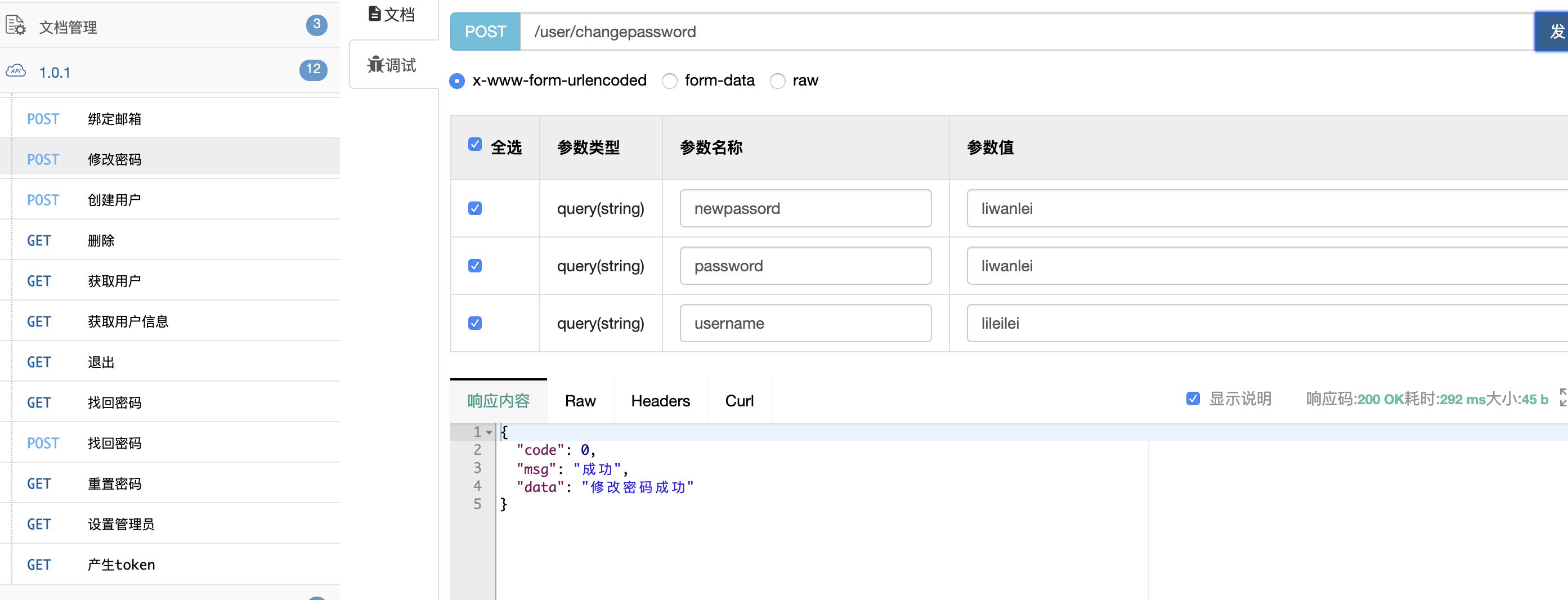
测试完毕,接口返回正常,我们去看下,我们的日志有没有执行我们的发送邮件。
Hibernate: select user0_.id as id1_70_, user0_.admin as admin2_70_, user0_.email as email3_70_, user0_.errornum as errornum4_70_, user0_.freeze as freeze5_70_, user0_.freezetime as freezeti6_70_, user0_.iphone as iphone7_70_, user0_.password as password8_70_, user0_.status as status9_70_, user0_.token as token10_70_, user0_.username as usernam11_70_ from user user0_ where user0_.username=?

。。。。。。。。

250 OK: queued as.

DEBUG SMTP: message successfully delivered to mail server

QUIT

221 Bye.
日志打印,我们看下正常我们应该可以看到邮件的,打开qq邮箱,收到了这封邮件。
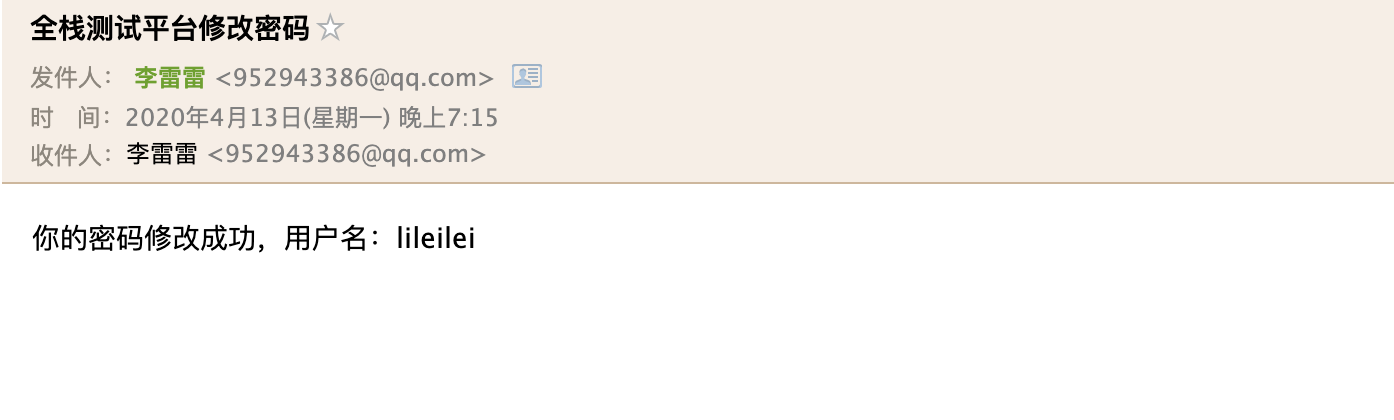
这样我们的异步发送邮件就修改成功了,完成了我们异步的发送邮件开发。后续封装下发送其他类型的模块,就可以完成了,我们的异步发送邮件的
spring boot 异步发送邮件的更多相关文章
- Spring Boot异步发送邮件和请求拦截器配置
用户登录流程图: 在spring拦截器中进行鉴权操作: 控制器的拦截: import com.mooc.house.common.model.User; import org.springframew ...
- Spring Boot 2发送邮件手把手图文教程
原文:http://www.itmuch.com/spring-boot/send-email/ 本文基于:Spring Boot 2.1.3,理论支持Spring Boot 2.x所有版本. 最近有 ...
- Spring Boot 之发送邮件
Spring Boot 之发送邮件 简介 API 配置 实战 引入依赖 配置邮件属性 Java 代码 完整示例 引申和引用 简介 Spring Boot 收发邮件最简便方式是通过 spring-boo ...
- Spring Boot (17) 发送邮件
添加依赖 <!--发送邮件 --> <dependency> <groupId>org.springframework.boot</groupId> & ...
- Spring Boot 异步请求和异步调用,一文搞定
一.Spring Boot中异步请求的使用 1.异步请求与同步请求 特点: 可以先释放容器分配给请求的线程与相关资源,减轻系统负担,释放了容器所分配线程的请求,其响应将被延后,可以在耗时处理完成(例如 ...
- SpringBoot系列:Spring Boot异步调用@Async
在实际开发中,有时候为了及时处理请求和进行响应,我们可能会多任务同时执行,或者先处理主任务,也就是异步调用,异步调用的实现有很多,例如多线程.定时任务.消息队列等, 这一章节,我们就来讲讲@Async ...
- Spring boot 中发送邮件
参考:https://blog.csdn.net/qq_39241443/article/details/81293939 添加依赖: <dependency> <groupId&g ...
- Spring Boot 异步运用
使用@Async标签 导入包 org.springframework.scheduling.annotation.Async 并配置并发线程池asyncTaskConfig 实现AsyncConfig ...
- Spring Boot 异步调用
添加一个类ThreadPoolConfig.java package com.cjcx.inter.framework.config; import org.springframework.conte ...
随机推荐
- 数学-Matrix Tree定理证明
老久没更了,冬令营也延期了(延期后岂不是志愿者得上学了?) 最近把之前欠了好久的债,诸如FFT和Matrix-Tree等的搞清楚了(啊我承认之前只会用,没有理解证明--),FFT老多人写,而Matri ...
- eslint常用三种校验语句
1.关闭对整段代码的校验 /* eslint-disable */ code /* eslint-enable */ 2.关闭当前行代码的校验 line code // eslint-disable- ...
- linux相关的帮助文档
几乎所有linux发行版都会提供大量的有用的文档. 手册页 linux发行版包含了有关常用命令.系统调用和库函数的手册页.手册页被分成不同的章节并分别标以序号: Section 名称 ...
- (转)GNU风格ARM汇编语法指南(非常详细)1
原文地址:http://zqwt.012.blog.163.com/blog/static/120446842010111481551809/ 汇编源程序一般用于系统最基本的初始化:初始化堆栈指针.设 ...
- Redis入门学习(学习过程记录)
Redis(入门笔记) 学习一个大的技术点,然后顺带着就把这个技术点的面试题给学习了. 学习完一个技术后,如果面试题还不能够解答的话,只能说明学的不精,需要查漏补缺. 下一个学习的方向:Redis-非 ...
- 二维数组及Arrays工具类
1.二维数组 概念: 数组中的每一个元素类型都是一维数组 二维数组初始化方式: 静态初始化: 格式: 元素类型[][] 数组名 = new 元素类型[][]{{一维数组1},{一维数组2},{一维数组 ...
- python基本数据类型及其使用方法
前言 python中的数据类型主要为int.float.string.list.tuple.dict.set.bool.bytes.接下来int和float统称为数字类型. 1.数据类型总结 按存 ...
- 数据库安装和基本sql语句
数据库概念 文件作为数据进行存储,数据格式千差万别 将保存数据的地方统一起来 MYSQL--------->一款应用软件 用来帮你操作文件的 只要是基于网络通信,底层就是socket 服务端 - ...
- 一文上手TensorFlow2.0(一)
目录: Tensorflow2.0 介绍 Tensorflow 常见基本概念 从1.x 到2.0 的变化 Tensorflow2.0 的架构 Tensorflow2.0 的安装(CPU和GPU) Te ...
- 机器学习算法系列:FM分解机
在线性回归中,是假设每个特征之间独立的,也即是线性回归模型是无法捕获特征之间的关系.为了捕捉特征之间的关系,便有了FM分解机的出现了.FM分解机是在线性回归的基础上加上了交叉特征,通过学习交叉特征的权 ...