
Selenium 实现自动下载文件(FirefoxOptions,FirefoxProfile) - 根据Selenium Webdriver3实战宝典
Firefox 版本是72
geckodriver 是 0.24
selenium 是3.14
代码中注释有关于FirefoxOptions,FirefoxProfile的解释,请各位寻找一下,不做另外解释
import org.openqa.selenium.By;

import org.openqa.selenium.JavascriptExecutor;

import org.openqa.selenium.WebDriver;

import org.openqa.selenium.firefox.FirefoxDriver;

import org.openqa.selenium.firefox.FirefoxOptions;

import org.openqa.selenium.firefox.FirefoxProfile;

import org.testng.annotations.AfterMethod;

import org.testng.annotations.BeforeMethod;

import org.testng.annotations.Test;

public class TestDemo {

    //设定存储下载文件的路径

        public static String downloadFilePath = "C:\\downloadFiles";

        WebDriver driver;

        String baseUrl;

        JavascriptExecutor js;

        @BeforeMethod

        public void befordMethod(){

            System.setProperty("webdriver.firefox.bin", "C:\\Program Files\\Mozilla Firefox\\firefox.exe");

            System.setProperty("webdriver.gecko.driver", "C:\\Users\\Administrator\\Desktop\\geckodriver.exe");

            //baseUrl = "http://ftp.mozilla.org/pub/firefox/releases/56.0/win64/zh-CN/";

            baseUrl = "http://ftp.mozilla.org/pub/firefox/releases/35.0b8/win32/zh-CN/";

        }

        @Test

        public void testDownloadFile() throws Exception{

            driver = new FirefoxDriver(firefoxDriverOptions());

            //driver = new FirefoxDriver();

            driver.get(baseUrl);

            //单机包含 Stub关键字的下载链接

            driver.findElement(By.partialLinkText("Stub")).click();

            //driver.findElement(By.xpath("/html/body/table/tbody/tr[3]/td[2]/a")).click();

            //设定10秒延迟,让程序下载完成,如果网络下载很慢,可以根据预估的下载完成时间

            //设定暂停时间

            //TODO 是否可以 用一个循环,来判定是否 下载完成,找到下载的元素,是否出现“已下载”,如果出现这个 partialLinkText 那么久break

            try {

                Thread.sleep(10000);

            } catch (InterruptedException e) {

                // TODO Auto-generated catch block

                e.printStackTrace();

            }

        }

          public  static FirefoxOptions firefoxDriverOptions(){

              try {

                Thread.sleep(4000);

            } catch (InterruptedException e) {

                // TODO Auto-generated catch block

                e.printStackTrace();

            }

                  FirefoxOptions options = new FirefoxOptions();

                  //声明一个profile对象

                  FirefoxProfile profile = new FirefoxProfile();

                  //设置Firefox的“broswer.download.folderList”属性为2

                  /**

                   * 如果没有进行设定,则使用默认值 1,表示下载文件保存在“下载”文件夹中

                   * 设定为0,则下载文件会被保存在用户的桌面上

                   * 设定为2,则下载的文件会被保存的用户指定的文件夹中

                   */

                  profile.setPreference("browser.download.folderList", 2);

                  //browser.download.manager.showWhenStarting的属性默认值为true

                  //设定为 true , 则在用户启动下载时显示Firefox浏览器的文件下载窗口

                  //设定为false,则在用户启动下载时不显示Firefox浏览器的文件下载窗口

                  profile.setPreference("browser.download.manager.showWhenStarting", false);

                  //设定文件保存的目录

                  profile.setPreference("browser.download.dir", downloadFilePath);

                  //browser.helperApps.neverAsk.openFile 表示直接打开下载文件,不显示确认框

                  //默认值.exe类型的文件,"application/excel"表示Excel类型的文件

                  //    application/x-msdownload

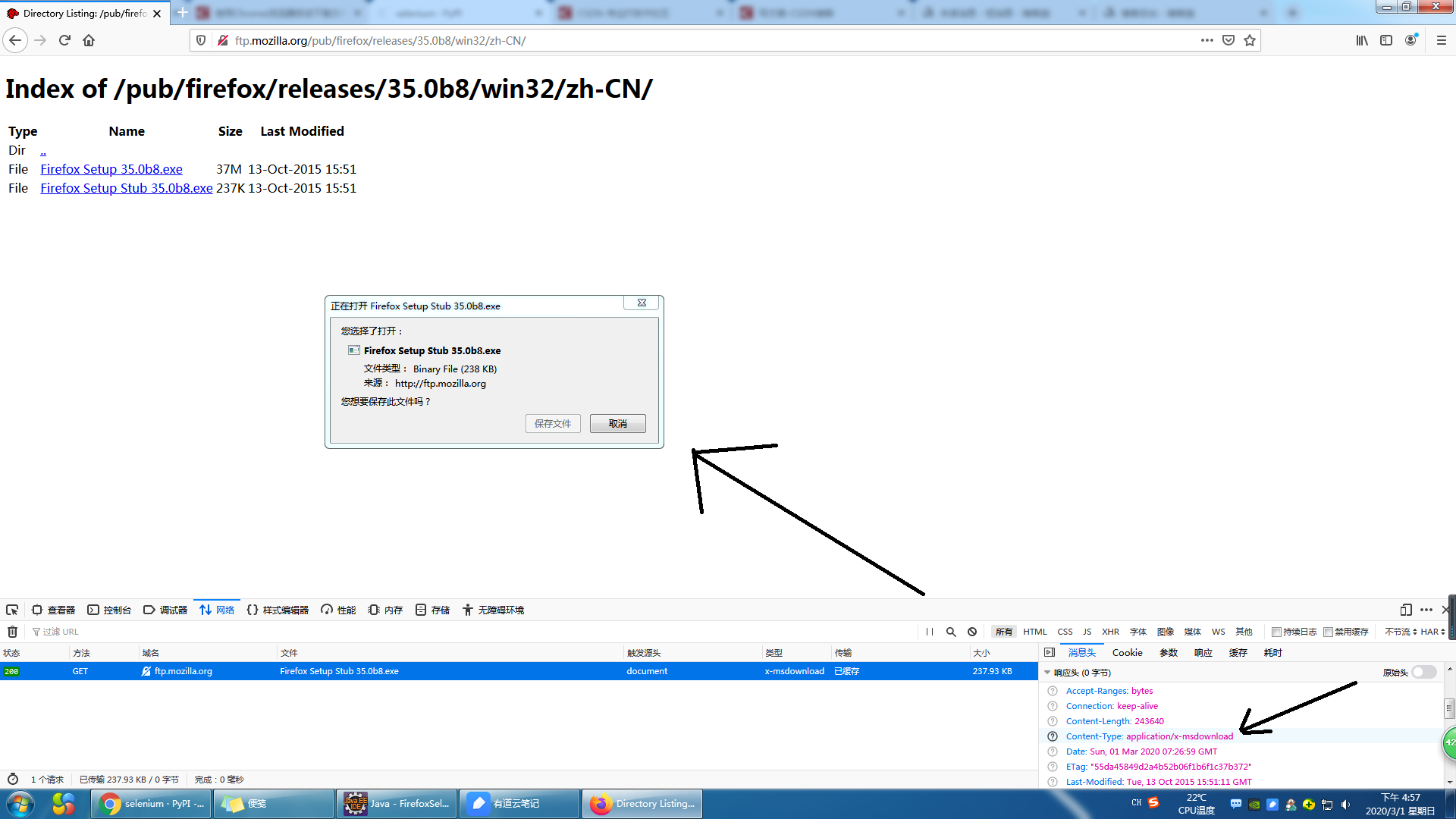
                  profile.setPreference("browser.helperApps.neverAsk.openFile", "application/x-msdownload");

                  //browser.helperApps.never.saveToDisk 设置是否直接保存 下载文件到磁盘中默认值为空字符串,厦航代码行设定了多种温江的MIME类型

                  profile.setPreference("browser.helperApps.neverAsk.saveToDisk", "application/x-msdownload");

                  //browser.helperApps.alwaysAsk.force 针对位置的MIME类型文件会弹出窗口让用户处理,默认值为true ,设定为false 表示不会记录打开未知MIME类型文件

                  profile.setPreference("browser.helperApps.alwaysAsk.force", true);

                  //下载.exe文件弹出窗口警告,默认值是true ,设定为false 则不会弹出警告框

                profile.setPreference("browser.download.manager.alertOnEXEOpen", false);

                //browser.download.manager.focusWhenStarting设定下载框在下载时会获取焦点

                profile.setPreference("browser.download.manager.focusWhenStarting", true);

                //browser.download.manager.useWindow 设定下载是否现在下载框,默认值为true,设定为false 会把下载框隐藏

                profile.setPreference("browser.download.manager.useWindow", false);

                //browser.download.manager.showAlertOnComplete 设定下载文件结束后是否显示下载完成的提示框,默认值为true,

                //设定为false表示下载完成后,现在下载完成提示框

                profile.setPreference("browser.download.manager.showAlertOnComplete", false);

                //browser.download.manager.closeWhenDone 设定下载结束后是否自动关闭下载框,默认值为true 设定为false 表示不关闭下载管理器

                profile.setPreference("browser.download.manager.closeWhenDone", false);

                 try {

                    Thread.sleep(80000);

                } catch (InterruptedException e) {

                    // TODO Auto-generated catch block

                    e.printStackTrace();

                }

                options.setProfile(profile);

                  return options;

          }

          @AfterMethod

            public void afterMethod(){

                try {

                    Thread.sleep(10000);

                } catch (InterruptedException e) {

                    // TODO Auto-generated catch block

                    e.printStackTrace();

                }

                driver.quit();

            }
Selenium 实现自动下载文件(FirefoxOptions,FirefoxProfile) - 根据Selenium Webdriver3实战宝典的更多相关文章
- selenium实现自动下载文件
#coding:utf-8'''说明:导出'''from selenium import webdriverfrom public.highlightElement import highlightf ...
- Selenium+Python:下载文件(Firefox 和 Chrome)
引自 https://blog.csdn.net/Momorrine/article/details/79794146 1. 环境 操作系统 Win10 IDE Eclipse (Oxyg ...
- 转:Windows下用sftp自动下载文件
远程服务器是Linux操作系统,没有ftp服务,可以ssh,数据库每天2:00会自动创建一个备份文件,本地计算机是windows操作系统,希望用sftp每天3:00下载远程服务器上的备份文件.本地系统 ...
- 记号一下selenium+Firefox自动下载的参数
参考: https://blog.csdn.net/wxstar8/article/details/80782556 https://blog.csdn.net/xiaoguanyusb/articl ...
- 调用百度云Api实现从百度云盘自动下载文件
一.注册账号 要从百度云下载文件,首先,注册一个百度云账号,现在可能都要注册手机号啦,当然,如果你已经注册过,很幸运,就可以省略掉此步骤啦. 如图登录后所示: 点击Access Key,即显示上面的图 ...
- 转 selenium 自动下载文件
#coding=utf-8from selenium import webdriver #实例化一个火狐配置文件fp = webdriver.FirefoxProfile() #设置各项参数,参数可以 ...
- selenium 自动下载文件
#coding=utf-8 from selenium import webdriver #实例化一个火狐配置文件 fp = webdriver.FirefoxProfile() #设置各项参数,参数 ...
- linux crontab命令 自动下载文件
#crontab -e#download stock data, Mon-Fri, 9:15 - 11:30, 13:00 - 15:0015,30,40,50 9 * * 1-5 (cd /home ...
- C#异步下载文件--基于http请求
1.废话不多说,直接上代码: using System; using System.IO; using System.Net; namespace AsyncProgram { class Progr ...
随机推荐
- python基础——异常处理及断言
python常见的异常类型? 异常有很多种类型,常见的由语法错误(SyntaxError).类型错误(TypeError).名字错误(NameError)等等,但我们要知道的是异常本身就是一个类的实例 ...
- Apsara Clouder云计算技能认证:云数据库管理与数据迁移
一.课程介绍 二.云数据库的简介及使用场景 1.云数据库简介 1.1特点: 用户按存储容量和带宽的需求付费 可移植性 按需扩展 高可用性(HA) 1.2阿里云云数据库 RDS 稳定可靠,可弹性伸缩的在 ...
- shell_分析服务器日志
1.查看有多少个IP访问: awk '{print $1}' log_file|sort|uniq|wc -l 2.查看某一个页面被访问的次数 grep "/index.php" ...
- 移植linux4.14内核到四核Exynos4412开发板
最近法师收到了很多留言,其中有一部分问法师什么时候更新,还有一大部分问法师我是买迅为的IMX6UL精英版好呢还是买4412精英版好呢,因为我们这俩个都不贵.法师的建议的是入手4412!为什么呢? 第一 ...
- 三十三、www服务apache软件
1.前面提到:www服务是一种网页服务,但是网页服务也是需要软件来支撑的,通过软件的形式展示需要的网页,返回给浏览器. www服务软件排名:http://w3techs.com/technologie ...
- SLAM——视觉里程计(一)feature
从现在开始下面两篇文章来介绍SLAM中的视觉里程计(Visual Odometry).这个是我们正式进入SLAM工程的第一步,而之前介绍的更多的是一些基础理论.视觉里程计完成的事情是视觉里程计VO的目 ...
- 搭建WordPress个人博客
1. 准备LNMP环境 LNMP 是 Linux.Nginx.MySQL 和 PHP 的缩写,是 WordPress 博客系统依赖的基础运行环境.我们先来准备 LNMP 环境 安装Nginx 使用 y ...
- PAT甲级——1006 Sign In and Sign Out
PATA1006 Sign In and Sign Out At the beginning of every day, the first person who signs in the compu ...
- 吴裕雄--天生自然 HADOOP大数据分布式处理:安装配置MYSQL数据库
安装之前先安装基本环境:yum install -y perl perl-Module-Build net-tools autoconf libaio numactl-libs # 下载mysql源安 ...
- C#函数的基础应用
C#函数的基础应用 函数之前的知识回顾 数据类型--变量常量--运算符表达式--语句(顺序,分支,循环)--数组--函数 程序里的函数:能完成一个相对独立功能的代码模块. 数学里的函数:高度抽象. 函 ...