
Maven:sun.security.validator.ValidatorException: PKIX path building failed: sun.security.provider.certpath.SunCertPathBuilderException: unable to find valid certification path to requested target
还是记录使用 maven 时遇到的问题。
一、maven报错
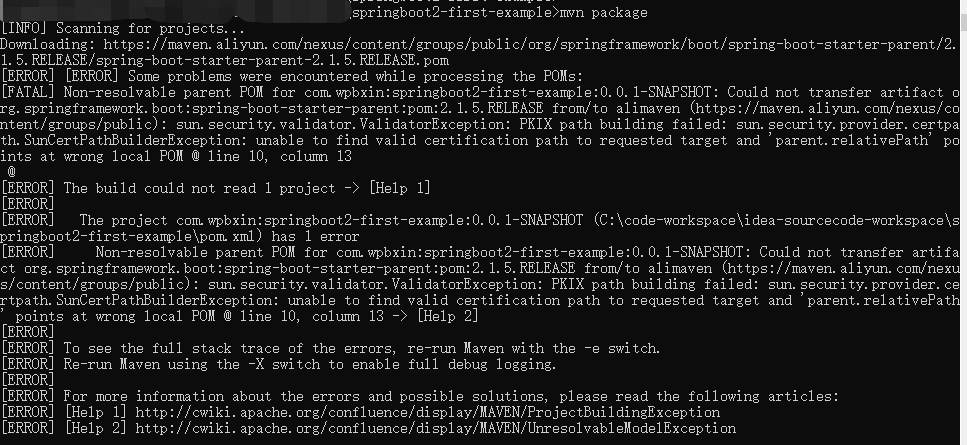
maven package 进行打包时出现了以下报错:
Non-resolvable parent POM for com.wpbxin:springboot2-first-example:0.0.1-SNAPSHOT: Could not transfer artifact org.springframework.boot:spring-boot-starter-parent:pom:2.1.5.RELEASE from/to alimaven (https://maven.aliyun.com/nexus/content/groups/public): sun.security.validator.ValidatorException: PKIX path building failed: sun.security.provider.certpath.SunCertPathBuilderException: unable to find valid certification path to requested target and 'parent.relativePath' points at wrong local POM @ line 10, column 13 -> [Help 2]
截图如下:
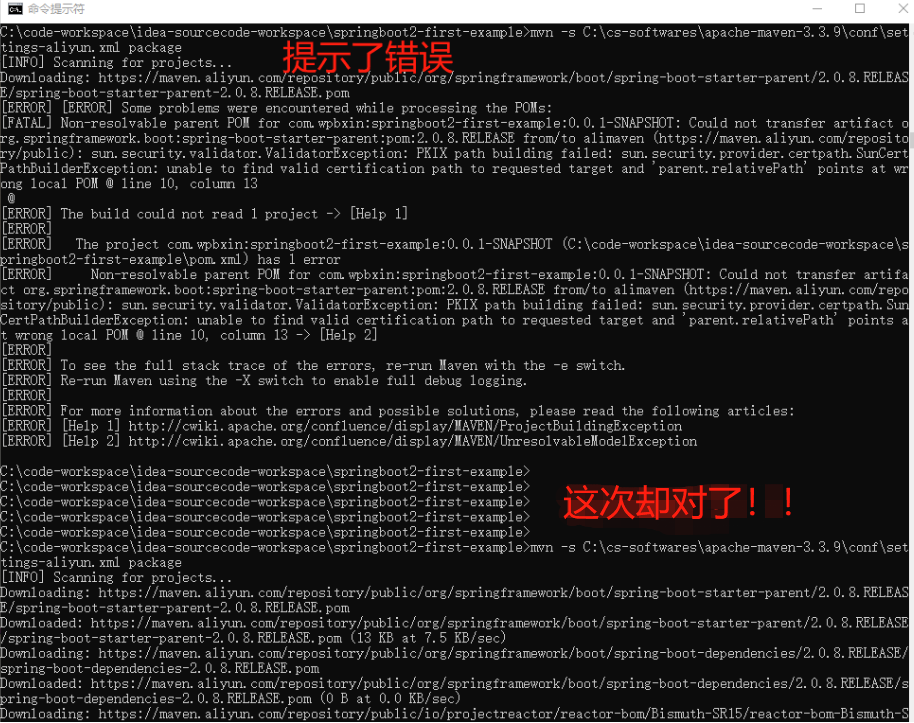
再来一个一样但是比较奇葩的截图,这一次基本是处理完本次出现的问题后,笔者想回过头来重现问题然后记录下来(前后间隔3天左右),但却发现,同个打包的 maven 命令,前面还打包不成功,隔了十几秒再次运行命令,却又打包成功了(还有真可能是渣渣的网络原因!毕竟我这里用了手机的热点),一次 package 成功了然后后面的打包又基本没问题了,呃。。。
二、一些说明
这个是学习 SpringBoot2 时创建 HelloWorld 工程遇到的问题。先说下相关环境和系统设置:
win10 + JDK 1.8.0_111 + Apache Maven 3.3.9 + idea2019.1( + 手机共享热点,不排除可能网络问题下载慢)( + 谷歌浏览器77版本的)
笔者回过头记录这篇文章的时候试了下,默认情况下的maven中央仓库地址:https://repo.maven.apache.org/maven2(好像比用阿里云的镜像库时顺利点,速度也感觉还行吧。)。这里贴上本地 maven 的 mirror 设置,这里设置的是国内的阿里云镜像,详情可以参考阿里云公共代理库官网相关说明:https://help.aliyun.com/document_detail/102512.html?spm=a2c40.aliyun_maven_repo.0.0.36183054oSYFKS。
<mirror>

    <id>alimaven</id>

    <name>aliyun maven</name>

    <mirrorOf>central</mirrorOf>

    <!-- 阿里云公共代理库使用指南:https://help.aliyun.com/document_detail/102512.html?spm=a2c40.aliyun_maven_repo.0.0.36183054oSYFKS -->

    <!-- <url>https://maven.aliyun.com/nexus/content/groups/public</url> -->

    <url>https://maven.aliyun.com/repository/public</url>

</mirror>
三、出现问题的原因和几种解决方法
看了下报错提示,然后在网上搜了下,大致可以看出是 HTTPS 的证书安全检查问题。想想也是,现在 HTTPS 在大力推广,而 HTTPS 确实是需要双向验证的。既然遇到了,那总得处理完然后记录下吧,免得再被坑。以下就是笔者关于处理这个问题过程中的一些参考和验证。以下是4种处理方式:
1、忽略SSL证书检查
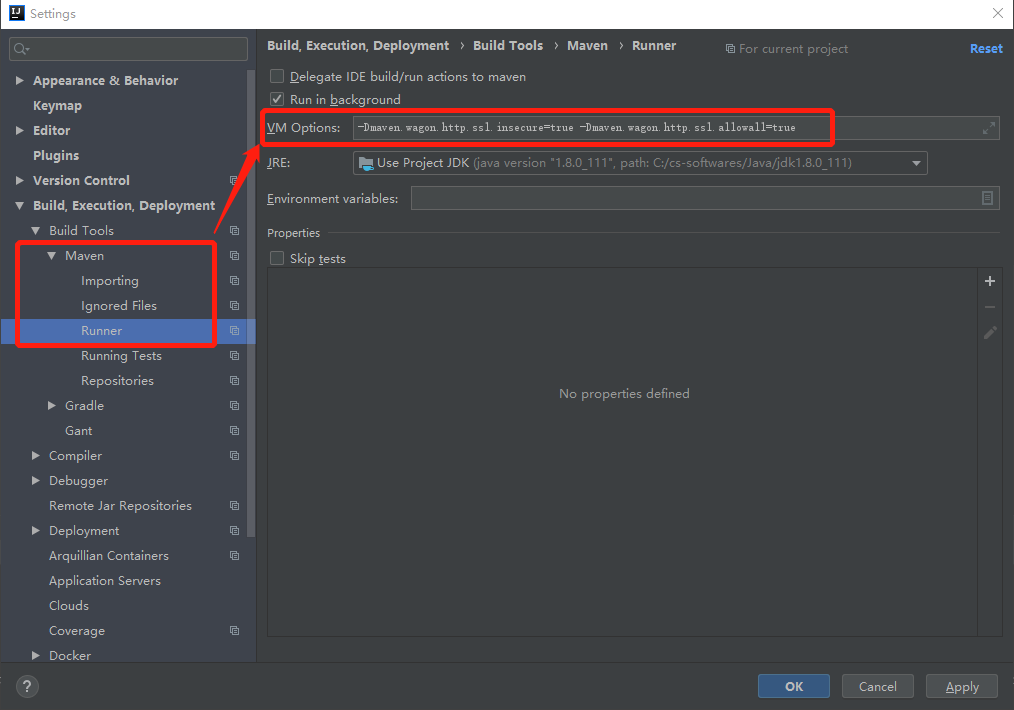
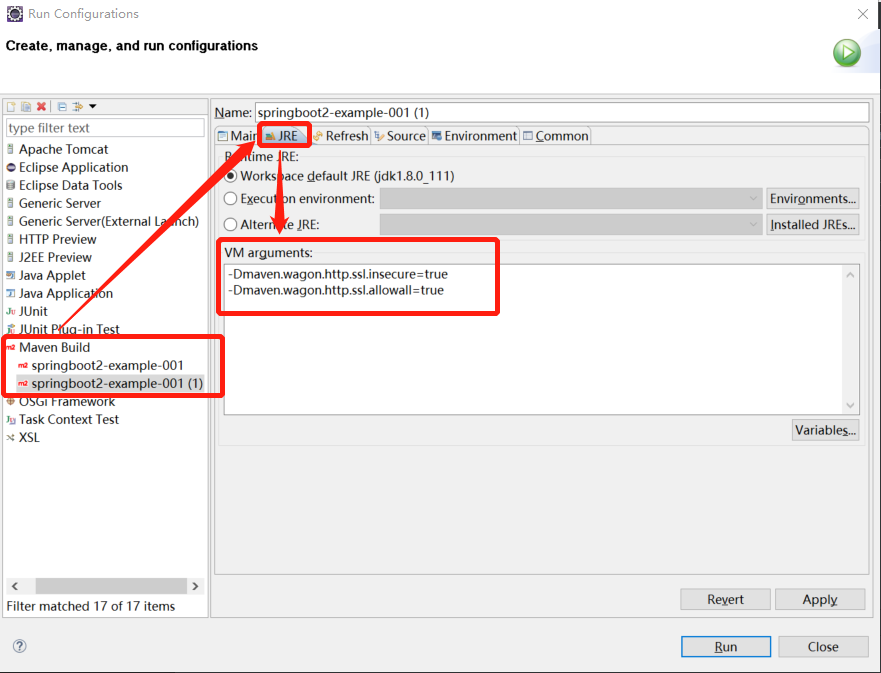
直接忽略掉SSL证书检查,跳过这个验证,在 maven 打包命令中加上参数 “-Dmaven.wagon.http.ssl.insecure=true -Dmaven.wagon.http.ssl.allowall=true” 。
idea中的设置: settings ==> Build,Execution,Deployment ==> Build Tools ==> Maven ==> Runner 中的 VM Options ,将参数填入,截图如下:
Eclipse中的设置:右键项目 ==> Run As ==> Run Configurations... ,在 Maven Build 那一块中的 JRE 栏位中的 VM arguments ,将参数填入,注意这里不同的参数需要换行,截图如下:
参考链接:使用Maven时出现“jssecacerts PKIX path building failed: sun.security.provider.certpath.SunCertPathBuilde”错:https://blog.csdn.net/carrie__yang/article/details/79612385
2、生成证书并导入到 JRE security 中
既然用的是阿里云的镜像,那就去官网下个证书瞧一瞧。
第一步,谷歌浏览器打开网站:https://maven.aliyun.com/mvn/view,左上角中那把小锁,也即截图的红框,

点击“证书(有效)”,旧版的浏览器可以有 View certificate 之类的,反正记住是看证书就行。

弹出来一个框框,点击“详细信息”
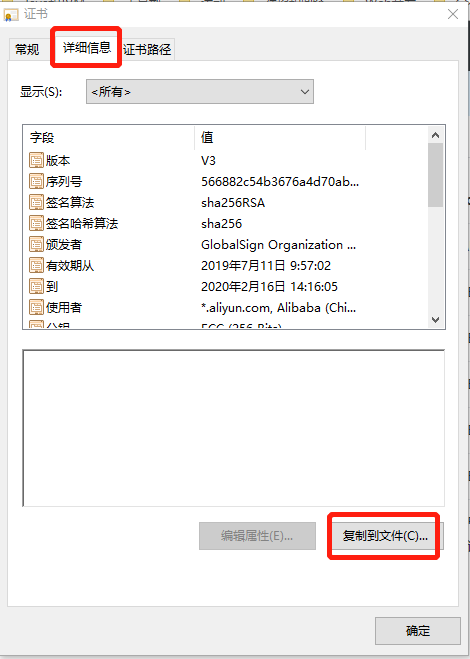
选择“复制到文件(C)...”,然后下一步
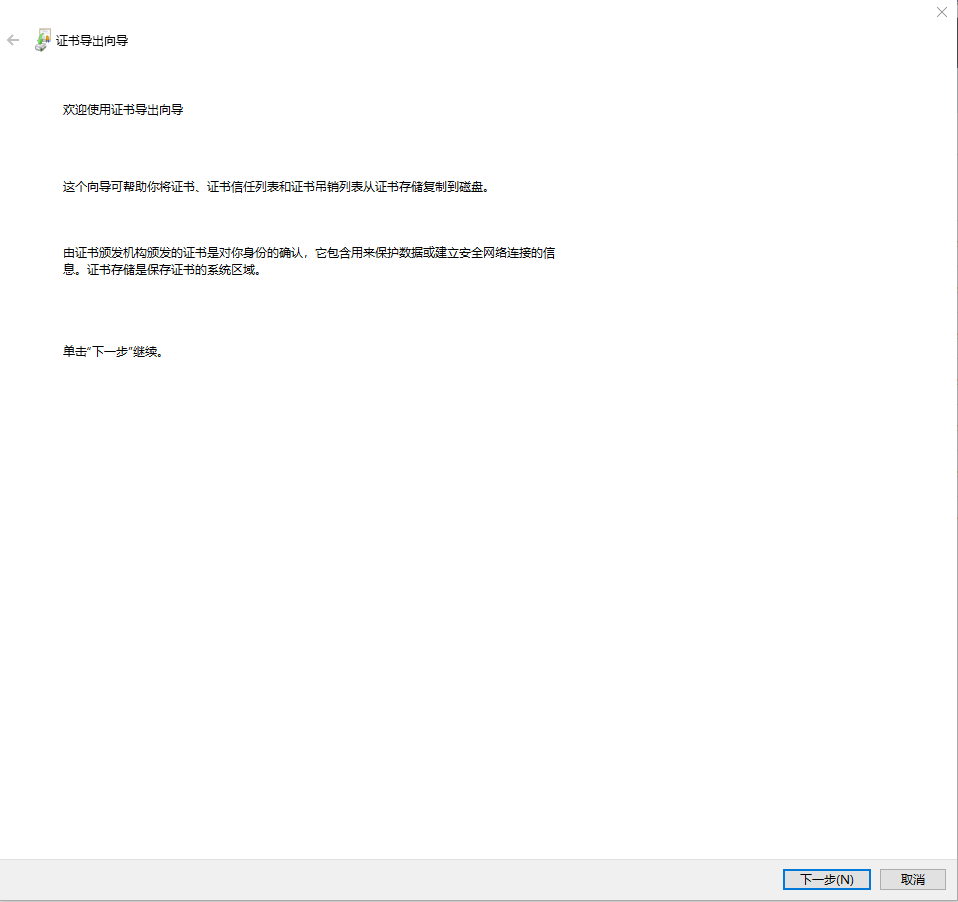
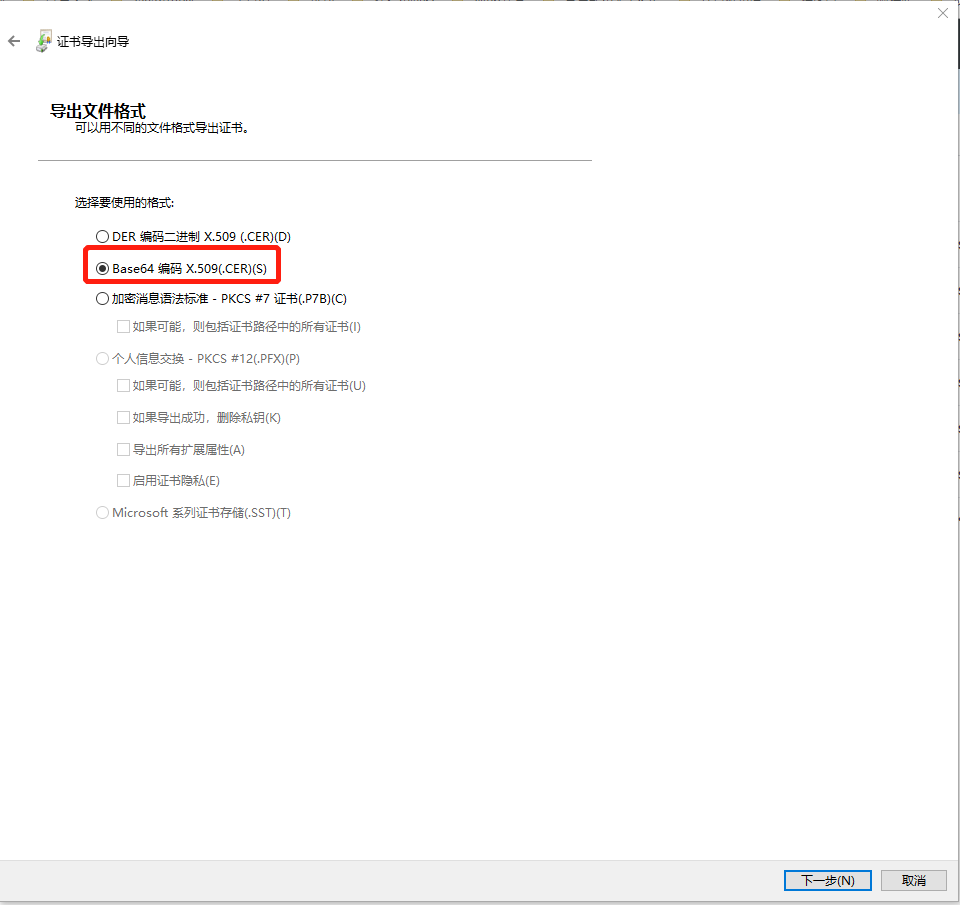
选择格式:
生成的名称,比如我这里aliyun-maven.cer,路径是 C:\cs-softwares\aliyun-maven.cer ,然后导出来:

完成证书导出
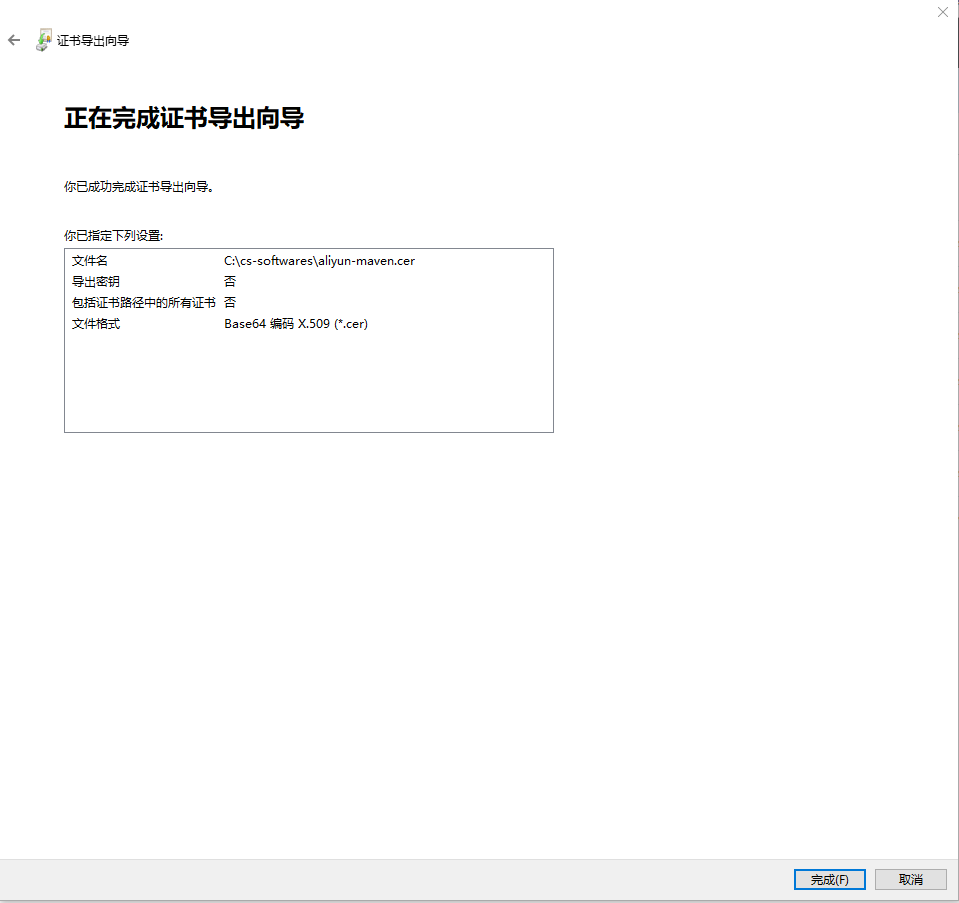
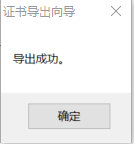
接下来,使用 keytool 命令导入证书,进入到 JDK 下 jre 下 lib 下的 security 目录,比如我的是 C:\cs-softwares\Java\jdk1.8.0_111\jre\lib\security,然后运行命令 keytool -import -alias aliyun-maven -keystore cacerts -file C:\cs-softwares\aliyun-maven.cer ,如下,证书指纹(证书密钥):changeit
-alias :表示指定证书别名
-file :指定证书文件

输入 Y 表示确认:

查看证书,证书密钥同样是 changeit :
keytool -list -keystore cacerts -alias aliyun-maven
删除证书,证书密钥同样是 changeit:
keytool -delete -alias aliyun-maven -keystore cacerts

确认安装了证书之后,记得关闭这个cmd窗口,然后重启下idea或者Eclipse,再次进行 maven packge ,到这里应该是OK了。如果还是不行,报出了错误: java.lang.RuntimeException: Unexpected error: java.security.InvalidAlgorithmParameterException: the trustAnchors parameter must be non-empty ,如截图:
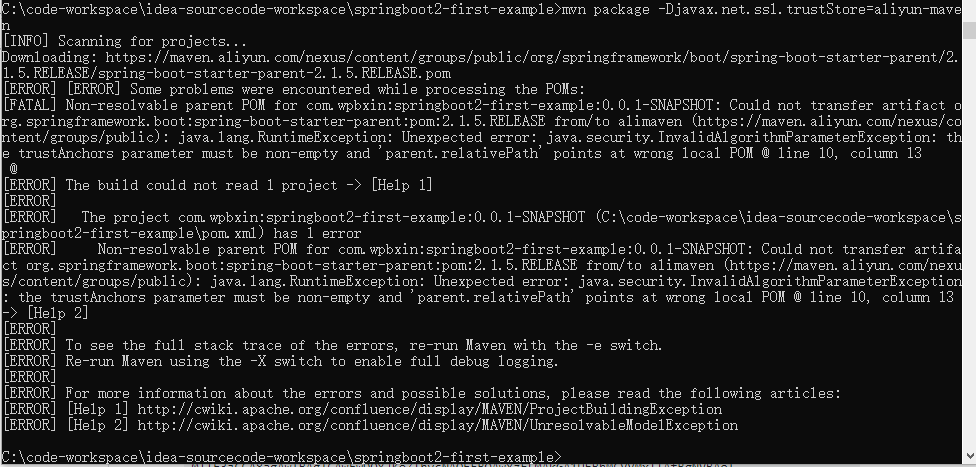
来来来,再加上参数(记得路径可以改为自己的 JDK 安装路径),把刚才的证书用上,参考:The trustAnchors Parameter Must Be Non Empty:https://www.techpaste.com/2017/03/trustanchors-parameter-must-non-empty/ ,这下应该妥妥了。(后面OK了之后,也试过删除了阿里云镜像的证书,然后再打包,一样没问题,这里可以先试下直接加参数,有问题再加证书)
-Djavax.net.ssl.trustStore=C:\cs-softwares\Java\jdk1.8.0_111\jre\lib\security\cacerts
-Djavax.net.ssl.trustAnchors=C:\cs-softwares\Java\jdk1.8.0_111\jre\lib\security\cacerts
3、使用默认的 maven 中央仓库
前面提到过默认的 maven 中央仓库: https://repo.maven.apache.org/maven2,使用默认的配置就行了(本地仓库自行设置)。
PS:吐槽下,绝望之后回到了最初的起点,使用默认的配置居然没啥问题(即使用了 maven 默认的中央仓库,本来是要来重现问题的),然后回过头来想用阿里云 maven 镜像重现问题,就把阿里云中央仓库的证书也删除了,而且使用了阿里云的镜像库,也不加任何参数,这次却顺利用上了,然后把 spring-boot-starter-parent 从 2.1.0.RELEASE 到 2.1.9.RELEASE 都试了个遍,哎呦去咋情况,又都没问题了,或者是有问题的,试了第二遍或者第三遍又行了,这还真有可能是我的渣渣网络原因。。。
4、使用 http 的镜像库
这就是直接避开了吧,这个方法就没试过了,只是查找问题的过程中看 stackoverflow 上有提到。
四、参考链接
1、使用Maven时出现“jssecacerts PKIX path building failed: sun.security.provider.certpath.SunCertPathBuilde”错:https://blog.csdn.net/carrie__yang/article/details/79612385
2、彻底解决unable to find valid certification path to requested target:https://blog.csdn.net/gabriel576282253/article/details/81531746
3、关于gradle Cause: unable to find valid certification path to requested target错误解决方法:https://www.chengbinbin.cn/archives/1550795296099/
4、Maven编译打包时报“PKIX path building failed”异常解决方法:https://www.iteye.com/blog/truth99-2160540
5、Problems using Maven and SSL behind proxy:https://stackoverflow.com/questions/25911623/problems-using-maven-and-ssl-behind-proxy
6、Could not transfer artifact from/to central because of InvalidAlgorithmParameterException: the trustAnchors parameter must be non-empty:https://stackoverflow.com/questions/37278306/could-not-transfer-artifact-from-to-central-because-of-invalidalgorithmparameter
7、The trustAnchors Parameter Must Be Non Empty:https://www.techpaste.com/2017/03/trustanchors-parameter-must-non-empty/
8、Could not transfer artifact (https://repo.maven.apache.org/maven2): Received fatal alert: protocol_version -> [Help 1]:https://stackoverflow.com/questions/50946420/could-not-transfer-artifact-https-repo-maven-apache-org-maven2-received-fat
Maven:sun.security.validator.ValidatorException: PKIX path building failed: sun.security.provider.certpath.SunCertPathBuilderException: unable to find valid certification path to requested target的更多相关文章
- mvn 编译报错mavn sun.security.validator.ValidatorException: PKIX path building failed: sun.security.provider.certpath.SunCertPathBuilderException: unable to find valid certification path to requested targ
mavn 编译报错: mavn sun.security.validator.ValidatorException: PKIX path building failed: sun.security.p ...
- 解决 java 使用ssl过程中出现"PKIX path building failed: sun.security.provider.certpath.SunCertPathBuilderException: unable to find valid certification path to requested target"
今天,封装HttpClient使用ssl时报一下错误: javax.net.ssl.SSLHandshakeException: sun.security.validator.ValidatorExc ...
- java程序中访问https时,报 PKIX path building failed: sun.security.provider.certpath.SunCertPathBuilderException: unable to find valid certification path to requested target
在java中使用https访问数据时报异常: Caused by: sun.security.validator.ValidatorException: PKIX path building fail ...
- PKIX path building failed: sun.security.provider.certpath.SunCertPathBuilderException: unable to find valid certification path to requested target
注:网上搜来的快照,暂未验证 在java代码中请求https链接的时候,可能会报下面这个错误javax.net.ssl.SSLHandshakeException: sun.security.vali ...
- Flutter配置环境报错“PKIX path building failed: sun.security.provider.certpath.SunCertPathBuilderException: unable to find valid certification path to requested target”
背景:最近看了很多Flutter漂亮的项目,想要尝试一下.所有环境都搭建好之后,按照文档一步一步配置(抄袭),但始终报如下图错误. PKIX path building failed: sun.sec ...
- ES访问遇到sun.security.validator.ValidatorException: PKIX path building failed: sun.security.provider.certpath.SunCertPathBuilderException: unable to find valid certification path to requested target
cmd命令cd到jre/bin目录下 输入命令keytool -import -alias 别名 -keystore cacerts -file C://certs//elasticsearch// ...
- sun.security.validator.ValidatorException: PKIX path building failed: sun.security.provider.certpath.SunCertPathBuilderException: unable to find valid certification path to requested target
httpclient-4.5.jar 定时发送http包,忽然有一天报错,http证书变更引起的. 之前的代码 try { CloseableHttpClient httpClient = build ...
- maven PKIX path building failed: sun.security.provider.certpath.SunCertPathBuilderException: unable to find valid certification path
maven编译的时候遇到的奇葩问题, 非常奇葩, 所有其他同事都没有遇到 , 仅仅是我遇到了 不清楚是因为用了最新的JDK的缘故(1.8 update91)还是其他什么原因. 总之是证书的问题. 当 ...
- 报错PKIX path building failed: sun.security.provider.certpath.SunCertPathBuilderException: unable to find valid certification path to requested target"
今天在调用第三方HTTPS接口的时候,一直显示这个报错,然后百度很久,有2种解决方法,一个是说自己手动去导入,第二种用代码忽略证书验证.我用二种方式, 复制即用, public void test2( ...
随机推荐
- 15 个优秀开源的 Spring Boot 学习项目
Spring Boot 算是目前 Java 领域最火的技术栈了,松哥年初出版的 <Spring Boot + Vue 全栈开发实战>迄今为止已经加印了 8 次,Spring Boot 的受 ...
- Linux 的三种软件安装包介绍
通过RPM软件包来安装 说起RPM(RedHat Package Management)标准的软件包,大家可能都会想起大名鼎鼎的REDHAT公司,正是RPM软件包发行方式的出现,使Linux中的应用软 ...
- 吴裕雄 Bootstrap 前端框架开发——简例
<!DOCTYPE html> <html> <head> <title>Bootstrap 模板</title> <meta cha ...
- css3 :default应用场景
引用自 张鑫旭文章.
- MYSQL优化考虑十个方面
1)索引 2)sql优化 3)锁 4)延迟 5)参数优化 6)连接数 7)cpu 8)iops 9)磁盘 10)内存
- python第一章 python基础编程
第一次学习python 首先python对于我来说是我学习的第三门语言,之前大一学习过了c和c++这两门语言. 接触一个新语言,首先应该的是搭载一下编译的环境.我们是老师给我们上传了的python3安 ...
- WPF TreeGrid Binding 简易实现方式
在設計TreeView編輯狀況下,希望 TreeItemName 后续的编辑框 复选框 可以整齐排列. 参考微软提供的TREELISTVIEW,发现它是根据层级关系调整Margin 属性. 我这边按照 ...
- nginx 重写 隐藏index.php
修改 nginx.conf 文件location / { if (!-e $request_filename) { rewrite ^(.*)$ /index.php?s=$1 last; break ...
- Python - 工具
Anaconda - 自带Conda,可以自定义环境 Pycharm zeal - API离线查看,类似于Dash
- springmvc_ajax异步上传文件(基于ajaxfileupload.js)
引入js <script th:src="@{/js/ajaxfileupload.js}"></script> html <tr> <t ...