
Heartbeat+Haproxy实现负载均衡高可用
环境说明:
| 主机名 | 角色 | IP地址 |
| mylinux1.contoso.com | heartbeat+haproxy |
eth0:192.168.100.121 eth1:172.16.100.121 |
| mylinux2.contoso.com | heartbeat+haproxy |
eth0:192.168.100.122 eth1:172.16.100.122 |
| mylinux3.contoso.com | web server 1 | eth0:192.168.100.181 |
| mylinux4.contoso.com | web server 2 | eth0:192.168.100.182 |
一、环境准备
在mylinux1和mylinux2上安装heartbeat,可以手动安装,当然也可以使用前面发布的一篇heartbeat脚本的博文,里面有heartbeat快速安装脚本。
然后在mylinux2上安装haproxy,并将mylinux1上的haproxy配置文件和启停脚本都拷贝到mylinux2上。
要保证mylinux1和mylinux2的heartbeat+haproxy环境一致。
|
1
2
3
4
5
6
7
8
9
10
11
12
|
[root@mylinux1 ~]# scp /etc/init.d/haproxy mylinux2:/etc/init.d/
root@mylinux2's password: Permission denied, please try again.root@mylinux2's password: haproxy 100% 1567 1.5KB/s 00:00
[root@mylinux1 ~]# scp /usr/local/haproxy/conf/haproxy.cfg mylinux2:/usr/local/haproxy/conf/haproxy.cfg
root@mylinux2's password: haproxy.cfg 100% 1194 1.2KB/s 00:00
[root@mylinux2 haproxy]# ll /etc/init.d/haproxy
-rwxr-xr-x 1 root root 1567 Oct 1 02:11 /etc/init.d/haproxy
[root@mylinux2 haproxy]# ll /usr/local/haproxy/conf/haproxy.cfg
-rw-r--r-- 1 root root 1194 Oct 1 02:13 /usr/local/haproxy/conf/haproxy.cfg
|
二、修改heartbeat的资源文件
|
1
2
3
4
|
[root@mylinux1 ~]# tail -1 /etc/ha.d/haresources
mylinux1.contoso.com IPaddr::192.168.100.120/24/eth0 haproxy
[root@mylinux2 haproxy]# tail -1 /etc/ha.d/haresources
mylinux1.contoso.com IPaddr::192.168.100.120/24/eth0 haproxy
|
这里还是贴出两个heartbeat节点的ha.cf配置,如下:
|
1
2
3
4
5
6
7
8
9
10
11
12
13
14
15
16
17
18
19
20
21
22
23
24
25
26
27
28
|
[root@mylinux1 ~]# egrep -v "#|^$" /etc/ha.d/ha.cf
debugfile /var/log/ha-debug
logfile/var/log/ha-log
logfacilitylocal1keepalive 2deadtime 30warntime 10initdead 120udpport694mcast eth1 225.0.0.1 694 1 0auto_failback onnodemylinux1.contoso.comnodemylinux2.contoso.comrespawn hacluster /usr/lib64/heartbeat/ipfail
[root@mylinux2 haproxy]# egrep -v "#|^$" /etc/ha.d/ha.cf
debugfile /var/log/ha-debug
logfile/var/log/ha-log
logfacilitylocal1keepalive 2deadtime 30warntime 10initdead 120udpport694mcast eth1 225.0.0.1 694 1 0auto_failback onnode mylinux1.contoso.comnode mylinux2.contoso.comrespawn hacluster /usr/lib64/heartbeat/ipfail
|
三、启动heartbeat服务
1、首先在mylinux1和mylinux2上先关闭haproxy服务
|
1
2
3
4
|
[root@mylinux1 ~]# service haproxy stop
Stop haproxy successful.[root@mylinux2 haproxy]# service haproxy stop
Haproxy is not running. Stop haproxy failed! |
2、依次启动mylinux1和mylinux2上的heartbeat服务
|
1
2
3
4
5
6
|
[root@mylinux1 ~]# /etc/init.d/heartbeat start
Starting High-Availability services: INFO: Resource is stoppedDone.[root@mylinux2 haproxy]# /etc/init.d/heartbeat start
Starting High-Availability services: INFO: Resource is stoppedDone. |
四、测试haproxy的高可用
1、首先,检查mylinux1的状态
|
1
2
3
4
|
[root@mylinux1 ~]# ip a|grep 192.168.100.120
inet 192.168.100.120/24 brd 192.168.100.255 scope global secondary eth0
[root@mylinux1 ~]# service haproxy status
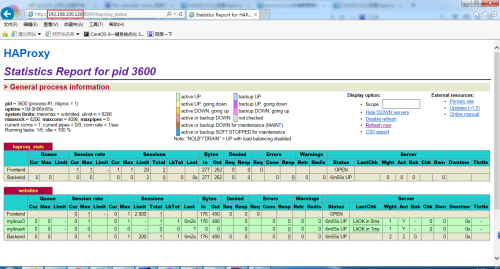
Haproxy (pid 3600) is running... |
2、其次,检查mylinux2的状态
|
1
2
3
|
[root@mylinux2 haproxy]# ip a |grep 192.168.100.120
[root@mylinux2 haproxy]# service haproxy status
Haproxy is stopped. |
3、查看监控界面
五、测试故障切换
1、停止mylinux1上的heartbeat服务
|
1
2
|
[root@mylinux1 ~]# /etc/init.d/heartbeat stop
Stopping High-Availability services: Done. |
2、检查mylinux1和mylinux2的状态
|
1
2
3
4
5
6
7
|
[root@mylinux1 ~]# ip a |grep 192.168.100.120
[root@mylinux1 ~]# service haproxy status
Haproxy is stopped.[root@mylinux2 haproxy]# ip a |grep 192.168.100.120
inet 192.168.100.120/24 brd 192.168.100.255 scope global secondary eth0
[root@mylinux2 haproxy]# service haproxy status
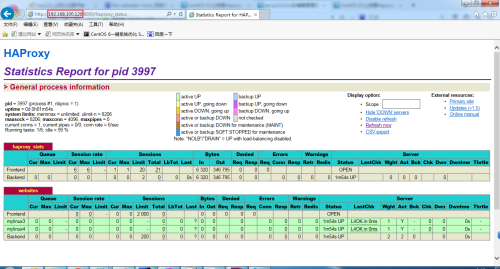
Haproxy (pid 3997) is running... |
3、查看监控页面
4、查看mylinux2上的heartbeat日志
[root@mylinux2 ~]# >/var/log/ha-log
[root@mylinux2 ~]# tail -f /var/log/ha-log
Oct 01 02:44:31 mylinux2.contoso.com heartbeat: [3534]: info: Received shutdown notice from 'mylinux1.contoso.com'.
Oct 01 02:44:31 mylinux2.contoso.com heartbeat: [3534]: info: Resources being acquired from mylinux1.contoso.com.
Oct 01 02:44:31 mylinux2.contoso.com heartbeat: [3655]: info: acquire local HA resources (standby).
Oct 01 02:44:31 mylinux2.contoso.com heartbeat: [3656]: info: No local resources [/usr/share/heartbeat/ResourceManager listkeys mylinux2.contoso.com] to acquire.
Oct 01 02:44:31 mylinux2.contoso.com heartbeat: [3655]: info: local HA resource acquisition completed (standby).
Oct 01 02:44:31 mylinux2.contoso.com heartbeat: [3534]: info: Standby resource acquisition done [all].
harc(default)[3681]:2016/10/01_02:44:31 info: Running /etc/ha.d//rc.d/status status
mach_down(default)[3698]:2016/10/01_02:44:31 info: Taking over resource group IPaddr::192.168.100.120/24/eth0
ResourceManager(default)[3725]:2016/10/01_02:44:31 info: Acquiring resource group: mylinux1.contoso.com IPaddr::192.168.100.120/24/eth0 haproxy
/usr/lib/ocf/resource.d//heartbeat/IPaddr(IPaddr_192.168.100.120)[3753]: 2016/10/01_02:44:31 INFO: Resource is stopped
ResourceManager(default)[3725]:2016/10/01_02:44:31 info: Running /etc/ha.d/resource.d/IPaddr 192.168.100.120/24/eth0 start
IPaddr(IPaddr_192.168.100.120)[3878]:2016/10/01_02:44:32 INFO: Adding inet address 192.168.100.120/24 with broadcast address 192.168.100.255 to device eth0
IPaddr(IPaddr_192.168.100.120)[3878]:2016/10/01_02:44:32 INFO: Bringing device eth0 up
IPaddr(IPaddr_192.168.100.120)[3878]:2016/10/01_02:44:32 INFO: /usr/libexec/heartbeat/send_arp -i 200 -r 5 -p /var/run/resource-agents/send_arp-192.168.100.120 eth0 192.168.100.120 auto not_used not_used
/usr/lib/ocf/resource.d//heartbeat/IPaddr(IPaddr_192.168.100.120)[3852]: 2016/10/01_02:44:32 INFO: Success
ResourceManager(default)[3725]:2016/10/01_02:44:32 info: Running /etc/init.d/haproxy start
mach_down(default)[3698]:2016/10/01_02:44:32 info: /usr/share/heartbeat/mach_down: nice_failback: foreign resources acquired
mach_down(default)[3698]:2016/10/01_02:44:32 info: mach_down takeover complete for node mylinux1.contoso.com.
Oct 01 02:44:32 mylinux2.contoso.com heartbeat: [3534]: info: mach_down takeover complete.
Oct 01 02:45:02 mylinux2.contoso.com heartbeat: [3534]: WARN: node mylinux1.contoso.com: is dead
Oct 01 02:45:02 mylinux2.contoso.com heartbeat: [3534]: info: Dead node mylinux1.contoso.com gave up resources.
Oct 01 02:45:02 mylinux2.contoso.com heartbeat: [3534]: info: Link mylinux1.contoso.com:eth1 dead.
Oct 01 02:45:02 mylinux2.contoso.com ipfail: [3543]: info: Status update: Node mylinux1.contoso.com now has status dead
Oct 01 02:45:03 mylinux2.contoso.com ipfail: [3543]: info: NS: We are dead. :<
Oct 01 02:45:03 mylinux2.contoso.com ipfail: [3543]: info: Link Status update: Link mylinux1.contoso.com/eth1 now has status dead
Oct 01 02:45:04 mylinux2.contoso.com ipfail: [3543]: info: We are dead. :<
Oct 01 02:45:04 mylinux2.contoso.com ipfail: [3543]: info: Asking other side for ping node count.
Heartbeat+Haproxy实现负载均衡高可用的更多相关文章
- 实现基于Haproxy+Keepalived负载均衡高可用架构
1.项目介绍: 上上期我们实现了keepalived主从高可用集群网站架构,随着公司业务的发展,公司负载均衡服务已经实现四层负载均衡,但业务的复杂程度提升,公司要求把mobile手机站点作为单独的服务 ...
- Linux下"负载均衡+高可用"集群的考虑点 以及 高可用方案说明(Keepalive/Heartbeat)
当下Linux运维技术越来越受到企业的关注和追捧, 在某些企业, 尤其是牵涉到电子商务和电子广告类的网站,通常会要求作负载均衡和高可用的Linux集群方案.那么如何实施Llinux集群架构,才能既有效 ...
- HAProxy实现slave负载均衡[高可用]
下面要执行的是HAProxy部分 这是一个集群,其他的部分在: mysql-cluster 7.3.5安装部署 mysql主备部署[高可用] mysql主备切换[高可用] mysql读写分离[高可用] ...
- linux系统下对网站实施负载均衡+高可用集群需要考虑的几点
随着linux系统的成熟和广泛普及,linux运维技术越来越受到企业的关注和追捧.在一些中小企业,尤其是牵涉到电子商务和电子广告类的网站,通常会要求作负载均衡和高可用的Linux集群方案. 那么如何实 ...
- Lvs+keepAlived实现负载均衡高可用集群(DR实现)
第1章 LVS 简介 1.1 LVS介绍 LVS是Linux Virtual Server的简写,意为Linux虚拟服务器,是虚拟的服务器集群系统,可在UNIX/LINUX平台下实现负载均衡集群功能. ...
- Nginx+Keepalived负载均衡高可用
Nginx+Keepalived负载均衡高可用方案: Nginx 使用平台:unix.linux.windows. 功能: A.www web服务 http 80 b.负载均衡(方向代理proxy) ...
- JAVAEE——宜立方商城03:Nginx负载均衡高可用、Keepalived+Nginx实现主备
1 nginx负载均衡高可用 1.1 什么是负载均衡高可用 nginx作为负载均衡器,所有请求都到了nginx,可见nginx处于非常重点的位置,如果nginx服务器宕机后端web服务将无法提供服务, ...
- Nginx负载均衡高可用
1. Nginx负载均衡高可用 首先介绍一下Keepalived,它是一个高性能的服务器高可用或热备解决方案,Keepalived主要来防止服务器单点故障的发生问题,可以通过其与Nginx的配合实 ...
- Keepalived+Nginx实现负载均衡高可用
一.负载均衡高可用 Nginx作为负载均衡器,所有请求都到了Nginx,可见Nginx处于非常重点的位置,如果Nginx服务器宕机后端web服务将无法提供服务,影响严重. 为了避免负载均衡服务器的宕机 ...
随机推荐
- 创建一个tar备份包
创建一个tar备份包 2.1问题 本例要求使用tar工具完成以下备份任务: 创 ...
- LeetCode#141-Linked List Cycle-环形链表
一.题目 给定一个链表,判断链表中是否有环. 为了表示给定链表中的环,我们使用整数 pos 来表示链表尾连接到链表中的位置(索引从 0 开始). 如果 pos 是 -1,则在该链表中没有环. 示例 1 ...
- Spring Boot入门系列(十)如何使用拦截器,一学就会!
前面介绍了Spring Boot 如何整合定时任务已经Spring Boot 如何创建异步任务,不清楚的朋友可以看看之前的文章:https://www.cnblogs.com/zhangweizhon ...
- go 闭包函数
一.什么是闭包函数? 二.匿名函数可以被赋值给变量并作为值使用: package main import "fmt" func main(){ f() } func f(){ fo ...
- Linux网络安全篇,认识防火墙(三),TCP Wrappers
1.防火墙设置文件 任何以xinetd管理的服务都可以通过 /etc/hosts.allow /etc/hosts.deny 这两个文件来设置防火墙(针对源IP或域进行允许或操作的设置). 其实/et ...
- 汇编刷题:统计2000H开始的正负数的个数
DATA SEGMENT ORG 2000H INFO DB 1,2,3,4,5,70H,71H,72H,80H,92H N_NUMS DB 00H P_NUMS DB 00H DATA ENDS C ...
- Alpha测试与Beta测试
粗略说一下Alpha测试与beta测试 1.Alpha测试 α测试是由一个用户在开发环境下进行的测试,也可以是公司内部的用户在模拟实际操作环境下进行的测试.α测试的目的是评价软件产品的功能.局域化.可 ...
- jsjsjs
var TooL = {}; (function(t){ function common(){ console.log("common"); } var a = function( ...
- matplotlib BboxBase类
2020-04-07 17:24:12 --Edit by yangray BboxBase 是 TransformNode 的子类, 同时它是所有 bounding box(平行四边形限位框) 的 ...
- GeoGebra的一些指令名字
列举出老师上课提出的一些命令 比较不常见的命令 1.取得函数上一点的坐标值x(A).y(A).z(A) 2.复数指令real() imaginary() 复数中的虚数应该使用Alt+i打出 点的表示指 ...