
R中的Regex
Description
grep、grepl、regexpr、gregexpr和regexec在字符向量的每个元素中搜索与参数模式匹配的参数:它们在结果的格式和详细程度上有所不同。
sub和gsub分别替换第一个匹配项和所有匹配项。
Usage
- grep(pattern, x, ignore.case = FALSE, perl = FALSE, value = FALSE, fixed = FALSE, useBytes = FALSE, invert = FALSE)
- grepl(pattern, x, ignore.case = FALSE, perl = FALSE, fixed = FALSE, useBytes = FALSE)
- regexpr(pattern, text, ignore.case = FALSE, perl = FALSE, fixed = FALSE, useBytes = FALSE)
- gregexpr(pattern, text, ignore.case = FALSE, perl = FALSE, fixed = FALSE, useBytes = FALSE)
- regexec(pattern, text, ignore.case = FALSE, perl = FALSE, fixed = FALSE, useBytes = FALSE)
- sub(pattern, replacement, x, ignore.case = FALSE, perl = FALSE, fixed = FALSE, useBytes = FALSE)
- gsub(pattern, replacement, x, ignore.case = FALSE, perl = FALSE, fixed = FALSE, useBytes = FALSE)
Arguments
- pattern:包含正则表达式的字符串;
- x,text:寻找匹配的字符向量(或者可以被as.character强制转换为字符串的其他对象);
- ignore.case:FALSE表示区分大小写,TRUE表示不区分;
- perl:逻辑值,表示是否使用perl支持的字符表达式;
- value:如果为假,则返回包含grep确定的匹配项的(整数)索引的向量;如果为真,则返回包含匹配元素本身的向量;
- fixed:如果为真,pattern是要按原样匹配的字符串;
- useBytes:如果为真,则按字节而不是按字符进行匹配;
- invert:如果为真,则返回不匹配的元素的索引或值;
- replacement:在sub和gsub中替换匹配的模式。对于fixed = FALSE,它可以包含对模式的括号子表达式的反向引用“\1”到“\9”。仅对于perl = TRUE,它还可以包含“\U”或“\L”来将替换的其余部分转换为大写或小写,“\E”转换为结束大小写转换。
Details
3种模式:
- fixed = TRUE:精确(普通)匹配;
- perl = TRUE:Perl正则匹配;
- fixed = FALSE, perl = FALSE:使用POSIX扩展正则匹配。
sub和gsub的不同仅在于替换第一个匹配项和所有匹配项。
对于regexpr、gregexpr和regexec,pattern如果为NA将会报错,否则NA是允许的,并给出一个NA匹配。
注意:R中转义需要用两个反斜杠\\。
Value
grep(value = FALSE)返回x元素的索引向量。
grep(value = TRUE)返回一个包含选定的x元素的字符向量。
grepl返回一个逻辑向量(对于x的每个元素是否匹配)。
regexpr返回一个与文本长度相同的整数向量,给出第一个匹配项的起始位置,如果没有匹配项,则返回-1,并带有一个整数向量“match.length”,给出匹配文本的长度(或-1表示没有匹配)。
gregexpr返回一个与文本长度相同的列表,其中每个元素的形式与regexpr的返回值相同,只是给出了每个匹配的起始位置。
regexec返回一个与文本长度相同的列表,如果没有匹配,则每个元素的长度为-1,或者返回一个整数序列,其中包含匹配的起始位置和与模式的圆括号子表达式对应的所有子字符串,并带有“match”属性。
sub和gsub返回与x相同长度和相同属性的字符向量。没有被替换的字符向量x的元素将不变地返回。
Examples
普通匹配
txt <- c("arm","foot","lefroo", "bafoobar")

grep("foo", txt)

[1] 2 4

Hide

grep("foo", txt, value = TRUE)

[1] "foot"     "bafoobar"
普通替换
## Double all 'a' or 'b's;  "\" must be escaped, i.e., 'doubled'

gsub("([ab])", "\\1_\\1_", "abc and ABC")

[1] "a_a_b_b_c a_a_nd ABC"
regexpr匹配 位置和长度
txt <- c("The", "licenses", "for", "General")

regexpr("en", txt)

[1] -1  4 -1  2

attr(,"match.length")

[1] -1  2 -1  2

attr(,"index.type")

[1] "chars"

attr(,"useBytes")

[1] TRUE
不同匹配方式
## trim trailing white space

str <- "Now is the time      "

sub(" +$", "", str)  ## spaces only

[1] "Now is the time"

Hide

## what is considered 'white space' depends on the locale.

sub("[[:space:]]+$", "", str) ## white space, POSIX-style

[1] "Now is the time"

Hide

## what PCRE considered white space changed in version 8.34: see ?regex

sub("\\s+$", "", str, perl = TRUE) ## PCRE-style white space

[1] "Now is the time"
回溯引用&perl大小写转换
## capitalizing

txt <- "a test of capitalizing"

gsub("(\\w)(\\w*)", "\\U\\1\\L\\2", txt, perl=TRUE)

[1] "A Test Of Capitalizing"

Hide

gsub("\\b(\\w)",    "\\U\\1",       txt, perl=TRUE)

[1] "A Test Of Capitalizing"
捕获命名
## named capture

notables <- c("  Ben Franklin and Jefferson Davis",

              "\tMillard Fillmore")

# name groups 'first' and 'last'

name.rex <- "(?<first>[[:upper:]][[:lower:]]+) (?<last>[[:upper:]][[:lower:]]+)"

(parsed <- regexpr(name.rex, notables, perl = TRUE))

[1] 3 2

attr(,"match.length")

[1] 12 16

attr(,"index.type")

[1] "chars"

attr(,"useBytes")

[1] TRUE

attr(,"capture.start")

     first last

[1,]     3    7

[2,]     2   10

attr(,"capture.length")

     first last

[1,]     3    8

[2,]     7    8

attr(,"capture.names")

[1] "first" "last"

Hide

parse.one <- function(res, result) {

  m <- do.call(rbind, lapply(seq_along(res), function(i) {

    if(result[i] == -1) return("")

    st <- attr(result, "capture.start")[i, ]

    substring(res[i], st, st + attr(result, "capture.length")[i, ] - 1)

  }))

  colnames(m) <- attr(result, "capture.names")

  m

}

parse.one(notables, parsed)

     first     last

[1,] "Ben"     "Franklin"

[2,] "Millard" "Fillmore"
URL拆分
## Decompose a URL into its components.

## Example by LT (http://www.cs.uiowa.edu/~luke/R/regexp.html).

x <- "http://stat.umn.edu:80/xyz"

m <- regexec("^(([^:]+)://)?([^:/]+)(:([0-9]+))?(/.*)", x)

m

[[1]]

[1]  1  1  1  8 20 21 23

attr(,"match.length")

[1] 26  7  4 12  3  2  4

attr(,"index.type")

[1] "chars"

attr(,"useBytes")

[1] TRUE

Hide

regmatches(x, m)

[[1]]

[1] "http://stat.umn.edu:80/xyz" "http://"

[3] "http"                       "stat.umn.edu"

[5] ":80"                        "80"

[7] "/xyz"
字符提取
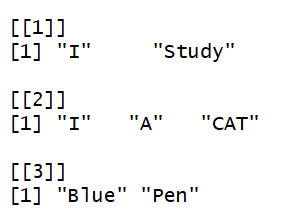
在R中没有找到合适的提取字符串中某一部分的函数,所以自己编写了一个如下。
比如,提取所有大写字母开头的单词。
SUB<-function(t,REG)

{

  m<-gregexpr(REG, t)

  start<-m[[1]]

  stop<-start+attr(m[[1]],"match.length")-1

  l<-length(start)

  r<-rep("1",l)

  for(i in 1:l)

  {

    r[i]<-substr(t,start[i],stop[i])

  }

  return(r)

}

temp<-c("I love Study",

        "I have A CAT",

        "there is a Blue Pen")

lapply(temp,SUB,REG="[A-Z][A-Za-z]*")
R中的Regex的更多相关文章
- R中一切都是vector
0.可以说R语言中一切结构体的基础是vector! R中一切都是vector,vecotor的每个component必须类型一致(character,numeric,integer....)!vect ...
- 简单介绍一下R中的几种统计分布及常用模型
统计学上分布有很多,在R中基本都有描述.因能力有限,我们就挑选几个常用的.比较重要的简单介绍一下每种分布的定义,公式,以及在R中的展示. 统计分布每一种分布有四个函数:d――density(密度函数) ...
- R中的par()函数的参数
把R中par()函数的主要参数整理了一下(另外本来还整理了每个参数的帮助文档中文解释,但是太长,就分类之后,整理为图表,excel不便放上来,就放了这些表的截图)
- 关于R中的mode()和class()的区别
本文原创,转载请注明出处,本人Q1273314690(交流学习) 说明:本文曾经在15年11月在CSDN发过,但是由于CSDN不支持为知笔记的发布为博客的API功能,所以,自今天起,转移到博客园(幸好 ...
- R中的name命名系列函数总结
本文原创,转载请注明出处,本人Q1273314690 R中关于给行列赋名称的函数有 dimnames,names,rowname,colname,row.names 这五个函数,初学的时候往往分不清楚 ...
- 总结——R中查看属性的函数
本文原创,转载注明出处,本人Q1273314690 R中知道一个变量的主要内容和结构,对我们编写代码是很重要的,也可以帮我们避免很多错误. 但是,R中有好几个关于属性查看的函数,我们往往不知道什么时候 ...
- R中创建not-yet-evaluated对象
create not-yet-evaluated object在R中创建 not-yet-evaluated(就是some code we will evaluated later!!)对象;然后执行 ...
- R中,去掉dataframe中的NA行
R中使用complete.cases 和 na.omit来去掉包含NA的行 现在有个一data.frame datafile如下所示 Date sulfate nitrate ID 1 ...
- 机器学习:形如抛物线的散点图在python和R中的非线性回归拟合方法
对于样本数据的散点图形如函数y=ax2+bx+c的图像的数据, 在python中的拟合过程为: ##最小二乘法 import numpy as np import scipy as sp import ...
随机推荐
- 【Linux_Shell 脚本编程学习笔记四、监控系统内存并报警企业案例脚本】
前置知识:awk 参考学习博客:https://www.cnblogs.com/bugingcode/p/8287914.html awk 'BEGIN{ commands } pattern{ co ...
- Archlinux安装与出现的问题
arch的安装 arch的安装主要参考官网arch wiki,基本上按照Beginners' guide的步骤就可以安装,不过这里推荐用U盘刻录的方法来安装,我尝试过用硬盘安装的办法,还是感觉U盘刻录 ...
- 用nexus搭建maven2内部服务器
由于项目组需要,要搭建内部的Maven仓库,借鉴项目组内部及外部同事的经验选用nexus来搭建内部仓库.下面描述一下具体的步骤. 一.安装配置过程 1.下载nexus,地址http://www.s ...
- documentFragment深入理解
documentFragment是一个保存多个element的容器对象(保存在内存)当更新其中的一个或者多个element时,页面不会更新.只有当documentFragment容器中保存的所有ele ...
- Ubuntu18.04安装Fabric
本文介绍如何在Ubuntu18.04中搭建Fabric1.4实验环境,默认使用root用户. 1.安装Golang 首先下载Golang安装包,安装包可以从这里下载.这里下载的是go1.13.4.li ...
- Python获取内网IP
Python 获取本机内网IP 本文记录使用Python获取本机IP的两种方法. 通过hostname来获取本机IP import socket print(socket.gethostbyname( ...
- Errors running builder JavaScript Validator
问题: 解决方法: 方法一. 选择对应项目—-右键Properties—-Builders—-取消“JavaScript Validator”的勾就OK了 方法二. 找到“.project”文件,找到 ...
- Picaso完美兼容OkHttp3.3,缓存优化两不误 - Tamic Developer"s Blog
为何在Fresco,Glide这么强大的背景下,我又想起了当初的Picasso,又为何写这篇文章?是因为最近项目采用了square公司的RxAndroid,Retrfit和OKhttp, 不得不联想到 ...
- SpringBoot快速上手系列01:入门
1.环境准备 1.1.Maven安装配置 Maven项目对象模型(POM),可以通过一小段描述信息来管理项目的构建,报告和文档的项目管理工具软件. 下载Maven可执行文件 cd /usr/local ...
- 小程序自定义switch组件
如上图,小程序api中的switch组件只能自定义颜色,不能自定义宽高,所以就开始了自己写switch组件. 自定义组件样式 switch组件样式大致如图,样式思路:未选中时为一个长方形有圆角按钮,和 ...