
indetityserver4-implicit-grant-types-请求流程叙述-下篇
上一篇将请求流程描述一遍,这篇将描述一下相关的源码。
1 访问客户端受保护的资源
GET /Home/Secure HTTP/1.1HTTP/1.1 302 Found
Date: Tue, 23 Oct 2018 09:02:40 GMT
Location: http://127.0.0.1:5000/connect/authorize?client_id=mvc&redirect_uri=http://127.0.0.1:5002/signin-oidc&response_type=id_token&scope=openid profile&response_mode=form_post&nonce=636758。。。&state=CfD。。。ZLI0fuVlCMPs&x-client-SKU=ID_NET&x-client-ver=2.1.4.0
Secure action 代码如下:
        [Authorize]

        public IActionResult Secure()

        {

            ViewData["Message"] = "Secure page.";

            return View();

        }
1.1 authorizationPolicy
不同点在用 Authorize 修饰了 action,中间有些曲折,最终其相当于在 ActionContext 的属性 FilterDescriptors 添加了一个 AuthorizerFilte,这个过滤器的 Policy 是 DenyAnonymousAuthorizationRequirement,就是拒绝匿名用户访问,同 [Authorize] 定义相符。

MVC 过滤器的解释及相关可以参考官方文档,个人认为主要是实践 AOP 想法。
1.2 Challenged
过滤器被执行的结果是
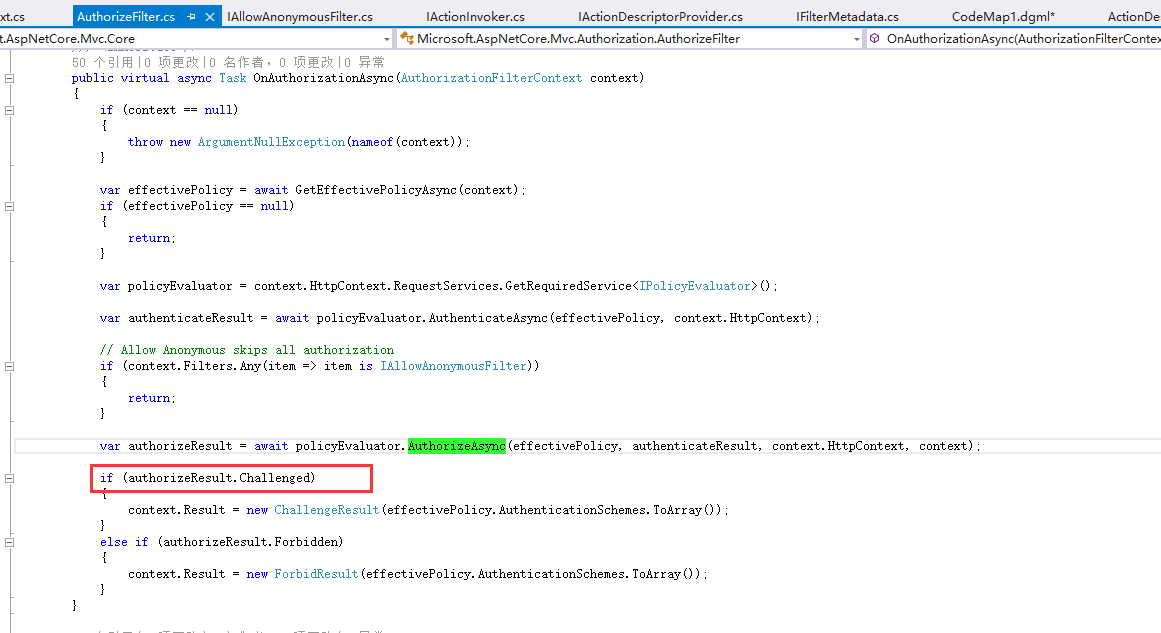
项目的地址在这里。dotnet core 授权和认证的原理主要是5个扩展方法,相关的代码是在 HttpAbstractions 这个项目中。
1.3 生成 redirect

MvcClient 中配置 oidc 的 options 会赋给 OpenIDConnectMessage 对象,并最终拼接中 RedirectUrl:
    public class Startup

    {

        public void ConfigureServices(IServiceCollection services)

        {

            services.AddMvc();

            JwtSecurityTokenHandler.DefaultInboundClaimTypeMap.Clear();

            services.AddAuthentication(options =>

                {

                    options.DefaultScheme = "Cookies";

                    options.DefaultChallengeScheme = "oidc";

                })

                .AddCookie("Cookies")

                .AddOpenIdConnect("oidc", options =>

                {

                    options.SignInScheme = "Cookies";

                    options.Authority = "http://127.0.0.1:5000";

                    options.RequireHttpsMetadata = false;

                    options.ClientId = "mvc";

                    options.SaveTokens = true;

                });

        }
1.4 OpenIDConnectOptions
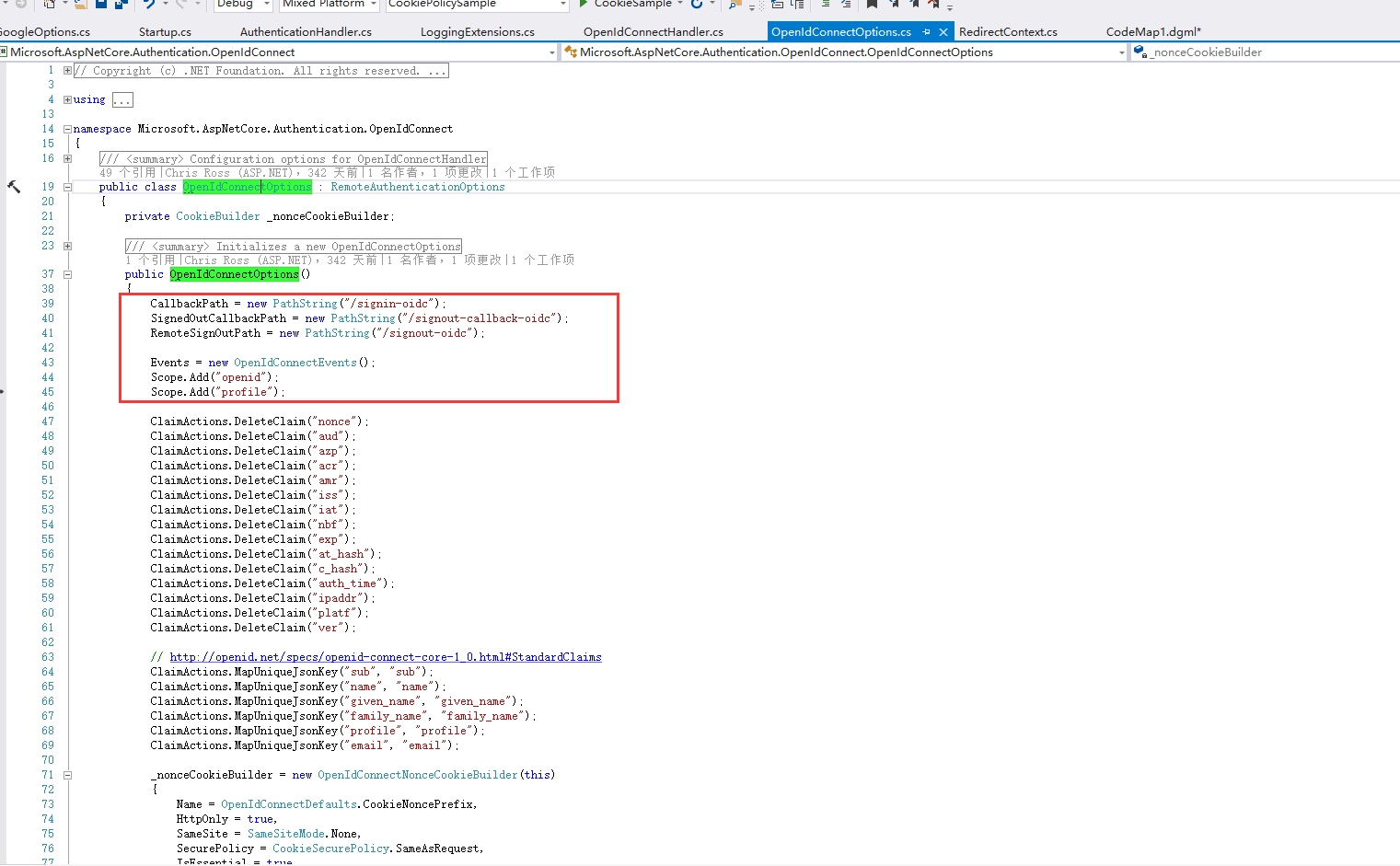
这个地方就可以看到 oidc 许多默认设置,比如当 Scope 没有设置时,默认会请求“openid”和“profile”
2 重定向到:请求identity Service 授权
GET /connect/authorize?client_id=mvc&redirect_uri=http%3A%2F%2F127.0.0.1%3A5002%2Fsignin-oidc&response_type=id_tok
HTTP/1.1 302 Found
Location: http://127.0.0.1:5000/account/login?returnUrl=%2Fconnect%2Fauthorize%2Fca。。。%26x-client-ver%3D2.1.4.0
2.1 IdentityServerMiddleware
项目地址在这里
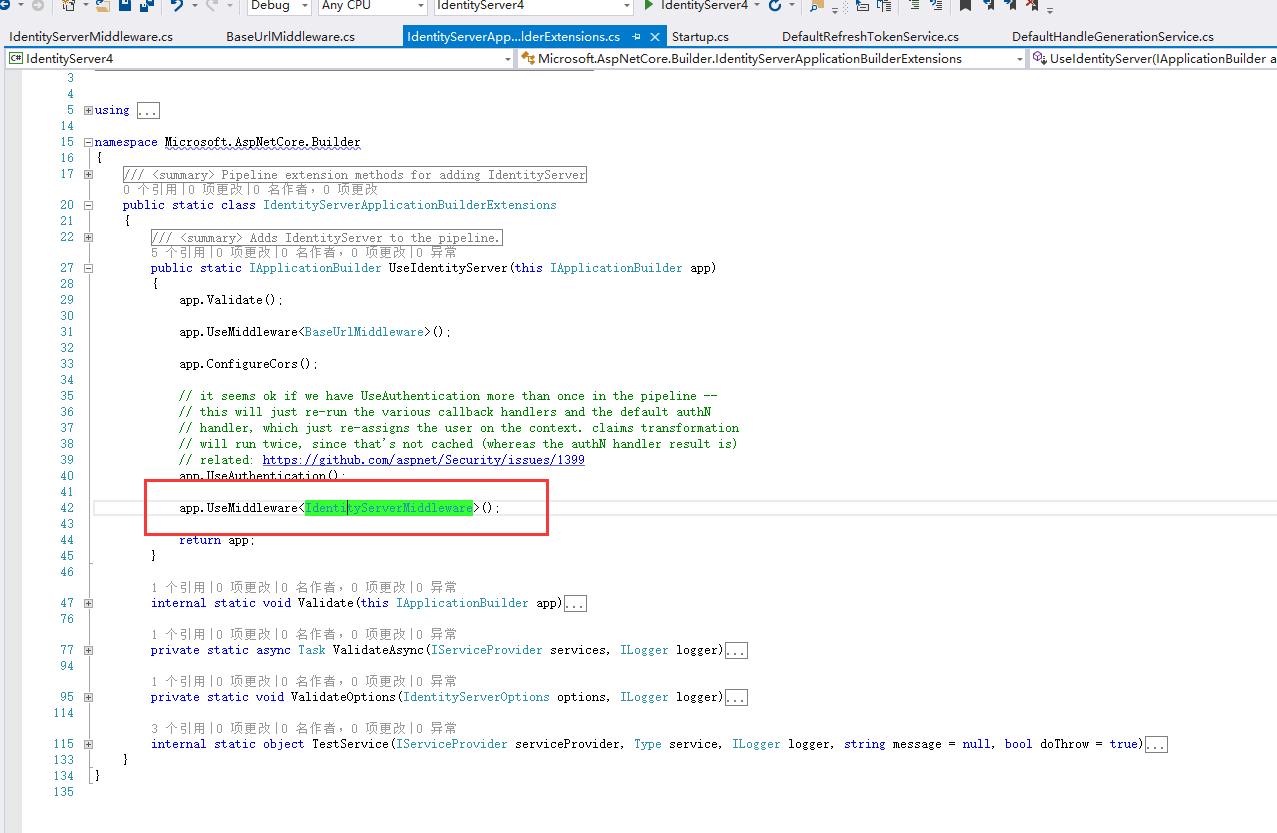
在 IdentityServer 的 Starup中
app.UseIdentityServer();
主要是将 IdentityServerMiddleware 中间件提交 app 管道中,
2.2 endpoint
个人认为 identityServer 的实现时各种 endpoint,并将 endpoint 与路径挂钩,
        public static class ProtocolRoutePaths

        {

            public const string Authorize              = "connect/authorize";

            public const string AuthorizeCallback      = Authorize + "/callback";

            public const string DiscoveryConfiguration = ".well-known/openid-configuration";

            public const string DiscoveryWebKeys       = DiscoveryConfiguration + "/jwks";

            public const string Token                  = "connect/token";

            public const string Revocation             = "connect/revocation";

            public const string UserInfo               = "connect/userinfo";

            public const string Introspection          = "connect/introspect";

            public const string EndSession             = "connect/endsession";

            public const string EndSessionCallback     = EndSession + "/callback";

            public const string CheckSession           = "connect/checksession";

            public static readonly string[] CorsPaths =

            {

                DiscoveryConfiguration,

                DiscoveryWebKeys,

                Token,

                UserInfo,

                Revocation

            };
比如请求的地址为:/connect/authorize?,它获得的就是 AuthorizeEndpoint
2.3 LoginPageResult
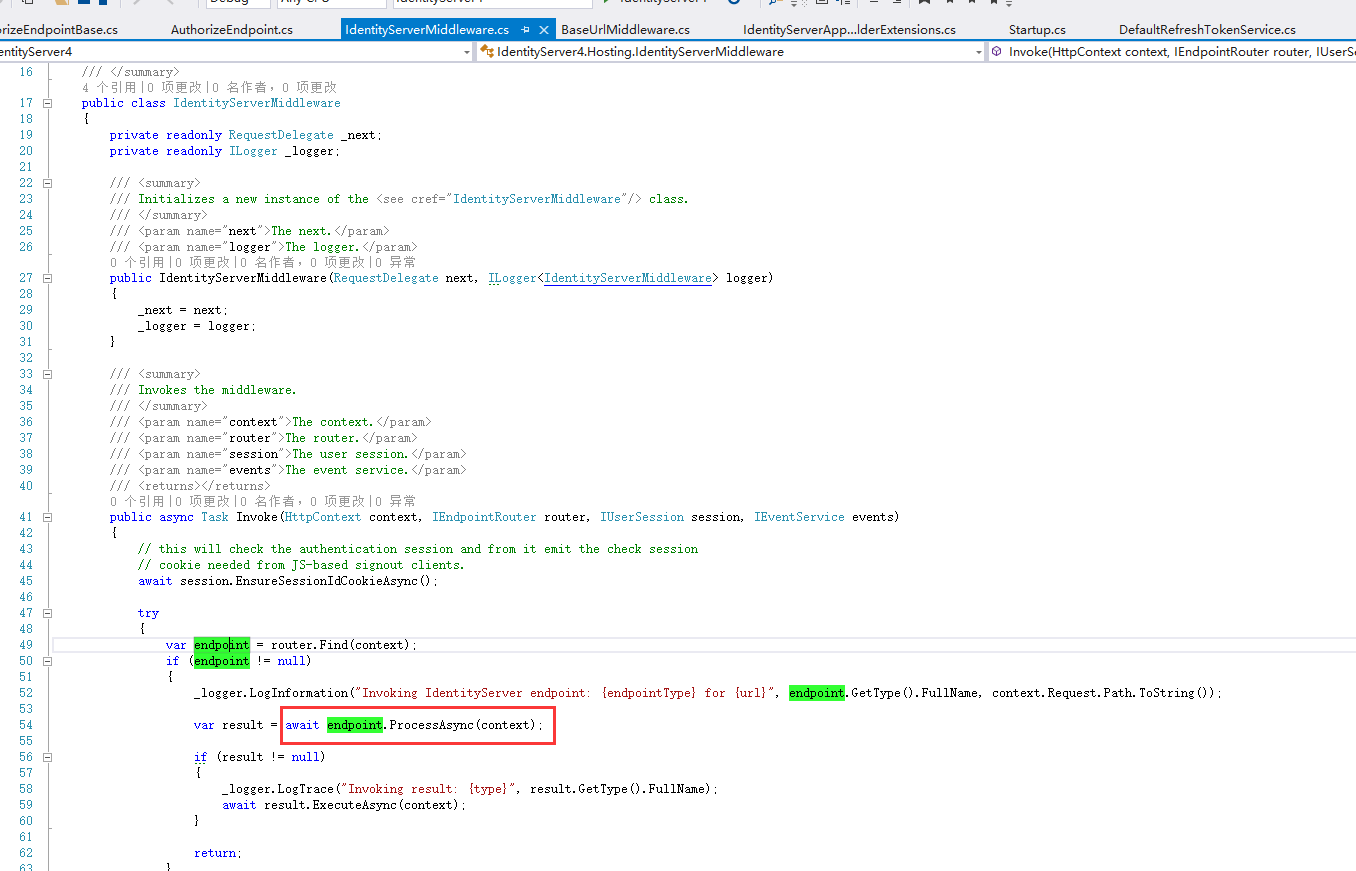
var result = endpoint.ProcessAsync(context);
endpoint 处理后就是 result 对象,
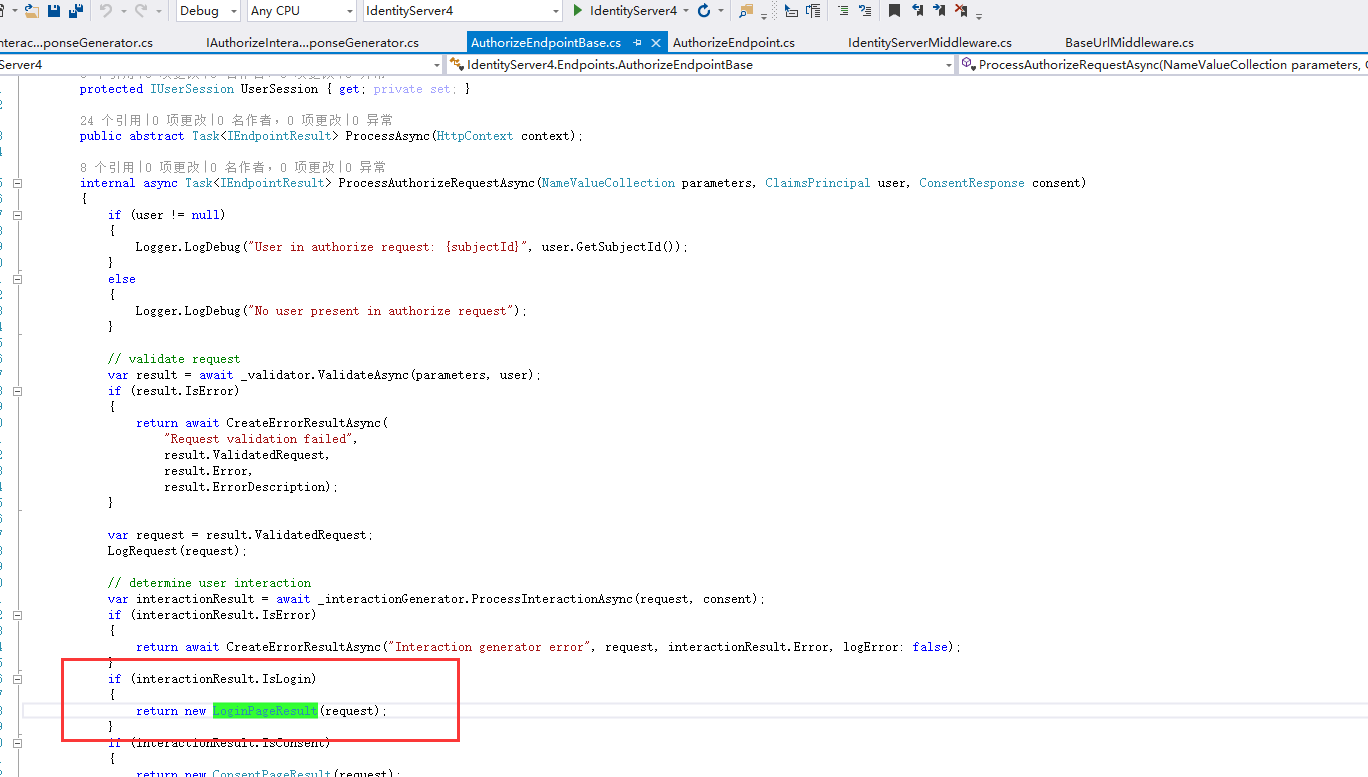
同 endpoint 类似, IdentityServer 实现了各种 result
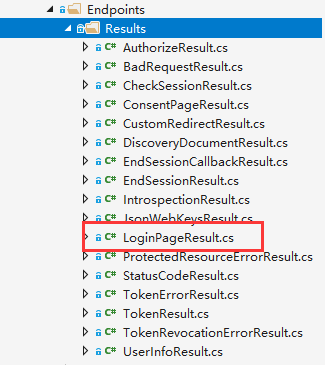
而 LoginPageResult 这是讲请求 redirect 到 /account/login?,这与抓包的流程3描述一致。
而后续在 IdentityServer 中跳转流程可通过了类似方式查看源代码,就不再一一描述。
-------感觉写代码现在变成了体力活,无任何技术可言。
indetityserver4-implicit-grant-types-请求流程叙述-下篇的更多相关文章
- indetityserver4-implicit-grant-types-请求流程叙述-上篇
说明:使用项目代码是这个,做了一点体力活:将 implicit grant types(简化授权类型)的页面跳转流程抓了个包. QuickstartIdentityServer 项目的发布地址:127 ...
- OAuth2.0学习(1-5)授权方式2-简化模式(implicit grant type)
授权方式2-简化模式(implicit grant type) 简化模式(implicit grant type)不通过第三方应用程序的服务器,直接在浏览器中向认证服务器申请令牌,跳过了"授 ...
- OAuth2.0和企业内部统一登录,token验证方式,OAuth2.0的 Authorization code grant 和 Implicit grant区别
统一登录是个很多应用系统都要考虑的问题,多个项目的话最好前期进行统一设计,否则后面改造兼容很麻烦: cas认证的方式:新公司都是老项目,用的是cas认证的方式,比较重而且依赖较多,winform的项目 ...
- 配置Postman通过OAuth 2 implicit grant获取Dynamics 365 CE Online实例的Access Token
微软动态CRM专家罗勇 ,回复335或者20190516可方便获取本文,同时可以在第一间得到我发布的最新博文信息,follow me. 对于测试Web API, Get 类型,不需要设定特别reque ...
- zookeeper源码分析之五服务端(集群leader)处理请求流程
leader的实现类为LeaderZooKeeperServer,它间接继承自标准ZookeeperServer.它规定了请求到达leader时需要经历的路径: PrepRequestProcesso ...
- ASP.NET MVC学前篇之请求流程
ASP.NET MVC学前篇之请求流程 请求流程描述 对于请求的流程,文章的重点是讲HttpApplication和HttpModule之间的关系,以及一个简单的示例实现.(HttpModule又是M ...
- MVC视图请求流程视图
/* *视图请求流程 *当接受到home/index请求时 *先去找viewstart.cshtml视图,再去加载index.cshtml视图 ...
- HTTP请求流程(一)----流程简介
最近一直在研究如何让asp.net实现上传大文件的功能,所以都没怎么写技术类的文章了.可惜的是至今还没研究出来,惭愧~~~.不过因为这样,也了解了一下http消息请求的大致过程.我就先简单介绍下,然后 ...
- [转】:HTTP请求流程(一)----流程简介
http://www.cnblogs.com/stg609/archive/2008/07/06/1236966.html HTTP请求流程(一)----流程简介 最近一直在研究如何让asp.net实 ...
随机推荐
- 在IIS服务器上本地部署 ArcGIS API for js 4.15
作为一名刚入门的小白,还没开始一个helloworld就在软件安装,环境部署时遇到了一大堆问题,简直太让人头秃了,脑壳疼.话不多说,这篇主要想分享一下自己部署ArcGIS API for js 4.1 ...
- 使用C++STL的map容器实现一种命令映射
因为最近在练习写一个ftp的服务器,其中的命令有很多种,每个命令对应一个执行函数,能够想到的最简单的实现方式便是使用if--else匹配命令和执行对应的函数,如下所示: if(strcmp(" ...
- Dreamoon Likes Coloring(模拟+构造)
\(这题刚好撞到我的思路了,但是因为模拟......我看了几十遍测试数据....\) $首先当\sum_^m$小于n时一定无解 大于呢?那我们就要浪费一些区间(覆盖一些点,也就是多出来的点) 但是又不 ...
- Spring Cloud 学习 之 Spring Cloud Eureka(源码分析)
Spring Cloud 学习 之 Spring Cloud Eureka(源码分析) Spring Boot版本:2.1.4.RELEASE Spring Cloud版本:Greenwich.SR1 ...
- Spring Cloud 学习 之 Spring Cloud Eureka(架构)
Spring Boot版本:2.1.4.RELEASE Spring Cloud版本:Greenwich.SR1 文章目录 Eureka服务治理基础架构的三个核心要素: 服务治理机制: 服务提供者: ...
- Qt编程基础入门之二
QMainWindow 菜单栏 菜单栏 最多有一个 //菜单栏创建,一个 QMenuBar *menu = new QMenuBar(this); // this->setMenuBar(men ...
- uniapp自定义简单弹窗组件
2.0(2019-08-31) 船新版本的信息弹窗组件 插件市场地址:http://ext.dcloud.net.cn/plugin?id=672 可以弹出很多条信息,并单独控制消失时间.点击消失. ...
- 使用天祥TX-1C调试DS18B20温度传感器的收获
翻查DS18B20的DataSheet编写操作函数,其过程遇到了不少坎,记下来备查. 对于单总线的DS18B20芯片,首先严格按照时序图写出正确的“写0”.“写1”和“读0.1”的基础函数,再以此写出 ...
- 【FreeRTOS实战汇总】小白博主的RTOS学习实战快速进阶之路(持续更新)
博主是个小白,打算把这段时间系统学习RTOS的文章统一整理到这里,另外本文会给出一些参考性资料和指导性建议: 本文宗旨 FreeRTOS 是由Richard Barry在2003年由设计的,由于其设计 ...
- 【SPOJ – REPEATS】 后缀数组【连续重复子串】
字体颜色如何 字体颜色 SPOJ - REPEATS 题意 给出一个字符串,求重复次数最多的连续重复子串. 题解 引自论文-后缀数组--处理字符串的有力工具. 解释参考博客 "S肯定包括了字 ...