
好看css搜索框样式_分享8款纯CSS搜索框
最简单实用的CSS3搜索框样式,纯CSS效果无需任何javascript,其中部分搜索框在点击的时候有动画特效,搜索框的应用也是比较普通的,效果如下:
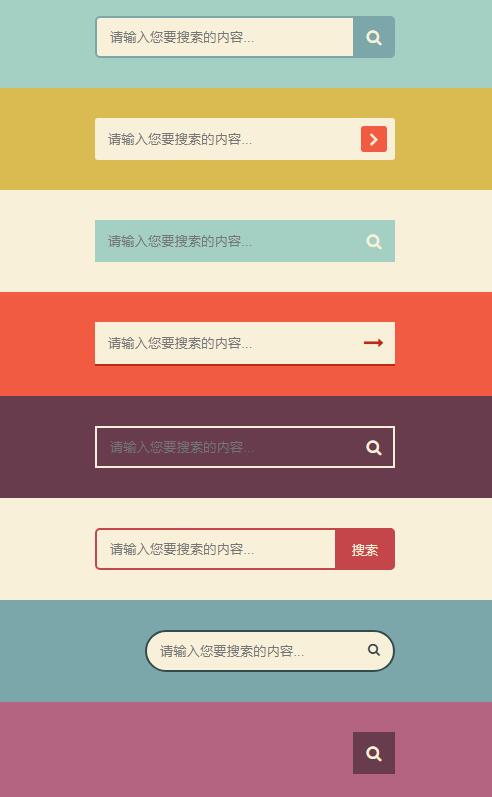
设计网站大全https://www.wode007.com/favorites/sjdh
代码如下:
 <!DOCTYPE html>

 <html lang="en">

 <head>

     <meta charset="UTF-8">

     <meta name="viewport" content="width=device-width, initial-scale=1.0">

     <title>8款纯CSS3搜索框</title>

     <link href="http://cdn.bootcss.com/font-awesome/4.7.0/css/font-awesome.min.css" rel="stylesheet">

     <link rel="stylesheet" href="style.css">

     <style>

         * {

             box-sizing: border-box;

         }

         body {

             margin: ;

             padding: ;

             background: #494A5F;

             font-weight: ;

             font-family: "Microsoft YaHei","宋体","Segoe UI", "Lucida Grande", Helvetica, Arial,sans-serif, FreeSans, Arimo;

         }

         #container {

             width: 500px;

             height: 820px;

             margin:  auto;

         }

         div.search {padding: 30px ;}

         form {

             position: relative;

             width: 300px;

             margin:  auto;

         }

         input, button {

             border: none;

             outline: none;

         }

         input {

             width: %;

             height: 42px;

             padding-left: 13px;

         }

         button {

             height: 42px;

             width: 42px;

             cursor: pointer;

             position: absolute;

         }

         /*搜索框1*/

         .bar1 {background: #A3D0C3;}

         .bar1 input {

             border: 2px solid #7BA7AB;

             border-radius: 5px;

             background: #F9F0DA;

             color: #9E9C9C;

         }

         .bar1 button {

             top: ;

             right: ;

             background: #7BA7AB;

             border-radius:  5px 5px ;

         }

         .bar1 button:before {

             content: "\f002";

             font-family: FontAwesome;

             font-size: 16px;

             color: #F9F0DA;

         }

         /*搜索框2*/

         .bar2 {background: #DABB52;}

         .bar2 input, .bar2 button {

             border-radius: 3px;

         }

         .bar2 input {

             background: #F9F0DA;

         }

         .bar2 button {

             height: 26px;

             width: 26px;

             top: 8px;

             right: 8px;

             background: #F15B42;

         }

         .bar2 button:before {

             content: "\f105";

             font-family: FontAwesome;

             color: #F9F0DA;

             font-size: 20px;

             font-weight: bold;

         }

         /*搜索框3*/

         .bar3 {background: #F9F0DA;}

         .bar3 form {background: #A3D0C3;}

         .bar3 input, .bar3 button {

             background: transparent;

         }

         .bar3 button {

             top: ;

             right: ;

         }

         .bar3 button:before {

             content: "\f002";

             font-family: FontAwesome;

             font-size: 16px;

             color: #F9F0DA;

         }

         /*搜索框4*/

         .bar4 {background: #F15B42;}

         .bar4 form {

             background: #F9F0DA;

             border-bottom: 2px solid #BE290E;

         }

         .bar4 input, .bar4 button {

             background: transparent;

         }

         .bar4 button {

             top: ;

             right: ;

         }

         .bar4 button:before {

             content: "\f178";

             font-family: FontAwesome;

             font-size: 20px;

             color: #be290e;

         }

         /*搜索框5*/

         .bar5 {background: #683B4D;}

         .bar5 input, .bar5 button {

             background: transparent;

         }

         .bar5 input {

             border: 2px solid #F9F0DA;

         }

         .bar5 button {

             top: ;

             right: ;

         }

         .bar5 button:before {

             content: "\f002";

             font-family: FontAwesome;

             font-size: 16px;

             color: #F9F0DA;

         }

         .bar5 input:focus {

             border-color: #311c24

         }

         /*搜索框6*/

         .bar6 {background: #F9F0DA;}

         .bar6 input {

             border: 2px solid #c5464a;

             border-radius: 5px;

             background: transparent;

             top: ;

             right: ;

         }

         .bar6 button {

             background: #c5464a;

             border-radius:  5px 5px ;

             width: 60px;

             top: ;

             right: ;

         }

         .bar6 button:before {

             content: "搜索";

             font-size: 13px;

             color: #F9F0DA;

         }

         /*搜索框7*/

         .bar7 {background: #7BA7AB;}

         .bar7 form {

             height: 42px;

         }

         .bar7 input {

             width: 250px;

             border-radius: 42px;

             border: 2px solid #324B4E;

             background: #F9F0DA;

             transition: .3s linear;

             float: right;

         }

         .bar7 input:focus {

             width: 300px;

         }

         .bar7 button {

             background: none;

             top: -2px;

             right: ;

         }

         .bar7 button:before{

           content: "\f002";

           font-family: FontAwesome;

           color: #324b4e;

         }

         /*搜索框8*/

         .bar8 {background: #B46381;}

         .bar8 form {

             height: 42px;

         }

         .bar8 input {

             width: ;

             padding:  42px  15px;

             border-bottom: 2px solid transparent;

             background: transparent;

             transition: .3s linear;

             position: absolute;

             top: ;

             right: ;

             z-index: ;

         }

         .bar8 input:focus {

             width: 300px;

             z-index: ;

             border-bottom: 2px solid #F9F0DA;

         }

         .bar8 button {

             background: #683B4D;

             top: ;

             right: ;

         }

         .bar8 button:before {

             content: "\f002";

             font-family: FontAwesome;

             font-size: 16px;

             color: #F9F0DA;

         }

     </style>

 </head>

 <body>

 <div id="container">

     <div class="search bar1">

         <form>

             <input type="text" placeholder="请输入您要搜索的内容...">

             <button type="submit"></button>

         </form>

     </div>

     <div class="search bar2">

         <form>

             <input type="text" placeholder="请输入您要搜索的内容...">

             <button type="submit"></button>

         </form>

     </div>

     <div class="search bar3">

         <form>

             <input type="text" placeholder="请输入您要搜索的内容...">

             <button type="submit"></button>

         </form>

     </div>

     <div class="search bar4">

         <form>

             <input type="text" placeholder="请输入您要搜索的内容...">

             <button type="submit"></button>

         </form>

     </div>

     <div class="search bar5">

         <form>

             <input type="text" placeholder="请输入您要搜索的内容...">

             <button type="submit"></button>

         </form>

     </div>

     <div class="search bar6">

         <form>

             <input type="text" placeholder="请输入您要搜索的内容...">

             <button type="submit"></button>

         </form>

     </div>

     <div class="search bar7">

         <form>

             <input type="text" placeholder="请输入您要搜索的内容...">

             <button type="submit"></button>

         </form>

     </div>

     <div class="search bar8">

         <form>

             <input type="text" placeholder="请输入您要搜索的内容...">

             <button type="submit"></button>

         </form>

     </div>

 </div>

 </body>

 </html>
好看css搜索框样式_分享8款纯CSS搜索框的更多相关文章
- 一款纯css实现的垂直时间线效果
今天给大家分享一款纯css实现的垂直时间线效果.垂直时间线适合放在类似任务时间安排的网页上.该实现采用了蓝色作为主题色,界面效果还不错.一起看下效果图: 实现的代码. html代码: ... 阅读原文 ...
- 一款纯css实现的漂亮导航
今天给大家分享一款纯css实现的漂亮导航.之前为大家分享过jquery实现的个人中心导航菜单,今天这款也是适合放在个人中心.还带来图标,效果不错.一起看下效果图: 在线预览 源码下载 实现的代码. ...
- 分享11个纯css完成的图片浏览器
图片画廊用于在网站上显示系列图片,它已成为网站重要的组成部分.实现图片画廊有很多种方法,今天要与大家分享的是11个使用纯 CSS 实现的图片画廊,它们代码少,效果炫,加载速度快,希望能对大家有所帮助. ...
- css重设样式_清除浏览器的默认样式
由于不同的浏览器默认的样式也不同,所以在网页开发前设置一个公用样式,来清除各个浏览器的默认样式,已达到做的网页在各个浏览器中达到统一. 收集的默认样式的链接地址: 1.eric-meyer-reset ...
- css通配样式初始化(多款,供君自选)
腾讯官网 body,ol,ul,h1,h2,h3,h4,h5,h6,p,th,td,dl,dd,form,fieldset,legend,input,textarea,select{margin:0; ...
- vue@cli3 public目录下的静态图片,如何使用在css类文件中(sass可行,纯css不行)
之前写了一篇vue文件怎么使用的文章,有人问我怎么在css文件中使用public下的文件,这是个好问题,因为我之前都没有研究过 需要解决的2个问题 一开始按照vue文件的使用方式(https://ww ...
- web前端篇:CSS使用,样式表特征,选择器
目录 web前端篇:CSS使用,样式表特征,选择器 1.CSS介绍 2.CSS使用 3.样式表特征 4.CSS选择器 5.选择器的优先级 6.练习题: web前端篇:CSS使用,样式表特征,选择器 1 ...
- web中用纯CSS实现筛选菜单
web中用纯CSS实现筛选菜单 本文我们来用纯css实现像淘宝宝贝筛选菜单那样的效果,例子虽然没有淘宝那样强大,不过原理差不多,如果花点心思也可以实现和淘宝一样的. 内容过滤是一个在Web上常见的一个 ...
- 如何使用纯 CSS 制作四子连珠游戏
序言:你是否想过单纯使用 CSS 也可以制作一款游戏?甚至可以双人对决!这是一篇非常有趣的文章,作者详细讲解了使用纯 CSS 制作四子连珠游戏的思路以及使用奇淫巧技解决困难问题的方法.因为案例本身比较 ...
随机推荐
- 洛谷P1012 拼数 【题解】
**原题链接** 题目描述 设有n个正整数(n ≤ 20),将它们联接成一排,组成一个最大的多位整数. 例如:n=3时,3个整数13,312,343联接成的最大整数为:34331213 又如:n=4时 ...
- gitee+picgo搭建个人博客图床
gitee+picgo搭建个人博客图床 准备 首先需要去码云注册一个账号,并新建一个仓库.接着下载PicGO并安装好. 过程 点击左下方的插件设置. image 在搜索框中输入gitee搜索插件,安装 ...
- 环境篇:CM+CDH6.3.2环境搭建(全网最全)
环境篇:CM+CDH6.3.2环境搭建(全网最全) 一 环境准备 1.1 三台虚拟机准备 Master( 32g内存 + 100g硬盘 + 4cpu + 每个cpu2核) 2台Slave( 12g内存 ...
- .NET 技术栈 思维导图
背景介绍 根据网上招聘网站的一些.NET技能需求,画了一个图,便于在自修和学习的过程当中有一个方向. 技能栈 Web front-end o 框架技术 ▣ Vue ▣ Bootstrap ▣ LayU ...
- Python Opencv-contrib Camshift&kalman卡尔曼滤波&CSRT算法 目标跟踪实现
本次课题实现目标跟踪一共用到了三个算法,分别是Camshift.Kalman.CSRT,基于Python语言的Tkinter模块实现GUI与接口设计,项目一共包含三个文件: main.py: # co ...
- Python 中class的小例子
class Song(): def __init__(self,lyrics): self.lyrics=lyrics def sing_a_song(self): for line in self. ...
- Dedecms 修改当前位置样式
当前列表页间隔符样式修改 后台-->系统基本参数-->核心设置-->栏目位置的间隔符号 只有二级位置栏目时的间隔符去除 找到include文件中的typelink.class.php ...
- Js中Array 函数使用方法
遇到数组有关操作,脑子第一反应不要再是嵌套 for 循环了,Array 类型提供了一些遍历有关的函数. Array.prototype.forEach() : 把数组每个元素丢到一个处理 functi ...
- Express4.x之中间件与路由详解及源码分析
Application.use() Application.router() express核心源码模拟 一.express.use() 1.1app.use([path,] callback [, ...
- Android学习笔记使用AlertDialog实现对话框
使用AlertDialog可以实现如下对话框 案例 布局问文件就加了几个Button,我直接上Java代码了 实现显示带取消,确定按钮的对话框按钮 Button showDialogOne = fin ...