
org.apache.maven.plugins:maven-archetype-plugin:RELEASE:generate——解决方案汇总
近期将自己本地的 maven 仓库进行了迁移,idea 的版本也升级到了IntelliJ IDEA 2019.3.3 x64,但是遇到了 Plugins 报红的情况,尝试很多方法,终于解决,现在做一下汇总。
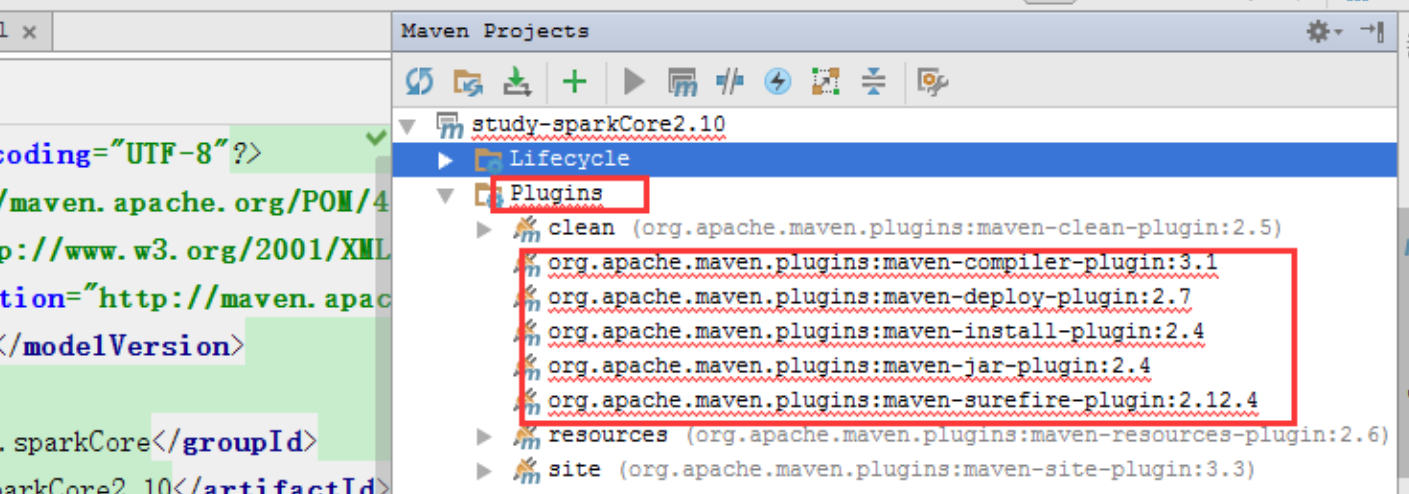
1、首先检查idea的 settings -> Build, Execution, Deployment -> Maven 和自己的本机路径是否属实

2、检查 Maven\apache-maven-3.6.3\conf\settings.xml 文件是否有冗余的字段 多l了的 <> 、</>要删除
3、一个要值得注意的问题是,阿里的镜像更新了要用https了而不是http!
     <mirror>

         <id>aliyunmaven</id>

         <mirrorOf>*</mirrorOf>

         <name>阿里云公共仓库</name>

         <url>https://maven.aliyun.com/repository/public</url>

     </mirror>
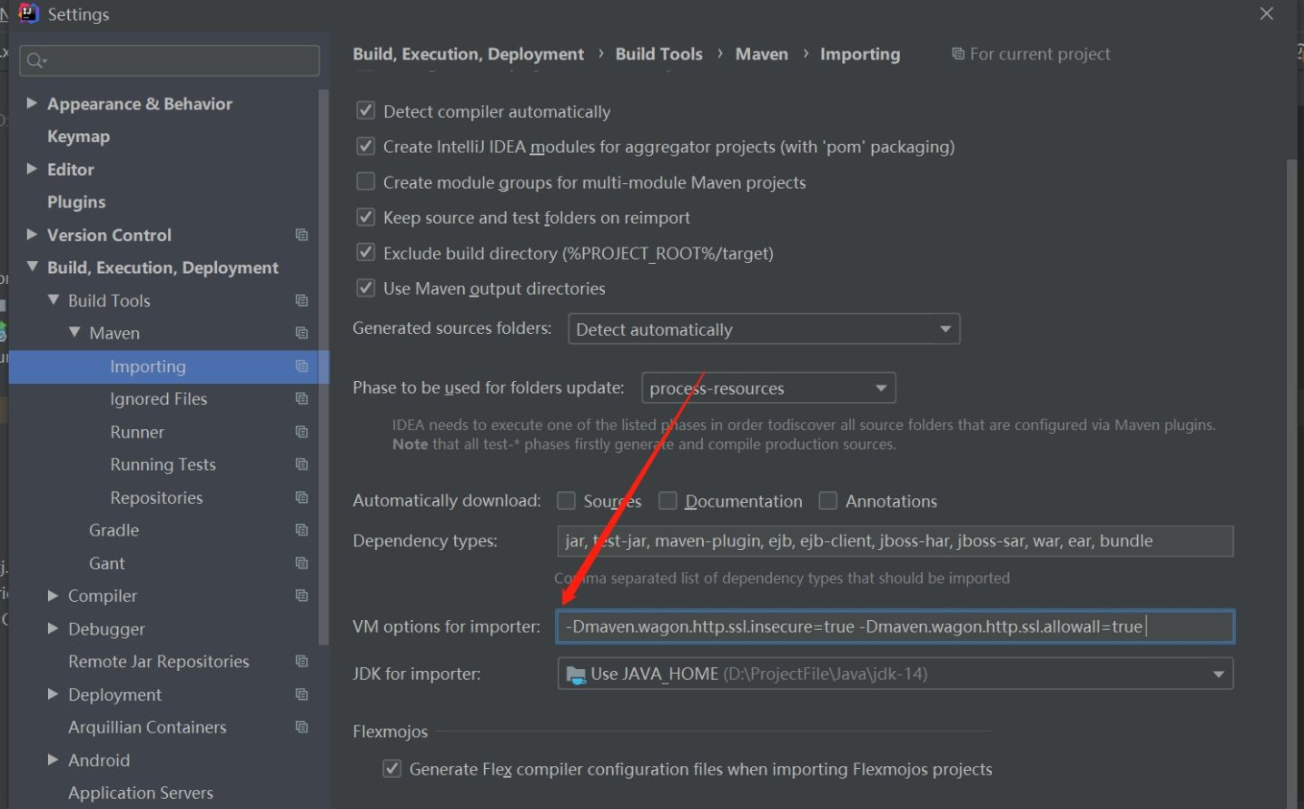
4、然后在IDEA中设置,忽略HTTPS的SSL证书验证就好了,注意是在Maven-Importing-VM options for importer里添加
-Dmaven.wagon.http.ssl.insecure=true -Dmaven.wagon.http.ssl.allowall=true
5、我的 Maven\apache-maven-3.6.3\conf\settings.xml 如下,每次修改都要及时保存,仅供参考,
 <?xml version="1.0" encoding="UTF-8"?>

 <settings xmlns="http://maven.apache.org/SETTINGS/1.0.0"

           xmlns:xsi="http://www.w3.org/2001/XMLSchema-instance"

           xsi:schemaLocation="http://maven.apache.org/SETTINGS/1.0.0 http://maven.apache.org/xsd/settings-1.0.0.xsd">

   <localRepository>D:\Maven\LocalWarehouse</localRepository>

   <mirrors>

     <mirror>

         <id>aliyunmaven</id>

         <mirrorOf>*</mirrorOf>

         <name>阿里云公共仓库</name>

         <url>https://maven.aliyun.com/repository/public</url>

     </mirror>

   </mirrors>

 <profiles>

     <profile>

         <id>jdk-1.8</id>

         <activation>

         <activeByDefault>true</activeByDefault>

             <jdk>1.8</jdk>

         </activation>

         <properties>

             <maven.compiler.source>1.8</maven.compiler.source>

             <maven.compiler.target>1.8</maven.compiler.target>

             <maven.compiler.compilerVersion>1.8</maven.compiler.compilerVersion>

         </properties>

     </profile>

 </profiles>

 </settings>
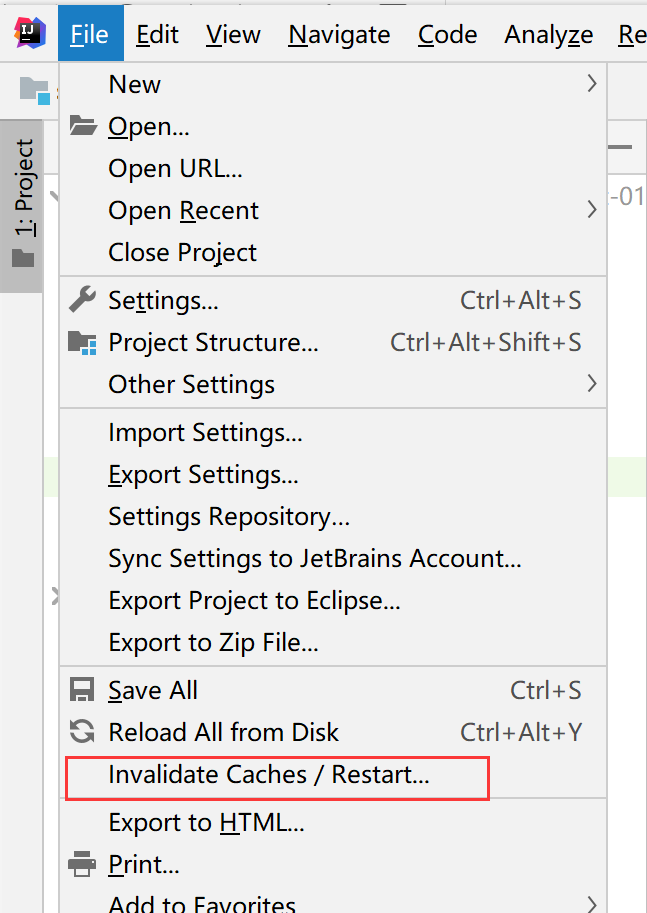
6、最后要将未下载成功的 jar 包删除掉,就是那些后缀名是 .update 的文件,然后清除缓存,重启 idea
7、maven 恢复正常
8、有什么问题大家可以在下面的评论 抛出,一起讨论解决。
参考链接:
maven在使用阿里云镜像的时候下载失败? - 知乎
https://www.zhihu.com/question/350864269
org.apache.maven.plugins:maven-archetype-plugin:RELEASE:generate——解决方案汇总的更多相关文章
- Failed to execute goal org.apache.maven.plugins:maven-compiler-plugin:3.1:compile (default-compile) 解决方案
1.命令行用maven编译项目失败,提示 Failed to execute goal org.apache.maven.plugins:maven-compiler-plugin:3.1:compi ...
- 【maven】maven创建项目问题
这个问题困扰了很多,几个月在做大数据课设的时候,本想创建maven项目,但是创建项目失败了.这次又碰到maven创建项目失败,终于解决了.下面按碰到问题的时间来描述,所以需要从头认真看 前提须知 Ma ...
- Maven命令行创建web项目,并部署到jobss当中(解决No plugin found for prefix 'jboss-as' in the current project and in the plugin groups [org.apache.maven.plugins,问题)
首件创建项目:此处可参照:http://maven.apache.org/guides/mini/guide-webapp.html mvn archetype:generate -DgroupId= ...
- Maven 命令行创建项目时 Could not find goal ‘create’ in plugin org.apache.maven.plugins:...
使用maven3.3.9 版本,进行命令行创建项目时输入以下命令创建失败 mvn archetype:create -DgroupId=com.zang.maven -DartifactId=sys ...
- maven Error resolving version for plugin 'org.apache.maven.plugins:maven-eclipse-plugin' from the repositories 解决
报错:Error resolving version for plugin 'org.apache.maven.plugins:maven-eclipse-plugin' from the repos ...
- CoreException: Could not calculate build plan: Plugin org.apache.maven.plugins:maven-compiler-plugin:3.1 or one of its dependencies could not be resolved
CoreException: Could not calculate build plan: Plugin org.apache.maven.plugins:maven-compiler-plugin ...
- Could not calculate build plan: Plugin org.apache.maven.plugins:maven-resources-plugin:2.5
Could not calculate build plan: Plugin org.apache.maven.plugins:maven-resources-plugin:2.5 or one of ...
- maven install 报错Could not calculate build plan: Plugin org.apache.maven.plugins:maven-resources-plugin
Could not calculate build plan: Plugin org.apache.maven.plugins:maven-resources-plugin:2.6 or one of ...
- Eclipse使用Maven,创建项目出现:Could not calculate build plan: Plugin org.apache.maven.plugins:maven-resour
使用maven创建简单的项目时候经常会遇到 Could not calculate build plan: Plugin org.apache.maven.plugins:maven-resource ...
随机推荐
- import * as x from 'xx' 和 import x from 'xx'
普通xx.js文件 //不可变的依赖模拟数据 module.exports=[ { id: "d52dccfc-656d-11e8-b153-7cd30ad3aa7a", regi ...
- 201771010128王玉兰《面向对象程序设计(Java)第十四周学习总结》
第一部分:理论知识总结: (1)Swing 设计模式(Design pattern)是设计者一种流行的 思考设计问题的方法,是一套被反复使用,多数人 知晓的,经过分类编目的,代码设计经验的总结. 使用 ...
- search(16)- elastic4s-内嵌文件:nested and join
从SQL领域来的用户,对于ES的文件关系维护方式会感到很不习惯.毕竟,ES是分布式数据库只能高效处理独个扁平类型文件,无法支持关系式数据库那样的文件拼接.但是,任何数据库应用都无法避免树型文件关系,因 ...
- Spring全家桶一一SpringBoot与Mybatis
Spring全家桶系列一一SpringBoot与Mybatis结合 本文授权"Java知音"独家发布. Mybatis 是一个持久层ORM框架,负责Java与数据库数据交互,也可以 ...
- 如何使用git命令行上传项目到github
第一步:我们需要先创建一个本地的版本库(其实也就是一个文件夹). 你可以直接右击新建文件夹,也可以右击打开Git bash命令行窗口通过命令来创建. 现在我通过命令行在桌面新建一个TEST文件夹(你也 ...
- JavaScript之倔强的字符串
关于倔强的JavaScript字符串:不可以被修改 我们是字符串 我们的口号是:你可以消灭我,但是你不能改变我 JavaScript字符串是不可改变的,当真是这样的吗? 让我们来试验一下. var n ...
- [JavaWeb基础] 005.Hibernate的配置和简单使用
1.Hibernate简介 Hibernate是一个基于Java的开源的持久化中间件,对JDBC做了轻量的封装.采用ORM映射机制,负责实现Java对象和关系数据库之间的映射,把sql语句传给数据库, ...
- GNS3配置问题(持续更新)
GNS3配置问题 1.关于All in One的GNS3提示"判断dynamips版本失败"的解决办法 当我们找到GNS3根目录里的dynamips.exe,执行会报错告诉我们缺少 ...
- 基于 abp vNext 和 .NET Core 开发博客项目 - 博客接口实战篇(二)
系列文章 基于 abp vNext 和 .NET Core 开发博客项目 - 使用 abp cli 搭建项目 基于 abp vNext 和 .NET Core 开发博客项目 - 给项目瘦身,让它跑起来 ...
- Java实现 LeetCode 887 鸡蛋掉落(动态规划,谷歌面试题,蓝桥杯真题)
887. 鸡蛋掉落 你将获得 K 个鸡蛋,并可以使用一栋从 1 到 N 共有 N 层楼的建筑. 每个蛋的功能都是一样的,如果一个蛋碎了,你就不能再把它掉下去. 你知道存在楼层 F ,满足 0 < ...