
winform怎么实现财务上凭证录入和打印
序言
现如今存在的财务软件层出不穷,怎么样让自己的业务系统与财务系统相结合,往往是很多公司头痛的问题。大多数公司也没有这个能力都去开发一套属于自己的财务软件,所以只有对接像金蝶用友这类的财务软件,花费大量的人力物力在两套系统中切换,从而开发属于自己的一套业务和财务一体化的系统迫在眉睫,去解决这些痛点。
如何去实现winform凭证
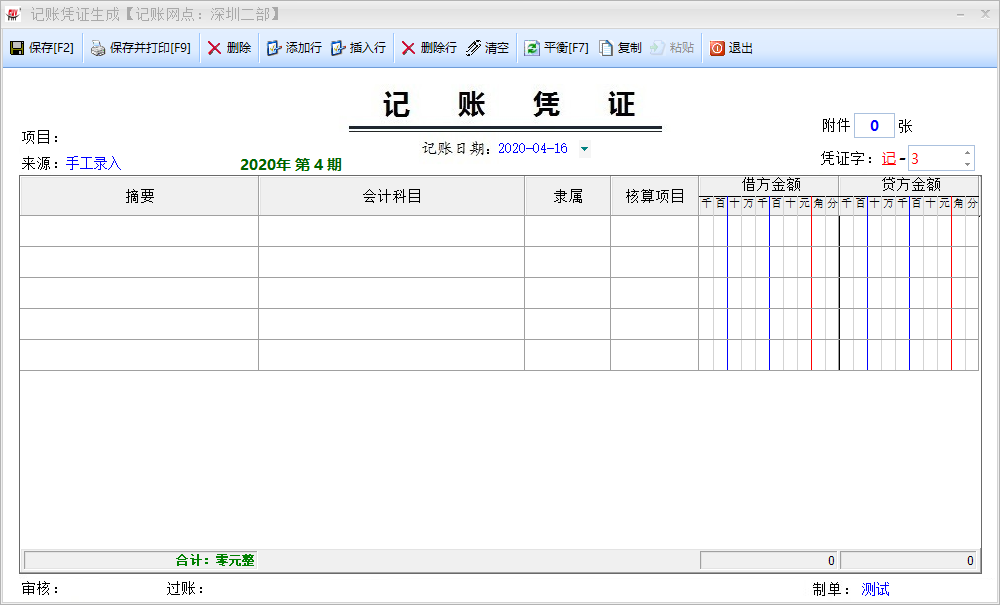
用C#语言开发,CS框架,DevExpress控件,实现出来的效果如下:
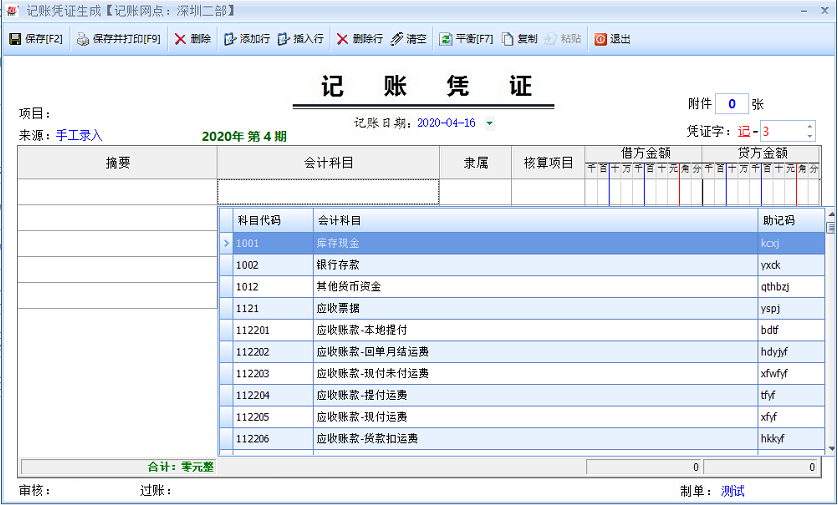
会计科目支持代码、科目和助记码的模糊搜索,可以进行快速找到相应的科目。同金蝶和用友专业的财务软件媲美了,功能齐全,操作方便简单。
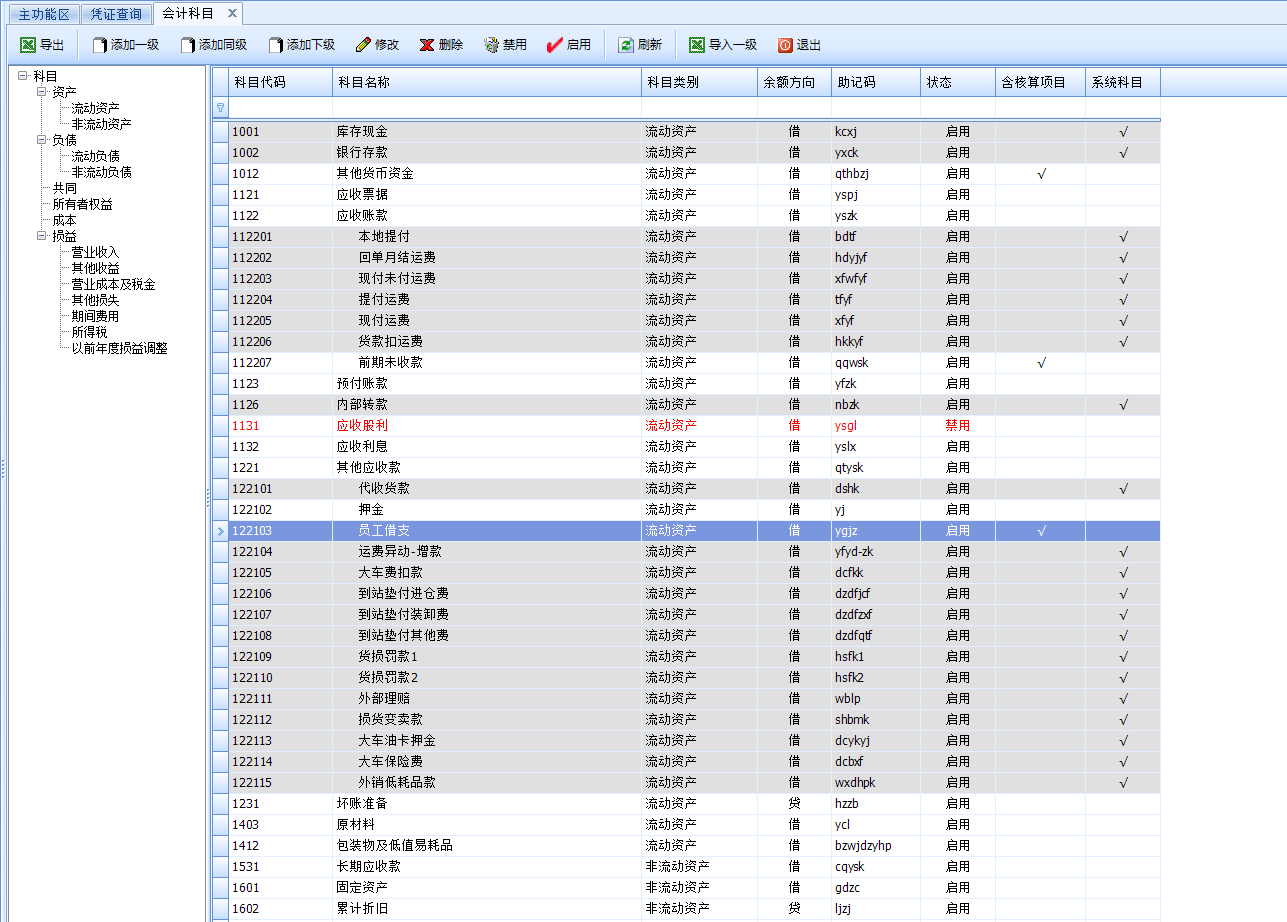
录入凭证之前先对科目进行定义,科目都是财政部相对应的科目:

录入简单的凭证,进行测试,相对简单方便。
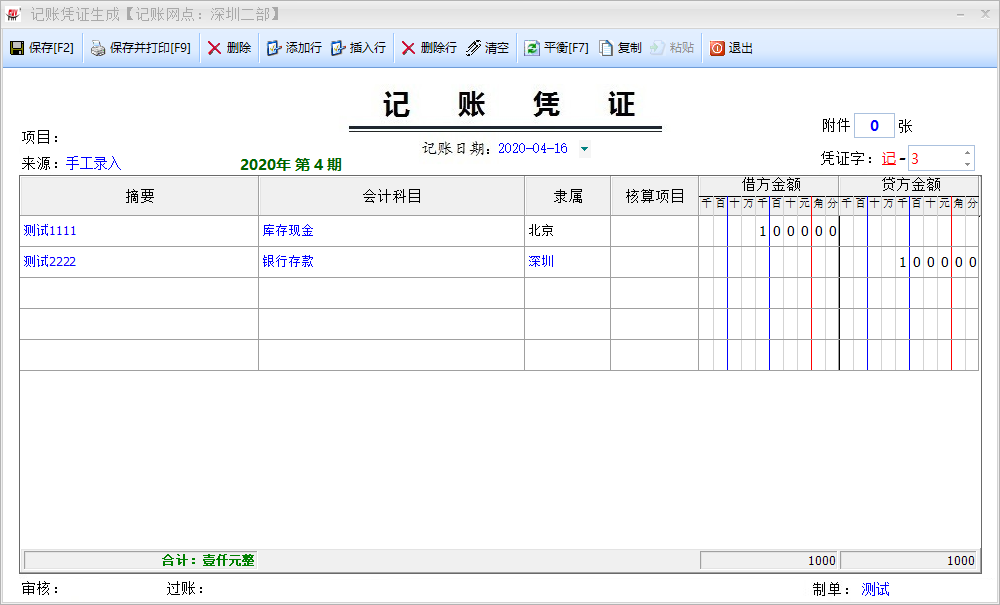
保存完进行打印,打印出来就是专业的会计凭证了,凭证的打印是用时锐浪进行实现的。同时支持A4纸张和套打都可以。
   try

            {

                string ReportPath = "", printtitle = "", printername = "";

                float paperlength = 0, paperwidth = 0;

                string printModel = CommonArgs.printTypes.ContainsKey(printType) ? (printType == "托运单" ? "tydtype" : printType == "标签" ? "bqtype" : (CommonArgs.printTypes[printType] + "Model")) : "";

                printtitle = API.ReadINI("Print", printModel, "", CommonArgs.config);

                printtitle = printtitle == "" ? printType : printtitle;//如果是没有选择模板的,默认为打印类型,找一下配置

                //查找配置信息

                DataRow[] drs = CommonClass.DsPrint.Tables[0].Select("title='" + printtitle + "'");

                if (drs.Length > 0)

                {

                    paperlength = drs[0]["paperlength"].ToFloat();

                    paperwidth = drs[0]["paperwidth"].ToFloat();

                    ReportPath = drs[0]["grfname"].ToStringEx();

                }

                else

                {

                    ReportPath = printType + ".grf";

                }

                string reportpath = Application.StartupPath + "\\" + ReportPath;

                if (!System.IO.File.Exists(reportpath))

                {

                    XtraMessageBox.Show("缺少相应的打印模板文件【" + ReportPath + "】!", "系统提示", MessageBoxButtons.OK, MessageBoxIcon.Error);

                    return;

                }

                printername = GetPrinter(printType);

                if (printername == "" || !CommonClass.CheckPrinters(printername))

                {

                    PrintDocument prtdoc = new PrintDocument();

                    printername = prtdoc.PrinterSettings.PrinterName;//获取默认的打印机名

                    ShowPrintDialog = true;

                }

                Report.LoadFromFile(reportpath);

                ds = new DataSet();

                ds.Tables.Add(dt.Copy());

                if (paperlength != 0)

                {

                    Report.Printer.PaperLength = paperlength;

                    Report.Printer.PaperWidth = paperwidth;

                    Report.Printer.PaperSize = 256;

                    Report.Printer.SheetPages = GRSheetPages.grsp1Pages;

                }

                Report.Printer.PrinterName = printername;

                Report.LoadDataFromXML(ds.GetXml());

                Report.Print(ShowPrintDialog);

                if (ShowPrintDialog) saveprinter(printType, Report.Printer.PrinterName);

                //保存打印次数

                CommonClass.SetPrintCount(printType, dt);

            }

            catch (Exception ex)

            {

                XtraMessageBox.Show(ex.Message, "系统提示", MessageBoxButtons.OK, MessageBoxIcon.Information);

            }
锐浪设计文件如下,把相应的字段对应基本上就大功告成了。

如何用代码去实现凭证界面的开发
其实说到用代码去实现凭证这个界面的开发还是挺有难度的,CS不必BS那么容易去布局,这个界面实现起来没得几千行代码也是搞不定,难点还是在借方和贷方金额这里,整个界面下面是一张背景图。
借方和贷方金额实现代码:
        public void gridView1_CustomDrawCell(object sender, DevExpress.XtraGrid.Views.Base.RowCellCustomDrawEventArgs e, GridControl showgrid, GridView gridView1)

        {

            try

            {

                int width = Math.Max(e.Bounds.Width, e.Column.Width);

                int spacewidth = width / 10;  //空格宽度

                int intlen = 8;//整数位数

                int fe = 2; //小数位数

                string format = string.Empty;

                GridControl gridControl = showgrid;

                //获取小数位

                if (e.Column.ColumnEdit != null)

                {

                    //format = (e.Column.ColumnEdit.DisplayFormat as FormatInfo).GetDisplayText(e.CellValue);

                    format = e.CellValue == null || e.CellValue == DBNull.Value ? "" : e.CellValue.ToString();

                }

                else

                {

                    //format = (e.Column.DisplayFormat as FormatInfo).GetDisplayText(e.CellValue);

                    format = e.CellValue == null || e.CellValue == DBNull.Value ? "" : e.CellValue.ToString();

                }

                //10个整数位,2个小数位

                format = Convert.ToDecimal(format == "" ? "0" : format).ToString("N2");

                format = format.Replace(",", "");

                fe = format.Substring(format.IndexOf('.') + 1).Length;

                for (int i = 0; i < intlen + fe; i++)

                {

                    if (i == 1 || i == 4)

                    {

                        e.Graphics.DrawLine(Pens.Blue, e.Bounds.Left + (i + 1) * spacewidth - 1, 0, e.Bounds.Left + (i + 1) * spacewidth - 1, gridControl.Height);

                    }

                    else if (i == 7)

                    {

                        e.Graphics.DrawLine(Pens.Red, e.Bounds.Left + (i + 1) * spacewidth - 1, 0, e.Bounds.Left + (i + 1) * spacewidth - 1, gridControl.Height);

                    }

                    else if (i == intlen + fe - 1)

                    {

                        e.Graphics.DrawLine(new Pen(Color.Black, 1), e.Bounds.Left + (i + 1) * spacewidth - 1, 0, e.Bounds.Left + (i + 1) * spacewidth - 1, gridControl.Height);

                    }

                    else

                    {

                        e.Graphics.DrawLine(Pens.LightGray, e.Bounds.Left + (i + 1) * spacewidth - 1, 0, e.Bounds.Left + (i + 1) * spacewidth - 1, gridControl.Height);

                    }

                }

                var sf = new StringFormat { Alignment = StringAlignment.Center, LineAlignment = StringAlignment.Center };

                //decimal v = e.CellValue == null || e.CellValue == DBNull.Value || e.CellValue.ToString() == "" ? 0 : Convert.ToDecimal(e.CellValue);

                string s_int = format.Substring(0, format.IndexOf('.')); //((int)v).ToString();

                //两位小数

                string s_dec = format.ToString().Substring(format.ToString().IndexOf('.') + 1, fe);

                string s_value = s_int + s_dec;

                int a = 1;

                for (int i = s_value.Length - 1; i >= 0; i--)

                {

                    //string ch = s_value[s_value.Length -i- 1].ToString();

                    string ch = s_value[i].ToString();

                    if (s_int == "0" && s_dec == "00") ch = "";

                    int x = e.Bounds.Left + (intlen + fe - a) * spacewidth;

                    int y = e.Bounds.Top;

                    var rect = new RectangleF(x, y, spacewidth, e.Bounds.Height);

                    e.Graphics.DrawString(ch, e.Column.AppearanceCell.Font, Brushes.Black, rect, sf);

                    a++;

                }

                e.Handled = true;

            }

            catch (Exception ex)

            {

                MsgBox.ShowError("输入金额过大!" + ex.Message);

                gridView1.SetRowCellValue(e.RowHandle, e.Column.FieldName, DBNull.Value);

                gridView1.FocusedColumn = e.Column;

                gridView1.ShowEditor();

            }

        }

        public void gridView1_CustomDrawColumnHeader(object sender, ColumnHeaderCustomDrawEventArgs e, GridControl showgrid, GridView gridView1, string type)

        {

            try

            {

                Pen penred = new Pen(Color.Red);

                Pen penblue = new Pen(Color.Blue);

                Pen pengray = new Pen(Color.LightGray);

                Pen fontpen = new Pen(Color.Black);

                int width = e.Bounds.Width;

                int spacewidth = width / 10; //计算格子宽度;一起10位数:8位整数 2位小数

                e.Painter.DrawObject(e.Info);

                e.Graphics.DrawLine(fontpen, e.Bounds.X, e.Bounds.Y + e.Bounds.Height / 2, e.Bounds.X + width, e.Bounds.Y + e.Bounds.Height / 2);

                e.Graphics.DrawString(type, e.Appearance.Font, fontpen.Brush, (type == "金额" ? e.Bounds.X + width / 4 + 18 : e.Bounds.X + width / 4 + 5), e.Bounds.Y);

                string u = "千百十万千百十元角分";

                string ch = "";

                Pen temppen = pengray;

                Font font = new Font(e.Appearance.Font.FontFamily, (float)7.5);

                for (int i = 0; i < u.Length; i++)

                {

                    ch = u[i].ToString();

                    if (i == 1 || i == 4)

                    {

                        temppen = penblue;

                    }

                    else if (i == 7)

                    {

                        temppen = penred;

                    }

                    else if (i == 9)

                    {

                        temppen = new Pen(Color.Black);

                    }

                    else

                    {

                        temppen = pengray;

                    }

                    e.Graphics.DrawString(ch, font, fontpen.Brush, e.Bounds.X + i * spacewidth, e.Bounds.Y + e.Bounds.Height / 2 + 1);

                    e.Graphics.DrawLine(temppen, e.Bounds.X + (i + 1) * spacewidth, e.Bounds.Y + e.Bounds.Height / 2, e.Bounds.X + (i + 1) * spacewidth, e.Bounds.Y + e.Bounds.Height);

                }

                e.Handled = true;

            }

            catch (Exception)

            {

                return; ;

            }

        }
汇总金额字体颜色控制
        private void gridView1_CustomDrawFooterCell(object sender, FooterCellCustomDrawEventArgs e)

        {

            if (e.Column == c0)

            {

                if (c0.SummaryText.Trim().Contains("借贷金额不平衡"))

                {

                    AppearanceDefault footer = new AppearanceDefault(Color.Red, Color.Empty, new Font(AppearanceObject.DefaultFont, FontStyle.Bold));

                    AppearanceHelper.Apply(e.Appearance, footer);

                }

                else

                {

                    AppearanceDefault footer = new AppearanceDefault(Color.Green, Color.Empty, new Font(AppearanceObject.DefaultFont, FontStyle.Bold));

                    AppearanceHelper.Apply(e.Appearance, footer);

                }

            }

        }
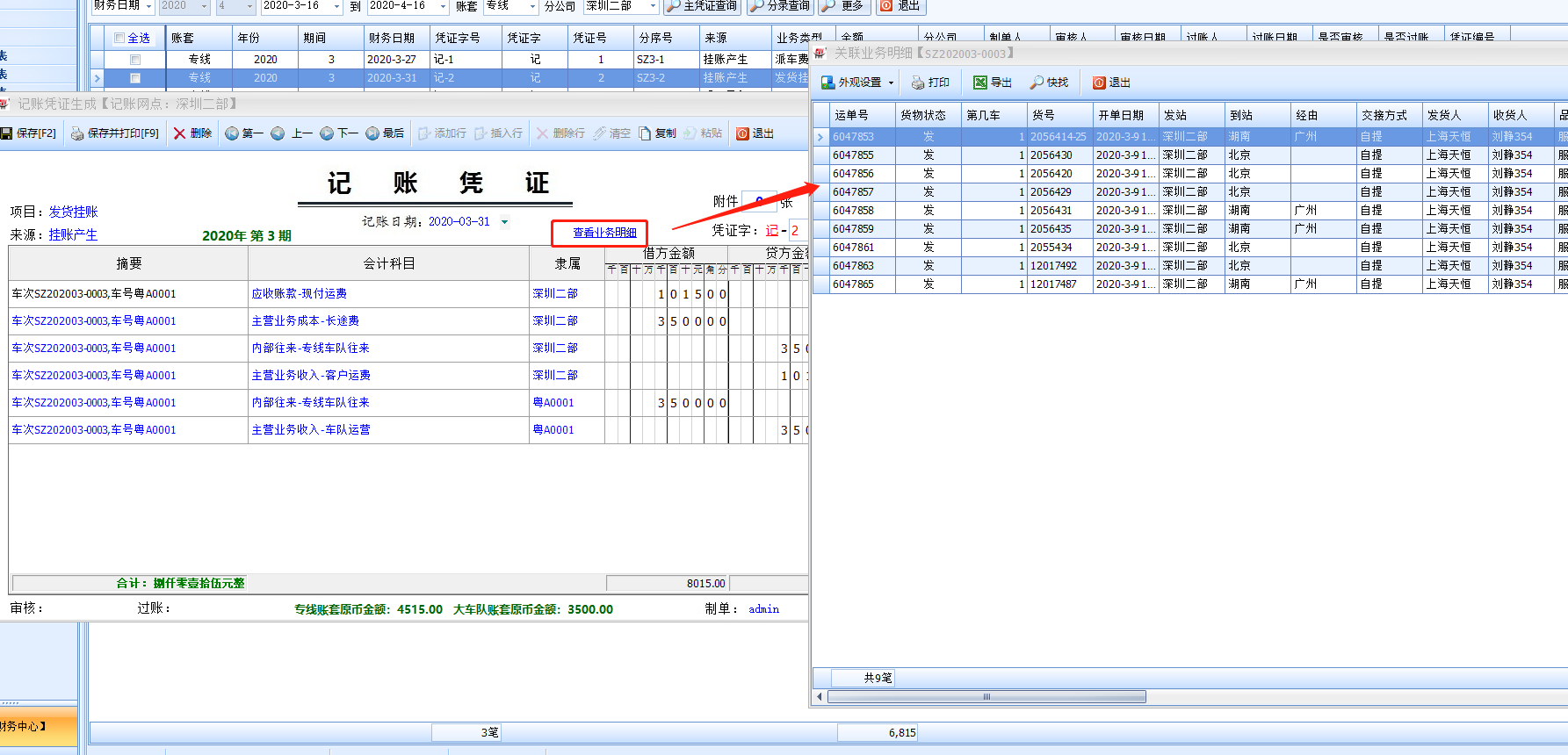
保存好的凭证,并可以打开查看业务明细:
结束语
以上就是财务凭证的实现,有兴趣朋友一起研究学习进步。
winform怎么实现财务上凭证录入和打印的更多相关文章
- C#在WinForm下使用HttpWebRequest上传文件
转自:http://blog.csdn.net/shihuan10430049/article/details/3734398 这段时间因项目需要,要实现WinForm下的文件上传,个人觉得采用FTP ...
- Lodop不要把客户端的打印机共享到服务器上 再在客户端打印
客户端打印需要每个客户端都安装,Lodop插件方式和C-Lodop方式,都是安装一次后,无需再次安装,c-lodop默认也是开机自启动的.集中打印方式,可以打印到某台电脑(作为云主机)上,但是不能打印 ...
- .NetCore对接各大财务软件凭证API——金蝶系列(1)
哈喽,又和大家见面了,虽然看文章的小伙伴不多,但是我相信总有一天,自己写的这些文章或多或少会对其他人有些帮助,让他们在相关的业务开发下能少走些弯路,那我的目的就达到了,好了,今天就正式开始我们的系列了 ...
- .NetCore对接各大财务软件凭证API——用友系列(1)
一.前言 今天,我们转战用友系列的第一个产品---T+/Tplus.前两篇文章讲解分享的都是金蝶的产品,因为本身公司牵涉的业务有限,后续有金蝶其他产品的API对接业务时,会继续来分享经验. T+的AP ...
- .NetCore对接各大财务软件凭证API——用友系列(2)
一. 前言 今天我们继续来分析用友系列的第二个产品--U8Cloud2.5 ,apilink方式的API.官网的API文档地址如下:U8API文档 因为我们主要是凭证对接,所以使用到的模块有总账.基础 ...
- .NetCore对接各大财务软件凭证API——用友系列(3)
一. 前言 由于前段时间项目比较集中,所以停更了好久,终于来到我们用友的系列产品3---U8Cloud2.7了. 一,2.7和2.5的api方式有什么区别? 1.2.7版本以后可以直接使用u8c登入地 ...
- 通过winForm控制webForm的上传控件file的值
文件上传是日常开发中经常遇到的,文件上传用的最多的当然是上传控件file了,一个form表单,其中有一点就是form表单的enctype属性设置为multipart/form-data,呵呵,这个在所 ...
- WinForm 控件(上)
窗体的事件 每一个窗体都有一个事件,这个窗体加载完成之后执行哪一段代码 位置:1)右键属性→事件→load 双击进入 2)双击窗体任意一个位置进入 删除事件:先将事件页面里面的挂好的事件删除,再删后台 ...
- winform程序压缩文件上传,服务器端asp.net mvc进行接收解压
期间编程没什么难度,唯一可能忽略导致结果失败是asp.net mvc配置 对于压缩文件大的话,需要配置mvc的最大接收量: <system.web> <httpRuntime ma ...
随机推荐
- vscode 的tab空格设置设置为4的方法
1.点击“文件>首选项>设置” 进入设置页面,设置如下几个选项 2.在“文件>首选项>设置” 的“用户设置”里添加 "editor.detectIndentation ...
- 网络安全从入门到精通 (第二章-2) 后端基础SQL—MySQL数据库简介及SQL语法
本文内容: 什么是数据库 常见数据库 数据库的基本知识 基本SQL语法 1,什么是数据库? 数据库就是将大量数据保存起来,通过计算机加工,可以高效访问的数据聚合. 数据库就是长期存储在计算机内,有组织 ...
- SpringMVC框架——自定义数据类型转换器
Spring MVC 框架的 Converter<S,T> 是一个可以将一种数据类型转换成另一种数据类型的接口,这里 S 表示源类型,T 表示目标类型. 开发中如果需要自定义数据类型转换时 ...
- drf-jwt的过滤,筛选,排序,分页组件
目录 自定义drf-jwt配置 案例:实现多方式登陆签发token urls.py models.py serializers.py views.py 案例:自定义认证反爬规则的认证类 urls.py ...
- 解析“60k”大佬的19道C#面试题(下)
解析"60k"大佬的19道C#面试题(下) 在上篇中,我解析了前 10 道题目,本篇我将尝试解析后面剩下的所有题目. 姐妹篇:解析"60k"大佬的19道C#面试 ...
- 网维大师重建B盘方法
[操作步骤]操作前先熟悉步骤,以免手忙脚乱.请在人少的时候操作. 1.打开网维大师安装目录,进入barserver\找到barserver.ini打开,找到[PlatformUpdate]字段下的up ...
- [最短路,floyd] Codeforces 1204C Anna, Svyatoslav and Maps
题目:http://codeforces.com/contest/1204/problem/C C. Anna, Svyatoslav and Maps time limit per test 2 s ...
- 【Java】 NullPointerException、ArrayIndexOutOfBoundsException、ClassCastException、ArrayIndexOutOfBoundsException、ArrayStoreException、ArithmeticException等没有异常堆栈信息
今天工作中,临时Fix一个bug,一看日志“java.lang.ClassCastException: null”相当懵逼,没有详细堆栈信息,这咋整.虽然根据上下文可以推测代码的大致位置,但不敢拍板确 ...
- Vmware15.5安装与许可教程
最近Windows总是提醒我1803版本的服务即将过期,劝我升级到最新版.可我在自动安装的过程中却总是安装失败.于是官网下载了更新助手.检测到的问题是升级过程和 Vmware 软件冲突,于是卸载了 V ...
- linux pdftk
部分内容来源网络,如有版权问题,请联系删除: http://xuqin.blog.51cto.com/5183168/1117780, http://blog.sina.com.cn/s/blog ...