
(2)SpringBoot 配置
一、SpringBoot全局配置文件
SpringBoot两个全局配置文件,application.properties和application.yml

例如端口号配置
(1)application.properties文件

(2)application.yml文件格式
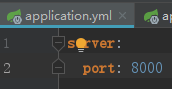
二、yaml文件格式语法
1.大小写敏感
2.属性: 值 之间必须有空格
3.值如果是字符串 默认不用加引号。加单引号转义字符功能失效原样输出,加双引号转义字符有转义功能,
4.对象
(1)
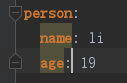
(2)或者

5.
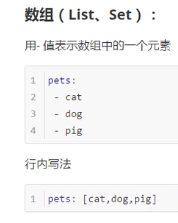
三、调用yaml
1.pom.xml添加
        <dependency>

            <groupId>org.springframework.boot</groupId>

            <artifactId>spring-boot-configuration-processor</artifactId>

            <optional>true</optional>

        </dependency>
2.

package com.example.demo.bean;

import org.springframework.boot.context.properties.ConfigurationProperties;

import org.springframework.stereotype.Component;

@Component

@ConfigurationProperties(prefix = "person")

public class Person {

    private String name;

    private int age;

    public String getName() {

        return name;

    }

    public void setName(String username) {

        this.name = username;

    }

}
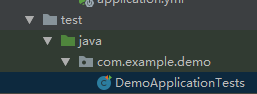
单元测试
package com.example.demo;

import com.example.demo.bean.Person;

import org.junit.Test;

import org.junit.runner.RunWith;

import org.springframework.beans.factory.annotation.Autowired;

import org.springframework.boot.test.context.SpringBootTest;

import org.springframework.test.context.junit4.SpringRunner;

@RunWith(SpringRunner.class)

@SpringBootTest

public class DemoApplicationTests {

    @Autowired //

    Person person;

    @Test

    public void contextLoads() {

        System.out.println(person.getName());

    }

}
测试文件运行

四、application.properties配置
书写方式
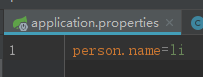
运行同理
注意如果是有中文
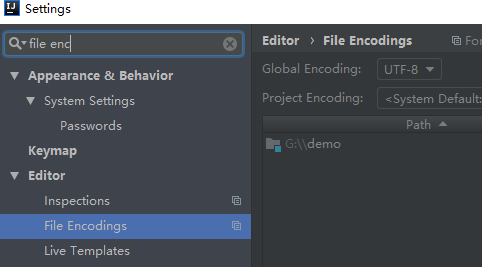
properties文件 需要转成ascii

六、用value注解方式单个读取配置文件


七、 加载非全局配置文件
创建一个
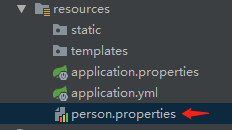
@Component

@ConfigurationProperties(prefix = "person")

@PropertySource(value = {"classpath:person.properties"})

public class Person {

    private String name;

    public String getName() {

        return name;

    }

    public void setName(String username) {

        this.name = username;

    }

}
八、导入Spring 配置文件
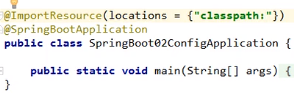
九、占位符
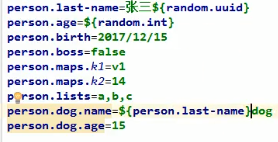
十、激活指定profile
快速切换开发、测试、生产的配置环境
1. properties的激活
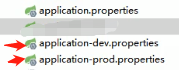
一个开发环境,一个生产环境的配置文件
在application.properties 中激活开发环境的配置

2.yml的激活

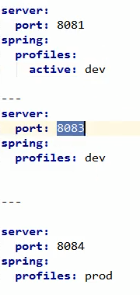
3.命令行方式激活


4.虚拟机参数

十一、配置顺序
1.
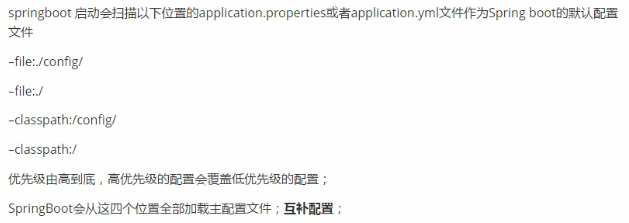
2.外部加载配置

(2)SpringBoot 配置的更多相关文章
- SpringBoot配置属性之Server
SpringBoot配置属性系列 SpringBoot配置属性之MVC SpringBoot配置属性之Server SpringBoot配置属性之DataSource SpringBoot配置属性之N ...
- SpringBoot基础系列-SpringBoot配置
原创作品,可以转载,但是请标注出处地址:https://www.cnblogs.com/V1haoge/p/9990680.html SpringBoot基础系列-SpringBoot配置 概述 属性 ...
- springboot上传文件 & 不配置虚拟路径访问服务器图片 & springboot配置日期的格式化方式 & Springboot配置日期转换器
1. Springboot上传文件 springboot的文件上传不用配置拦截器,其上传方法与SpringMVC一样 @RequestMapping("/uploadPicture&q ...
- springboot配置Druid数据源
springboot配置druid数据源 Author:SimpleWu springboot整合篇 前言 对于数据访问层,无论是Sql还是NoSql,SpringBoot默认采用整合SpringDa ...
- springboot配置详解
springboot配置详解 Author:SimpleWu properteis文件属性参考大全 springboot默认加载配置 SpringBoot使用两种全局的配置文件,全局配置文件可以对一些 ...
- SpringBoot 配置 Servlet、Filter、Listener
SpringBoot 配置 Servlet.Filter.Listener 在SpringBoot应用中,嵌入式的 Servlet 3.0+ 容器不会直接使用 ServletContainerInit ...
- SpringBoot 配置静态资源映射
SpringBoot 配置静态资源映射 (嵌入式servlet容器)先决知识 request.getSession().getServletContext().getRealPath("/& ...
- springboot配置server相关配置&整合模板引擎Freemarker、thymeleaf&thymeleaf基本用法&thymeleaf 获取项目路径 contextPath 与取session中信息
1.Springboot配置server相关配置(包括默认tomcat的相关配置) 下面的配置也都是模板,需要的时候在application.properties配置即可 ############## ...
- springboot配置cxf
1.引入两个需要的jar <dependency> <groupId>org.apache.cxf</groupId> <artifactId>cxf- ...
- SpringBoot配置(2) slf4j&logback
SpringBoot配置(2) slf4j&logback 一.SpringBoot的日志使用 全局常规设置(格式.路径.级别) SpringBoot能自动适配所有的日志,而且底层使用slf4 ...
随机推荐
- delphi数据库进行增加操作时,怎么判断插入的这个值是否已经存在?
//增 procedure TForm1.btnAddClick(Sender: TObject); begin ADOQuery1.Close; ADOQuery1.SQL.Clear; ADOQu ...
- 用 xampp 在ubuntu 下配置php 运行环境 lampp
在linux下搭建php的运行环境,可以分别安装apache.mysql .php .phpmyadmin,也可以安装xampp(apache.mysql .php .phpmyadmin)集成包 ...
- [洛谷P1317]低洼地
题目大意:一组数,分别表示地平线的高度变化.高度值为整数,相邻高度用直线连接.找出并统计有多少个可能积水的低洼地?(首尾都为0) 题解:求出其中都多少个不严格下降子段和不严格上升子段所夹的位置,即为答 ...
- Codeforces Round #350 (Div. 2) D1
D1. Magic Powder - 1 time limit per test 1 second memory limit per test 256 megabytes input standard ...
- [codechef MEXDIV]Mex division
题目链接:https://vjudge.net/contest/171650#problem/I 直接用set+dp水过去了... /* 设dp[i]表示前i个做划分满足条件的方案数 有一个显然的转移 ...
- maven与gradle的对比
Java世界中主要有三大构建工具:Ant.Maven和Gradle.经过几年的发展,Ant几乎销声匿迹.Maven也日薄西山,而Gradle的发展则如日中天.笔者有幸见证了Maven的没落和Gradl ...
- 线段树+矩阵快速幂 Codeforces Round #373 (Div. 2) E
http://codeforces.com/contest/719/problem/E 题目大意:给你一串数组a,a[i]表示第i个斐波那契数列,有如下操作 ①对[l,r]区间+一个val ②求出[l ...
- loadView不需要调用super view,原因:loadView方法的作用就是自定义view.[super loadView]会耗性能.
https://www.evernote.com/shard/s227/sh/423fd81d-ab1c-4e6c-997d-39359472a4a5/f220ade8bd9be149ad70 ...
- [ CodeVS冲杯之路 ] P2456
不充钱,你怎么AC? 题目:http://codevs.cn/problem/2456/ 用贪心的思想,木材当然要尽量分成多的木板,而大的木材能够分成大木板,但是小的木材不一定能够分成大的木板,所以木 ...
- django unresolved template
参考:https://stackoverflow.com/questions/8487410/pycharm-django-1-3-static-url-in-templates-unresolved ...