
【原创】Sagger使用
Swagger使用
1. Spring MVC配置文件中的配置
<mvc:annotation-driven/>
<context:component-scan base-package="com.demo"/>
设置使用注解的类所在的jar包,只加载controller类
<mvc:default-servlet-handler />
使用 Swagger Restful API文档时,添加此注解
2. maven依赖
|
<properties> <spring.version>4.2.6.RELEASE</spring.version> <servlet.version>3.1.0</servlet.version> <swagger2.version>2.5.0</swagger2.version> </properties> <dependencies> <!-- swagger开始 --> <dependency> <groupId>io.springfox</groupId> <artifactId>springfox-swagger2</artifactId> <version>${swagger2.version}</version> </dependency> <dependency> <groupId>io.springfox</groupId> <artifactId>springfox-swagger-ui</artifactId> <version>${swagger2.version}</version> </dependency> <dependency> <groupId>io.springfox</groupId> <artifactId>springfox-staticdocs</artifactId> <version>${swagger2.version}</version> </dependency> <!-- swagger结束 --> <!--spring--> <dependency> <groupId>org.springframework</groupId> <artifactId>spring-core</artifactId> <version>${spring.version}</version> </dependency> <dependency> <groupId>org.springframework</groupId> <artifactId>spring-web</artifactId> <version>${spring.version}</version> </dependency> <dependency> <groupId>org.springframework</groupId> <artifactId>spring-webmvc</artifactId> <version>${spring.version}</version> </dependency> <dependency> <groupId>org.springframework</groupId> <artifactId>spring-beans</artifactId> <version>${spring.version}</version> </dependency> <dependency> <groupId>org.springframework</groupId> <artifactId>spring-context</artifactId> <version>${spring.version}</version> </dependency> <dependency> <groupId>org.springframework</groupId> <artifactId>spring-context-support</artifactId> <version>${spring.version}</version> </dependency> <!--web--> <dependency> <groupId>javax.servlet</groupId> <artifactId>javax.servlet-api</artifactId> <version>${servlet.version}</version> <scope>provided</scope> </dependency> </dependencies> |
3. Swagger注解配置
|
@RequestMapping(value = "/add", method = RequestMethod.POST) @ApiOperation(value = "添加用户", notes = "增加用户") public Result<UserVo> add(@ApiParam(name = "userName",value = "用户昵称",required = true)@RequestParam(name = "userName",required = true)String userName, @ApiParam(name = "mobile",value = "手机",required = true)@RequestParam(name = "mobile",required = true)String mobile, @ApiParam(required = true, name = "email", value = "邮箱") @RequestParam(name = "email", required = true) String email ) { UserVo userVo=new UserVo(); userVo.setUserId(System.currentTimeMillis()); userVo.setUserName(userName); return new Result<UserVo>(Constants.SUCCESS,Constants.MSG_SUCCESS,userVo); } |
|
@ApiOperation(value = "创建用户", notes = "根据UserVo对象创建用户") @RequestMapping(value = "/create", method = RequestMethod.POST) public String postUser(@ApiParam(required = true, name = "userVo", value = "实体UserVo") @RequestBody UserVo userVo) { return "success"; } |
|
@RequestMapping(value = "/getUser", method = RequestMethod.GET) @ApiOperation(value = "获取用户", notes = "根据UserVo获取用户") @ResponseBody public Result<UserVo> getUser() { UserVo userVo=new UserVo(); userVo.setUserId(System.currentTimeMillis()); userVo.setUserName("UserName"); return new Result<UserVo>(Constants.SUCCESS,Constants.MSG_SUCCESS,userVo); } |
SwaggerConfig类编写示例
|
@Configuration @EnableSwagger2 public class SwaggerConfig { @Bean public Docket userApi() { return new Docket(DocumentationType.SWAGGER_2) .groupName("用户") .select() // 选择那些路径和api会生成document .apis(RequestHandlerSelectors.basePackage("com.zyx.controller")) .paths(PathSelectors.any()) // 对所有路径进行监控 .build() .apiInfo(userInfo()); } private ApiInfo userInfo() { ApiInfo apiInfo = new ApiInfo("用户相关接口",//大标题 "用户有关的接口,包括增加删除用户",//小标题 "0.1",//版本 "杭州", new Contact("zyx", "", ""),// 作者 "swagger url",//链接显示文字 ""//网站链接 ); return apiInfo; } @Bean public Docket otherApi() { return new Docket(DocumentationType.SWAGGER_2) .groupName("其它") .select() // 选择那些路径和api会生成document .apis(RequestHandlerSelectors.basePackage("com.zyx.controller")) .paths(PathSelectors.any()) // 对所有路径进行监控 .build() .apiInfo(otherInfo()); } private ApiInfo otherInfo() { ApiInfo apiInfo = new ApiInfo("其它相关接口",//大标题 "其它有关的接口,包括增加删除其它",//小标题 "0.1",//版本 "杭州", new Contact("zyx_other", "", ""),// 作者 "点击",//链接显示文字 ""//网站链接 ); return apiInfo; } } |
注:将SwaggerConfig在Spring注入管理 <bean class="com.demo.config.SwaggerConfig"/>
|
@ApiModel(value = "用户信息") public class UserVo { @ApiModelProperty(value = "用户id", required = true) private long userId; @ApiModelProperty(value = "昵称", required = true) private String userName; public long getUserId() { return userId; } public void setUserId(long userId) { this.userId = userId; } public String getUserName() { return userName; } public void setUserName(String userName) { this.userName = userName; } } |
4. 界面展示
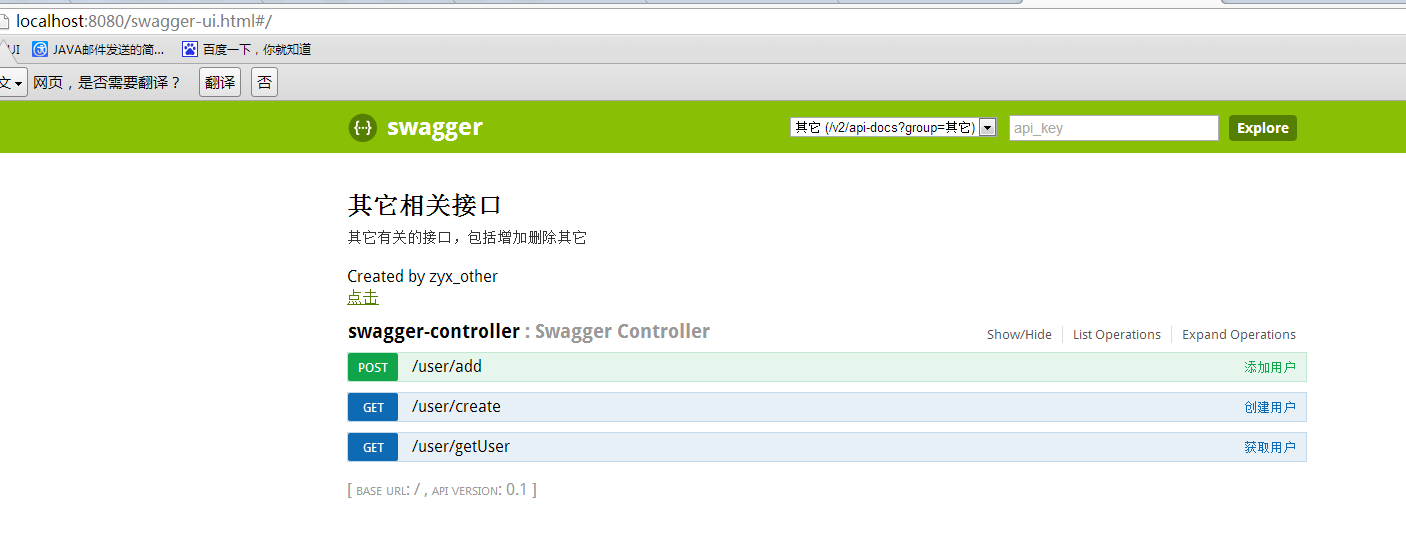


在浏览器输入地址:http://localhost:8080/swagger-ui.html
【原创】Sagger使用的更多相关文章
- 【原创分享·支付宝支付】HBuilder打包APP调用支付宝客户端支付
前言 最近有点空余时间,所以,就研究了一下APP支付.前面很早就搞完APP的微信支付了,但是由于时间上和应用上的情况,支付宝一直没空去研究.然后等我空了的时候,发现支付宝居然升级了支付逻辑,虽然目前还 ...
- 【原创分享·微信支付】C# MVC 微信支付教程系列之现金红包
微信支付教程系列之现金红包 最近最弄这个微信支付的功能,然后扫码.公众号支付,这些都做了,闲着无聊,就看了看微信支付的其他功能,发现还有一个叫“现金红包”的玩意,想 ...
- 【原创分享·微信支付】 C# MVC 微信支付教程系列之扫码支付
微信支付教程系列之扫码支付 今天,我们来一起探讨一下这个微信扫码支付.何为扫码支付呢?这里面,扫的码就是二维码了,就是我们经常扫一扫的那种二维码图片,例如,我们自己添 ...
- 【原创分享·微信支付】 C# MVC 微信支付教程系列之公众号支付
微信支付教程系列之公众号支付 今天,我们接着讲微信支付的系列教程,前面,我们讲了这个微信红包和扫码支付.现在,我们讲讲这个公众号支付.公众号支付的应用环境常见的用户通过公众号,然后再通 ...
- 【原创分享·微信支付】C# MVC 微信支付之微信模板消息推送
微信支付之微信模板消息推送 今天我要跟大家分享的是“模板消息”的推送,这玩意呢,你说用途嘛,那还是真真的牛逼呐.原因在哪?就是因为它是依赖微信生存的呀,所以他能不 ...
- [原创]java使用JDBC向MySQL数据库批次插入10W条数据测试效率
使用JDBC连接MySQL数据库进行数据插入的时候,特别是大批量数据连续插入(100000),如何提高效率呢?在JDBC编程接口中Statement 有两个方法特别值得注意:通过使用addBatch( ...
- GJM : C#设计模式汇总整理——导航 【原创】
感谢您的阅读.喜欢的.有用的就请大哥大嫂们高抬贵手"推荐一下"吧!你的精神支持是博主强大的写作动力以及转载收藏动力.欢迎转载! 版权声明:本文原创发表于 [请点击连接前往] ,未经 ...
- 信息安全-5:RSA算法详解(已编程实现)[原创]
转发注明出处:http://www.cnblogs.com/0zcl/p/6120389.html 背景介绍 1976年以前,所有的加密方法都是同一种模式: (1)甲方选择某一种加密规则,对信息进行加 ...
- Atitit.你这些项目不都是模板吗?不是原创 集成和整合的方式大总结
Atitit.你这些项目不都是模板吗?不是原创 集成和整合的方式大总结 1.1. 乔布斯的名言:创新即整合(Creativity is just connecting things).1 1.2. ...
随机推荐
- window.location.href 跳转无历史记录
需求:从页面a单点登录跳至页面b,在页面b里做判断符合条件后location.href至c页面 问题:在页面c中点击返回按钮页面回到了a,正常情况下应该回到页面b 原因:在当前页面的 onload 事 ...
- 第13届景驰-埃森哲杯广东工业大学ACM程序设计大赛--D-psd面试
链接:https://www.nowcoder.com/acm/contest/90/D 来源:牛客网 1.题目描述 掌握未来命运的女神 psd 师兄在拿了朝田诗乃的 buff 后决定去实习. 埃森哲 ...
- vue 数组数据更新或者对象数据更新 但是页面没有同步问题
1,使用set函数来设置数据. 2,你可以通过 $forceUpdate 来做这件事.在数据赋值之后 就直接调用 this.$forceUpdata()
- Python自动化运维——系统性能信息模块
Infi-chu: http://www.cnblogs.com/Infi-chu/ 模块:psutil psutil是一个跨平台库,可以很轻松的为我们实现获取系统运行的进程和资源利用率等信息. 功能 ...
- Python3 模块、包调用&路径
''' 以下代码均为讲解,不能实际操作 ''' ''' 博客园 Infi_chu ''' ''' 模块的优点: 1.高可维护性 2.可以大大减少编写的代码量 模块一共有三种: 1.Python标准库 ...
- Hadoop学习(一) Hadoop是什么
Hadoop是什么? Hadoop是一个开发和运行处理大规模数据的软件平台,是Appach的一个用Java语言实现开源软件框架,实现在大量计算机组成的集群中对海量数据进行分布式计算. Hadoop框架 ...
- C#的委托Delegate
一.委托基础 1.什么是委托 委托(Delegate) 是存有对某个方法的引用的一种引用类型变量,用关键字delegate申明,实现相同返回值和参数的函数的动态调用,提供了对方法的抽象. 委托(Del ...
- C++11中rvalue references的使用
Rvalue references are a feature of C++ that was added with the C++11 standard. The syntax of an rval ...
- P1016 旅行家的预算
P1016 旅行家的预算 题目描述 一个旅行家想驾驶汽车以最少的费用从一个城市到另一个城市(假设出发时油箱是空的).给定两个城市之间的距离D1.汽车油箱的容量C(以升为单位).每升汽油能行驶的距离D2 ...
- python 字典(dict)按键和值排序
python 字典(dict)的特点就是无序的,按照键(key)来提取相应值(value),如果我们需要字典按值排序的话,那可以用下面的方法来进行: 1 下面的是按照value的值从大到小的顺序来排序 ...