
ET5.0-添加心跳功能
ET5.0 demo中添加心跳功能
一、服务端
1:添加文件夹,在Model/Module文件夹下新建文件夹 Hearbeat
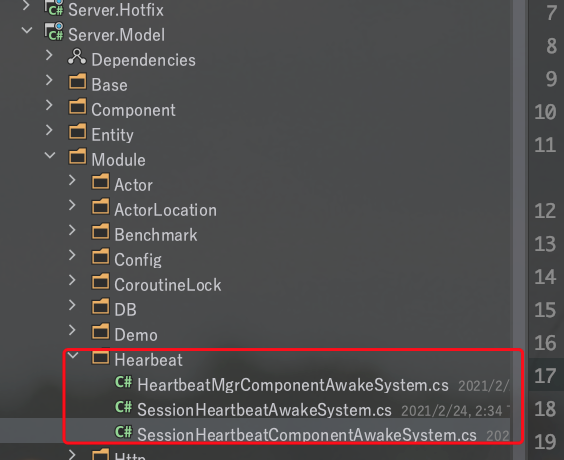
2:添加心跳配置文件 SessionHeartbeatComponentAwakeSystem
namespace ETModel

{

    [ObjectSystem]

    public class SessionHeartbeatComponentAwakeSystem : AwakeSystem<SessionHeartbeatComponent>

    {

        public override void Awake(SessionHeartbeatComponent self)

        {

            HeartbeatMgrComponent.Ins.AddSessionHeartbeat(self);

        }

    }

    public class SessionHeartbeatComponent: Component

    {

        public const int DestroySeesiontTime = 40;//多长 时间 没收到客户端消息 就直接销毁

        public const int DestroySeesiontSecondTotalNum = 10;//一秒内收到多少条消息 就直接销毁

        public int SecondTotalMessageNum = 0;//一秒内 累计收到的消息条数

        public int UpReceiveMessageDistance = 0;//距离上次收到消息 有多长时间

        //销毁Session

        public void DisposeSession()

        {

            Entity.Dispose();

        }

        public override void Dispose()

        {

            HeartbeatMgrComponent.Ins.RemoveSessionHeartbeat(InstanceId);//必须在 base.Dispose(); 前面调 因为 Dispose会吧id置为0

            base.Dispose();

            SecondTotalMessageNum = 0;//一秒内 累计收到的消息条数

            UpReceiveMessageDistance = 0;//距离上次收到消息 有多长时间

        }

    }

}
3、添加心跳检测组件 HeartbeatMgrComponentAwakeSystem
using System.Collections.Generic;

namespace ETModel

{

    [ObjectSystem]

    public class HeartbeatMgrComponentAwakeSystem: AwakeSystem<HeartbeatMgrComponent>

    {

        // public static List<SessionHeartbeatComponent> _DestroyHeartbeatComponents = new List<SessionHeartbeatComponent>();

        public override void Awake(HeartbeatMgrComponent self)

        {

            HeartbeatMgrComponent.Ins = self;

            self.Awake();

        }

    }

    public class HeartbeatMgrComponent: Component

    {

        public List<long> SessionHeartbeatIds = new List<long>();

        public Dictionary<long, SessionHeartbeatComponent> SessionHeartbeatDic = new Dictionary<long, SessionHeartbeatComponent>();

        public static HeartbeatMgrComponent Ins { get; set; }

        public async void Awake()

        {

            while (true)

            {

                await Game.Scene.GetComponent<TimerComponent>().WaitAsync(1000);

                for (int i = 0; i < SessionHeartbeatIds.Count; i++)

                {

                    //一秒内收到消息的数量

                    SessionHeartbeatDic[SessionHeartbeatIds[i]].SecondTotalMessageNum = 0;

                    SessionHeartbeatDic[SessionHeartbeatIds[i]].UpReceiveMessageDistance++;

                    if (SessionHeartbeatDic[SessionHeartbeatIds[i]].UpReceiveMessageDistance>=

                        SessionHeartbeatComponent.DestroySeesiontTime)

                    {

                        SessionHeartbeatDic[SessionHeartbeatIds[i]].DisposeSession();//如果上次收到时间 过长 就直接销毁DisposeSession

                    }

                }

            }

        }

        /// <summary>

        /// 添加SessionHeartbeat 组件

        /// </summary>

        /// <param name="sessionHeartbeat"></param>

        public void AddSessionHeartbeat(SessionHeartbeatComponent sessionHeartbeat)

        {

            SessionHeartbeatDic[sessionHeartbeat.InstanceId] = sessionHeartbeat;

            SessionHeartbeatIds.Add(sessionHeartbeat.InstanceId);

        }

        /// <summary>

        /// 移除组件

        /// </summary>

        /// <param name="id"></param>

        public void RemoveSessionHeartbeat(long id)

        {

            if (SessionHeartbeatDic.ContainsKey(id))

            {

                SessionHeartbeatDic.Remove(id);

                SessionHeartbeatIds.Remove(id);

            }

        }

    }

}
4、添加Session挂载心跳组件 SessionHeartbeatAwakeSystem
namespace ETModel

{

    [ObjectSystem]

    public class SessionHeartbeatAwakeSystem:AwakeSystem<Session, AChannel>

    {

        public override void Awake(Session self, AChannel a)

        {

            if (self.Network.AppType==AppType.None)//不是任何APPType 就是客户端

            {

                self.AddComponent<SessionHeartbeatComponent>();

            }

        }

    }

}
5、Program.cs 文件在 AppType.AllServer中挂载心跳组件
//与客户端有连接都要加

Game.Scene.AddComponent<HeartbeatMgrComponent>();//心跳管理组件 验证服 也是要加的
6、处理心跳消息,在OuterMessage.proto 添加
//心跳消息

message C2G_Heartbeat // IMessage

{

    int32 RpcId = 90;

}
在 OuterMessageDispatcher 文件中添加心跳逻辑处理
using ETModel;

namespace ETHotfix

{

    public class OuterMessageDispatcher: IMessageDispatcher

    {

        public void Dispatch(Session session, ushort opcode, object message)

        {

            DispatchAsync(session, opcode, message).Coroutine();

        }

        public async ETVoid DispatchAsync(Session session, ushort opcode, object message)

        {

            /********* 添加心跳修改 **************/

            SessionHeartbeatComponent sessionHeartbeatComponent = session.GetComponent<SessionHeartbeatComponent>();

            if (sessionHeartbeatComponent == null)

            {

                Log.Info("---not heartbeat compinent---");

                session.Dispose();//心跳组件 没有 直接销毁

                return;

            }

            sessionHeartbeatComponent.UpReceiveMessageDistance = 0;//重置上次收到消息的时间

            //如果收到 一秒收到的消息 大于规定的消息 就认定是DOSS攻击 直接销毁

            if (++sessionHeartbeatComponent.SecondTotalMessageNum >=

                SessionHeartbeatComponent.DestroySeesiontSecondTotalNum)

            {

                //断开连接

                sessionHeartbeatComponent.DisposeSession();

                //直接封号

                //  UserHelp.StopSealOrRelieve(sessionUserComponent.UserId,true,"DOSS攻击封号"); //不要封号容易误封

                return;

            }

            /********* 添加心跳修改 **************/

            // 根据消息接口判断是不是Actor消息,不同的接口做不同的处理

            switch (message)

            {

                case IActorLocationRequest actorLocationRequest: // gate session收到actor rpc消息,先向actor 发送rpc请求,再将请求结果返回客户端

                {

                    long unitId = session.GetComponent<SessionPlayerComponent>().Player.UnitId;

                    ActorLocationSender actorLocationSender = await Game.Scene.GetComponent<ActorLocationSenderComponent>().Get(unitId);

                    int rpcId = actorLocationRequest.RpcId; // 这里要保存客户端的rpcId

                    long instanceId = session.InstanceId;

                    IResponse response = await actorLocationSender.Call(actorLocationRequest);

                    response.RpcId = rpcId;

                    // session可能已经断开了,所以这里需要判断

                    if (session.InstanceId == instanceId)

                    {

                        session.Reply(response);

                    }

                    break;

                }

                case IActorLocationMessage actorLocationMessage:

                {

                    long unitId = session.GetComponent<SessionPlayerComponent>().Player.UnitId;

                    ActorLocationSender actorLocationSender = await Game.Scene.GetComponent<ActorLocationSenderComponent>().Get(unitId);

                    actorLocationSender.Send(actorLocationMessage).Coroutine();

                    break;

                }

                case IActorRequest actorRequest:  // 分发IActorRequest消息,目前没有用到,需要的自己添加

                {

                    break;

                }

                case IActorMessage actorMessage:  // 分发IActorMessage消息,目前没有用到,需要的自己添加

                {

                    break;

                }

                case C2G_Heartbeat c2GHeartbeat: //单独处理心跳

                {

                    //心跳不做处理

                    Log.Info("--收到心跳--");

                    break;

                }

                default:

                {

                    // 非Actor消息

                    Game.Scene.GetComponent<MessageDispatcherComponent>().Handle(session, new MessageInfo(opcode, message));

                    break;

                }

            }

        }

    }

}
7、重新编译
二、客户端
1、在客户端 Assets/Hotfix/Module/Demo新建文件 HeartbeatComponent
using ETModel;

namespace ETHotfix

{

    [ObjectSystem]

    public class HeartbeatComponentAwakeSystem: AwakeSystem<HeartbeatComponent>

    {

        public override void Awake(HeartbeatComponent self)

        {

           self.Awake();

        }

        public async void DetectionNetworkType(Session session)

        {

            // while (!session.IsDisposed)

            // {

            //     await ETModel.Game.Scene.GetComponent<TimerComponent>().WaitAsync(1000);

            //     //如果当前是无网络状态 发送连接失败的消息

            //     if (NetworkType.None == SdkMgr.Ins.GetNetworkInfo())

            //     {

            //         session.session.Error = (int) SocketError.NetworkDown;

            //         session.Dispose();

            //     }

            // }

        }

    }

    /// <summary>

    /// 心跳组件

    /// </summary>

    public class HeartbeatComponent: Component

    {

        public static C2G_Heartbeat heartBeat = new C2G_Heartbeat();

        public async void Awake()

        {

            //每间隔10秒发一条 心跳消息

            // DetectionNetworkType(session);//检测网络连接状态

            Log.Debug("--status:" + !IsDisposed);

            while (!IsDisposed)

            {

                await ETModel.Game.Scene.GetComponent<TimerComponent>().WaitAsync(10000);

                Log.Debug("--ping---" + ETModel.SessionComponent.Instance.Session.IsDisposed);

                if (ETModel.SessionComponent.Instance.Session.IsDisposed)

                {

                    Log.Error("--服务器连接断开-");

                }

                ETModel.SessionComponent.Instance.Session.Send(heartBeat);

            }

        }

    }

}
运行:
1、重新编译服务器,并运行。不要移动小人,停止40秒(服务端配置的是40秒)左右,服务器会断开客户端。
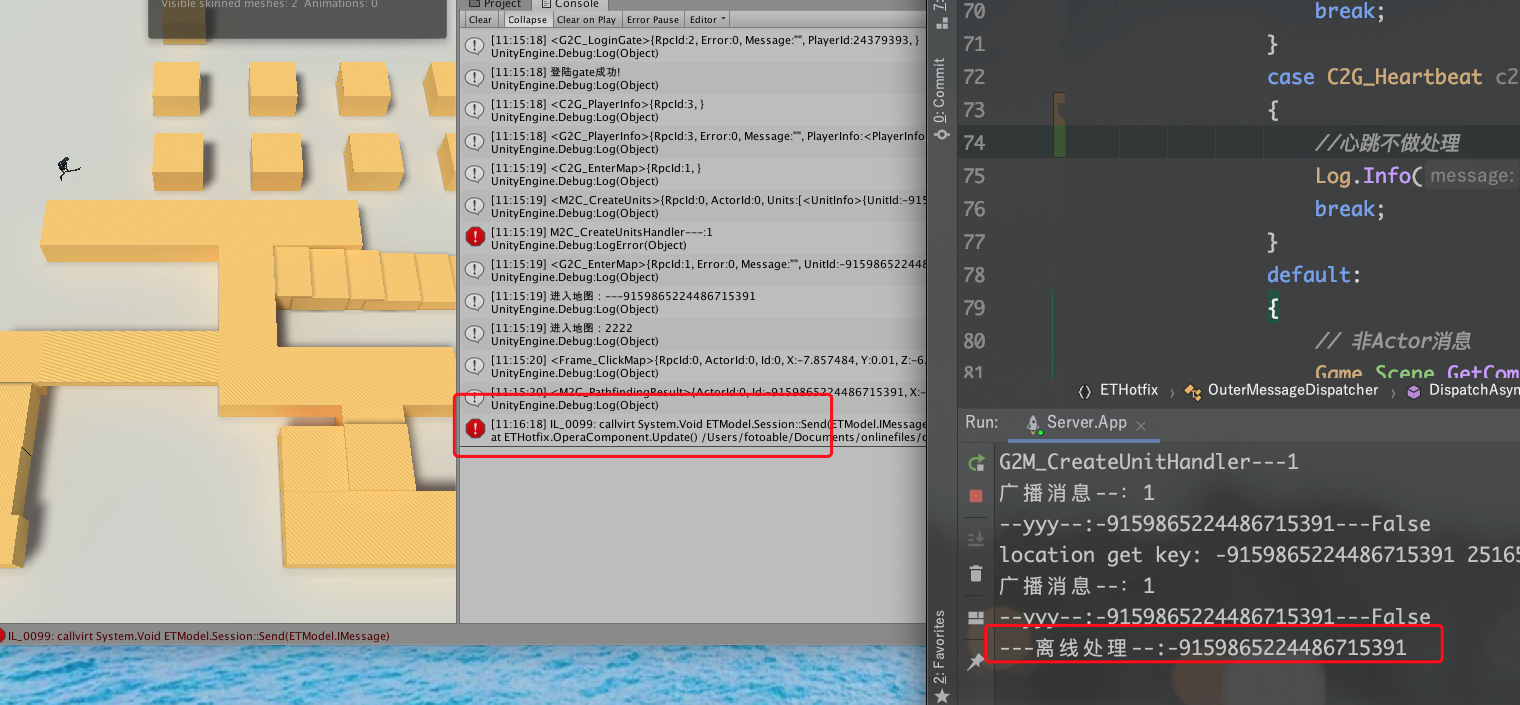
2、修改客户端,挂载心跳组件发送心跳
我是在登录gate服务器成功时添加的组件,文件LoginHelper.cs中添加组件
   //挂载心跳组建

                Game.Scene.GetComponent<SessionComponent>().Session.AddComponent<HeartbeatComponent>();

3、再次运行,不会断开客户端。服务器每隔10秒收到心跳消息。
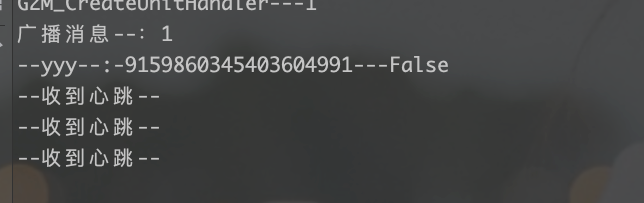
注意:这里只处理了服务端检测心跳,去掉无心跳的链接。没有处理客户端的连接状态。可以将心跳消息修改为 IRequest,通过Call方式发生心跳。

心跳组件参考: 五星麻将的心跳组件。
ET5.0-添加心跳功能的更多相关文章
- layui-treeTable v2.0添加搜索功能
layui-treeTable 添加搜索功能 在树形表格头部加一个input框: <div class="layui-inline"> <input class= ...
- 创建ASP.NET Core MVC应用程序(5)-添加查询功能 & 新字段
创建ASP.NET Core MVC应用程序(5)-添加查询功能 & 新字段 添加查询功能 本文将实现通过Name查询用户信息. 首先更新GetAll方法以启用查询: public async ...
- 033医疗项目-模块三:药品供应商目录模块——供货商药品目录t添加查询功能----------Dao层和Service层和Action层和调试
什么叫做供货商药品目录t添加查询功能?就是说我们前面的博客里面不是说供货商登录后看到了自己供应的药品了么如下: 现在供货商想要往里面添加别的药品,那么这个药品的来源就是卫生局提供的那个Ypxx表(药品 ...
- (三)开始在OJ上添加签到功能
在了解完OJ文件下的各个文件夹的主要作用后,我们开始往里面添加东西(其实只要知道各文件夹是干什么的后,添加东西也变得非常简单了) 一 在数据库中添加对应功能的字段. 我们这个学期才刚开数据库这门课,所 ...
- 给destoon商城的列表中和首页添加购物车功能
如何给destoon商城的列表中和首页添加购物车功能? 目前加入购物车的功能只存在商城的详细页面里,有时候我们需要批量购买的时候,希望在列表页就能够使用这个加入购物车的功能. 修改步骤见下: 例如在商 ...
- lucene3.6笔记添加搜索功能
lucene为程序添加搜索功能,此功能基于已创建好的文档的索引之上.这里我已经为一些文档建立了索引,并保存到硬盘上.下面开始针对这些索引,添加搜索功能. 1.简单的TermQuery搜索 Java代码 ...
- 在VC中,为图片按钮添加一些功能提示(转)
在VC中,也常常为一些图片按钮添加一些功能提示.下面讲解实现过程:该功能的实现主要是用CToolTipCtrl类.该类在VC msdn中有详细说明.首先在对话框的头文件中加入初始化语句:public ...
- Swift - 给表格添加编辑功能(删除,插入)
1,下面的样例是给表格UITableView添加编辑功能: (1)给表格添加长按功能,长按后表格进入编辑状态 (2)在编辑状态下,第一个分组处于删除状态,第二个分组处于插入状态 (3)点击删除图标,删 ...
- 【百度地图API】情人节求爱大作战——添加标注功能
原文:[百度地图API]情人节求爱大作战--添加标注功能 任务描述: 2月2日是除夕,2月14立马来!即将到来的情人节,你想送TA一份什么礼物呢? 不如,在你们居住的地方,画个大大的桃心,表达你对TA ...
- JS实现为控件添加倒计时功能
一.概述 在有些报表需求中,需要为控件添加倒计时功能,限制到某一个时间点后能进行一项操作或不能进行某项操作,比如查询,导出功能等等,又需要人性化地显示还有多少时间,即倒计时功能,比如下图中我们限制这个 ...
随机推荐
- MySQL-对Change Buffer的理解
Change Buffer的处理过程 对非唯一的普通索引的新增或更新操作,如果索引B+树的需要新增或更新的数据页不在内存中,则直接更新change buffer,等到后面需要使用这个数据页(真正读到内 ...
- 【SpringCloud】SpringCloud Bus消息总线
SpringCloud Bus消息总线 概述 上一讲解的加深和扩充,一言以蔽之 分布式自动刷新配置功能 Spring Cloud Bus配合Spring Cloud Config使用可以实现配置的动态 ...
- 【C语言】转义字符及其对应英文
对于很多人来说,用转义字符都是熟能生巧,而不清楚为什么是那样的转义字符,所以我在这列了一个表,翻译了其对应的英文. 转义字符分为一般转义字符.八进制转义字符.十六进制转义字符. 一般转义字符:\0. ...
- Kratos 下载与安装
前置条件 请确保已经安装好 go git protoc 然后获取 kratos 工具 go get -u github.com/go-kratos/kratos/tool/kratos 验证是否安装成 ...
- C# 多项目打包时如何将项目引用转为包依赖
项目背景 最近开发一组类库,大约会有五六个项目.一个Core,加上若干面向不同产品的实现库,A/B/C/D...它们都依赖Core. 首先,我想统一版本号,这个容易,通过Directory.Build ...
- MySQL 中长事务可能会导致哪些问题?
MySQL 中长事务可能会导致哪些问题? 长事务是指那些执行时间较长.涉及多个操作且没有及时提交或回滚的事务.长事务在 MySQL 中可能引发一系列问题,尤其是在高并发的数据库环境中.以下是长事务可能 ...
- 如何对 Java 的垃圾回收进行调优?
如何对 Java 的垃圾回收进行调优? Java 垃圾回收的调优涉及多个方面,从选择合适的垃圾回收器到调整堆内存的大小.配置 GC 参数等,下面是一些常见的调优方法: 1. 选择合适的垃圾回收器 不同 ...
- 如何使用CSS和JS使网页页面灰掉
让页面灰掉,通常是通过CSS样式或JavaScript来实现.以下是一些具体的方法: 一.使用CSS样式 应用filter属性 CSS的filter属性可以用来对元素应用图形效果,如灰度.要将整个页面 ...
- CS及免杀
Strategic Cyber 责任有限公司发行了适用于 Windows.Linux 和 MacOS X 的 Cobalt Strike 软件包. 要安装 Cobalt Strike,只需将其存档解压 ...
- Navicat Premiun已经停止工作
与网易有道词典冲突.退出词典即可.