
games101_Homework1
本次作业的任务是填写一个旋转矩阵和一个透视投影矩阵。给定三维下三个 点 v0(2.0, 0.0, −2.0), v1(0.0, 2.0, −2.0), v2(−2.0, 0.0, −2.0), 你需要将这三个点的坐 标变换为屏幕坐标,并在屏幕上绘制出对应的线框三角形 (在代码框架中,我们 已经提供了 draw_triangle 函数,所以你只需要去构建变换矩阵即可)。简而言 之,我们需要进行模型、视图、投影、视口等变换来将三角形显示在屏幕上。在 提供的代码框架中,我们留下了模型变换和投影变换的部分给你去完成。
作业解答:
作业1:get_model_matrix(float rotation_angle): 逐个元素地构建模型变换矩 阵并返回该矩阵。在此函数中,你只需要实现三维中绕 z 轴旋转的变换矩阵, 而不用处理平移与缩放。该项只要求我们传入一个旋转角度然后返回一个旋转矩阵即可。(很简单)


Eigen::Matrix4f get_model_matrix(float rotation_angle)

{

    Eigen::Matrix4f model = Eigen::Matrix4f::Identity();

    // TODO: Implement this function

    // Create the model matrix for rotating the triangle around the Z axis.

    // Then return it.

    // Rz matrix is (cosa, -sina, 0, 0)(sina, cosa, 0, 0)(0, 0, 1, 0)(0, 0, 0, 1)

    Eigen::Matrix4f Rz;

    Rz << cos(rotation_angle / 180.0 * MY_PI), -sin(rotation_angle / 180.0 * MY_PI), 0, 0,

          sin(rotation_angle / 180.0 * MY_PI),  cos(rotation_angle / 180.0 * MY_PI), 0, 0,

          0, 0, 1, 0,

          0, 0, 0, 1;

    return Rz * model;

}
作业2:get_projection_matrix(float eye_fov, float aspect_ratio, float zNear, float zFar): 使用给定的参数逐个元素地构建透视投影矩阵并返回 该矩阵。该项要求通过已知条件写出投影矩阵,这个需要用到L4、L5中提到的知识,即MVP变换。
Eigen::Matrix4f get_projection_matrix(float eye_fov, float aspect_ratio,

                                      float zNear, float zFar)

{

    // Students will implement this function

    Eigen::Matrix4f projection = Eigen::Matrix4f::Identity();

    // TODO: Implement this function

    // Create the projection matrix for the given parameters.

    // Then return it.

    // Get t、r、l、b by eye_fov and aspect_ration

    float t = abs(zNear) * tanf(eye_fov / 2);     // tan需传入角度,tanf传入一个float弧度返回一个float,此处fov/2为弧度值

    float r = t * aspect_ratio;

    float l = -r;

    float b = -t;

    // Create the perspective projection matrix Mpo

    Eigen::Matrix4f Mpo = Eigen::Matrix4f::Identity();;

    Mpo << zNear, 0, 0, 0,

           0, zNear, 0, 0,

           0, 0, zNear + zFar, -(zFar * zFar),

           0, 0, 1, 0;

    // Create the orthographic projection matrix Mor

    Eigen::Matrix4f MorTran = Eigen::Matrix4f::Identity();    //Mor平移矩阵

    MorTran << 1, 0, 0, -((l + r) / 2),

               0, 1, 0, -((t + b) / 2),

               0, 0, 1, -((zNear + zFar) / 2),

               0, 0, 0, 1;

    Eigen::Matrix4f MorScal = Eigen::Matrix4f::Identity();    //Mor大小变换矩阵

    MorScal << 2 / (r - l), 0, 0, 0,                          //Notice: t\r\l\b need be float

               0, 2 / (t - b), 0, 0,

               0, 0, 2 / (zNear - zFar), 0,

               0, 0, 0, 1;

    projection = MorScal * MorTran * Mpo * projection;

    return projection;

}
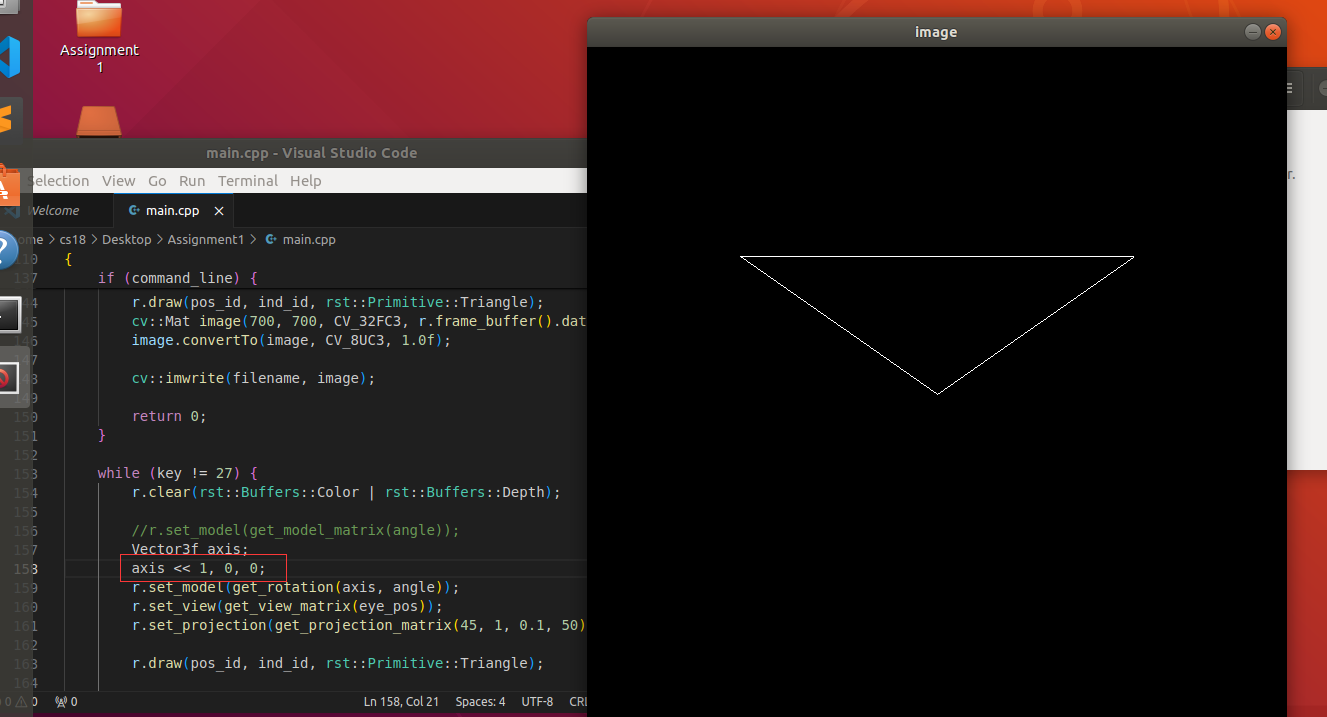
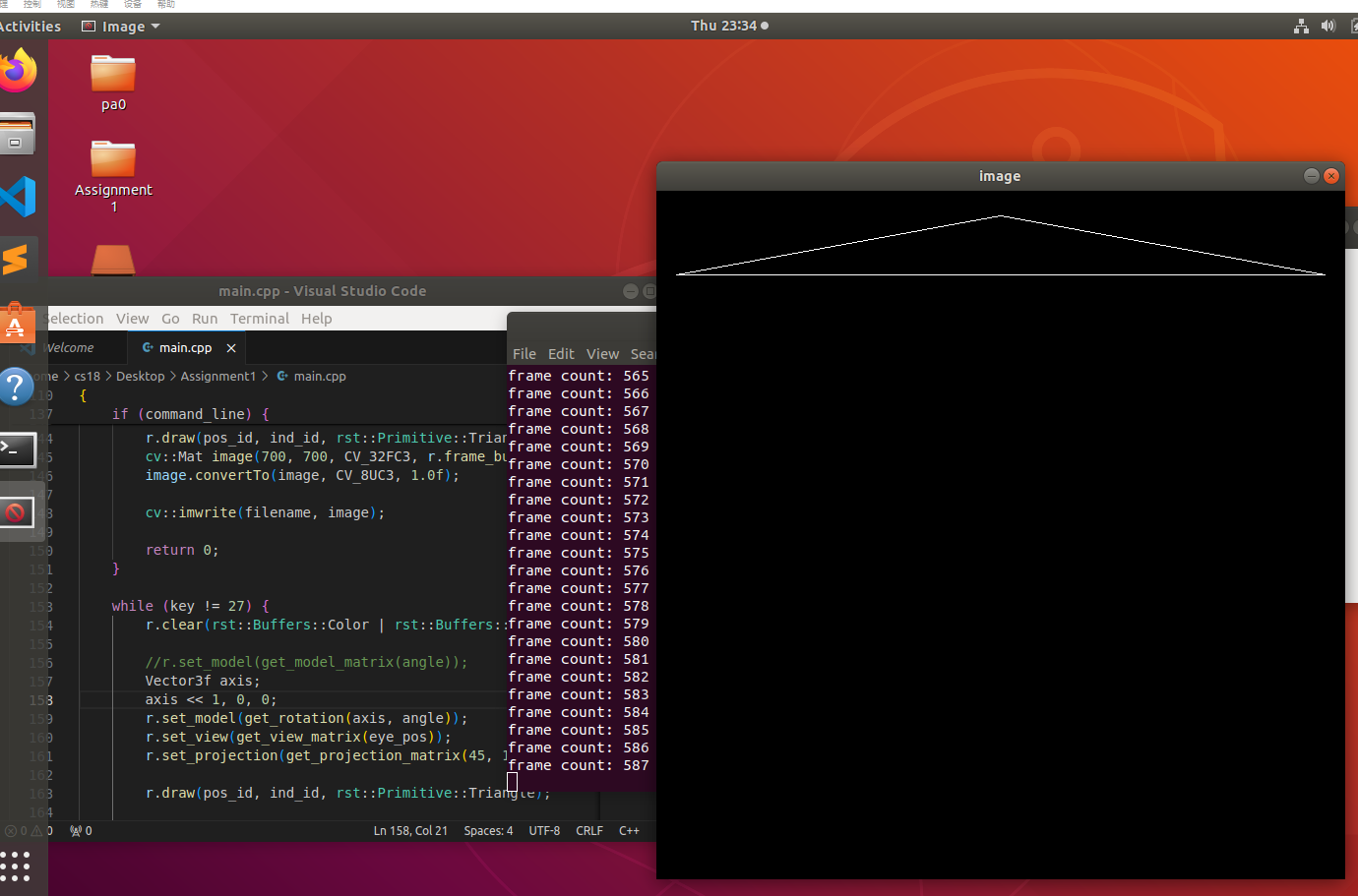
附加作业:在 main.cpp 中构造一个函数,该函数的作用是得到绕任意 过原点的轴的旋转变换矩阵。 Eigen::Matrix4f get_rotation(Vector3f axis, float angle) 。直接使用罗德里格斯公式返回一个旋转矩阵。
Eigen::Matrix4f get_rotation(Vector3f axis, float angle){

    //R1 = cosa * I

    Eigen::Matrix3f I = Eigen::Matrix3f::Identity();

    Eigen::Matrix3f R1 = cosf(angle) * I;

    //R2 = (1 - cosa) * n*nT 即 (1 - cosa)* (a[0], a[1], a[2])T * (a[0], a[1], a[2])

    Eigen::Matrix3f R2;

    R2 << axis[0] * axis[0], axis[0] * axis[1], axis[0] * axis[2],

          axis[1] * axis[0], axis[1] * axis[1], axis[1] * axis[2],

          axis[2] * axis[0], axis[2] * axis[1], axis[2] * axis[2];

    R2 = (1 - cosf(angle)) * R2;

    //R3 = sina * (0, -nz, ny)(nz, 0, -nx)(-ny, nx, 0)

    Eigen::Matrix3f R3;

    R3 << 0, -axis[2], axis[1],

          axis[2], 0, -axis[0],

          -axis[1], axis[0], 0;

    R3 = sinf(angle) * R3;

    Eigen::Matrix3f R = R1 + R2 + R3;

    Eigen::Matrix4f Res;

    Res << R(0,0), R(0,1), R(0,2), 0,

           R(1,0), R(1,1), R(1,2), 0,

           R(2,0), R(2,1), R(2,2), 0,

           0, 0, 0, 1;

    return Res;

}
这里贴出绕x轴旋转效果
随机推荐
- 微服务全链路跟踪:grpc集成jaeger
微服务全链路跟踪:grpc集成zipkin 微服务全链路跟踪:grpc集成jaeger 微服务全链路跟踪:springcloud集成jaeger 微服务全链路跟踪:jaeger集成istio,并兼容u ...
- 如何让你的C语言程序打印的log多一点色彩?(超级实用)
接着上一篇文章<由字节对齐引发的一场"血案" > 在平常的调试中,printf字体格式与颜色都是默认一致的. 如果可以根据log信息的重要程度,配以不同的颜色与格式,可 ...
- Lucas-Washburn + Cassie-Baxter
如果粉末间隙内壁的表面能随着润湿而降低,则液体会向管内上升渗入(\(\gamma_{\text{SL}}<\gamma_{\text{SO}}\)). 考虑液体上升的驱动力来自于附加压力,则由弯 ...
- win10无法访问共享文件夹win2008R2 错误代码0X80004005
错误代码0X80004005 无法访问共享计算机的解决方法 开始->运行(快捷键"win+R"),输入"regedit"后回车,打开注册表编辑器. 依次打 ...
- 《Programming from the Ground Up》阅读笔记:p103-p116
<Programming from the Ground Up>学习第7天,p103-p116总结,总计14页. 一.技术总结 1.读写文件 (1)linux.s linux.s: #fi ...
- Maven 打 JAR 包
项目和依赖分别打入独立 JAR 包 使用 Maven Jar Plugin 插件,可以将项目自身单独打成一个 JAR 包,项目依赖的 JAR 包统一放置到指定目录. 在项目的 pom.xml 中添加如 ...
- chrome.tabs.sendMessage和chrome.runtime.sendMessage的用法及区别
在 Chrome 扩展开发中,chrome.tabs.sendMessage 和 chrome.runtime.sendMessage 是用于不同目的的消息发送 API,它们的主要区别在于消息的目标对 ...
- three.js的使用
以创建一个立方体为例 安装 安装three:npm i three 使用 引用 引入three以及three中自带的相机控件OrbitControls用以操控相机: 初始化场景 scene:场景所有t ...
- 鸿蒙(HarmonyOS)常见的三种弹窗方式
最近有一个想法,做一个针对鸿蒙官方API的工具箱项目,介绍常用的控件,以及在项目中如何使用,今天介绍Harmony中如何实现弹窗功能. 警告弹窗 警告弹窗是一个App中非常常用的弹窗,例如: 删除一条 ...
- Go runtime 调度器精讲(八):sysmon 线程和 goroutine 运行时间过长的抢占
原创文章,欢迎转载,转载请注明出处,谢谢. 0. 前言 在 Go runtime 调度器精讲(七):案例分析 一文我们介绍了一个抢占的案例.从案例分析抢占的实现,并未涉及到源码层面.本文将继续从源码入 ...